Page 30 of 380
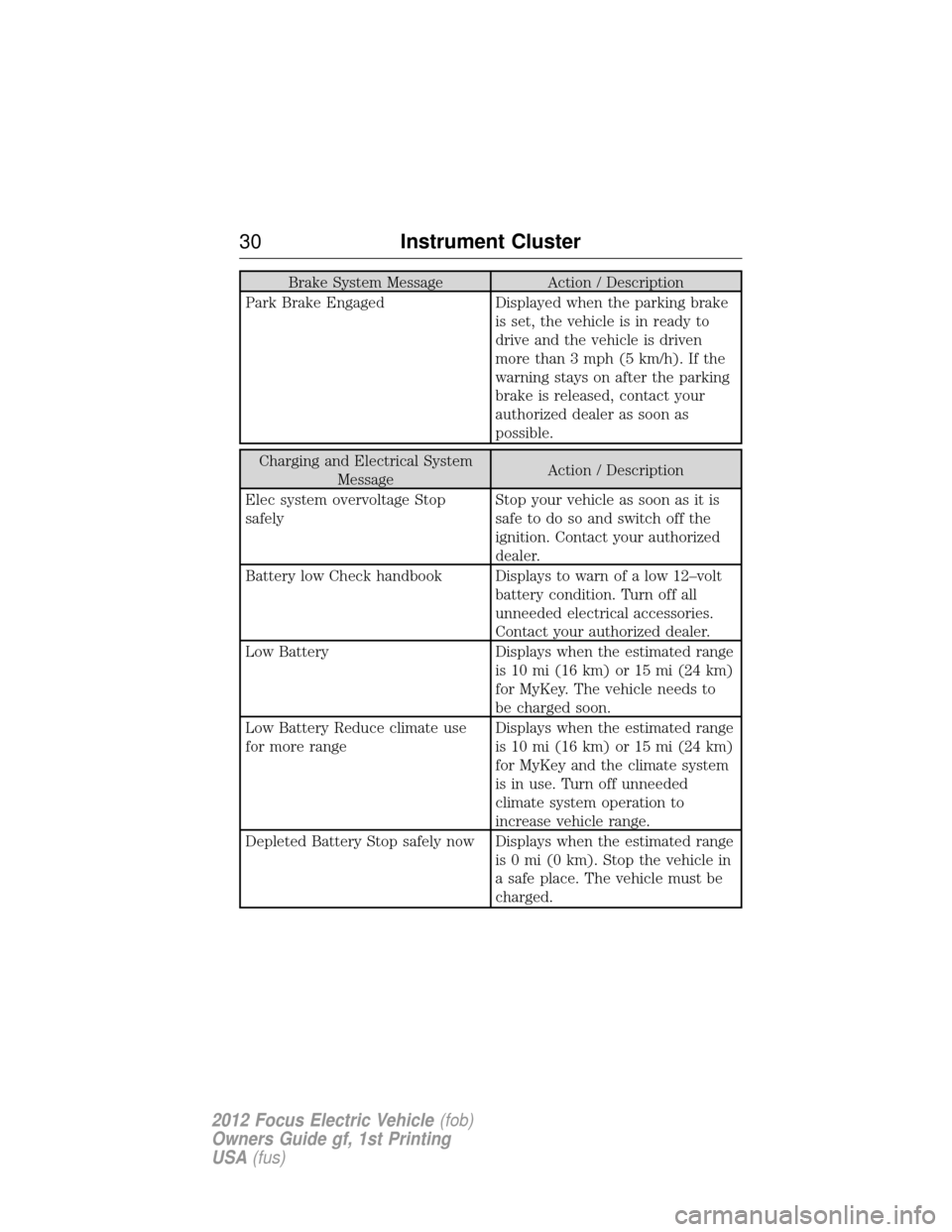
Brake System MessageAction / Description
Park Brake Engaged Displayed when the parking brake
is set, the vehicle is in ready to
drive and the vehicle is driven
more than 3 mph (5 km/h). If the
warning stays on after the parking
brake is released, contact your
authorized dealer as soon as
possible.
Charging and Electrical System Message Action / Description
Elec system overvoltage Stop
safely Stop your vehicle as soon as it is
safe to do so and switch off the
ignition. Contact your authorized
dealer.
Battery low Check handbook Displays to warn of a low 12–volt battery condition. Turn off all
unneeded electrical accessories.
Contact your authorized dealer.
Low Battery Displays when the estimated range is 10 mi (16 km) or 15 mi (24 km)
for MyKey. The vehicle needs to
be charged soon.
Low Battery Reduce climate use
for more range Displays when the estimated range
is 10 mi (16 km) or 15 mi (24 km)
for MyKey and the climate system
is in use. Turn off unneeded
climate system operation to
increase vehicle range.
Depleted Battery Stop safely now Displays when the estimated range is 0 mi (0 km). Stop the vehicle in
a safe place. The vehicle must be
charged.
30Instrument Cluster
2012 Focus Electric Vehicle (fob)
Owners Guide gf, 1st Printing
USA (fus)
Page 32 of 380
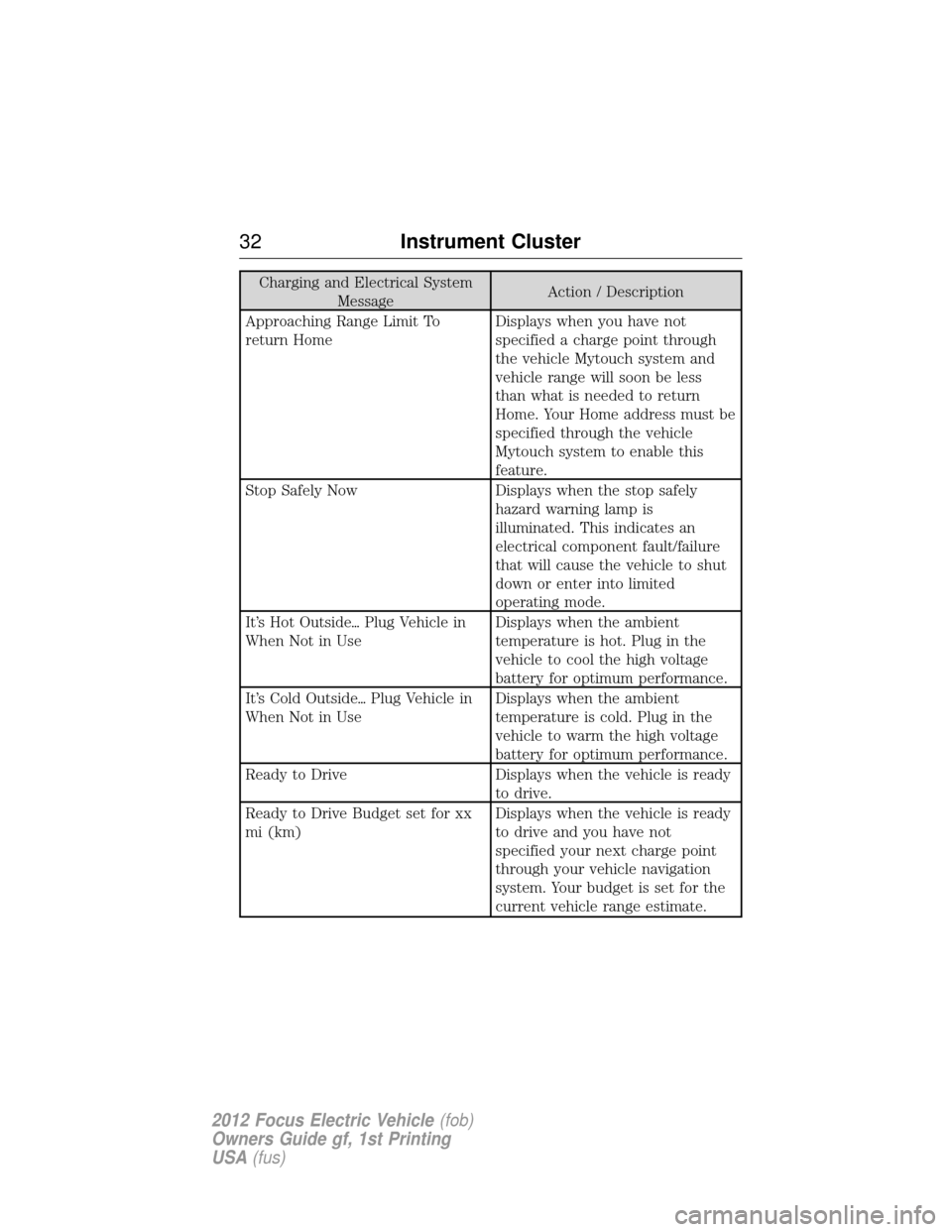
Charging and Electrical SystemMessage Action / Description
Approaching Range Limit To
return Home Displays when you have not
specified a charge point through
the vehicle Mytouch system and
vehicle range will soon be less
than what is needed to return
Home. Your Home address must be
specified through the vehicle
Mytouch system to enable this
feature.
Stop Safely Now Displays when the stop safely hazard warning lamp is
illuminated. This indicates an
electrical component fault/failure
that will cause the vehicle to shut
down or enter into limited
operating mode.
It’s Hot Outside� Plug Vehicle in
When Not in Use Displays when the ambient
temperature is hot. Plug in the
vehicle to cool the high voltage
battery for optimum performance.
It’s Cold Outside� Plug Vehicle in
When Not in Use Displays when the ambient
temperature is cold. Plug in the
vehicle to warm the high voltage
battery for optimum performance.
Ready to Drive Displays when the vehicle is ready to drive.
Ready to Drive Budget set for xx
mi (km) Displays when the vehicle is ready
to drive and you have not
specified your next charge point
through your vehicle navigation
system. Your budget is set for the
current vehicle range estimate.
32
Instrument Cluster
2012 Focus Electric Vehicle (fob)
Owners Guide gf, 1st Printing
USA (fus)
Page 35 of 380
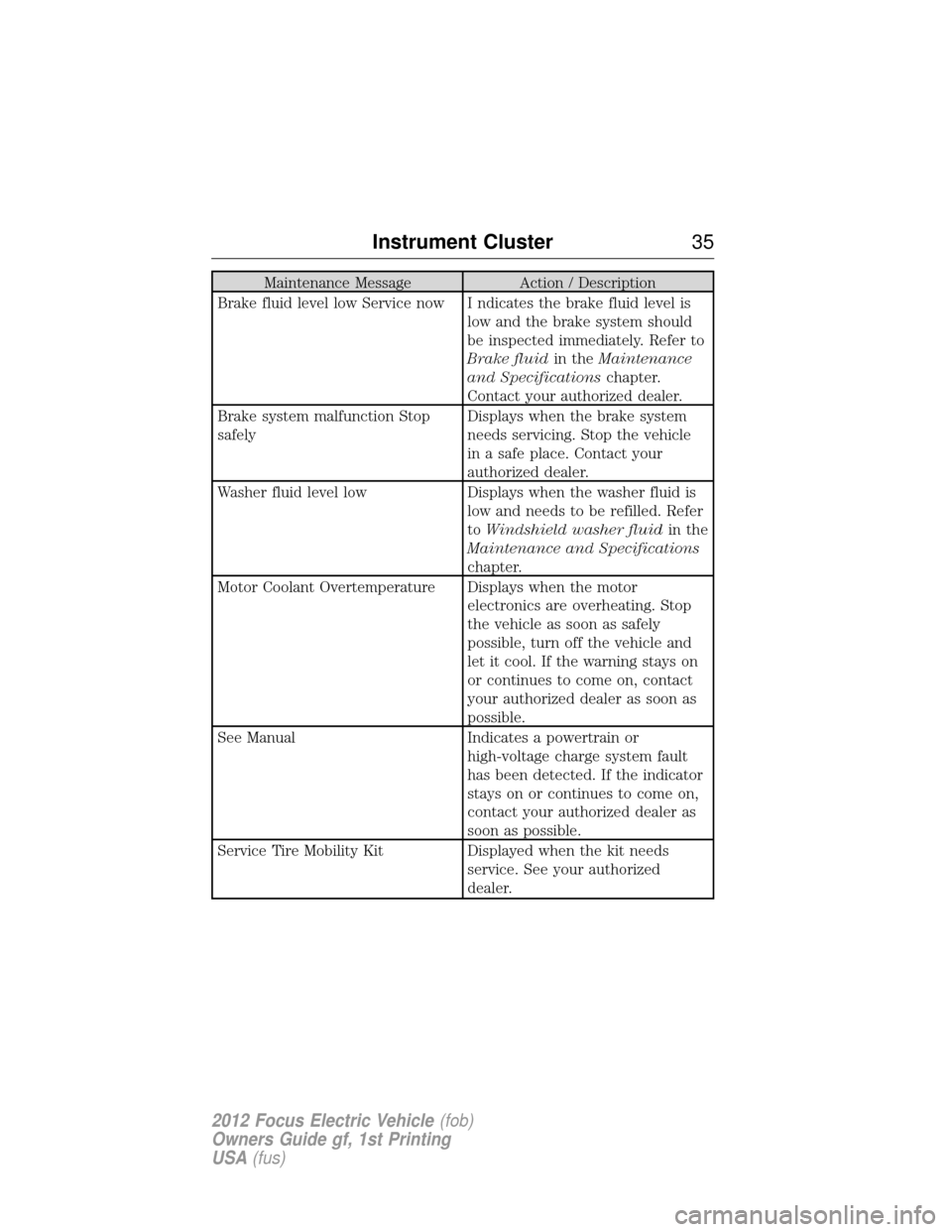
Maintenance MessageAction / Description
Brake fluid level low Service now I ndicates the brake fluid level is low and the brake system should
be inspected immediately. Refer to
Brake fluidin theMaintenance
and Specifications chapter.
Contact your authorized dealer.
Brake system malfunction Stop
safely Displays when the brake system
needs servicing. Stop the vehicle
in a safe place. Contact your
authorized dealer.
Washer fluid level low Displays when the washer fluid is
low and needs to be refilled. Refer
to Windshield washer fluid in the
Maintenance and Specifications
chapter.
Motor Coolant Overtemperature Displays when the motor electronics are overheating. Stop
the vehicle as soon as safely
possible, turn off the vehicle and
let it cool. If the warning stays on
or continues to come on, contact
your authorized dealer as soon as
possible.
See Manual Indicates a powertrain or
high-voltage charge system fault
has been detected. If the indicator
stays on or continues to come on,
contact your authorized dealer as
soon as possible.
Service Tire Mobility Kit Displayed when the kit needs
service. See your authorized
dealer.
Instrument Cluster 35
2012 Focus Electric Vehicle(fob)
Owners Guide gf, 1st Printing
USA (fus)
Page 38 of 380
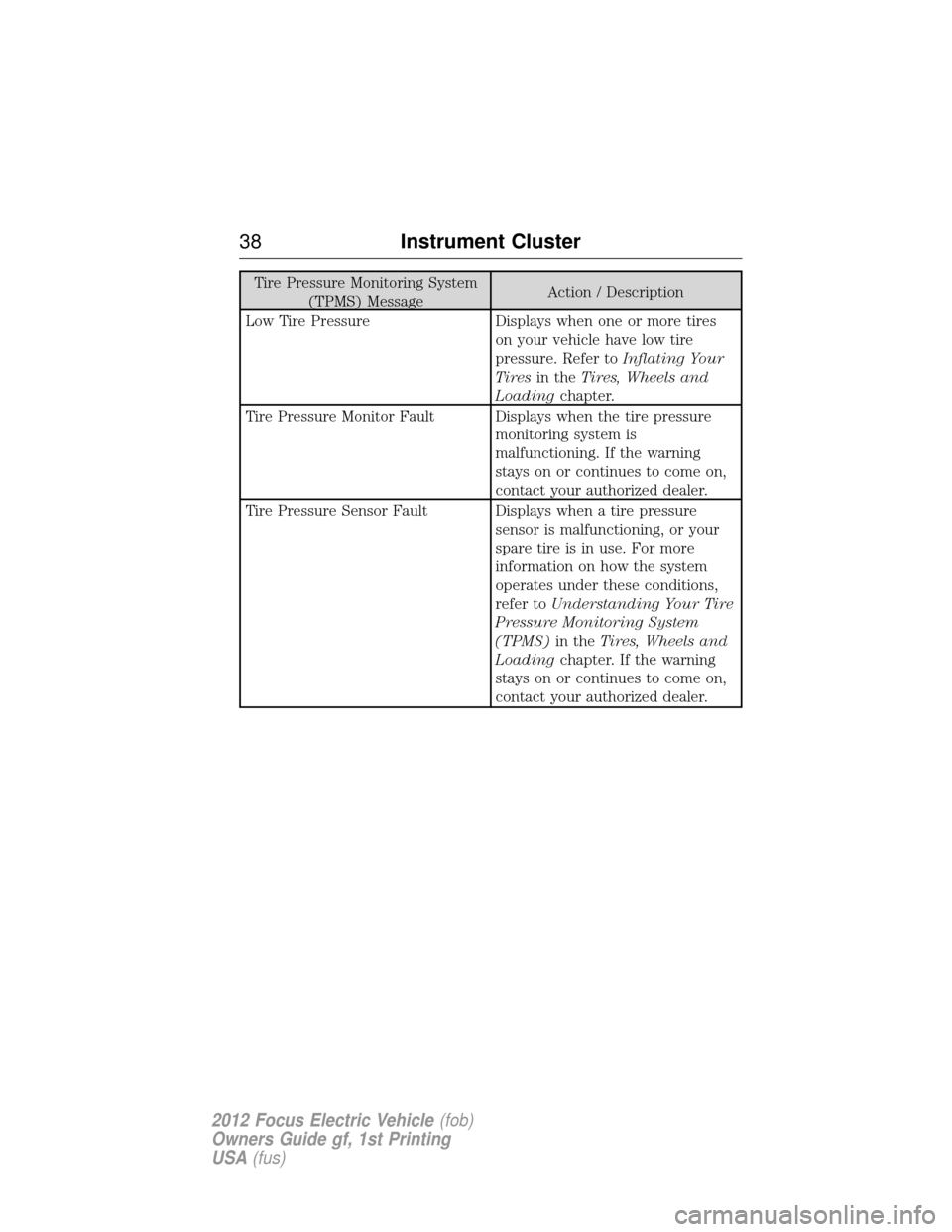
Tire Pressure Monitoring System(TPMS) Message Action / Description
Low Tire Pressure Displays when one or more tires on your vehicle have low tire
pressure. Refer toInflating Your
Tires in the Tires, Wheels and
Loading chapter.
Tire Pressure Monitor Fault Displays when the tire pressure monitoring system is
malfunctioning. If the warning
stays on or continues to come on,
contact your authorized dealer.
Tire Pressure Sensor Fault Displays when a tire pressure sensor is malfunctioning, or your
spare tire is in use. For more
information on how the system
operates under these conditions,
refer toUnderstanding Your Tire
Pressure Monitoring System
(TPMS) in theTires, Wheels and
Loading chapter. If the warning
stays on or continues to come on,
contact your authorized dealer.
38 Instrument Cluster
2012 Focus Electric Vehicle (fob)
Owners Guide gf, 1st Printing
USA (fus)
Page 39 of 380
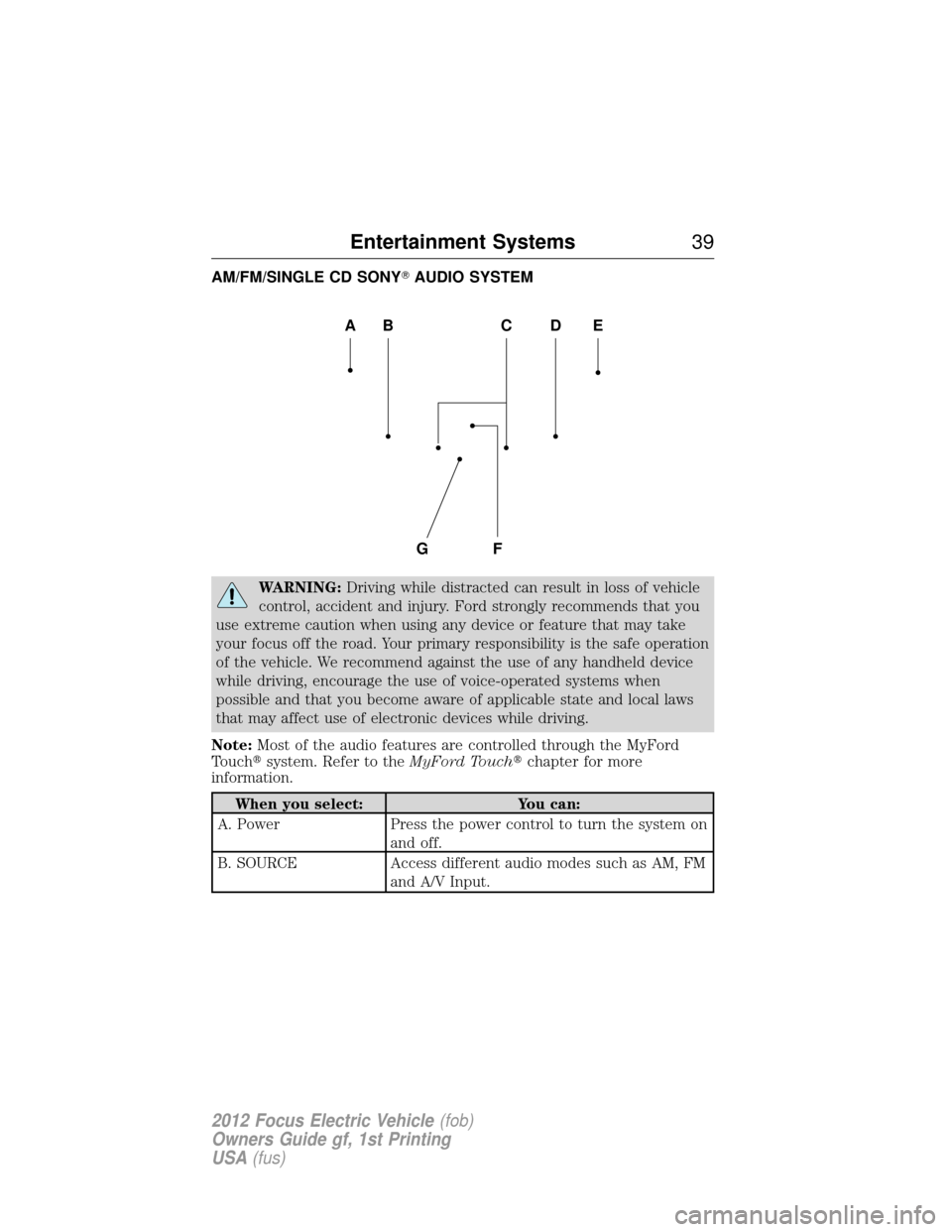
AM/FM/SINGLE CD SONY�AUDIO SYSTEM
WARNING:Driving while distracted can result in loss of vehicle
control, accident and injury. Ford strongly recommends that you
use extreme caution when using any device or feature that may take
your focus off the road. Your primary responsibility is the safe operation
of the vehicle. We recommend against the use of any handheld device
while driving, encourage the use of voice-operated systems when
possible and that you become aware of applicable state and local laws
that may affect use of electronic devices while driving.
Note: Most of the audio features are controlled through the MyFord
Touch� system. Refer to the MyFord Touch�chapter for more
information.
When you select: You can:
A. Power Press the power control to turn the system on
and off.
B. SOURCE Access different audio modes such as AM, FM
and A/V Input.
AEDBC
GF
Entertainment Systems 39
2012 Focus Electric Vehicle(fob)
Owners Guide gf, 1st Printing
USA (fus)
Page 40 of 380
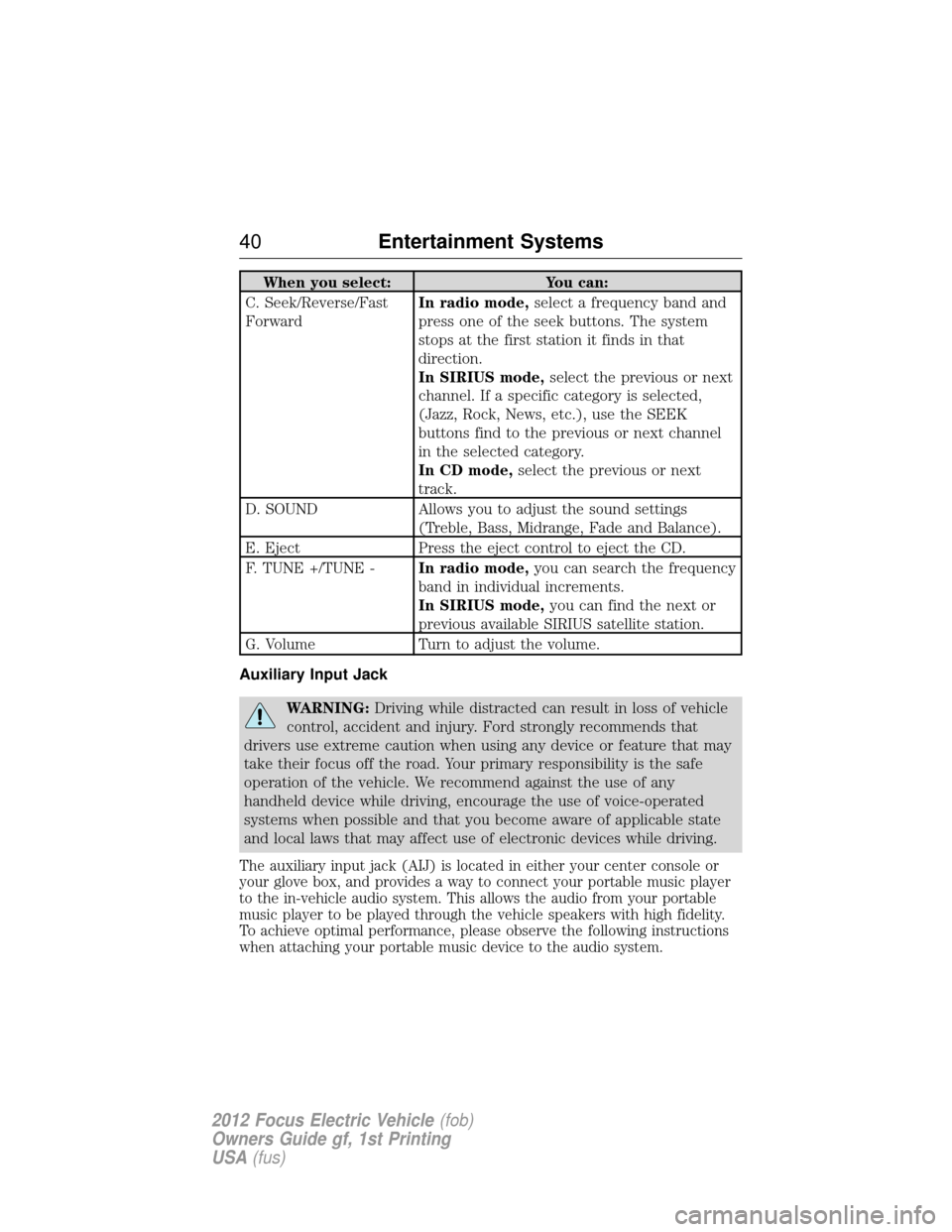
When you select:You can:
C. Seek/Reverse/Fast
Forward In radio mode,
select a frequency band and
press one of the seek buttons. The system
stops at the first station it finds in that
direction.
In SIRIUS mode, select the previous or next
channel. If a specific category is selected,
(Jazz, Rock, News, etc.), use the SEEK
buttons find to the previous or next channel
in the selected category.
In CD mode, select the previous or next
track.
D. SOUND Allows you to adjust the sound settings
(Treble, Bass, Midrange, Fade and Balance).
E. Eject Press the eject control to eject the CD.
F. TUNE +/TUNE - In radio mode,you can search the frequency
band in individual increments.
In SIRIUS mode, you can find the next or
previous available SIRIUS satellite station.
G. Volume Turn to adjust the volume.
Auxiliary Input Jack
WARNING: Driving while distracted can result in loss of vehicle
control, accident and injury. Ford strongly recommends that
drivers use extreme caution when using any device or feature that may
take their focus off the road. Your primary responsibility is the safe
operation of the vehicle. We recommend against the use of any
handheld device while driving, encourage the use of voice-operated
systems when possible and that you become aware of applicable state
and local laws that may affect use of electronic devices while driving.
The auxiliary input jack (AIJ) is located in either your center console or
your glove box, and provides a way to connect your portable music player
to the in-vehicle audio system. This allows the audio from your portable
music player to be played through the vehicle speakers with high fidelity.
To achieve optimal performance, please observe the following instructions
when attaching your portable music device to the audio system.
40 Entertainment Systems
2012 Focus Electric Vehicle (fob)
Owners Guide gf, 1st Printing
USA (fus)
Page 41 of 380
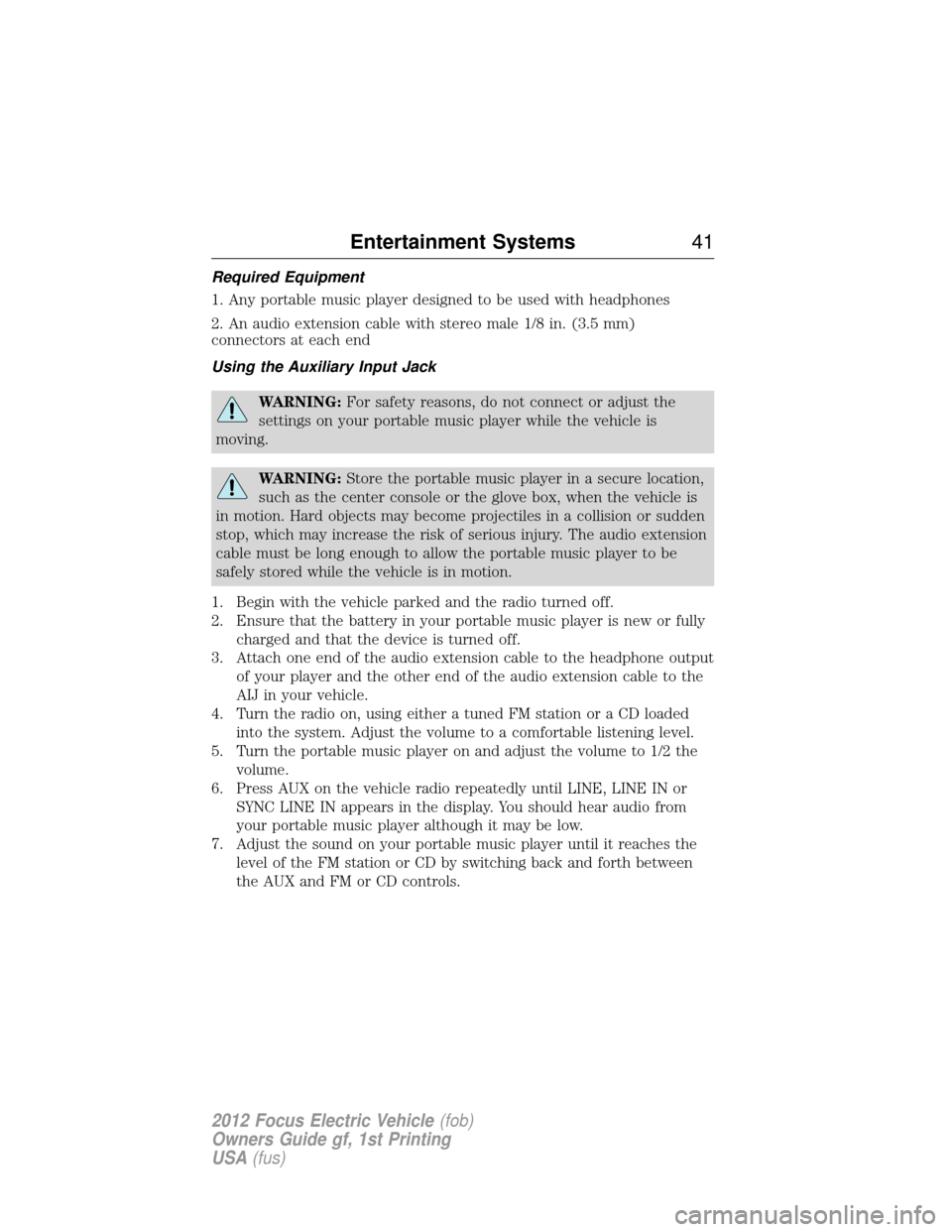
Required Equipment
1. Any portable music player designed to be used with headphones
2. An audio extension cable with stereo male 1/8 in. (3.5 mm)
connectors at each end
Using the Auxiliary Input Jack
WARNING:For safety reasons, do not connect or adjust the
settings on your portable music player while the vehicle is
moving.
WARNING: Store the portable music player in a secure location,
such as the center console or the glove box, when the vehicle is
in motion. Hard objects may become projectiles in a collision or sudden
stop, which may increase the risk of serious injury. The audio extension
cable must be long enough to allow the portable music player to be
safely stored while the vehicle is in motion.
1. Begin with the vehicle parked and the radio turned off.
2. Ensure that the battery in your portable music player is new or fully charged and that the device is turned off.
3. Attach one end of the audio extension cable to the headphone output of your player and the other end of the audio extension cable to the
AIJ in your vehicle.
4. Turn the radio on, using either a tuned FM station or a CD loaded into the system. Adjust the volume to a comfortable listening level.
5. Turn the portable music player on and adjust the volume to 1/2 the volume.
6. Press AUX on the vehicle radio repeatedly until LINE, LINE IN or SYNC LINE IN appears in the display. You should hear audio from
your portable music player although it may be low.
7. Adjust the sound on your portable music player until it reaches the level of the FM station or CD by switching back and forth between
the AUX and FM or CD controls.
Entertainment Systems 41
2012 Focus Electric Vehicle(fob)
Owners Guide gf, 1st Printing
USA (fus)
Page 42 of 380
USB Port
WARNING:Driving while distracted can result in loss of vehicle
control, accident and injury. Ford strongly recommends that
drivers use extreme caution when using any device or feature that may
take their focus off the road. Your primary responsibility is the safe
operation of the vehicle. We recommend against the use of any
handheld device while driving, encourage the use of voice-operated
systems when possible and that you become aware of applicable state
and local laws that may affect use of electronic devices while driving.
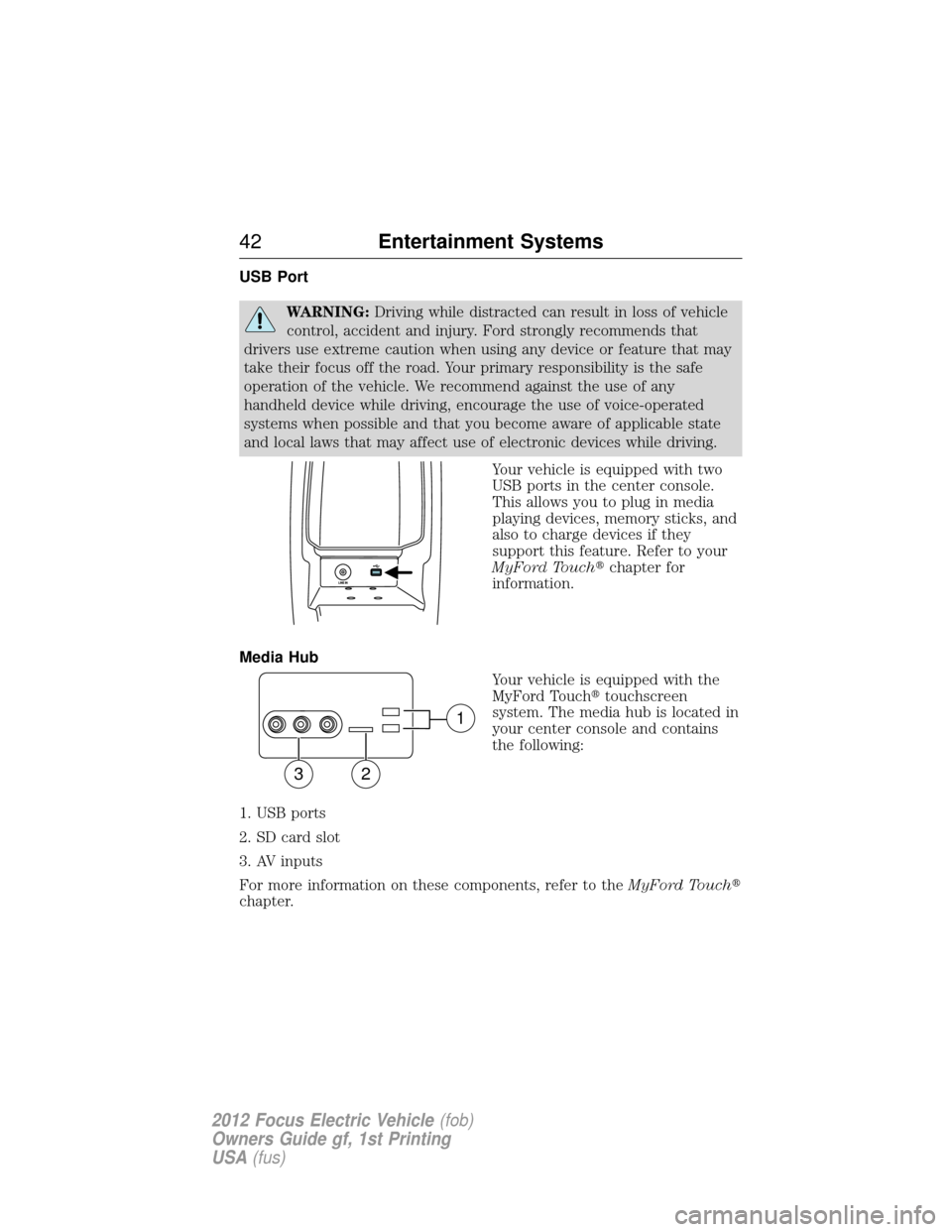
Your vehicle is equipped with two
USB ports in the center console.
This allows you to plug in media
playing devices, memory sticks, and
also to charge devices if they
support this feature. Refer to your
MyFord Touch�chapter for
information.
Media Hub Your vehicle is equipped with the
MyFord Touch�touchscreen
system. The media hub is located in
your center console and contains
the following:
1. USB ports
2. SD card slot
3. AV inputs
For more information on these components, refer to the MyFord Touch�
chapter.
1
32
42 Entertainment Systems
2012 Focus Electric Vehicle (fob)
Owners Guide gf, 1st Printing
USA (fus)