2011 TOYOTA VERSO S ECO mode
[x] Cancel search: ECO modePage 134 of 664
1342-2. Charging
each part of the AC charging cable
is in good condition. (P.117)
■During charging
●The charging starting time may differ
depending on the state of the vehicle,
but this does not indicate a malfunc-
tion.
●Cooling fan sounds may be heard
from near the rear seat. (P.98)
●During charging, sounds may be
heard from near the hybrid battery
(traction battery) in accordance with
the operation of the air conditioning
system or “Battery Cooler” (P.129).
●During and after charging, the rear
seat and its surrounding area in which
the onboard traction battery charger is
installed may get warm.
●The surface of the CCID (Charging
Circuit Interrupting Device) may
become hot, but this does not indicate
a malfunction. (When using Mode 2
AC charging cable.)
●Depending on radio wave conditions,
interference may be heard on the
radio.
●The current charging condition and
the estimated time until charging will
complete can be checked on the
multi-information display.
■Capacity reduction of the hybrid
battery (traction battery)
The capacity of the hybrid battery (trac-
tion battery) will decline gradually when
the hybrid battery (traction battery) is in
use. The rate at which it declines will dif-
fer in accordance with environmental
conditions and the way in which the
vehicle is used. Observing the following
can help suppress battery capacity
decline.
●Avoid parking the vehicle in areas with
a high temperature under direct sun-
light when the hybrid battery (traction
battery) is fully charged.
●Avoid accelerating and decelerating frequently and suddenly when EV
driving.
●Avoid frequent driving near the top
speed for EV driving. (P.90)
●Leave a low level of charge in the
hybrid battery (traction battery) when
leaving the vehicle undriven for a long
period of time.
After confirming that EV mode or
AUTO EV/HV mode has switched to
HV mode, turn the power switch off.
●Use the charging schedule function as
much as possible in order to fully
charge the hybrid battery (traction bat-
tery) immediately before starting off.
(P.144)
Also, if the hybrid battery (traction bat-
tery) capacity reduces, the distance that
can be driven in EV mode or AUTO
EV/HV mode decreases. However, vehi-
cle performance does not significantly
become worse.
■When the remaining charge of the
hybrid battery (traction battery) is
low after charging
In the following situations, the remaining
charge of the hybrid battery (traction
battery) after charging completes may
be less than normal in order to protect
the system (the EV driving range after
the battery is fully charged may be
shorter).
*
●Charging is carried out when the out-
side temperature is low or high.
●Charging is carried out immediately
after high-load driving or in extreme
heat.
When none of the above situations
apply and there is a drastic drop in the
remaining charge of the hybrid battery
(traction battery) after charging com-
pletes, have the vehicle inspected by
any authorized Toyota retailer or Toyota
authorized repairer, or any reliable
repairer.
*: When this occurs, even if the remain-
ing charge display of the hybrid bat-
tery (traction battery) shows that it is
Page 146 of 664
1462-2. Charging
connected.
●After connecting the AC charging
cable, check that the charging indica-
tor of the charging port flashes
(P.106)
●Do not use an socket that has a power
cut off function (including a timer func-
tion)
Use an socket that constantly supplies
electricity. For sockets where the
power is cut off due to a timer func-
tion, etc., charging may not be carried
out according to plan if the power is
cut off during the set time.
■When the AC charging cable
remains connected to the vehicle
Even if multiple consecutive charging
schedules are registered, the next
charge will not be carried out according
to the charging schedule until the AC
charging cable is removed and recon-
nected after charging completes. Also,
when the hybrid battery (traction battery)
is fully charged, charging according to
the charging schedule will not be carried
out.
■“Climate Prep”
●When the air conditioning-linked set-
ting is turned on, the air conditioning
operates until the set departure time.
Therefore, the air conditioning will
consume electricity and charging may
not complete by the set departure
time.
●If the hybrid battery (traction battery)
is fully charged, charging will not be
carried out, even if the charging
schedule is set. However, if “Climate
Prep” is turned on, the air conditioning
will operate only once when it nears
the time set in “Departure”. If this
occurs, the air conditioning will con-
sume electricity and the remaining
charge of the hybrid battery (traction
battery) when departing may be
decreased.
●When the doors are unlocked, the air
conditioning system does not operate.
■When charging schedules are
ignored
When the following operations are per-
formed while the charging schedule is
on standby, charging schedule is tempo-
rarily canceled and charging is started.
●When the Remote Air Conditioning
System (P.460) is operated
●When turning “My Room Mode” on
(P.153)
●When turning “Charge Now” on
(P.150)
●When an operation that temporarily
cancel charging using the charging
schedule (P.138)
■Effects of outside temperature
When the charging mode is set to
“Departure”, charging schedule may be
ignored due to the outside temperature
and charging may start.
■“Battery Heater” (P.128) /“Battery
Cooler” (P.129)
When charging is carried out using the
charging schedule, the hybrid battery
(traction battery) heating or cooling func-
tion may operate according to the tem-
perature of the hybrid battery (traction
battery).
●When the charging mode is set to
“Start”, the function starts at the set
charging start time.
●“Battery Heater”: When the charging
mode is set to “Departure”, the func-
tion starts automatically to complete
heating by the desired departure time.
●“Battery Cooler”: When the charging
mode is set to “Departure”, cooling
starts approximately 30 minutes
before the charging start time. How-
ever, if there is no time to finish
charging by the charging schedule,
the hybrid battery (traction battery)
cooling time may be shortened and
“Battery Cooler” may not operate.
Page 153 of 664
153
2 2-2. Charging
Plug-in hybrid system
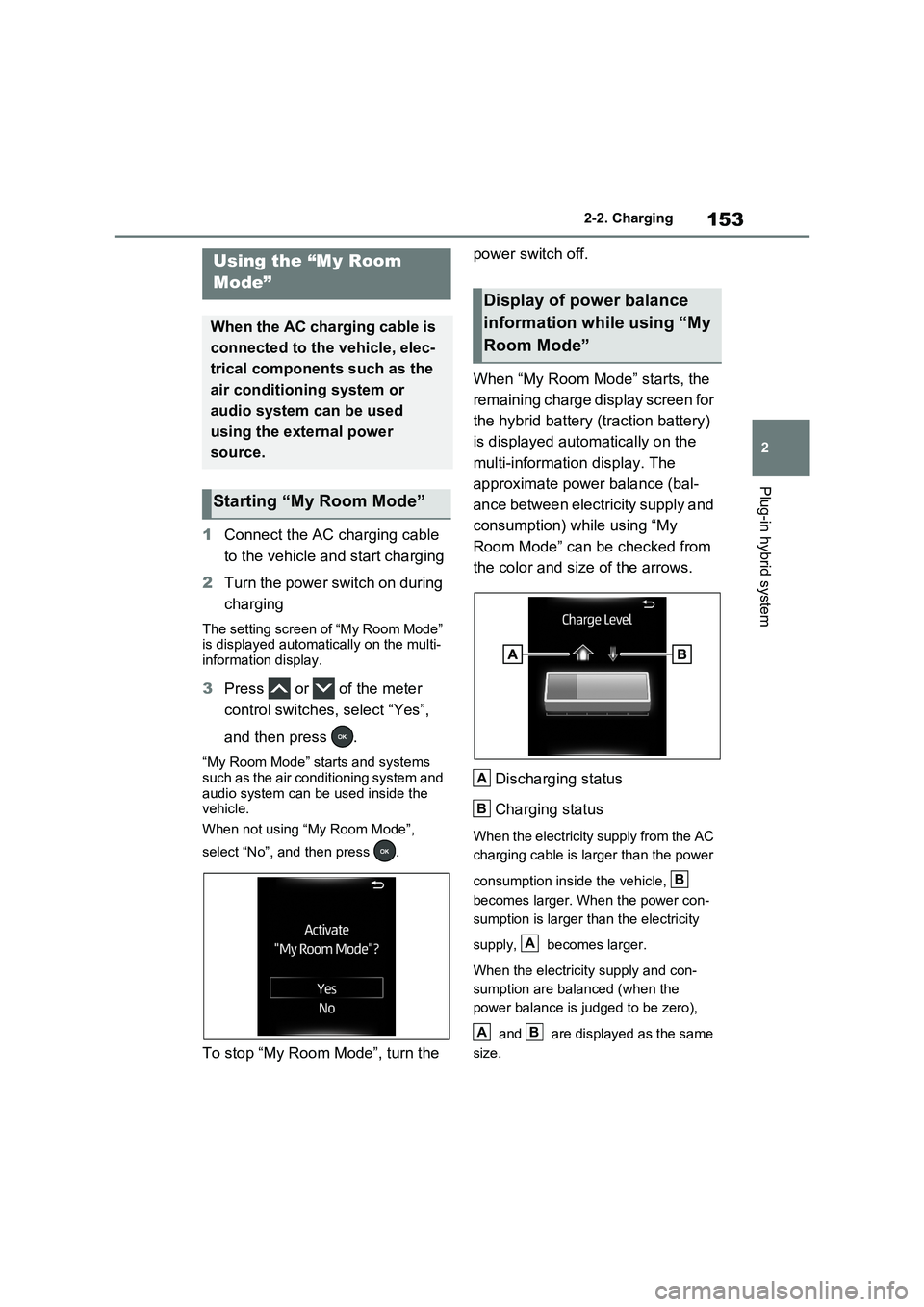
1Connect the AC charging cable
to the vehicle and start charging
2Turn the power switch on during
charging
The setting screen of “My Room Mode”
is displayed automatically on the multi-
information display.
3Press or of the meter
control switches, select “Yes”,
and then press .
“My Room Mode” starts and systems
such as the air conditioning system and
audio system can be used inside the
vehicle.
When not using “My Room Mode”,
select “No”, and then press .
To stop “My Room Mode”, turn the power switch off.
When “My Room Mode” starts, the
remaining charge display screen for
the hybrid battery (traction battery)
is displayed automatically on the
multi-information display. The
approximate power balance (bal-
ance between electricity supply and
consumption) while using “My
Room Mode” can be checked from
the color and size of the arrows.
Discharging status
Charging status
When the electricity supply from the AC
charging cable is larger than the power
consumption inside the vehicle,
becomes larger. When the power con-
sumption is larger than the electricity
supply, becomes larger.
When the electricity supply and con-
sumption are balanced (when the
power balance is judged to be zero),
and are displayed as the same
size.
Using the “My Room
Mode”
When the AC charging cable is
connected to the vehicle, elec-
trical components such as the
air conditioning system or
audio system can be used
using the external power
source.
Starting “My Room Mode”
Display of power balance
information while using “My
Room Mode”
A
B
B
A
AB
Page 154 of 664
1542-2. Charging
■When a door is unlocked while
using “My Room Mode”
The charging connector unlocks,
charging stops and “My Room Mode”
stops. In order to use “My Room Mode”
again, reconnect the AC charging cable
and start “My Room Mode” (P.153).
When using “My Room Mode” with pub-
lic charging station, operation to start
charging using the charger may be
required again before starting “My Room
Mode”.
■Meter display during charging
If “My Room Mode” is not turned on for
approximately 100 seconds after the
power switch is turned on during
charging, the power switch will automat-
ically turn off.
■While using “My Room Mode”
Any of the following may occur.
●When the remaining charge of the
hybrid battery (traction battery)
reaches the lower limit, the air condi-
tioning system automatically turns off.
In this situation, the air conditioning
system cannot be used until the
remaining charge of the hybrid battery
(traction battery) increases. Turn the
power switch off and use “My Room
Mode” after the remaining charge of
the hybrid battery (traction battery) is
restored.
●When the outside temperature is low,
the heater output may be limited due
to the air conditioning system opera-
tion being restricted.
●Warning lights and indicators such as
electric power steering system warn-
ing light (yellow) and malfunction indi-
cator lamp may turn on, but this is not
a malfunction.
Also, when the surrounding area is
dark, the headlights are turned on.
(P.332)
■When a charging schedule is regis-
tered
When “My Room Mode” starts while the
charging schedule is on standby, charging schedules are ignored and
charging starts.
■When “My Room Mode” is used
while the hybrid battery (traction
battery) is fully charged
When the power switch is turned on
while the hybrid battery (traction battery)
is fully charged and the charging con-
nector that supplies power is connected,
“Charging Port Lid is Open” is displayed
on the multi-information display. In this
case, press of the meter control
switches to display the setting screen of
“My Room Mode”, and then select “My
Room Mode”.
When “My Room Mode” is used while
the hybrid battery (traction battery) is
fully charged, the electric power of the
hybrid battery (traction battery) may be
consumed. In this case, charging may
be performed again.
■When a message related to “My
Room Mode” is displayed
When a message is displayed on the
multi-information display while using or
attempting to start “My Room Mode”,
take the following correction proce-
dures.
●“Traction battery is too low for “My
Room Mode””
There is insufficient remaining charge in
the hybrid battery (traction battery) for
starting “My Room Mode”.
Wait until the charge of the hybrid bat-
tery (traction battery) increases, then
start “My Room Mode”.
●““My Room Mode” has stopped due to
low traction battery”
The remaining charge in the hybrid bat-
tery (traction battery) is insufficient.
Stop using “My Room Mode” and
charge the hybrid battery (traction bat-
tery).
●““My Room Mode” will stop when trac-
tion battery is too low Reduce power
usage to continue using “My Room
Page 155 of 664
155
2
2-2. Charging
Plug-in hybrid system
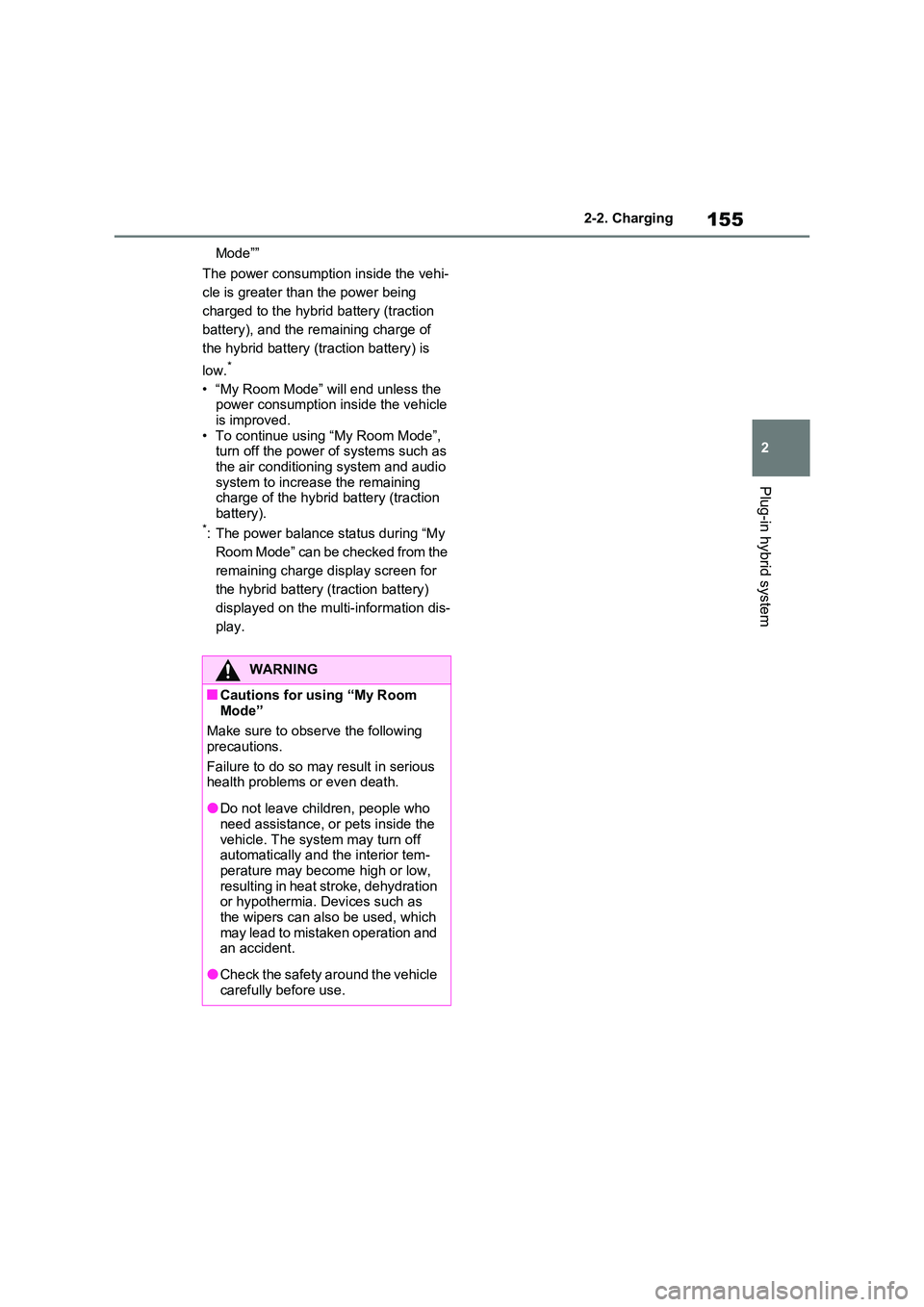
Mode””
The power consumption inside the vehi-
cle is greater than the power being
charged to the hybrid battery (traction
battery), and the remaining charge of
the hybrid battery (traction battery) is
low.*
• “My Room Mode” will end unless the power consumption inside the vehicle is improved.
• To continue using “My Room Mode”, turn off the power of systems such as the air conditioning system and audio
system to increase the remaining charge of the hybrid battery (traction battery).*: The power balance status during “My
Room Mode” can be checked from the
remaining charge display screen for
the hybrid battery (traction battery)
displayed on the multi-information dis-
play.
WARNING
■Cautions for using “My Room Mode”
Make sure to observe the following
precautions.
Failure to do so may result in serious health problems or even death.
●Do not leave children, people who need assistance, or pets inside the
vehicle. The system may turn off automatically and the interior tem-perature may become high or low,
resulting in heat stroke, dehydration or hypothermia. Devices such as the wipers can also be used, which
may lead to mistaken operation and an accident.
●Check the safety around the vehicle carefully before use.
Page 158 of 664
1582-2. Charging
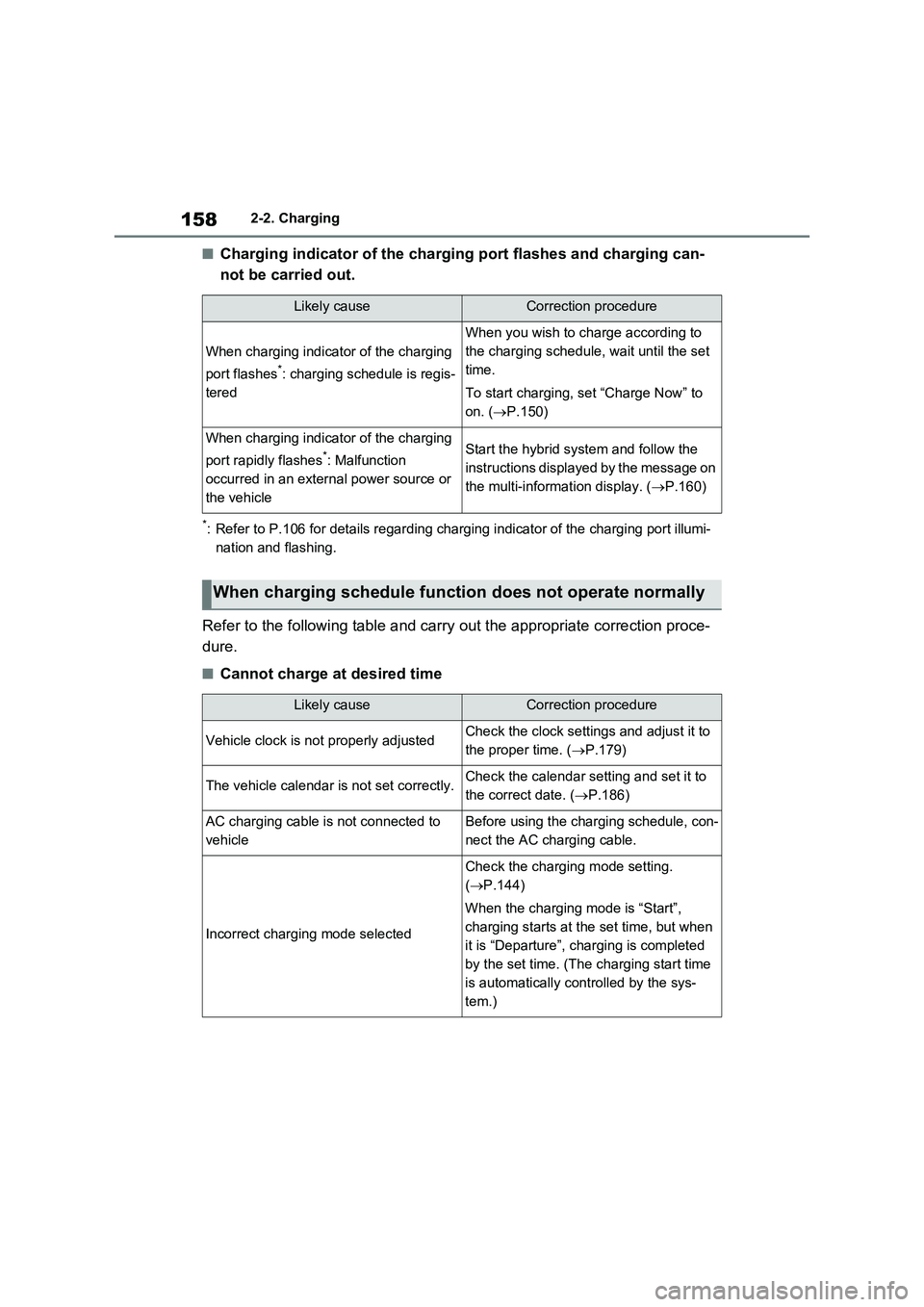
■Charging indicator of the charging port flashes and charging can-
not be carried out.
*: Refer to P.106 for details regarding charging indicator of the charging port illumi-
nation and flashing.
Refer to the following table and carry out the appropriate correction proce-
dure.
■Cannot charge at desired time
Likely causeCorrection procedure
When charging indicator of the charging
port flashes
*: charging schedule is regis-
tered
When you wish to charge according to
the charging schedule, wait until the set
time.
To start charging, set “Charge Now” to
on. (P.150)
When charging indicator of the charging
port rapidly flashes
*: Malfunction
occurred in an external power source or
the vehicleStart the hybrid system and follow the
instructions displayed by the message on
the multi-information display. (P.160)
When charging schedule function does not operate normally
Likely causeCorrection procedure
Vehicle clock is not properly adjustedCheck the clock settings and adjust it to
the proper time. (P.179)
The vehicle calendar is not set correctly.Check the calendar setting and set it to
the correct date. (P.186)
AC charging cable is not connected to
vehicleBefore using the charging schedule, con-
nect the AC charging cable.
Incorrect charging mode selected
Check the charging mode setting.
(P.144)
When the charging mode is “Start”,
charging starts at the set time, but when
it is “Departure”, charging is completed
by the set time. (The charging start time
is automatically controlled by the sys-
tem.)
Page 159 of 664
159
2 2-2. Charging
Plug-in hybrid system
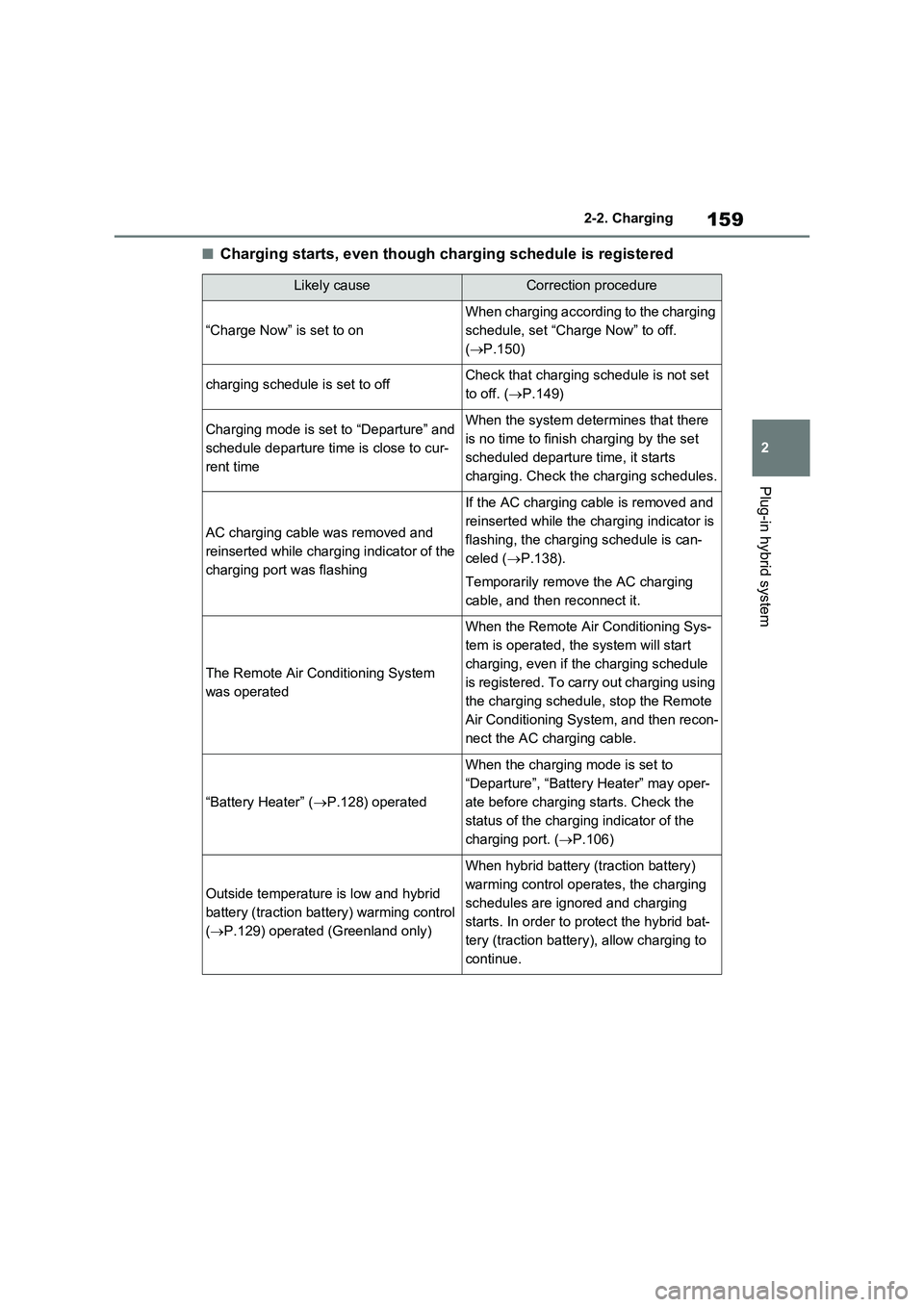
■Charging starts, even though charging schedule is registered
Likely causeCorrection procedure
“Charge Now” is set to on
When charging according to the charging
schedule, set “Charge Now” to off.
(P.150)
charging schedule is set to offCheck that charging schedule is not set
to off. (P.149)
Charging mode is set to “Departure” and
schedule departure time is close to cur-
rent timeWhen the system determines that there
is no time to finish charging by the set
scheduled departure time, it starts
charging. Check the charging schedules.
AC charging cable was removed and
reinserted while charging indicator of the
charging port was flashing
If the AC charging cable is removed and
reinserted while the charging indicator is
flashing, the charging schedule is can-
celed (P.138).
Temporarily remove the AC charging
cable, and then reconnect it.
The Remote Air Conditioning System
was operated
When the Remote Air Conditioning Sys-
tem is operated, the system will start
charging, even if the charging schedule
is registered. To carry out charging using
the charging schedule, stop the Remote
Air Conditioning System, and then recon-
nect the AC charging cable.
“Battery Heater” (P.128) operated
When the charging mode is set to
“Departure”, “Battery Heater” may oper-
ate before charging starts. Check the
status of the charging indicator of the
charging port. (P.106)
Outside temperature is low and hybrid
battery (traction battery) warming control
(P.129) operated (Greenland only)
When hybrid battery (traction battery)
warming control operates, the charging
schedules are ignored and charging
starts. In order to protect the hybrid bat-
tery (traction battery), allow charging to
continue.
Page 172 of 664

1723-1. Instrument cluster
*1: This light illuminates on the multi-
information display with a message.
*2: Depending on the operating condi-
tion, the color and illuminating/flash-
ing state of the light change.
*3: The light comes on when the system
is turned off.
*4: Toyota parking assist-sensor OFF
indicator turns on when the power
switch is turned to ON while the
Toyota parking assist-sensor func-
tion is on. It will turn off after a few
seconds.
*5: These lights turn on when the power
switch is turned to ON to indicate
that a system check is being per-
formed. They will turn off after the
hybrid system is on, or after a few
seconds. There may be a malfunc-
tion in a system if the lights do not
turn on, or turn off. Have the vehicle
inspected by any authorized Toyota
retailer or Toyota authorized
repairer, or any reliable repairer.
*6: This light illuminates on the outside
rear view mirrors.
*7: When the outside temperature is
approximately 3°C (37°F) or lower,
(Flashes)
Slip indicator light*5
(P.439)
VSC OFF indicator
*3, 5
(P.439)
PCS warning light
*3, 5 (if
equipped) (P.357)
BSM outside rear view
mirror indicators
*5, 6 (if
equipped) (P.393)
BSM OFF indicator
*3, 5
(if equipped) (P.393)
RCTA OFF indicator
*3, 5
(if equipped) (P.393)
Brake hold standby indi-
cator
*5 (P.329)
Brake hold operated
indicator
*5 (P.329)
Security indicator
(P.76, 78)
“READY” indicator
(P.317)
Low outside tempera-
ture indicator
*7
(P.177)
EV indicator (P.90)
Parking brake indicator
(P.326)
EV drive mode indica-
tor
*8 (P.86)
AUTO EV/HV mode
indicator
*8 (P.86)
HV drive mode indica-
tor
*8 (P.86)
Hybrid battery charge
mode indicator
*8
(P.87)
Eco drive mode indica-
tor (P.434)
Sport mode indicator
(P.434)
Trail Mode indicator
(P.435)
“PASSENGER AIR BAG”
indicator
*5, 9 (if equipped)
(P.48)