2011 TOYOTA VERSO S ECO mode
[x] Cancel search: ECO modePage 328 of 664
3285-2. Driving procedures
●The driver is wearing the seat belt
●The shift lever is in a forward or reverse position.
●The malfunction indicator lamp or brake system warning light is not illu-
minated
If the automatic release function does
not operate, release the parking brake
manually.
■If “Parking Brake Temporarily Unavailable” is displayed on the multi-information display
If the parking brake is operated repeat- edly over a short period of time, the sys-tem may restrict operation to prevent
overheating. If this happens, refrain from operating the parking brake. Normal operation will return after about 1 min-
ute.
■If “Parking Brake Unavailable” is displayed on the multi-information display
Operate the parking brake switch. If the message does not disappear after oper-ating the switch several times, the sys-
tem may be malfunctioning. Have the vehicle inspected by any authorized Toyota retailer or Toyota authorized
repairer, or any reliable repairer.
■Parking brake operation sound
When the parking brake operates, a motor sound (whirring sound) may be
heard. This does not indicate a malfunc- tion.
■Parking brake indicator light
●Depending on the power switch mode, the parking brake indicator light will turn on and stay on as described
below: ON: Comes on until the parking brake is released.
Not in ON: Stays on for approximately 15 seconds.
●When the power switch is turned off with the parking brake set, the parking brake indicator light will stay on for
about 15 seconds. This does not indi-
cate a malfunction.
■When the parking brake switch
malfunctions
Automatic mode (automatic brake set- ting and releasing) will be turned on
automatically.
■Parking the vehicle
P.300
■Parking brake engaged warning buzzer
A buzzer will sound if the vehicle is driven with the parking brake engaged. “Parking Brake ON” is displayed on the
multi-information display (with the vehi- cle reaching a speed of 5 km/h [3 mph]).
■If the brake system warning light comes on
P.568
■Usage in winter time
P.446
WARNING
■When parking the vehicle
Do not leave a child in the vehicle alone. The parking brake may be released unintentionally by a child
and there is the danger of the vehicle moving that may lead to an accident resulting in death or serious injury.
■Parking brake switch
Do not set any objects near the park-
ing brake switch. Objects may inter- fere with the switch and may lead the parking brake to unexpectedly oper-
ate.
NOTICE
■When parking the vehicle
Before you leave the vehicle, shift the shift lever to P, set the parking brake
and make sure that the vehicle does not move.
Page 339 of 664

339
5
5-3. Operating the lights and wipers
Driving
■The windshield wipers and washer can be operated when
The power switch is in ON.
■Effects of vehicle speed on wiper operation
With low speed windshield wiper opera-
tion selected, wiper operation will be switched from low speed to intermittent wiper operation when the vehicle is sta-
tionary. (However, when the sensor sen- sitivity is adjusted to the highest level, the mode will not switch.)
■Raindrop sensor
●The raindrop sensor judges the
amount of raindrops.* An optical sen- sor is adopted. It may not operate properly when sunlight from the rising
or setting of the sun intermittently strikes the windshield, or if bugs, etc. are present on the windshield.
●If the wiper switch is turned to the “AUTO” position while the power
switch is in ON, the wipers will operate once to show that “AUTO” mode is activated.
●If the wiper sensitivity is adjusted to higher, the wiper may operate once to
indicate the change of sensitivity.
●If the temperature of the raindrop sen-
sor is 85°C (185°F) or higher, or -15°C (5°F) or lower, the automatic opera-tion may not occur. In this case, oper-
ate the wipers in any mode other than “AUTO”.*: It may be located on the opposite side
depending on the target region.
■If no windshield washer fluid
sprays
Check that the washer nozzles are not blocked if there is washer fluid in the
windshield washer fluid reservoir.
■Washer nozzle heaters (if equipped)
The washer nozzle heaters operate to
prevent frozen nozzle when the outside temperature is 5°C (41°F) or less and the power switch is in ON.
WARNING
■Caution regarding the use of windshield wipers in “AUTO” mode
The windshield wipers may operate unexpectedly if the sensor is touched or the windshield is subject to vibra-
tion in “AUTO” mode. Take care that your fingers or anything else does not become caught in the windshield wip-
ers.
■Caution regarding the use of
washer fluid
When it is cold, do not use the washer fluid until the windshield becomes
warm. The fluid may freeze on the windshield and cause low visibility. This may lead to an accident, result-
ing in death or serious injury.
■When the washer nozzle heaters
are operating (if equipped)
Do not touch the area around the washer nozzle, as they can become
very hot and burn you.
NOTICE
■When the washer fluid tank is empty
Do not operate the switch continually
as the washer fluid pump may over- heat.
Page 370 of 664
3705-5. Using the driving support systems
• Vehicle speed is approximately 50
km/h (32 mph) or more.
• Width of traffic lane is approximately 3
m (9.8 ft.) or more.
• No system malfunctions are detected.
(P.371)
●Lane centering function
This function operates when all of the
following conditions are met.
• LTA is turned on.
• Setting for “Steering Assist” and “Lane
Center” in the screen of the multi-
information display are set to “ON”.
(P.179)
• This function recognizes white (yel-
low) lane lines or the position of a pre-
ceding vehicle (except when the
preceding vehicle is small, such as a
motorcycle).
• The dynamic radar cruise control with
full-speed range is operating in vehi-
cle-to-vehicle distance control mode.
• Width of traffic lane is approximately 3
to 4 m (10 to 13 ft.).
• Turn signal lever is not operated.
• Vehicle is not being driven around a
sharp curve.
• No system malfunctions are detected.
(P.371)
• Vehicle does not accelerate or decel-
erate by a fixed amount or more.
• Steering wheel is not operated with a
steering force level suitable for chang-
ing lanes.
• ABS, VSC, TRC and PCS are not
operating.
• TRC or VSC is not turned off.
• Hands off steering wheel warning is
not displayed. (P.370)
• The vehicle is being driven in the cen-
ter of a lane.
• Steering assist function is not operat-
ing.
■Temporary cancelation of functions
●When operation conditions are no lon-
ger met, a function may be temporar-
ily canceled. However, when the
operation conditions are met again,
operation of the function is automati-
cally restored. (P.369)
●If the operation conditions (P.369)
are no longer met while the lane cen-
tering function is operating, the steer-
ing wheel may vibrate and the buzzer
may sound to indicate that the func-
tion has been temporarily canceled.
However, if the “Alert” customization
setting is set to “Steering wheel vibra-
tion”, the system will notify the driver
by vibrating the steering wheel instead
of sounding the buzzer.
■Steering assist function/lane cen-
tering function
●Depending on the vehicle speed, lane
departure situation, road conditions,
etc., the driver may not feel the func-
tion is operating or the function may
not operate at all.
●The steering control of the function is
overridden by the driver’s steering
wheel operation.
●Do not attempt to test the operation of
the steering assist function.
■Lane departure alert function
●The warning buzzer may be difficult to
hear due to external noise, audio play-
back, etc. Also, it may be difficult to
feel steering wheel vibrations due to
the road conditions, etc.
●If the edge of the course* is not clear
or straight, the lane departure alert
function may not operate.
●Vehicles with BSM: It may not be pos-
sible for the system to determine if
there is a danger of a collision with a
vehicle in an adjacent lane.
●Do not attempt to test the operation of
the lane departure alert function.
*: Boundary between asphalt and the
side of the road, such as grass, soil,
or a curb
■Hands off steering wheel warning
In the following situations, a warning
message urging the driver to hold the
steering wheel and the symbol shown in
the illustration are displayed on the
multi-information display to warn the
Page 379 of 664
379
5
5-5. Using the driving support systems
Driving
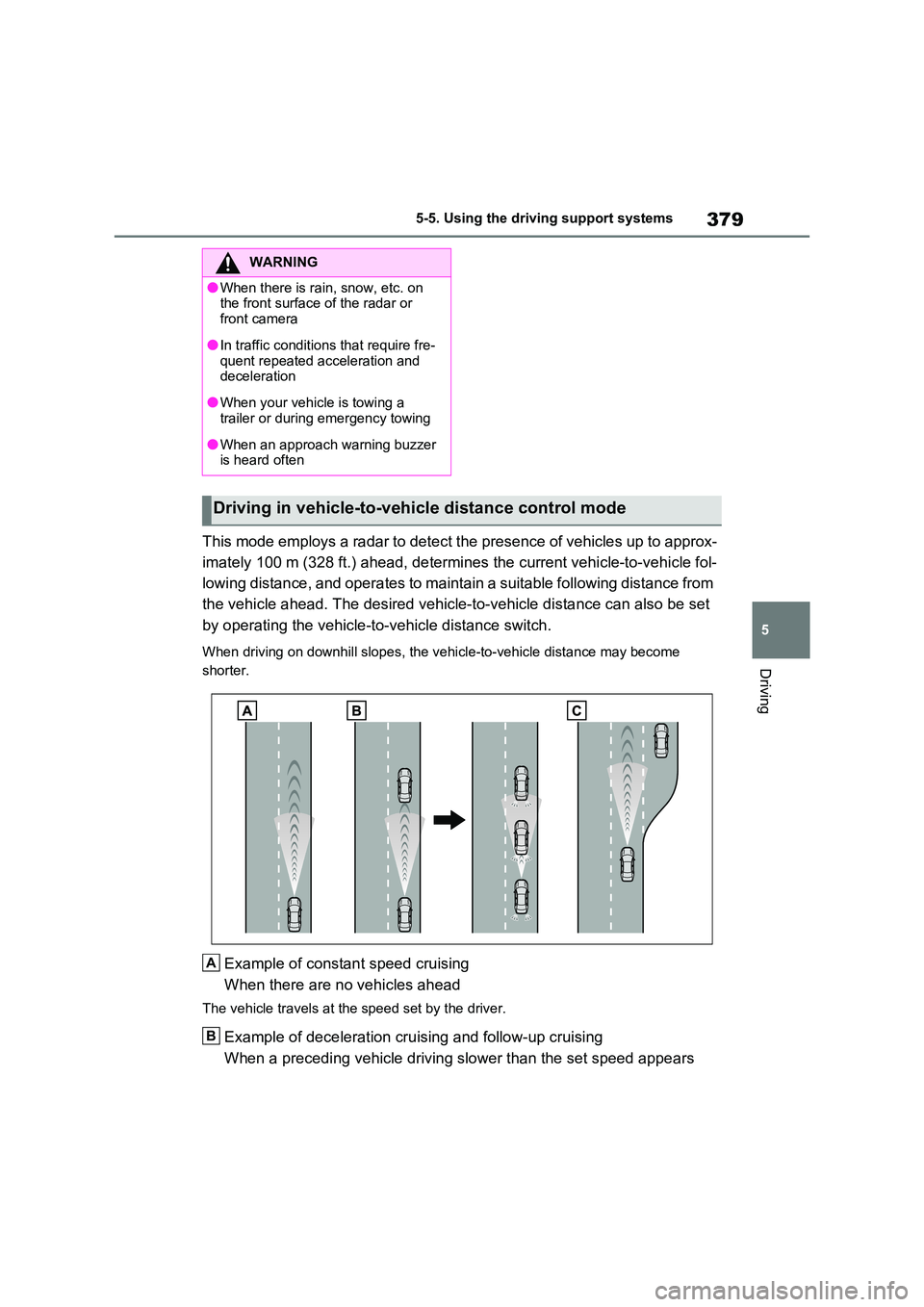
This mode employs a radar to detect the presence of vehicles up to approx-
imately 100 m (328 ft.) ahead, determines the current vehicle-to-vehicle fol-
lowing distance, and operates to maintain a suitable following distance from
the vehicle ahead. The desired vehicle-to-vehicle distance can also be set
by operating the vehicle-to-vehicle distance switch.
When driving on downhill slopes, the vehicle-to-vehicle distance may become
shorter.
Example of constant speed cruising
When there are no vehicles ahead
The vehicle travels at the speed set by the driver.
Example of deceleration cruising and follow-up cruising
When a preceding vehicle driving slower than the set speed appears
WARNING
●When there is rain, snow, etc. on the front surface of the radar or
front camera
●In traffic conditions that require fre-
quent repeated acceleration and deceleration
●When your vehicle is towing a trailer or during emergency towing
●When an approach warning buzzer is heard often
Driving in vehicle-to-vehicle distance control mode
A
B
Page 380 of 664
3805-5. Using the driving support systems
When a vehicle is detected running ahead of you, the system automatically deceler-
ates your vehicle. When a greater reduction in vehicle speed is necessary, the sys-
tem applies the brakes (the stop lights will come on at this time). The system will
respond to changes in the speed of the vehicle ahead in order to maintain the vehi-
cle-to-vehicle distance set by the driver. Approach warning warns you when the sys-
tem cannot decelerate sufficiently to prevent your vehicle from closing in on the
vehicle ahead.
When the vehicle ahead of you stops, your vehicle will also stop (vehicle is stopped
by system control). After the vehicle ahead starts off, pressing the “+RES” switch or
depressing the accelerator pedal (start-off operation) will resume follow-up cruising.
If the start-off operation is not performed, system control continues to keep your
vehicle stopped.
When the turn signal lever is operated and your vehicle moves to an overtaking lane
while driving at 50 mph (80 km/h) or more, the vehicle will accelerate to help to over-
take a passing vehicle.
The system’s identification of what is an overtaking lane may be determined solely
based on the location of the steering wheel in the vehicle (left side driver position
versus right side driver position.) If the vehicle is driven to a region where the over-
taking lane is on a different side from where the vehicle is normally driven, the vehi-
cle may accelerate when the turn signal lever is operated in the opposite direction to
the overtaking lane (e.g., if the driver normally operates the vehicle in a region
where the overtaking lane is to the right but then drives to a region where the over-
taking lane is to the left, the vehicle may accelerate when the right turn signal is acti-
vated).
Example of acceleration
When there are no longer any preceding vehicles driving slower than the
set speed
The system accelerates until the set speed is reached. The system then returns to
constant speed cruising.
1Press the cruise control main
switch to activate the cruise con-
trol.
Dynamic radar cruise control indicator
will come on and a message will be dis-
played on the multi-information display.
Press the switch again to deactivate the
cruise control.If the cruise control main switch is
pressed and held for 1.5 seconds or
more, the system turns on in constant
C
Setting the vehicle speed
(vehicle-to-vehicle distance
control mode)
Page 381 of 664
381
5
5-5. Using the driving support systems
Driving
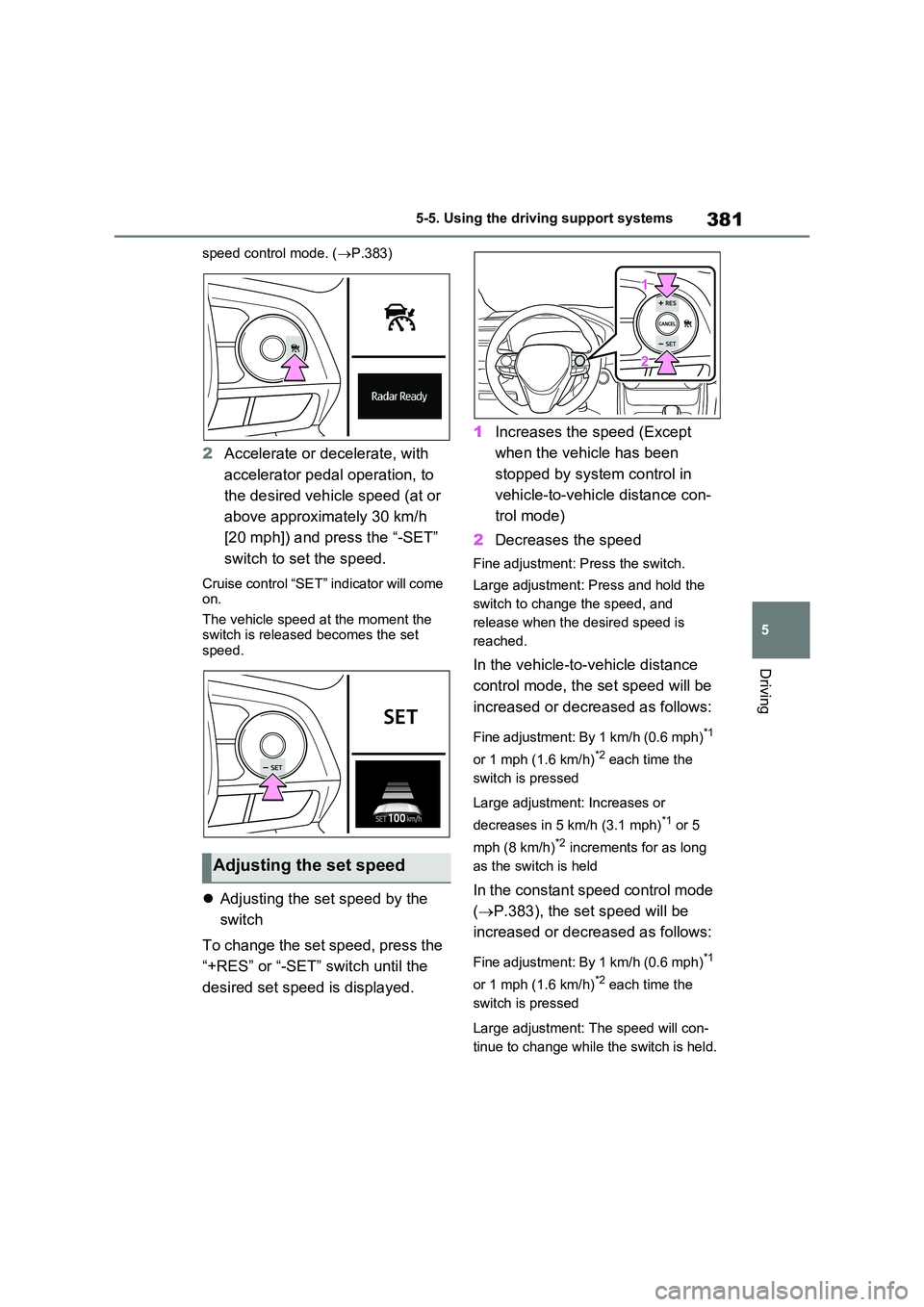
speed control mode. ( P.383)
2Accelerate or decelerate, with
accelerator pedal operation, to
the desired vehicle speed (at or
above approximately 30 km/h
[20 mph]) and press the “-SET”
switch to set the speed.
Cruise control “SET” indicator will come on.
The vehicle speed at the moment the switch is released becomes the set speed.
Adjusting the set speed by the
switch
To change the set speed, press the
“+RES” or “-SET” switch until the
desired set speed is displayed.
1 Increases the speed (Except
when the vehicle has been
stopped by system control in
vehicle-to-vehicle distance con-
trol mode)
2 Decreases the speed
Fine adjustment: Press the switch.
Large adjustment: Press and hold the
switch to change the speed, and
release when the desired speed is
reached.
In the vehicle-to-vehicle distance
control mode, the set speed will be
increased or decreased as follows:
Fine adjustment: By 1 km/h (0.6 mph)*1
or 1 mph (1.6 km/h)*2 each time the
switch is pressed
Large adjustment: Increases or
decreases in 5 km/h (3.1 mph)*1 or 5
mph (8 km/h)*2 increments for as long
as the switch is held
In the constant speed control mode
( P.383), the set speed will be
increased or decreased as follows:
Fine adjustment: By 1 km/h (0.6 mph)*1
or 1 mph (1.6 km/h)*2 each time the
switch is pressed
Large adjustment: The speed will con-
tinue to change while the switch is held.
Adjusting the set speed
Page 384 of 664
3845-5. Using the driving support systems
the vehicle-to-vehicle distance.
Select this mode only when vehi-
cle-to-vehicle distance control
mode does not function correctly
due to a dirty radar, etc.
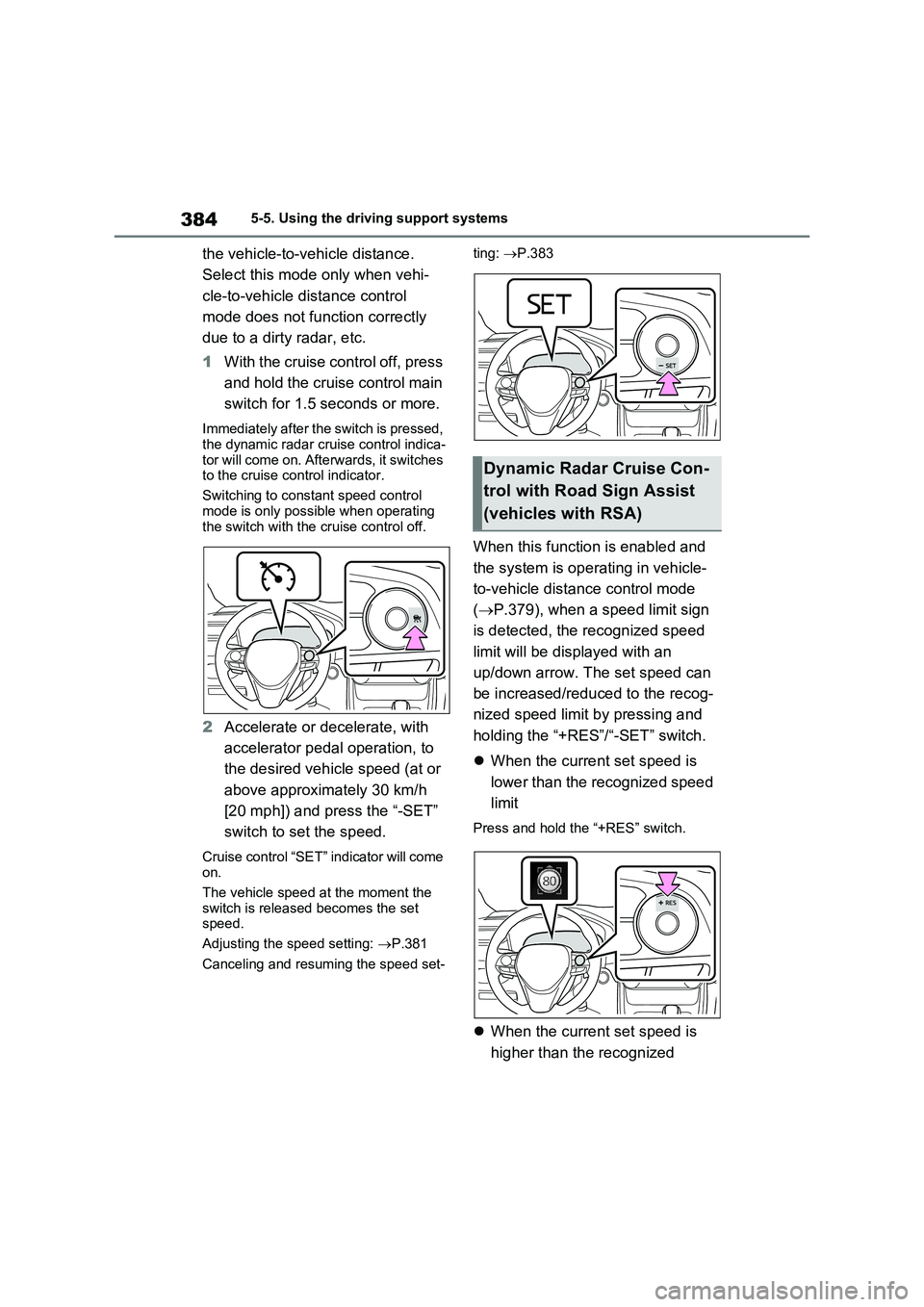
1With the cruise control off, press
and hold the cruise control main
switch for 1.5 seconds or more.
Immediately after the switch is pressed,
the dynamic radar cruise control indica-
tor will come on. Afterwards, it switches
to the cruise control indicator.
Switching to constant speed control
mode is only possible when operating
the switch with the cruise control off.
2Accelerate or decelerate, with
accelerator pedal operation, to
the desired vehicle speed (at or
above approximately 30 km/h
[20 mph]) and press the “-SET”
switch to set the speed.
Cruise control “SET” indicator will come
on.
The vehicle speed at the moment the
switch is released becomes the set
speed.
Adjusting the speed setting: P.381
Canceling and resuming the speed set-ting: P.383
When this function is enabled and
the system is operating in vehicle-
to-vehicle distance control mode
(P.379), when a speed limit sign
is detected, the recognized speed
limit will be displayed with an
up/down arrow. The set speed can
be increased/reduced to the recog-
nized speed limit by pressing and
holding the “+RES”/“-SET” switch.
When the current set speed is
lower than the recognized speed
limit
Press and hold the “+RES” switch.
When the current set speed is
higher than the recognized
Dynamic Radar Cruise Con-
trol with Road Sign Assist
(vehicles with RSA)
Page 385 of 664

385
5 5-5. Using the driving support systems
Driving
speed limit
Press and hold the “-SET” switch.
Dynamic Radar Cruise Control with
Road Sign Assist can be
enabled/disabled in the screen
on the multi-information display.
(P.186)
■Dynamic radar cruise control with
full-speed range can be set when
●The shift lever is in D.
●The desired set speed can be set
when the vehicle speed is approxi-
mately 30 km/h (20 mph) or more.
(However, when the vehicle speed is
set while driving at below approxi-
mately 30 km/h [20 mph], the set
speed will be set to approximately 30
km/h [20 mph].)
■Accelerating after setting the vehi-
cle speed
The vehicle can accelerate by operating
the accelerator pedal. After accelerat-
ing, the set speed resumes. However,
during vehicle-to-vehicle distance con-
trol mode, the vehicle speed may
decrease below the set speed in order
to maintain the distance to the preced-ing vehicle.
■When the vehicle stops while fol-
low-up cruising
●Pressing the “+RES” switch while the
vehicle ahead stops will resume fol-
low-up cruising if the vehicle ahead
starts off within approximately 3 sec-
onds after the switch is pressed.
●If the vehicle ahead starts off within 3
seconds after your vehicle stops, fol-
low-up cruising will be resumed.
■Automatic cancelation of vehicle-
to-vehicle distance control mode
Vehicle-to-vehicle distance control
mode is automatically canceled in the
following situations.
●VSC is activated.
●TRC is activated for a period of time.
●When the VSC or TRC system is
turned off.
●The sensor cannot detect correctly
because it is covered in some way.
●Pre-collision braking is activated.
●The parking brake is operated.
●The vehicle is stopped by system con-
trol on a steep incline.
●The following are detected when the
vehicle has been stopped by system
control:
• The driver is not wearing a seat belt.
• The driver’s door is opened.
• The vehicle has been stopped for
about 3 minutes
If vehicle-to-vehicle distance control
mode is automatically canceled for any
reasons other than the above, there
may be a malfunction in the system.
Contact any authorized Toyota retailer
or Toyota authorized repairer, or any
reliable repairer.
■Automatic cancelation of constant
speed control mode
Constant speed control mode is auto-
matically canceled in the following situa-
tions:
Enabling/Disabling the
Dynamic Radar Cruise Con-
trol with Road Sign Assist
(vehicles with RSA)