2011 TOYOTA VERSO S ECO mode
[x] Cancel search: ECO modePage 173 of 664
173
3 3-1. Instrument cluster
Vehicle status information and indicators
the indicator will flash for approxi-
mately 10 seconds, then stay on.
*8: The displayed indicator changes
according to the current plug-in
hybrid system operation mode.
*9: This light illuminates on the center
panel.
■BSM (Blind Spot Monitor) outside
rear view mirror indicators (if
equipped)
In order to confirm operation, the BSM
outside rear view mirror indicators illumi-
nate when the power switch is turned to
ON, or when the BSM function/RCTA
function is enabled while the power
switch is in ON.
If the system is functioning correctly, the
BSM outside rear view mirror indicators
will turn off after a few seconds.
If the BSM outside rear view mirror indi-
cators do not illuminate or do not turn
off, there may be a malfunction in the
system.
If this occurs, have the vehicle inspected
by any authorized Toyota retailer or
Toyota authorized repairer, or any reli-
able repairer.
Page 175 of 664
175
3 3-1. Instrument cluster
Vehicle status information and indicators
the blue zone, EV driving is no longer possible (in this situation, the vehicle switches
to HV mode). Charge the hybrid battery (traction battery) to allow EV driving.
Odometer, trip meter and instrument cluster light control display
Odometer:
Displays the total distance that the vehicle has been driven
Trip meter:
Displays the distance the vehicle has been driven since the meter was last reset.
Trip meters “A” and “B” can be used to record and display different distances inde-
pendently.
Instrument cluster light control:
Displays the brightness of the instrument cluster lights that can be adjusted.
Outside temperature (P.177)
Multi-information display
Presents the driver with a variety of driving-related data (P.179)
Displays warning messages if a malfunction occurs (P.578)
Shift position and shift range indicator
Displays the selected shift position or selected shift range (P.321)
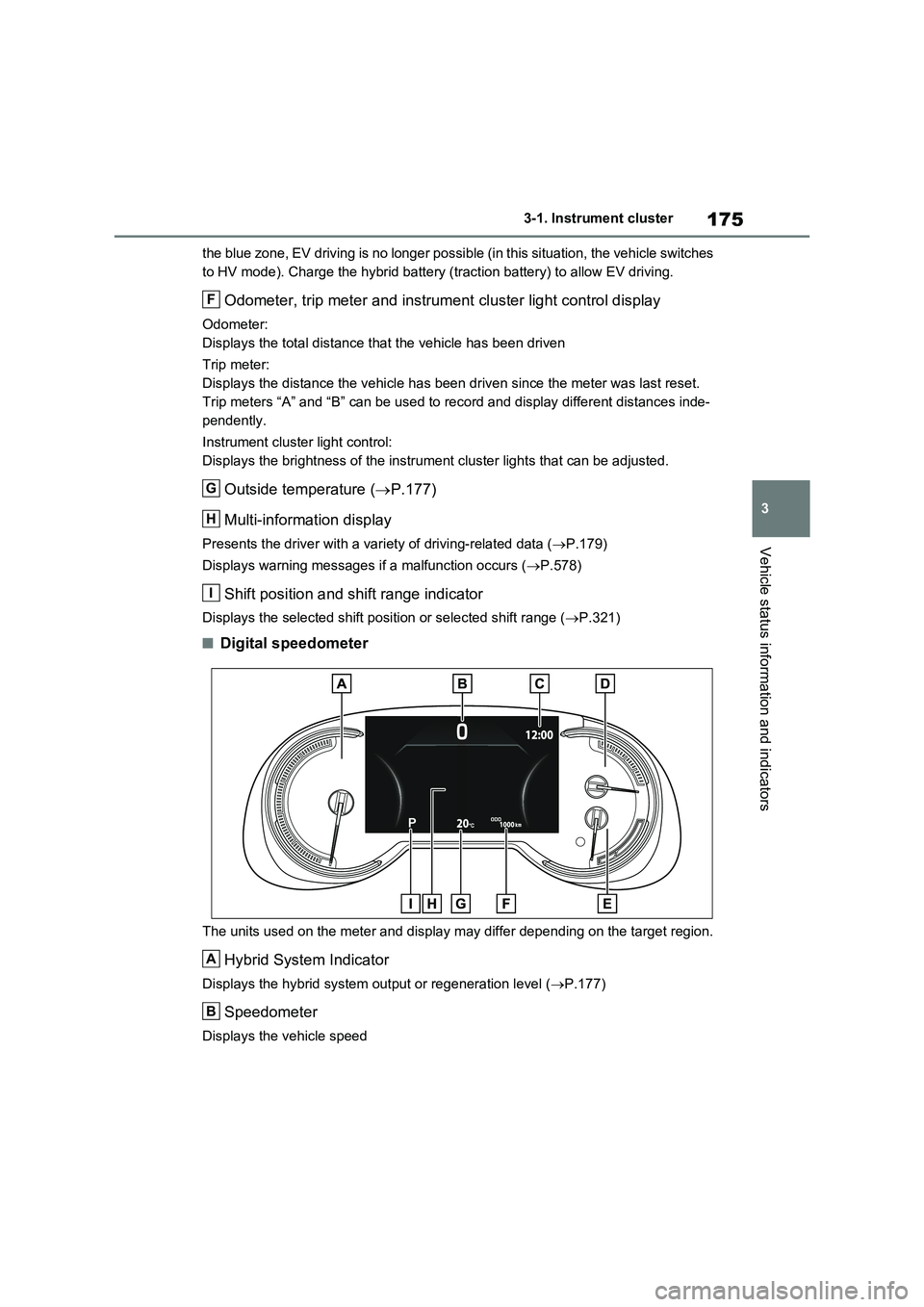
■Digital speedometer
The units used on the meter and display may differ depending on the target region.
Hybrid System Indicator
Displays the hybrid system output or regeneration level (P.177)
Speedometer
Displays the vehicle speed
F
G
H
I
A
B
Page 176 of 664
1763-1. Instrument cluster
Clock
Automatically adjusts the time by using the GPS time information (GPS clock).
For details, refer to “Navigation and Multimedia System Owner’s Manual” or “Multi-
media Owner’s Manual”.
Fuel gauge
Displays the quantity of fuel remaining in the tank
SOC (State of Charge) gauge
Displays the amount of charge remaining in the traction battery.
When the gauge is in the green zone, EV driving is possible. When the gauge is in
the blue zone, EV driving is no longer possible (in this situation, the vehicle switches
to HV mode). Charge the hybrid battery (traction battery) to allow EV driving.
Odometer, trip meter and instrument cluster light control display
Odometer:
Displays the total distance that the vehicle has been driven
Trip meter:
Displays the distance the vehicle has been driven since the meter was last reset.
Trip meters A and B can be used to record and display different distances inde-
pendently.
Instrument cluster light control:
Displays the brightness of the instrument cluster lights that can be adjusted.
Outside temperature (P.177)
Multi-information display
Presents the driver with a variety of driving-related data (P.179)
Displays warning messages if a malfunction occurs (P.578)
Shift position and shift range indicator
Displays the selected shift position or selected shift range (P.321)
■The meters and display illuminate
when
The power switch is in ON.
■When changing driving mode
●Speedometer color is changed follow-
ing the selected driving mode.
(P.434)
●Speedometer color is changed follow-
ing the selected driving mode or when
Trail Mode is turned on. (P.434,
435)
■If the units of measure for speed-
ometer can be changed (if
equipped)
The other units of measure is also dis-
played as shown in the illustrations.
C
D
E
F
G
H
I
Page 177 of 664
177
3 3-1. Instrument cluster
Vehicle status information and indicators
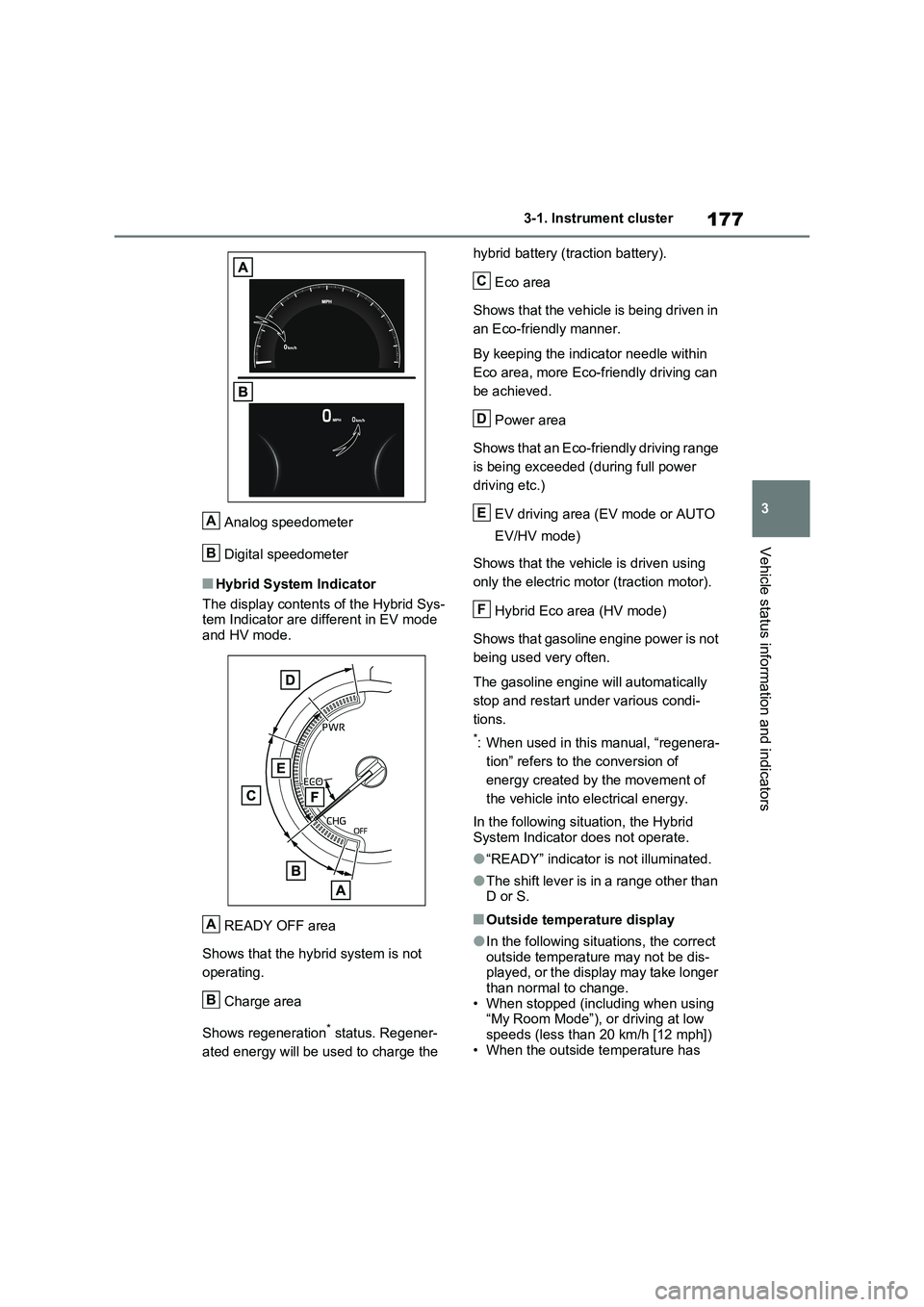
Analog speedometer
Digital speedometer
■Hybrid System Indicator
The display contents of the Hybrid Sys-
tem Indicator are different in EV mode
and HV mode.
READY OFF area
Shows that the hybrid system is not
operating.
Charge area
Shows regeneration
* status. Regener-
ated energy will be used to charge the hybrid battery (traction battery).
Eco area
Shows that the vehicle is being driven in
an Eco-friendly manner.
By keeping the indicator needle within
Eco area, more Eco-friendly driving can
be achieved.
Power area
Shows that an Eco-friendly driving range
is being exceeded (during full power
driving etc.)
EV driving area (EV mode or AUTO
EV/HV mode)
Shows that the vehicle is driven using
only the electric motor (traction motor).
Hybrid Eco area (HV mode)
Shows that gasoline engine power is not
being used very often.
The gasoline engine will automatically
stop and restart under various condi-
tions.
*: When used in this manual, “regenera-
tion” refers to the conversion of
energy created by the movement of
the vehicle into electrical energy.
In the following situation, the Hybrid
System Indicator does not operate.
●“READY” indicator is not illuminated.
●The shift lever is in a range other than
D or S.
■Outside temperature display
●In the following situations, the correct
outside temperature may not be dis-
played, or the display may take longer
than normal to change.
• When stopped (including when using
“My Room Mode”), or driving at low
speeds (less than 20 km/h [12 mph])
• When the outside temperature has
A
B
A
B
C
D
E
F
Page 181 of 664
181
3 3-1. Instrument cluster
Vehicle status information and indicators
Select to display fuel consumption
data in various forms.
■Power Consumption/Fuel
Economy
The display contents are different in
EV mode or AUTO EV/HV mode,
and HV mode.
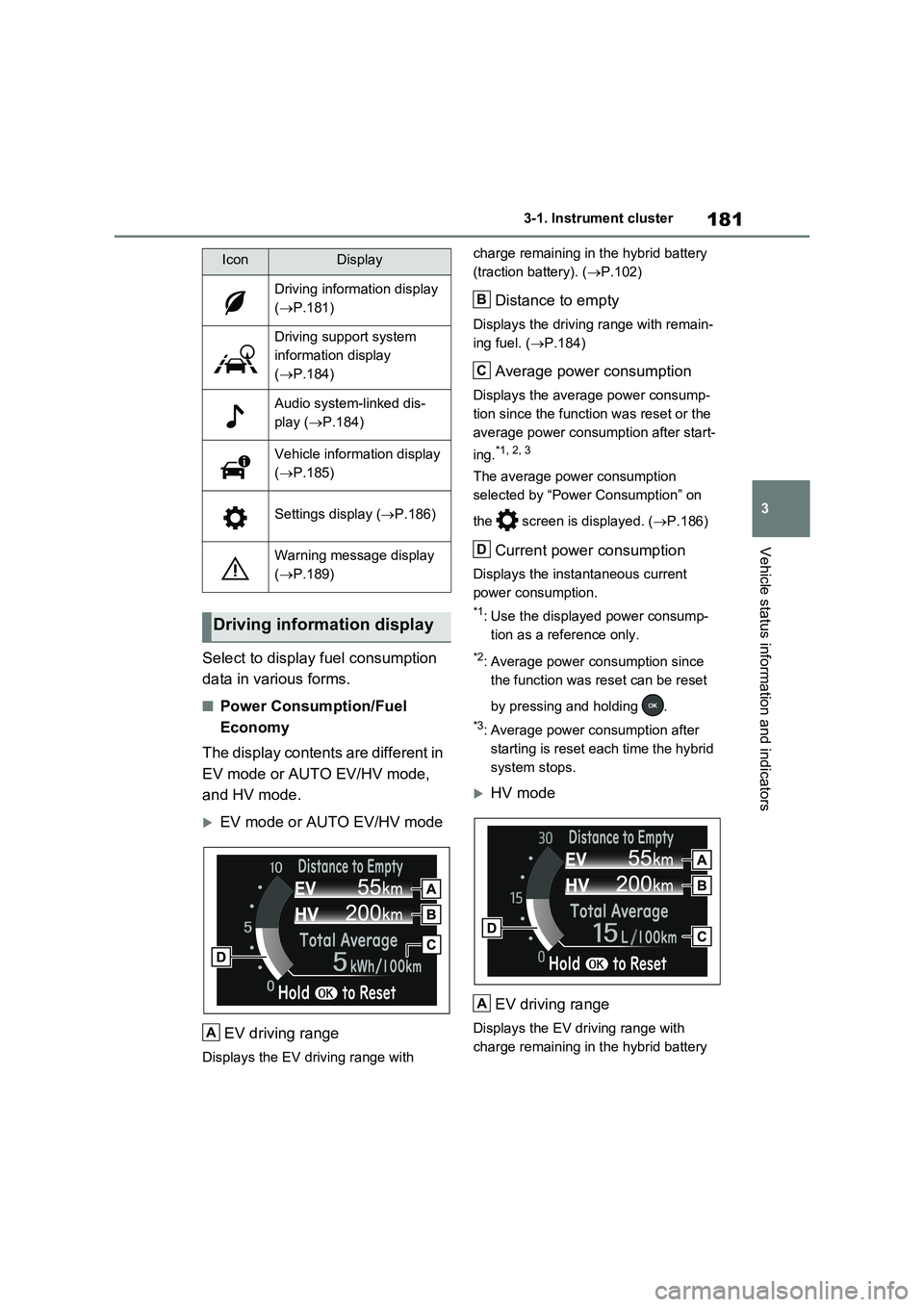
EV mode or AUTO EV/HV mode
EV driving range
Displays the EV driving range with charge remaining in the hybrid battery
(traction battery). (P.102)
Distance to empty
Displays the driving range with remain-
ing fuel. (P.184)
Average power consumption
Displays the average power consump-
tion since the function was reset or the
average power consumption after start-
ing.
*1, 2, 3
The average power consumption
selected by “Power Consumption” on
the screen is displayed. (P.186)
Current power consumption
Displays the instantaneous current
power consumption.
*1: Use the displayed power consump-
tion as a reference only.
*2: Average power consumption since
the function was reset can be reset
by pressing and holding .
*3: Average power consumption after
starting is reset each time the hybrid
system stops.
HV mode
EV driving range
Displays the EV driving range with
charge remaining in the hybrid battery
IconDisplay
Driving information display
(P.181)
Driving support system
information display
(P.184)
Audio system-linked dis-
play (P.184)
Vehicle information display
(P.185)
Settings display (P.186)
Warning message display
(P.189)
Driving information display
A
B
C
D
A
Page 185 of 664
185
3 3-1. Instrument cluster
Vehicle status information and indicators
■Drive information
2 items that are selected using the
“Drive Info Items” setting (average
speed, distance and total time) can
be displayed vertically.
The displayed information changes
according to the “Drive Info Type”
setting (since the system was
started or between resets).
(P.186)
Use the displayed information as a ref-
erence only.
Following items will be displayed.
“Trip”
• “Average Speed”: Displays the aver-
age vehicle speed since hybrid sys-
tem start
*
• “Distance”: Displays the distance
driven since hybrid system start*
• “Total Time”: Displays the elapsed
time since hybrid system start*
*
: These items are reset each time the
hybrid system stops.
“Total”
• “Average Speed”: Displays the aver-
age vehicle speed since the display
was reset
*
• “Distance”: Displays the distance
driven since the display was reset*
• “Total Time”: Displays the elapsed
time since the display was reset*
*
: To reset, display the desired item and
press and hold .
■Energy monitor
P.195
■Tire pressure
P.511
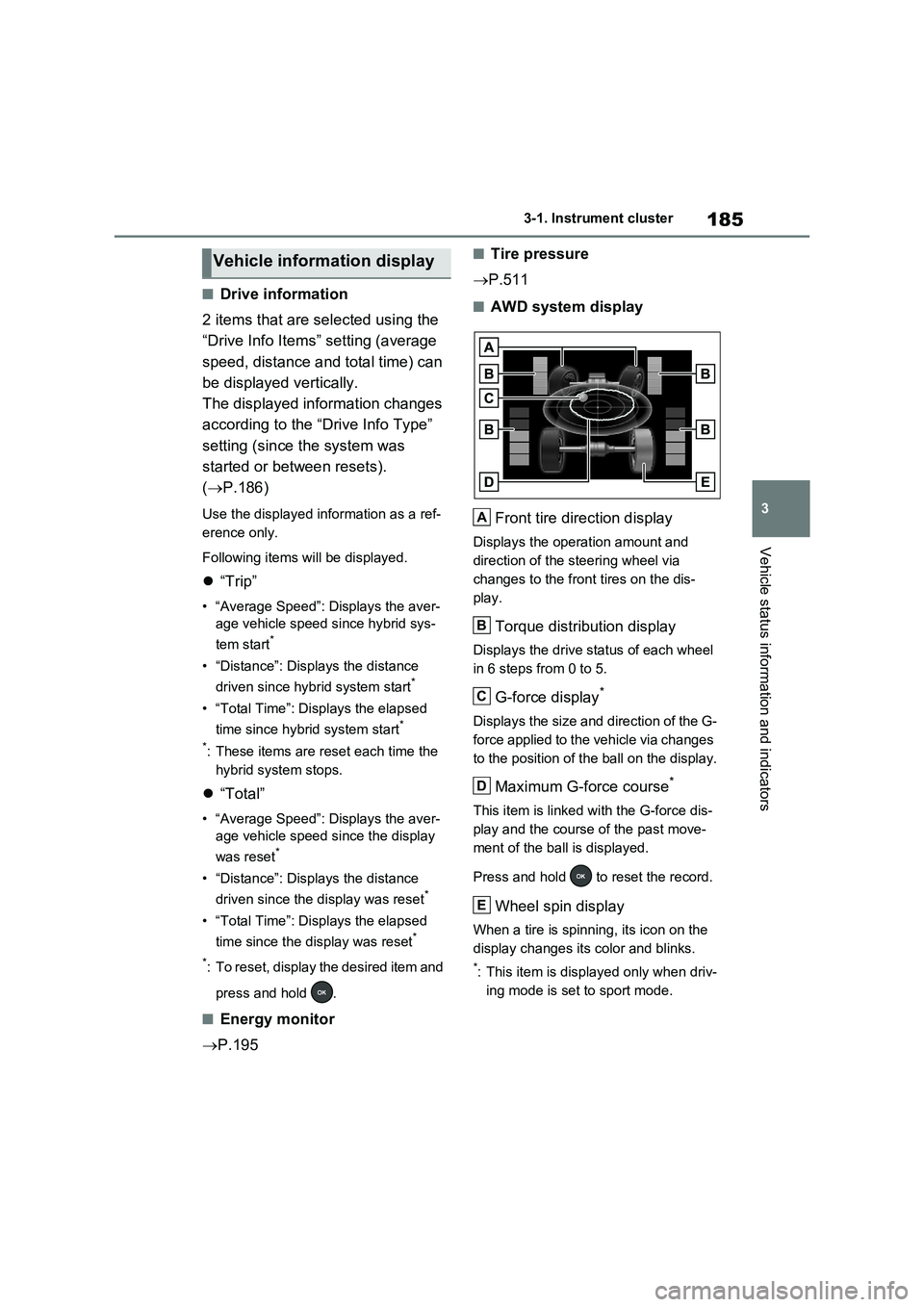
■AWD system display
Front tire direction display
Displays the operation amount and
direction of the steering wheel via
changes to the front tires on the dis-
play.
Torque distribution display
Displays the drive status of each wheel
in 6 steps from 0 to 5.
G-force display*
Displays the size and direction of the G-
force applied to the vehicle via changes
to the position of the ball on the display.
Maximum G-force course*
This item is linked with the G-force dis-
play and the course of the past move-
ment of the ball is displayed.
Press and hold to reset the record.
Wheel spin display
When a tire is spinning, its icon on the
display changes its color and blinks.
*: This item is displayed only when driv-
ing mode is set to sport mode.
Vehicle information display
A
B
C
D
E
Page 194 of 664
1943-1. Instrument cluster
Brake Override System
(P.301)
Drive-Start Control (P.301)
Parking Support Brake function
(static objects) (if equipped)
(P.424)
Displayed content is the same as that
displayed on the meter. For details,
refer to the explanations of each sys-
tem.
■ / icons
Displays the following multi-infor-
mation display linked icons:
: Master warning icon
Displayed when a warning message is
displayed on the multi-information dis-
play.
: Information icon
Displayed when a suggestion/advice
pop-up display is displayed on the
multi-information display.
■Warning message
Some warning messages are dis-
played when necessary, according
to certain conditions.
Displayed content is the same as that
displayed on the multi-information dis-
play. For details, refer to the explana-
tions of each system.
■Audio system operation status
Displayed when an audio remote
control switch on the steering wheel
is operated.
■Hands-free system status (if
equipped)
Displayed when the hands-free system is operated.
■Outside temperature display
Displayed when the power switch is
turned to ON or when the low out-
side temperature indicator is flash-
ing.
■When a pop-up display is displayed
When a pop-up display is displayed, a
current display may no longer be dis-
played. In this case, the display will
return after the pop-up display disap-
pears.
■Outside temperature display
●When the ambient temperature is
approximately 3°C (37°F) or lower,
will flash for approximately 10
seconds and the outside temperature
display will turn off.
●In the following situations, the correct
outside temperature may not be dis-
played, or the display may take longer
than normal to change:
• When stopped (including when using
“My Room Mode”), or driving at low
speeds (less than 20 km/h [12 mph])
• When the outside temperature has
changed suddenly (at the
entrance/exit of a garage, tunnel, etc.)
●When “--” or “E” is displayed, the sys-
tem may be malfunctioning.
Take your vehicle to any authorized
Toyota retailer or Toyota authorized
repairer, or any reliable repairer.
Display content selected by “HUD
Driving Support” on the screen
is displayed. (P.192)
Hybrid System Indica-
tor/Tachometer
Page 202 of 664
2024-1. Key information
4-1.Key info rmation
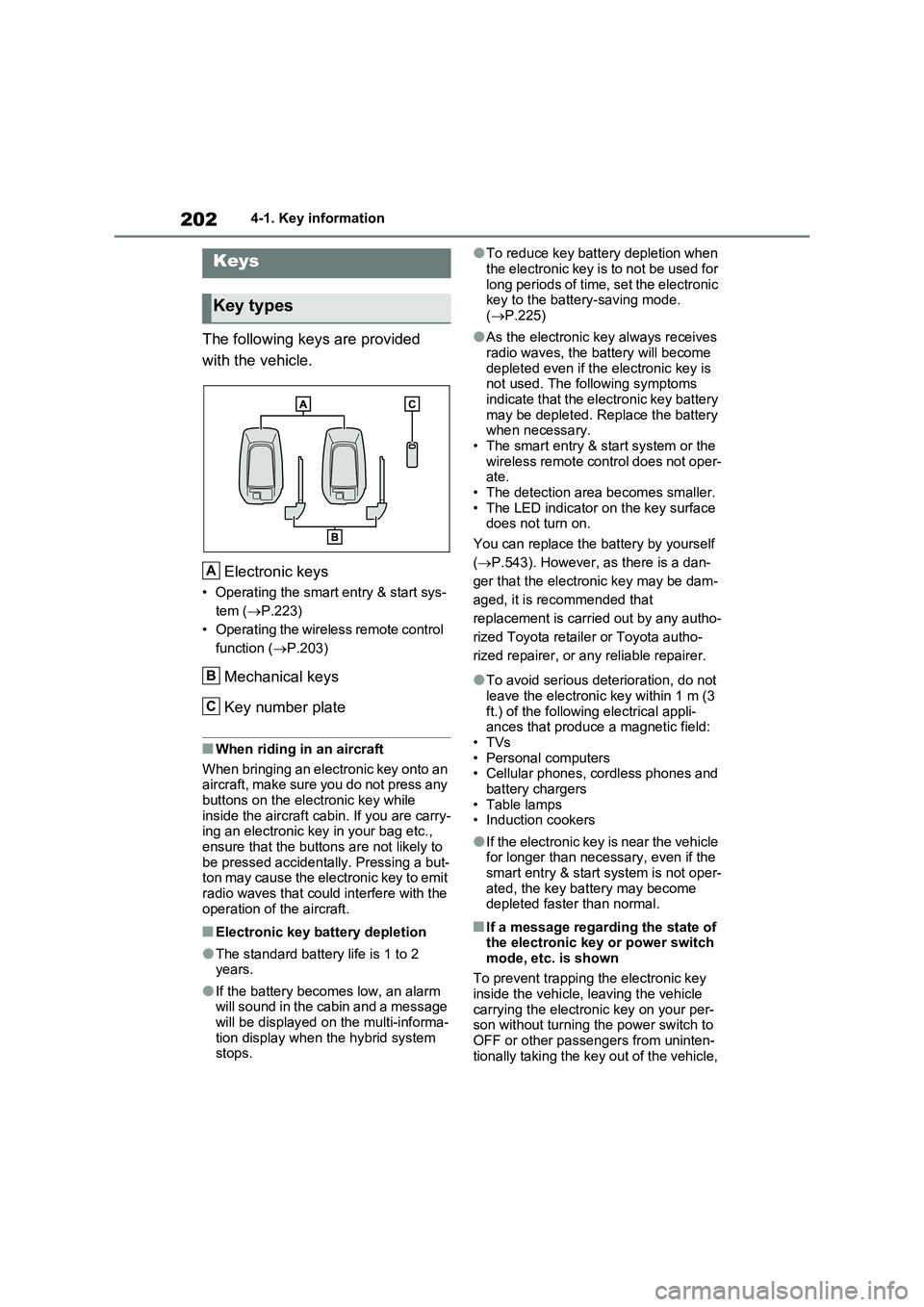
The following keys are provided
with the vehicle.
Electronic keys
• Operating the smart entry & start sys-
tem ( P.223)
• Operating the wireless remote control
function ( P.203)
Mechanical keys
Key number plate
■When riding in an aircraft
When bringing an electronic key onto an aircraft, make sure you do not press any
buttons on the electronic key while inside the aircraft cabin. If you are carry-ing an electronic key in your bag etc.,
ensure that the buttons are not likely to be pressed accidentally. Pressing a but-ton may cause the electronic key to emit
radio waves that could interfere with the operation of the aircraft.
■Electronic key battery depletion
●The standard battery life is 1 to 2 years.
●If the battery becomes low, an alarm will sound in the cabin and a message will be displayed on the multi-informa-
tion display when the hybrid system stops.
●To reduce key battery depletion when
the electronic key is to not be used for long periods of time, set the electronic key to the battery-saving mode.
( P.225)
●As the electronic key always receives
radio waves, the battery will become depleted even if the electronic key is not used. The following symptoms
indicate that the electronic key battery may be depleted. Replace the battery when necessary.
• The smart entry & start system or the wireless remote control does not oper-ate.
• The detection area becomes smaller. • The LED indicator on the key surface does not turn on.
You can replace the battery by yourself
( P.543). However, as there is a dan-
ger that the electronic key may be dam-
aged, it is recommended that
replacement is carried out by any autho-
rized Toyota retailer or Toyota autho-
rized repairer, or any reliable repairer.
●To avoid serious deterioration, do not leave the electronic key within 1 m (3
ft.) of the following electrical appli- ances that produce a magnetic field:•TVs
• Personal computers • Cellular phones, cordless phones and battery chargers
•Table lamps • Induction cookers
●If the electronic key is near the vehicle for longer than necessary, even if the smart entry & start system is not oper-
ated, the key battery may become depleted faster than normal.
■If a message regarding the state of the electronic key or power switch
mode, etc. is shown
To prevent trapping the electronic key inside the vehicle, leaving the vehicle
carrying the electronic key on your per- son without turning the power switch to OFF or other passengers from uninten-
tionally taking the key out of the vehicle,
Keys
Key types
A
B
C