2011 TOYOTA VERSO S ECO mode
[x] Cancel search: ECO modePage 386 of 664

3865-5. Using the driving support systems
●Actual vehicle speed is more than
approximately 16 km/h (10 mph) below the set vehicle speed.
●Actual vehicle speed falls below approximately 30 km/h (20 mph).
●VSC is activated.
●TRC is activated for a period of time.
●When the VSC or TRC system is turned off.
●Pre-collision braking is activated.
●The parking brake is operated.
If constant speed control mode is auto-
matically canceled for any reasons other
than the above, there may be a malfunc-
tion in the system. Contact any autho-
rized Toyota retailer or Toyota
authorized repairer, or any reliable
repairer.
■The Dynamic Radar Cruise Control with Road Sign Assist may not
operate properly when (vehicles with RSA)
As the Dynamic Radar Cruise Control
with Road Sign Assist may not operate properly in conditions in which RSA may not operate or detect correctly
( P.375), when using this function, make sure to check the speed limit sign displayed.
In the following situations, the set speed may not be changed to the recognized speed limit by pressing and holding the
“+RES”/“-SET” switch.
●If speed limit information is not avail-
able
●When the recognized speed limit is
the same as the set speed
●When the recognized speed limit is
outside of the speed range that the dynamic radar cruise control system can operate
■Brake operation
A brake operation sound may be heard and the brake pedal response may change, but these are not malfunctions.
■Warning messages and buzzers for
dynamic radar cruise control with full-speed range
Warning messages and buzzers are
used to indicate a system malfunction or to inform the driver of the need for cau-tion while driving. If a warning message
is shown on the multi-information dis- play, read the message and follow the instructions. ( P.353, 578)
■When the sensor may not be cor-
rectly detecting the vehicle ahead
In the case of the following and depend- ing on the conditions, operate the brake
pedal when deceleration of the system is insufficient or operate the accelerator pedal when acceleration is required.
As the sensor may not be able to cor- rectly detect these types of vehicles, the approach warning ( P.383) may not be
activated.
●Vehicles that cut in suddenly
●Vehicles traveling at low speeds
●Vehicles that are not moving in the same lane
●Vehicles with small rear ends (trailers with no load on board, etc.)
●Motorcycles traveling in the same lane
●When water or snow thrown up by the
surrounding vehicles hinders the detecting of the sensor
●When your vehicle is pointing upwards (caused by a heavy load in the luggage compartment, etc.)
Page 434 of 664
4345-5. Using the driving support systems
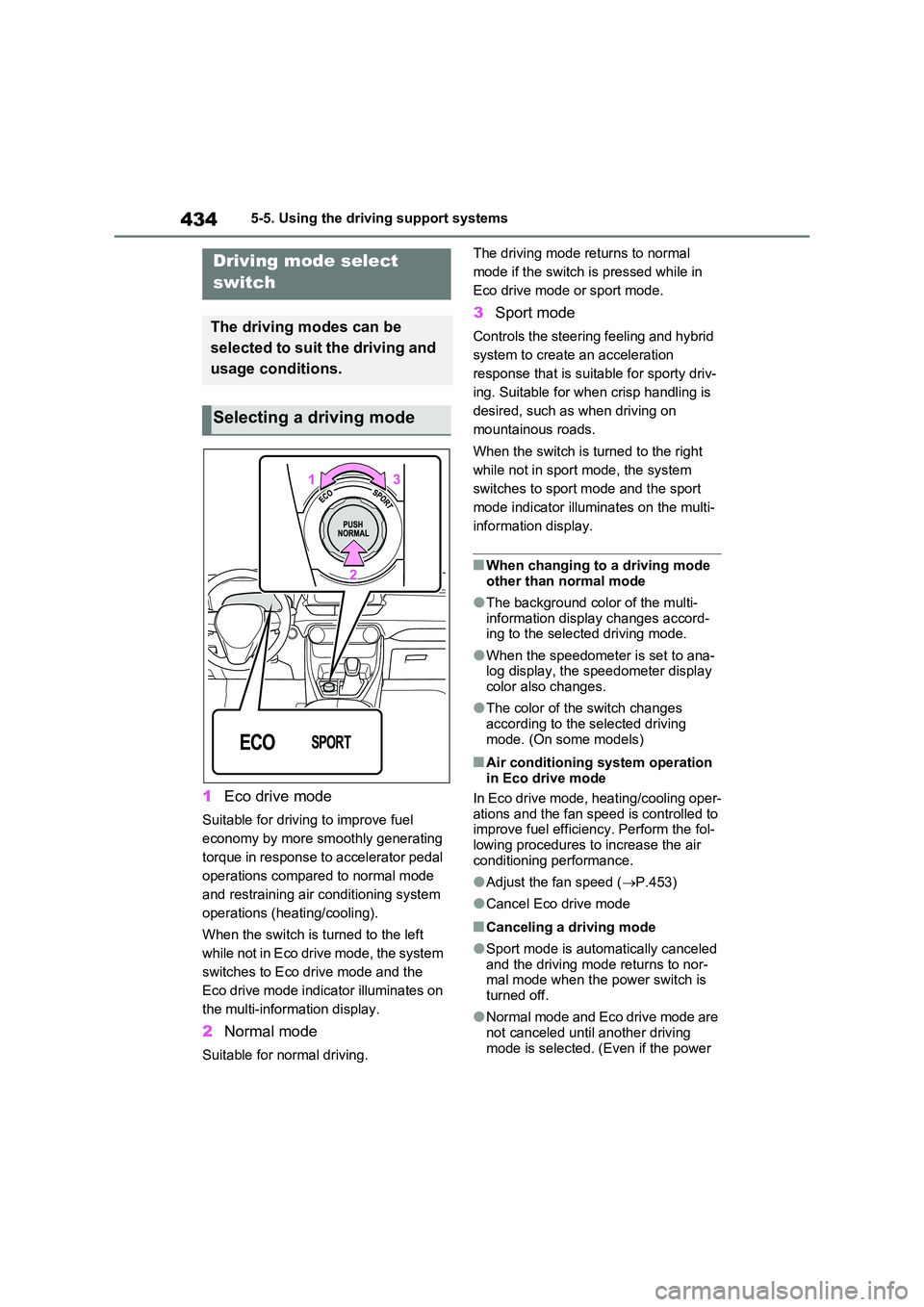
1Eco drive mode
Suitable for driving to improve fuel
economy by more smoothly generating
torque in response to accelerator pedal
operations compared to normal mode
and restraining air conditioning system
operations (heating/cooling).
When the switch is turned to the left
while not in Eco drive mode, the system
switches to Eco drive mode and the
Eco drive mode indicator illuminates on
the multi-information display.
2 Normal mode
Suitable for normal driving.
The driving mode returns to normal
mode if the switch is pressed while in
Eco drive mode or sport mode.
3 Sport mode
Controls the steering feeling and hybrid
system to create an acceleration
response that is suitable for sporty driv-
ing. Suitable for when crisp handling is
desired, such as when driving on
mountainous roads.
When the switch is turned to the right
while not in sport mode, the system
switches to sport mode and the sport
mode indicator illuminates on the multi-
information display.
■When changing to a driving mode
other than normal mode
●The background color of the multi-
information display changes accord- ing to the selected driving mode.
●When the speedometer is set to ana-log display, the speedometer display color also changes.
●The color of the switch changes according to the selected driving
mode. (On some models)
■Air conditioning system operation in Eco drive mode
In Eco drive mode, heating/cooling oper-
ations and the fan speed is controlled to improve fuel efficiency. Perform the fol-lowing procedures to increase the air
conditioning performance.
●Adjust the fan speed ( P.453)
●Cancel Eco drive mode
■Canceling a driving mode
●Sport mode is automatically canceled and the driving mode returns to nor-mal mode when the power switch is
turned off.
●Normal mode and Eco drive mode are
not canceled until another driving mode is selected. (Even if the power
Driving mode select
switch
The driving modes can be
selected to suit the driving and
usage conditions.
Selecting a driving mode
Page 435 of 664
435
5
5-5. Using the driving support systems
Driving
switch is turned off, normal mode and
Eco drive mode will not be automati- cally canceled.)
Press the Trail Mode switch
When the switch is pressed, Trail Mode
turns on and the Trail Mode indicator
illuminates on the multi-information dis-
play.
When the switch is pressed again, the
Trail Mode indicator turns off.
Trail Mode
Trail Mode is a system that per-
forms integrated control for
the AWD, brake and drive force
control systems to assist the
drive power on bumpy roads,
etc.
WARNING
■Before using Trail Mode
Make sure to observe the following
precautions. Failure to observe these precautions may result in an unex-pected accident.
●Check that the Trail Mode indicator is illuminated before driving. Trail Mode will not operate when the
indicator is off.
●Trail Mode is not intended to
expand the limits of the vehicle. Thoroughly check the road condi-tions and drive with caution.
●Thoroughly check the road condi-tions before driving. As Trail Mode
is suitable for driving on bumpy roads, such as those where the tire on one side spins, there is a chance
that Trail Mode may not be the most appropriate for other road conditions.
Turning Trail Mode on
Page 454 of 664
4546-1. Using the air conditioning system and defogger
switch to outside air mode if the recircu-
lated air mode is used. (It may switch
automatically.)
To defog the windshield and the side
windows quickly, turn the air flow and
temperature up.
To return to the previous mode, press
the windshield defogger switch again
when the windshield is defogged.
When the windshield defogger switch is
on, the indicator illuminates on the
windshield defogger switch.
■Defogging the rear window
and outside rear view mirrors
Defoggers are used to defog the
rear window, and to remove rain-
drops, dew and frost from the out-
side rear view mirrors.
Press the rear window defogger
and outside rear view mirror defog-
gers switch.
The defoggers will automatically turn off
after 15 minutes.
When the rear window defogger and
outside rear view mirror defoggers
switch is on, the indicator illuminates on
the rear window defogger and outside
rear view mirror defoggers switch.
■Blower customization
The fan speed can be adjusted
according to your preference.
1Press the automatic mode or
airflow mode control switch.
2Press the blower customization
switch.
3Each time the blower customi-
zation switch is pressed, the fan
speed changes as follows.
Normal “ECO” “FAST”
■Heating
●In HV mode, the gasoline engine may
operate in order to extract heat from
the engine coolant via the heater.
●In EV mode, heating is done by a heat
pump system.
• When the outside temperature is low
or it is snowing, compared to conven-
tional vehicles, heating may be less
effective and warm air may not come
out.
• When the outside heat exchanger is
frosted over, fan speed declines and it
may become harder to heat the inte-
rior. However, it is not a malfunction.
In this situation, the air temperature
from the outlets may not change even
though the set temperature is raised.
• If frost has formed of the outside heat
exchanger, the heating performance
will decline. The frost can be removed
from the outside heat exchanger by
operating the Remote Air Conditioning
System before driving (P.460).
When frosted over, the heating opera-
tion of the Remote Air Conditioning
System starts after defrosting.
• When “AUTO” switch is turned on, the
heating is controlled optimally. There-
fore, the set heating performance may
not be achieved even if the fan speed
setting is increased.
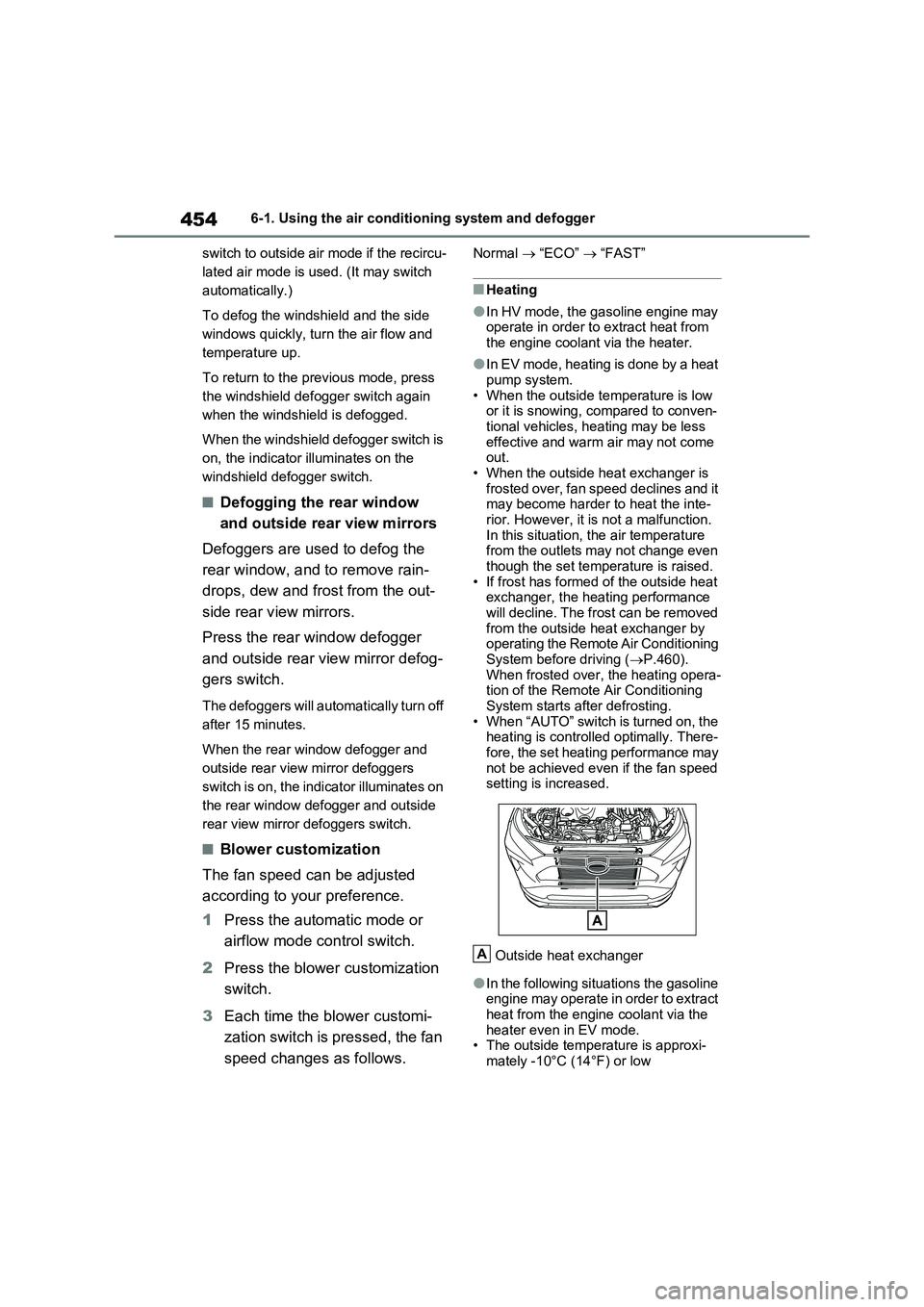
Outside heat exchanger
●In the following situations the gasoline
engine may operate in order to extract
heat from the engine coolant via the
heater even in EV mode.
• The outside temperature is approxi-
mately -10°C (14°F) or low
A
Page 455 of 664
455
6 6-1. Using the air conditioning system and defogger
Interior features
• is operating
■Water droplets during air condi-
tioning operation
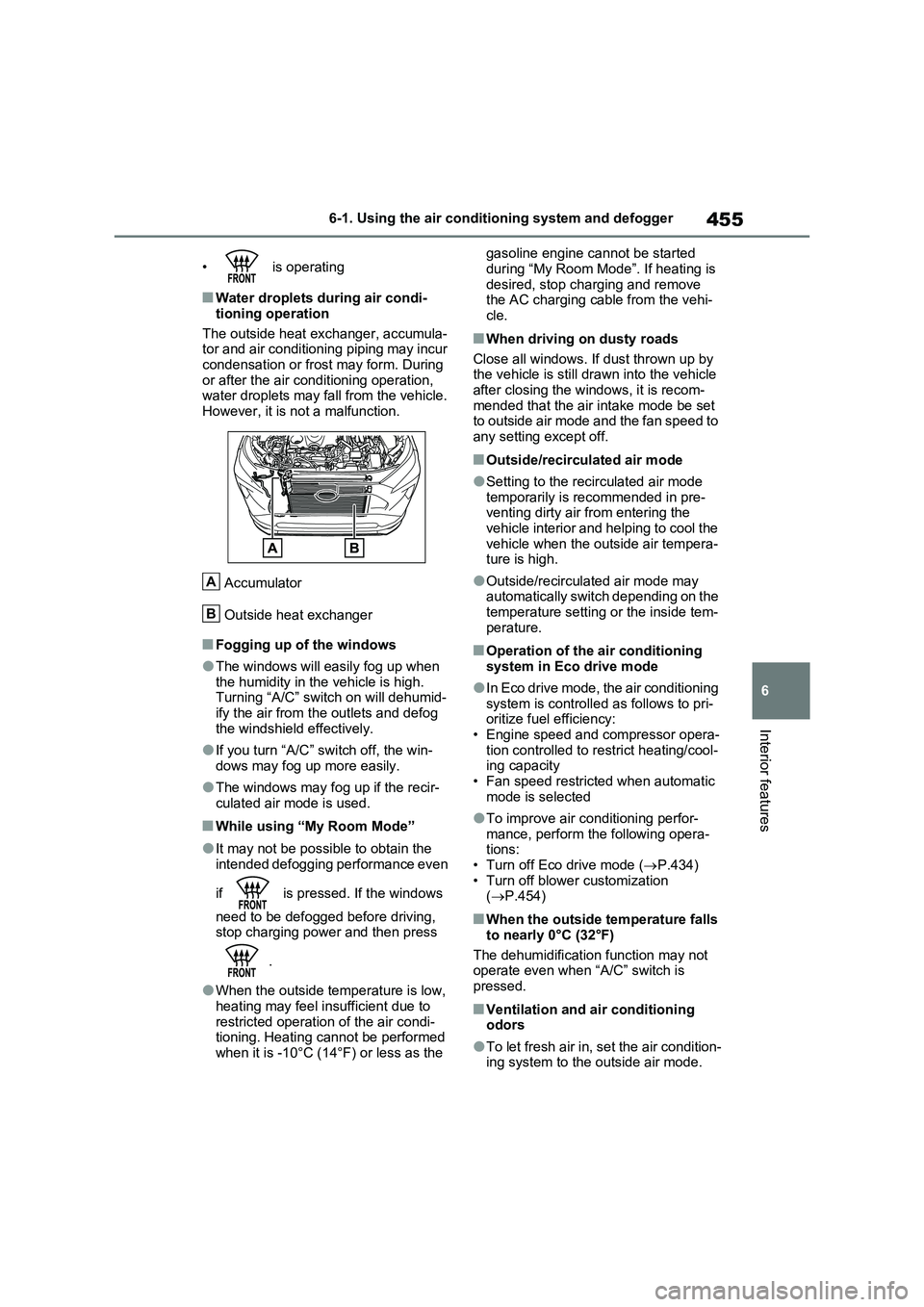
The outside heat exchanger, accumula-
tor and air conditioning piping may incur
condensation or frost may form. During
or after the air conditioning operation,
water droplets may fall from the vehicle.
However, it is not a malfunction.
Accumulator
Outside heat exchanger
■Fogging up of the windows
●The windows will easily fog up when
the humidity in the vehicle is high.
Turning “A/C” switch on will dehumid-
ify the air from the outlets and defog
the windshield effectively.
●If you turn “A/C” switch off, the win-
dows may fog up more easily.
●The windows may fog up if the recir-
culated air mode is used.
■While using “My Room Mode”
●It may not be possible to obtain the
intended defogging performance even
if is pressed. If the windows
need to be defogged before driving,
stop charging power and then press
.
●When the outside temperature is low,
heating may feel insufficient due to
restricted operation of the air condi-
tioning. Heating cannot be performed
when it is -10°C (14°F) or less as the gasoline engine cannot be started
during “My Room Mode”. If heating is
desired, stop charging and remove
the AC charging cable from the vehi-
cle.
■When driving on dusty roads
Close all windows. If dust thrown up by
the vehicle is still drawn into the vehicle
after closing the windows, it is recom-
mended that the air intake mode be set
to outside air mode and the fan speed to
any setting except off.
■Outside/recirculated air mode
●Setting to the recirculated air mode
temporarily is recommended in pre-
venting dirty air from entering the
vehicle interior and helping to cool the
vehicle when the outside air tempera-
ture is high.
●Outside/recirculated air mode may
automatically switch depending on the
temperature setting or the inside tem-
perature.
■Operation of the air conditioning
system in Eco drive mode
●In Eco drive mode, the air conditioning
system is controlled as follows to pri-
oritize fuel efficiency:
• Engine speed and compressor opera-
tion controlled to restrict heating/cool-
ing capacity
• Fan speed restricted when automatic
mode is selected
●To improve air conditioning perfor-
mance, perform the following opera-
tions:
• Turn off Eco drive mode (P.434)
• Turn off blower customization
(P.454)
■When the outside temperature falls
to nearly 0°C (32°F)
The dehumidification function may not
operate even when “A/C” switch is
pressed.
■Ventilation and air conditioning
odors
●To let fresh air in, set the air condition-
ing system to the outside air mode.
A
B
Page 456 of 664
4566-1. Using the air conditioning system and defogger
●During use, various odors from inside
and outside the vehicle may enter into and accumulate in the air conditioning system. This may then cause odor to
be emitted from the vents.
●To reduce potential odors from occur-
ring: • It is recommended that the air condi-tioning system be set to outside air
mode prior to turning the vehicle off. • The start timing of the blower may be delayed for a short period of time
immediately after the air conditioning system is started in automatic mode.
●When parking, the system automati-cally switches to outside air mode to encourage better air circulation
throughout the vehicle, helping to reduce odors that occur when starting the vehicle.
■Air conditioning filter
P.532
■Noise from air conditioning system
Approximately 90 seconds after the power switch turned to OFF, you may
hear sound coming from air conditioning system. This is the sound of a air condi-tioning system initialize and, it does not
indicate a malfunction.
■Customization
Settings (e.g. A/C Auto switch opera- tion) can be changed.
(Customizable features: P.640)
1Press the “AUTO” switch.
The dehumidification function begins to
operate. Air outlets and fan speed are automatically adjusted according to the temperature setting and humidity.
2 Adjust the temperature setting.
3 To stop the operation, press the
“OFF” switch.
If the fan speed setting or air flow
modes are operated, the automatic
mode indicator goes off. However,
automatic mode for functions other
than that operated is maintained.
■Using automatic mode
Fan speed is adjusted automatically
according to the temperature setting and the ambient conditions.
WARNING
■Cautions for using “My Room Mode”
Do not leave children, people who need assistance, or pets inside the vehicle. The system may turn off
automatically and the interior tem- perature may become high or low, resulting in heat stroke, dehydration
or hypothermia. Failure to do so may result in death or serious injury.
■To prevent the windshield from fogging up
Do not use the windshield defogger
switch during cool air operation in extremely humid weather.The difference between the tempera-
ture of the outside air and that of the windshield can cause the outer sur-face of the windshield to fog up,
blocking your vision.
■When the outside rear view mir-
ror defoggers are operating
Do not touch the rear view mirror sur- faces when the outside rear view mir-
ror defoggers are on.
NOTICE
■To prevent 12-volt battery dis- charge
Do not leave the air conditioning sys- tem on longer than necessary when the hybrid system is off.
Using automatic mode
Page 457 of 664

457
6
6-1. Using the air conditioning system and defogger
Interior features
Therefore, the fan may stop for a while
until warm or cool air is ready to flow immediately after the “AUTO” switch is pressed.
■Windshield fog detection function
When automatic mode is set, the humid- ity sensor detects fog on the windshield and controls the air conditioning system
to prevent fog.
This feature is used to prevent ice
from building up on the windshield
and wiper blades.
Press the switch to turn the system
on/off.
The indicator comes on when the sys-
tem is on.
Vehicles with windshield wiper de-icer:
The windshield wiper de-icer will auto-
matically turn off after a period of time.
Vehicles with Heated Windshield
Defroster:
The Heated Windshield
Defroster will automatically turn
off in 4 minutes.
The Heated Windshield
Defroster will not operate if the
outside temperature is 5°C
(41°F) or higher.
Windshield wiper de-icer switch
Heated Windshield Defroster
switch
This function automatically controls
the air conditioning airflow so that
priority is given to the front seats.
When the front passenger seat is
not occupied, airflow may switch to
only the driver’s seat. Unnecessary
air conditioning is suppressed, con-
Windshield wiper de-icer (if
equipped)/Heated Wind-
shield Defroster (if
equipped)
WARNING
■To prevent burns
●Vehicles with windshield wiper
deicer: Do not touch the glass at lower part of the windshield or to the side of the front pillars when the
windshield wiper de-icer is on.
●Vehicles with Heated Windshield
Defroster: Do not touch the wind- shield (especially the lower part) as the surfaces can become very hot
when the Heated Windshield Defroster is on.
Front seat concentrated air-
flow mode (S-FLOW)
A
B
Page 466 of 664
4666-2. Using the interior lights
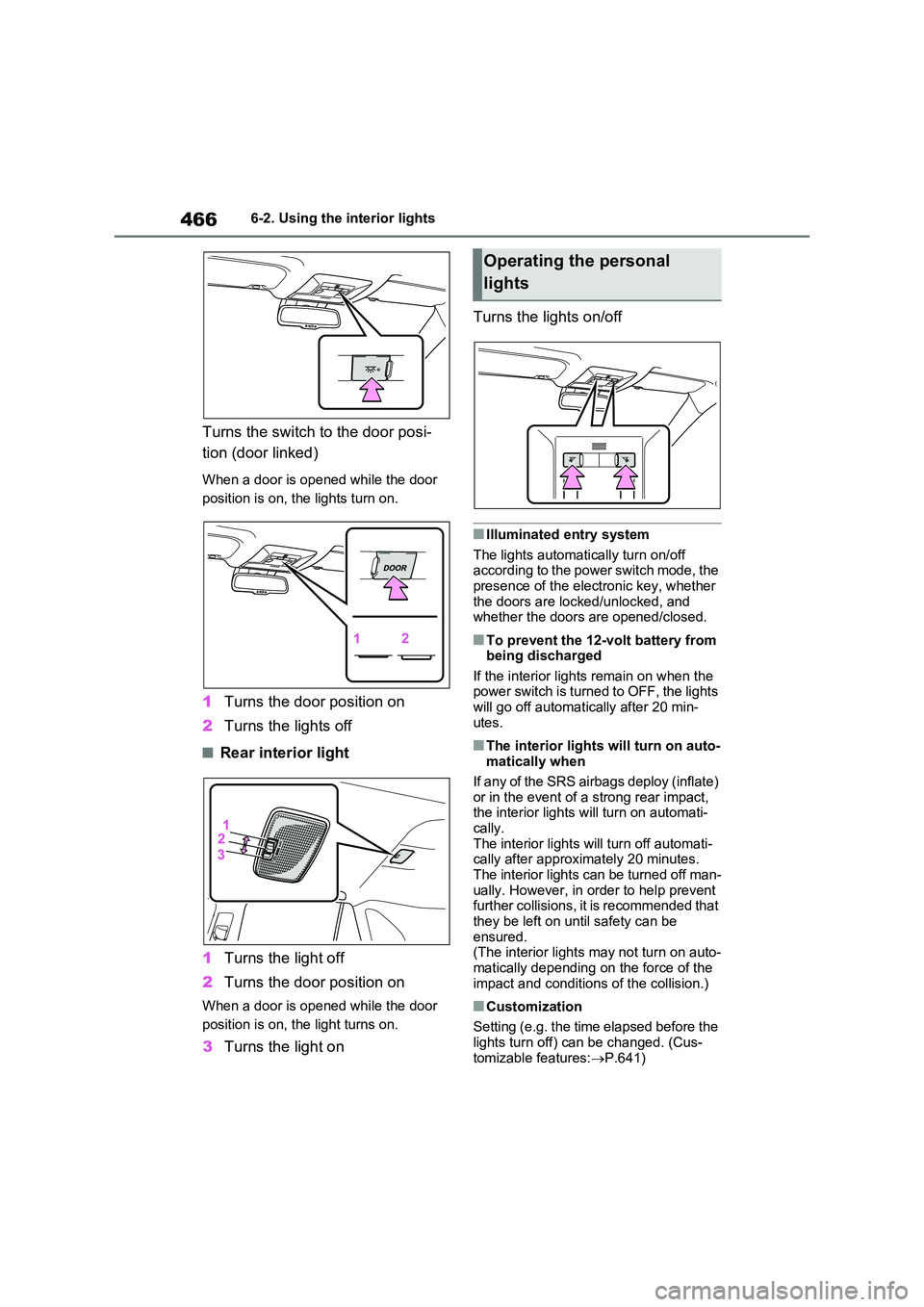
Turns the switch to the door posi-
tion (door linked)
When a door is opened while the door
position is on, the lights turn on.
1 Turns the door position on
2 Turns the lights off
■Rear interior light
1 Turns the light off
2 Turns the door position on
When a door is opened while the door
position is on, the light turns on.
3 Turns the light on
Turns the lights on/off
■Illuminated entry system
The lights automatically turn on/off according to the power switch mode, the presence of the electronic key, whether
the doors are locked/unlocked, and whether the doors are opened/closed.
■To prevent the 12-volt battery from being discharged
If the interior lights remain on when the power switch is turned to OFF, the lights will go off automatically after 20 min-
utes.
■The interior lights will turn on auto- matically when
If any of the SRS airbags deploy (inflate)
or in the event of a strong rear impact, the interior lights will turn on automati-cally.
The interior lights will turn off automati- cally after approximately 20 minutes. The interior lights can be turned off man-
ually. However, in order to help prevent further collisions, it is recommended that they be left on until safety can be
ensured. (The interior lights may not turn on auto-
matically depending on the force of the impact and conditions of the collision.)
■Customization
Setting (e.g. the time elapsed before the
lights turn off) can be changed. (Cus- tomizable features: P.641)
Operating the personal
lights