Page 280 of 722
�µ
�µ
�µ
�µ
�µ
�µ
�µ
�µ
�µ
If equippedThe CD Library Audio f unction can
record tracks from music CDs to the
f lash memory. Each music CD is
stored on an albumlist. This audio
system can store up to 18 albums.Digital music f iles, such as MP3,
WMA, AAC etc., from CD-R,
DVD-R and USB f lash memory
devices cannot be copied to the
CD Library. Likewise, digital
musicfilesrecordedintheCD
Library cannot be copied to CD-R,
DVD-R and USB devices. Music data recorded in the CD
Library can only be used f or
personal use.
Title inf ormation will be displayed
when the inf ormation is f ound in
the Gracenote
Album Inf o
(Gracenote
Media Database) in
the built-in f lash memory. See
page .
If the CD Library is ever replaced,
all data will be lost and stored
music will not be recovered.
Only recordings f rom a standard
CD-DA (44.1 kHz, 16 bit stereo
PCM digital sound data) to CD
Library are supported.
Although data is recorded using
ultra-ef f icient compression
technology, sound quality may
vary slightly f rom the original.Recording f unction f rom f ollowing
media is not supported.
CD-DA which prohibits the
copying by SCMS
CD-DA with copy control
SACD (Super Audio CD)
DTS-CD
DVD-A
CD-R/RW
DVD-R/RW
Copy controlled CDs (Playback
cannot be guaranteed)
DTS-CDs (Only enabled f or
playback)
380
Playing CD L ibrary A udio (EX, EX-L models without navigation system)
Features
277
NOTE:
10/07/17 10:11:27 31TK8600_282
2011 Odyssey
Page 290 of 722
The audio system reads and plays
playable sound f iles on the iPod. The
system cannot operate an iPod as a
mass storage device. The system will
only play songs stored on the iPod
with iTunes.
iPod and iTunes are registered
trademarks owned by Apple Inc.
iPods compatible with your audio
system using the USB adapter cable
are:
This audio system can select and
play the audio f iles on the iPod
with
the same controls used f or the in-
dash disc player. To play an iPod,
connect it to the USB adapter cable
in the glove box by using your dock
connector, then press the USB/AUX
button. The ignition switch must be
in the ACCESSORY (I) or ON (II)
position. The iPod will also be
charged with the ignition switch in
these settings.
Model
iPod 5th and 6th
generations
iPod classic
iPod nano
1st generation
iPod nano
2nd generation
iPod nano
3rd generation
iPod nano
4th generation
iPod nano
5th generation
iPod touch
1st generation
iPod touch
2nd generation
iPod touch
3rd generation
iPhone
iPhone 3G
iPhone 3GS
CONT INUED
Sof tware
Ver. 1.3 or more
Ver. 1.1.2 or more
Ver. 1.3.1 or more
Ver. 1.1.3 or more
Ver. 1.1.3 or more
Ver. 1.0.4 or more
Ver. 1.0.1 or more
Ver. 1.1.1 or more
Ver. 2.2.1 or more
Ver. 3.1.1 or more
Ver. 2.1.0 or more
Ver. 2.1.0 or more
Ver. 5.12.1 or more
EX-L models without navigation system and Canadian EX model
Playing an iPod
(Models without navigation system)
To Play an iPod
Features
287
10/07/17 10:12:53 31TK8600_292
2011 Odyssey
Page 299 of 722
Do not use a device such as a card
reader or hard drive as the device
or your f iles may be damaged.
Do not connect your USB f lash
memory device using a hub.
Do not use an extension cable to
the USB adapter cable equipped
with your vehicle.
Do not keep a USB f lash memory
device in the vehicle. Direct
sunlight and high heat will
This audio system can select and
play the audio f iles f rom a USB f lash
memory device with the same
controls used f or the in-dash disc
player. To play a USB f lash memory
device, connect it to the USB adapter
cable in the glove box, then press the
USB/AUX button. The ignition
switch must be in the ACCESSORY
(I) or ON (II) position. The recommended USB f lash
memory devices are 256 MB or
higher, and f ormatted with the FAT
f ile system. Some digital audio
players may be compatible as well.
Some USB f lash memory devices
(such as devices with security lock-
out f eatures, etc.) will not work in
this audio unit.
EX-L models without navigation system
and Canadian EX modelPlaying a USB Flash Memory Device (Models without navigation system)To Play a USB Flash Memory
Device296
NOTE:
10/07/17 10:13:56 31TK8600_301
damage it.
2011 Odyssey
Page 321 of 722
The dial turns lef t and right. Use it to
make selections or adjustments to a
list or menu on the screen.
The selector can be pushed lef t,
right, up, down, and in. Use the
selector to scroll through lists, to
select menus, and to highlight menu
items. When you make a selection,
push the center of the selector
(ENTER)togotothatselection.
Most audio system f unctions can still
be controlled by standard buttons,
dials, and knobs, but some f unctions
can only be accessed using the
interf ace dial. The interf ace dial has
twoparts,adialandaselector.
The audio system, including the
music search f eature Song By
Voice , can be operated by voice
control. See the navigation system
manual f or complete details.
Interf ace Dial
Voice Control System
Audio System (Models with navigation system)318
SELECTOR
DIAL ENTER
TM
10/07/17 10:16:37 31TK8600_323
2011 Odyssey
Page 323 of 722
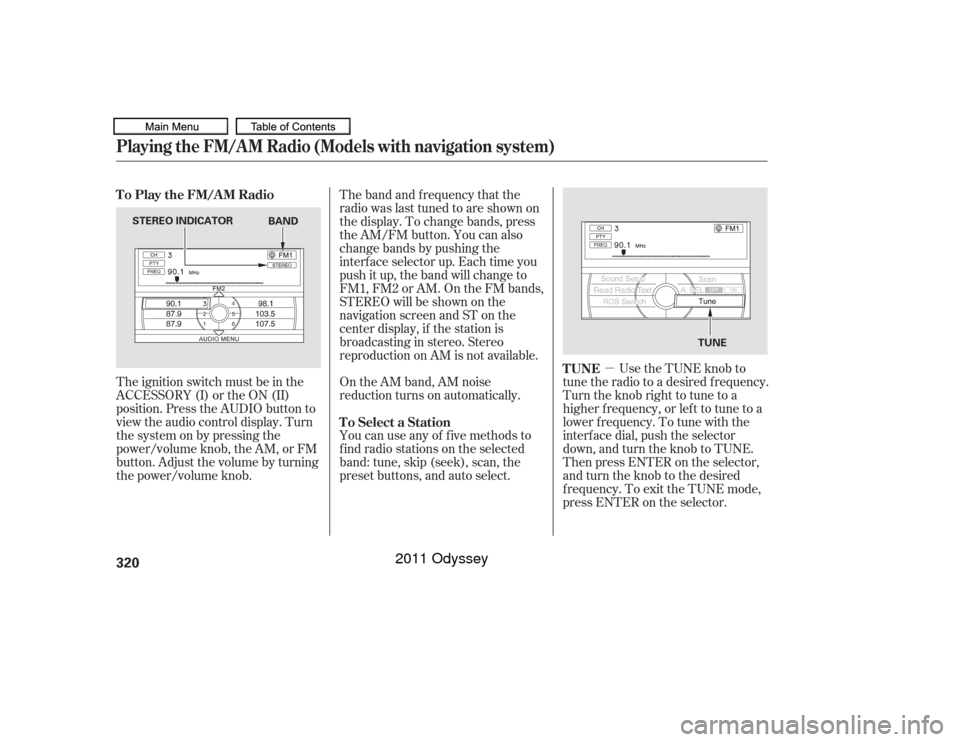
�µUse the TUNE knob to
tune the radio to a desired frequency.
Turn the knob right to tune to a
higher f requency, or lef t to tune to a
lower f requency. To tune with the
interf ace dial, push the selector
down, and turn the knob to TUNE.
Then press ENTER on the selector,
andturntheknobtothedesired
f requency. To exit the TUNE mode,
press ENTER on the selector.
The ignition switch must be in the
ACCESSORY (I) or the ON (II)
position. Press the AUDIO button to
view the audio control display. Turn
the system on by pressing the
power/volume knob, the AM, or FM
button. Adjust the volume by turning
the power/volume knob.
On the AM band, AM noise
reduction turns on automatically.
You can use any of f ive methods to
f ind radio stations on the selected
band: tune, skip (seek), scan, the
preset buttons, and auto select. The band and f requency that the
radio was last tuned to are shown on
the display. To change bands, press
the AM/FM button. You can also
change bands by pushing the
interf ace selector up. Each time you
push it up, the band will change to
FM1, FM2 or AM. On the FM bands,
STEREO will be shown on the
navigation screen and ST on the
center display, if the station is
broadcasting in stereo. Stereo
reproduction on AM is not available.
TUNE
To Play the FM/AM Radio
To Select a Station
Playing the FM/A M Radio (Models with navigation system)320
STEREO INDICATOR TUNE
BAND
10/07/17 10:16:53 31TK8600_325
2011 Odyssey
Page 334 of 722
Features
331
10/07/17 10:18:00 31TK8600_334
�µDolby
PL (ProLogic) II signal processing
creates multi-channel surround
sound f rom 2 channel stereo audio
sources. Dolby ProLogic II can only
be activated when listening to DISC
(CD-DA, MP3/WMA), XM Radio,
andAUX.WhenProLogicIIisactive,
‘‘PL II’’ is shown in the audio display.
To set this f eature on or of f , select
Dolby PL II, and press ENTER on
the interf ace selector. Rotate the
interf ace dial to ON or OFF, and
press ENTER.
Manuf actured under license f rom
Dolby Laboratories. Dolby, Pro
Logic, a n d the double
trademarks of Dolby Dolby PL (ProL ogic) II
-D symbol are
Laboratories. The SVC mode controls the volume
based on vehicle speed. The f aster
you go, the louder the audio volume
becomes. As you slow down, the
audio volume decreases.
The SVC has f our modes: SVC OFF,
SVC LOW, SVC MID, and SVC
HIGH. To change the SVC mode,
select SVC, then press ENTER on
the interf ace selector. The current
setting is shown on the screen. Turn
the interface knob to the desired
level, and enter your selection by
pressing ENTER on the interf ace
selector. If you f eel the sound is too
loud, choose low. If you f eel the
sound is too quiet, choose high.
Speed-sensit ive Volume
Compensat ion (SVC)
In some audio playing modes
(XM,AUX),whenDPLIIison,the
music coming f rom the rear
speakers may sound distorted. This
is due to compression of the music,
and it does not indicate a problem
with the setting. NOTE:
Playing the FM/A M Radio (Models with navigation system)
2011 Odyssey
Page 344 of 722
You cannot load and play 3-inch
(8-cm) discs in this system.Insert a disc about half way into the
disc slot. The drive will pull the disc
intherestof thewaytoplayit.You
operate the disc player with the
same controls used f or the radio.
The number of the current track is
showninthedisplay.Whenplayinga
disc in MP3, WMA or AAC, the
numbers of the current f older and
f ile are shown. The system will
continuously play a disc until you
change modes. For inf ormation on how to handle
and protect compact discs, see
page .
352
To Load a Disc
Playing a Disc (Models with navigation system)
Features
341
Do not use discs with adhesive labels.
The label can curl up and cause the
disc to jam in the unit.
10/07/17 10:19:33 31TK8600_346
2011 Odyssey
Page 349 of 722
The CD player can play CD-Rs and
CD-RWs compressed in MP3, WMA
or AAC f ormats. When playing a disc
in MP3, WMA or AAC, you will see
‘‘MP3,’’ ‘‘WMA’’ or ‘‘AAC’’ on the
center display and screen (if
selected). A disc can support more
than 99 folders, and each folder can
hold up to 255 playable f iles.To play an MP3/WMA/AAC disc,
use the disc controls previously
described, along with the f ollowing
inf ormation. Combining a low sampling f requency
with a low bitrate may result in
extremely degraded sound quality.
Depending on the sof tware the f iles
were made with, it may not be
possible to play some f iles, or display
some text data. Each time you press either side of
the bar, the folder title and its first
f ile’s inf ormation appear on the
center display. On the navigation
display, each time you press either
side of the bar, the system skips to
the previous or next f older on the
disc and displays a list of the
selected f older’s contents.
Playing an MP3/WMA /A A C Disc
Changing the FoldersPlaying a Disc (Models with navigation system)346
NOTE:
10/07/17 10:20:09 31TK8600_351
2011 Odyssey