Page 205 of 722
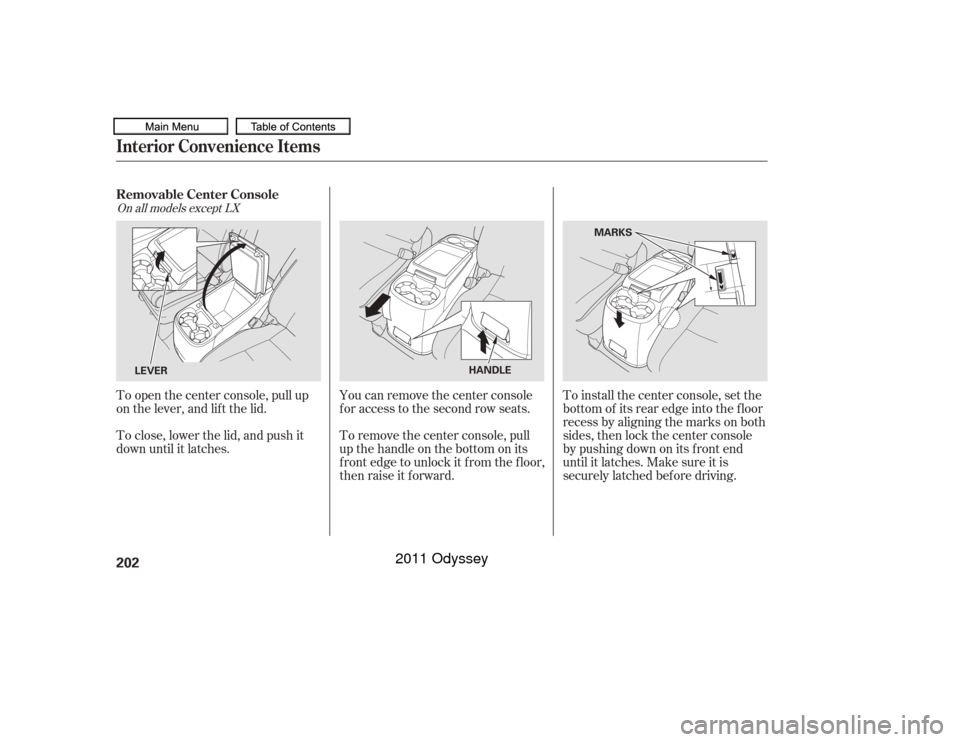
To remove the center console, pull
up the handle on the bottom on its
f ront edge to unlock it f rom the f loor,
then raise it f orward.
To close, lower the lid, and push it
down until it latches. To open the center console, pull up
on the lever, and lif t the lid.
You can remove the center console
f or access to the second row seats.To install the center console, set the
bottom of its rear edge into the floor
recess by aligning the marks on both
sides, then lock the center console
bypushingdownonitsfrontend
until it latches. Make sure it is
securely latched bef ore driving.
On all models except LXRemovable Center ConsoleInterior Convenience Items202
LEVER
HANDLEMARKS
10/07/17 10:01:14 31TK8600_207
2011 Odyssey
Page 211 of 722
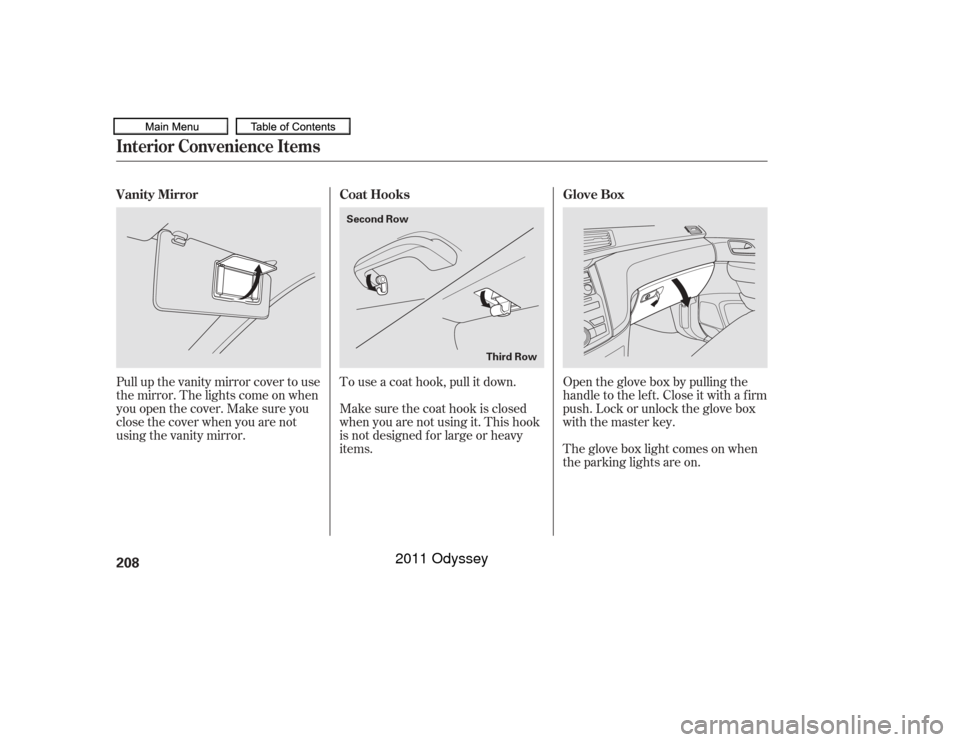
Open the glove box by pulling the
handle to the lef t. Close it with a f irm
push. Lock or unlock the glove box
with the master key.
The glove box light comes on when
the parking lights are on.
To use a coat hook, pull it down.
Make sure the coat hook is closed
when you are not using it. This hook
is not designed f or large or heavy
items.
Pull up the vanity mirror cover to use
the mirror. The lights come on when
you open the cover. Make sure you
close the cover when you are not
using the vanity mirror.
Interior Convenience Items
Glove Box
Coat Hooks
Vanity Mirror
208
Second Row
Third Row
10/07/17 10:02:01 31TK8600_213
2011 Odyssey
Page 213 of 722
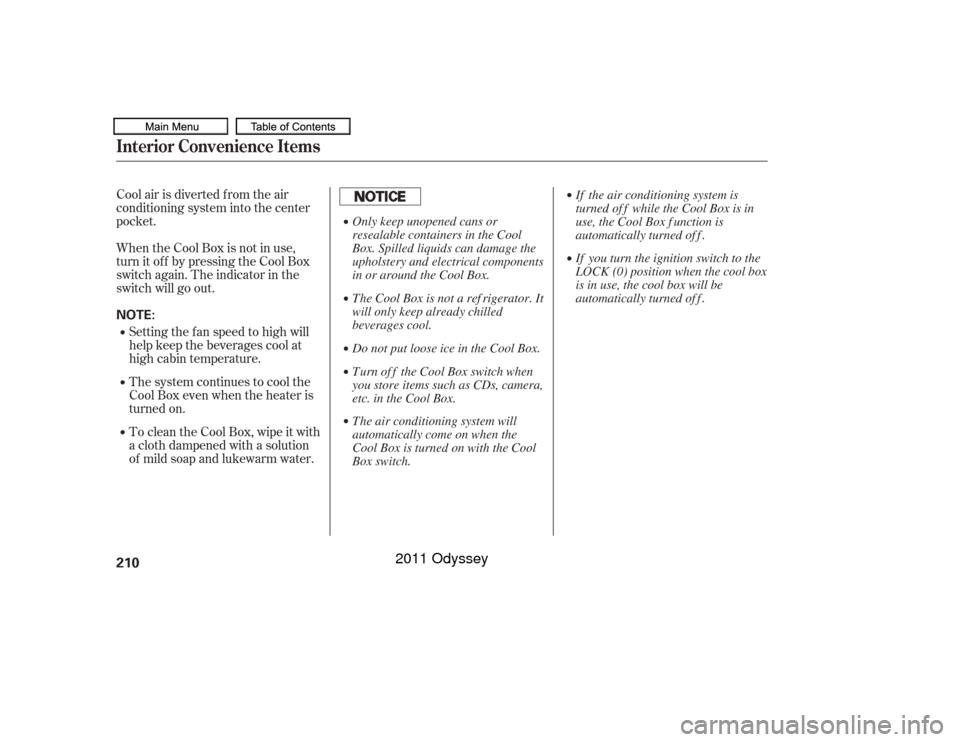
Cool air is diverted from the air
conditioning system into the center
pocket.
When the Cool Box is not in use,
turn it of f by pressing the Cool Box
switch again. The indicator in the
switch will go out.Setting the fan speed to high will
help keep the beverages cool at
high cabin temperature.
The system continues to cool the
Cool Box even when the heater is
turned on.
To clean the Cool Box, wipe it with
a cloth dampened with a solution
of mild soap and lukewarm water.Interior Convenience Items210NOTE: Only keep unopened cans or
resealable containers in the Cool
Box. Spilled liquids can damage the
upholstery and electrical components
in or around the Cool Box.
The Cool Box is not a ref rigerator. It
will only keep already chilled
beverages cool.
Do not put loose ice in the Cool Box.
Turn of f the Cool Box switch when
you store items such as CDs, camera,
etc. in the Cool Box.
The air conditioning system will
automatically come on when the
Cool Box is turned on with the Cool
Box switch.If the air conditioning system is
turned of f while the Cool Box is in
use, the Cool Box f unction is
automatically turned of f .
If you turn the ignition switch to the
LOCK (0) position when the cool box
is in use, the cool box will be
automatically turned of f .
10/07/17 10:02:17 31TK8600_215
2011 Odyssey
Page 215 of 722

The AC power outlet is not
designed f or electric appliances
which require high initial peak
wattage such as cathode-ray tube
type televisions, ref rigerators,
electric pumps, etc. It is also not
suitable f or devices that process
precise data such as medical
equipment or measuring instruments.
Any appliances that require an
extremely stable power supply such
as microcomputer-controlled electric
blankets, touch sensor lamps, etc.,
should not be connected to this
outlet.
The maximum capacity f or this
power outlet is 115 volt AC at 150
watts or less. If you use an appliance
which requires more than 150 watts,
it automatically stops supplying the
power. If this happens, turn the
ignition switch of f and turn it on
again.
Always run the engine when you use
the AC power outlet. There is a 115 volt AC power outlet
above the third seat armrest on the
driver’s side. To use the AC power
outlet, open the outlet cover. Insert
the plug into the receptacle slightly,
turn it 90° clockwise, then push in
the plug all the way.
If equippedAC Power OutletInterior Convenience Items212
NOTE:
10/07/17 10:02:31 31TK8600_217
2011 Odyssey
Page 216 of 722
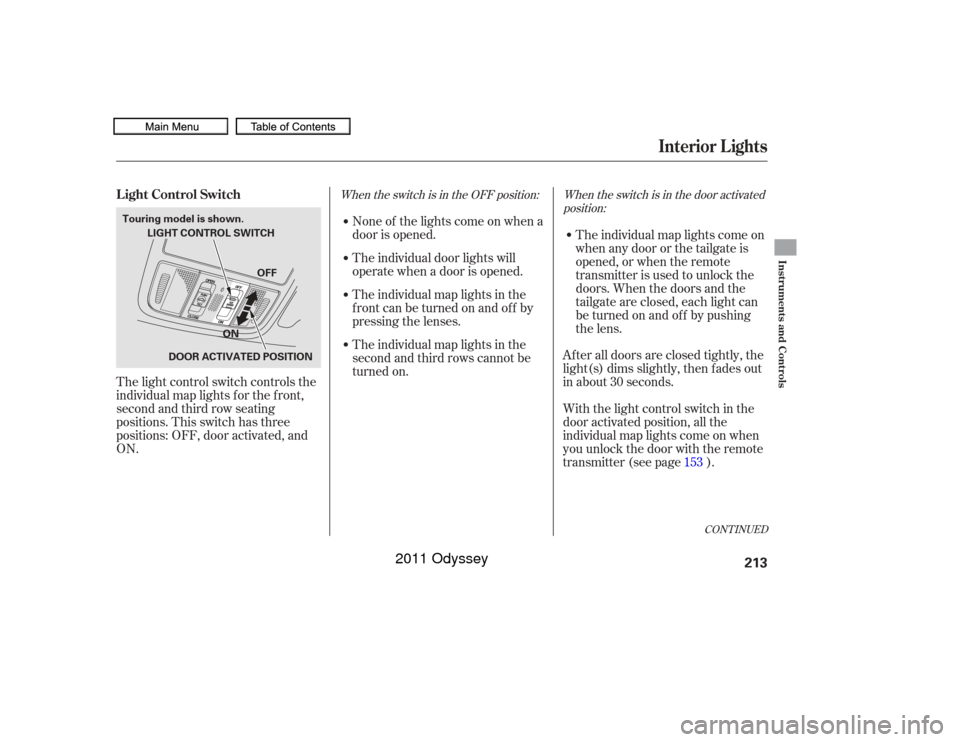
When the switch is in the OFF position: When the switch is in the door activatedposition:
None of the lights come on when a
door is opened.
The light control switch controls the
individual map lights f or the f ront,
second and third row seating
positions. This switch has three
positions: OFF, door activated, and
ON. The individual door lights will
operate when a door is opened.
The individual map lights in the
frontcanbeturnedonandoff by
pressing the lenses.
The individual map lights in the
second and third rows cannot be
turned on.
The individual map lights come on
when any door or the tailgate is
opened, or when the remote
transmitter is used to unlock the
doors. When the doors and the
tailgate are closed, each light can
be turned on and of f by pushing
the lens.
After all doors are closed tightly, the
light(s) dims slightly, then f ades out
in about 30 seconds.
With the light control switch in the
door activated position, all the
individual map lights come on when
you unlock the door with the remote
transmitter (see page ). 153
CONT INUED
L ight Control Switch
Interior Lights
Instruments and Controls
213
LIGHT CONTROL SWITCH
DOOR ACTIVATED POSITION
Touring model is shown.
OFF
ON
10/07/17 10:02:41 31TK8600_218
2011 Odyssey
Page 220 of 722

The heating and air conditioning
system in your vehicle provides a
comf ortable driving environment in
all weather conditions.
The standard audio system has
many f eatures. This section
describes those f eatures and how to
use them.
Your vehicle has an anti-theft audio
system that requires a code number
to enable it.
The security system helps to
discourage vandalism and thef t of
your vehicle.
Theclimatecontrolsystemandthe
audio system have a voice control
feature. Refer to the navigation
system manual f or more inf ormation..............
Vents, Heating, and A/C . 218
...................
Rear A/C Controls . 224
...............
Climate Control System . 225
................................
Audio System .234 ..........
Playing the FM/AM Radio . 236
................................
Playing a Disc .243
.......
Disc Player Error Messages . 250
................................
Audio System .251
..........
Playing the FM/AM Radio . 252
................
Playing the XM
Radio . 260
................................
Playing a Disc .266
.......
Disc Player Error Messages . 275
...........
Playing CD Library Audio . 276
............................
PlayinganiPod
. 286
.................
iPod
Error Messages . 294
.. 295
USB Flash Memory Device Error ...................................
Messages .303
.............
Audio System . 304
............................
Wallpaper Setup .309
.................................
Display Setup .312
..........................
Setting the Clock .315
...................
Setting the Language . 317
................................
Audio System .318
..........
Playing the FM/AM Radio . 319
................
Playing the XM
Radio . 332 ................................
Playing a Disc .339
.......
Disc Player Error Messages . 351
..................
Protecting Your Discs . 352
..... 355
............................
PlayinganiPod
. 383
.................
iPod
Error Messages . 391
.. 392
.. 403
.............
Audio System . 404
............
FM/AM Radio Reception . 409
................
Remote Audio Controls . 411
......................
Auxiliary Input Jack .412
.................
Radio Thef t Protection . 413
........
Rear Entertainment System . 414
Ultrawide Rear Entertainment ........................................
System .442
.........................................
Compass .475
............................
Security System .479
...............................
Cruise Control .480
...... 483
................
Parking Sensor System . 486
....
Reaview Camera and Monitor . 493HandsFreeLink
.....495
HandsFreeLink
....516
LX model
EX, EX-L models without navigation system
BluetoothModels with navigation system Bluetooth
BluetoothBluetooth
On vehicles with navigation systemPlaying a USB Flash Memory Device
Playing a USB Flash Memory Device
HomeLink
Universal Transceiver
(Models with navigation system)
Playing Hard Disc Drive (HDD) Audio
(Models without navigation system)USB Flash Memory Device Error Messages
Features
Features
217
10/07/17 10:03:06 31TK8600_222
2011 Odyssey
Page 222 of 722
When the indicator in the button is
on, air f rom the vehicle’s interior is
sent throughout the system again.
When the indicator is off, air is
brought in f rom the outside of the
vehicle (fresh air mode).
Thesystemshouldbeleftinfresh
air mode under almost all conditions.
Keeping the system in recirculation
mode, particularly with the A/C of f ,
can cause the windows to fog up.
Switch to recirculation mode when
driving through dusty or smoky
conditions, then return to fresh air
mode. The outside air intakes f or the
heating and cooling system are at
the base of the windshield. Keep this
area clear of leaves and other debris.
Turn the dial clockwise to increase
the fan speed and airflow. Turn the
dial counterclockwise to decrease
them.
Turning this dial clockwise increases
the temperature of the airflow.
This button turns the air
conditioning on and of f . The
indicatorinthebuttonisonwhen
the A/C is on.
Vents, Heating, and A/C
Fan Control
Air Conditioning (A/C) Button Recirculation Button
T emperature Control
Features
219
10/07/17 10:03:19 31TK8600_224
2011 Odyssey
Page 228 of 722
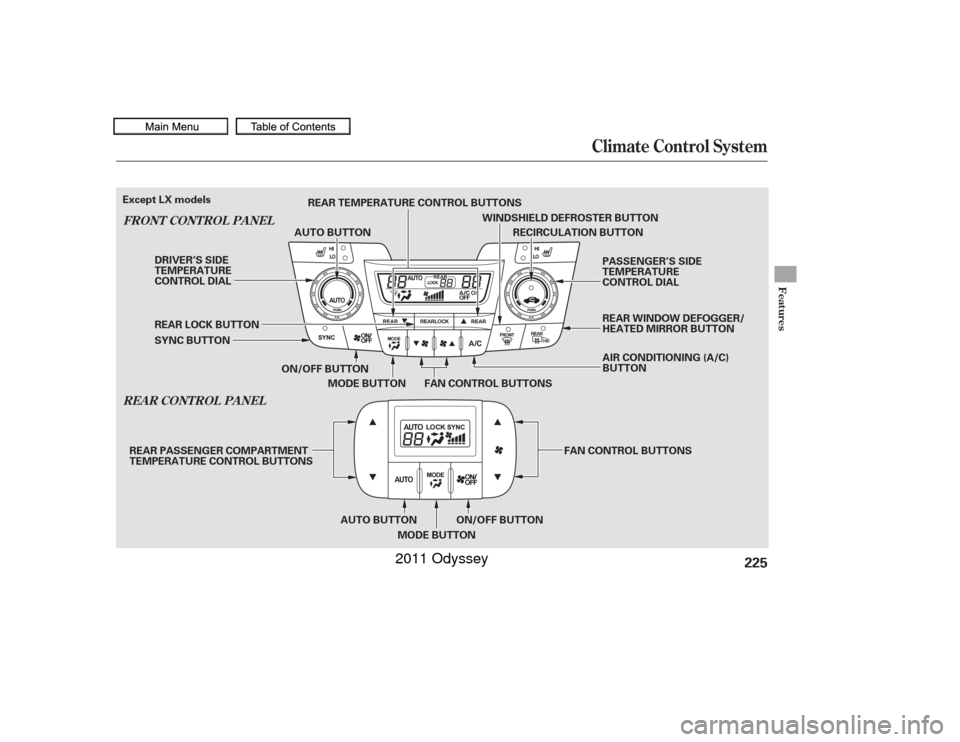
Climate Control System
REA R CONT ROL PA NEL
FRONT CONT ROL PA NEL
Features
225
RECIRCULATION BUTTON
ON/OFF BUTTON FAN CONTROL BUTTONS
MODE BUTTON
SYNC BUTTON REAR LOCK BUTTON AUTO BUTTON
WINDSHIELD DEFROSTER BUTTON
DRIVER’S SIDE
TEMPERATURE
CONTROL DIAL PASSENGER’S SIDE
TEMPERATURE
CONTROL DIAL
AIR CONDITIONING (A/C)
BUTTON
ON/OFF BUTTON
AUTO BUTTON
MODE BUTTON FAN CONTROL BUTTONS
REAR TEMPERATURE CONTROL BUTTONS
REAR PASSENGER COMPARTMENT
TEMPERATURE CONTROL BUTTONS
Except LX models
REAR WINDOW DEFOGGER/
HEATED MIRROR BUTTON
10/07/17 10:04:23 31TK8600_230
2011 Odyssey