Page 191 of 400

�µ�µ �µ
�µ �µ
�µ
�µ
�Û �Ý
Each time you press and
release (preset 6 button), the
player skips f orward to the
beginning of the next f ile. Press and
release (preset 5 button), to
skip backward to the beginning of
the current f ile. Press it again to skip
to the beginning of the previous file.
To move rapidly within
a f ile, press and hold (preset 4
button) or (preset 3 button). To continuously replay
a f ile, press and release the RPT
button (preset 1). You will see
TRACK REPEAT in the display.
Press the RPT button again to turn it
off.
This f eature, when
activated, replays all the files in the
selected f older/artist/album in the
order they are recorded or listed. To
activate each repeat mode, press and
hold the RPT button (preset 1) f or 2
seconds. You will see FOLDER
REPEAT, ARTIST REPEAT or
ALBUM REPEAT in the display.
The system continuously replays the
current f older/artist/album. Press
andholdtheRPTbuttonfor2
seconds again to turn it of f . Pressing
the RDM button, or selecting a
dif f erent f older/artist/album with
the TUNE bar also turns off the
repeat feature. This feature
plays the f iles within a f older in
random order. To activate track
random, press and release the RDM
button (preset 2). You will see
TRACK RANDOM in the display.
Press and hold the RDM button for 2
seconds to return to normal play.
This f eature, when
activated, plays all files in each
f older/artist/album in random order,
rather than in the order they are
recorded or listed. To activate each
random play, press the RDM button
(preset 2) 2 times. You will see
FOLDER RANDOM, ARTIST
RANDOM or ALBUM RANDOM in
the display.
To
select a dif f erent f older, press either
side of the TUNE bar to move to the
beginning of the next f older. Press
the side of the TUNE bar to skip
to the next folder, and the side to
move to the beginning of the
previous f older.
CONT INUED
SK IP
FF/REW T RA CK REPEA T (FIL E
REPEAT)
FOLDER/ARTIST/ALBUM
REPEATTRACK RANDOM (Random
within a f older)
FOLDER/ARTIST/ALBUM
RANDOM
FOLDER SELECTION
Playing a PC Card (Models with navigation system)
Features
187
Main Menu
Page 192 of 400

�µ�µ
The system then selects and plays
f iles randomly. This continues until
you deactivate each random play by
pressing the RDM button again, or
you select a dif f erent f older/artist/
album with the TUNE bar.
Pressing either of the SKIP buttons
(preset 5 button or 6 button) also
turns off the scan feature. The scan f unction samples
all f iles on the PC card in the order
they are recorded. To activate scan,
press and release the SCAN button.
You will see TRACK SCAN in the
display. You will get a 10 second
sampling of each f ile on the PC card.
Press and hold the SCAN button for
2 seconds to get out of scan mode
and play the last f ile sampled. This f eature, when
activated, samples the first file in
each f older/artist/album on the PC
card in order. To activate each scan
f eature, press and hold the SCAN
button until you hear a beep. You will
see FOLDER SCAN, ARTIST SCAN
or ALBUM SCAN in the display.
The system plays the f irst f ile in the
f older f or about 10 seconds. If you do
nothing, the system plays the first
f ile in each f older, in order, f or 10
seconds each. Af ter playing the f irst
f ile of the last f older/artist/album,
the system returns to normal play.
Pressing either of the SKIP buttons
(preset 5 button or 6 button),
selecting a dif f erent f older/artist/
album with the TUNE bar, or
pressing the SCAN button, also turns
off the scan feature. You can also select a f ile directly
from the folder and track lists on the
audio display. Press the AUDIO
button to show the audio display,
then touch the Track List icon. The
f older list menu appears on the
display.
SCAN
FOLDER/ARTIST/ALBUM
SCAN
Using a T rack L ist
Playing a PC Card (Models with navigation system)
188
TRACK LIST ICON
U.S. model is shown.
Main Menu
Page 193 of 400
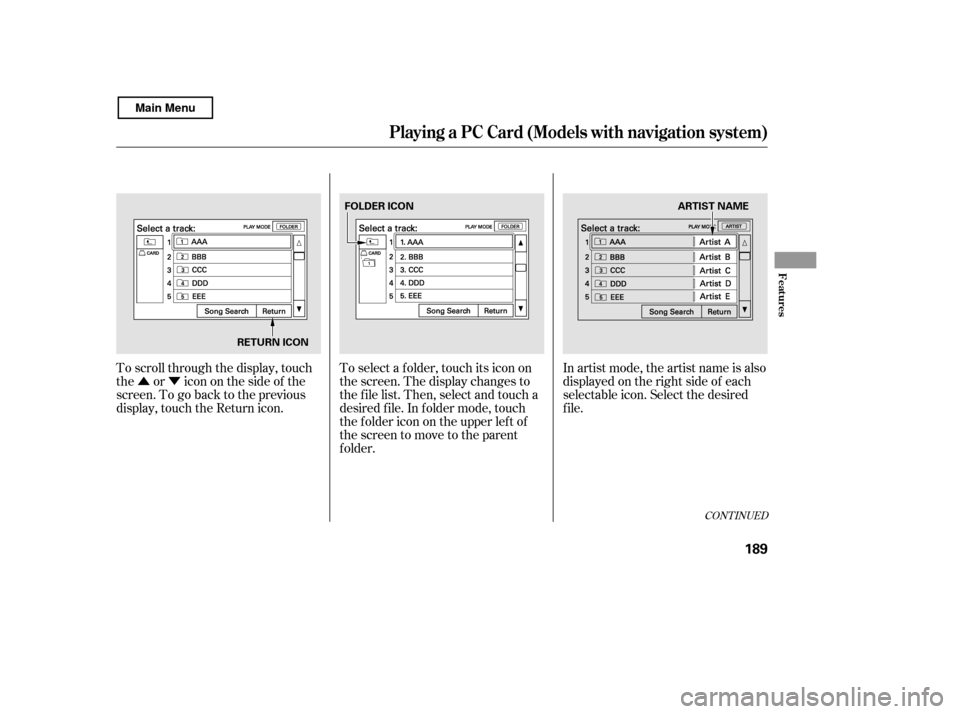
�Û�ÝIn artist mode, the artist name is also
displayed on the right side of each
selectable icon. Select the desired
f ile.
To scroll through the display, touch
the or icononthesideof the
screen.Togobacktotheprevious
display, touch the Return icon. To select a f older, touch its icon on
the screen. The display changes to
the f ile list. Then, select and touch a
desired f ile. In f older mode, touch
the f older icon on the upper lef t of
the screen to move to the parent
f older.
CONT INUED
Playing a PC Card (Models with navigation system)
Features
189
RETURN ICONFOLDER ICON
ARTIST NAME
Main Menu
Page 194 of 400
To select a desired icon with the
joystick, move it in the appropriate
direction, then press ENT.
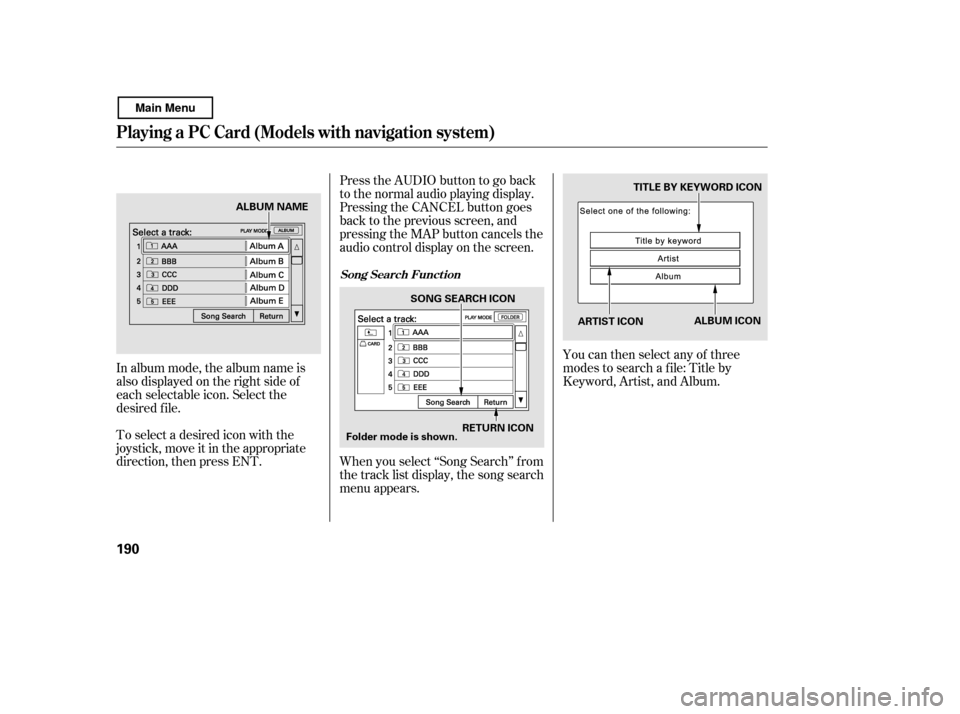
In album mode, the album name is
also displayed on the right side of
each selectable icon. Select the
desired f ile.
You can then select any of three
modes to search a f ile: Title by
Keyword, Artist, and Album.
PresstheAUDIObuttontogoback
to the normal audio playing display.
Pressing the CANCEL button goes
back to the previous screen, and
pressing the MAP button cancels the
audio control display on the screen.
When you select ‘‘Song Search’’ f rom
the track list display, the song search
menu appears.
Song Search Funct ion
Playing a PC Card (Models with navigation system)
190
ARTIST ICON
TITLE BY KEYWORD ICON
RETURN ICON
SONG SEARCH ICON
ALBUM ICON
Folder mode is shown.
ALBUM NAME
Main Menu
Page 195 of 400
�Û�Ý
Searching f or a Song Title by KeywordSearching f or a Song by Artist Name
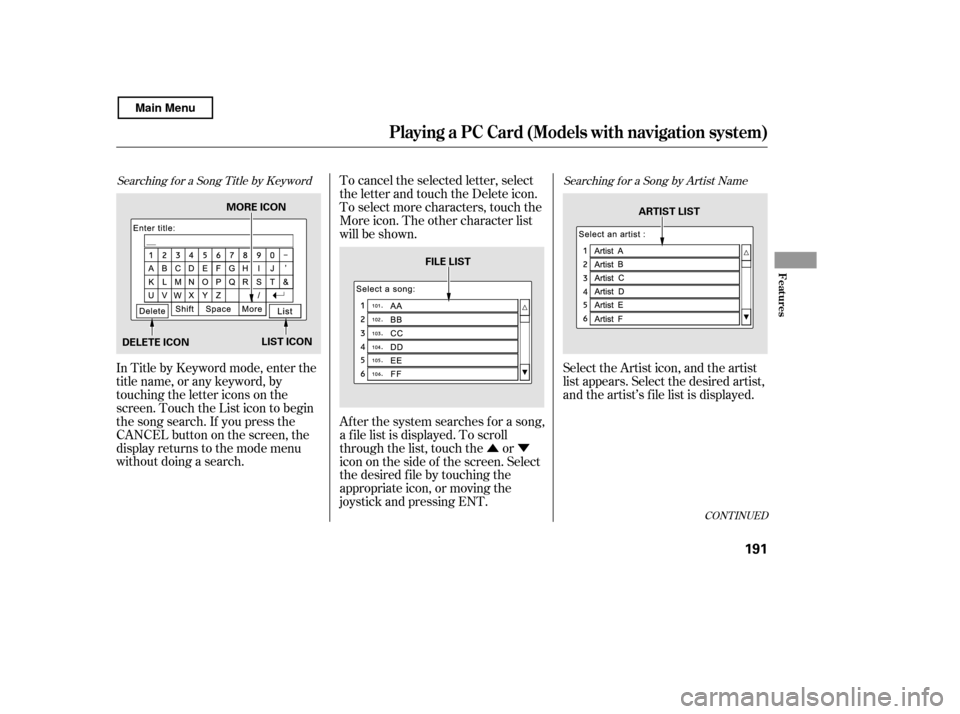
In Title by Keyword mode, enter the
title name, or any keyword, by
touching the letter icons on the
screen. Touch the List icon to begin
the song search. If you press the
CANCELbuttononthescreen,the
display returns to the mode menu
without doing a search.To cancel the selected letter, select
the letter and touch the Delete icon.
To select more characters, touch the
More icon. The other character list
will be shown.
Af ter the system searches f or a song,
a f ile list is displayed. To scroll
through the list, touch the or
icon on the side of the screen. Select
the desired f ile by touching the
appropriate icon, or moving the
joystick and pressing ENT.
Select the Artist icon, and the artist
list appears. Select the desired artist,
and the artist’s f ile list is displayed.
CONT INUED
Playing a PC Card (Models with navigation system)
Features
191
MORE ICON
DELETE ICON LIST ICON FILE LIST
ARTIST LIST
Main Menu
Page 196 of 400
�Î
�Î
�Î
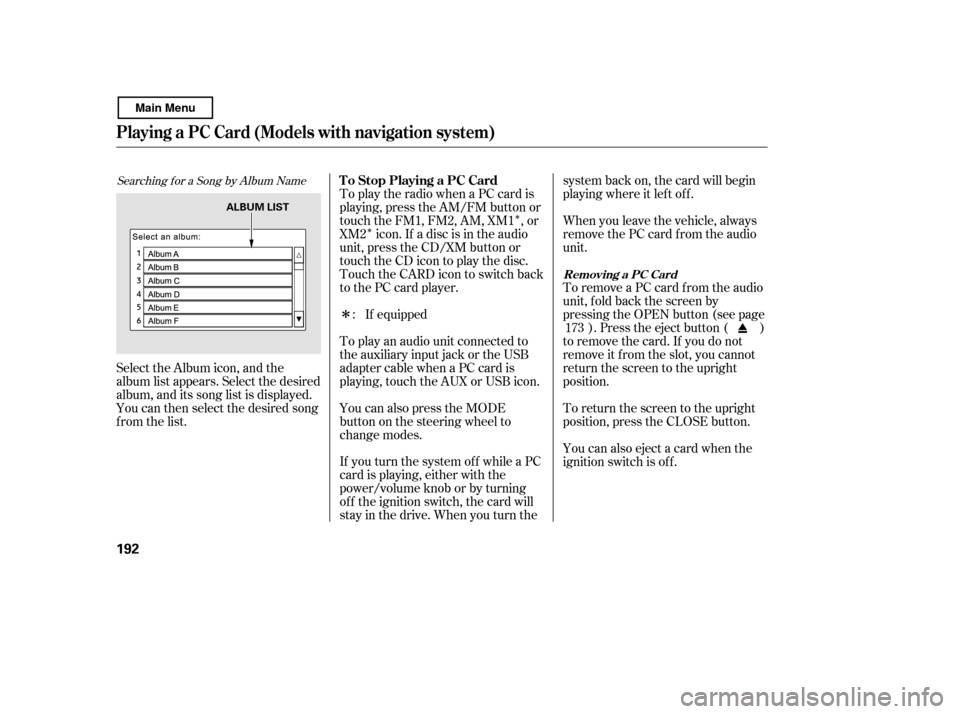
Searching f or a Song by Album Name
Select the Album icon, and the
album list appears. Select the desired
album, and its song list is displayed.
You can then select the desired song
from the list. If equipped
To play an audio unit connected to
the auxiliary input jack or the USB
adapter cable when a PC card is
playing, touch the AUX or USB icon.
To play the radio when a PC card is
playing, press the AM/FM button or
touch the FM1, FM2, AM, XM1 , or
XM2 icon. If a disc is in the audio
unit, press the CD/XM button or
touch the CD icon to play the disc.
Touch the CARD icon to switch back
to the PC card player.
If you turn the system of f while a PC
card is playing, either with the
power/volume knob or by turning
of f the ignition switch, the card will
stay in the drive. When you turn the system back on, the card will begin
playing where it lef t of f .
You can also press the MODE
buttononthesteeringwheelto
change modes. When you leave the vehicle, always
remove the PC card f rom the audio
unit.
To remove a PC card f rom the audio
unit, f old back the screen by
pressing the OPEN button (see page
). Press the eject button ( )
to remove the card. If you do not
remove it f rom the slot, you cannot
return the screen to the upright
position.
To return the screen to the upright
position, press the CLOSE button.
You can also eject a card when the
ignition switch is of f .
:
173
T o Stop Playing a PC Card
Removing a PC Card
Playing a PC Card (Models with navigation system)
192
ALBUM LIST
Main Menu
Page 198 of 400
�µ�´
Playing an iPod(Models with navigation system)
194
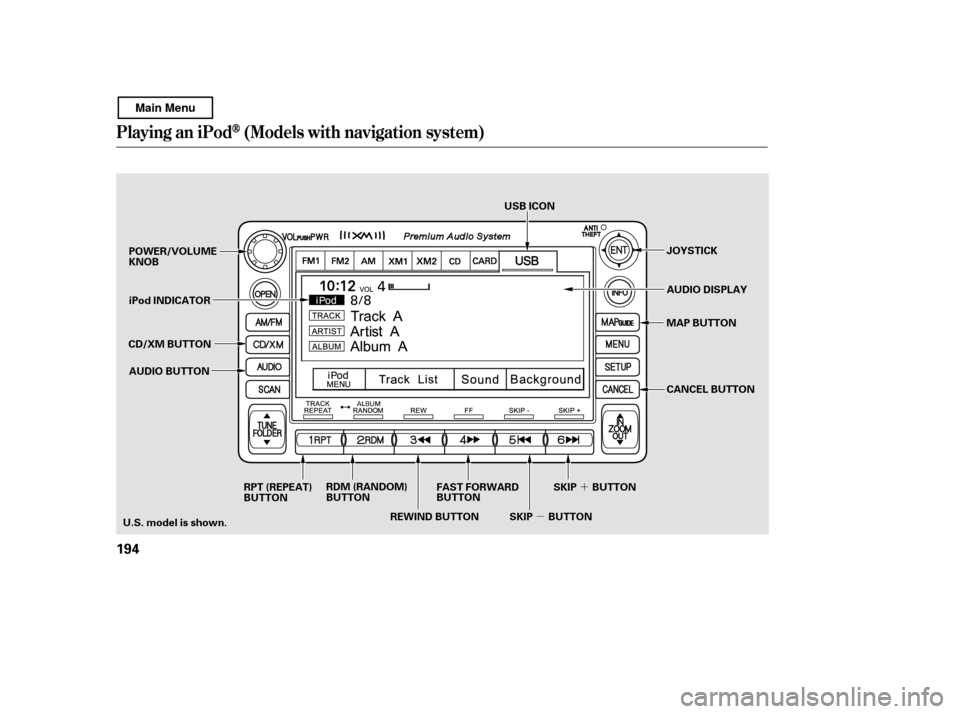
JOYSTICK
POWER/VOLUME KNOB
MAP BUTTON
iPod INDICATOR
REWIND BUTTON
AUDIO BUTTON USB ICON
AUDIO DISPLAY
RPT (REPEAT)
BUTTON RDM (RANDOM)
BUTTON
FAST FORWARD
BUTTON
SKIP BUTTONSKIP BUTTON CANCEL BUTTON
U.S. model is shown. CD/XM BUTTON
Main Menu
Page 199 of 400

iPods compatible with your audio
system using the USB adapter cable
are:
You can also select an icon by
moving the joystick. Move it to lef t,
right, up, or down to change the
highlighting and scroll through lists,
then press ENT on the top of the
joystick to set your selection. To select the USB mode without
using the icon, press the CD/XM
button repeatedly. The status bar
appears on the bottom of the screen.
The audio system reads and plays
playable sound f iles on the iPod. The
system cannot operate an iPod as a
mass storage device. The system will
only play songs stored on the iPod
with iTunes.
iPod and iTunes are registered
trademarks owned by Apple Inc.
You can select the AUX mode by
using the navigation system voice
control buttons, but cannot operate
theplaymodefunctions.
This audio system can select and
play the audio f iles on the iPod
with
the same controls used f or the in-
dash disc player. To play an iPod,
connect it to the USB adapter cable
in the console compartment by using
your dock connector. Press the
AUDIO button beside the screen to
show the audio display and touch the
USB icon. The ignition switch must
be in the ACCESSORY (I) or ON (II)
position. The iPod will also be
recharged with the ignition switch in
these positions.
CONT INUED
Model
iPod classic
(80/160 G)
iPod classic
(120 G)
iPod with video
(iPod 5th
generation)
iPod nano
iPod nano
2nd generation
iPod nano
3rd generation
iPod nano
4th generation
iPod nano
5th generation
iPod touch
iPod touch
2nd generation Sof tware
Ver. 1.1.2 or more
Ver. 2.0.1 or more
Ver. 1.3.0 or more
Ver. 1.3.1 or more
Ver. 1.1.3 or more
Ver. 1.1.3 or more
Ver. 1.0.3 or more
Ver. 1.0.1 or more
Ver. 1.1.5 or more
Ver. 2.2.1 or more
To Play an iPod
Voice Cont rol Syst em
Playing an iPod(Models with navigation system)
Features
195
Main Menu