Page 163 of 400
The audio system can also be
operated by voice control. See the
navigation system manual f or
complete details.
Voice Control System
Audio System (Models with navigation system)
Features
159
TUNE BAR AUTO SELECT ICON
BACKGROUND ICON
SOUND ICON
AM/FM
BUTTON
AUDIO
BUTTON
SCAN
BUTTON
PRESET BUTTONS
FM1 ICON
FM2 ICON
AM ICON
U.S. model
Main Menu
Page 164 of 400

�µ�Û�Ý
�Û
�Ý
The ignition switch must be in the
ACCESSORY (I) or ON (II) position.
Turn the system on by pushing the
power/volume knob or the AM/FM
button. Adjust the volume by turning
the power/volume knob.
Pushing the AUDIO button will also
turn on the system.
You can also operate the audio
system without using the control
icons on the audio screen. Use the
control buttons on the lef t side of the
screen. The status bar appears on
the bottom of the screen each time
you operate any of the control
buttons. On the navigation screen,
you can also see audio inf ormation
by touching the AUDIO INFO icon
on the lower half of the screen. The band and f requency that the
radio was last tuned to are displayed.
To change bands, press the AM/FM
button, or touch the desired band
icon (FM1, FM2, AM, XM1, or XM2).
On the FM band, STEREO will be
displayed if the station is
broadcasting in stereo. Stereo
reproduction on AM is not available.
You can use any of f ive methods to
f ind radio stations on the selected
band: tune, seek, scan, the preset
buttons, and auto select.
Use the TUNE bar to tune
the radio to a desired f requency.
Press the side of the bar to tune
to a higher f requency, and press the
side to tune to a lower
f requency.
Press and hold the or side of
the TUNE bar until you hear two
beeps to change the f requency
rapidly. Release the bar when the
display reaches the desired
f requency.
For inf ormation on XM Radio, see
page .
163
T o Play the A M/FM Radio
T o Select a Station
TUNE
Playing t he A M/FM Radio (Models wit h navigat ion syst em)
160
Main Menu
Page 167 of 400
Playing t he XMRadio (Models with navigation system)
Features
163
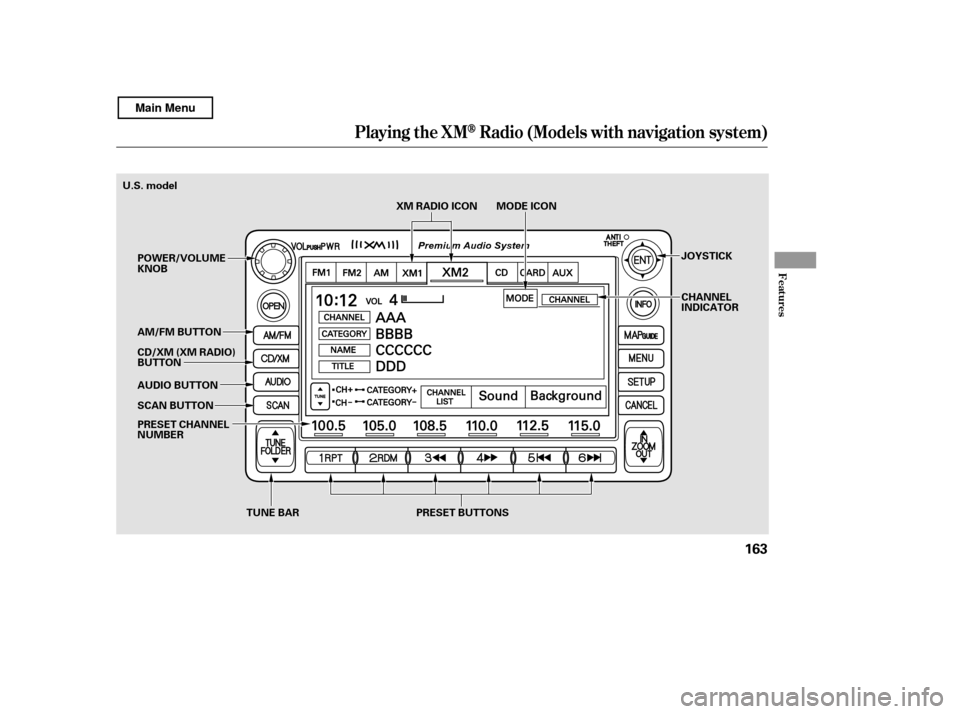
TUNE BAR PRESET BUTTONSXM RADIO ICON MODE ICON
PRESET CHANNEL
NUMBER
SCAN BUTTON
AUDIO BUTTON
AM/FM BUTTON
POWER/VOLUMEKNOB
CD/XM (XM RADIO)
BUTTON JOYSTICK
CHANNEL
INDICATOR
U.S. model
Main Menu
Page 168 of 400

�µ
XM is a registered trademark of
Sirius XM Radio
,Inc.
XM Radio receives signals f rom two
satellites to produce clear, high-
quality digital reception. It of f ers
many channels in several categories.
Along with a large selection of
dif f erent types of music, XM Radio
allows you to view channel and
category selections in the display.
Whenyoupressandholdthe
AUDIO button, the display also
shows all XM inf ormation. To switch between
channel mode and category mode,
touch the MODE icon. In channel
mode, you can select all of the
available channels. In category mode,
such as Jazz, Rock, Classical, etc.,
you can select all of the channels
within that category. Each time you
touch and release the MODE icon,
the display changes between the
channel mode and the category
mode.
To listen to XM Radio, turn the
ignition switch to the ACCESSORY
(I) or the ON (II) position. Press the
CD/XM button to select XM Radio.
Adjust the volume by turning the
power/volume knob. The last
channel you listened to will show in
the display.
Your audio system is capable of
receiving XM
Radio anywhere in
the United States, except Hawaii,
Alaska, and Puerto Rico.
You can also operate the radio using
the control buttons on the left side of
the screen. The status bar appears
on the bottom of the screen each
time you press any of the control
buttons. On the navigation screen,
you can also see the audio
inf ormation by touching the AUDIO
INFO icon on the lower part of the
screen.
You can also change to the XM
Radio while you are listening to an
FM station, AM station, disc, PC
card, etc., by touching the XM1 or
XM2iconontheaudiodisplay.
Operating the XM Radio MODE
Playing t he XMRadio (Models with navigation system)
164
Main Menu
Page 169 of 400
�µ
�µ
�µ
�µ
�Ý
�Û
Pick the preset button (icon) you
want f or that channel. Press and
hold the button (icon) until you
hear a beep.
In category mode, only channels
within that category can be selected.
In channel mode, all channels can be
selected.
Usethetune,seek,orscan
function to tune to a desired
channel.
Press the XM button. Either XM1
or XM2 will show in the display.
To store a channel: Youcanstoreupto12
preset channels using each preset
button or preset icons on the screen.
Each preset button or icon stores
one channel f rom the XM1 band and
one channel f rom the XM2 band.
Press the TUNE bar to
change channel selections. Press f or higher numbered channels
and f or lower numbered
channels. In the category mode, you
can only select channels within that
category.
Press and hold
either side of the TUNE bar
( or ) until you hear a beep
to select another category.
The scan f unction gives
you a sampling of all channels while
in the channel mode. In the category
mode, only the channels within that
category are scanned. To activate
scan, press the SCAN button or
touch the SCAN icon on the screen.
The system plays each channel in
numerical order f or a f ew seconds,
then selects the next channel. When
you hear a channel you want to listen
to, press the button or touch the icon
again.
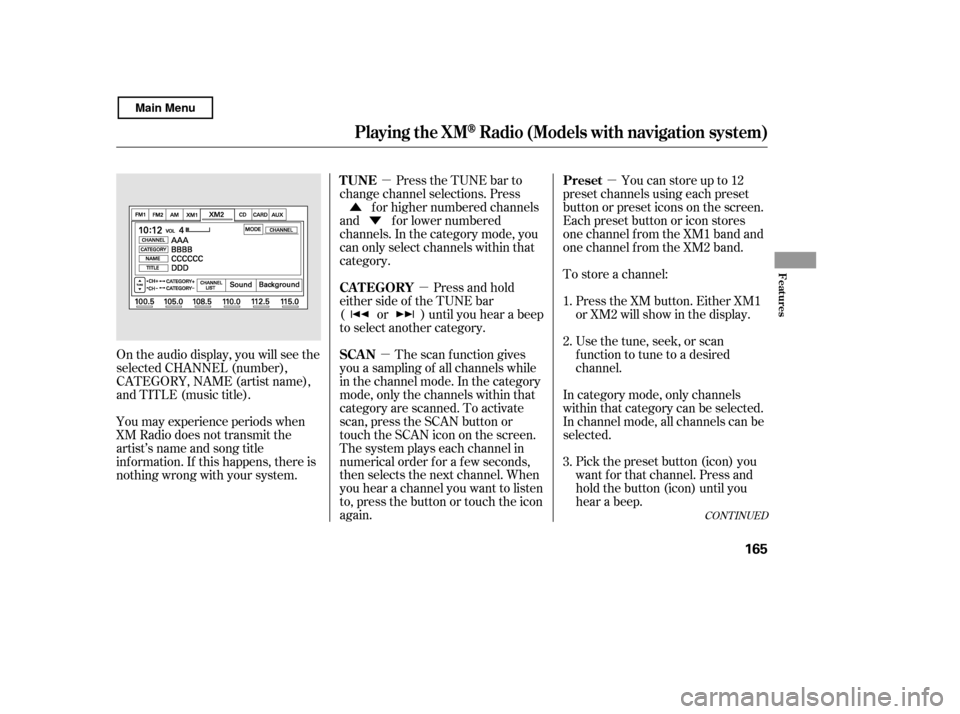
On the audio display, you will see the
selected CHANNEL (number),
CATEGORY, NAME (artist name),
and TITLE (music title).
You may experience periods when
XM Radio does not transmit the
artist’s name and song title
inf ormation. If this happens, there is
nothing wrong with your system. 1. 2. 3.
CONT INUED
Preset
TUNE
CAT EGORY
SCAN
Playing t he XMRadio (Models with navigation system)
Features
165
Main Menu
Page 170 of 400
�Û�Ý
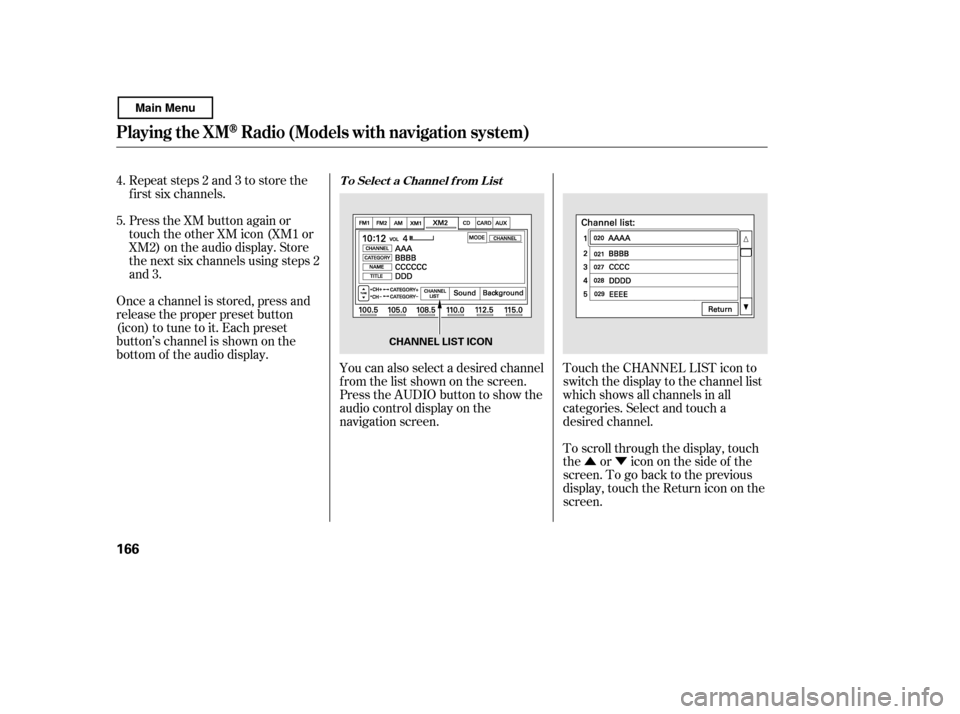
Touch the CHANNEL LIST icon to
switch the display to the channel list
which shows all channels in all
categories. Select and touch a
desired channel.
Repeat steps 2 and 3 to store the
f irst six channels.
Press the XM button again or
touch the other XM icon (XM1 or
XM2) on the audio display. Store
the next six channels using steps 2
and 3.
You can also select a desired channel
f rom the list shown on the screen.
Press the AUDIO button to show the
audio control display on the
navigation screen.
Once a channel is stored, press and
release the proper preset button
(icon) to tune to it. Each preset
button’s channel is shown on the
bottom of the audio display.
To scroll through the display, touch
the or icononthesideof the
screen.Togobacktotheprevious
display, touch the Return icon on the
screen.
4. 5.
Playing t he XMRadio (Models with navigation system)
T o Select a Channel f rom L ist
166
CHANNEL LIST ICON
Main Menu
Page 171 of 400
�µ
�µ
�µ
�µ
�µ �µ
�µ
CONT INUED
The signal is
currently too weak. Move the vehicle
to an area away from tall buildings,
and with an unobstructed view of the
southern horizon.
The selected channel
number does not exist or is not part
of your subscription.
To select a desired icon with the
joystick, move it in the appropriate
direction, then press ENT.
XM is loading the
audio or program inf ormation.
The channel
currently selected is no longer
broadcasting.
The encryption
code is being updated. Wait until the
encryption code is f ully updated.
Channels 0 and 1 should still work
normally. The selected
channel has no artist or title
inf ormation at this time.
There is a problem
with the XM antenna. Please consult
your dealer.
‘‘NO SIGNA L ’’
XM Radio Display Messages
‘‘----’’
‘‘L OA DING’’
‘‘OFF A IR’’
‘‘UPDA T ING’’
‘‘NO INFO’’
‘‘A NT ENNA ’’
Playing t he XMRadio (Models with navigation system)
Features
167
Main Menu
Page 172 of 400
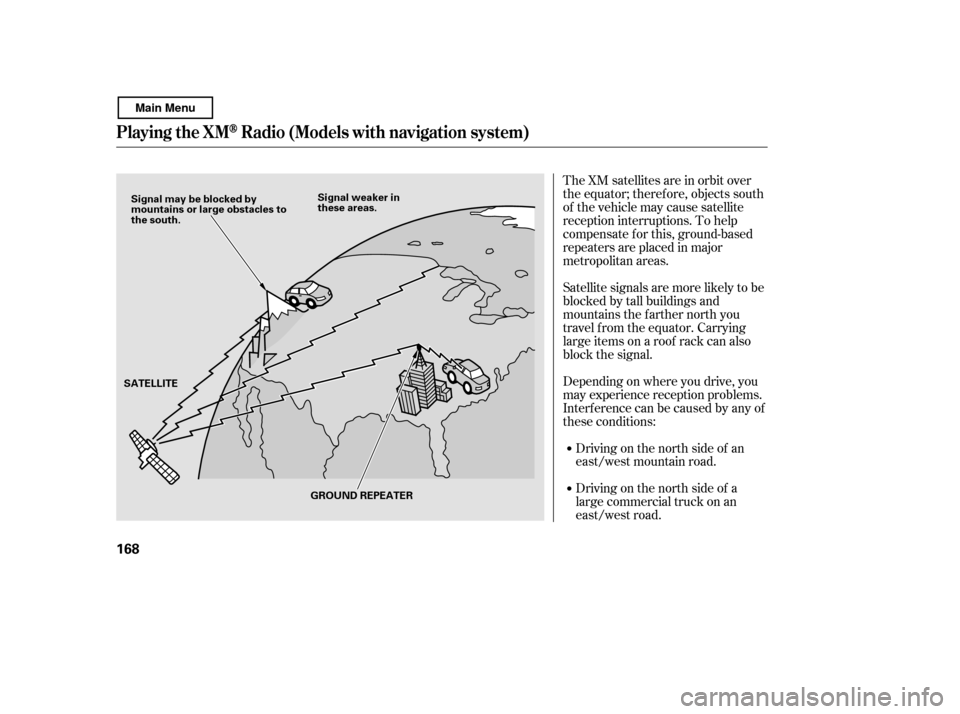
The XM satellites are in orbit over
the equator; therefore, objects south
of the vehicle may cause satellite
reception interruptions. To help
compensate f or this, ground-based
repeaters are placed in major
metropolitan areas.
Satellite signals are more likely to be
blocked by tall buildings and
mountains the f arther north you
travel f rom the equator. Carrying
large items on a roof rack can also
block the signal.
Depending on where you drive, you
may experience reception problems.
Interf erence can be caused by any of
these conditions:Driving on the north side of an
east/west mountain road.
Driving on the north side of a
large commercial truck on an
east/west road.
Playing t he XMRadio (Models with navigation system)
168
Signal may be blocked by
mountains or large obstacles to
the south. Signal weaker in
these areas.
SATELLITE GROUND REPEATER
Main Menu