Page 7 of 400
�Î
�Î�Î
�Î�Î
�Î
�Î
�Î �Î
If equipped
:
Your Vehicle at a Glance
Your Vehicle at a Glance
3
(P.9, 23)
DRIVER’S FRONT AIRBAG
MIRROR CONTROLS MOONROOF SWITCH
A/T model without navigation system is shown. (P.106)
HAZARD WARNING BUTTON
AUDIO SYSTEM
HEATING/COOLING
CONTROLS
(P.118)(P.123)
POWER DOOR LOCK
MASTER SWITCH
(P.108)
(P.83)
AUTOMATIC TRANSMISSION
(P.274)
MANUAL TRANSMISSION
(P.271)
FUEL FILL DOOR/
TRUNK RELEASE
HANDLE
(P.144, 153, 196, 207)
USB ADAPTER CABLE
(P.57, 58)
INSTRUMENT PANEL INDICATORS
GAUGES
(P.67)
POWER WINDOW
SWITCHES
(P.104)
HOOD RELEASE
HANDLE
(P.254)
(P.253, 93) SEAT HEATER
SWITCHES
(P.103) ACCESSORY POWER
SOCKETSCLOCK
PASSENGER’S
FRONT AIRBAG
(P.9, 23)
(P.77)
(P.112) (P.222)
Main Menu
Page 85 of 400

�µ
�µ
�µ
�µ If the f ront wheels are turned, the
anti-thef t lock may make it dif f icult
to turn the key. Firmly turn the
steering wheel to the lef t or right as
you turn the key.
You can
operate the audio system and the
accessory power sockets in this
position.
This is the normal key
position when driving. Several of the
indicators on the instrument panel
come on as a test when you turn the
ignition switch f rom the
ACCESSORY (I) to the ON (II)
position.
Use this position
only to start the engine. The switch
returns to the ON (II) position when
you let go of the key.
You can insert or
remove the key only in this position.
To turn the key, push it in slightly. If
your vehicle has an automatic
transmission, the shif t lever must
also be in park.
The ignition switch has f our
positions: LOCK (0), ACCESSORY
(I), ON (II), and START (III).
As required by the FCC:
This device complies with Part 15 of theFCC rules. Operation is subject to the
f ollowing two conditions: (1) This devicemay not cause harmf ul interf erence, and (2) this device must accept any
interf erence received, includinginterf erence that may cause undesiredoperation.
Changes or modif ications not expresslyapproved by the party responsible f or
compliance could void the user’sauthority to operate the equipment.
This device complies with IndustryCanada Standard RSS-210.Operation is subject to the f ollowing two
conditions: (1) this device may not causeinterf erence, and (2) this device mustaccept any interf erence that may cause
undesired operation of the device.
CONT INUED
A CCESSORY (I)
ON (II)
ST A RT (III)
LOCK (0)
Ignition Switch
Immobilizer Syst em, Ignit ion Switch
Inst rument s and Cont rols
81
Main Menu
Page 86 of 400
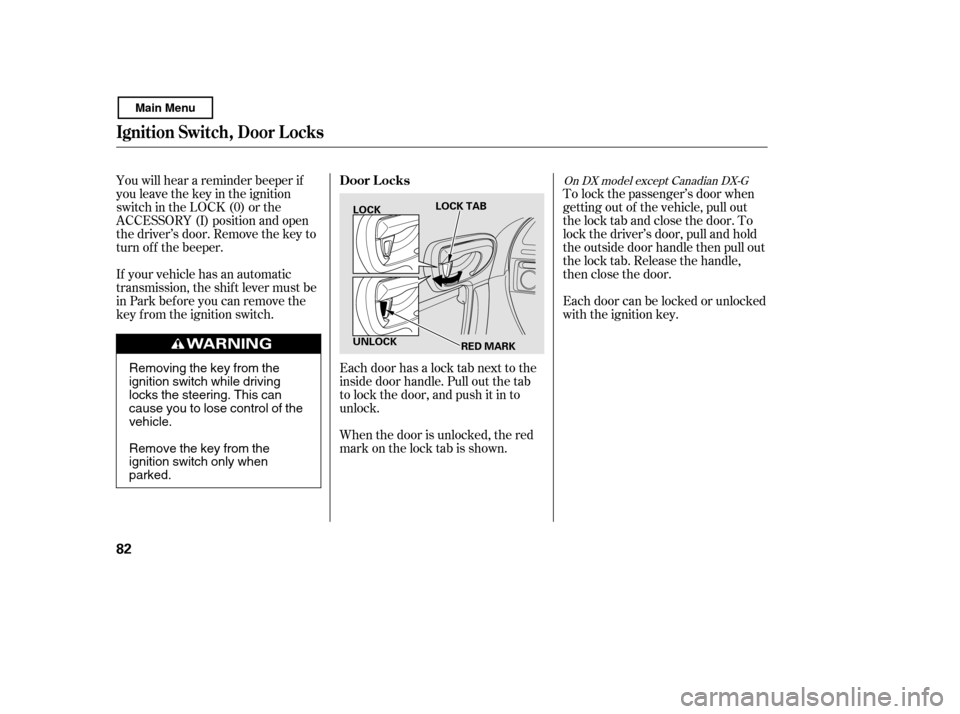
To lock the passenger’s door when
getting out of the vehicle, pull out
the lock tab and close the door. To
lock the driver’s door, pull and hold
the outside door handle then pull out
the lock tab. Release the handle,
then close the door.
Each door can be locked or unlocked
with the ignition key.
Each door has a lock tab next to the
inside door handle. Pull out the tab
to lock the door, and push it in to
unlock.
When the door is unlocked, the red
mark on the lock tab is shown.
You will hear a reminder beeper if
you leave the key in the ignition
switch in the LOCK (0) or the
ACCESSORY (I) position and open
thedriver’sdoor.Removethekeyto
turn of f the beeper.
If your vehicle has an automatic
transmission, the shif t lever must be
in Park bef ore you can remove the
key f rom the ignition switch.
On DX model except Canadian DX-GDoor L ocks
Ignit ion Swit ch, Door L ocks
82
LOCK
UNLOCK LOCK TAB
RED MARK
Removing the key from the
ignition switch while driving
locks the steering. This can
cause you to lose control of thevehicle.
Remove the key from the
ignition switch only whenparked.
Main Menu
Page 271 of 400
This section gives you tips on
starting the engine under various
conditions, and how to operate the
manual and automatic transmissions.
It also includes important
information on parking your vehicle,
the braking system, the vehicle
stability assist (VSA
) system, and
the tire pressure monitoring system
(TPMS). .......................
Driving Guidelines . 268
........................
Preparing to Drive . 269
.......................
Starting the Engine . 270
...................
Manual Transmission . 271
..............
Automatic Transmission . 274
...........................................
Parking . 278
.............................
Braking System . 279
...............
Anti-lock Brakes (ABS) . 280
Vehicle Stability Assist (VSA
),
aka Electronic Stability ........
Control (ESC), System . 282
Tire Pressure Monitoring System ......................................
(TPMS) . 284
...........................
Towing a Trailer . 287
Driving
Driving
267
Main Menu
Page 274 of 400

Apply the parking brake.
In cold weather, turn of f all
electrical accessories to reduce
the drain on the battery.
Make sure the shif t lever is in
Park. Press on the brake pedal.
Press the clutch pedal down all the
way. The START (III) position
does not f unction unless the clutch
pedal is pressed. Without touching the accelerator
pedal, turn the ignition key to the
START (III) position. Do not hold
the key in the START (III)
position f or more than 15 seconds
at a time. If the engine does not
start right away, pause for at least
10 seconds bef ore trying again.
1. 2. 3.
4.
Manual transmission:
Automatic transmission:
Starting the Engine
270
The engine is harder to start in cold
weather. Also, the thinner air f ound at
altitudes above 8,000 f eet (2,400
meters) adds to this problem.
T he immobilizer system protects your
vehicle f rom thef t. If an improperly
coded key (or other device) is used, the
engine’s f uel system is disabled. For
more inf ormation, see page . 80
Main Menu
Page 278 of 400
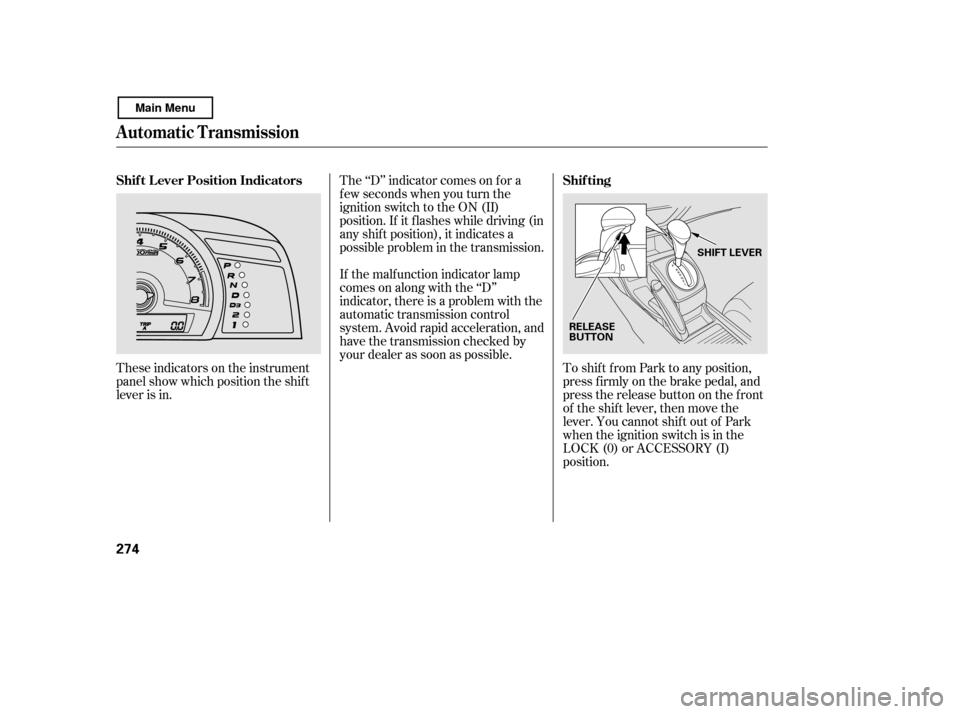
These indicators on the instrument
panel show which position the shif t
lever is in.The ‘‘D’’ indicator comes on f or a
f ew seconds when you turn the
ignition switch to the ON (II)
position. If it f lashes while driving (in
any shif t position), it indicates a
possible problem in the transmission.
If the malf unction indicator lamp
comes on along with the ‘‘D’’
indicator, there is a problem with the
automatic transmission control
system. Avoid rapid acceleration, and
have the transmission checked by
your dealer as soon as possible.
To shif t f rom Park to any position,
pressfirmlyonthebrakepedal,and
pressthereleasebuttononthefront
of the shift lever, then move the
lever. You cannot shift out of Park
when the ignition switch is in the
LOCK (0) or ACCESSORY (I)
position.
Automatic Transmission
Shif t L ever Position Indicators Shif ting
274
RELEASE
BUTTONSHIFT LEVER
Main Menu
Page 279 of 400
�µ
�µ �µ
�µ
CONT INUED
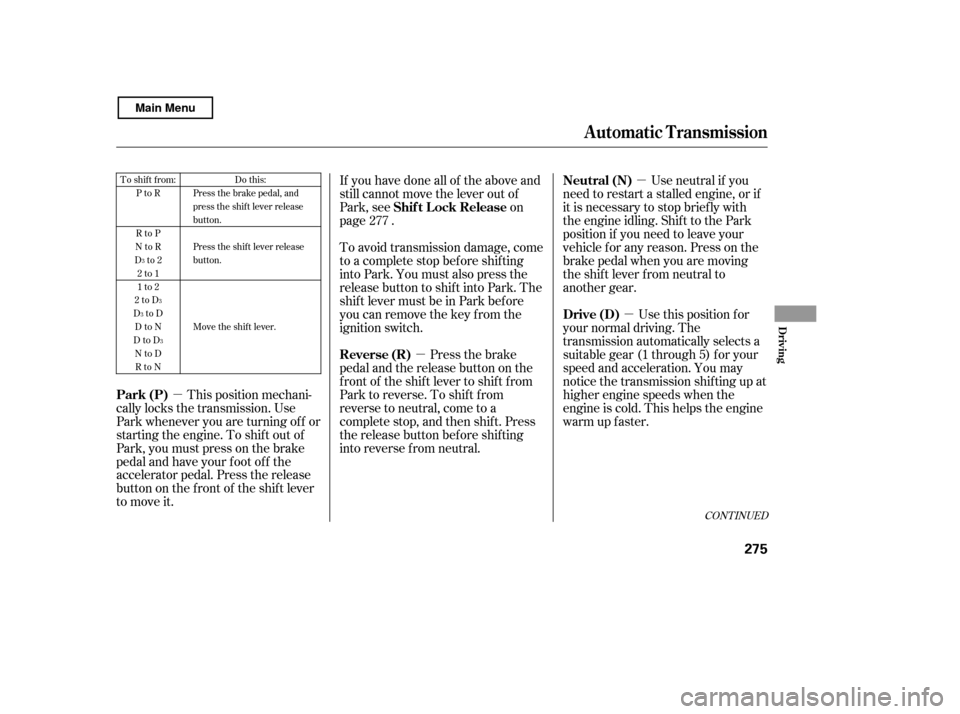
If you have done all of the above and
still cannot move the lever out of
Park, see on
page .
To avoid transmission damage, come
to a complete stop bef ore shif ting
into Park. You must also press the
release button to shift into Park. The
shif t lever must be in Park bef ore
you can remove the key f rom the
ignition switch. Press the brake
pedal and the release button on the
frontoftheshiftlevertoshiftfrom
Park to reverse. To shif t f rom
reverse to neutral, come to a
completestop,andthenshift.Press
the release button bef ore shif ting
into reverse f rom neutral.
This position mechani-
cally locks the transmission. Use
Park whenever you are turning of f or
starting the engine. To shif t out of
Park, you must press on the brake
pedal and have your f oot of f the
accelerator pedal. Press the release
buttononthefrontof theshiftlever
to move it. Use neutral if you
need to restart a stalled engine, or if
it is necessary to stop brief ly with
the engine idling. Shif t to the Park
position if you need to leave your
vehicle for any reason. Press on the
brake pedal when you are moving
the shift lever from neutral to
another gear.
Use this position f or
your normal driving. The
transmission automatically selects a
suitable gear (1 through 5) f or your
speed and acceleration. You may
notice the transmission shifting up at
higher engine speeds when the
engine is cold. This helps the engine
warm up f aster.
277To shift from:
PtoR
RtoP
NtoR
Dto2
2to1
1to2
2toD
DtoD
DtoN
DtoD NtoD
RtoN Do this:
Press the brake pedal, and
press the shift lever release
button.
Press the shift lever release
button.
Move the shift lever.
3
3
3
3
Automatic Transmission
Shif t L ock Release
Reverse (R)
Park (P) Neutral (N)
Drive (D)
Driving
275
Main Menu
Page 280 of 400

�µ�µ �µ
This position is similar
to D, except only the first three
gears are selected. Use D to provide
engine braking when going down a
steep hill. D can also keep the
transmission f rom cycling between
third and f ourth gears in stop-and-go
driving.
To shif t to second,
pressthereleasebuttononthefront
of the shif t lever. This position locks
the transmission in second gear. It
does not downshif t to f irst gear
when you come to a stop.
Use second gear: For more power when climbing.
To increase engine braking when
going down steep hills.
For starting out on a slippery
surf ace or in deep snow.
To help reduce wheel spin. To shif t f rom second to
first, press the release button on the
f ront of the shif t lever. This position
locks the transmission in f irst gear.
By upshif ting and downshif ting
through 1, 2, D , and D, you can
operate the transmission much like a
manual transmission without a
clutch pedal. If you exceed the maximum speed
f or the gear you are in, the engine
speed will enter into the tachometer’s
red zone. If this occurs, you may f eel
the engine cut in and out. This is
caused by a limiter in the engine’s
computer controls. The engine will
run normally when you reduce the
rpm below the red zone.
3
3 3
Automatic Transmission
Engine Speed L imiter
Drive (D )
Second (2) First (1)3
276
Main Menu