2011 CHEVROLET CORVETTE steering
[x] Cancel search: steeringPage 92 of 428
Black plate (28,1)Chevrolet Corvette Owner Manual - 2011
3-28 Seats and Restraints
How Does an Airbag
Restrain?
In moderate to severe frontal or
near frontal collisions, even belted
occupants can contact the steering
wheel or the instrument panel.
In moderate to severe side
collisions, even belted occupants
can contact the inside of the
vehicle.
Airbags supplement the protection
provided by safety belts. Frontal
airbags distribute the force of
the impact more evenly over the
occupant's upper body, stopping
the occupant more gradually.
Seat-mounted side impact airbags
distribute the force of the impact
more evenly over the occupant's
upper body.
But airbags would not help in
many types of collisions, primarily
because the occupant's motion is
not toward those airbags. SeeWhen
Should an Airbag Inflate? on
page 3‑26 for more information. Airbags should never be regarded
as anything more than a supplement
to safety belts.
What Will You See After
an Airbag Inflates?
After the frontal and seat-mounted
side impact airbags inflate, they
quickly deflate, so quickly that some
people may not even realize the
airbags inflated. Some components
of the airbag module may be hot for
several minutes. For location of the
airbag modules, see
What Makes
an Airbag Inflate? on page 3‑27.
The parts of the airbag that come
into contact with you may be warm,
but not too hot to touch. There may
be some smoke and dust coming
from the vents in the deflated
airbags. Airbag inflation does not
prevent the driver from seeing out
of the windshield or being able to
steer the vehicle, nor does it prevent
people from leaving the vehicle.
{WARNING
When an airbag inflates, there
may be dust in the air. This dust
could cause breathing problems
for people with a history of
asthma or other breathing trouble.
To avoid this, everyone in the
vehicle should get out as soon
as it is safe to do so. If you have
breathing problems but cannot
get out of the vehicle after an
airbag inflates, then get fresh air
by opening a window or a door.
If you experience breathing
problems following an airbag
deployment, you should seek
medical attention.
The vehicle has a feature that may
automatically unlock the doors,
turn the interior lamps on, turn
on the hazard warning flashers,
and shut off the fuel system
after the airbags inflate.
Page 93 of 428
Black plate (29,1)Chevrolet Corvette Owner Manual - 2011
Seats and Restraints 3-29
You can lock the doors, turn the
interior lamps off, and turn the
hazard warning flashers off by using
the controls for those features.
{WARNING
A crash severe enough to inflate
the airbags may have also
damaged important functions
in the vehicle, such as the fuel
system, brake and steering
systems, etc. Even if the vehicle
appears to be drivable after a
moderate crash, there may be
concealed damage that could
make it difficult to safely operate
the vehicle.
Use caution if you should attempt
to restart the engine after a crash
has occurred.In many crashes severe enough to
inflate the airbag, windshields are
broken by vehicle deformation.
Additional windshield breakage
may also occur from the right front
passenger airbag..Airbags are designed to inflate
only once. After an airbag
inflates, you will need some
new parts for the airbag system.
If you do not get them, the
airbag system will not be there
to help protect you in another
crash. A new system will include
airbag modules and possibly
other parts. The service manual
for your vehicle covers the need
to replace other parts.
.The vehicle has a crash sensing
and diagnostic module which
records information after a
crash. See
Vehicle Data
Recording and Privacy on
page 13‑17 andEvent Data
Recorders on page 13‑17.
.Let only qualified technicians
work on the airbag system.
Improper service can mean that
the airbag system will not work
properly. See your dealer for
service.
Page 99 of 428

Black plate (35,1)Chevrolet Corvette Owner Manual - 2011
Seats and Restraints 3-35
Adding Equipment to the
Airbag-Equipped Vehicle
Q: Is there anything I might addto or change about the vehicle
that could keep the airbags
from working properly?
A: Yes. If you add things that
change the vehicle's frame,
bumper system, height, front
end or side sheet metal, they
may keep the airbag system
from working properly. Changing
or moving any parts of the front
seats, safety belts, the airbag
sensing and diagnostic module,
steering wheel, instrument
panel, the inside rear mirror,
front sensors, or airbag wiring
can affect the operation of the
airbag system.
In addition, the vehicle has
a passenger sensing system
for the right front passenger
position, which includes sensors
that are part of the passenger seat. The passenger sensing
system may not operate properly
if the original seat trim is
replaced with non-GM covers,
upholstery or trim, or with
GM covers, upholstery or
trim designed for a different
vehicle. Any object, such as
an aftermarket seat heater or
a comfort enhancing pad or
device, installed under or on
top of the seat fabric, could
also interfere with the operation
of the passenger sensing
system. This could either
prevent proper deployment
of the passenger airbag(s) or
prevent the passenger sensing
system from properly turning
off the passenger airbag(s).
See
Passenger Sensing System
on page 3‑30.
If you have any questions
about this, you should contact
Customer Assistance before you
modify your vehicle. The phone
numbers and addresses for
Customer Assistance are in Step Two of the Customer
Satisfaction Procedure in
this manual. See
Customer
Satisfaction Procedure
(United States and Canada) on
page 13‑1 orCustomer
Satisfaction Procedure (Mexico)
on page 13‑3.
Q: Because I have a disability, I have to get my vehicle
modified. How can I find out
whether this will affect my
airbag system?
A: If you have questions,
call Customer Assistance.
The phone numbers and
addresses for Customer
Assistance are in Step Two
of the Customer Satisfaction
Procedure in this manual.
See Customer Satisfaction
Procedure (United States and
Canada) on page 13‑1 or
Customer Satisfaction
Procedure (Mexico) on
page 13‑3.
Page 121 of 428

Black plate (1,1)Chevrolet Corvette Owner Manual - 2011
Instruments and Controls 5-1
Instruments and
Controls
Controls
Steering Wheel Adjustment . . . 5-2
Steering Wheel Controls . . . . . . 5-3
Horn . . . . . . . . . . . . . . . . . . . . . . . . . . 5-4
Windshield Wiper/Washer . . . . . 5-4
Compass . . . . . . . . . . . . . . . . . . . . . 5-5
Clock . . . . . . . . . . . . . . . . . . . . . . . . . 5-6
Power Outlets . . . . . . . . . . . . . . . . . 5-6
Cigarette Lighter . . . . . . . . . . . . . . 5-7
Ashtrays . . . . . . . . . . . . . . . . . . . . . . 5-8
Warning Lights, Gauges, and
Indicators
Warning Lights, Gauges, andIndicators . . . . . . . . . . . . . . . . . . . . 5-8
Instrument Cluster . . . . . . . . . . . . 5-9
Speedometer . . . . . . . . . . . . . . . . 5-11
Odometer . . . . . . . . . . . . . . . . . . . . 5-11
Tachometer . . . . . . . . . . . . . . . . . . 5-11
Fuel Gauge . . . . . . . . . . . . . . . . . . 5-11
Boost Gauge (ZR1) . . . . . . . . . . 5-12
Engine Oil Pressure Gauge . . . . . . . . . . . . . . . . . . . . . . 5-13 Engine Coolant Temperature
Gauge . . . . . . . . . . . . . . . . . . . . . . 5-15
Voltmeter Gauge . . . . . . . . . . . . . 5-15
Safety Belt Reminders . . . . . . . 5-16
Airbag Readiness Light . . . . . . 5-16
Passenger Airbag Status Indicator . . . . . . . . . . . . . . . . . . . . 5-17
Malfunction Indicator Lamp . . . . . . . . . . . . . 5-18
Brake System Warning Light . . . . . . . . . . . . . . . . . . . . . . . 5-21
Antilock Brake System (ABS) Warning Light . . . . . . . . . . . . . . 5-22
One-to-Four Shift Light (Manual Transmission) . . . . . 5-22
Active Handling System Light . . . . . . . . . . . . . . . . . . . . . . . 5-23
Traction Control System (TCS) Warning Light . . . . . . . 5-23
Tire Pressure Light . . . . . . . . . . 5-24
Security Light . . . . . . . . . . . . . . . . 5-24
High-Beam on Light . . . . . . . . . 5-25
Front Fog Lamp Light . . . . . . . . 5-25
Lamps on Reminder . . . . . . . . . 5-25
Information Displays
Driver Information Center (DIC) . . . . . . . . . . . . . . . 5-25
Head-Up Display (HUD) . . . . . 5-31
Vehicle Messages
Vehicle Messages . . . . . . . . . . . 5-35
Battery Voltage and Charging Messages . . . . . . . . . . . . . . . . . . 5-35
Brake System Messages . . . . 5-36
Convertible Top Messages . . . 5-37
Cruise Control Messages . . . . 5-38
Door Ajar Messages . . . . . . . . . 5-39
Engine Cooling System Messages . . . . . . . . . . . . . . . . . . 5-39
Engine Oil Messages . . . . . . . . 5-40
Engine Power Messages . . . . 5-41
Fuel System Messages . . . . . . 5-41
Key and Lock Messages . . . . . 5-42
Lamp Messages . . . . . . . . . . . . . 5-44
Ride Control System Messages . . . . . . . . . . . . . . . . . . 5-44
Safety Belt Messages . . . . . . . 5-49
Anti-Theft Alarm System Messages . . . . . . . . . . . . . . . . . . 5-50
Service Vehicle Messages . . . 5-50
Starting the Vehicle Messages . . . . . . . . . . . . . . . . . . 5-50
Tire Messages . . . . . . . . . . . . . . . 5-51
Transmission Messages . . . . . 5-53
Vehicle Reminder Messages . . . . . . . . . . . . . . . . . . 5-54
Washer Fluid Messages . . . . . 5-54
Page 122 of 428

Black plate (2,1)Chevrolet Corvette Owner Manual - 2011
5-2 Instruments and Controls
Vehicle Personalization
Vehicle Personalization . . . . . . 5-55
Universal Remote System
Universal Remote System . . . 5-64
Universal Remote SystemProgramming . . . . . . . . . . . . . . . 5-64
Universal Remote System Operation . . . . . . . . . . . . . . . . . . 5-69
Controls
Steering Wheel
Adjustment
The lever is located on the left side
of the steering column.
To adjust the steering wheel:
1. Pull the lever toward you.
2. Move the steering wheel up
or down.
3. Release the lever to lock the steering wheel in place.
Telescopic Steering Column
For vehicles with this feature, the
telescopic steering column switch
is located on the right side of the
steering column.
To adjust the telescopic steering
column:
1. Push the switch forward to movethe wheel away from you.
2. Pull the switch toward you to move the wheel closer to you.
Page 123 of 428

Black plate (3,1)Chevrolet Corvette Owner Manual - 2011
Instruments and Controls 5-3
The telescopic steering column
position can be stored with your
memory settings. See“Memory
Seat, Mirrors and Steering Wheel”
under Power Seat Adjustment on
page 3‑3 for more information.
Steering Wheel Controls
For vehicles with steering wheel
controls, some audio controls can
be adjusted at the steering wheel.
bg(Mute/Push to Talk): Press to
silence the vehicle speakers only.
Press again to turn the sound on.
For vehicles with Bluetooth or
OnStar
®systems press and
hold
b gfor longer than 2 seconds
to interact with those systems.
See Bluetooth on page 7‑18 and
the OnStar Owner's Guide for
more information.
c(Phone On Hook): Press to
reject an incoming call, or end a
current call.
w x(Next/Previous) : Press to
change radio stations or select
tracks on a CD. To change radio stations:
.Pressworxto go to the
next or to the previous radio
station and stay there. The
radio only seeks stations with
a strong signal that are in the
selected band.
.Press and holdworxfor
2 seconds until SCAN displays
and a beep sounds to scan
stations. The radio goes to a
station, plays for a few seconds,
then goes to the next station.
Press again to stop scanning.
.Press and holdworxfor
4 seconds until PRESET SCAN
displays and a beep sounds to
scan presets. The radio goes
to a station, plays for a few
seconds, then goes to the
next station. Press again to
stop scanning.
Page 124 of 428
Black plate (4,1)Chevrolet Corvette Owner Manual - 2011
5-4 Instruments and Controls
To select tracks on a CD:
.Pressworxto go to the next
or to the previous track when a
CD is playing.
.Press and holdworxfor
more than 2 seconds to scan
the current CD. The CD goes
to the next track, plays the first
10 seconds, then goes to the
next track. Press again to stop
scanning.
.Press and holdworxfor
more than 4 seconds to scan all
of the CDs loaded. The CD goes
to the next CD, plays the first
10 seconds of each track, then
goes to the next CD. Press
again to stop scanning.
+
e−e(Volume): Press to
increase or to decrease the radio
volume.
1 to 6 (Preset Pushbuttons):
Press to play stations that are
programmed on the radio preset
pushbuttons.
Horn
Press near or on the horn symbols
on the steering wheel pad to sound
the horn.
Windshield Wiper/Washer
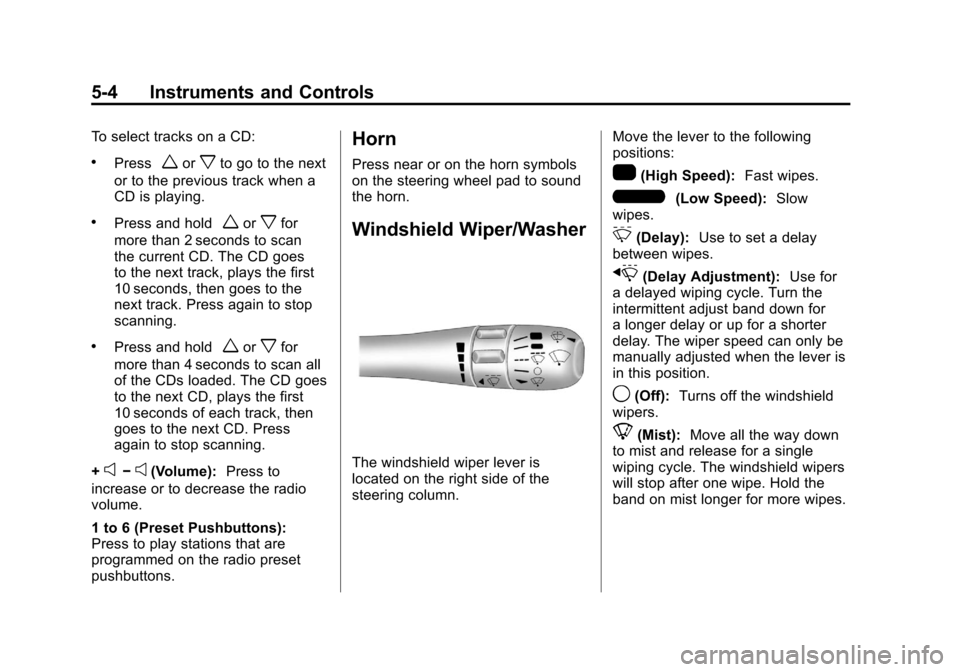
The windshield wiper lever is
located on the right side of the
steering column. Move the lever to the following
positions:
1(High Speed):
Fast wipes.
6(Low Speed):Slow
wipes.
&(Delay): Use to set a delay
between wipes.
x(Delay Adjustment): Use for
a delayed wiping cycle. Turn the
intermittent adjust band down for
a longer delay or up for a shorter
delay. The wiper speed can only be
manually adjusted when the lever is
in this position.
9(Off): Turns off the windshield
wipers.
8(Mist): Move all the way down
to mist and release for a single
wiping cycle. The windshield wipers
will stop after one wipe. Hold the
band on mist longer for more wipes.
Page 125 of 428

Black plate (5,1)Chevrolet Corvette Owner Manual - 2011
Instruments and Controls 5-5
Heavy snow or ice can overload
the wipers. If this occurs, a circuit
breaker will stop the wipers until the
motor cools. Clear all ice and snow
from the wiper blades before using
them. If frozen to the windshield,
carefully loosen them or thaw them.
Damaged wiper blades should
be replaced. SeeWiper Blade
Replacement on page 10‑46.
Windshield Washer
The lever on the right side of the
steering column also controls the
windshield washer. There is a
button at the end of the lever.
To spray washer fluid on the
windshield, press the button and
hold it. The washer will spray until
you release the button. The wipers
will continue to clear the window for
about six seconds after the button
is released and then stop or return
to your preset speed.
{WARNING
In freezing weather, do not
use your washer until the
windshield is warmed. Otherwise
the washer fluid can form ice on
the windshield, blocking your
vision.
If the fluid in the windshield washer
fluid reservoir is low, the message
CHECK WASHER FLUID will
appear on the Driver Information
Center (DIC) display. It will take
15 seconds after the bottle is
refilled for this message to turn
off. For information on the correct
washer fluid to use, see Washer
Fluid on page 10‑37 and
Recommended Fluids and
Lubricants on page 11‑6.
Compass
Compass Operation
With the compass feature on, each
time the vehicle is started, the
compass will take a few seconds
to adjust and display the current
compass heading. For example,
NE is displayed for north-east.
Compass Calibration
PressPonce to turn the compass
display on or off.
If after several seconds the display
does not show a compass heading,
there may be a strong magnetic
field interfering with the compass.
Interference can be caused by a
magnetic antenna mount, note
pad holder or similar object. If the
letter C or CAL appears in the
compass window, the compass
needs calibration.