2011 CHEVROLET CORVETTE steering
[x] Cancel search: steeringPage 19 of 428

Black plate (13,1)Chevrolet Corvette Owner Manual - 2011
In Brief 1-13
Exterior Lighting
Exterior Lamps
The exterior lamp control is located
to the left of the steering wheel, on
the multifunction lever.
O:Turn the band with this symbol
on it to operate the exterior lamps.
O: Turns off all lamps.
AUTO: Sets the exterior lamps
to automatic mode. AUTO mode
turns the exterior lamps on and off
depending on how much light is
available outside the vehicle.
;: Turns on the parking lamps
together with the sidemarker lamps,
taillamps, license plate lamps and
instrument panel lights.
5: Turns on the headlamps
together with the parking lamps,
sidemarker lamps, taillamps, license
plate lamps and instrument panel
lights.
Turn and Lane-Change Signal
The turn signal lever has two
upward and downward positions
to signal a lane change or a turn.
.For a lane change, raise or
lower the lever. The signal
automatically flashes three
times.
.For a turn, raise or lower the
lever all of the way up or down.
The turn signal will stop flashing
when the turn is completed.
For more information, see:
.Exterior Lamp Controls on
page 6‑1.
.Turn and Lane-Change Signals
(Auto Signal) on page 6‑4.
Windshield Wiper/Washer
The windshield wiper lever is
located on the right side of the
steering column.
1: Fast wipes.
6:Slow wipes.
&:Use to set a delay between
wipes.
x: Use for a delayed wiping
cycle. Turn the intermittent adjust
band down for a longer delay or up
for a shorter delay.
Page 21 of 428
Black plate (15,1)Chevrolet Corvette Owner Manual - 2011
In Brief 1-15
Transmission
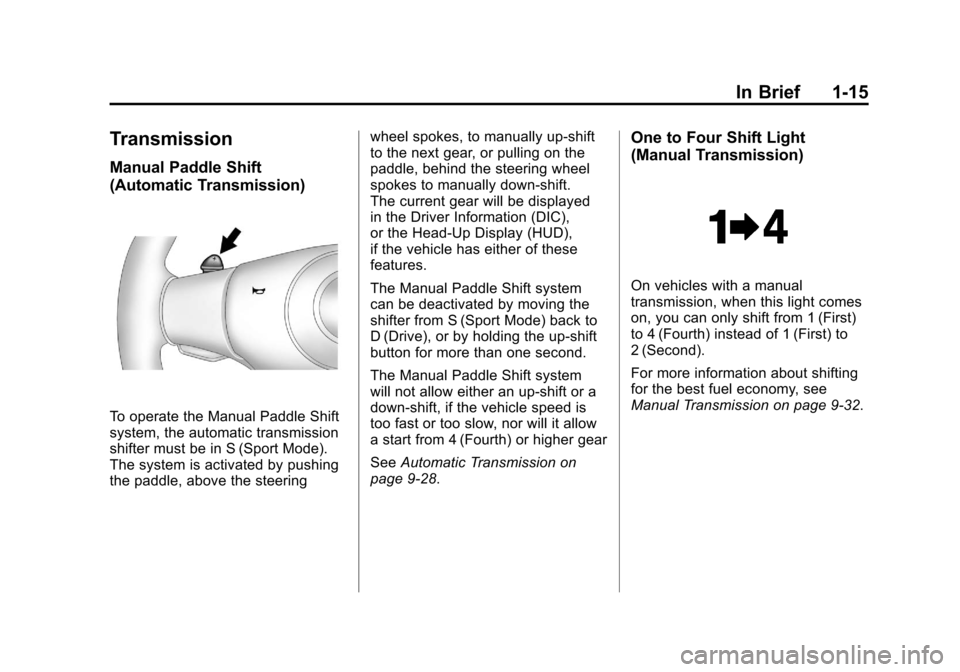
Manual Paddle Shift
(Automatic Transmission)
To operate the Manual Paddle Shift
system, the automatic transmission
shifter must be in S (Sport Mode).
The system is activated by pushing
the paddle, above the steeringwheel spokes, to manually up-shift
to the next gear, or pulling on the
paddle, behind the steering wheel
spokes to manually down-shift.
The current gear will be displayed
in the Driver Information (DIC),
or the Head-Up Display (HUD),
if the vehicle has either of these
features.
The Manual Paddle Shift system
can be deactivated by moving the
shifter from S (Sport Mode) back to
D (Drive), or by holding the up‐shift
button for more than one second.
The Manual Paddle Shift system
will not allow either an up-shift or a
down-shift, if the vehicle speed is
too fast or too slow, nor will it allow
a start from 4 (Fourth) or higher gear
See
Automatic Transmission on
page 9‑28.
One to Four Shift Light
(Manual Transmission)
On vehicles with a manual
transmission, when this light comes
on, you can only shift from 1 (First)
to 4 (Fourth) instead of 1 (First) to
2 (Second).
For more information about shifting
for the best fuel economy, see
Manual Transmission on page 9‑32.
Page 24 of 428

Black plate (18,1)Chevrolet Corvette Owner Manual - 2011
1-18 In Brief
Bluetooth®
For vehicles with a Bluetooth
system, it allows users with a
Bluetooth‐enabled cell phone
to make and receive hands-free
calls using the vehicle’s audio
system and controls.
The Bluetooth‐enabled cell phone
must be paired with the Bluetooth
system before it can be used in the
vehicle. Not all phones will support
all functions. For more information,
visit www.gm.com/bluetooth.
For more information, seeBluetooth
on page 7‑18.
Steering Wheel Controls
For vehicles with steering wheel
controls, some audio controls can
be adjusted at the steering wheel.
b g: Press to turn on and off the
vehicle speakers. Press and hold
longer than two seconds to interact
with the OnStar
®or Bluetooth
systems.
c: Press to reject an incoming
call, or to end a call.
e+ /e− : Increases or decreases
volume.
w/x: Press to change radio
stations or select tracks on a CD.
1 to 6 (Preset Pushbuttons):
Press to play stations that are
programmed on the radio preset
pushbuttons.
For more information, see Steering
Wheel Controls on page 5‑3.
Page 26 of 428

Black plate (20,1)Chevrolet Corvette Owner Manual - 2011
1-20 In Brief
TRIP:Press to display your total
and trip distance driven, the elapsed
time function, your average speed,
and the engine oil life.
OPTION: Press to choose personal
options that are available on your
vehicle, depending on the options
your vehicle is equipped with, such
as door locks, easy entry seats, and
language.
RESET: Press, along with the other
buttons, to reset system functions,
select personal options, and turn
off or acknowledge messages on
the DIC.
For more information, see Driver
Information Center (DIC) on
page 5‑25.Vehicle Personalization
Some vehicle features can be
programmed by using the DIC
buttons on the left side of the
steering wheel. The features that
can be programmed include:
.Units
.Memory Features
.Lighting Features
.Lock and Unlock Feedback
.Door Lock and Unlock Settings
.Language
.Personalization Name
See Vehicle Personalization on
page 5‑55.
Power Outlets
The accessory power outlet can be
used to plug in electrical equipment,
such as a cell phone or MP3 player.
The accessory power outlet is
located inside the center console
storage compartment, on the
forward left side.
Remove the cover to access and
replace when not in use.
See Power Outlets on page 5‑6.
Roof Panel
On vehicles with a removable
roof panel, there are three release
latches. Two are located on the front
of the roof panel and the other is
located on the back of the roof
panel. See “Removing the Roof
Panel” underRoof Panel on
page 2‑18.
Page 32 of 428

Black plate (26,1)Chevrolet Corvette Owner Manual - 2011
1-26 In Brief
The OnStar system can record
and transmit vehicle information.
This information is automatically
sent to an OnStar call center when
Qis pressed,]is pressed, or if
the airbags or ACR system deploy.
This information usually includes
the vehicle's GPS location and,
in the event of a crash, additional
information regarding the crash that
the vehicle was involved in (e.g. the
direction from which the vehicle was
hit). When the virtual advisor feature
of OnStar hands-free calling is
used, the vehicle also sends OnStar
the vehicle's GPS location so they
can provide services where it is
located.
Location information about the
vehicle is only available if the GPS
satellite signals are unobstructed
and available. The vehicle must have a working
electrical system, including
adequate battery power, for the
OnStar equipment to operate.
There are other problems OnStar
cannot control that may prevent
OnStar from providing OnStar
service at any particular time or
place. Some examples are damage
to important parts of the vehicle in
a crash, hills, tall buildings, tunnels,
weather or wireless phone network
congestion.
OnStar Steering Wheel
Controls
This vehicle may have a Talk/Mute
button that can be used to interact
with OnStar hands-free calling.
See
Steering Wheel Controls on
page 5‑3 for more information. On some vehicles, the mute button
can be used to dial numbers into
voice mail systems, or to dial phone
extensions. See the OnStar Owner's
Guide for more information.
Your Responsibility
Increase the volume of the radio if
the OnStar advisor cannot be heard.
If the light next to the OnStar
buttons is red, the system may
not be functioning properly.
Press
Qand request a vehicle
diagnostic. If the light appears clear
(no light is appearing), your OnStar
subscription has expired and all
services have been deactivated.
Press
Qto confirm that the OnStar
equipment is active.
Page 36 of 428

Black plate (4,1)Chevrolet Corvette Owner Manual - 2011
2-4 Keys, Doors and Windows
Keyless Locking
The doors lock after
several seconds if all doors
are closed and at least one
keyless access transmitter
has been removed from the
interior of the vehicle. To customize
whether the doors automatically
lock when exiting the vehicle,
see“Passive Door Locking”
under Vehicle Personalization on
page 5‑55 for additional information.
Keyless Trunk Opening
Press the hatch/trunk release
button located on the rear of
the hatch/trunk lid above the
license plate to open the trunk
if the keyless access transmitter
is within range. See Hatch on
page 2‑10 for additional information. There are other conditions that
can affect the performance of the
transmitter. See
Remote Keyless
Entry (RKE) System on page 2‑3.
This vehicle comes with two
transmitters.
Q(Lock): Press once to lock the
doors. When
Qis pressed twice,
the lights flash and the horn sounds
to confirm locking.
K(Unlock): Press once to unlock
only the driver door. Press
Ktwice
within five seconds to unlock both
doors. The interior lamps may
come on.
Pressing
Kalso recalls the memory
settings. See “Memory Seat, Mirrors
and Steering Wheel” underPower
Seat Adjustment on page 3‑3 for
more information.
}(Hatch/Trunk): Press and
hold for about one second to
unlock the hatch/trunk. If the
engine is running, the shift lever
must be in P (Park) for an automatic
transmission. For a manual
transmission, the shift lever must
be in NEUTRAL with the parking
brake set.
Page 37 of 428
Black plate (5,1)Chevrolet Corvette Owner Manual - 2011
Keys, Doors and Windows 2-5
L(Panic):Press to sound the
horn. Press any other button on the
keyless access transmitter to stop it.
The vehicle comes with
two transmitters. Each transmitter
will have a number on top of
it, “1” or“2”. These numbers
correspond to the driver of the
vehicle. For example, the memory
seat position for driver 1 will be
recalled when using the transmitter
labeled “1”, if enabled through the
DIC. See “Memory Seat, Mirrors
and Steering Wheel” underPower
Seat Adjustment on page 3‑3
and Vehicle Personalization on
page 5‑55 for more information.
Programming Transmitters to
the Vehicle
Only keyless access transmitters
programmed to this vehicle will
work. If a transmitter is lost or
stolen, a replacement can be
purchased and programmed through
your dealer. The vehicle can be reprogrammed so that lost or stolen
transmitters no longer work.
Each vehicle can have up to
four transmitters programmed to it.
Programming with a Recognized
Transmitter
A new transmitter can be
programmed to the vehicle when
there is one recognized transmitter.
For vehicles sold in Canada, two
recognized transmitters are required
to program a new transmitter.
1. The vehicle must be off.
2. Both the recognized and new
transmitters must be with you.
3. Insert the vehicle key into the key cylinder located above the
license plate.
4. Open the hatch/trunk.
5. Turn the key five times within five seconds.
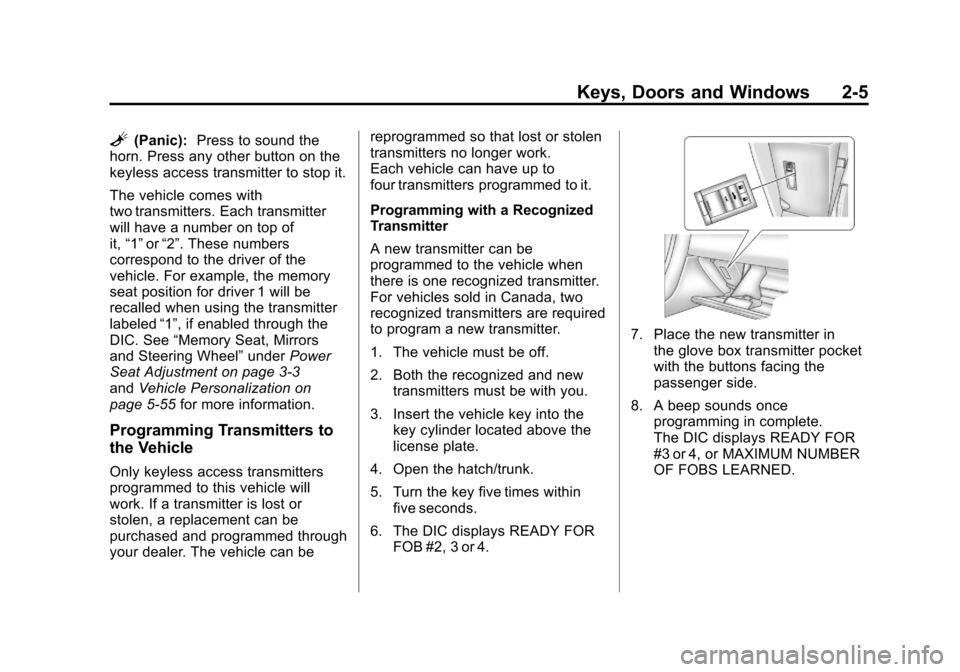
6. The DIC displays READY FOR FOB #2, 3 or 4.
7. Place the new transmitter inthe glove box transmitter pocket
with the buttons facing the
passenger side.
8. A beep sounds once programming in complete.
The DIC displays READY FOR
#3 or 4, or MAXIMUM NUMBER
OF FOBS LEARNED.
Page 43 of 428

Black plate (11,1)Chevrolet Corvette Owner Manual - 2011
Keys, Doors and Windows 2-11
WARNING (Continued)
.Adjust the Climate Control
system to a setting that
brings in only outside air
and set the fan speed to the
highest setting. See Climate
Control System in the Index.
.If the vehicle is equipped with
a power liftgate, disable the
power liftgate function.
For more information about
carbon monoxide, see Engine
Exhaust on page 9‑26.
Notice: Closing the hatch/trunk
lid forcefully or from the sides
can cause damage to the glass,
the defogger or the weather
stripping. Be sure objects will fit
in the hatch/trunk area before
closing the hatch/trunk lid. When
closing the hatch/trunk lid, gently
pull down from the center. Notice:
Do not store heavy or
sharp objects in the rear storage
compartments located in the
hatch/trunk area. The objects
could damage the underbody.
Hatch/Trunk Lid Release
There are several ways to release
the hatch/trunk lid. If your vehicle
has an automatic transmission,
the shift lever must be in P (Park).
For manual transmission vehicles,
the parking brake must be set
when the ignition is started for
the hatch/trunk release to operate.
The parking brake does not need
to be set when the ignition is off for
the hatch/trunk release to operate.
See Parking Brake on page 9‑35.
V(Hatch/Trunk) : Press this
button, located on the instrument
panel to the left of the steering
wheel. The theft-deterrent alarm
system must not be armed.
}(Hatch/Trunk) : Press this
button on the keyless access
transmitter. See Remote Keyless
Entry (RKE) System on page 2‑3.
Press the hatch/trunk release button
located on the rear of the hatch/
trunk lid above the license plate, as
long as you have your transmitter
with you.
If your vehicle has lost battery
power, open the hatch/trunk using
the vehicle key. See Keys on
page 2‑2 for more information.
The key lock cylinder is located on
the rear of the hatch/trunk lid above
the license plate. Turn the vehicle
key clockwise in the lock.