Page 176 of 592
176 2-2. Instrument cluster and information display
Instrument panel light controlThe brightness of the instrument panel lights can be adjusted.
Darker
Brighter
Optitron type meters only:
When the headlight switch is
turned on, the brightness will
be reduced slightly unless the
control button is turned fully
clockwise.
NOTICE
■To prevent damage to the engine and its components
●Do not let the indicator needle of the tachometer enter the red zone, which
indicates the maximum engine speed.
● The engine may be overheating if the engine coolant temperature gauge is
in the red zone (H). In this case, immediately stop the vehicle in a safe
place, and check the engine after it has cooled completely. (
P. 536)
Page 177 of 592
177
2-2. Instrument cluster and information display
2
When driving
Indicators and warning lights
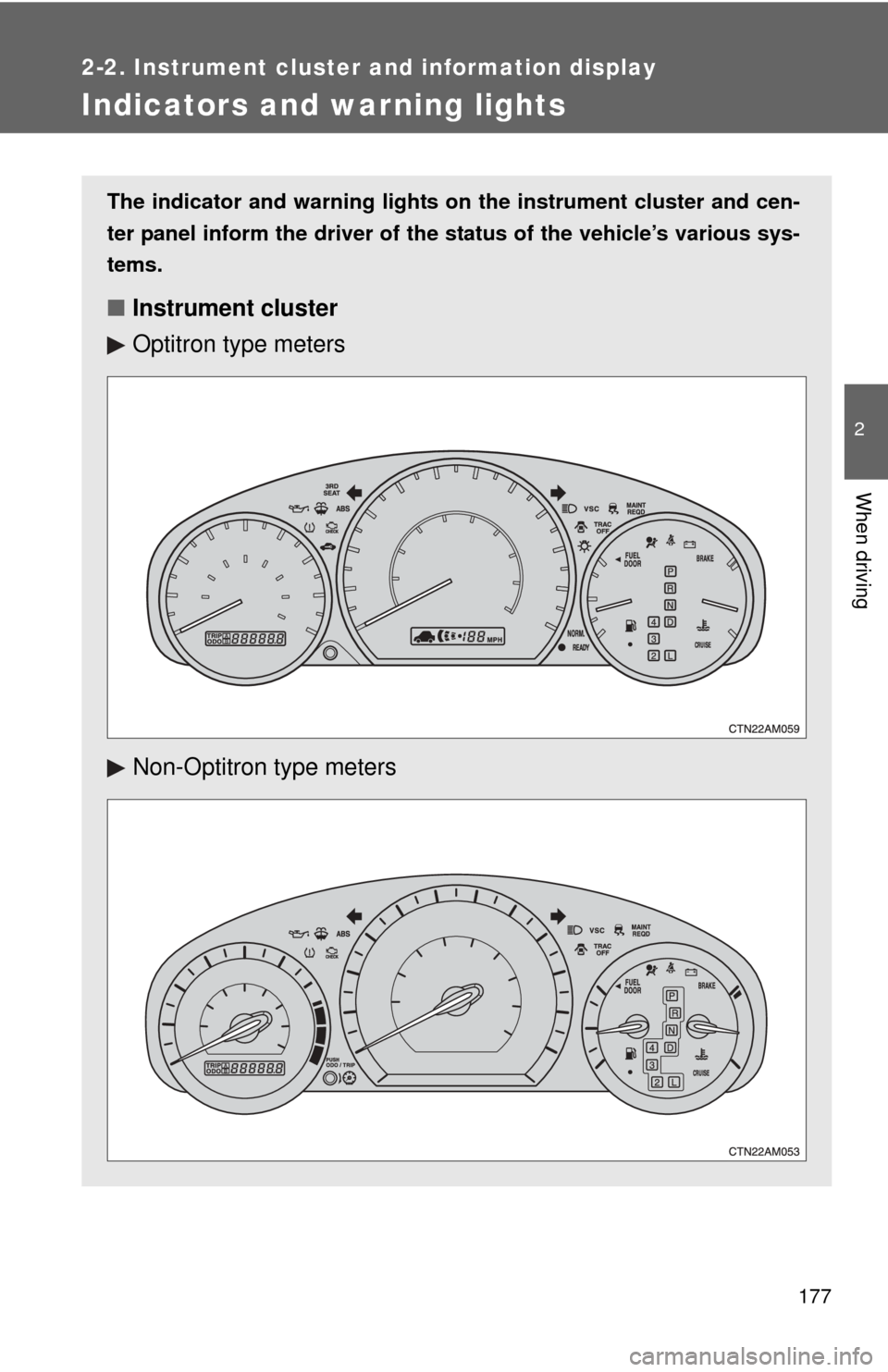
The indicator and warning lights on the instrument cluster and cen-
ter panel inform the driver of the status of the vehicle’s various sys-
tems.
■ Instrument cluster
Optitron type meters
Non-Optitron type meters
Page 179 of 592
179
2-2. Instrument cluster and information display
2
When driving
■
Indicators
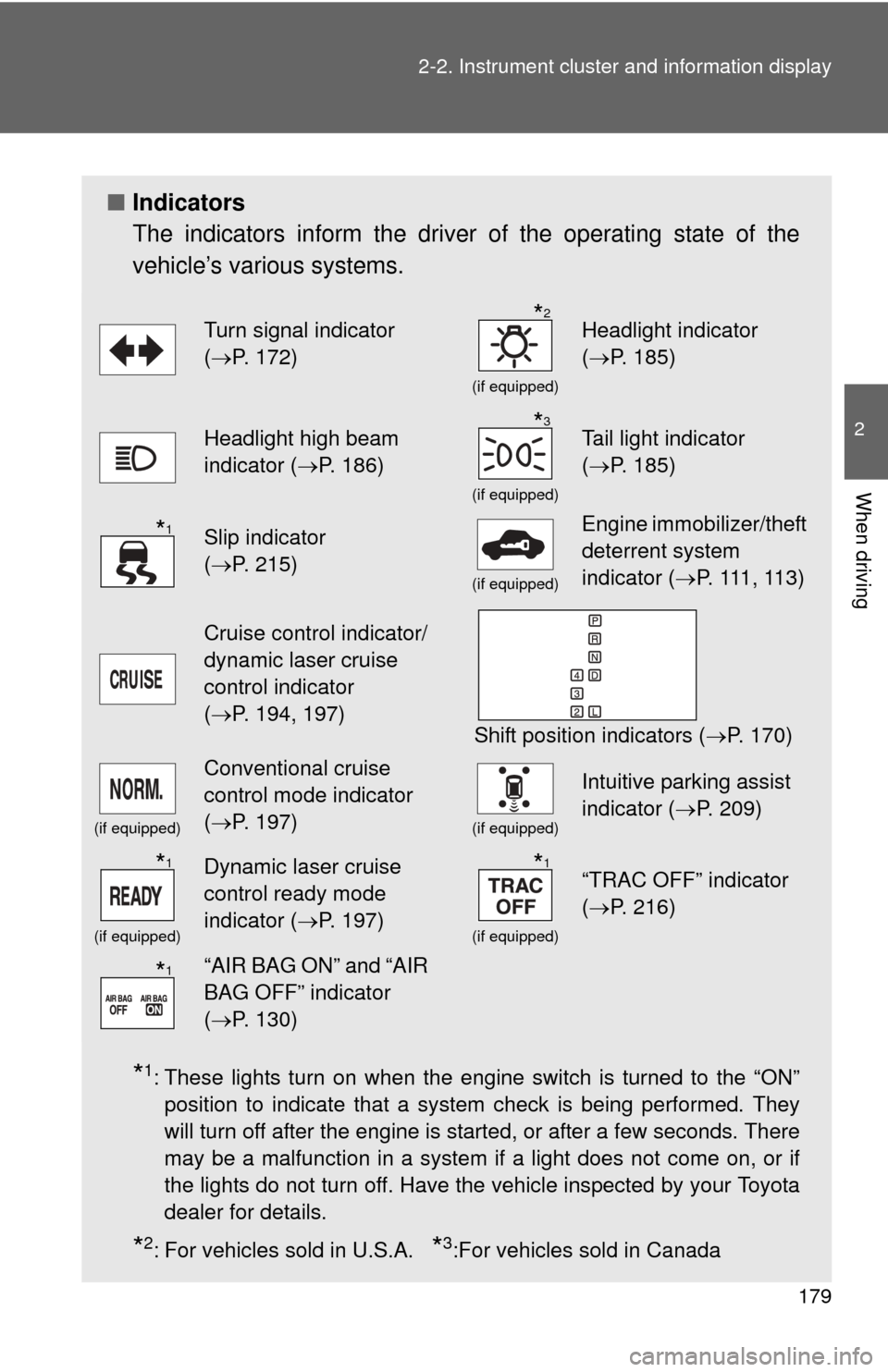
The indicators inform the driver of the operating state of the
vehicle’s various systems.
*1: These lights turn on when the engine switch is turned to the “ON”
position to indicate that a system check is being performed. They
will turn off after the engine is started, or after a few seconds. There
may be a malfunction in a system if a light does not come on, or if
the lights do not turn off. Have the vehicle inspected by your Toyota
dealer for details.
*2: For vehicles sold in U.S.A. *3:For vehicles sold in Canada
Turn signal indicator
(P. 172)
(if equipped)
Headlight indicator
( P. 185)
Headlight high beam
indicator ( P. 186)
(if equipped)
Tail light indicator
(P. 185)
Slip indicator
(P. 215)
(if equipped)
Engine immobilizer/theft
deterrent system
indicator ( P. 111 , 11 3 )
Cruise control indicator/
dynamic laser cruise
control indicator
(P. 194, 197)
Shift position indicators ( P. 170)
(if equipped)
Conventional cruise
control mode indicator
(P. 197)
(if equipped)
Intuitive parking assist
indicator ( P. 209)
(if equipped)
Dynamic laser cruise
control ready mode
indicator (P. 197)
(if equipped)
“TRAC OFF” indicator
(P. 216)
“AIR BAG ON” and “AIR
BAG OFF” indicator
(P. 130)
*2
*3
*1
*1*1
*1
Page 194 of 592
194
2-4. Using other driving systems
Cruise control (if equipped)
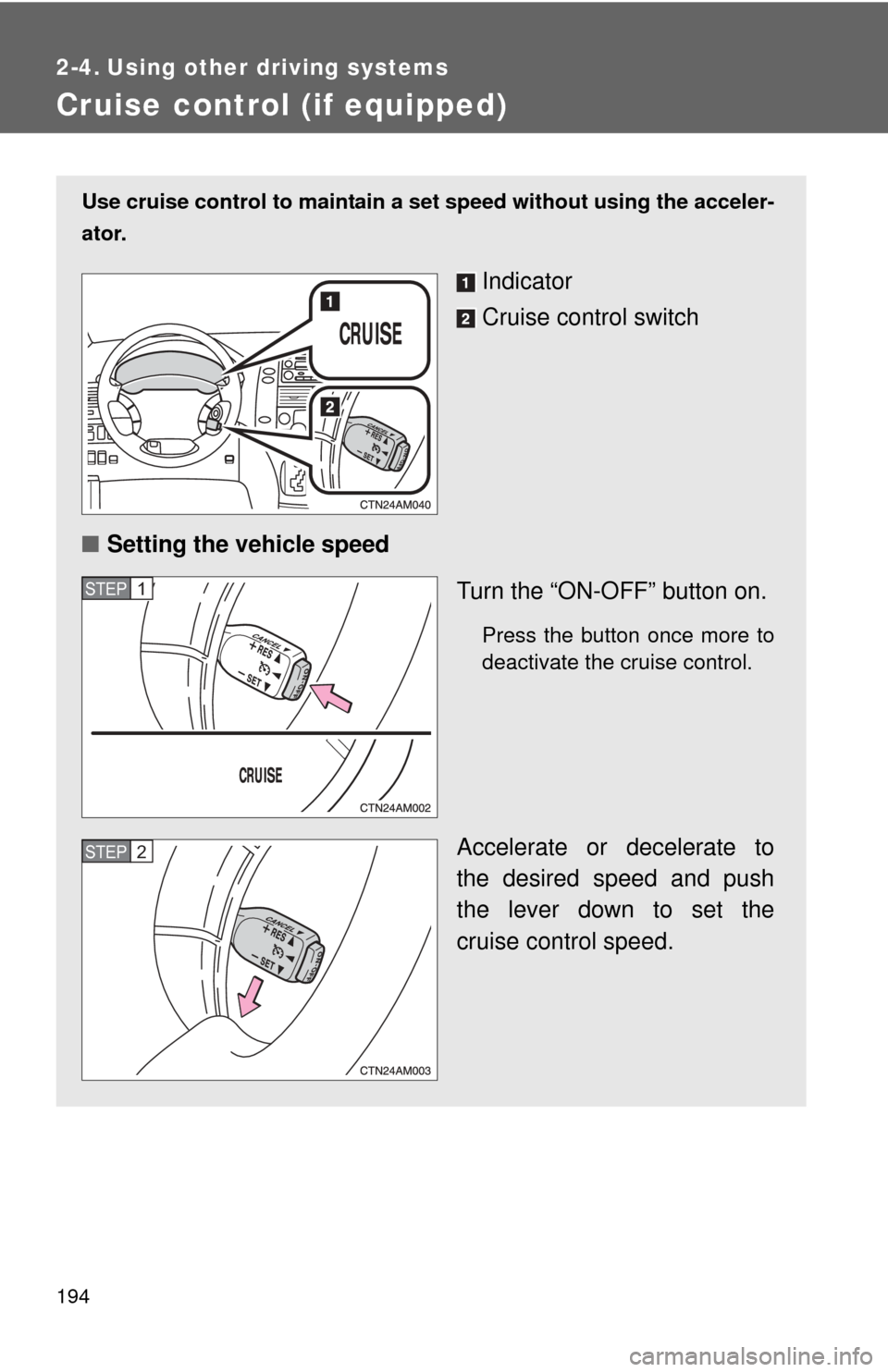
Use cruise control to maintain a set speed without using the acceler-
ator.
Indicator
Cruise control switch
■ Setting the vehicle speed
Turn the “ON-OFF” button on.
Press the button once more to
deactivate the cruise control.
Accelerate or decelerate to
the desired speed and push
the lever down to set the
cruise control speed.
STEP1
STEP2
Page 196 of 592
196 2-4. Using other driving systems
■Automatic cruise control cancellation
The set speed is automatically canceled in any of the following situations.
●Actual vehicle speed falls more than 10 mph (16 km/h) below the preset
vehicle speed.
At this time, the memorized set speed is not retained.
● Actual vehicle speed is below 25 mph (40 km/h).
● VSC is activated.
■ If the cruise control indicator light flashes
Turn the “ON-OFF” button off once, and then reactivate the system.
If the cruise control speed cannot be set or if the cruise control cancels
immediately after being activated, there may be a malfunction in the cruise
control system. Have the vehicle inspected by your Toyota dealer.
CAUTION
■To avoid operating the cruise control by mistake
Keep the “ON-OFF” button off when not in use.
■ Situations unsuitable for cruise control
Do not use cruise control in any of the following situations.
Doing so may result in control of the vehicle being lost and could cause an
accident resulting in death or serious injury.
●In heavy traffic
● On roads with sharp bends
● On winding roads
● On slippery roads, such as those covered with rain, ice or snow
● On steep hills
Page 197 of 592
197
2-4. Using other driving systems
2
When driving
Dynamic laser cruise control (if equipped)
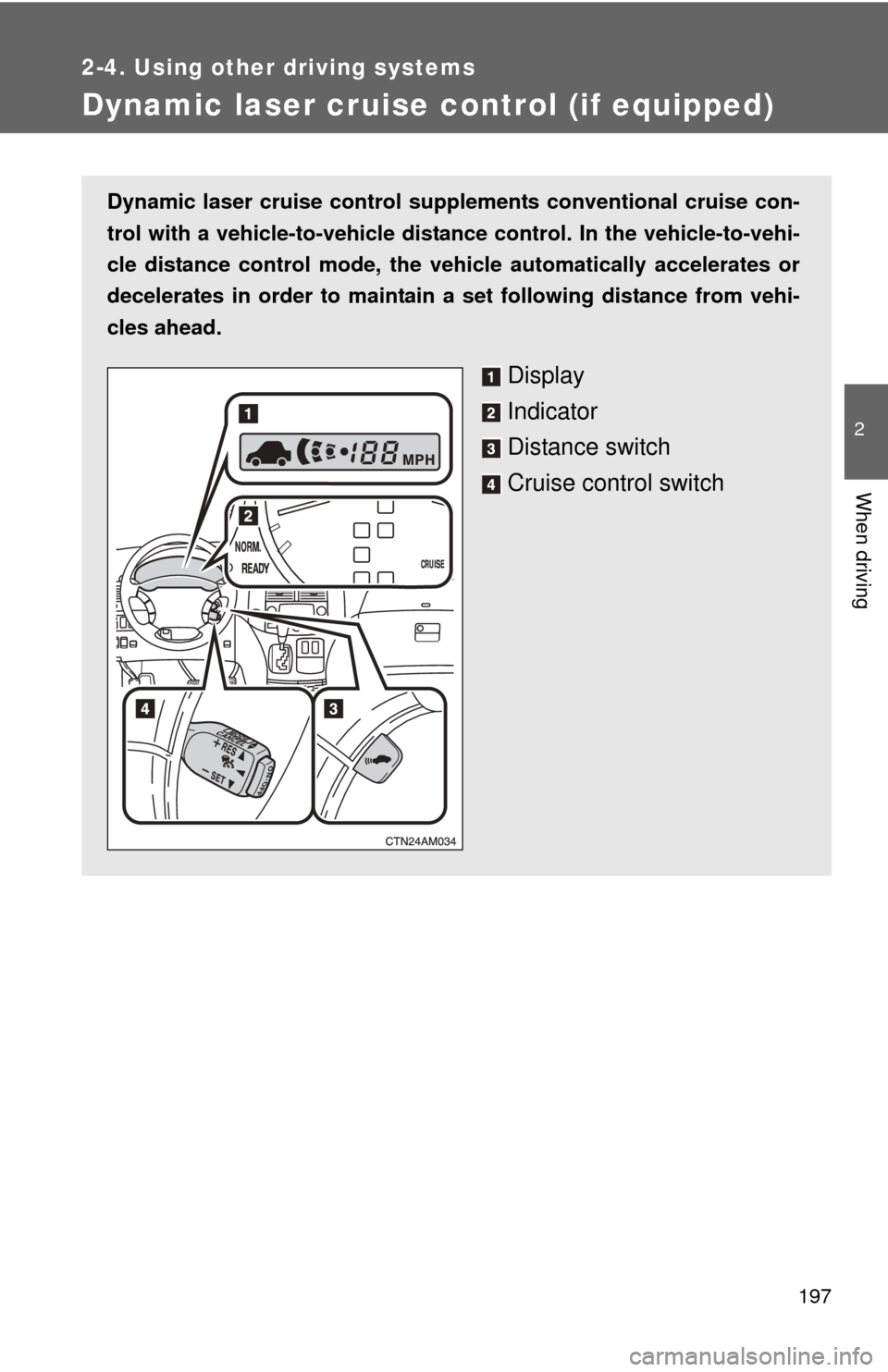
Dynamic laser cruise control supple ments conventional cruise con-
trol with a vehicle-to-vehicle distan ce control. In the vehicle-to-vehi-
cle distance control mode, the vehicle automatically accelerates or
decelerates in order to maintain a set following distance from vehi-
cles ahead.
Display
Indicator
Distance switch
Cruise control switch
Page 204 of 592
204 2-4. Using other driving systems
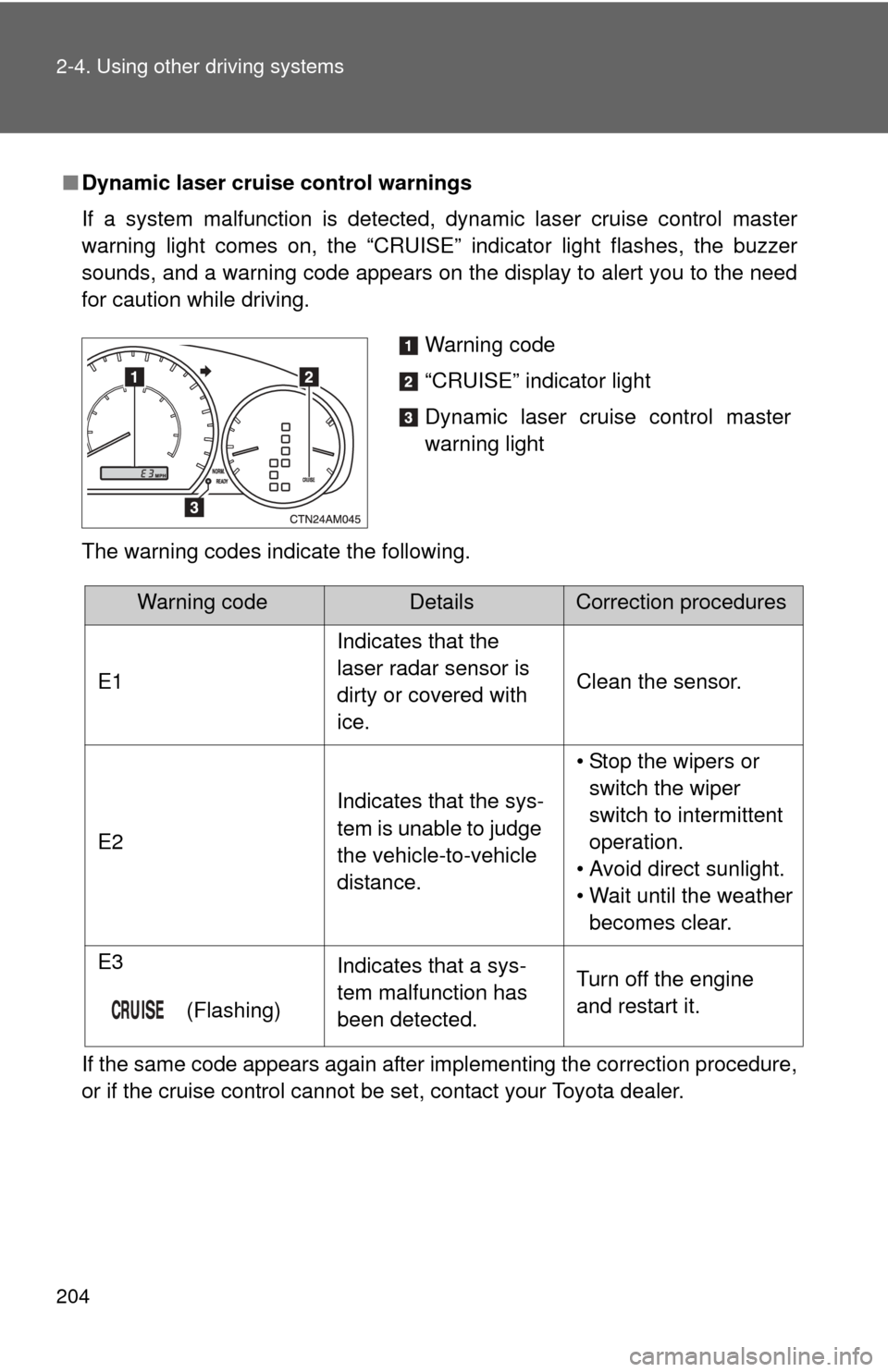
■Dynamic laser cruise control warnings
If a system malfunction is detected, dynamic laser cruise control master
warning light comes on, the “CRUISE” indicator light flashes, the buzzer
sounds, and a warning code appears on the display to alert you to the need
for caution while driving.
The warning codes indicate the following.
If the same code appears again after implementing the correction procedure,
or if the cruise control cannot be set, contact your Toyota dealer.
Warning code
“CRUISE” indicator light
Dynamic laser cruise control master
warning light
Warning codeDetailsCorrection procedures
E1 Indicates that the
laser radar sensor is
dirty or covered with
ice.Clean the sensor.
E2 Indicates that the sys-
tem is unable to judge
the vehicle-to-vehicle
distance.• Stop the wipers or
switch the wiper
switch to intermittent
operation.
• Avoid direct sunlight.
• Wait until the weather becomes clear.
E3
(Flashing) Indicates that a sys-
tem malfunction has
been detected.
Turn off the engine
and restart it.
Page 209 of 592
209
2-4. Using other driving systems
2
When driving
Intuitive parking assist (if equipped)
The distance to obstacles measured by the sensors is communi-
cated via the indicator and a buzzer when parallel parking or maneu-
vering into a garage. Always check the surrounding area when using
this system.
■ Types of sensors
Front corner sensors (if
equipped)
Rear corner sensors
Back sensors
■ Intuitive parking assist indicator and switch
Intuitive parking assist indi-
cator
Intuitive parking assist
switch
On/off
When on, the indicator is
displayed and the buzzer
sounds to inform the driver
that the function is opera-
tional.