Page 14 of 592
14
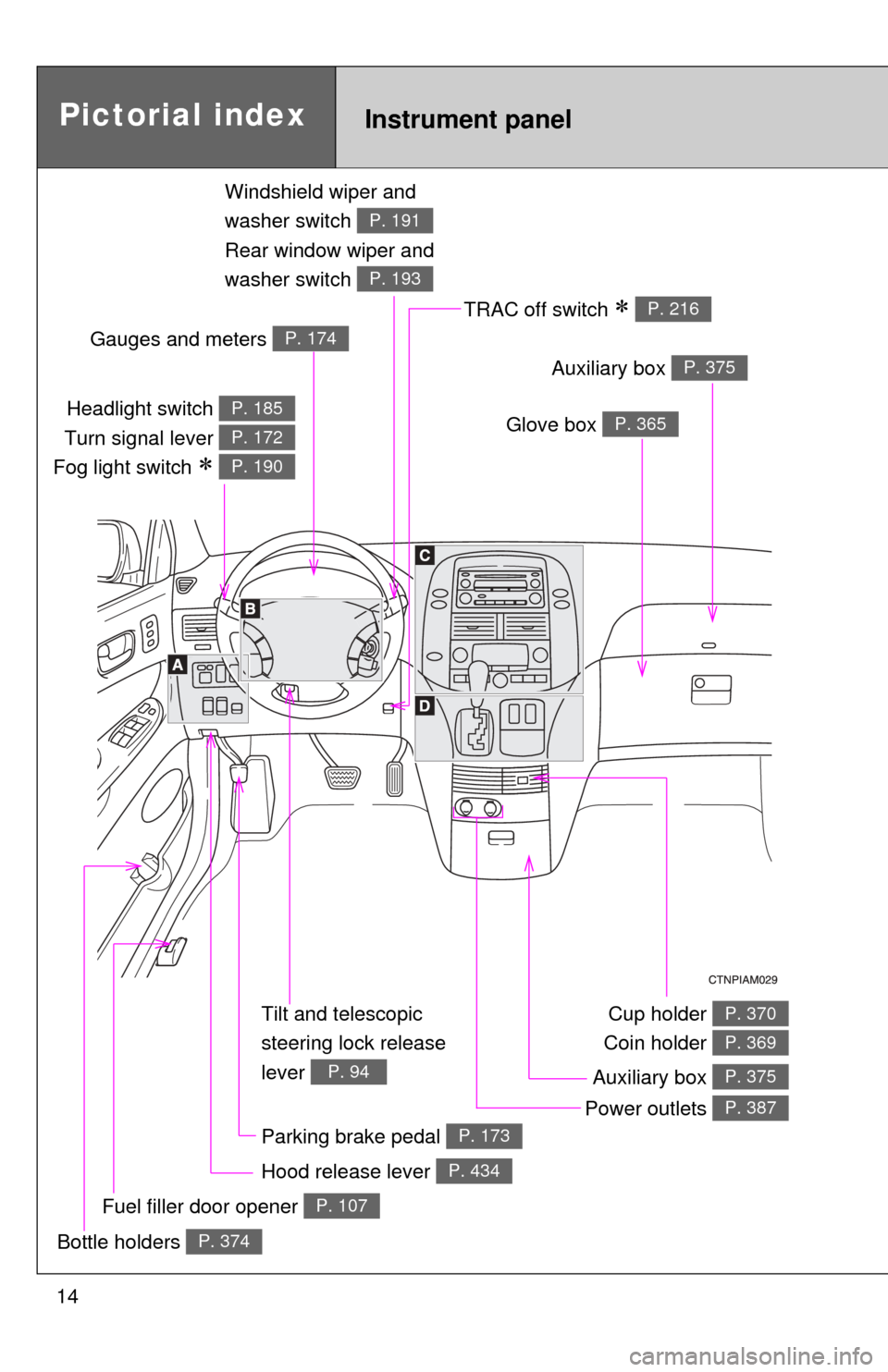
Tilt and telescopic
steering lock release
lever
P. 94
Pictorial index
Headlight switch
Turn signal lever
Fog light switch
P. 185
P. 172
P. 190
Instrument panel
Glove box P. 365
Windshield wiper and
washer switch
Rear window wiper and
washer switch
P. 191
P. 193
Auxiliary box P. 375
Power outlets P. 387
Fuel filler door opener P. 107
Gauges and meters P. 174
TRAC off switch P. 216
Cup holder
Coin holder P. 370
P. 369
Auxiliary box P. 375
Parking brake pedal P. 173
Bottle holders P. 374
Hood release lever P. 434
Page 179 of 592
179
2-2. Instrument cluster and information display
2
When driving
■
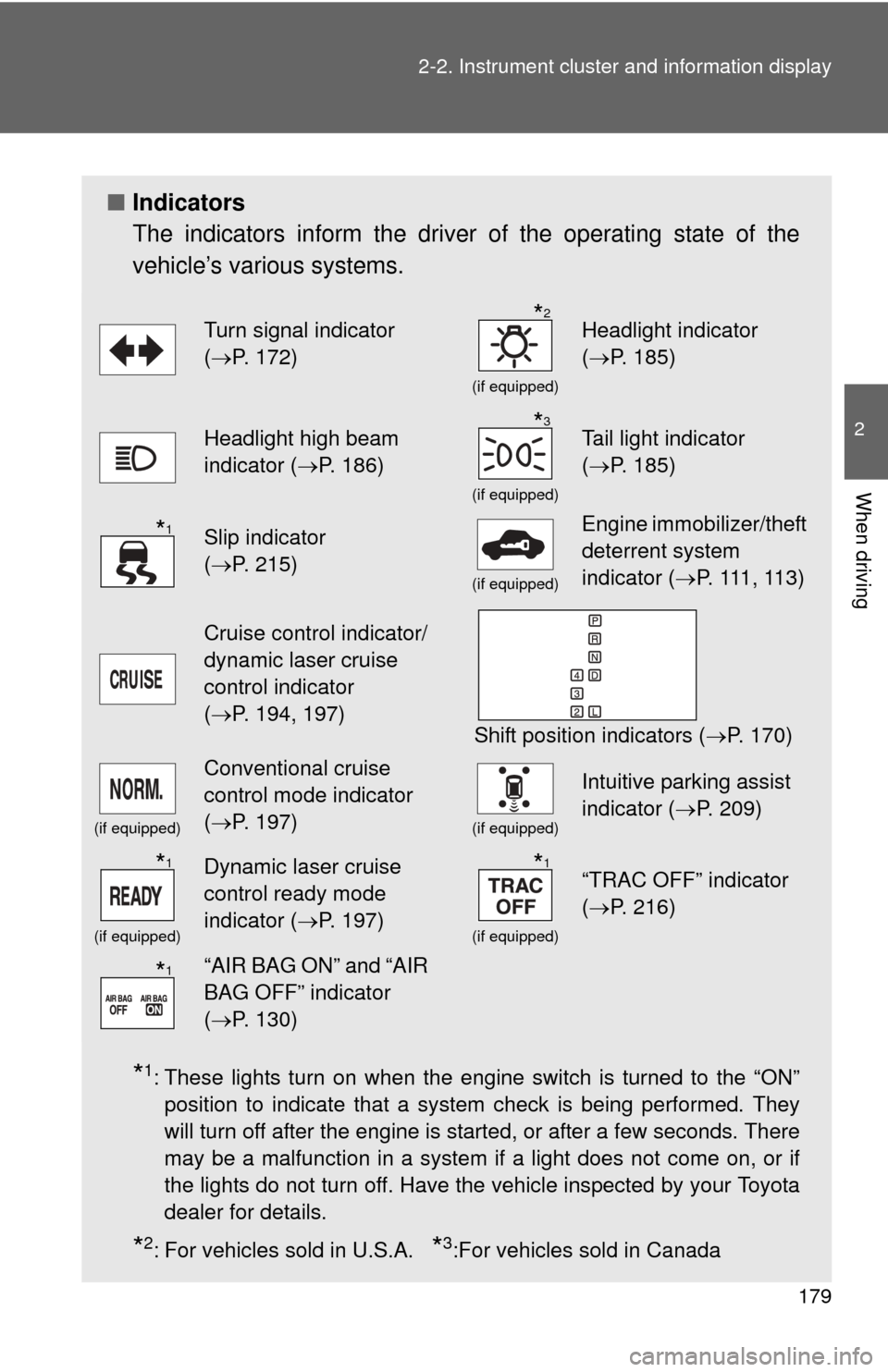
Indicators
The indicators inform the driver of the operating state of the
vehicle’s various systems.
*1: These lights turn on when the engine switch is turned to the “ON”
position to indicate that a system check is being performed. They
will turn off after the engine is started, or after a few seconds. There
may be a malfunction in a system if a light does not come on, or if
the lights do not turn off. Have the vehicle inspected by your Toyota
dealer for details.
*2: For vehicles sold in U.S.A. *3:For vehicles sold in Canada
Turn signal indicator
(P. 172)
(if equipped)
Headlight indicator
( P. 185)
Headlight high beam
indicator ( P. 186)
(if equipped)
Tail light indicator
(P. 185)
Slip indicator
(P. 215)
(if equipped)
Engine immobilizer/theft
deterrent system
indicator ( P. 111 , 11 3 )
Cruise control indicator/
dynamic laser cruise
control indicator
(P. 194, 197)
Shift position indicators ( P. 170)
(if equipped)
Conventional cruise
control mode indicator
(P. 197)
(if equipped)
Intuitive parking assist
indicator ( P. 209)
(if equipped)
Dynamic laser cruise
control ready mode
indicator (P. 197)
(if equipped)
“TRAC OFF” indicator
(P. 216)
“AIR BAG ON” and “AIR
BAG OFF” indicator
(P. 130)
*2
*3
*1
*1*1
*1
Page 216 of 592
216 2-4. Using other driving systems
To disable TRAC (2WD models only)If the vehicle gets stuck in fresh snow or mud, TRAC may reduce
power from the engine to the wheels. You may need to turn the sys-
tem off to enable you to rock the vehicle in order to free it.
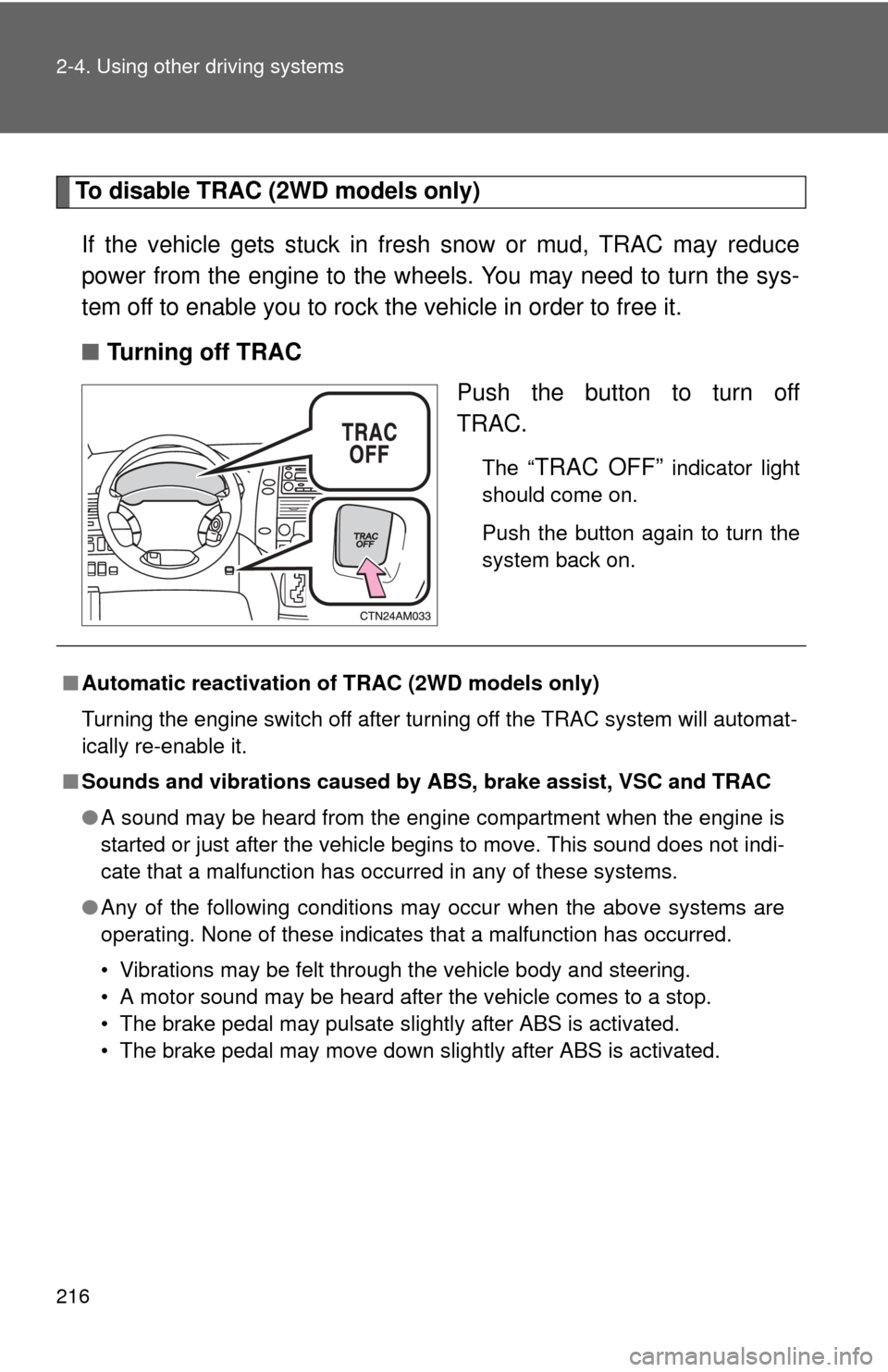
■ Turning off TRAC
Push the button to turn off
TRAC.
The “TRAC OFF” indicator light
should come on.
Push the button again to turn the
system back on.
■ Automatic reactivation of TRAC (2WD models only)
Turning the engine switch off after turning off the TRAC system will automat-
ically re-enable it.
■ Sounds and vibrations caused by ABS, brake assist, VSC and TRAC
●A sound may be heard from the engine compartment when the engine is
started or just after the vehicle begins to move. This sound does not indi-
cate that a malfunction has occurred in any of these systems.
● Any of the following conditions may occur when the above systems are
operating. None of these indicates that a malfunction has occurred.
• Vibrations may be felt through the vehicle body and steering.
• A motor sound may be heard after the vehicle comes to a stop.
• The brake pedal may pulsate slightly after ABS is activated.
• The brake pedal may move down slightly after ABS is activated.
Page 217 of 592
217
2-4. Using other
driving systems
2
When driving
■Another situation in which the “T RAC OFF” indicator light comes on
(2WD models only)
When the “VSC” warning light comes on, the “TRAC OFF” indicator light
comes on even if the “TRAC OFF” switch is not pushed.
CAUTION
■ ABS does not operate effectively when
●Tires with inadequate gripping ability are used (such as excessively worn
tires on a snow covered road).
● The vehicle hydroplanes while driving at high speed on the wet or slick
road.
■ Stopping distance when ABS is operating on the wet or slick roads
ABS is not designed to shorten the vehicle's stopping distance. Always
maintain a safe distance from the vehicle in front of you in the following situ-
ations.
●When driving on dirt, gravel or snow-covered roads
● When driving with tire chains
● When driving over bumps in the road
● When driving over roads with potholes or uneven roads
■ TRAC may not operate effectively when
Directional control and power may not be achievable while driving on slip-
pery road surfaces, even if the TRAC system is operating.
Do not drive the vehicle in conditions where stability and power may be lost.
Page 218 of 592
218 2-4. Using other driving systems
CAUTION
■When VSC is activated
The slip indicator light flashes and a warning buzzer sounds. Always drive
carefully. Reckless driving may cause an accident. Exercise particular care
when the indicator light flashes and a buzzer sounds.
■ When TRAC is off (2WD models only)
Be especially careful and drive at a speed appropriate to the road condi-
tions. As this is a system to ensure vehicle stability and driving force, do not
turn off TRAC unless necessary.
■ Replacing tires
Make sure that all tires are of the same size, brand, tread pattern and total
load capacity. In addition, make sure that the tires are inflated to the recom-
mended tire pressure level.
The ABS and VSC systems will not function correctly if different tires are fit-
ted on the vehicle.
Contact your Toyota dealer for further information when replacing tires or
wheels.
■ Handling of tires and suspension
Using tires with any kind of problem or modifying the suspension will affect
the driving assist systems, and may cause the system to malfunction.
Page 269 of 592
269
3-2. Using the audio system
3
Interior features
■
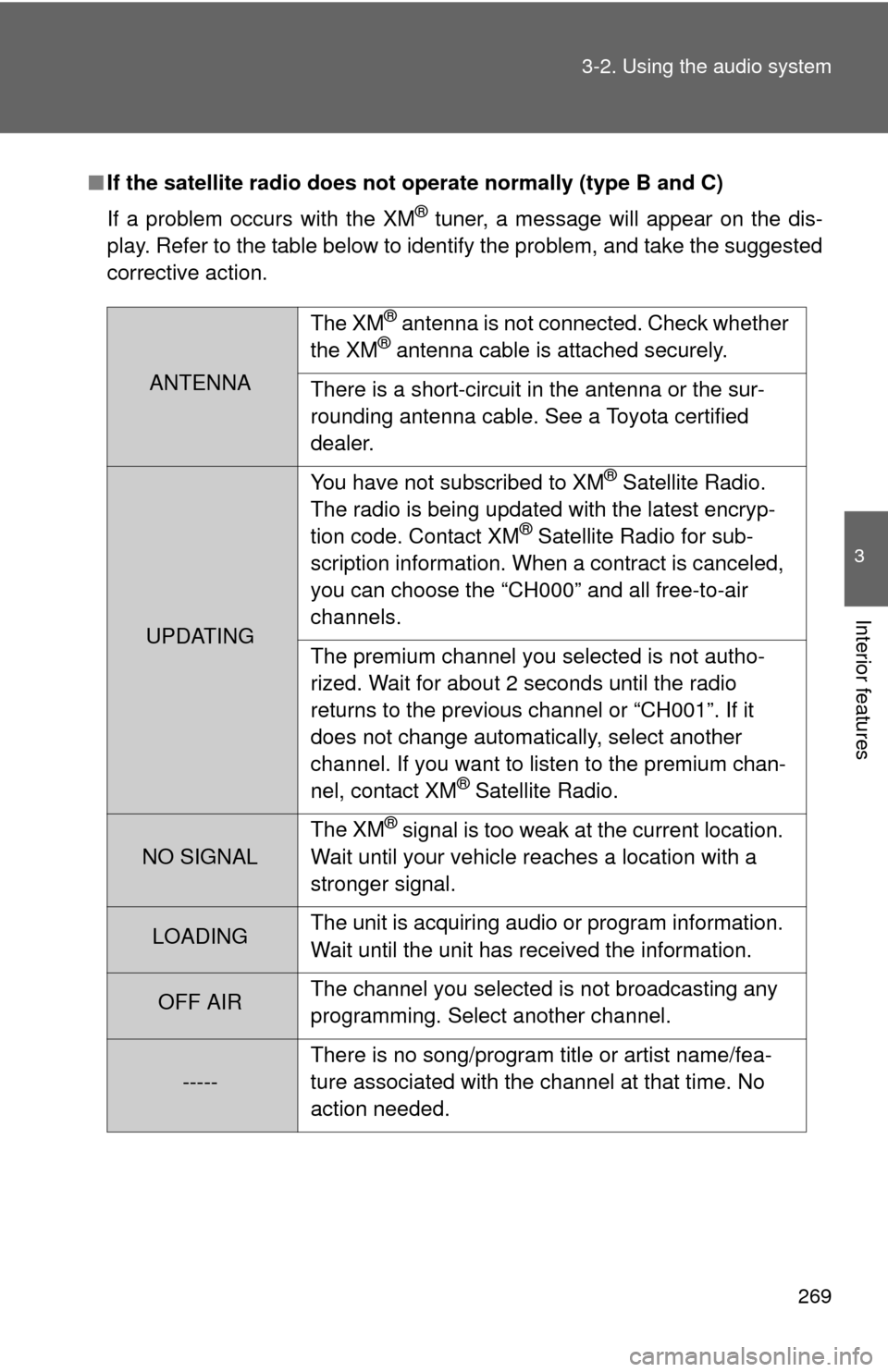
If the satellite radio does not operate normally (type B and C)
If a problem occurs with the XM
® tuner, a message will appear on the dis-
play. Refer to the table below to identify the problem, and take the suggested
corrective action.
ANTENNA The XM
® antenna is not connected. Check whether
the XM® antenna cable is attached securely.
There is a short-circuit in the antenna or the sur-
rounding antenna cable. See a Toyota certified
dealer.
UPDATING You have not subscribed to XM
® Satellite Radio.
The radio is being updated with the latest encryp-
tion code. Contact XM
® Satellite Radio for sub-
scription information. When a contract is canceled,
you can choose the “CH000” and all free-to-air
channels.
The premium channel you selected is not autho-
rized. Wait for about 2 seconds until the radio
returns to the previous channel or “CH001”. If it
does not change automatically, select another
channel. If you want to listen to the premium chan-
nel, contact XM
® Satellite Radio.
NO SIGNAL The XM
® signal is too weak at the current location.
Wait until your vehicle reaches a location with a
stronger signal.
LOADING The unit is acquiring audio or program information.
Wait until the unit has received the information.
OFF AIRThe channel you selected is not broadcasting any
programming. Select another channel.
-----There is no song/program title or artist name/fea-
ture associated with the channel at that time. No
action needed.
Page 292 of 592
292
3-2. Using the audio system
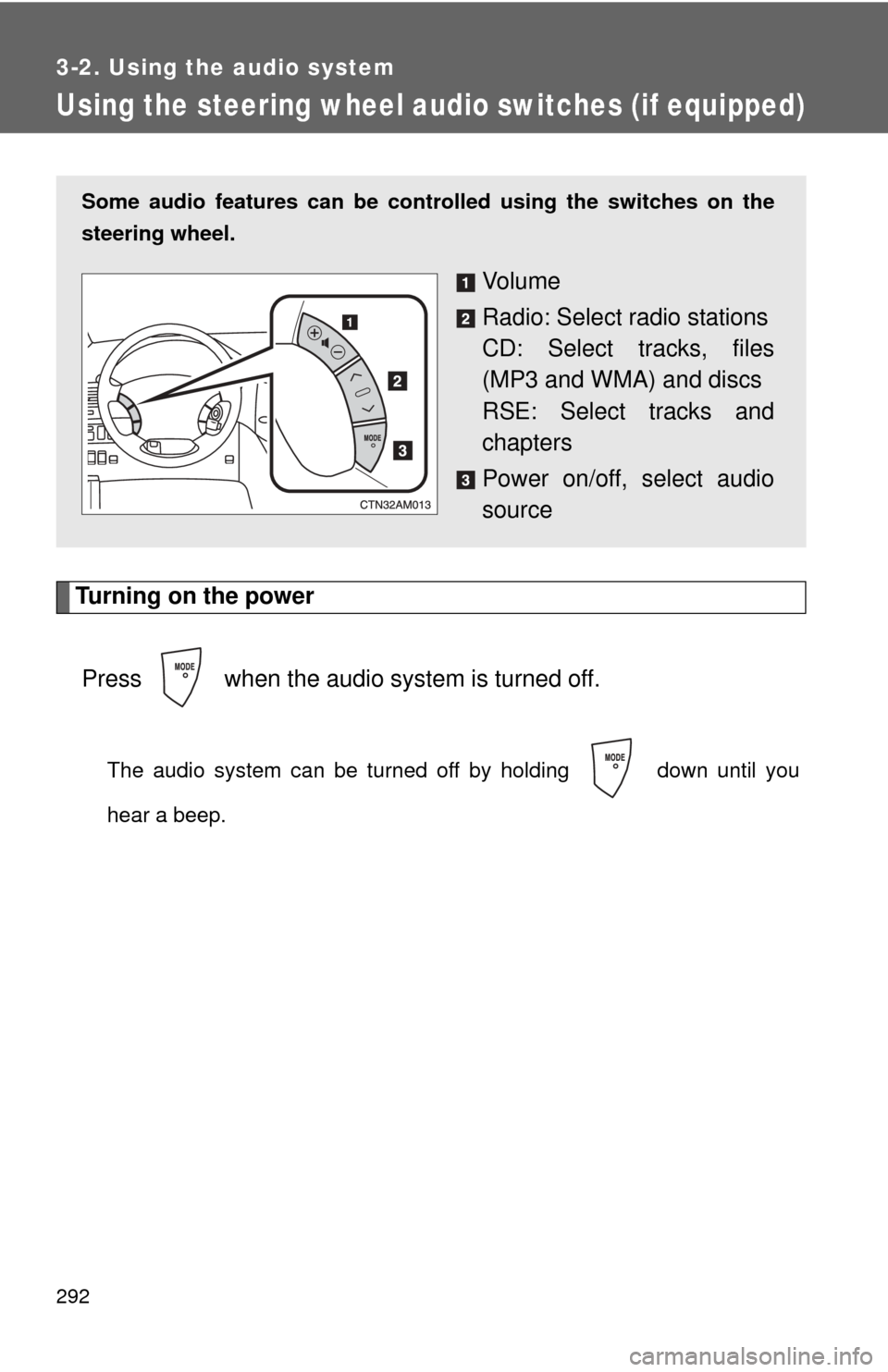
Using the steering wheel audio switches (if equipped)
Turning on the powerPress when the audio system is turned off.
The audio system can be turned off by holding down until you
hear a beep.
Some audio features can be cont rolled using the switches on the
steering wheel.
Vo l u m e
Radio: Select radio stations
CD: Select tracks, files
(MP3 and WMA) and discs
RSE: Select tracks and
chapters
Power on/off, select audio
source
Page 297 of 592
297
3-3. Using the rear audio system
3
Interior features
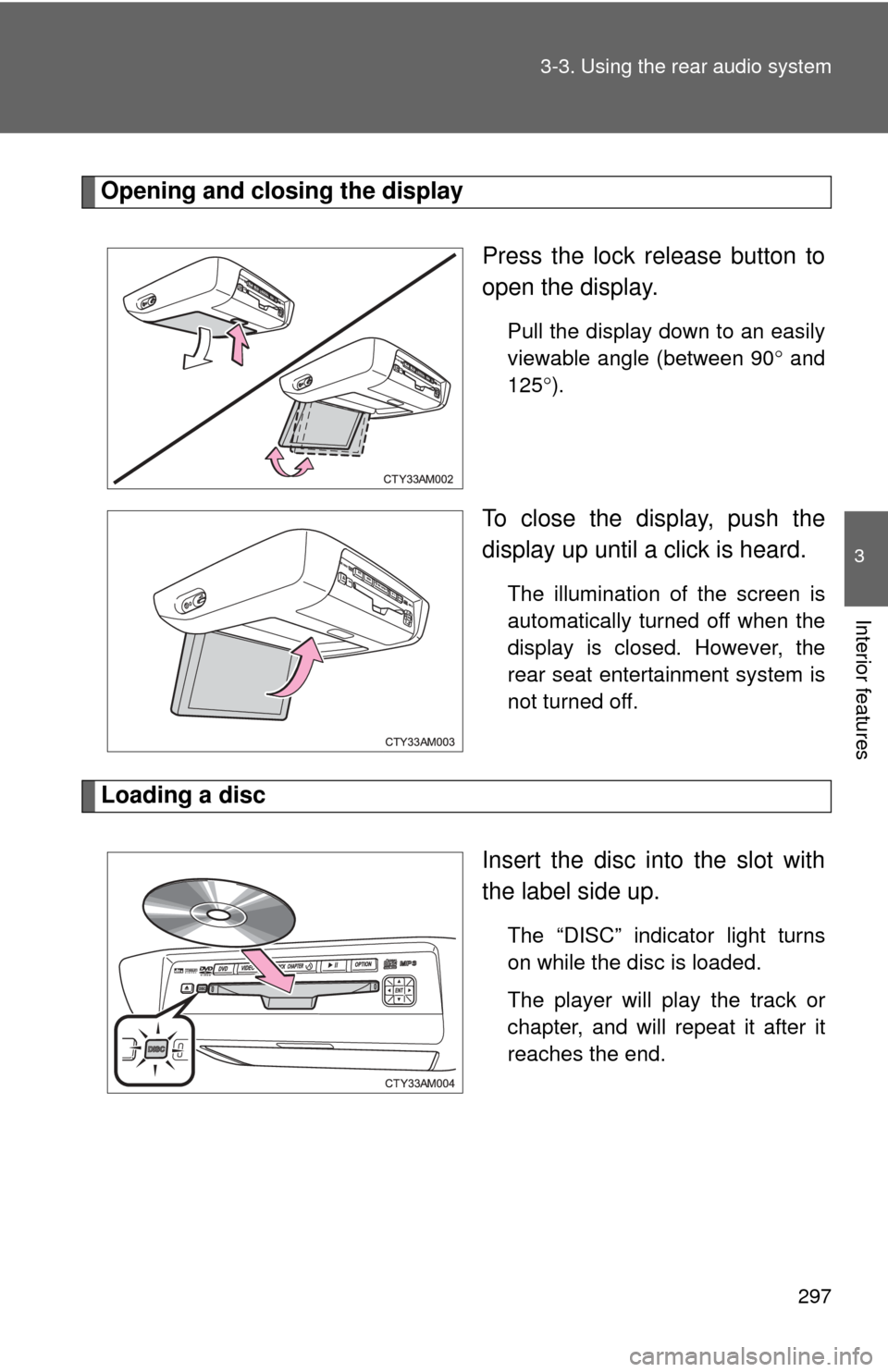
Opening and closing the display
Press the lock release button to
open the display.
Pull the display down to an easily
viewable angle (between 90 and
125 ).
To close the display, push the
display up until a click is heard.
The illumination of the screen is
automatically turned off when the
display is closed. However, the
rear seat entertainment system is
not turned off.
Loading a disc
Insert the disc into the slot with
the label side up.
The “DISC” indicator light turns
on while the disc is loaded.
The player will play the track or
chapter, and will repeat it after it
reaches the end.