DVD
Copy protection ............................. 167
Disc ............................................... 167
Selecting atrack ............................ 176
DVD audio
Operation (on-board computer) .....235
DVD playbac kconditions ................. 191
DVD video Operating (on-board computer) .....236
Dynamic route guidance ................... 119
Switching on/off ........................... 119
TMC/TMCPro ................................ 119E
EASY-ENTRY feature .........................207
Activating/deactivating (on-
board computer) ............................ 240
EASY-EXIT feature ............................. 207
Crash-responsive ........................... 207
EBD
Display message ............................ 299
EBV (electronic brake force distri-
bution) .................................................. 49
Electronic brake force distribution See EBV ........................................... 49
Electronic Stability Program
see ESP ®
Electronic Traction Support see ETS
Emergency call 999 or 112 ..............129
Emergency key element ...................321
Lost ............................................... 320
Emergency spare wheel
Inflating ......................................... 333
Stowing .......................................... 334
Technical data ............................... 355
Emergency unlocking
Boot ............................................... 322
Vehicle .......................................... .322
Engine
Running irregularl y......................... 315
Starting .................................. 202, 220
Starting problems ..........................315
Starting the engine with the key ....220
Starting with KEYLESS GO .............220
Starting with the key ..................... .220
Stopping ........................................ 222Engine diagnostics warning lamp
....310
Engine electronics .............................346
Malfunction ................................... .315
Engine number .................................. 349
Engine oil ........................................... 350
Capacities ...................................... 269
Checking the oil level (dipstick) .....269
Consumption ................................. 269
Display mes-
sag e....................................... 302, 303
Filler neck ...................................... 269
Temperature display (on-board
computer) ...................................... 241
Temperature gauge ........................ 229
Topping up ..................................... 269
Ensemble ........................................... 161
ESP ®
(Electronic Stability Pro-
gram) .................................................... 47
Activating/deactivating .............47, 48
AMG menu (on-board computer) ...241
Warning lamp ..................47, 308, 309
ETS (Electronic Traction Support) ...... 48
Example of operation ..........................66
Exterior lighting Delayed switch-off (on-board
computer) ...................................... 239
Exterior mirrors
Adjusting ....................................... 208
Anti-dazzle mode (automatic) ........209
Folding in/ou t(automatically) .......209
Folding in/ou t(electrically) ...........208
Folding in whe nlocking (on-board
computer) ...................................... 240
Malfunction ................................... .318
Parking position ............................. 209
Resetting ....................................... 209
Storing settings ............................. 210
Exterior view
Overview .......................................... 22
External authorisation ........................77
External data Deleting (convenience telephone) .137
Importing (convenience tele-
phone )................................... 136, 155
External devices (Media Interface)
Connecting .................................... 1848
Index BA 197 ECE RE 2010/6a; 1; 2, en-GB
sabbae uV ersion: 3.0.3.6
2010-05-07T14:19:43+02:00 - Seite 8
X
Push release lever 0001down completely.
The steering column is unlocked.
X Adjust the steering wheel to the desired
position.
X Push release lever 0001up completely.
The steering column is locked.
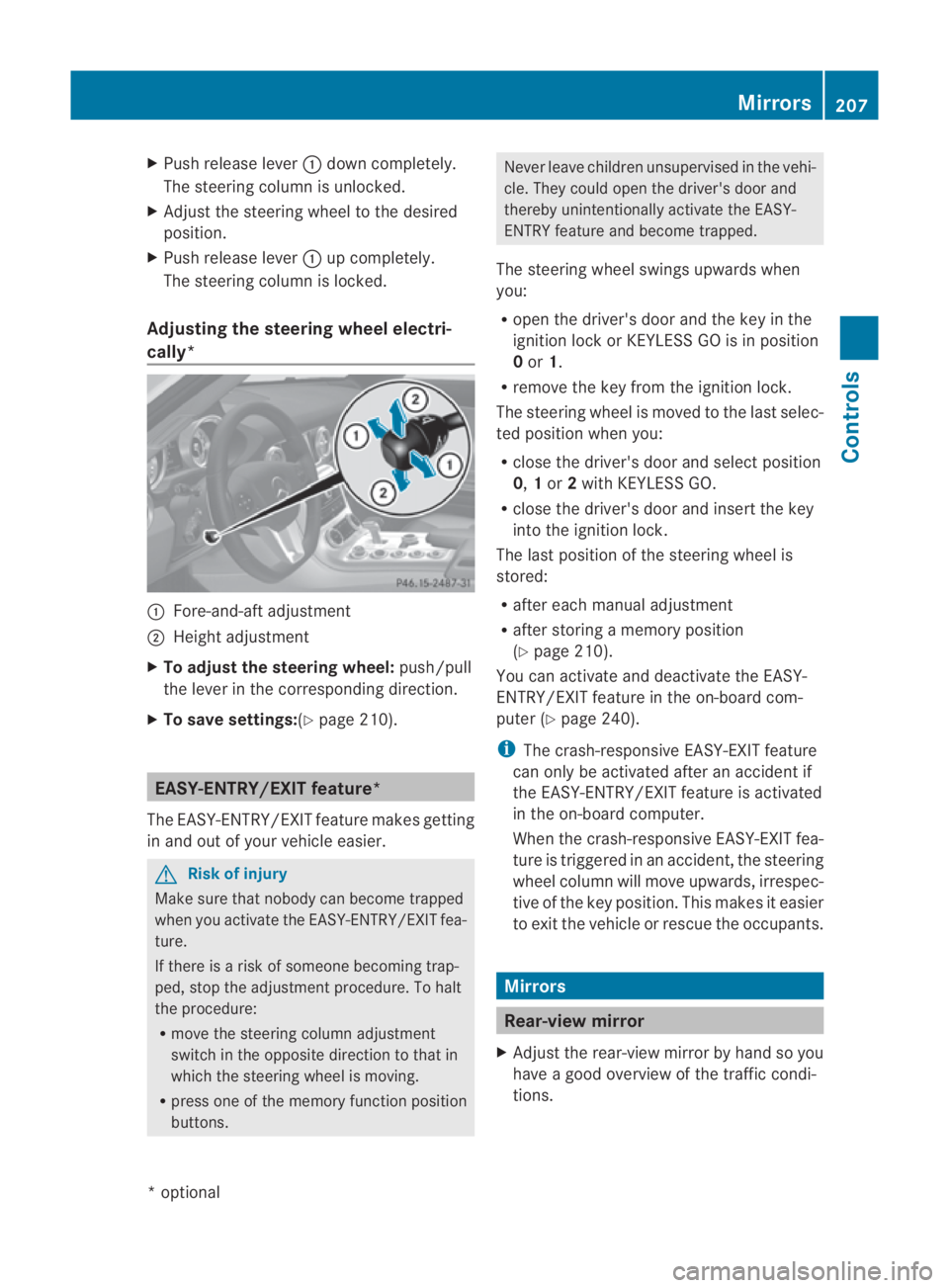
Adjusting the steering wheel electri-
cally* 0001
Fore-and-aft adjustment
0002 Height adjustment
X To adjust the steering wheel: push/pull
the lever in the corresponding direction.
X To save settings: (Ypage 210). EASY-ENTRY/EXIT feature*
The EASY-ENTRY/EXIT feature makes getting
in and out of your vehicle easier. G
Risk of injury
Make sure that nobody can become trapped
when you activate the EASY-ENTRY/EXIT fea-
ture.
If there is a risk of someone becoming trap-
ped, stop the adjustmen tprocedure. To halt
the procedure:
R move the steering column adjustment
switch in the opposite directio nto that in
which the steering wheel is moving.
R press one of the memory function position
buttons. Never leave children unsupervised in the vehi-
cle. They could open the driver's door and
thereby unintentionally activate the EASY-
ENTRY feature and become trapped.
The steering wheel swings upwards when
you:
R open the driver's door and the key in the
ignition lock or KEYLESS GO is in position
0or 1.
R remove the key from the ignition lock.
The steering wheel is moved to the last selec-
ted position when you:
R close the driver's door and select position
0, 1or 2with KEYLESS GO.
R close the driver's door and insert the key
into the ignition lock.
The last position of the steering wheel is
stored:
R after each manual adjustment
R after storing a memory position
(Y page 210).
You can activate and deactivate the EASY-
ENTRY/EXIT feature in the on-board com-
puter (Y page 240).
i The crash-responsive EASY-EXIT feature
can only be activated after an accident if
the EASY-ENTRY/EXIT feature is activated
in the on-board computer.
When the crash-responsive EASY-EXIT fea-
ture is triggered in an accident, the steering
wheel column will move upwards, irrespec-
tive of the key position. This makes it easier
to exit the vehicle or rescue the occupants. Mirrors
Rear-view mirror
X Adjust the rear-view mirror by hand so you
have a good overview of the traffic condi-
tions. Mirrors
207Controls
*optional
BA 197 ECE RE 2010/6a; 1; 2, en-GB
sabbaeu
Version: 3.0.3.6 2010-05-07T14:19:43+02:00 - Seite 207 Z