2010 MERCEDES-BENZ SLS COUPE change wheel
[x] Cancel search: change wheelPage 9 of 361
Trim strips
..................................... 285
Windows ........................................ 283
Wiper blades .................................. 283
Care products .................................... 280
CD Cop yprotection ............................. 167
Disc ............................................... 167
General information .......................167
Multisession .................................. 166
Playback options ........................... 178
Selecting amedium ....................... 175
Selecting atrack ............................ 176
CD/DVD
Ejecting .......................................... 170
Loading .......................................... 168
CD player/CD changer
Operating (on-board computer) .....235
Central locking
Key ................................................ 200
Central unlocking
Key ................................................ 200
Centre
Entering ........................................... 98
Centre console
Lowe rsection .................................. 30
Uppe rsection .................................. 29
Changing awheel
see Flat tyre
Changing bulbs
Headlamps .................................... .323
Tai llamp ........................................ 324
Changing direction ............................112
Announcement phase ....................112
Change of direction phase .............112
Preparation phase .........................112
Character entry ................................... 64
Charge maintenance socket ............264
Children In the vehicle ................................... 40
Restraint system .............................. 41
Child seat
Automatic recognition .....................42
Automatic recognition (malfunc-
tion) ............................................... 307
Child sea tlock ................................. 45
Display message ............................ 291Recommendations
...........................45
Suitable positions ............................ 44
Child seat lock ..................................... 45
Cigarette lighter ................................ 260
Cleaning agents ................................. 280
Cockpit Overview .......................................... 23
COMAND
Basi cfunction s................................ 67
Components .................................... 55
Switching on/off .............................. 67
COMAND controller .............................59
COMAND control panel .......................57
COMAND display ................................. 55
Cleaning ......................................... 284
Cleaning instructions .......................57
Setting ............................................. 72
COMAND operating system ................ 55
Constant headlamp mode see Daytime driving lights ..............238
Control menu
Showing/hiding ............................. 193
Convenience closing feature ............219
Convenience opening feature ..........219
Coolant Checking the leve l......................... 269
Display message ............................ 299
Mixture ratio .................................. 351
Copy protection (CD/DVD) ...............167
Country Selecting .......................................... 93
Crosshair
Hiding .............................................. 84
Crosshair position
Saving ...................................... 84, 127
Cruise control .................................... 243
Display message ............................ 293
Cup holder ......................................... 258
Current fuel consumption (on-
board computer) ............................... 233 D
DAB Sub-programme ............................. 165
DAB radio mode
Switching to ................................... 1586
Index BA 197 ECE RE 2010/6a; 1; 2, en-GB
sabbae uV ersion: 3.0.3.6
2010-05-07T14:19:43+02:00 - Seite 6
Page 22 of 361
G
Risk of accident and injury
Some safety systems only function whe nthe
engine is running. You should therefore never
switch off the engine when driving. Otherwise,
the safety systems of your vehicle may not
function correctly and as a result will no lon-
ger protect you and other persons as inten-
ded. In addition, there is a risk that you may
lose control of your vehicle and thus cause an
accident. G
Risk of accident and injury
Work carried out incorrectly, or alterations
made to the vehicle, e.g. re-routing of cables
under coverings, could cause the safety sys-
tems of your vehicle to stop working properly.
The safety systems would thus no longer pro-
tect you and other persons as intended. In
addition, there is a risk that you may lose con-
trol of your vehicle and thus cause an acci-
dent.
All work and alterations to the vehicle, e.g.
installations or modifications, should there-
fore be carried out at aqualified specialist
workshop. G
Ris
kofa ccident
If you drive ove robstacles at high speed or if
the vehicle bottoms out in rough terrain, it
could cause heavy impacts to the vehicle
underbody, tyres or wheels. This could cause
your vehicle to be damaged, which in turn
might lead to an accident. This also applies to
vehicles which are equipped with underbody
protection.
You should therefore drive over obstacles
slowly. Preven tthe vehicle from bottoming
out when driving off-road and if necessary,
have your vehicle inspected at a qualified spe-
cialist workshop. G
Risk of accident
If work on electronic equipment and its soft-
ware is carried out incorrectly, this equipment
could stop working. The electronic systems
are networked via interfaces. Tampering with these electronic systems could cause mal-
functions in systems which have not been
modified. Malfunctions such as these can
seriously jeopardise the vehicle's operating
safety and therefore your own safety.
You should therefore have all work and mod-
ifications to electronic components carried
out at a qualified specialist workshop. Vehicle registration
Mercedes-Benz may ask its Service Centres
to carry out technical inspections on certain
vehicles to improve their quality or safety.
If you did not purchase your vehicle from an
authorised specialist dealer and your vehicle
has never been inspected at a Mercedes-
Benz Service Centre, it is possible that your
vehicle is not registered in your name with
Mercedes-Benz. Mercedes-Benz can only
inform you about vehicle checks if it has your
registration data.
It is advisable to register your vehicle with a
Mercedes-Benz Service Centre.
Inform Mercedes-Ben zas soon as possible
abouta ny change in address or vehicle own-
ership. Correc
tuse
Observe the following information when using
your vehicle:
R the safety notes in this manual
R the "Technical data” section in this manual
R national road traffic regulations
R national road traffic licensing regulations G
Risk of injury
Various warning stickers are affixed to your
vehicle. Their purpose is to draw your atten-
tion, and the attention of others, to various
dangers. Therefore, do not remove any warn-
ing stickers unless the sticker clearly states
that you may do so. Introduction
19BA 197 ECE RE 2010/6a; 1; 2, en-GB
sabbaeu Version: 3.0.3.6 2010-05-07T14:19:43+02:00 - Seite 19 Z
Page 70 of 361
X
To select the desire dstation: turn002800130029
or slide 001F0013000D.
X To confirm your selection: press0017.
The selected statio nis played. The radio
basic display appears. Basic functions of COMAND
i You can find the components of COMAND
under (Y page 55). Examples for operation
can be found under (Y page 63).
Switching COMAND on/off X
Press the 0002control knob.
The cover folds open and the COMAND dis-
play extends. Awarning message appears.
COMAND calls up the previously selected
menu.
i If you switch off COMAND, playbac kof
the current audio or vide osource will also
be switched off.
Mute function X
To switch on/off: press the000Bbutton.
The sound from the respective audio or
video source is switched on or muted.
i When the sound is off, the system dis-
plays the 0026symbol in the status line.
When you change the audio or video
source, or adjust the volume, sound auto-
matically switches on again.
i Even if the sound is switched off you will
still hear traffic and navigation system
announcements.
Switching off Traffic Programme and nav-
igation announcements completely
X Traffic announcements: press and hold
the 000Bbutton until the 0021icon in the sta-
tus line of the COMAND display
(Y page 55) goes out.
A confirmation tone sounds. X
Navigation announcements: press the
000B button during the announcement.
i The navigation announcementsa re active
again if you start a new route guidance or
if you switch COMAND on again.
Adjusting the volume X
To set: turn the 0002control knob.
or
X Press the 0005or0009 button on the mul-
tifunction steering wheel.
The volume of the currently selected audio
or video source changes.
Volume of traffic and navigation
announcements
You can adjust the volume of traffic and nav-
igation announcements independently of the
volume of the audio or video source.
During traffic or navigation announcements:
X Turn the 0002control knob.
or
X Press the 0005or0009 button on the mul-
tifunction steering wheel.
Phone calls
You can adjust the volume for hands-free
mode during a telephone call:
X Turn the 0002control knob.
or
X Press the 0005or0009 button on the mul-
tifunction steering wheel.
Adjusting the soun dsettings You can make various sound settings for the
differen
taudio and video sources .You can
call up the respective sound menu from the
menu of the desired mode.
Examples:
R Audio0004Radio0004 Sound
R Audio0004Disc0004Sound At
ag lance
67COMAND APS
BA 197 ECE RE 2010/6a; 1; 2, en-GB
sabbaeu Version: 3.0.3.6 2010-05-07T14:19:43+02:00 - Seite67 Z
Page 142 of 361
Changing the smar
tspelle rlanguage
X Select 0014.
X Select the desired language.
Changing the smart speller character set
X Select 0001.
Depending on the previous setting, you will
change to letters with numbers or with spe-
cial characters.
Selecting an entry directly from the list
X If the lis tis displayed, switch to the smart
speller first.
X Turn 002800130029or slide 001F0013000Duntil the desired
entry is highlighted.
X To confirm you rselection: press0017.
Using the multifunction steering wheel
X Use 0008 or000E to selec tthe Tel menu.
X Use 000F or000C or0020 to call up the phone
book.
X Press the 000For000C button or press and
hold 0020until the desired entryi s highligh-
ted.
i If you press the 000For000C button for
longer than a second, the on-board com-
puter shows the names in rapid scroll.
Rapid scroll speeds up after four seconds.
It stops when you release the button again
or the end of the list is reached.
Selecting sub-entries
You can tell that an entry has several tele-
phone numbers by the 0005icon.
X Select a phone book entry with the 0005icon
and press 0017.
The sub-entries appear. The 0005icon
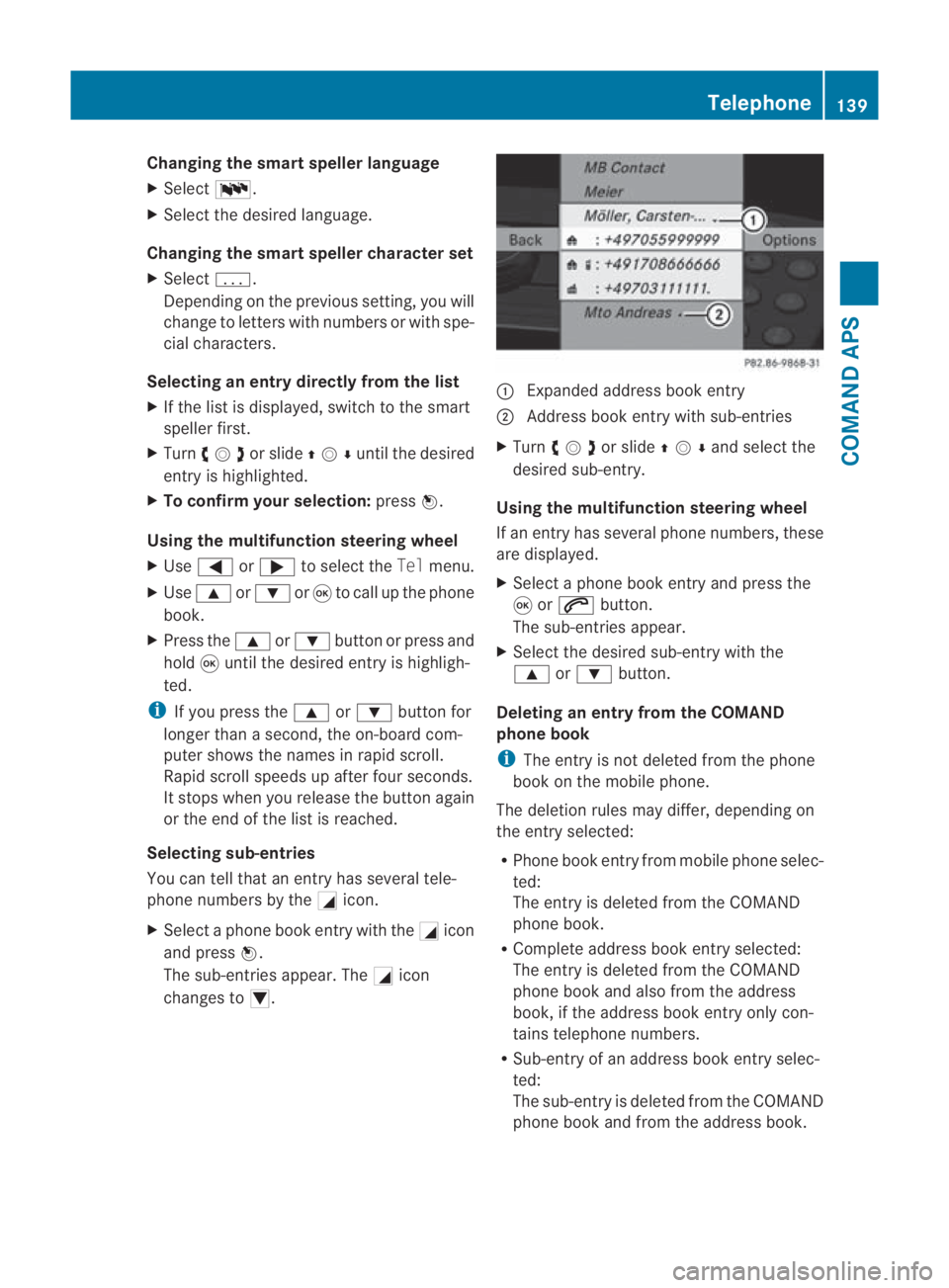
changes to 0006. 0001
Expanded address book entry
0002 Address book entry with sub-entries
X Turn 002800130029or slide 001F0013000Dand selec tthe
desired sub-entry.
Using the multifunction steering wheel
If an entry has several phone numbers, these
are displayed.
X Select a phone book entry and press the
0020 or001C button.
The sub-entries appear.
X Select the desired sub-entry with the
000F or000C button.
Deleting an entry from the COMAND
phone book
i The entry is not deleted from the phone
book on the mobile phone.
The deletion rules may differ, depending on
the entry selected:
R Phone book entry from mobile phone selec-
ted:
The entry is deleted from the COMAND
phone book.
R Complete address book entry selected:
The entry is deleted from the COMAND
phone book and also from the address
book, if the address book entry only con-
tains telephone numbers.
R Sub-entry of an address book entry selec-
ted:
The sub-entry is deleted from the COMAND
phone book and from the address book. Telephone
139COMAND APS
BA 197 ECE RE 2010/6a; 1; 2, en-GB
sabbaeu Version: 3.0.3.6 2010-05-07T14:19:43+02:00 - Seite 139 Z
Page 198 of 361
X
To stop playback: select0010againwhile
playback is interrupted.
or
X Select 0010twice in quick succession dur-
ing playback.
Selection is at 000D.
X To restart playback: select000D.
Playback restarts from the beginning.
Pause function X
Show the menu system (Y page 194).
X To pause playback: select0007.
The 0007 display changes to 000D.
X To resume playback: select000D.
The menu system is hidden.
Selecting ascene/chapter X
To skip forwards/back: turn002800130029 or slide
002B0013002C .
or
X Press the 0001or0002 buttonont he con-
trol panel.
The control menu (Y page 194) appears for
approximately 8seconds.
Using the multifunction steering wheel
X In COMAND, switch to video DVD mode
(Y page 193).
X Press 0008or000E to select the Audio
menu.
X Press 000For000C to select a scene/
chapter.
Selecting afilm/title i
This function is only available if the DVD
is divided into several films/titles.
X Show the menu syste m(Ypage 194).
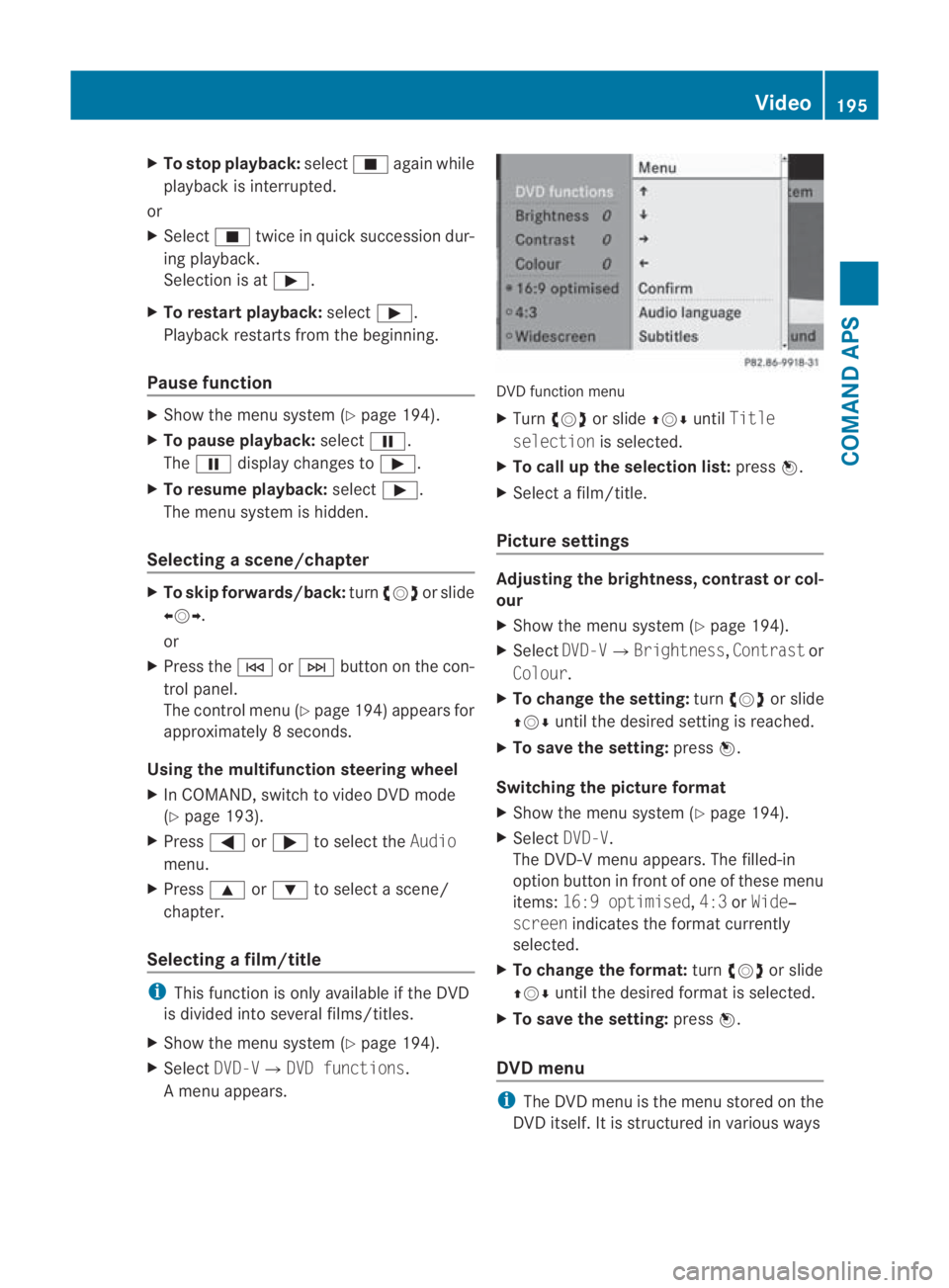
X Select DVD-V0004 DVD functions.
Am enu appears. DVD function menu
X
Turn 002800130029 or slide 001F0013000DuntilTitle
selection is selected.
X To call up the selection list: press0017.
X Select a film/title.
Picture settings Adjusting the brightness, contrast or col-
our
X
Show the menu system (Y page 194).
X Select DVD-V0004Brightness, Contrastor
Colour.
X To change the setting: turn002800130029 or slide
001F0013000D until the desired setting is reached.
X To save the setting: press0017.
Switching the picture format
X Show the menu system (Y page 194).
X Select DVD-V.
The DVD-V menu appears. The filled-in
option button in fron tofone of these menu
items: 16:9 optimised ,4:3 orWide‐
screen indicates the format currently
selected.
X To change the format: turn002800130029 or slide
001F0013000D until the desired format is selected.
X To save the setting: press0017.
DVD menu i
The DVD menu is the menu stored on the
DVD itself. It is structured in various ways Video
195COMAND APS
BA 197 ECE RE 2010/6a; 1; 2, en-GB
sabbaeuV ersion: 3.0.3.6
2010-05-07T14:19:43+02:00 - Seite 195 Z
Page 226 of 361
If you open the driver's or front-passenger
door during this period, the transmission
automatically shifts to
P.
i The engine can be turned off while the
vehicle is in motion by pressing and holding
the Start/Stop button for three seconds.
Using the key !
Do not remove the key while the vehicle
is in motion. At low speeds, park position
P will otherwise be engaged automatically.
This can damage the transmission.
X Use the button on the centre console to
shift the transmission to P.
X Turn the key to position 0in the ignition
lock (Y page 203) and remove it.
The immobiliser/parking lock is activated.
i If you set the selector lever to Nbefore
switching off the engine, the transmission
remains in Nfor approximately 30 minutes.
While the key is in the ignition lock, the
transmission remains in Neven if you open
the driver's or front-passenger door. AMG SPEEDSHIFT DCT7
-speedsports
transmission Notes on the transmission
G
Ris
kofa ccident
Do no tchange down for additional engine
braking on a slippery road surface. This could
cause the drive wheels to lose their grip and
the vehicle could skid. This could cause you
to lose control of your vehicle and cause an
accident. Selector lever
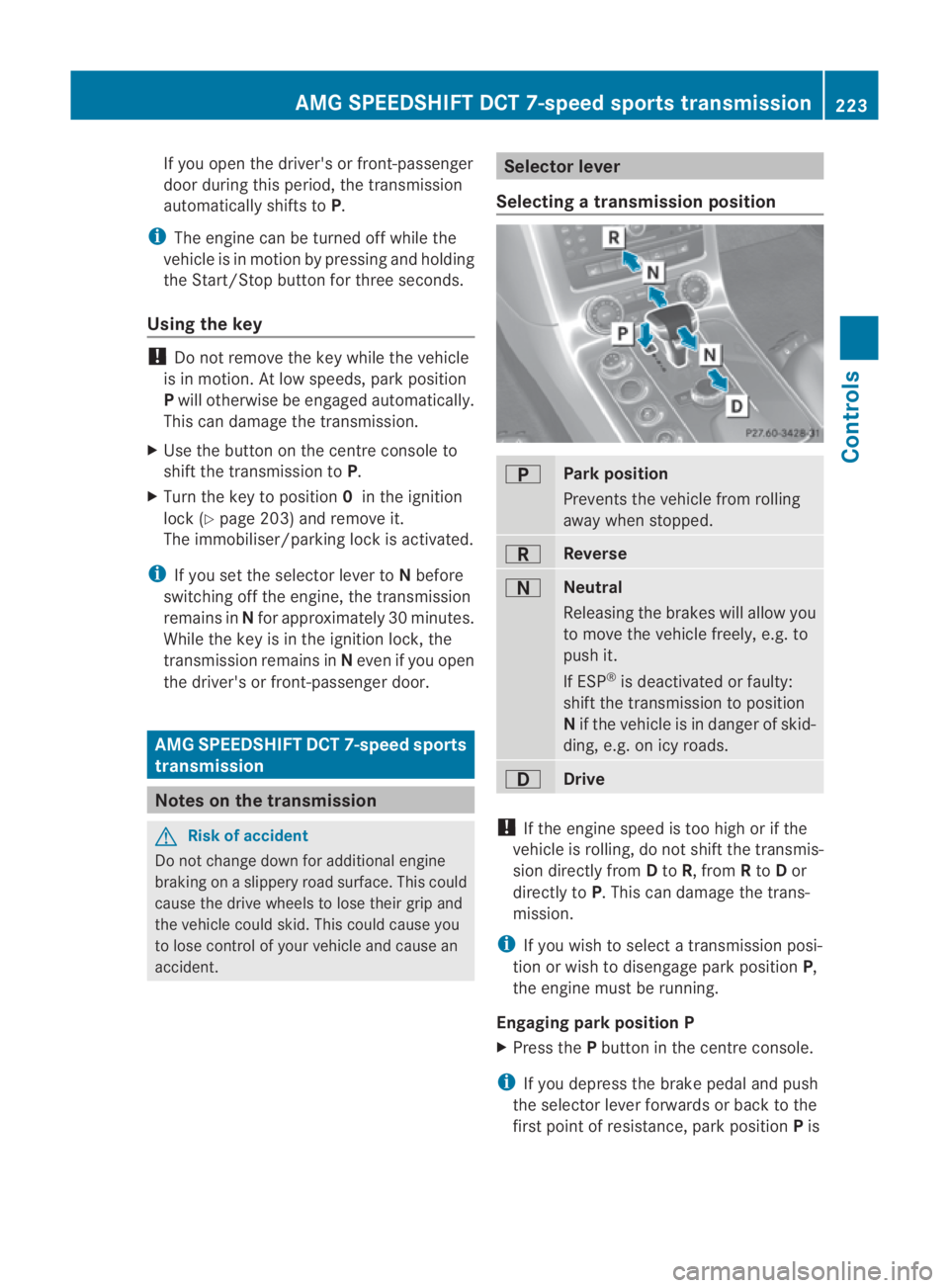
Selecting atransmission position 0002
Park position
Prevents the vehicle fro
mrolling
away when stopped. 0003
Reverse
0001
Neutral
Releasing the brakes will allow you
to move the vehicle freely, e.g. to
push it.
If ESP
®
is deactivated or faulty:
shift the transmission to position
N if the vehicle is in danger of skid-
ding, e.g. on icy roads. 0008
Drive
!
If the engine speed is too high or if the
vehicle is rolling, do not shift the transmis-
sion directly from Dto R, from Rto Dor
directly to P.This can damage the trans-
mission.
i If you wish to select a transmission posi-
tion or wish to disengage park position P,
the engine must be running.
Engaging parkp osition P
X Press the Pbutton in the centre console.
i If you depress the brake pedal and push
the selector lever forwards or back to the
first poin tofresistance, park position Pis AMG SPEEDSHIF
TDCT 7-speed sports transmission
223Controls
BA 197 ECE RE 2010/6a; 1; 2, en-GB
sabbaeuV ersion: 3.0.3.6
2010-05-07T14:19:43+02:00 - Seite 223 Z
Page 230 of 361
gram
S+is activated. ESP ®
Sport remains
activated.
RACE START is immediately deactivated if
you take your foot off the accelerator pedal
during RACE START or if the conditions for
activation are no longer met. The RACE
START not possible orRACE START can‐
celled message appears in the multifunction
display.
i After using it several times in short suc-
cession, RACE START will be unavailable
until a certain distance has been driven. Displays in the instrument cluster
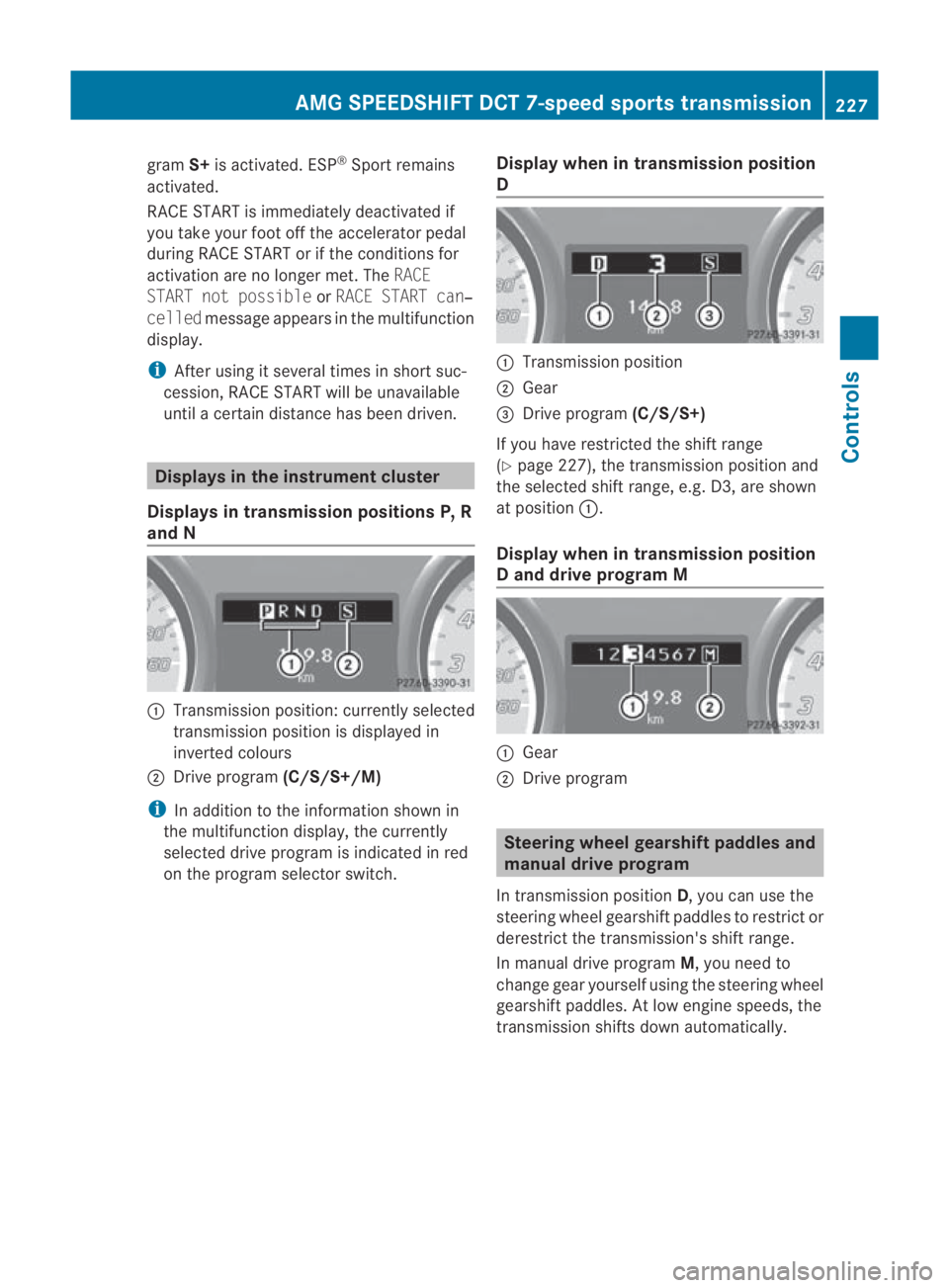
Displays in transmission positions P, R
and N 0001
Transmission position: currently selected
transmission position is displayed in
inverted colours
0002 Drive program (C/S/S+/M)
i In addition to the information shown in
the multifunction display, the currently
selected drive program is indicated in red
on the program selector switch. Display when in transmission position
D 0001
Transmission position
0002 Gear
0015 Drive program (C/S/S+)
If you have restricted the shift range
(Y page 227), the transmission position and
the selected shift range, e.g. D3, are shown
at position 0001.
Display when in transmission position
D and drive program M 0001
Gear
0002 Drive program Steering wheel gearshift paddles and
manual drive program
In transmission position D, you can use the
steering wheel gearshift paddles to restrict or
derestric tthe transmission's shift range.
In manual drive program M, you need to
change gear yourself using the steering wheel
gearshift paddles. At low engine speeds, the
transmission shifts down automatically. AMG SPEEDSHIFT DCT 7-speed sports transmission
227Controls
BA 197 ECE RE 2010/6a; 1; 2, en-GB
sabbaeuVersion: 3.0.3.6 2010-05-07T14:19:43+02:00 - Seite 227 Z
Page 231 of 361
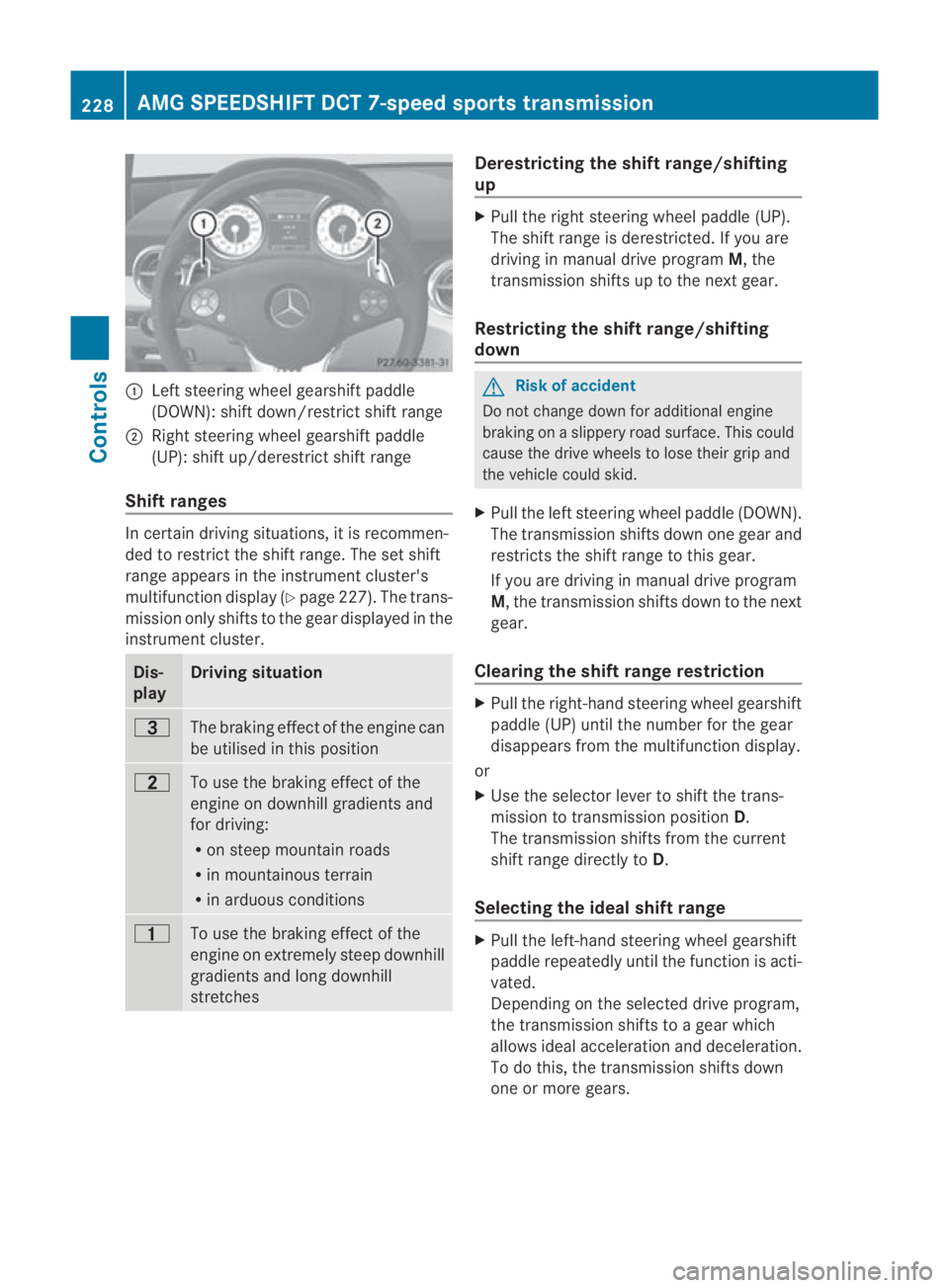
0001
Left steering wheel gearshift paddle
(DOWN): shift down/restrict shift range
0002 Right steering wheel gearshift paddle
(UP): shift up/derestrict shift range
Shift ranges In certain driving situations, it is recommen-
ded to restrict the shift range. The set shift
range appears in the instrument cluster's
multifunction display (Y page 227). The trans-
missio nonly shifts to the gear displayed in the
instrument cluster. Dis-
play Driving situation
0007
The braking effect of the engine can
be utilised in this position
000A
To use the braking effect of the
engine on downhill gradients and
for driving:
R
on steep mountai nroads
R in mountainous terrain
R in arduous conditions 000B
To use the braking effect of the
engine on extremely steep downhill
gradients and long downhill
stretches Derestricting the shift range/shifting
up
X
Pull the right steering wheel paddle (UP).
The shift range is derestricted. If you are
driving in manual drive program M, the
transmission shifts up to the next gear.
Restricting the shift range/shifting
down G
Risk of accident
Do not change down for additional engine
braking on a slippery road surface. This could
cause the drive wheels to lose their grip and
the vehicle could skid.
X Pull the left steering wheel paddle (DOWN).
The transmission shifts down one gear and
restricts the shift range to this gear.
If you are driving in manual drive program
M, the transmission shifts down to the next
gear.
Clearing the shift range restriction X
Pull the right-hand steering wheel gearshift
paddle (UP) until the number for the gear
disappears from the multifunction display.
or
X Use the selector lever to shift the trans-
mission to transmission position D.
The transmission shifts from the current
shift range directly to D.
Selecting the ideal shift range X
Pull the left-hand steerin gwheel gearshift
paddle repeatedly until the function is acti-
vated.
Depending on the selected drive program,
the transmission shifts to a gear which
allows ideal acceleration and deceleration.
To do this, the transmission shifts down
one or more gears. 228
AMG SPEEDSHIFT DCT 7-speed sports transmissionControls
BA 197 ECE RE 2010/6a; 1; 2, en-GB
sabbaeu
Version: 3.0.3.6 2010-05-07T14:19:43+02:00 - Seite 228