Page 35 of 76
SETUP
327
5. When two or less numbers in total
are registered to this contact, this
screen is displayed.
When you want to add a number to this
contact, touch “Yes”.
�Editing the phonebook data
You can register the phone number in
“Phone#1”, “Phone#2” and “Phone#3”
separately.
1. Touch “Edit Contacts”.
2. Touch the data you want to edit.
Page 36 of 76
SETUP
328
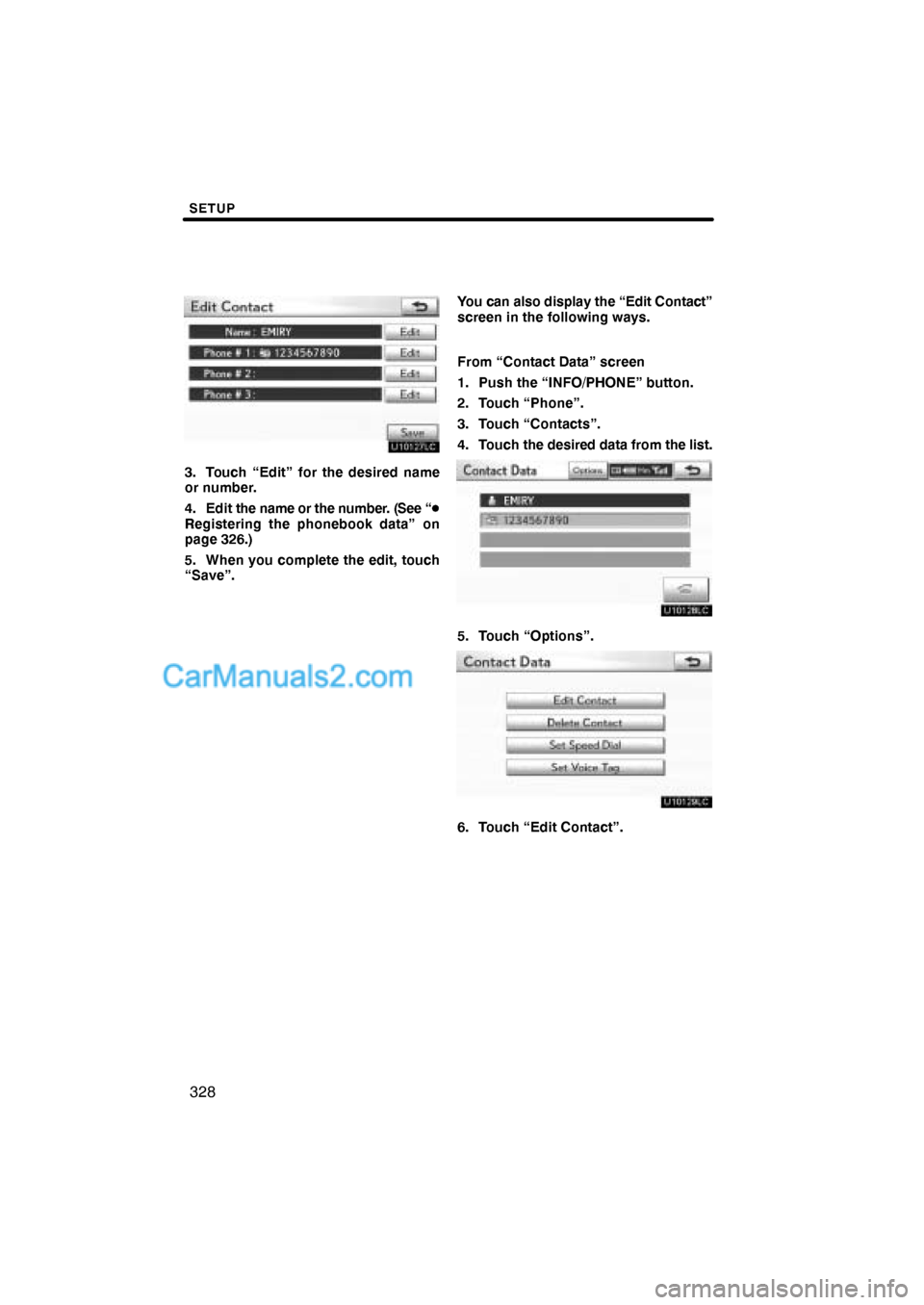
3. Touch “Edit” for the desired name
or number.
4. Edit the name or the number. (See “�
Registering the phonebook data” on
page 326.)
5. When you complete the edit, touch
“Save”.You can also display the “Edit Contact”
screen in the following ways.
From “Contact Data” screen
1. Push the “INFO/PHONE” button.
2. Touch “Phone”.
3. Touch “Contacts”.
4. Touch the desired data from the list.
5. Touch “Options”.
6. Touch “Edit Contact”.
Page 37 of 76
SETUP
329
From “Call History” screen
1. Push the “INFO/PHONE” button.
2. Touch “Phone”.
3. Touch “Call History”.
4. Touch the desired number from the
list.
5. Touch “Add Contact” or “Update
Contact”.
6. In case that you have touched “Up-
date Contact”, this screen is displayed.
Touch the desired data from the list.
�Deleting the phonebook data
You can delete the data.
When you release your car, delete all
your data on the system.
1. Touch “Delete Contacts”.
2. Touch the desired data or touch
“Select All”, then touch “Delete”.
You can touch multiple data and delete
them at the same time.
Page 38 of 76
SETUP
330
3. Touch “Yes”.You can also delete it in the following
way.
1. Push the “INFO/PHONE” button.
2. Touch “Phone”.
3. Touch “Contacts”.
4. Touch the desired data from the list.
5. Touch “Options”.
6. Touch “Delete Contact”.
Page 39 of 76
SETUP
331
7. Touch “Yes”.
INFORMATION
When you delete a Bluetooth�
phone, the phonebook data will be
deleted at the same time.
“Speed dials setting” is accessed from
the “Speed Dials” screen.
1. Push the “SETUP” button.
2. Touch “Phone”.
3. Touch “Phonebook”.
4. Touch “Manage Speed Dials”.
Please refer to the following pages for
each setting.
— Speed dials setting
Page 40 of 76
SETUP
332
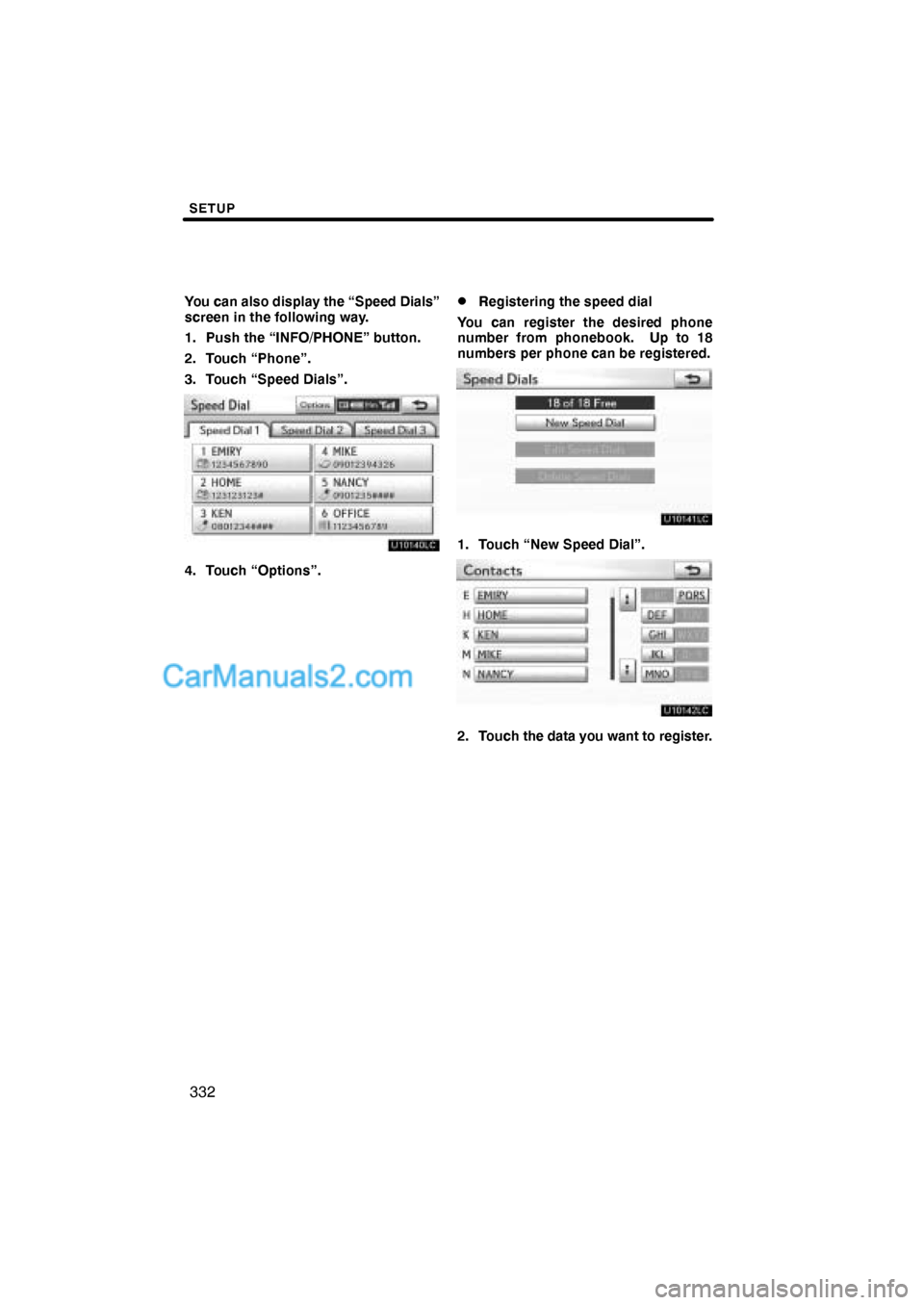
You can also display the “Speed Dials”
screen in the following way.
1. Push the “INFO/PHONE” button.
2. Touch “Phone”.
3. Touch “Speed Dials”.
4. Touch “Options”.
�Registering the speed dial
You can register the desired phone
number from phonebook. Up to 18
numbers per phone can be registered.
1. Touch “New Speed Dial”.
2. Touch the data you want to register.
Page 41 of 76
SETUP
333
3. Touch the desired phone number.
4. Touch the button you want to regis-
ter in.
5. If you touch a button you registered
before, this screen is displayed.
Touch “Yes” if you want to replace it.
6. When this screen is displayed, the
operation is complete.
Page 42 of 76
SETUP
334
You can also register the speed dial in
the following ways.
From “Speed Dial” screen
1. Push the “INFO/PHONE” button.
2. Touch “Phone”.
3. Touch “Speed Dials”.
4. Touch “(add new)”.
5. Touch “Yes” to set new speed dial.
6. Touch the data you want to register.
7. Touch the desired phone number.