2010 JAGUAR XFR pinpoint
[x] Cancel search: pinpointPage 202 of 3039

DTC Description Possible Causes Action B11A9-23 Tone Button - Signal stuck
low
Button stuck
down/jammed
Integrated control
panel failure
Check for stuck down/jammed button. Check and
install a new integrated control panel as required B121F-23
Climate Switch - Signal
stuck low
Button stuck
down/jammed
Integrated control
panel failure
Check for stuck down/jammed button. Check and
install a new integrated control panel as required U0010-88
Medium Speed CAN
Communication Bus - Bus
off
Bus off
Carry out any pinpoint tests associated with this DTC
using the manufacturer approved diagnostic system U0140-00
Lost Communication With
Body Control Module - No
sub type information
Missing message
from CJB
Carry out any pinpoint tests associated with this DTC
using the manufacturer approved diagnostic system U0142-00
Lost Communication With
Body Control Module "B" -
No sub type information
Missing message
from RJB
Carry out any pinpoint tests associated with this DTC
using the manufacturer approved diagnostic system U0155-00
Lost Communication With
Instrument Panel Cluster
(IPC) Control Module - No
sub type information
Missing message
from instrument
cluster
Carry out any pinpoint tests associated to this DTC
using the manufacturer approved diagnostic system U0156-00
Lost Communication With
Information Center "A" -
No sub type information
Missing message
from information and
entertainment control
module
Carry out any pinpoint tests associated with this DTC
using the manufacturer approved diagnostic system U0300-00
Internal Control Module
Software Incompatibility -
No sub type information
Invalid car
configuration data
received
Re-configure the integrated control panel as new.
Clear DTC and re-test, if DTC remains suspect the
integrated control panel. Check and install a new
integrated control panel as required, refer to the new
module/component installation note at the top of the
DTC Index U3000-41
Control Module - General
checksum failure
Checksum error,
internal module
failure
Suspect the integrated control panel, check and
install a new integrated control panel as required,
refer to the new module/component installation note
at the top of the DTC Index
Page 203 of 3039
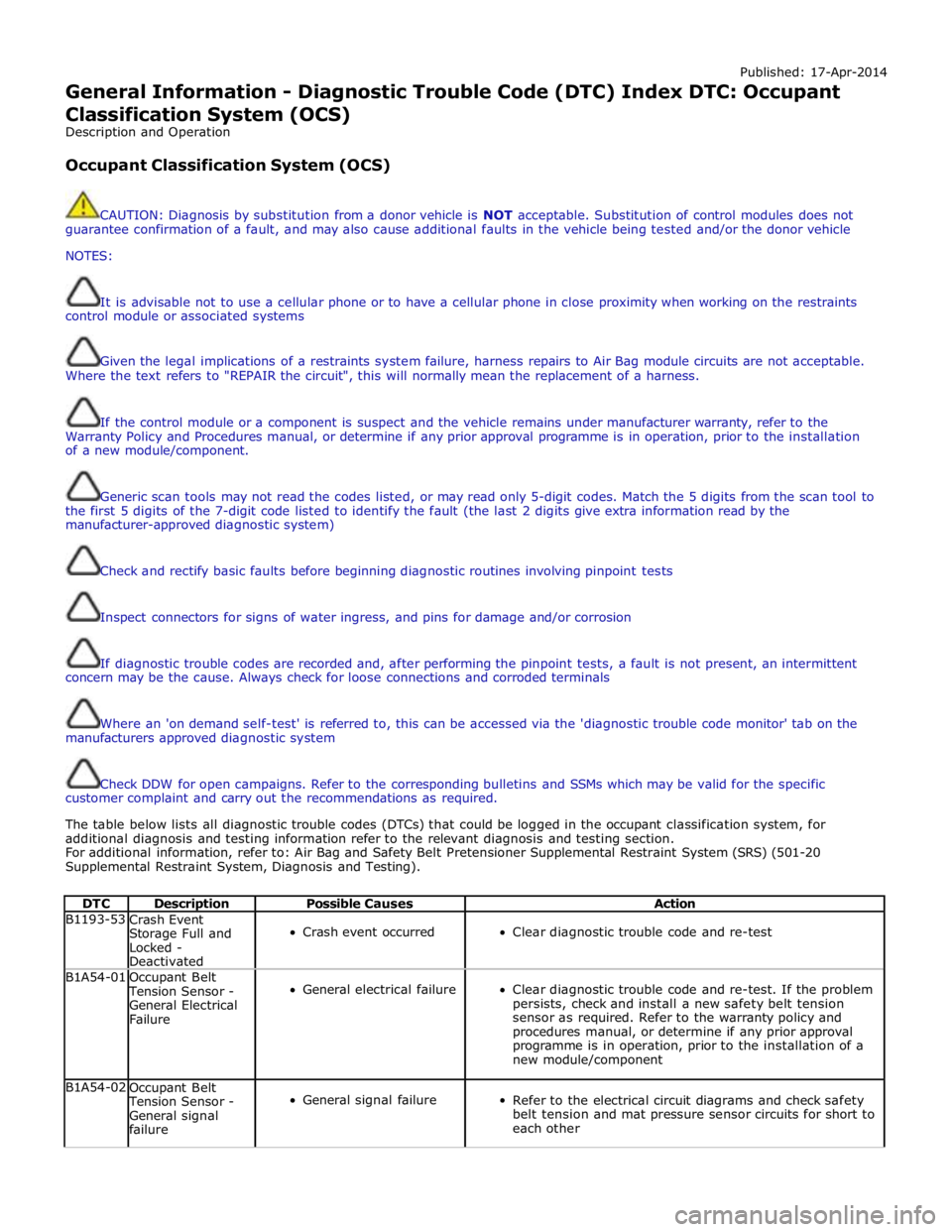
Published: 17-Apr-2014
General Information - Diagnostic Trouble Code (DTC) Index DTC: Occupant Classification System (OCS)
Description and Operation
Occupant Classification System (OCS)
CAUTION: Diagnosis by substitution from a donor vehicle is NOT acceptable. Substitution of control modules does not
guarantee confirmation of a fault, and may also cause additional faults in the vehicle being tested and/or the donor vehicle
NOTES:
It is advisable not to use a cellular phone or to have a cellular phone in close proximity when working on the restraints
control module or associated systems
Given the legal implications of a restraints system failure, harness repairs to Air Bag module circuits are not acceptable.
Where the text refers to "REPAIR the circuit", this will normally mean the replacement of a harness.
If the control module or a component is suspect and the vehicle remains under manufacturer warranty, refer to the
Warranty Policy and Procedures manual, or determine if any prior approval programme is in operation, prior to the installation
of a new module/component.
Generic scan tools may not read the codes listed, or may read only 5-digit codes. Match the 5 digits from the scan tool to
the first 5 digits of the 7-digit code listed to identify the fault (the last 2 digits give extra information read by the
manufacturer-approved diagnostic system)
Check and rectify basic faults before beginning diagnostic routines involving pinpoint tests
Inspect connectors for signs of water ingress, and pins for damage and/or corrosion
If diagnostic trouble codes are recorded and, after performing the pinpoint tests, a fault is not present, an intermittent
concern may be the cause. Always check for loose connections and corroded terminals
Where an 'on demand self-test' is referred to, this can be accessed via the 'diagnostic trouble code monitor' tab on the
manufacturers approved diagnostic system
Check DDW for open campaigns. Refer to the corresponding bulletins and SSMs which may be valid for the specific
customer complaint and carry out the recommendations as required.
The table below lists all diagnostic trouble codes (DTCs) that could be logged in the occupant classification system, for
additional diagnosis and testing information refer to the relevant diagnosis and testing section.
For additional information, refer to: Air Bag and Safety Belt Pretensioner Supplemental Restraint System (SRS) (501-20
Supplemental Restraint System, Diagnosis and Testing).
DTC Description Possible Causes Action B1193-53
Crash Event
Storage Full and
Locked -
Deactivated
Crash event occurred
Clear diagnostic trouble code and re-test B1A54-01
Occupant Belt Tension Sensor -
General Electrical
Failure
General electrical failure
Clear diagnostic trouble code and re-test. If the problem
persists, check and install a new safety belt tension
sensor as required. Refer to the warranty policy and
procedures manual, or determine if any prior approval
programme is in operation, prior to the installation of a
new module/component B1A54-02
Occupant Belt Tension Sensor -
General signal
failure
General signal failure
Refer to the electrical circuit diagrams and check safety
belt tension and mat pressure sensor circuits for short to
each other
Page 206 of 3039
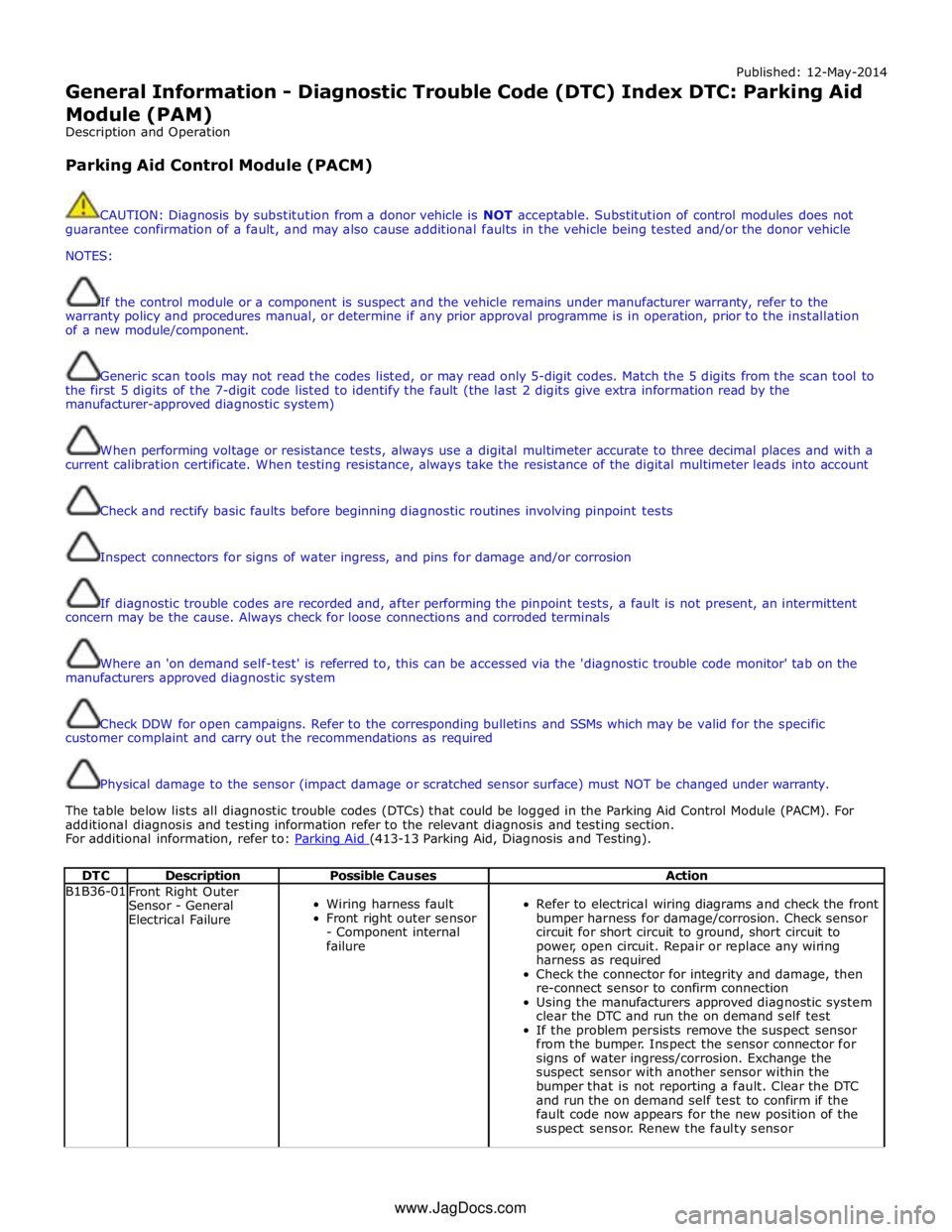
Published: 12-May-2014
General Information - Diagnostic Trouble Code (DTC) Index DTC: Parking Aid
Module (PAM)
Description and Operation
Parking Aid Control Module (PACM)
CAUTION: Diagnosis by substitution from a donor vehicle is NOT acceptable. Substitution of control modules does not
guarantee confirmation of a fault, and may also cause additional faults in the vehicle being tested and/or the donor vehicle
NOTES:
If the control module or a component is suspect and the vehicle remains under manufacturer warranty, refer to the
warranty policy and procedures manual, or determine if any prior approval programme is in operation, prior to the installation
of a new module/component.
Generic scan tools may not read the codes listed, or may read only 5-digit codes. Match the 5 digits from the scan tool to
the first 5 digits of the 7-digit code listed to identify the fault (the last 2 digits give extra information read by the
manufacturer-approved diagnostic system)
When performing voltage or resistance tests, always use a digital multimeter accurate to three decimal places and with a
current calibration certificate. When testing resistance, always take the resistance of the digital multimeter leads into account
Check and rectify basic faults before beginning diagnostic routines involving pinpoint tests
Inspect connectors for signs of water ingress, and pins for damage and/or corrosion
If diagnostic trouble codes are recorded and, after performing the pinpoint tests, a fault is not present, an intermittent
concern may be the cause. Always check for loose connections and corroded terminals
Where an 'on demand self-test' is referred to, this can be accessed via the 'diagnostic trouble code monitor' tab on the
manufacturers approved diagnostic system
Check DDW for open campaigns. Refer to the corresponding bulletins and SSMs which may be valid for the specific
customer complaint and carry out the recommendations as required
Physical damage to the sensor (impact damage or scratched sensor surface) must NOT be changed under warranty.
The table below lists all diagnostic trouble codes (DTCs) that could be logged in the Parking Aid Control Module (PACM). For
additional diagnosis and testing information refer to the relevant diagnosis and testing section.
For additional information, refer to: Parking Aid (413-13 Parking Aid, Diagnosis and Testing).
DTC Description Possible Causes Action B1B36-01
Front Right Outer
Sensor - General
Electrical Failure
Wiring harness fault
Front right outer sensor
- Component internal
failure
Refer to electrical wiring diagrams and check the front
bumper harness for damage/corrosion. Check sensor
circuit for short circuit to ground, short circuit to
power, open circuit. Repair or replace any wiring
harness as required
Check the connector for integrity and damage, then
re-connect sensor to confirm connection
Using the manufacturers approved diagnostic system
clear the DTC and run the on demand self test
If the problem persists remove the suspect sensor
from the bumper. Inspect the sensor connector for
signs of water ingress/corrosion. Exchange the
suspect sensor with another sensor within the
bumper that is not reporting a fault. Clear the DTC
and run the on demand self test to confirm if the
fault code now appears for the new position of the
suspect sensor. Renew the faulty sensor www.JagDocs.com
Page 215 of 3039

Published: 18-Apr-2014
General Information - Diagnostic Trouble Code (DTC) Index DTC: Pedestrian
Protection System Control Module (PPSCM)
Description and Operation
Pedestrian Protection System Control Module (PPSCM)
WARNING: TO AVOID ACCIDENTAL DEPLOYMENT AND POSSIBLE PERSONAL INJURY, THE BACKUP POWER SUPPLY MUST
BE DEPLETED BEFORE REPAIRING OR REPLACING ANY PEDESTRIAN PROTECTION SYSTEM COMPONENTS. TO DEPLETE THE
BACKUP POWER SUPPLY ENERGY, DISCONNECT THE BATTERY GROUND CABLE AND WAIT TWO MINUTES. FAILURE TO FOLLOW
THIS INSTRUCTION MAY RESULT IN PERSONAL INJURY.
CAUTION: Diagnosis by substitution from a donor vehicle is NOT acceptable. Substitution of control modules does not
guarantee confirmation of a fault, and may also cause additional faults in the vehicle being tested and/or the donor vehicle.
NOTES:
If the control module or a component is suspect and the vehicle remains under manufacturer warranty, refer to the
Warranty Policy and Procedures manual, or determine if any prior approval programme is in operation, prior to the installation
of a new module/component.
Generic scan tools may not read the codes listed, or may read only 5-digit codes. Match the 5 digits from the scan tool to
the first 5 digits of the 7-digit code listed to identify the fault (the last 2 digits give extra information read by the
manufacturer-approved diagnostic system).
When performing voltage or resistance tests, always use a digital multimeter accurate to three decimal places, and with
an up-to-date calibration certificate. When testing resistance always take the resistance of the digital multimeter leads into
account.
Check and rectify basic faults before beginning diagnostic routines involving pinpoint tests.
Inspect connectors for signs of water ingress, and pins for damage and/or corrosion.
If DTCs are recorded and, after performing the pinpoint tests, a fault is not present, an intermittent concern may be the
cause. Always check for loose connections and corroded terminals.
Check DDW for open campaigns. Refer to the corresponding bulletins and SSMs which may be valid for the specific
customer complaint and carry out the recommendations as required.
The table below lists all Diagnostic Trouble Codes (DTCs) that could be logged in the Pedestrian Protection System Control
Module (PPSCM). For additional diagnosis and testing information, refer to the relevant Diagnosis and Testing section in the
workshop manual.
For additional information, refer to: Pedestrian Protection System (501-20C Pedestrian Protection System, Diagnosis and Testing).
DTC Description Possible Causes Action B1001-11
Right Hood Deployment
Control - Circuit short to
ground
Right hood deployment
control circuit short circuit
to ground
Refer to the electrical circuit diagrams and
check the right hood deployment control circuit
for short circuit to ground. Install a new wiring
harness as necessary. If no wiring harness
fault exists, using the manufacturer approved
diagnostic system, clear the DTCs and retest.
If the fault persists, install a new right hood
deployment control B1001-12
Right Hood Deployment
Control - Circuit short to
battery
Right hood deployment
control circuit short circuit
to power
Refer to the electrical circuit diagrams and
check the right hood deployment control circuit
for short circuit to power. Install a new wiring
harness as necessary. If no wiring harness
fault exists, using the manufacturer approved
diagnostic system, clear the DTCs and retest.
If the fault persists, install a new right hood
deployment control
Page 216 of 3039

Published: 17-Apr-2014
General Information - Diagnostic Trouble Code (DTC) Index DTC: Rear
Differential Control Module (RDCM)
Description and Operation
Rear Differential Control Module (RDCM)
CAUTION: Diagnosis by substitution from a donor vehicle is NOT acceptable. Substitution of control modules does not
guarantee confirmation of a fault, and may also cause additional faults in the vehicle being tested and/or the donor vehicle
NOTES:
If the control module or a component is suspect and the vehicle remains under manufacturer warranty, refer to the
warranty policy and procedures manual, or determine if any prior approval programme is in operation, prior to the installation
of a new module/component
Generic scan tools may not read the codes listed, or may read only 5-digit codes. Match the 5 digits from the scan tool to
the first 5 digits of the 7-digit code listed to identify the fault (the last 2 digits give extra information read by the
manufacturer-approved diagnostic system)
When performing voltage or resistance tests, always use a digital multimeter accurate to three decimal places and with a
current calibration certificate. When testing resistance, always take the resistance of the digital multimeter leads into account
Check and rectify basic faults before beginning diagnostic routines involving pinpoint tests
Inspect connectors for signs of water ingress, and pins for damage and/or corrosion
If DTCs are recorded and, after performing the pinpoint tests, a fault is not present, an intermittent concern may be the
cause. Always check for loose connections and corroded terminals
If the rear differential control module, rear differential actuator or the rear differential are replaced, the on demand self
test (ODST) must be carried out to calibrate the components
Check DDW for open campaigns. Refer to the corresponding bulletins and SSMs which may be valid for the specific
customer complaint and carry out the recommendations as needed
The table below lists all diagnostic trouble codes (DTCs) that could be logged in the rear differential control module, for
additional diagnosis and testing information refer to the relevant diagnosis and testing section.
For additional information, refer to: Rear Drive Axle and Differential (205-02 Rear Drive Axle/Differential, Diagnosis and
Testing).
DTC Description Possible Causes Action P0562-00
System Voltage Low -
No sub type
information
Rear differential control
module voltage supply
below 9 volts
Check the battery charge condition, refer to the
electrical circuit diagrams and check the wiring to
the rear differential control module, repair as
necessary P0563-00
System Voltage High -
No sub type
information
System voltage high
(supply voltage supply
greater than 16 volts)
Check engine control module for stored DTCs,
suspect charging system fault. Refer to the
electrical circuit diagrams and check, power and
ground circuit for fault P0604-00
Internal Control Module
Random Access Memory
(RAM) Error - No sub
type information
Rear differential control
module internal error
Clear the DTC and retest. If the problem persists,
renew the control module. Refer to the warranty
policy and procedures manual, or determine if any
prior approval programme is in operation, prior to
the installation of a new module/component P0605-00
Internal Control Module
Read Only Memory
(ROM) Error - No sub
type information
Rear differential control
module internal error
Clear the DTC and retest. If the problem persists,
renew the control module. Refer to the warranty
policy and procedures manual, or determine if any www.JagDocs.com
Page 218 of 3039

Published: 12-May-2014
General Information - Diagnostic Trouble Code (DTC) Index DTC: Rear
Junction Box (RJB)
Description and Operation
Rear Junction Box (RJB)
CAUTION: Diagnosis by substitution from a donor vehicle is NOT acceptable. Substitution of control modules does not
guarantee confirmation of a fault, and may also cause additional faults in the vehicle being tested and/or the donor vehicle.
NOTES:
If a control module or a component is suspect and the vehicle remains under manufacturer warranty, refer to the Warranty
Policy and Procedures manual, or determine if any prior approval programme is in operation, prior to the installation of a new
module/component.
Generic scan tools may not read the codes listed, or may read only 5-digit codes. Match the 5 digits from the scan tool to
the first 5 digits of the 7-digit code listed to identify the fault (the last 2 digits give extra information read by the
manufacturer-approved diagnostic system).
When performing voltage or resistance tests, always use a digital multimeter accurate to three decimal places, and with
an up-to-date calibration certificate. When testing resistance always take the resistance of the digital multimeter leads into
account.
Check and rectify basic faults before beginning diagnostic routines involving pinpoint tests.
Inspect connectors for signs of water ingress, and pins for damage and/or corrosion.
If DTCs are recorded and, after performing the pinpoint tests, a fault is not present, an intermittent concern may be the
cause. Always check for loose connections and corroded terminals.
Check DDW for open campaigns. Refer to the corresponding bulletins and SSMs which may be valid for the specific
customer complaint and carry out the recommendations as required.
The table below lists all Diagnostic Trouble Codes (DTCs) that could be logged in the Rear Junction Box (RJB). For additional
diagnosis and testing information, refer to the relevant Diagnosis and Testing section in the workshop manual.
For additional information, refer to: Communications Network (418-00 Module Communications Network, Diagnosis and Testing).
DTC Description Possible Causes Action P0460-11
Fuel Level Sensor A
Circuit - Circuit short to
ground
Fuel level sensor A
analogue input circuit -
short to ground
Carry out any pinpoint test associated with this DTC
using the manufacturer approved diagnostic system.
Refer to the electrical circuit diagrams and check
fuel level sensor A analogue input circuit for short to
ground P0460-15
Fuel Level Sensor A
Circuit - Circuit short to
battery or open
Fuel level sensor A
analogue input circuit -
short to power, open
circuit
Carry out any pinpoint test associated with this DTC
using the manufacturer approved diagnostic system.
Refer to the electrical circuit diagrams and check
fuel level sensor A analogue input circuit for short to
power, open circuit P0571-12
Brake Switch A Circuit -
Circuit short to battery
Footbrake switch digital
input signal circuits -
short to power
Refer to the electrical circuit diagrams and check
footbrake switch digital input signal circuits for
short to power P1230-12
Fuel Pump Low Speed
Malfunction (VLCM) -
Circuit short to battery
High Side output not
driven - Diagnosis
feedback indicates
output is short to power
Refer to the electrical circuit diagrams and check
fuel pump delivery module for short to power
Page 219 of 3039

DTC Description Possible Causes Action P1230-14
Fuel Pump Low Speed
Malfunction (VLCM) -
Circuit short to ground
or open
High Side output not
driven - Diagnosis
feedback indicates
output is short to
ground, open circuit
Refer to the electrical circuit diagrams and check
fuel pump delivery module for short to ground, open
circuit P1230-93
Fuel Pump Low Speed
Malfunction (VLCM) - No
operation
High Side output not
driven - Diagnosis
feedback indicates
output is at open load
or short to power
Carry out any pinpoint test associated with this DTC
using the manufacturer approved diagnostic system.
Refer to the electrical circuit diagrams and check
fuel pump delivery module for short to power, open
circuit P1346-11
Fuel Level Sensor B
Circuit - Circuit short to
ground
Fuel level sensor B
analogue input circuit -
short to ground
Carry out any pinpoint test associated with this DTC
using the manufacturer approved diagnostic system.
Refer to the electrical circuit diagrams and check
fuel level sensor B analogue input circuit for short to
ground P1346-15
Fuel Level Sensor B
Circuit - Circuit short to
battery or open
Fuel level sensor B
analogue input circuit -
short to power, open
circuit
Carry out any pinpoint test associated with this DTC
using the manufacturer approved diagnostic system.
Refer to the electrical circuit diagrams and check
fuel level sensor B analogue input circuit for short to
power, open circuit P1624-13
Anti-theft System -
Circuit open
Anti-theft signal circuit
from CJB - open circuit
Refer to the electrical circuit diagrams and check
anti-theft signal circuit from CJB for open circuit C111A-11
Right Stop Lamp -
Circuit short to ground
Right stomp lamp
control circuit - short to
ground
Carry out any pinpoint test associated with this DTC
using the manufacturer approved diagnostic system.
Refer to the electrical circuit diagrams and check
right stomp lamp control circuit for short to ground C111A-12
Right Stop Lamp -
Circuit short to battery
Right stomp lamp
control circuit - short to
power
Refer to the electrical circuit diagrams and check
right stomp lamp control circuit for short to power C111A-13
Right Stop Lamp -
Circuit open
Right stomp lamp
control circuit - open
circuit
Refer to the electrical circuit diagrams and check
right stomp lamp control circuit for open circuit C111B-11
Left Stop Lamp - Circuit
short to ground
Left stomp lamp control
circuit - short to ground
Carry out any pinpoint test associated with this DTC
using the manufacturer approved diagnostic system.
Refer to the electrical circuit diagrams and check left
stomp lamp control circuit for short to ground C111B-13
Left Stop Lamp - Circuit
open
Left stomp lamp control
circuit - open circuit
Refer to the electrical circuit diagrams and check left
stomp lamp control circuit for open circuit C1120-11
Reversing lamp - Circuit
short to ground
Reverse lamp control
circuit - short to ground
Carry out any pinpoint test associated with this DTC
using the manufacturer approved diagnostic system.
Refer to the electrical circuit diagrams and check
reverse lamp control circuit for short to ground C1120-12
Reversing lamp - Circuit
short to battery
Reverse lamp control
circuit - short to power
Refer to the electrical circuit diagrams and check
reverse lamp control circuit for short to power C1120-13
Reversing lamp - Circuit
open
Reverse lamp control
circuit - open circuit
Refer to the electrical circuit diagrams and check
reverse lamp control circuit for open circuit C1120-15
Reversing lamp - Circuit
short to battery or open
Reverse lamp control
circuit - short circuit to
power, open circuit, high
resistance
Refer to the electrical circuit diagrams and check
reverse lamp control circuit for short circuit to power,
open circuit, high resistance. Repair wiring harness
as required. Clear DTC and retest
Page 220 of 3039

DTC Description Possible Causes Action B100A-51 Fuel Pump Authorisation
- Not programmed
RJB fault
Low speed CAN fault
Instrument cluster fault
Check power and ground supplies to RJB. Check CAN
communications between RJB and instrument
cluster. Check power and ground supplies to
instrument cluster B100A-62 Fuel Pump Authorisation
- Signal compare failure
Low speed CAN fault
RJB fault
Instrument cluster fault
Incorrect module
installed
(RJB/Instrument cluster)
Write target SID
synchronisation error
following
re-programming
Noise/EMC related error
Check CAN communications between RJB and
instrument cluster. Check power and ground supplies
to RJB and instrument cluster. Confirm correct
module installed. Re-synchronise ID by
re-configuring the RJB as a new module. Check CAN
network for interference/EMC related issues B100A-63 Fuel Pump Authorisation
- Circuit/component
protection time-out
RJB fault
Low speed CAN fault
Instrument cluster fault
Low battery voltage <9V
Check power and ground supplies to RJB and
instrument cluster. Check CAN communications
between RJB and instrument cluster. Check battery
is in fully charged and serviceable condition, refer to
the battery care manual B1026-12
Steering Column Lock -
Circuit short to battery
Steering column lock
ground circuit - short to
power
Refer to the electrical circuit diagrams and check
steering column lock ground circuit for short to
power B1087-83
LIN Bus "A" - Value of
signal protection
calculation incorrect
The checksum of the
received LIN frame is
incorrect
Check the battery monitoring system and rear
parking aid system for DTCs and refer to relevant
DTC Index B1087-86
LIN Bus "A" - Signal
invalid
The header of the LIN
message received is
incorrect
Carry out any pinpoint test associated with this DTC
using the manufacturer approved diagnostic system.
Check the battery monitoring system and rear
parking aid system for DTCs and refer to relevant
DTC Index B1087-88 LIN Bus "A" - Bus off
Battery monitoring
system LIN circuit -
short to ground, power
Carry out any pinpoint test associated with this DTC
using the manufacturer approved diagnostic system.
Refer to the electrical circuit diagrams and check
battery monitoring system LIN circuit for short to
ground, power B108A-23
Start Button - Signal
stuck low
Start/Stop switch digital
input signal circuit -
stuck low
Carry out any pinpoint test associated with this DTC
using the manufacturer approved diagnostic system.
Refer to the electrical circuit diagrams and check
Start/Stop switch digital input signal circuit for short
to ground B10A1-11 Trailer Tow Detection -
Circuit short to ground
Trailer tow detection
digital input circuit -
short to ground
Carry out any pinpoint test associated with this DTC
using the manufacturer approved diagnostic system.
Refer to the electrical circuit diagrams and check
trailer tow detection digital input circuit for short to
ground B10AF-12
Blower Fan Relay -
Circuit short to battery
High Side output not
driven - Diagnosis
feedback indicates
output is short to power
Refer to the electrical circuit diagrams and check
blower motor supply circuit for short to power B10AF-14
Blower Fan Relay -
Circuit short to ground
or open
High Side output not
driven - Diagnosis
feedback indicates
output is short to
ground, open circuit
Refer to the electrical circuit diagrams and check
blower motor supply circuit for short to ground, open
circuit