Page 2418 of 3039
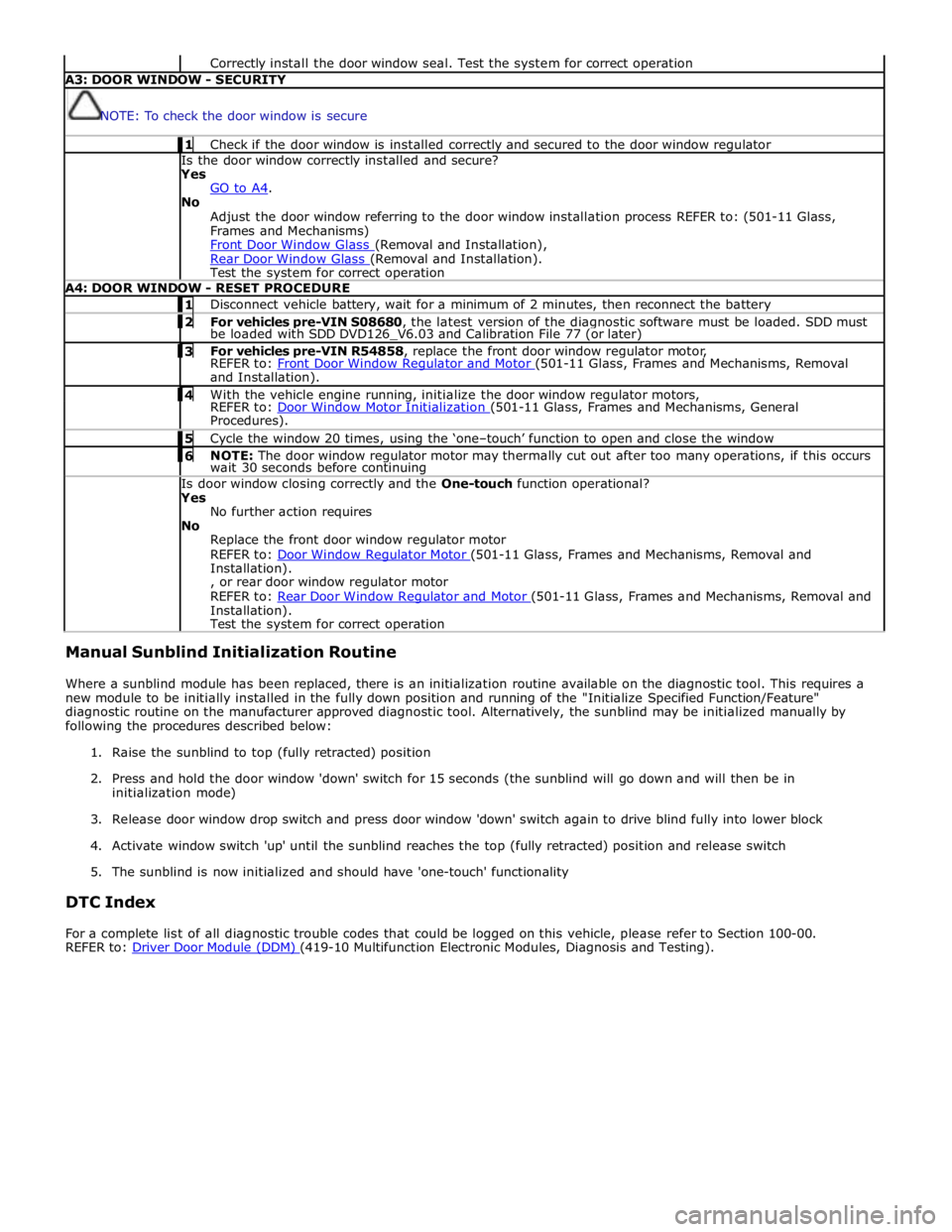
Correctly install the door window seal. Test the system for correct operation A3: DOOR WINDOW - SECURITY
NOTE: To check the door window is secure 1 Check if the door window is installed correctly and secured to the door window regulator Is the door window correctly installed and secure?
Yes
GO to A4. No
Adjust the door window referring to the door window installation process REFER to: (501-11 Glass,
Frames and Mechanisms)
Front Door Window Glass (Removal and Installation), Rear Door Window Glass (Removal and Installation). Test the system for correct operation A4: DOOR WINDOW - RESET PROCEDURE 1 Disconnect vehicle battery, wait for a minimum of 2 minutes, then reconnect the battery 2 For vehicles pre-VIN S08680, the latest version of the diagnostic software must be loaded. SDD must be loaded with SDD DVD126_V6.03 and Calibration File 77 (or later) 3 For vehicles pre-VIN R54858, replace the front door window regulator motor, REFER to: Front Door Window Regulator and Motor (501-11 Glass, Frames and Mechanisms, Removal and Installation). 4 With the vehicle engine running, initialize the door window regulator motors, REFER to: Door Window Motor Initialization (501-11 Glass, Frames and Mechanisms, General Procedures). 5 Cycle the window 20 times, using the ‘one–touch’ function to open and close the window 6 NOTE: The door window regulator motor may thermally cut out after too many operations, if this occurs wait 30 seconds before continuing Is door window closing correctly and the One-touch function operational?
Yes
No further action requires
No
Replace the front door window regulator motor
REFER to: Door Window Regulator Motor (501-11 Glass, Frames and Mechanisms, Removal and Installation).
, or rear door window regulator motor
REFER to: Rear Door Window Regulator and Motor (501-11 Glass, Frames and Mechanisms, Removal and Installation).
Test the system for correct operation Manual Sunblind Initialization Routine
Where a sunblind module has been replaced, there is an initialization routine available on the diagnostic tool. This requires a
new module to be initially installed in the fully down position and running of the "Initialize Specified Function/Feature"
diagnostic routine on the manufacturer approved diagnostic tool. Alternatively, the sunblind may be initialized manually by
following the procedures described below:
1. Raise the sunblind to top (fully retracted) position
2. Press and hold the door window 'down' switch for 15 seconds (the sunblind will go down and will then be in
initialization mode)
3. Release door window drop switch and press door window 'down' switch again to drive blind fully into lower block
4. Activate window switch 'up' until the sunblind reaches the top (fully retracted) position and release switch
5. The sunblind is now initialized and should have 'one-touch' functionality
DTC Index
For a complete list of all diagnostic trouble codes that could be logged on this vehicle, please refer to Section 100-00.
REFER to: Driver Door Module (DDM) (419-10 Multifunction Electronic Modules, Diagnosis and Testing).
Page 2422 of 3039
Published: 15-Jan-2013
Glass, Frames and Mechanisms - Door Window Motor Initialization
General Procedures
NOTES:
Make sure that the vehicle battery is fully charged before carrying out this procedure.
After the battery has been disconnected or a new window regulator and motor or door module has been installed, it is
necessary to initialize each door window motor separately to operate the one-touch and anti-trap function.
In addition to this manual procedure, the approved diagnostic tool can also be used to initialize the door window motor.
1. Start the engine.
2. Operate the window control switch until the door window glass is in the
fully closed position, continue to operate the window control switch for a
further two seconds.
3. Release the window control switch.
4. Operate the window control switch in the closed position and continue to
operate the window control switch for a further two seconds.
5. Operate the window control switch until the door window glass is in the
fully open position (one-touch down).
6. NOTES:
If the door window motor initialization has been completed
correctly, when the window control switch is operated, the door window
glass should move to the fully closed position (one-touch up)
automatically.
If the door window glass does not fully close automatically
(one-touch up), repeat the complete procedure.
Operate the window control switch once to the close position.
If multiple attempts have failed to initialize the door window
motor, refer the diagnosis and testing procedure.
For additional information, refer to: Glass, Frames and Mechanisms (501-11 Glass, Frames and Mechanisms, Diagnosis and Testing).
7. Repeat the door window motor initialization for each door window motor.
Page 2452 of 3039
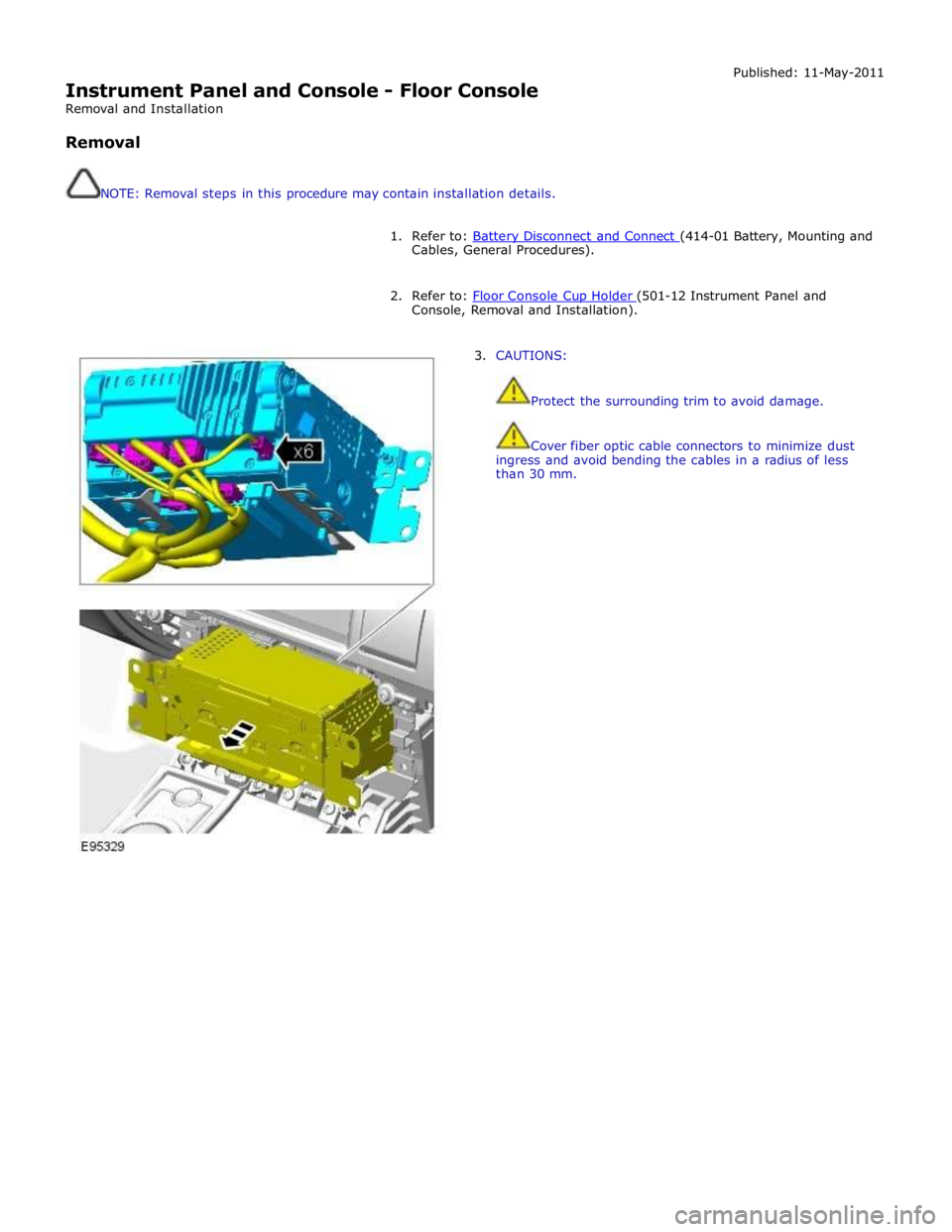
Instrument Panel and Console - Floor Console
Removal and Installation
Removal
NOTE: Removal steps in this procedure may contain installation details. Published: 11-May-2011
1. Refer to: Battery Disconnect and Connect (414-01 Battery, Mounting and Cables, General Procedures).
2. Refer to: Floor Console Cup Holder (501-12 Instrument Panel and Console, Removal and Installation).
3. CAUTIONS:
Protect the surrounding trim to avoid damage.
Cover fiber optic cable connectors to minimize dust
ingress and avoid bending the cables in a radius of less
than 30 mm.
Page 2457 of 3039
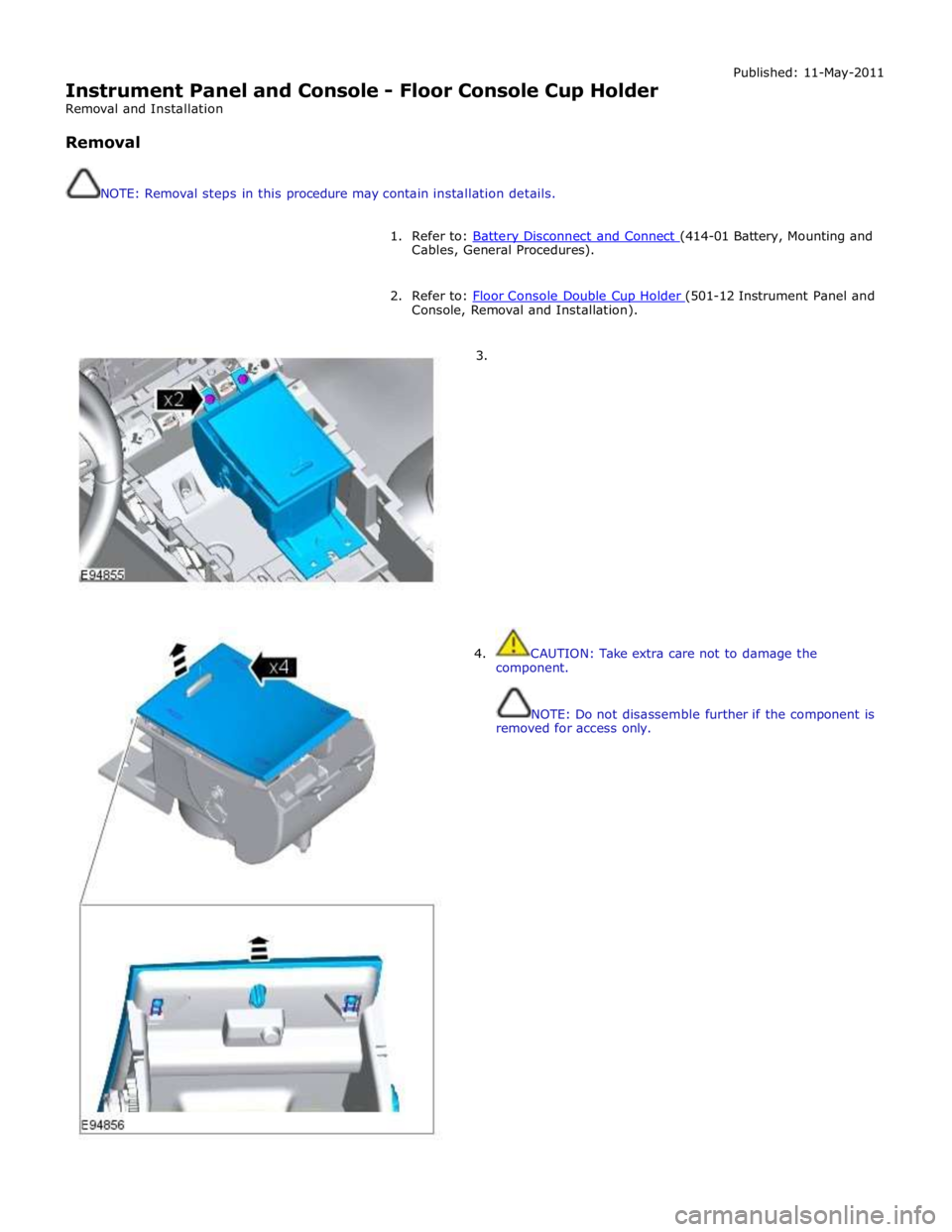
Instrument Panel and Console - Floor Console Cup Holder
Removal and Installation
Removal
NOTE: Removal steps in this procedure may contain installation details. Published: 11-May-2011
1. Refer to: Battery Disconnect and Connect (414-01 Battery, Mounting and Cables, General Procedures).
2. Refer to: Floor Console Double Cup Holder (501-12 Instrument Panel and Console, Removal and Installation).
3.
4. CAUTION: Take extra care not to damage the
component.
NOTE: Do not disassemble further if the component is
removed for access only.
Page 2459 of 3039
Published: 11-May-2011
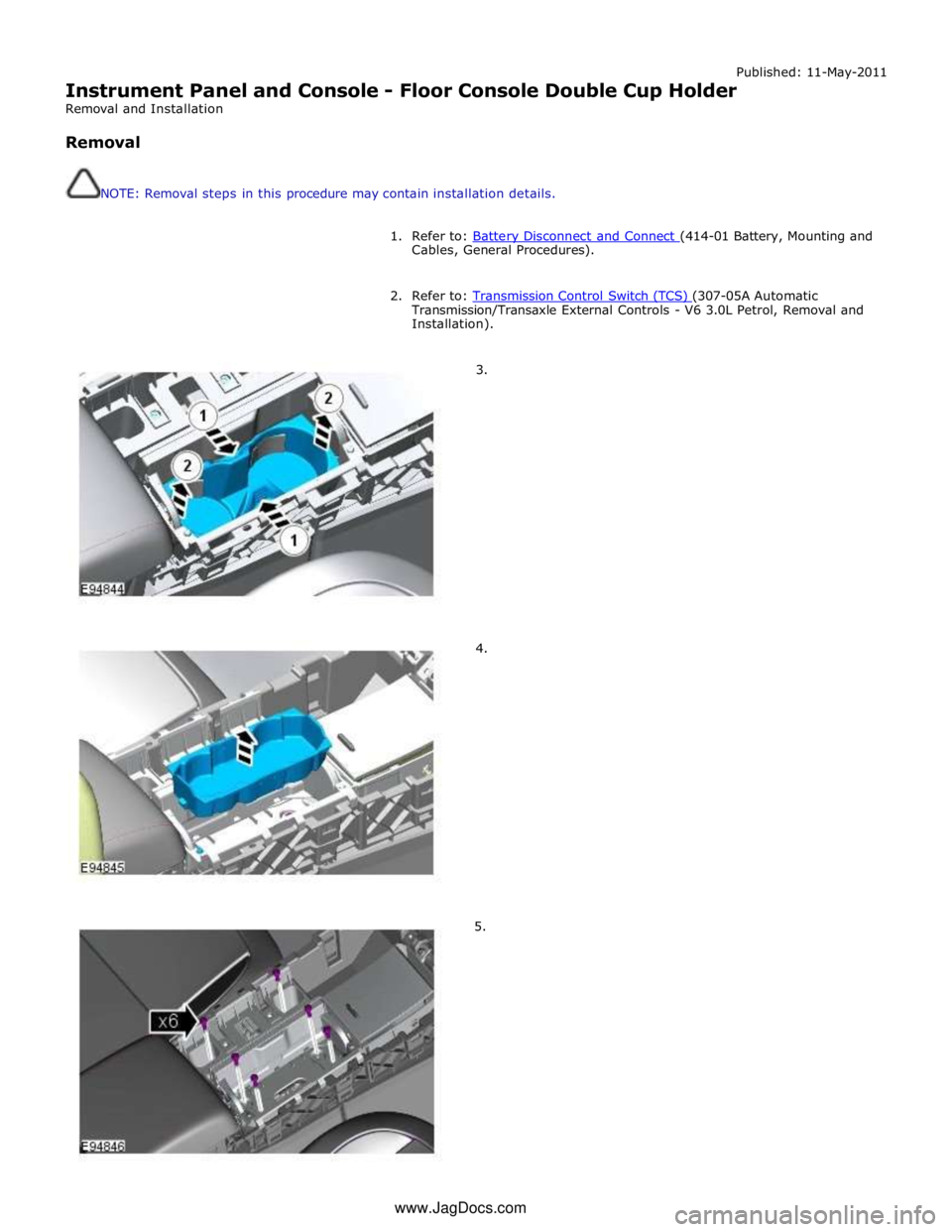
Instrument Panel and Console - Floor Console Double Cup Holder
Removal and Installation
Removal
NOTE: Removal steps in this procedure may contain installation details.
1. Refer to: Battery Disconnect and Connect (414-01 Battery, Mounting and Cables, General Procedures).
2. Refer to: Transmission Control Switch (TCS) (307-05A Automatic Transmission/Transaxle External Controls - V6 3.0L Petrol, Removal and
Installation).
3.
4.
5. www.JagDocs.com
Page 2469 of 3039
Instrument Panel and Console - Instrument Panel Console
Removal and Installation Published: 11-May-2011
Removal
CAUTIONS:
Inspect the seals, replace if damaged.
Inspect the O-rings, replace if damaged.
NOTE: Removal steps in this procedure may contain installation details.
All vehicles
1. Refer to: Battery Disconnect and Connect (414-01 Battery, Mounting and Cables, General Procedures).
2. WARNING: Make sure to support the vehicle with axle stands.
Raise and support the vehicle.
Vehicles with supercharger
3. Refer to: Cooling System Draining, Filling and Bleeding - V8 S/C 5.0L Petrol (303-03C Engine Cooling - V8 5.0L Petrol/V8 S/C 5.0L Petrol, General Procedures).
Vehicles without supercharger
4. Refer to: Cooling System Draining, Filling and Bleeding - V8 5.0L Petrol (303-03C Engine Cooling - V8 5.0L Petrol/V8 S/C 5.0L Petrol, General
Procedures).
Vehicles with diesel engine
5. Refer to: Cooling System Draining, Filling and Bleeding (303-03A Engine Cooling - TDV6 3.0L Diesel, General Procedures).
All vehicles
6. Refer to: Air Conditioning (A/C) System Recovery, Evacuation and Charging (412-00 Climate Control System - General Information, General Procedures).
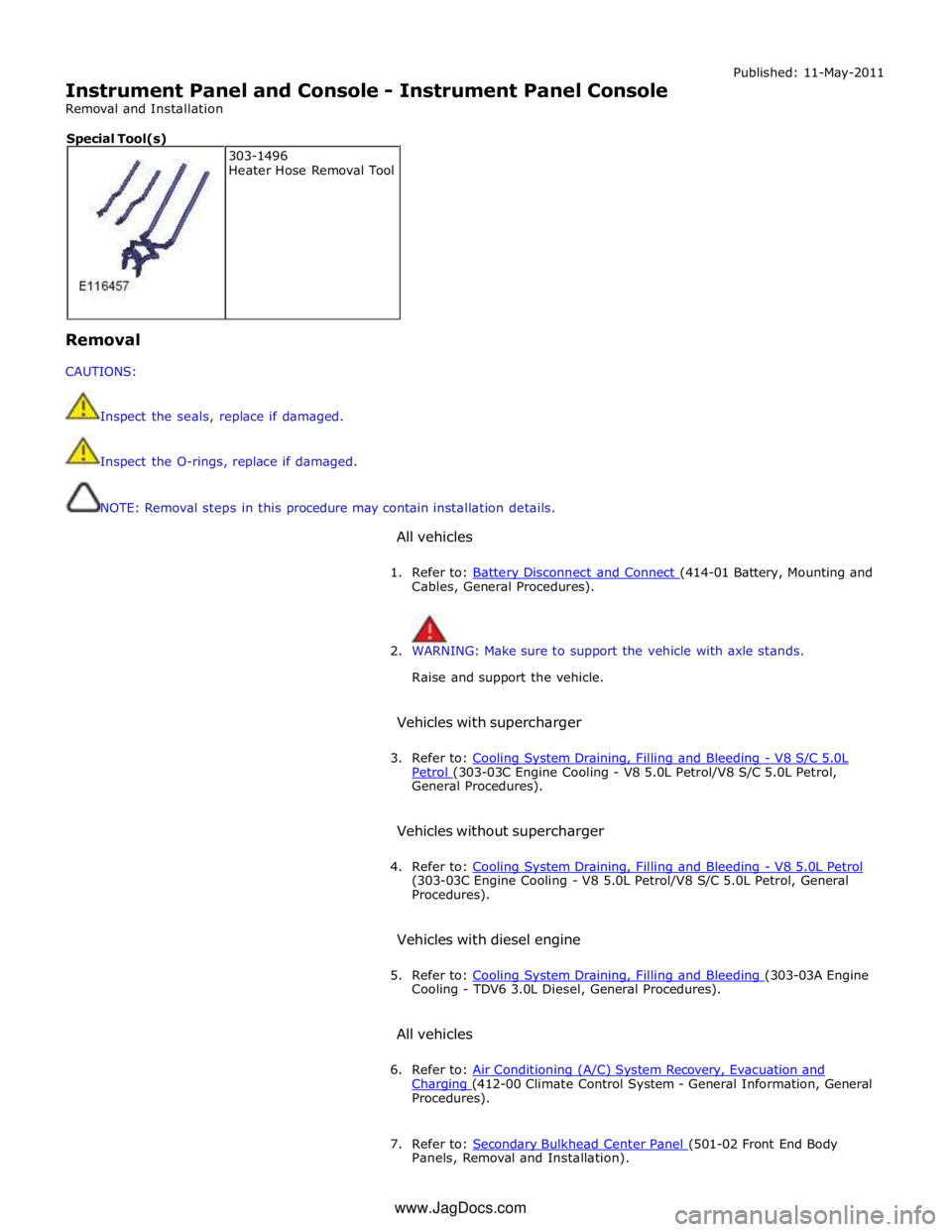
7. Refer to: Secondary Bulkhead Center Panel (501-02 Front End Body Panels, Removal and Installation). 303-1496
Heater Hose Removal Tool Special Tool(s)
www.JagDocs.com
Page 2490 of 3039
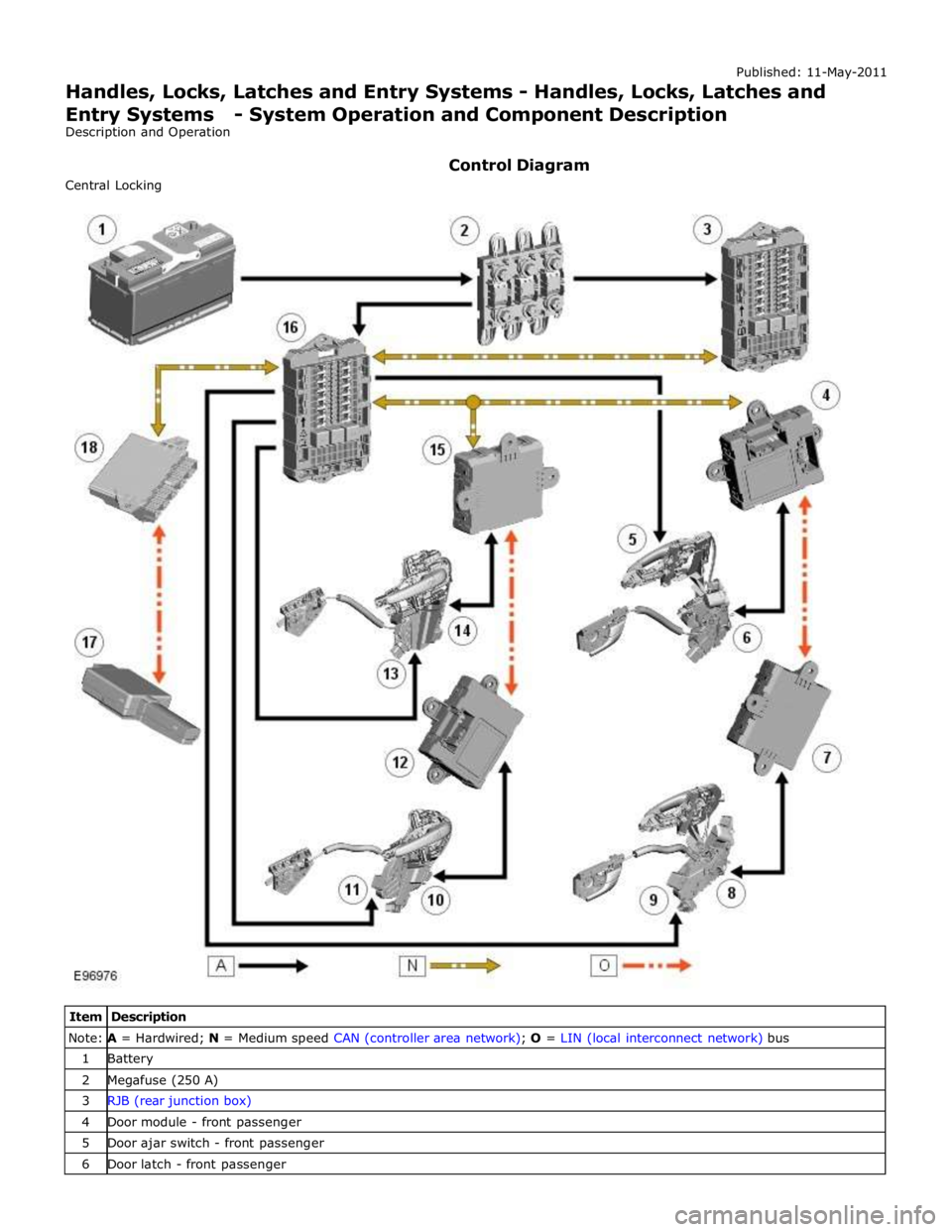
Note: A = Hardwired; N = Medium speed CAN (controller area network); O = LIN (local interconnect network) bus 1 Battery 2 Megafuse (250 A) 3 RJB (rear junction box) 4 Door module - front passenger 5 Door ajar switch - front passenger 6 Door latch - front passenger
Page 2492 of 3039
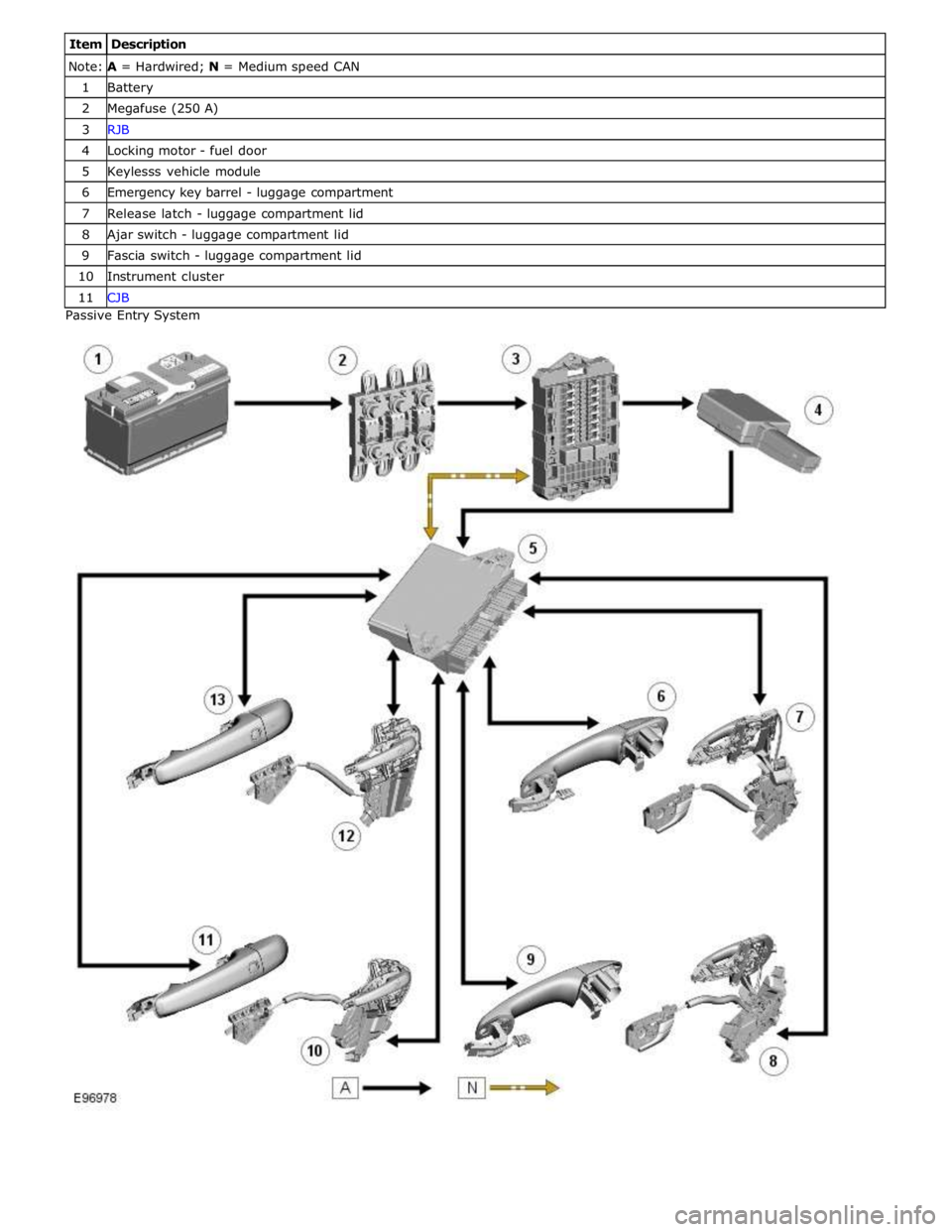
Note: A = Hardwired; N = Medium speed CAN 1 Battery 2 Megafuse (250 A) 3 RJB 4 Locking motor - fuel door 5 Keylesss vehicle module 6 Emergency key barrel - luggage compartment 7 Release latch - luggage compartment lid 8 Ajar switch - luggage compartment lid 9 Fascia switch - luggage compartment lid 10 Instrument cluster 11 CJB Passive Entry System