2010 JAGUAR XFR ad blue
[x] Cancel search: ad bluePage 2115 of 3039
length.
4.
5.
6.
7.
8.
9.
10.
11.
12.
13.
14.
15. NOTE: See illustration: Stripping Insulation
From the Relationship Table, find the correct length of insulation to be stripped from the pre-terminated wiring harness
and set the adjustable cable length stop to the correct length. Place the pre-terminated wiring harness in the wire
stripper and remove the insulation.
Put the cable identification sleeve(s) on to the wiring harness with the main cable colour nearest to the terminal.
During this next step do not over tighten. Place the selected butt splice connector in the crimping tool, matching the
aperture and the butt connector colours. Make sure that the window indentation in the butt connector is resting over
the guide bar on the lower jaw. Partially close the grip until the butt connector is securely held in the aperture. This will
give support to the butt connector while the pre-terminated wiring harness is inserted into it.
NOTE: See illustration: Splice Correctly Located
Insert the pre-terminated wiring harness into the butt connector and make sure that the wire is against the wire stop.
Close the grip firmly, crimping the lead to the butt connector. When the handles have been completely closed the butt
connector will be freed from the tool as the handles are released. If the handles have not been completely closed then
the jaws will hold the butt connector and it cannot be removed from the tool until the crimp is fully made by closing the
handles completely.
Make sure that the harness cable has been squarely cut and the correct length of insulation removed. If more than one
splice is needed the butt connectors must be not be crimped to the wiring harness at the same distance from the
connector. The splices must be staggered to prevent a bulk of splices in the same area of the wiring harness.
It is preferable to cover the butt splice joint with heat shrink sleeve. This is desirable not essential, except where the
electrical connector is a sealed electrical connector. Use the smaller diameter sleeve for red and blue pre-terminated
wiring harness(s) and the large diameter sleeve for the yellow pre-terminated wiring harness(s). It is advisable to place
the heat shrink over the completed joint but in some instances the sleeve will not pass over the terminal. Check, and if
required, place the correct size sleeve onto the harness cable or pre-terminated wiring harness before crimping the butt
splice to the wiring harness.
Place the harness cable into the butt splice with the splice window over the guide bar. Make sure that the cable harness
wire is against the stop in the butt splice, crimp the butt splice connector to the wiring harness.
Gently pull the harness cables each side of the butt splice to make sure that a secure joint has been made.
WARNING: Do not use a naked flame in areas where fuel or oil have been spilt. Clean the area of residual oil and
fuel and wait until the fuel spill has fully evaporated.
CAUTIONS:
When using a heat source make sure that it is localised and causes no damage to surrounding materials.
Where the repair procedure indicates that a glue lined heat shrink sleeve should be applied, apply sufficient heat
to the glue lined heat shrink to melt the glue in order to provide a water tight seal. Do not over heat the glue lined
heat shrink sleeve so that the wiring harness insulation becomes damaged.
Using a suitable heat source, shrink the sleeve over the butt splice.
If further pre-terminated wiring harness(s) are to be installed to the same electrical connector, make sure that the lead
is cut at a different length to the previous joint. This makes sure that the splices will, where possible, be staggered on
the wiring harness and prevent a bulk of splices in one area.
When all of the splices have been made, fit the terminal(s) to the electrical connector, taking care that the terminals
are correctly orientated.
Install the wiring harness cover and secure with adhesive electrical tape. Do not cover the wiring harness right to the
electrical connector as the terminals must have a little movement and not be firmly bound to the electrical connector or
wiring harness. Make sure that the cable identification sleeve(s) are showing at the wiring harness electrical connector.
www.JagDocs.com
Page 2160 of 3039
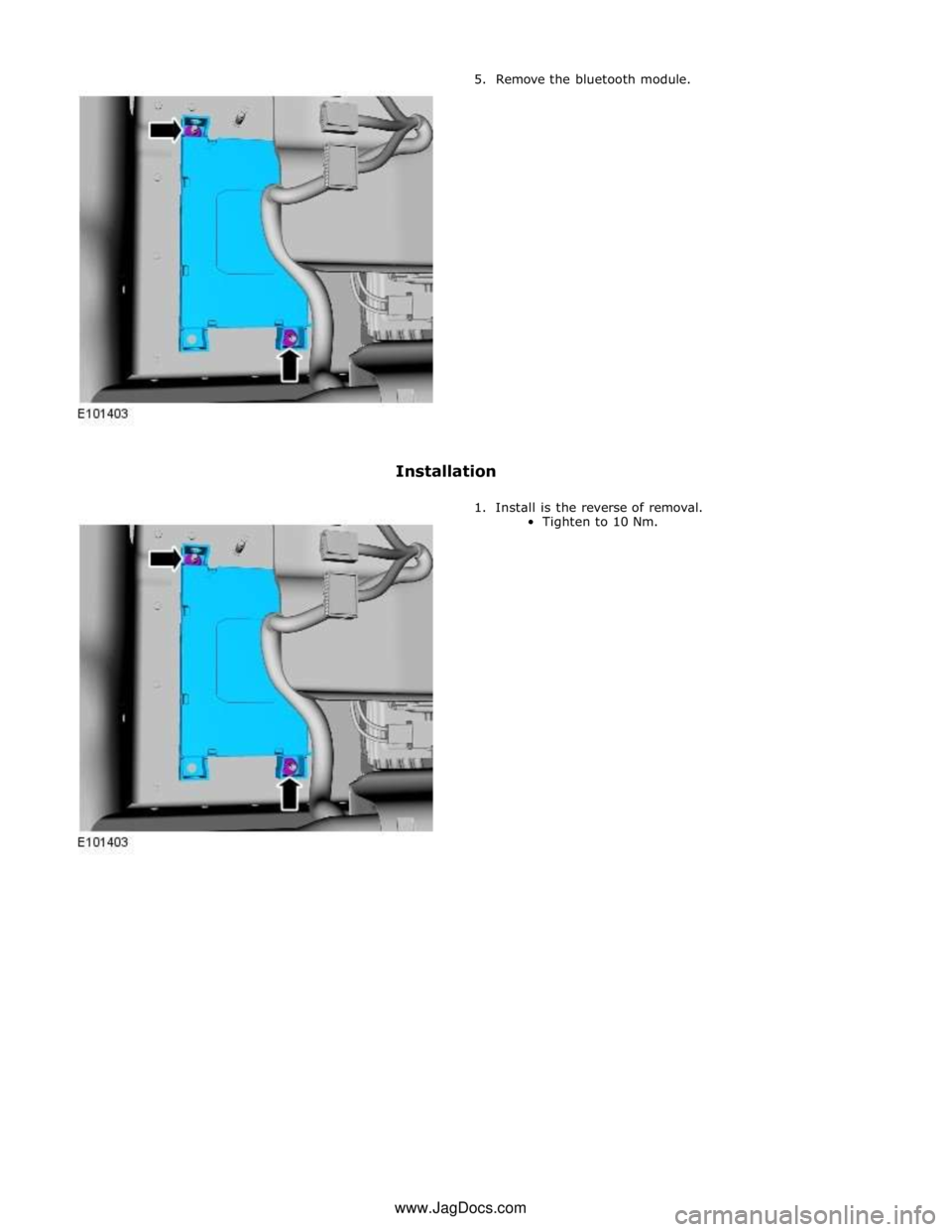
5. Remove the bluetooth module.
Installation
1. Install is the reverse of removal.
Tighten to 10 Nm. www.JagDocs.com
Page 2168 of 3039

7 Television (TV) tuner 8 Portable audio interface 9 Blue tooth phone module 10 Software download socket
Page 2172 of 3039
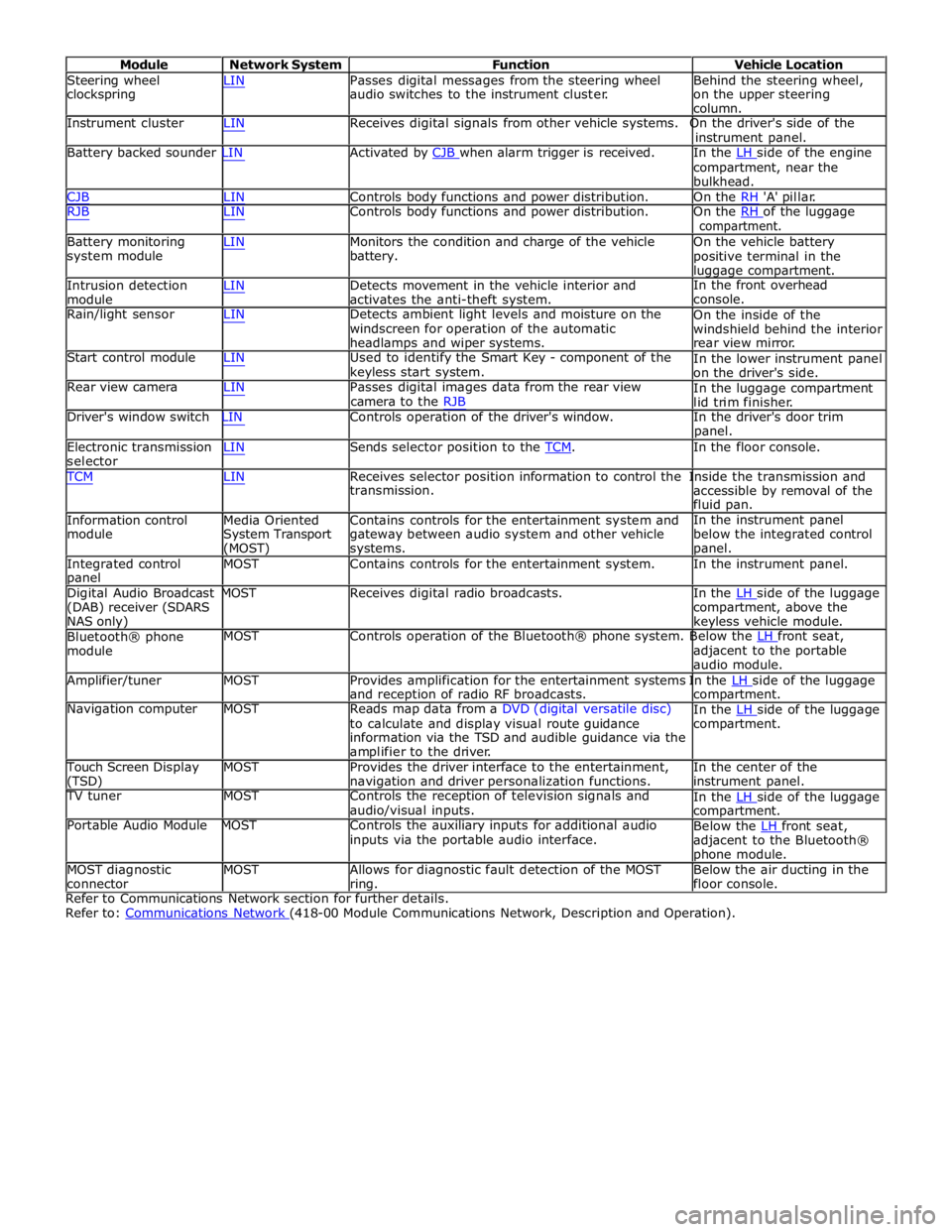
Module Network System Function Vehicle Location
Steering wheel
clockspring LIN Passes digital messages from the steering wheel
audio switches to the instrument cluster. Behind the steering wheel,
on the upper steering
column.
Instrument cluster LIN Receives digital signals from other vehicle systems. On the driver's side of the
instrument panel.
Battery backed sounder LIN Activated by CJB when alarm trigger is received. In the LH side of the engine compartment, near the
bulkhead.
CJB LIN Controls body functions and power distribution. On the RH 'A' pillar.
RJB LIN Controls body functions and power distribution. On the RH of the luggage compartment.
Battery monitoring
system module
Intrusion detection
module LIN Monitors the condition and charge of the vehicle
battery.
LIN Detects movement in the vehicle interior and
activates the anti-theft system. On the vehicle battery
positive terminal in the
luggage compartment.
In the front overhead
console.
Rain/light sensor LIN Detects ambient light levels and moisture on the
windscreen for operation of the automatic
headlamps and wiper systems.
Start control module LIN Used to identify the Smart Key - component of the
keyless start system.
Rear view camera LIN Passes digital images data from the rear view
camera to the RJB On the inside of the
windshield behind the interior
rear view mirror.
In the lower instrument panel
on the driver's side.
In the luggage compartment
lid trim finisher.
Driver's window switch LIN Controls operation of the driver's window. In the driver's door trim
panel.
Electronic transmission
selector LIN Sends selector position to the TCM. In the floor console. TCM LIN Receives selector position information to control the Inside the transmission and
Information control
module
Media Oriented
System Transport
(MOST) transmission.
Contains controls for the entertainment system and
gateway between audio system and other vehicle
systems. accessible by removal of the
fluid pan.
In the instrument panel
below the integrated control
panel.
Integrated control
panel MOST Contains controls for the entertainment system. In the instrument panel.
Digital Audio Broadcast MOST Receives digital radio broadcasts. In the LH side of the luggage (DAB) receiver (SDARS
NAS only)
Bluetooth® phone
module compartment, above the
keyless vehicle module.
MOST Controls operation of the Bluetooth® phone system. Below the LH front seat, adjacent to the portable
audio module.
Amplifier/tuner MOST Provides amplification for the entertainment systems In the LH side of the luggage and reception of radio RF broadcasts.
Navigation computer MOST Reads map data from a DVD (digital versatile disc)
to calculate and display visual route guidance
information via the TSD and audible guidance via the
amplifier to the driver. compartment.
In the LH side of the luggage compartment.
Touch Screen Display
(TSD) MOST Provides the driver interface to the entertainment,
navigation and driver personalization functions. In the center of the
instrument panel.
TV tuner MOST Controls the reception of television signals and
audio/visual inputs.
Portable Audio Module MOST Controls the auxiliary inputs for additional audio
inputs via the portable audio interface. In the LH side of the luggage compartment.
Below the LH front seat, adjacent to the Bluetooth®
phone module.
MOST diagnostic
connector MOST Allows for diagnostic fault detection of the MOST
ring. Below the air ducting in the
floor console.
Refer to Communications Network section for further details.
Refer to: Communications Network (418-00 Module Communications Network, Description and Operation).
Page 2341 of 3039
6. Locate climate seat module, (refer to Electrical Information - Electrical Reference Library, contained in TOPIx) for
guidance on how to gain access to the connector(s)
7. Locate and disconnect relevant connector prior to pin test
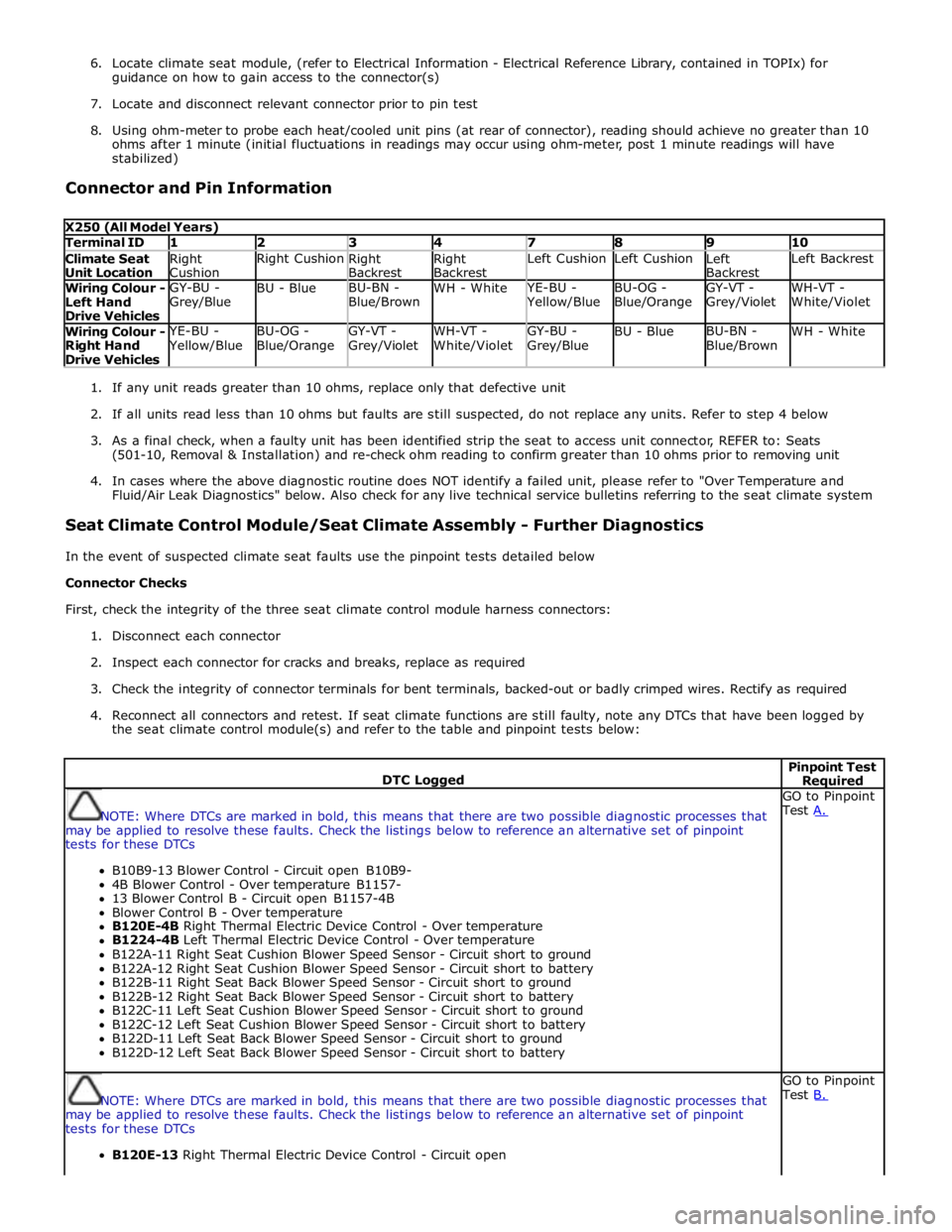
8. Using ohm-meter to probe each heat/cooled unit pins (at rear of connector), reading should achieve no greater than 10
ohms after 1 minute (initial fluctuations in readings may occur using ohm-meter, post 1 minute readings will have
stabilized)
Connector and Pin Information
X250 (All Model Years) Terminal ID 1 2 3 4 7 8 9 10 Climate Seat
Unit Location Right
Cushion Right Cushion
Right
Backrest Right
Backrest Left Cushion Left Cushion
Left
Backrest Left Backrest Wiring Colour -
Left Hand
Drive Vehicles GY-BU -
Grey/Blue BU - Blue BU-BN -
Blue/Brown WH - White YE-BU - Yellow/Blue BU-OG -
Blue/Orange GY-VT -
Grey/Violet WH-VT -
White/Violet Wiring Colour -
Right Hand
Drive Vehicles YE-BU - Yellow/Blue BU-OG -
Blue/Orange GY-VT -
Grey/Violet WH-VT -
White/Violet GY-BU -
Grey/Blue BU - Blue BU-BN -
Blue/Brown WH - White
1. If any unit reads greater than 10 ohms, replace only that defective unit
2. If all units read less than 10 ohms but faults are still suspected, do not replace any units. Refer to step 4 below
3. As a final check, when a faulty unit has been identified strip the seat to access unit connector, REFER to: Seats
(501-10, Removal & Installation) and re-check ohm reading to confirm greater than 10 ohms prior to removing unit
4. In cases where the above diagnostic routine does NOT identify a failed unit, please refer to "Over Temperature and
Fluid/Air Leak Diagnostics" below. Also check for any live technical service bulletins referring to the seat climate system
Seat Climate Control Module/Seat Climate Assembly - Further Diagnostics
In the event of suspected climate seat faults use the pinpoint tests detailed below
Connector Checks
First, check the integrity of the three seat climate control module harness connectors:
1. Disconnect each connector
2. Inspect each connector for cracks and breaks, replace as required
3. Check the integrity of connector terminals for bent terminals, backed-out or badly crimped wires. Rectify as required
4. Reconnect all connectors and retest. If seat climate functions are still faulty, note any DTCs that have been logged by
the seat climate control module(s) and refer to the table and pinpoint tests below:
DTC Logged Pinpoint Test Required
NOTE: Where DTCs are marked in bold, this means that there are two possible diagnostic processes that
may be applied to resolve these faults. Check the listings below to reference an alternative set of pinpoint
tests for these DTCs
B10B9-13 Blower Control - Circuit open B10B9-
4B Blower Control - Over temperature B1157-
13 Blower Control B - Circuit open B1157-4B
Blower Control B - Over temperature
B120E-4B Right Thermal Electric Device Control - Over temperature
B1224-4B Left Thermal Electric Device Control - Over temperature
B122A-11 Right Seat Cushion Blower Speed Sensor - Circuit short to ground
B122A-12 Right Seat Cushion Blower Speed Sensor - Circuit short to battery
B122B-11 Right Seat Back Blower Speed Sensor - Circuit short to ground
B122B-12 Right Seat Back Blower Speed Sensor - Circuit short to battery
B122C-11 Left Seat Cushion Blower Speed Sensor - Circuit short to ground
B122C-12 Left Seat Cushion Blower Speed Sensor - Circuit short to battery
B122D-11 Left Seat Back Blower Speed Sensor - Circuit short to ground
B122D-12 Left Seat Back Blower Speed Sensor - Circuit short to battery GO to Pinpoint
Test A.
NOTE: Where DTCs are marked in bold, this means that there are two possible diagnostic processes that
may be applied to resolve these faults. Check the listings below to reference an alternative set of pinpoint
tests for these DTCs
B120E-13 Right Thermal Electric Device Control - Circuit open GO to Pinpoint
Test B.
Page 2343 of 3039
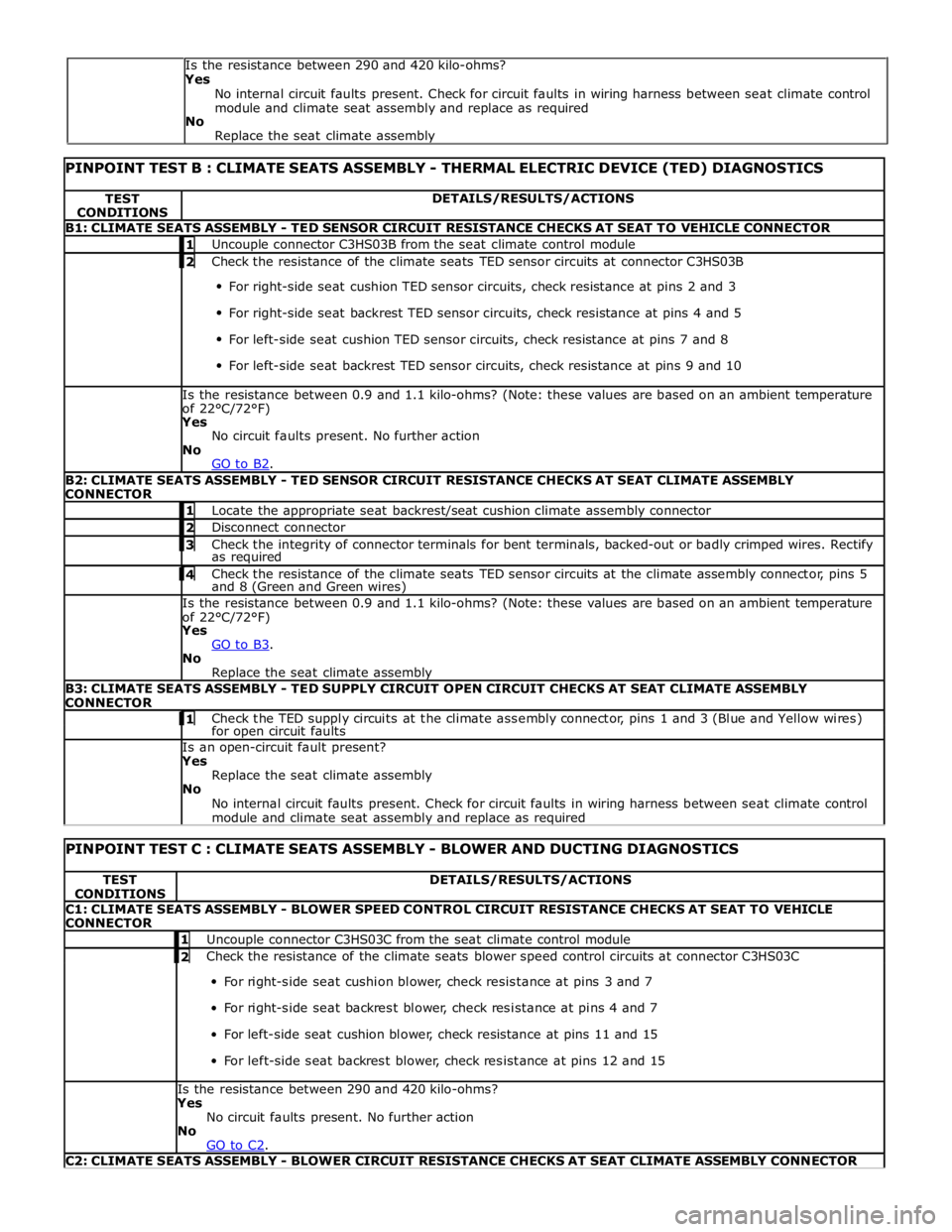
PINPOINT TEST B : CLIMATE SEATS ASSEMBLY - THERMAL ELECTRIC DEVICE (TED) DIAGNOSTICS TEST
CONDITIONS DETAILS/RESULTS/ACTIONS B1: CLIMATE SEATS ASSEMBLY - TED SENSOR CIRCUIT RESISTANCE CHECKS AT SEAT TO VEHICLE CONNECTOR 1 Uncouple connector C3HS03B from the seat climate control module 2 Check the resistance of the climate seats TED sensor circuits at connector C3HS03B For right-side seat cushion TED sensor circuits, check resistance at pins 2 and 3
For right-side seat backrest TED sensor circuits, check resistance at pins 4 and 5
For left-side seat cushion TED sensor circuits, check resistance at pins 7 and 8
For left-side seat backrest TED sensor circuits, check resistance at pins 9 and 10 Is the resistance between 0.9 and 1.1 kilo-ohms? (Note: these values are based on an ambient temperature
of 22°C/72°F) Yes
No circuit faults present. No further action
No
GO to B2. B2: CLIMATE SEATS ASSEMBLY - TED SENSOR CIRCUIT RESISTANCE CHECKS AT SEAT CLIMATE ASSEMBLY
CONNECTOR 1 Locate the appropriate seat backrest/seat cushion climate assembly connector 2 Disconnect connector 3 Check the integrity of connector terminals for bent terminals, backed-out or badly crimped wires. Rectify as required 4 Check the resistance of the climate seats TED sensor circuits at the climate assembly connector, pins 5 and 8 (Green and Green wires) Is the resistance between 0.9 and 1.1 kilo-ohms? (Note: these values are based on an ambient temperature
of 22°C/72°F) Yes
GO to B3. No
Replace the seat climate assembly B3: CLIMATE SEATS ASSEMBLY - TED SUPPLY CIRCUIT OPEN CIRCUIT CHECKS AT SEAT CLIMATE ASSEMBLY
CONNECTOR 1 Check the TED supply circuits at the climate assembly connector, pins 1 and 3 (Blue and Yellow wires) for open circuit faults Is an open-circuit fault present? Yes
Replace the seat climate assembly
No
No internal circuit faults present. Check for circuit faults in wiring harness between seat climate control
module and climate seat assembly and replace as required
PINPOINT TEST C : CLIMATE SEATS ASSEMBLY - BLOWER AND DUCTING DIAGNOSTICS TEST
CONDITIONS DETAILS/RESULTS/ACTIONS C1: CLIMATE SEATS ASSEMBLY - BLOWER SPEED CONTROL CIRCUIT RESISTANCE CHECKS AT SEAT TO VEHICLE
CONNECTOR 1 Uncouple connector C3HS03C from the seat climate control module 2 Check the resistance of the climate seats blower speed control circuits at connector C3HS03C For right-side seat cushion blower, check resistance at pins 3 and 7
For right-side seat backrest blower, check resistance at pins 4 and 7
For left-side seat cushion blower, check resistance at pins 11 and 15
For left-side seat backrest blower, check resistance at pins 12 and 15 Is the resistance between 290 and 420 kilo-ohms?
Yes
No circuit faults present. No further action
No
GO to C2. C2: CLIMATE SEATS ASSEMBLY - BLOWER CIRCUIT RESISTANCE CHECKS AT SEAT CLIMATE ASSEMBLY CONNECTOR Is the resistance between 290 and 420 kilo-ohms?
Yes
No internal circuit faults present. Check for circuit faults in wiring harness between seat climate control
module and climate seat assembly and replace as required
No
Replace the seat climate assembly
Page 2345 of 3039
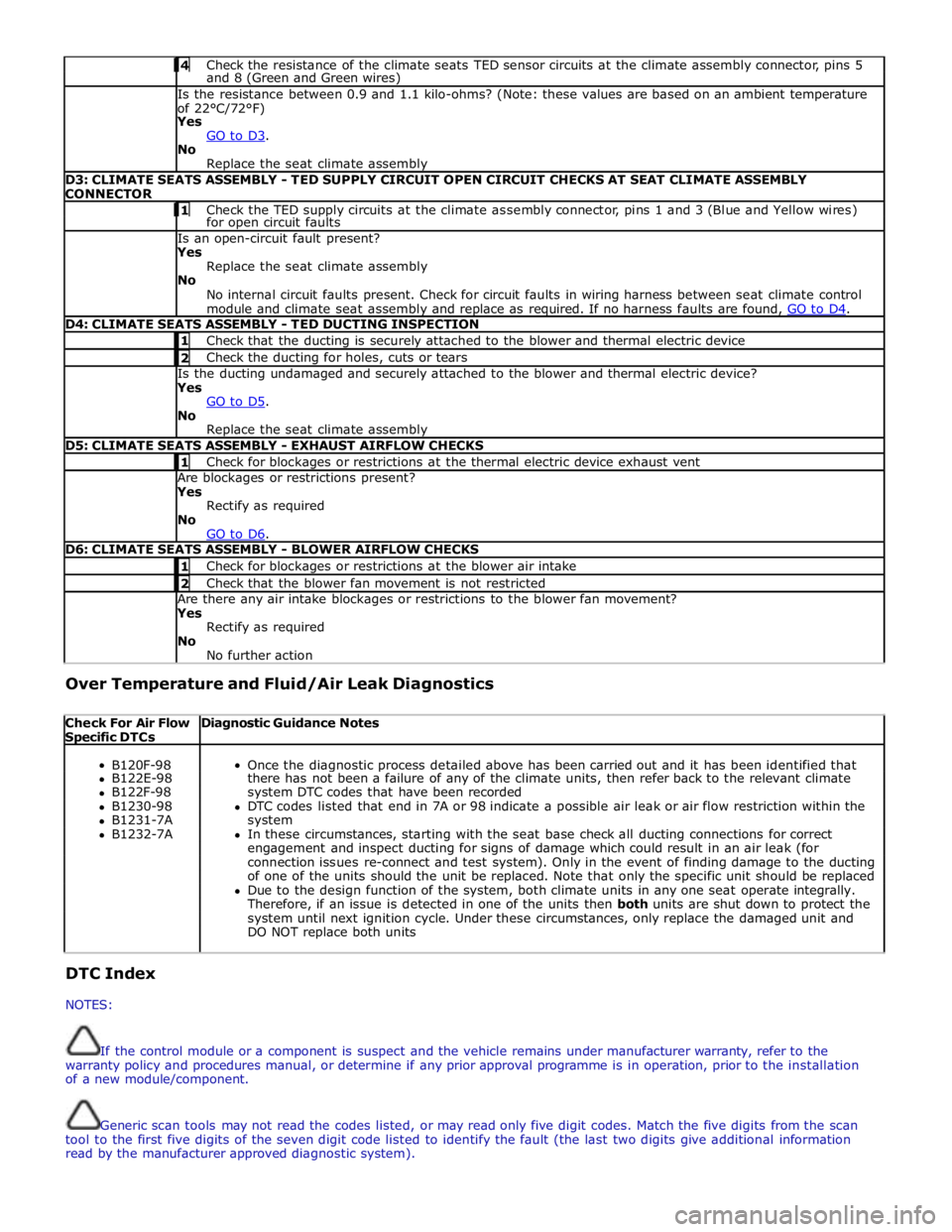
4 Check the resistance of the climate seats TED sensor circuits at the climate assembly connector, pins 5 and 8 (Green and Green wires) Is the resistance between 0.9 and 1.1 kilo-ohms? (Note: these values are based on an ambient temperature
of 22°C/72°F)
Yes
GO to D3. No
Replace the seat climate assembly D3: CLIMATE SEATS ASSEMBLY - TED SUPPLY CIRCUIT OPEN CIRCUIT CHECKS AT SEAT CLIMATE ASSEMBLY
CONNECTOR 1 Check the TED supply circuits at the climate assembly connector, pins 1 and 3 (Blue and Yellow wires) for open circuit faults Is an open-circuit fault present?
Yes
Replace the seat climate assembly
No
No internal circuit faults present. Check for circuit faults in wiring harness between seat climate control
module and climate seat assembly and replace as required. If no harness faults are found, GO to D4. D4: CLIMATE SEATS ASSEMBLY - TED DUCTING INSPECTION 1 Check that the ducting is securely attached to the blower and thermal electric device 2 Check the ducting for holes, cuts or tears Is the ducting undamaged and securely attached to the blower and thermal electric device?
Yes
GO to D5. No
Replace the seat climate assembly D5: CLIMATE SEATS ASSEMBLY - EXHAUST AIRFLOW CHECKS 1 Check for blockages or restrictions at the thermal electric device exhaust vent Are blockages or restrictions present?
Yes
Rectify as required
No
GO to D6. D6: CLIMATE SEATS ASSEMBLY - BLOWER AIRFLOW CHECKS 1 Check for blockages or restrictions at the blower air intake 2 Check that the blower fan movement is not restricted Are there any air intake blockages or restrictions to the blower fan movement?
Yes
Rectify as required
No
No further action Over Temperature and Fluid/Air Leak Diagnostics
Check For Air Flow Specific DTCs Diagnostic Guidance Notes
B120F-98
Once the diagnostic process detailed above has been carried out and it has been identified that B122E-98 there has not been a failure of any of the climate units, then refer back to the relevant climate B122F-98 system DTC codes that have been recorded B1230-98 DTC codes listed that end in 7A or 98 indicate a possible air leak or air flow restriction within the B1231-7A system B1232-7A In these circumstances, starting with the seat base check all ducting connections for correct engagement and inspect ducting for signs of damage which could result in an air leak (for connection issues re-connect and test system). Only in the event of finding damage to the ducting of one of the units should the unit be replaced. Note that only the specific unit should be replaced Due to the design function of the system, both climate units in any one seat operate integrally. Therefore, if an issue is detected in one of the units then both units are shut down to protect the system until next ignition cycle. Under these circumstances, only replace the damaged unit and DO NOT replace both units DTC Index
NOTES:
If the control module or a component is suspect and the vehicle remains under manufacturer warranty, refer to the
warranty policy and procedures manual, or determine if any prior approval programme is in operation, prior to the installation
of a new module/component.
Generic scan tools may not read the codes listed, or may read only five digit codes. Match the five digits from the scan
tool to the first five digits of the seven digit code listed to identify the fault (the last two digits give additional information
read by the manufacturer approved diagnostic system).