2010 JAGUAR XFR phone
[x] Cancel search: phonePage 203 of 3039
Published: 17-Apr-2014
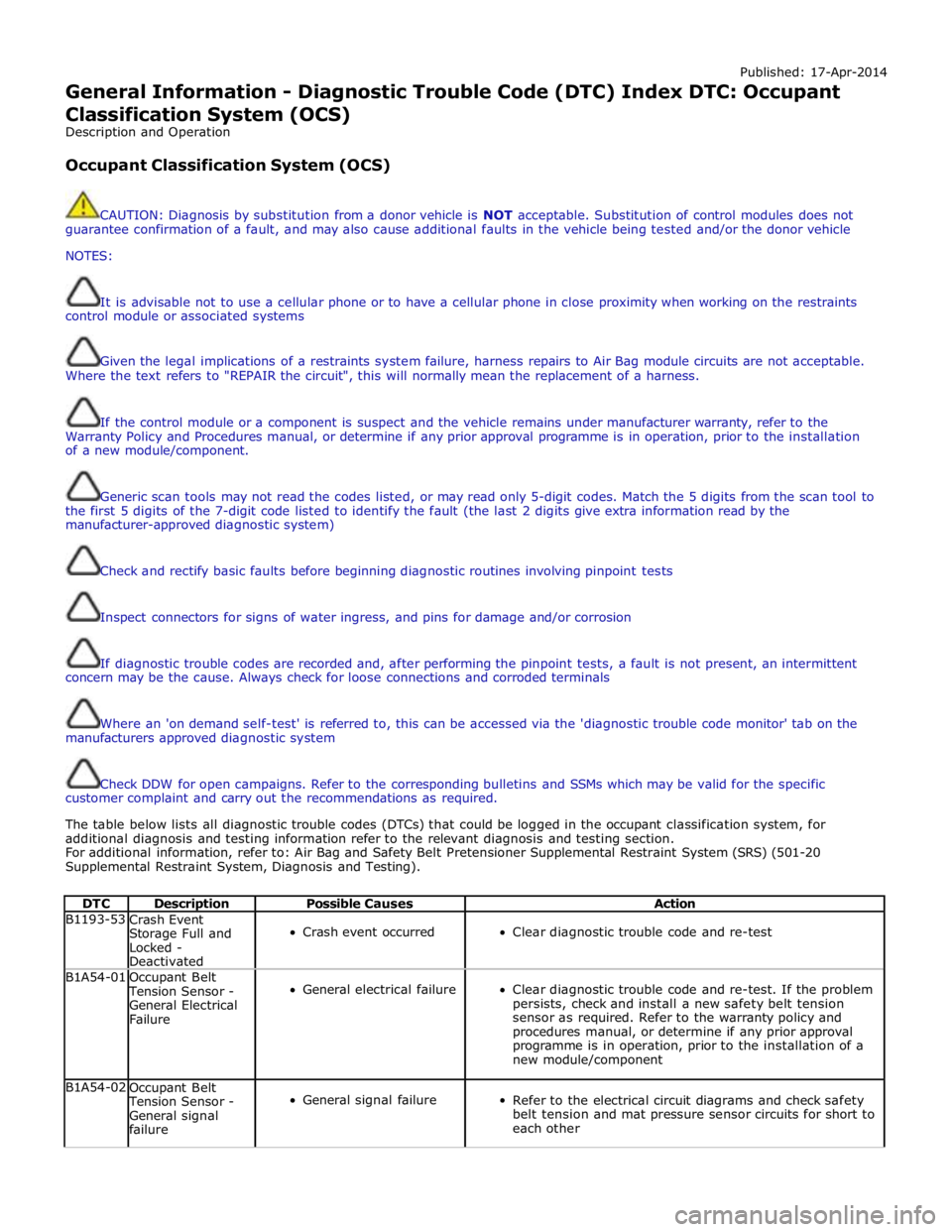
General Information - Diagnostic Trouble Code (DTC) Index DTC: Occupant Classification System (OCS)
Description and Operation
Occupant Classification System (OCS)
CAUTION: Diagnosis by substitution from a donor vehicle is NOT acceptable. Substitution of control modules does not
guarantee confirmation of a fault, and may also cause additional faults in the vehicle being tested and/or the donor vehicle
NOTES:
It is advisable not to use a cellular phone or to have a cellular phone in close proximity when working on the restraints
control module or associated systems
Given the legal implications of a restraints system failure, harness repairs to Air Bag module circuits are not acceptable.
Where the text refers to "REPAIR the circuit", this will normally mean the replacement of a harness.
If the control module or a component is suspect and the vehicle remains under manufacturer warranty, refer to the
Warranty Policy and Procedures manual, or determine if any prior approval programme is in operation, prior to the installation
of a new module/component.
Generic scan tools may not read the codes listed, or may read only 5-digit codes. Match the 5 digits from the scan tool to
the first 5 digits of the 7-digit code listed to identify the fault (the last 2 digits give extra information read by the
manufacturer-approved diagnostic system)
Check and rectify basic faults before beginning diagnostic routines involving pinpoint tests
Inspect connectors for signs of water ingress, and pins for damage and/or corrosion
If diagnostic trouble codes are recorded and, after performing the pinpoint tests, a fault is not present, an intermittent
concern may be the cause. Always check for loose connections and corroded terminals
Where an 'on demand self-test' is referred to, this can be accessed via the 'diagnostic trouble code monitor' tab on the
manufacturers approved diagnostic system
Check DDW for open campaigns. Refer to the corresponding bulletins and SSMs which may be valid for the specific
customer complaint and carry out the recommendations as required.
The table below lists all diagnostic trouble codes (DTCs) that could be logged in the occupant classification system, for
additional diagnosis and testing information refer to the relevant diagnosis and testing section.
For additional information, refer to: Air Bag and Safety Belt Pretensioner Supplemental Restraint System (SRS) (501-20
Supplemental Restraint System, Diagnosis and Testing).
DTC Description Possible Causes Action B1193-53
Crash Event
Storage Full and
Locked -
Deactivated
Crash event occurred
Clear diagnostic trouble code and re-test B1A54-01
Occupant Belt Tension Sensor -
General Electrical
Failure
General electrical failure
Clear diagnostic trouble code and re-test. If the problem
persists, check and install a new safety belt tension
sensor as required. Refer to the warranty policy and
procedures manual, or determine if any prior approval
programme is in operation, prior to the installation of a
new module/component B1A54-02
Occupant Belt Tension Sensor -
General signal
failure
General signal failure
Refer to the electrical circuit diagrams and check safety
belt tension and mat pressure sensor circuits for short to
each other
Page 231 of 3039
Published: 12-May-2014
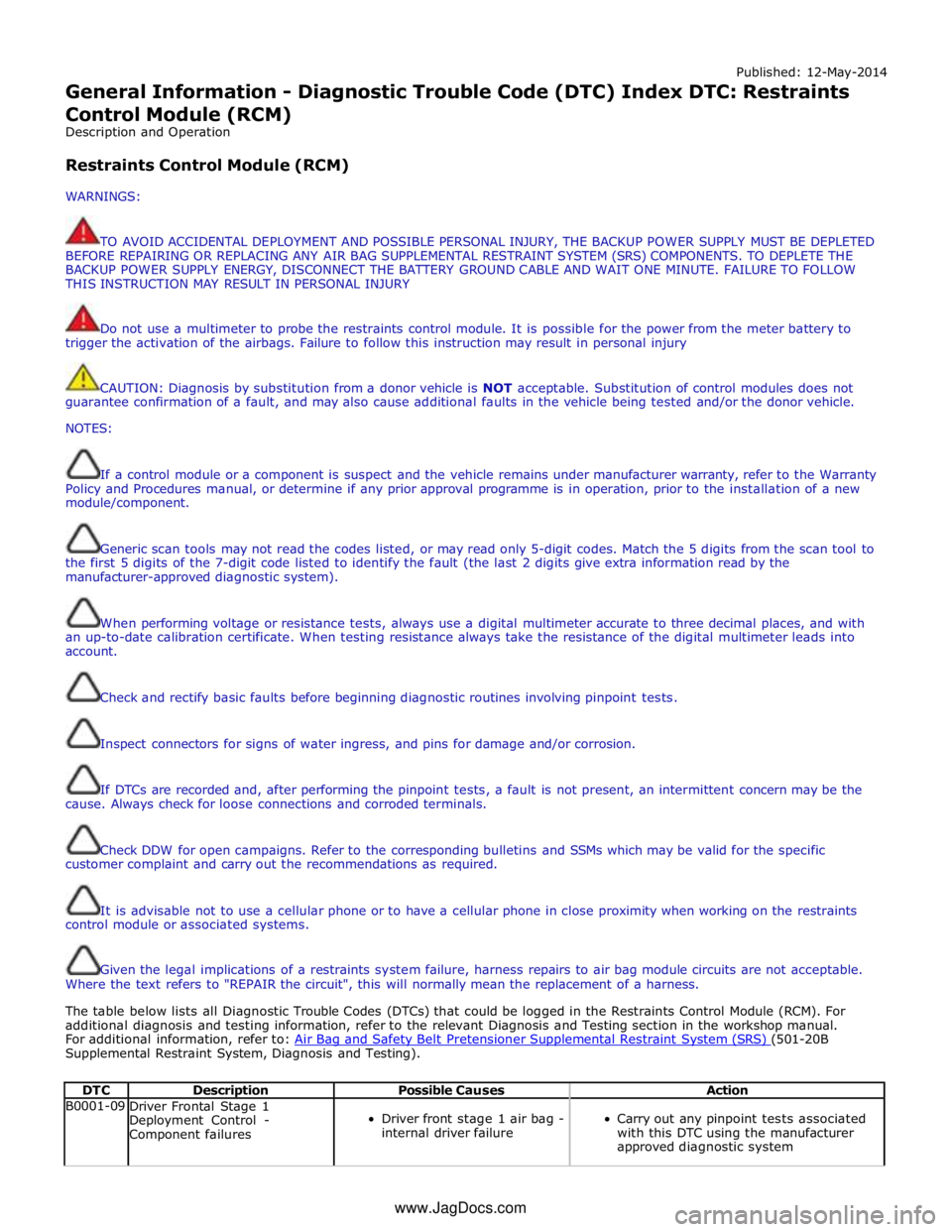
General Information - Diagnostic Trouble Code (DTC) Index DTC: Restraints
Control Module (RCM)
Description and Operation
Restraints Control Module (RCM)
WARNINGS:
TO AVOID ACCIDENTAL DEPLOYMENT AND POSSIBLE PERSONAL INJURY, THE BACKUP POWER SUPPLY MUST BE DEPLETED
BEFORE REPAIRING OR REPLACING ANY AIR BAG SUPPLEMENTAL RESTRAINT SYSTEM (SRS) COMPONENTS. TO DEPLETE THE
BACKUP POWER SUPPLY ENERGY, DISCONNECT THE BATTERY GROUND CABLE AND WAIT ONE MINUTE. FAILURE TO FOLLOW
THIS INSTRUCTION MAY RESULT IN PERSONAL INJURY
Do not use a multimeter to probe the restraints control module. It is possible for the power from the meter battery to
trigger the activation of the airbags. Failure to follow this instruction may result in personal injury
CAUTION: Diagnosis by substitution from a donor vehicle is NOT acceptable. Substitution of control modules does not
guarantee confirmation of a fault, and may also cause additional faults in the vehicle being tested and/or the donor vehicle.
NOTES:
If a control module or a component is suspect and the vehicle remains under manufacturer warranty, refer to the Warranty
Policy and Procedures manual, or determine if any prior approval programme is in operation, prior to the installation of a new
module/component.
Generic scan tools may not read the codes listed, or may read only 5-digit codes. Match the 5 digits from the scan tool to
the first 5 digits of the 7-digit code listed to identify the fault (the last 2 digits give extra information read by the
manufacturer-approved diagnostic system).
When performing voltage or resistance tests, always use a digital multimeter accurate to three decimal places, and with
an up-to-date calibration certificate. When testing resistance always take the resistance of the digital multimeter leads into
account.
Check and rectify basic faults before beginning diagnostic routines involving pinpoint tests.
Inspect connectors for signs of water ingress, and pins for damage and/or corrosion.
If DTCs are recorded and, after performing the pinpoint tests, a fault is not present, an intermittent concern may be the
cause. Always check for loose connections and corroded terminals.
Check DDW for open campaigns. Refer to the corresponding bulletins and SSMs which may be valid for the specific
customer complaint and carry out the recommendations as required.
It is advisable not to use a cellular phone or to have a cellular phone in close proximity when working on the restraints
control module or associated systems.
Given the legal implications of a restraints system failure, harness repairs to air bag module circuits are not acceptable.
Where the text refers to "REPAIR the circuit", this will normally mean the replacement of a harness.
The table below lists all Diagnostic Trouble Codes (DTCs) that could be logged in the Restraints Control Module (RCM). For
additional diagnosis and testing information, refer to the relevant Diagnosis and Testing section in the workshop manual.
For additional information, refer to: Air Bag and Safety Belt Pretensioner Supplemental Restraint System (SRS) (501-20B Supplemental Restraint System, Diagnosis and Testing).
DTC Description Possible Causes Action B0001-09
Driver Frontal Stage 1
Deployment Control -
Component failures
Driver front stage 1 air bag -
internal driver failure
Carry out any pinpoint tests associated
with this DTC using the manufacturer
approved diagnostic system www.JagDocs.com
Page 278 of 3039

DTC Description Possible Causes Action hardware
Module has incorrect serial
number U0197-00
Lost communication
with telephone
control module - No
sub type
information
General failure
Telephone control module
battery supply circuit, open
circuit
Telephone control module
ground supply circuit, open
circuit
Telephone control module
MOST network open circuit
Telephone control module
not configured
Telephone control module
failure
Check the telephone control module for DTCs and
refer to the relevant DTC index. Using the
manufacturing approved diagnostic system carry out
most ring test. Using the manufacturers approved
diagnostic system re-configure the telephone
control module. Refer to electrical circuit diagrams
check battery and ground supplies to telephone
control module for open circuit. Repair as necessary.
Refer to the warranty policy and procedures manual
if module is suspect. Check the system is operating
correctly and there are no DTCs U0197-4A
Lost communication
with telephone
control module -
Incorrect component
installed
The information and
entertainment module has
detected a mismatch
between the hardware
connected and the expected
hardware
Module has incorrect serial
number
Suspect incorrect telephone module installed. Refer
to the warranty policy and procedures manual if
module is suspect. Check the system is operating
correctly and there are no DTCs U0237-00
Lost communication
with digital audio
control module C -
No sub type
information
General failure
High definition radio module
battery supply circuit, open
circuit
High definition radio module
ground supply circuit, open
circuit
High definition radio module
MOST network, open circuit
High definition radio module
not configured
High definition radio module
failure
Check the module for DTCs and refer to the relevant
DTC index. Using the manufacturing approved
diagnostic system carry out MOST ring test. Using
the manufacturers approved diagnostic system
re-configure the high definition radio module . Refer
to electrical circuit diagrams check battery and
ground supplies to high definition radio module for
open circuit. Repair as necessary. Refer to the
warranty policy and procedures manual if module is
suspect. Check the system is operating correctly
and there are no DTCs U0237-4A
Lost communication
with digital audio
control module C -
Incorrect component
installed
The information and
entertainment module has
detected a mismatch
between the hardware
connected and the expected
hardware
Module has incorrect serial
number
Suspect incorrect high definition radio module
installed, Refer to the warranty policy and
procedures manual if module is suspect. Check the
system is operating correctly and there are no DTCs U0253-00
Lost communication
with accessory
protocol interface
module - No sub
type information
General failure
Portable audio interface
console battery supply
circuit, open circuit
Portable audio interface
console ground supply
circuit, open circuit
Portable audio interface
console MOST network, open
circuit
Portable audio interface
console not configured
Portable audio interface
console failure
Check the portable audio interface console for DTCs
and refer to the relevant DTC index. Using the
manufacturing approved diagnostic system carry out
MOST ring test. Using the manufacturers approved
diagnostic system re-configure the portable audio
interface console. Refer to electrical circuit diagrams
check battery and ground supplies to portable audio
interface console for open circuit. Repair as
necessary. Refer to the warranty policy and
procedures manual if module is suspect. Check the
system is operating correctly and there are no DTCs U0253-4A
Lost communication
with accessory
protocol interface
module - Incorrect
component installed
The information and
entertainment module has
detected a mismatch
between the hardware
connected and the expected
hardware
Module has incorrect serial
number
Suspect incorrect portable audio interface console
installed. Refer to the warranty policy and
procedures manual if module is suspect. Check the
system is operating correctly and there are no DTCs
Page 279 of 3039

Published: 12-May-2014
General Information - Diagnostic Trouble Code (DTC) Index DTC: Telephone
Module (TEL)
Description and Operation
Telephone Module
CAUTION: Diagnosis by substitution from a donor vehicle is NOT acceptable. Substitution of control modules does not
guarantee confirmation of a fault, and may also cause additional faults in the vehicle being tested and/or the donor vehicle.
NOTES:
If a control module or a component is suspect and the vehicle remains under manufacturer warranty, refer to the Warranty
Policy and Procedures manual, or determine if any prior approval programme is in operation, prior to the installation of a new
module/component.
Generic scan tools may not read the codes listed, or may read only 5-digit codes. Match the 5 digits from the scan tool to
the first 5 digits of the 7-digit code listed to identify the fault (the last 2 digits give extra information read by the
manufacturer-approved diagnostic system).
When performing voltage or resistance tests, always use a digital multimeter accurate to three decimal places, and with
an up-to-date calibration certificate. When testing resistance always take the resistance of the digital multimeter leads into
account.
Check and rectify basic faults before beginning diagnostic routines involving pinpoint tests.
Inspect connectors for signs of water ingress, and pins for damage and/or corrosion.
If DTCs are recorded and, after performing the pinpoint tests, a fault is not present, an intermittent concern may be the
cause. Always check for loose connections and corroded terminals.
Check DDW for open campaigns. Refer to the corresponding bulletins and SSMs which may be valid for the specific
customer complaint and carry out the recommendations as required.
The table below lists all Diagnostic Trouble Codes (DTCs) that could be logged in the Telephone Module. For additional
diagnosis and testing information, refer to the relevant Diagnosis and Testing section in the workshop manual.
For additional information, refer to: Cellular Phone (415-00 Information and Entertainment System - General Information, Diagnosis and Testing).
DTC Description Possible Causes Action B1A56-13 Antenna - Circuit open
Bluetooth antenna circuit
- open circuit
Refer to the electrical circuit diagrams and check blue
tooth antenna circuit for open circuit B1D79-84
Microphone Input -
Signal below
allowable range
Signal amplitude <
minimum
Refer to the electrical circuit diagrams and test
microphone input circuit for short/open circuit. Check
integrated audio module for related DTCs and refer to
relevant DTC Index U1A00-88
Private
Communication
Network - Bus off
Bluetooth phone module
internal communications
failure
Suspect the module. Check and install a new
telephone module as required, refer to the new
module/component installation note at the top of the
DTC Index U2100-00
Initial Configuration
Not Complete - No
sub type information
Initial configuration not
complete
Re-configure the RJB using the manufacturer approved
diagnostic system. If DTC remains, carry out CAN
network integrity tests using the manufacturer
approved diagnostic system U2101-00
Control Module
Configuration
Incompatible - No sub
type information
Configuration
incompatible
Re-configure the RJB using the manufacturer approved
diagnostic system. If DTC remains, suspect the
telephone module. Check and install a new telephone
Page 280 of 3039

DTC Description Possible Causes Action module as required, refer to the new
module/component installation note at the top of the
DTC Index U3000-44
Control Module - Data
memory failure
Data memory failure
Re-configure the telephone module. If the DTC
remains, suspect the telephone module. Check and
install a new telephone module as required, refer to
the new module/component installation note at the
top of the DTC Index U3000-45
Control Module -
Program memory
failure
Program memory failure
Re-configure the telephone module. If the DTC
remains, suspect the telephone module. Check and
install a new telephone module as required, refer to
the new module/component installation note at the
top of the DTC Index U3000-55
Control Module - Not
configured
Incorrect car
configuration data
received
Re-configure the RJB using the manufacturer approved
diagnostic system. Clear DTC and re-test. If the DTC
remains suspect the telephone module. Check and
install a new module as required, refer to the new
module/component installation note at the top of the
DTC Index U3000-98
Control Module -
Component or system
over temperature
Component or system
over temperature
Check for additional DTCs and refer to DTC Index.
Clear DTC and re-test/monitor condition for
re-occurrence U3003-62
Battery Voltage -
Signal compare failure
Mis-match in battery
voltage, of 2 volts or
more, between
telephone module and
RJB
Carry out any pinpoint tests associated with this DTC
using the manufacturer approved diagnostic system
Page 796 of 3039
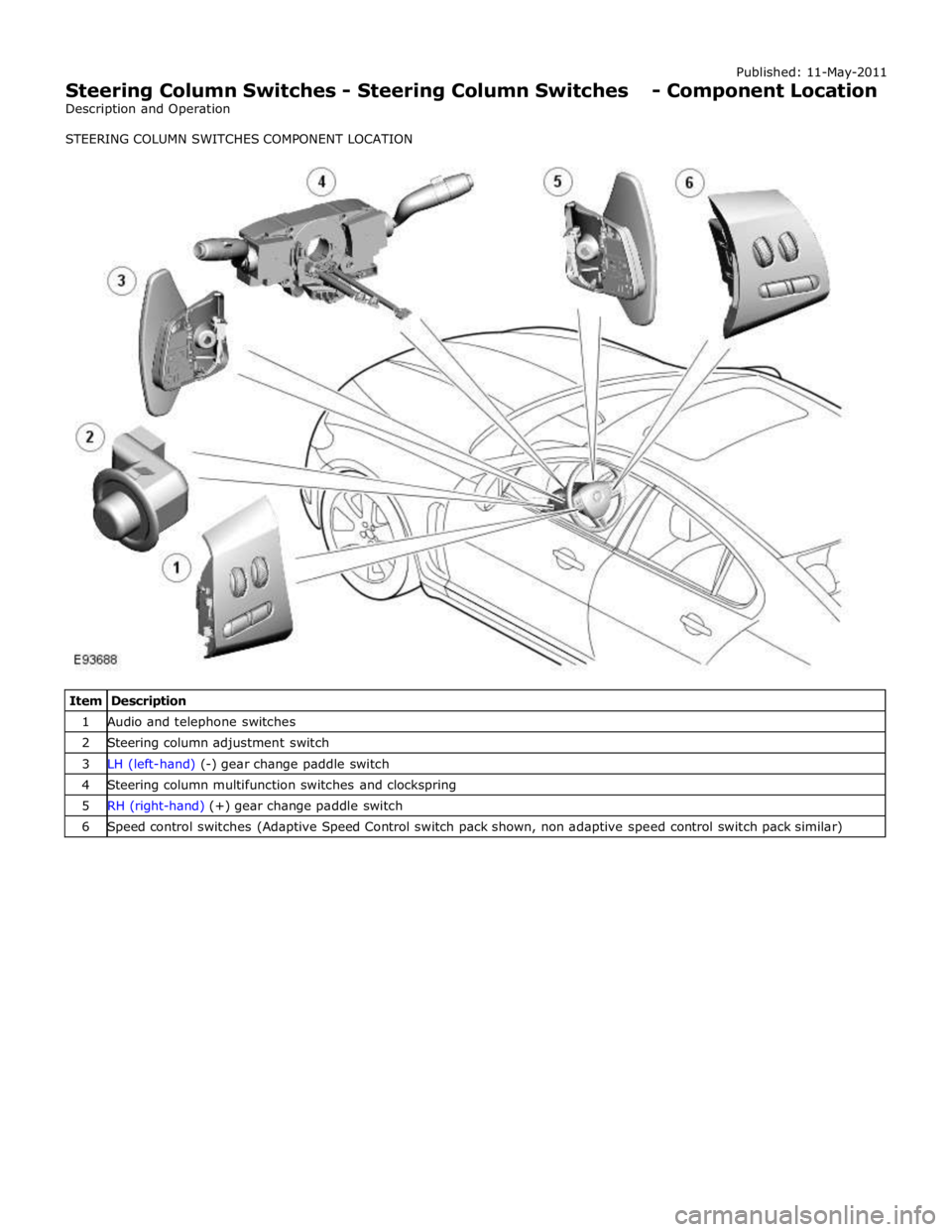
1 Audio and telephone switches 2 Steering column adjustment switch 3 LH (left-hand) (-) gear change paddle switch 4 Steering column multifunction switches and clockspring 5 RH (right-hand) (+) gear change paddle switch 6 Speed control switches (Adaptive Speed Control switch pack shown, non adaptive speed control switch pack similar)
Page 797 of 3039
Published: 11-May-2011
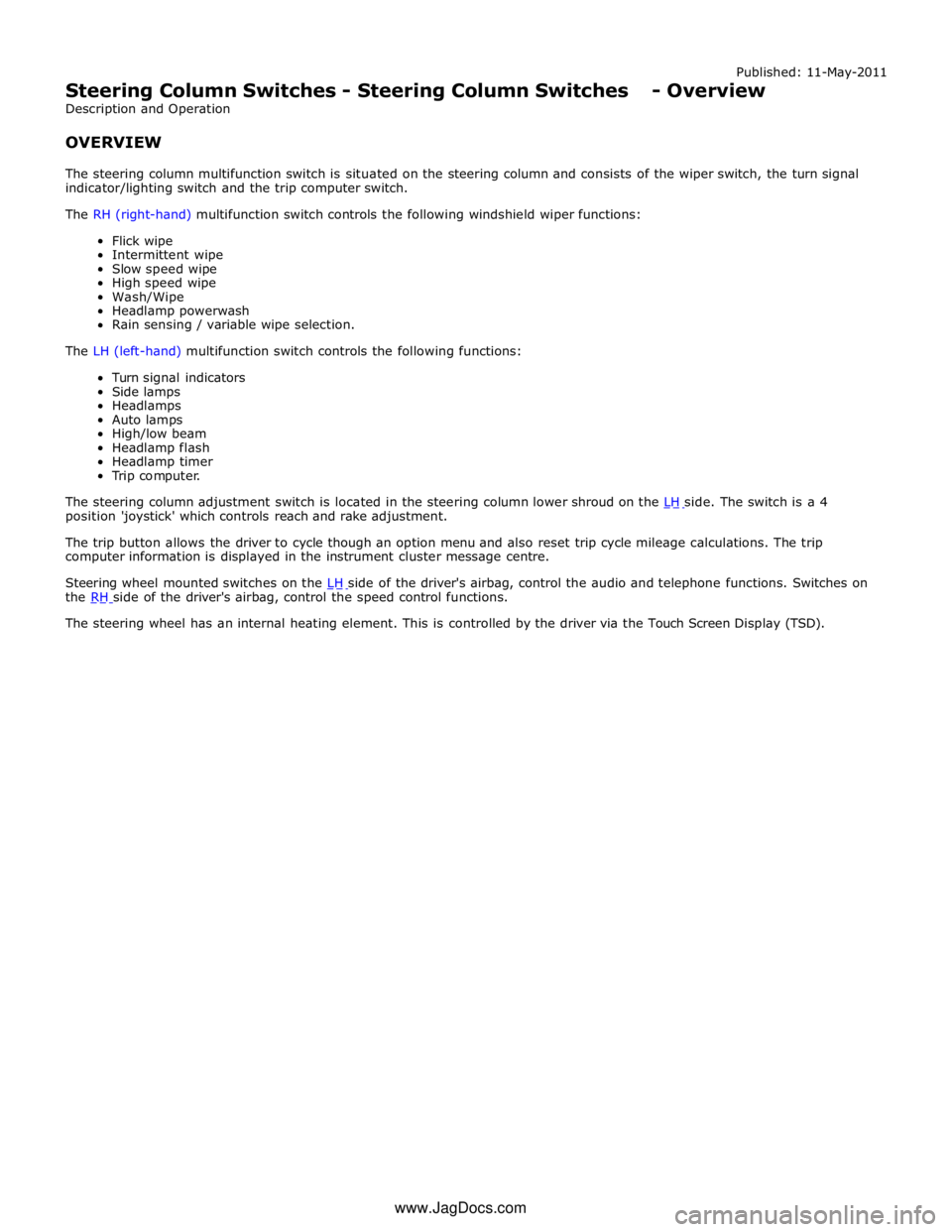
Steering Column Switches - Steering Column Switches - Overview
Description and Operation
OVERVIEW
The steering column multifunction switch is situated on the steering column and consists of the wiper switch, the turn signal
indicator/lighting switch and the trip computer switch.
The RH (right-hand) multifunction switch controls the following windshield wiper functions:
Flick wipe
Intermittent wipe
Slow speed wipe
High speed wipe
Wash/Wipe
Headlamp powerwash
Rain sensing / variable wipe selection.
The LH (left-hand) multifunction switch controls the following functions:
Turn signal indicators
Side lamps
Headlamps
Auto lamps
High/low beam
Headlamp flash
Headlamp timer
Trip computer.
The steering column adjustment switch is located in the steering column lower shroud on the LH side. The switch is a 4 position 'joystick' which controls reach and rake adjustment.
The trip button allows the driver to cycle though an option menu and also reset trip cycle mileage calculations. The trip
computer information is displayed in the instrument cluster message centre.
Steering wheel mounted switches on the LH side of the driver's airbag, control the audio and telephone functions. Switches on the RH side of the driver's airbag, control the speed control functions. The steering wheel has an internal heating element. This is controlled by the driver via the Touch Screen Display (TSD). www.JagDocs.com
Page 799 of 3039
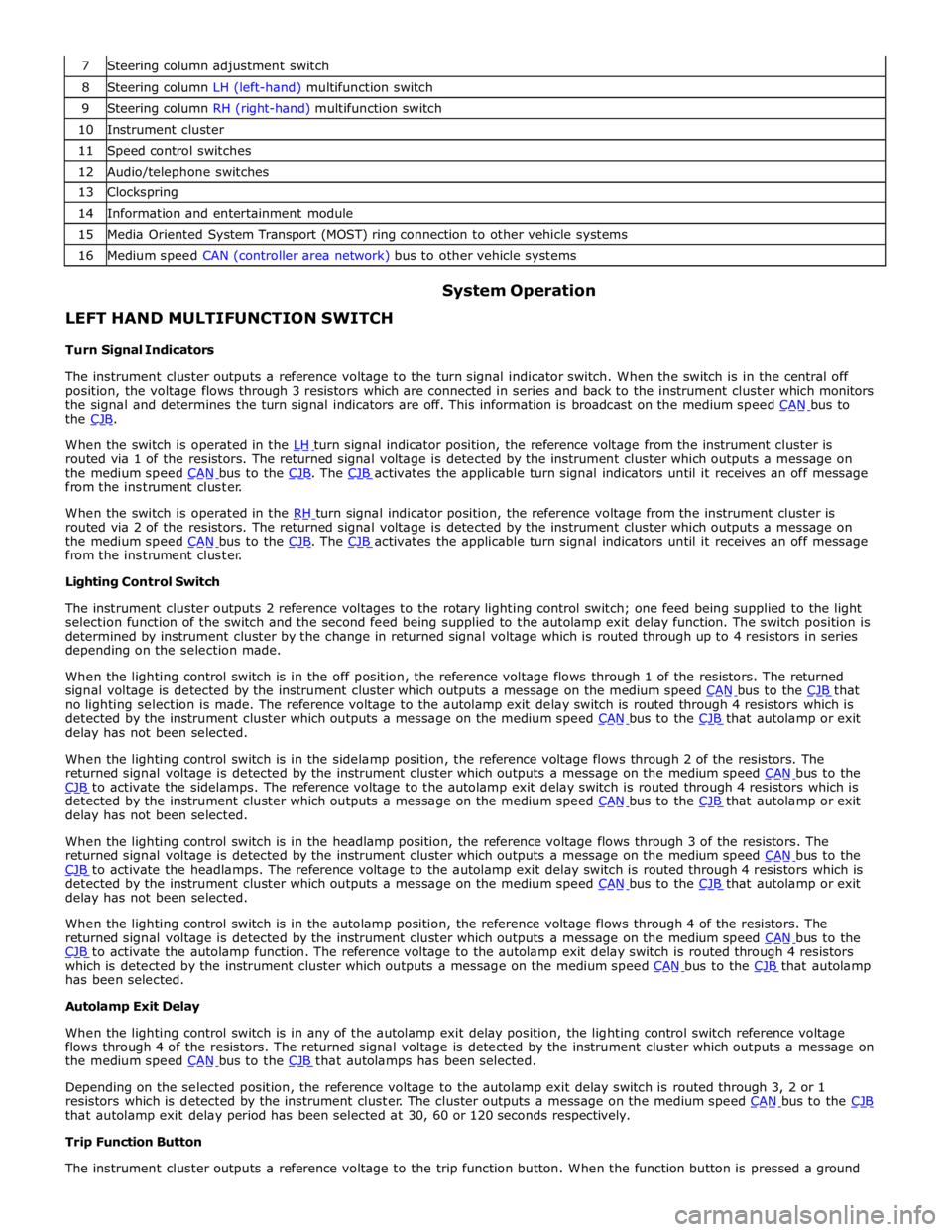
8 Steering column LH (left-hand) multifunction switch 9 Steering column RH (right-hand) multifunction switch 10 Instrument cluster 11 Speed control switches 12 Audio/telephone switches 13 Clockspring 14 Information and entertainment module 15 Media Oriented System Transport (MOST) ring connection to other vehicle systems 16 Medium speed CAN (controller area network) bus to other vehicle systems
LEFT HAND MULTIFUNCTION SWITCH
Turn Signal Indicators System Operation
The instrument cluster outputs a reference voltage to the turn signal indicator switch. When the switch is in the central off
position, the voltage flows through 3 resistors which are connected in series and back to the instrument cluster which monitors
the signal and determines the turn signal indicators are off. This information is broadcast on the medium speed CAN bus to the CJB.
When the switch is operated in the LH turn signal indicator position, the reference voltage from the instrument cluster is routed via 1 of the resistors. The returned signal voltage is detected by the instrument cluster which outputs a message on
the medium speed CAN bus to the CJB. The CJB activates the applicable turn signal indicators until it receives an off message from the instrument cluster.
When the switch is operated in the RH turn signal indicator position, the reference voltage from the instrument cluster is routed via 2 of the resistors. The returned signal voltage is detected by the instrument cluster which outputs a message on
the medium speed CAN bus to the CJB. The CJB activates the applicable turn signal indicators until it receives an off message from the instrument cluster.
Lighting Control Switch
The instrument cluster outputs 2 reference voltages to the rotary lighting control switch; one feed being supplied to the light
selection function of the switch and the second feed being supplied to the autolamp exit delay function. The switch position is
determined by instrument cluster by the change in returned signal voltage which is routed through up to 4 resistors in series
depending on the selection made.
When the lighting control switch is in the off position, the reference voltage flows through 1 of the resistors. The returned
signal voltage is detected by the instrument cluster which outputs a message on the medium speed CAN bus to the CJB that no lighting selection is made. The reference voltage to the autolamp exit delay switch is routed through 4 resistors which is
detected by the instrument cluster which outputs a message on the medium speed CAN bus to the CJB that autolamp or exit delay has not been selected.
When the lighting control switch is in the sidelamp position, the reference voltage flows through 2 of the resistors. The
returned signal voltage is detected by the instrument cluster which outputs a message on the medium speed CAN bus to the CJB to activate the sidelamps. The reference voltage to the autolamp exit delay switch is routed through 4 resistors which is detected by the instrument cluster which outputs a message on the medium speed CAN bus to the CJB that autolamp or exit delay has not been selected.
When the lighting control switch is in the headlamp position, the reference voltage flows through 3 of the resistors. The
returned signal voltage is detected by the instrument cluster which outputs a message on the medium speed CAN bus to the CJB to activate the headlamps. The reference voltage to the autolamp exit delay switch is routed through 4 resistors which is detected by the instrument cluster which outputs a message on the medium speed CAN bus to the CJB that autolamp or exit delay has not been selected.
When the lighting control switch is in the autolamp position, the reference voltage flows through 4 of the resistors. The
returned signal voltage is detected by the instrument cluster which outputs a message on the medium speed CAN bus to the CJB to activate the autolamp function. The reference voltage to the autolamp exit delay switch is routed through 4 resistors which is detected by the instrument cluster which outputs a message on the medium speed CAN bus to the CJB that autolamp has been selected.
Autolamp Exit Delay
When the lighting control switch is in any of the autolamp exit delay position, the lighting control switch reference voltage
flows through 4 of the resistors. The returned signal voltage is detected by the instrument cluster which outputs a message on
the medium speed CAN bus to the CJB that autolamps has been selected.
Depending on the selected position, the reference voltage to the autolamp exit delay switch is routed through 3, 2 or 1
resistors which is detected by the instrument cluster. The cluster outputs a message on the medium speed CAN bus to the CJB that autolamp exit delay period has been selected at 30, 60 or 120 seconds respectively.
Trip Function Button
The instrument cluster outputs a reference voltage to the trip function button. When the function button is pressed a ground