Page 124 of 530
VOICE COMMAND — IF EQUIPPED
Voice Command can be initiated by pressing the VR
button
located on the radio or steering wheel
controls (if equipped).
Refer to “Voice Command” in the Uconnect™ Phone
User Manual located on the DVD for further details.
SEATS
Seats are a primary part of the Occupant Restraint System
of the vehicle. They need to be used properly for safe
operation of the vehicle.
WARNING!
•DO NOT allow people to ride in any area of your
vehicle that is not equipped with seats and seat
belts. In a collision, people riding in these areas
are more likely to be seriously injured or killed.
•Be sure everyone in your vehicle is in a seat and
using a seat belt properly.
3
UNDERSTANDING THE FEATURES OF YOUR VEHICLE 123
ProCarManuals.com
Page 145 of 530
Plastic Grocery Bag Retainer Hooks
Retainer hooks which will hold plastic grocery bag
handles are built into the seatbacks of all rear seats and
some front seats. The floor supports the partial weight of
the bagged goods.
Second Row Bench Seat — If Equipped
While the bench seat does not stow in the floor, it is
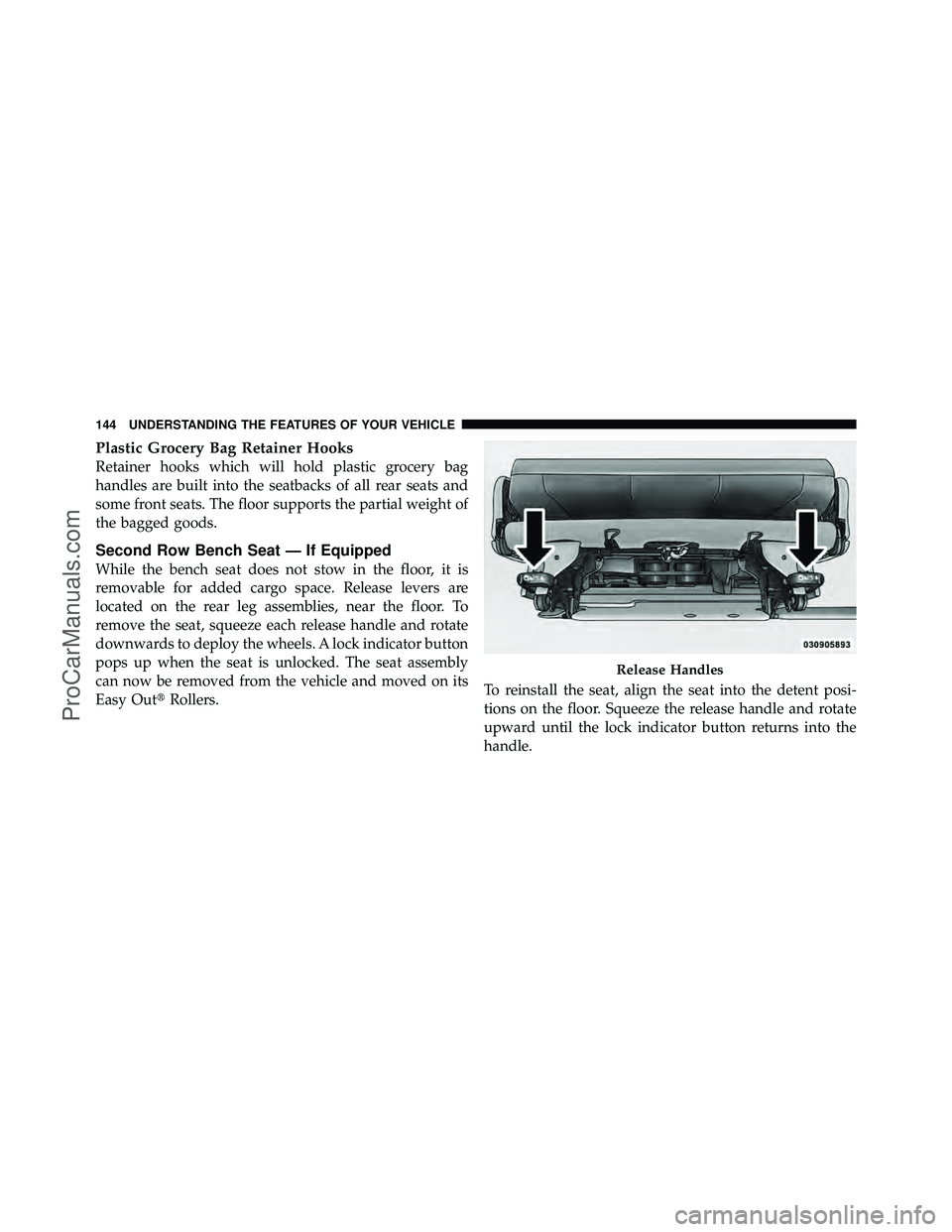
removable for added cargo space. Release levers are
located on the rear leg assemblies, near the floor. To
remove the seat, squeeze each release handle and rotate
downwards to deploy the wheels. A lock indicator button
pops up when the seat is unlocked. The seat assembly
can now be removed from the vehicle and moved on its
Easy Out�Rollers. To reinstall the seat, align the seat into the detent posi-
tions on the floor. Squeeze the release handle and rotate
upward until the lock indicator button returns into the
handle.
Release Handles
144 UNDERSTANDING THE FEATURES OF YOUR VEHICLE
ProCarManuals.com
Page 166 of 530

•The Rain Sensing feature can be turned on and off
through the EVIC (if equipped). Refer to “Electronic
Vehicle Information Center (EVIC)/Personal Settings
(Customer-Programmable Features)” in “Understand-
ing Your Instrument Panel” for further information.
The Rain Sensing system has protective features for the
wiper blades and arms. It will not operate under the
following conditions:
•Low Temperature Wipe Inhibit — The Rain Sensing
feature will not operate when the ignition is first
switched ON, and the vehicle is stationary, and the
outside temperature is below 32°F (0°C), unless the
wiper control on the multifunction lever is moved, or
the vehicle speed becomes greater than 0 mph
(0 km/h), or the outside temperature rises above
freezing.
•Neutral Wipe Inhibit—The Rain Sensing feature will
not operate when the ignition is ON, and the transmis-
sion shift lever is in the NEUTRAL position, and the
vehicle speed is less than 5 mph (8 km/h), unless the
wiper control on the multifunction lever is moved or
the shift lever is moved out of the NEUTRAL position.
•Remote Start Mode Inhibit — On vehicles equipped
with Remote Starting system, Rain Sensing wipers are
not operational when the vehicle is in the remote start
mode. Once the operator is in the vehicle and has
placed the ignition switch in the RUN position, rain
sensing wiper operation can resume, if it has been
selected, and no other inhibit conditions (mentioned
previously) exist.
TILT STEERING COLUMN
This feature allows you to tilt the steering column
upward or downward. The tilt control lever is located on
the steering column, below the steering wheel.
3
UNDERSTANDING THE FEATURES OF YOUR VEHICLE 165
ProCarManuals.com
Page 167 of 530
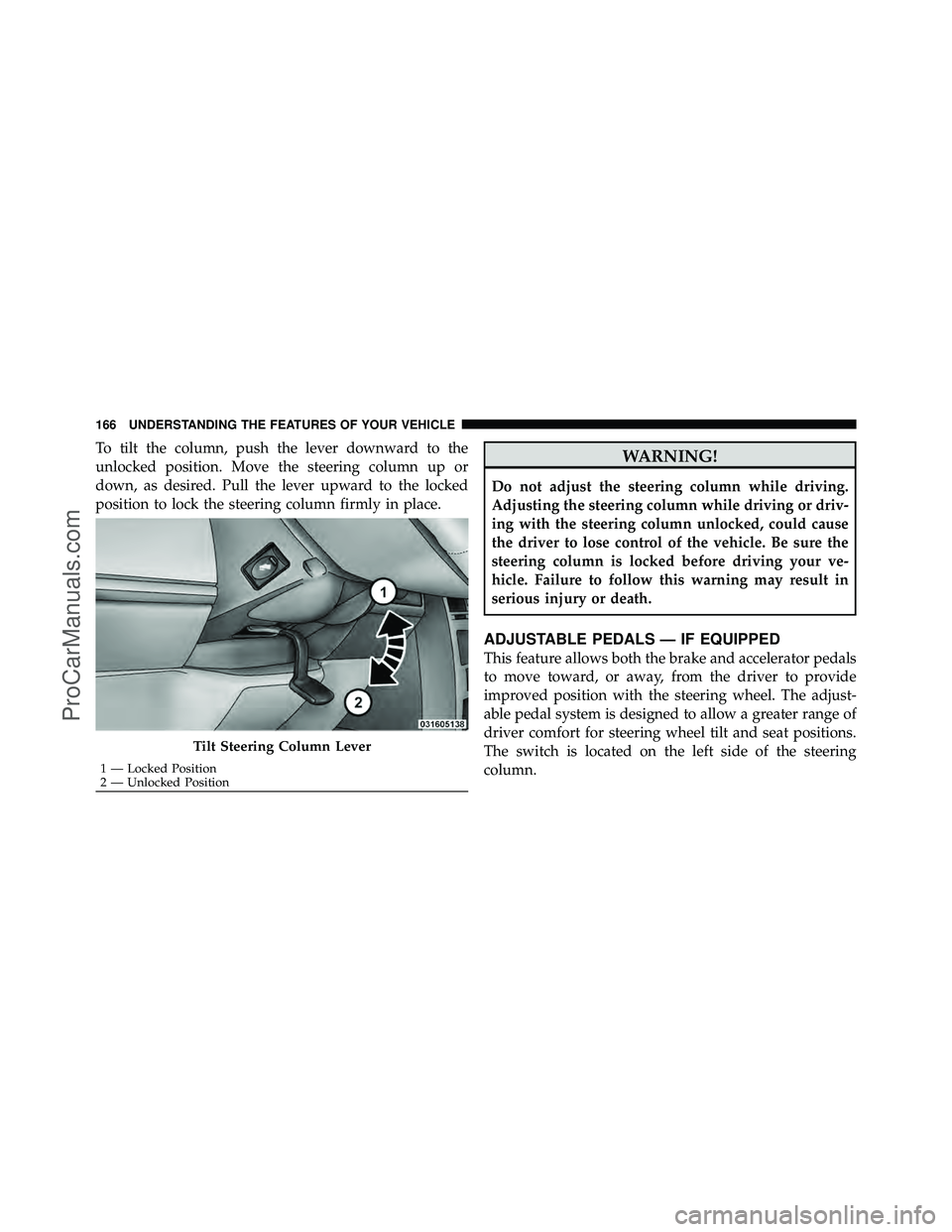
To tilt the column, push the lever downward to the
unlocked position. Move the steering column up or
down, as desired. Pull the lever upward to the locked
position to lock the steering column firmly in place.WARNING!
Do not adjust the steering column while driving.
Adjusting the steering column while driving or driv-
ing with the steering column unlocked, could cause
the driver to lose control of the vehicle. Be sure the
steering column is locked before driving your ve-
hicle. Failure to follow this warning may result in
serious injury or death.
ADJUSTABLE PEDALS — IF EQUIPPED
This feature allows both the brake and accelerator pedals
to move toward, or away, from the driver to provide
improved position with the steering wheel. The adjust-
able pedal system is designed to allow a greater range of
driver comfort for steering wheel tilt and seat positions.
The switch is located on the left side of the steering
column.
Tilt Steering Column Lever
1 — Locked Position
2 — Unlocked Position
166 UNDERSTANDING THE FEATURES OF YOUR VEHICLE
ProCarManuals.com
Page 239 of 530

vehicle placard or tire inflation pressure label, you should
determine the proper tire inflation pressure for those
tires.)
As an added safety feature, your vehicle has been
equipped with a Tire Pressure Monitoring System
(TPMS) that illuminates a low tire pressure telltale when
one or more of your tires is significantly under-inflated.
Accordingly, when the low tire pressure telltale illumi-
nates, you should stop and check your tires as soon as
possible, and inflate them to the proper pressure. Driving
on a significantly under-inflated tire causes the tire to
overheat and can lead to tire failure. Under-inflation also
reduces fuel efficiency and tire tread life, and may affect
the vehicle’s handling and stopping ability.
Please note that the TPMS is not a substitute for proper
tire maintenance, and it is the driver ’s responsibility tomaintain correct tire pressure, even if under-inflation has
not reached the level to trigger illumination of the TPMS
low tire pressure telltale.
Your vehicle has also been equipped with a TPMS
malfunction indicator to indicate when the system is not
operating properly. The TPMS malfunction indicator is
combined with the low tire pressure telltale. When the
system detects a malfunction, the telltale will flash for
approximately one minute and then remain continuously
illuminated. This sequence will continue upon subse-
quent vehicle start-ups as long as the malfunction exists.
When the malfunction indicator is illuminated, the sys-
tem may not be able to detect or signal low tire pressure
as intended. TPMS malfunctions may occur for a variety
of reasons, including the installation of replacement or
alternate tires or wheels on the vehicle that prevent the
TPMS from functioning properly. Always check the
TPMS malfunction telltale after replacing one or more
238 UNDERSTANDING YOUR INSTRUMENT PANEL
ProCarManuals.com
Page 240 of 530
tires or wheels on your vehicle, to ensure that the
replacement or alternate tires and wheels allow the TPMS
to continue to function properly.
CAUTION!
The TPMS has been optimized for the original
equipment tires and wheels. TPMS pressures and
warning have been established for the tire size
equipped on your vehicle. Undesirable system opera-
tion or sensor damage may result when using re-
placement equipment that is not of the same size,
type, and/or style. Aftermarket wheels can cause
sensor damage. Do not use tire sealant from a can, or
balance beads if your vehicle is equipped with a
TPMS, as damage to the sensors may result.26.
Electronic Stability Program (ESP) Indicator Light /
Brake Assist System (BAS) Warning Light
The malfunction light for the Electronic Stabil-
ity Program (ESP) is combined with Brake
Assist System (BAS). The yellow “ESP/BAS
Warning Light” comes on when the ignition
switch is turned to the “ON” position. They should go
out with the engine running. If the “ESP/BAS Warning
Light” comes on continuously with the engine running, a
malfunction has been detected in either the ESP or the
BAS system. If this light remains on after several ignition
cycles, and the vehicle has been driven several miles/
kilometers at speeds greater than 30 mph (48 km/h), see
an authorized dealer as soon as possible.
4
UNDERSTANDING YOUR INSTRUMENT PANEL 239
ProCarManuals.com
Page 246 of 530
This system conveniently allows the driver to select a
variety of useful information by pressing the switches
mounted on the steering wheel. The EVIC consists of the
following:
•System Status display
•Vehicle information warning message displays
•Tire Pressure Monitor System
•Personal Settings (Customer-Programmable Features)
•Compass display
•Outside temperature display
•Trip computer functions
•Audio Modes displayEVIC Menu / Step Control Button, as
it appears on the left side of the steer-
ing wheel spoke.
Electronic Vehicle Information Center (EVIC)
4
UNDERSTANDING YOUR INSTRUMENT PANEL 245
ProCarManuals.com
Page 247 of 530

Press and release the MENU button, and the
mode displayed will change between
Compass/Temperature, Trip, System Status,
and Personal Settings.Press the STEP button to scroll through sub
menus (i.e., Trip Functions, Avg. Fuel Economy,
DTE, Elapsed Time, and Units).
Steering Wheel EVIC Compass/Temp
Control Button, as it appears on the
right side of the steering wheel spoke.
Press and release the Compass/Temperature
button to for instant access to the Compass/
Temperature screens. Press this button to RESET Trip Functions and
change Personal Settings.
Electronic Vehicle Information Center (EVIC)
Displays
When the appropriate conditions exist, the EVIC displays
the following messages:
•Door(s) Ajar (with a single chime, if vehicle is in
motion)
•Liftgate Ajar (chime will sound when vehicle starts
moving)
•Check TPM System (refer to “Tire Pressure Monitoring
System” in “Starting And Operating”)
•Turn Signal On
•RKE Battery Low
246 UNDERSTANDING YOUR INSTRUMENT PANEL
ProCarManuals.com