2010 CHEVROLET CORVETTE mirror
[x] Cancel search: mirrorPage 39 of 472

To recall a memory position:
.On vehicles with an automatic transmission, press
and release the desired button.
If the vehicle is in P (Park), a single beep sounds
and the memory position is recalled after a brief
delay.
If the vehicle is not in P (Park), three beeps sound
and the memory position is not recalled.
.On vehicles with a manual transmission, when the
vehicle is on, the parking brake needs to be set to
recall the memory position. Press and release the
desired button.
A single beep sounds and the memory position is
recalled after a brief delay.
If the vehicle is on and the parking brake is not set,
three beeps sound and the memory position is not
recalled.
For vehicles with the Auto Memory Recall, see “Auto
Memory Recall” underDIC Vehicle Personalization
on
page 4‑71for more information.
To stop recall movement of the memory feature, press
one of the power seat controls, power mirror or memory
buttons, or the telescopic steering column switch.
Easy Exit Seat
B (Easy Exit Seat) : This button is used to program
and recall the desired driver's seat exit position.
To program an exit position:
1. Recall the desired driving position by pressing button 1.
2. Adjust the seat and the telescopic steering column position to a comfortable exit position.
3. Press and hold the exit button until two beeps sound to let you know that the exit position is
now programmed.
A second exit position can be programmed by repeating
the above steps and pressing button 2.
To recall an exit position:
.On vehicles with an automatic transmission, the
vehicle needs to be in P (Park).
.On vehicles with a manual transmission, the
parking brake must be set.
B: Press to recall an exit position.
One beep will sound and the exit position for the
currently identified driver will be recalled.
For vehicles with the Auto Exit Recall, see “Auto Exit
Recall” underDIC Vehicle Personalization
on
page 4‑71for more information.
2-5
Page 87 of 472

Passenger Sensing System
The vehicle has a passenger sensing system for the
right front passenger position. The passenger airbag
status indicator will be visible in the rearview mirror
when the vehicle is started.
United States
Canada The words ON and OFF, or the symbol for on and off,
will be visible during the system check. When the
system check is complete, either the word ON or OFF,
or the symbol for on or off, will be visible. See
Passenger Airbag Status Indicator on page 4‑34.
The passenger sensing system will turn off the right
front passenger frontal airbag and seat-mounted side
impact airbag under certain conditions. The driver
airbags are not affected by the passenger sensing
system.
The passenger sensing system works with sensors
that are part of the right front passenger seat.
The sensors are designed to detect the presence of
a properly-seated occupant and determine if the right
front passenger frontal airbag and seat-mounted side
impact airbag should be enabled (may inflate) or not.
According to accident statistics, children are safer when
properly secured in a rear seat in the correct child
restraint for their weight and size. We recommend that
rear-facing child restraints not be transported in the
vehicle, even if the airbags are off.
2-53
Page 93 of 472
Adding Equipment to Your
Airbag-Equipped Vehicle
Q: Is there anything I might add to or change about the vehicle that could keep the airbags from
working properly?
A: Yes. If you add things that change your vehicle's
frame, bumper system, height, front end or side
sheet metal, they may keep the airbag system from
working properly. Changing or moving any parts of
the front seats, safety belts, the airbag sensing and
diagnostic module, steering wheel, instrument panel,
the inside review mirror, front sensors, or airbag
wiring can affect the operation of the airbag system.
In addition, the vehicle has a passenger sensing
system for the right front passenger position, which
includes sensors that are part of the passenger seat.
The passenger sensing system may not operate
properly if the original seat trim is replaced with
non-GM covers, upholstery or trim, or with
GM covers, upholstery or trim designed for a
different vehicle. Any object, such as an aftermarket
seat heater or a comfort enhancing pad or device,
installed under or on top of the seat fabric, could also interfere with the operation of the passenger
sensing system. This could either prevent proper
deployment of the passenger airbag(s) or prevent
the passenger sensing system from properly turning
off the passenger airbag(s). See
Passenger Sensing
System
on page 2‑53.
If you have any questions about this, you should
contact Customer Assistance before you modify
your vehicle. The phone numbers and addresses
for Customer Assistance are in Step Two of the
Customer Satisfaction Procedure in this manual.
See Customer Satisfaction Procedure on page 8‑2.
Q: Because I have a disability, I have to get my vehicle modified. How can I find out whether this
will affect my airbag system?
A: If you have questions, call Customer Assistance.
The phone numbers and addresses for Customer
Assistance are in Step Two of the Customer
Satisfaction Procedure in this manual. See
Customer Satisfaction Procedure on page 8‑2.
Your dealer/retailer and the service manual have
information about the location of the airbag sensors,
sensing and diagnostic module and airbag wiring.
2-59
Page 97 of 472

Section 3 Features and Controls
Keys. . . . . . . . . . . . . . . . . . . . . . . . . . . . . . . . . . . . . . . . . . . . . . . . 3-3
Keyless Access System . . . . . . . . . . . . . . . . . . . . . . . . . 3-5
Keyless Access System Operation . . . . . . . . . . . . . . 3-5
Doors and Locks . . . . . . . . . . . . . . . . . . . . . . . . . . . . . . . . . 3-10
Door Locks . . . . . . . . . . . . . . . . . . . . . . . . . . . . . . . . . . . . 3-10
Power Door Locks . . . . . . . . . . . . . . . . . . . . . . . . . . . . . 3-12
Automatic Door Lock . . . . . . . . . . . . . . . . . . . . . . . . . . 3-13
Programmable Automatic Door Unlock . . . . . . . . 3-13
Lockout Protection . . . . . . . . . . . . . . . . . . . . . . . . . . . . . 3-13
Hatch . . . . . . . . . . . . . . . . . . . . . . . . . . . . . . . . . . . . . . . . . . 3-14
Windows . . . . . . . . . . . . . . . . . . . . . . . . . . . . . . . . . . . . . . . . . . 3-16
Power Windows . . . . . . . . . . . . . . . . . . . . . . . . . . . . . . . 3-17
Sun Visors . . . . . . . . . . . . . . . . . . . . . . . . . . . . . . . . . . . . . 3-18
Theft-Deterrent Systems . . . . . . . . . . . . . . . . . . . . . . . . . 3-19
Theft-Deterrent System . . . . . . . . . . . . . . . . . . . . . . . . 3-19
Immobilizer . . . . . . . . . . . . . . . . . . . . . . . . . . . . . . . . . . . . 3-20
Immobilizer Operation . . . . . . . . . . . . . . . . . . . . . . . . . 3-20 Starting and Operating Your Vehicle
. . . . . . . . . . . . 3-21
New Vehicle Break-In . . . . . . . . . . . . . . . . . . . . . . . . . . 3-21
Front Air Dam . . . . . . . . . . . . . . . . . . . . . . . . . . . . . . . . . . 3-22
Ignition Positions . . . . . . . . . . . . . . . . . . . . . . . . . . . . . . 3-23
Retained Accessory Power (RAP) . . . . . . . . . . . . . 3-24
Starting the Engine . . . . . . . . . . . . . . . . . . . . . . . . . . . . 3-24
Automatic Transmission Operation . . . . . . . . . . . . . 3-26
Manual Transmission Operation . . . . . . . . . . . . . . . 3-32
Parking Brake . . . . . . . . . . . . . . . . . . . . . . . . . . . . . . . . . 3-34
Shifting Into Park (Automatic Transmission) . . . 3-35
Shifting Out of Park . . . . . . . . . . . . . . . . . . . . . . . . . . . . 3-36
Parking the Vehicle (Manual Transmission) . . . . 3-36
Parking Over Things That Burn . . . . . . . . . . . . . . . . 3-37
Engine Exhaust . . . . . . . . . . . . . . . . . . . . . . . . . . . . . . . . 3-37
Running the Vehicle While Parked . . . . . . . . . . . . . 3-38
Mirrors . . . . . . . . . . . . . . . . . . . . . . . . . . . . . . . . . . . . . . . . . . . . 3-39
Automatic Dimming Rearview Mirror . . . . . . . . . . . 3-39
Compass . . . . . . . . . . . . . . . . . . . . . . . . . . . . . . . . . . . . . . 3-39
Outside Power Mirrors . . . . . . . . . . . . . . . . . . . . . . . . . 3-41
Outside Automatic Dimming Mirror . . . . . . . . . . . . . 3-41
Outside Convex Mirror . . . . . . . . . . . . . . . . . . . . . . . . . 3-42
Outside Heated Mirrors . . . . . . . . . . . . . . . . . . . . . . . . 3-42
3-1
Page 102 of 472

Keyless Trunk Opening
Press the hatch/trunk release button located on the rear
of the hatch/trunk lid above the license plate to open the
trunk if the keyless access transmitter is within range.
See Hatch
on page 3‑14for additional information.
There are other conditions that can affect the
performance of the transmitter. See Keyless Access
System
on page 3‑5Keyless Access System.
This vehicle comes with
two transmitters.
Q(Lock): Press once to lock the doors. WhenQis
pressed twice, the lights flash and the horn sounds to
confirm locking.
K(Unlock): Press once to unlock only the driver door.
Press
Ktwice within five seconds to unlock both doors.
The interior lamps may come on.
Pressing
Kalso recalls the memory settings.
See Memory Seat, Mirrors and Steering Wheel
on
page 2‑4for more information.
}(Hatch/Trunk): Press and hold for about
one second to unlock the hatch/trunk. If the engine
is running, the shift lever must be in P (Park) for an
automatic transmission. For a manual transmission,
the shift lever must be in NEUTRAL with the parking
brake set.
L(Panic): Press to sound the horn. Press any other
button on the keyless access transmitter to stop it.
The vehicle comes with two transmitters. Each
transmitter will have a number on top of it, “1”or“2”.
These numbers correspond to the driver of the vehicle.
For example, the memory seat position for driver 1 will
be recalled when using the transmitter labeled “1”,
if enabled through the DIC. See Memory Seat, Mirrors
and Steering Wheel
on page 2‑4and DIC Vehicle
Personalizationon page 4‑71for more information.
3-6
Page 114 of 472
Express-Down Window
Press the front of the switch to the second position to
activate the express-down feature. If you want to stop
the window as it is lowering, press the switch again.
Window Indexing
This feature automatically lowers the window a small
amount when the door is opened. When the door is
closed, the window will raise to its full up position.
If either window does not index properly, it could be due
to loss of power. Before returning to your dealer/retailer
for service, perform the power window initialize
procedure.
Power Window Initialize
After a power reconnect such as battery replacement,
the window index‐up feature will not function until the
system is initialized.
Once power is restored: 1. Close the door.
2. Raise the window and hold the switch up for three seconds after the window is closed.
3. Release the switch, then hold the switch up again for three seconds and release.
Sun Visors
Pull the visor toward you, or move it to the side to help
reduce glare.
To use the lighted mirror, lift the cover.
3-18
Page 135 of 472

Mirrors
Automatic Dimming Rearview Mirror
The vehicle may have an automatic dimming inside
rearview mirror with a compass display and/or map
lamps, and OnStar
®. The mirror automatically changes
to reduce glare from headlamps behind you. A time
delay feature prevents rapid changing from the day to
night positions while driving under lights and through
traffic.
If the vehicle has OnStar, there are three control buttons
located at the bottom of the mirror. See the OnStar
®
owner's guide for more information on the services
OnStar®provides.
P(On/Off): The automatic dimming feature is
activated when the vehicle is started. Press and hold
this button for up to six seconds to turn this feature on
or off.
T(Indicator Light): This light turns on when the
automatic dimming feature is active.
Map Lamps
If the mirror has map lamps, they are located at the
bottom of the mirror. To manually turn the lamps on
or off, press the button next to each lamp.
Cleaning the Mirror
Do not spray glass cleaner directly on the mirror.
Use a soft towel dampened with water.
Compass
Compass Operation
With the compass feature on, each time the vehicle is
started, the compass will take a few seconds to adjust
and display the current compass heading. For example,
NE is displayed for north-east.
3-39
Page 136 of 472
Compass Calibration
PressPonce to turn the compass display on or off.
If after several seconds the display does not show a
compass heading, there may be a strong magnetic
field interfering with the compass. Interference can be
caused by a magnetic antenna mount, note pad holder
or similar object. If the letter C or CAL appears in the
compass window, the compass needs calibration.
Depending on the mirror, in order to calibrate, CAL must
be displayed in the mirror compass windows. If CAL is
not displayed, press
Pfor several seconds or until
CAL is displayed.
If the compass has map lamps, it can be placed in
calibration mode by pressing and holding the left map
light button until a C appears on the compass display.
The mirror compass can be calibrated by driving the
vehicle in circles at 5 mph (8 km/h) or less until the
display reads a direction.
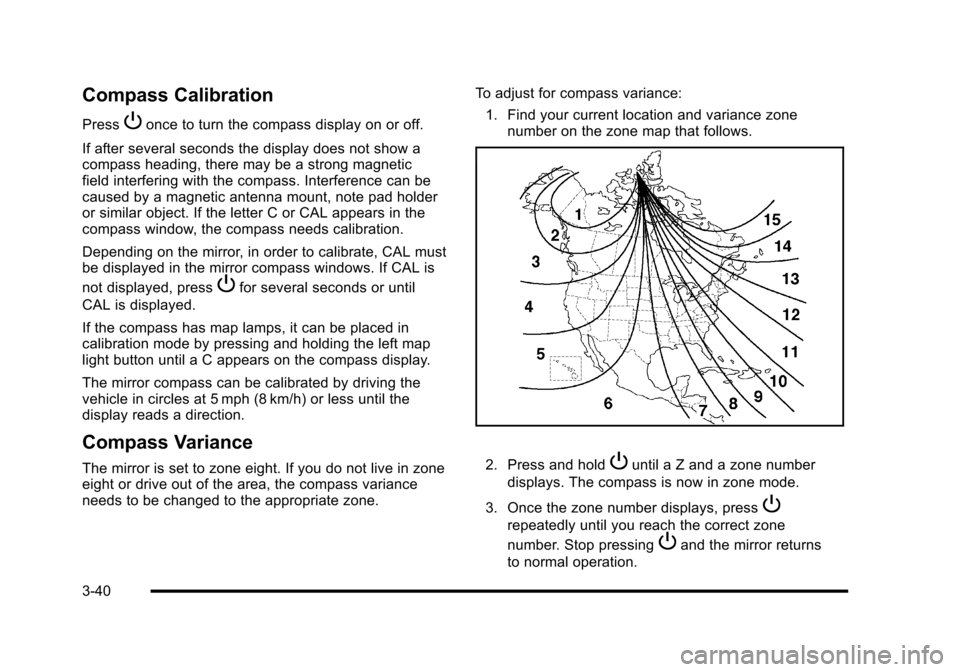
Compass Variance
The mirror is set to zone eight. If you do not live in zone
eight or drive out of the area, the compass variance
needs to be changed to the appropriate zone. To adjust for compass variance:
1. Find your current location and variance zone number on the zone map that follows. 2. Press and holdPuntil a Z and a zone number
displays. The compass is now in zone mode.
3. Once the zone number displays, press
P
repeatedly until you reach the correct zone
number. Stop pressing
Pand the mirror returns
to normal operation.
3-40