2010 CHEVROLET CORVETTE center console
[x] Cancel search: center consolePage 15 of 472
Heated Seats
On vehicles with heated seats, the buttons are located
on the center console. The ignition must be on for this
feature to work.
L: Press to turn the seat on at the high setting.
Press again to turn it to the low setting
9: Press to turn the system off.
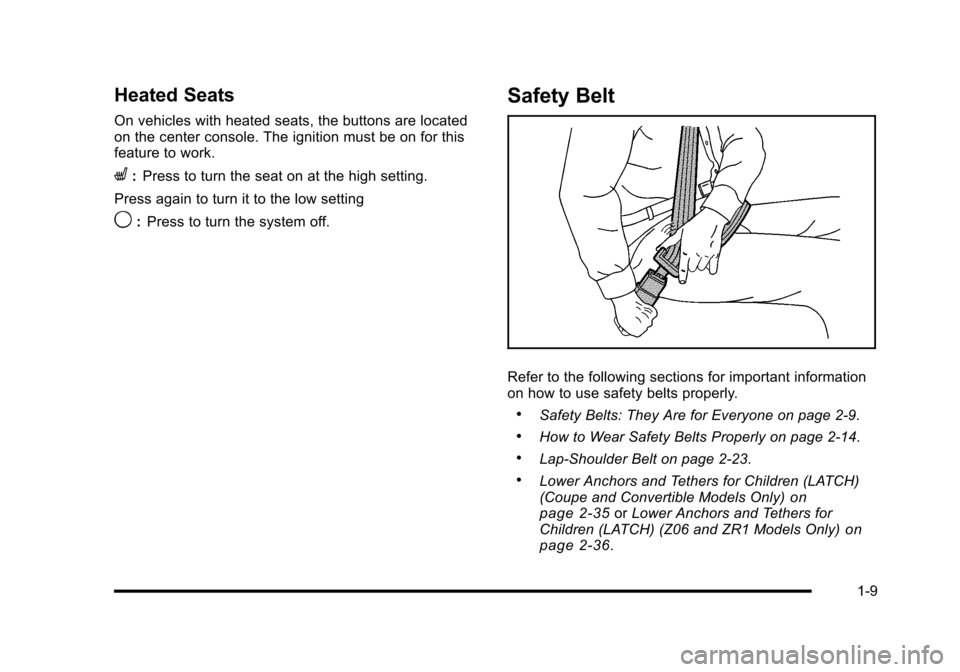
Safety Belt
Refer to the following sections for important information
on how to use safety belts properly.
.Safety Belts: They Are for Everyone on page 2‑9.
.How to Wear Safety Belts Properly on page 2‑14.
.Lap-Shoulder Belt on page 2‑23.
.Lower Anchors and Tethers for Children (LATCH)
(Coupe and Convertible Models Only)on
page 2‑35or Lower Anchors and Tethers for
Children (LATCH) (Z06 and ZR1 Models Only)on
page 2‑36.
1-9
Page 27 of 472
Power Outlets
The accessory power outlet can be used to connect
electrical equipment, such as a cellular phone.
The accessory power outlet is located inside the center
console storage compartment, on the forward left side.
To use the outlet, remove the tethered cap.
See Accessory Power Outlet(s) on page 4‑20.
Roof Panel
On vehicles with a removable roof panel, there are
three release latches. Two are located on the front of
the roof panel and the other is located on the back of
the roof panel. See Removing the Roof Panel
on
page 3‑54.
Until you are sure you can remove the roof panel by
yourself, have someone help you. Once removed, the
roof panel should always be stored properly in the rear
storage compartment.
For more information, see:
.Storing the Roof Panel on page 3‑56.
.Installing the Roof Panel on page 3‑58.
Convertible
If equipped, the convertible top can be lowered and
stowed under the tonneau cover behind the seats.
For step-by-step instructions, see Convertible Top
(Manual)
on page 3‑59or Convertible Top (Power)on
page 3‑66.
Performance and Maintenance
Traction Control System (TCS)
The traction control system limits wheel spin.
The system turns on automatically every time the
vehicle is started.
.To turn off traction control, press and releasedon
the console.
dilluminates and the appropriate
DIC message displays. See DIC Warnings and
Messages on page 4‑52.
.Press and release the button again to turn on
traction control.
See Traction Control System (TCS) on page 5‑6.
The vehicle has an Active Handling System that helps
maintain directional control of the vehicle in difficult
driving conditions. See Active Handling System
on
page 5‑8.
1-21
Page 38 of 472

Heated Seats
On vehicles with heated seats, the buttons are located
on the center console.
The ignition must be on for this feature to work.
L: Press to turn the seat on at the high setting.
Press again to turn it to the low setting
9: Press to turn the system off.
Memory Seat, Mirrors and Steering
Wheel
On vehicles with the memory package, the controls are
located on the driver's door.
1 : Saves the seating position for driver 1.
2 : Saves the seating position for driver 2.
B:Recalls the easy exit position. The numbers on the back of the keyless access
transmitters correspond to the numbers on the
memory buttons.
To save seating positions in the memory:
1. Adjust the driver's seat, both outside mirrors, and the telescopic steering column to a comfortable
driving position.
2. Press and hold button 1 until two beeps let you know that the position has been stored in the
memory.
A second seating, mirror, and telescopic steering
column position can be set by repeating the above
steps and pressing button 2.
2-4
Page 98 of 472
Section 3 Features and Controls
Universal Home Remote System. . . . . . . . . . . . . . . . 3-42
Universal Home Remote System Operation . . . . 3-43
Storage Areas . . . . . . . . . . . . . . . . . . . . . . . . . . . . . . . . . . . . 3-50
Glove Box . . . . . . . . . . . . . . . . . . . . . . . . . . . . . . . . . . . . . 3-50
Cupholders . . . . . . . . . . . . . . . . . . . . . . . . . . . . . . . . . . . . 3-50
Center Console Storage . . . . . . . . . . . . . . . . . . . . . . 3-50
Floor Mats . . . . . . . . . . . . . . . . . . . . . . . . . . . . . . . . . . . . . 3-50
Rear Storage Area . . . . . . . . . . . . . . . . . . . . . . . . . . . . . 3-51
Convenience Net . . . . . . . . . . . . . . . . . . . . . . . . . . . . . . 3-52
Cargo Cover . . . . . . . . . . . . . . . . . . . . . . . . . . . . . . . . . . . 3-52 Roof Panel
. . . . . . . . . . . . . . . . . . . . . . . . . . . . . . . . . . . . . . . . 3-54
Removing the Roof Panel . . . . . . . . . . . . . . . . . . . . . . 3-54
Storing the Roof Panel . . . . . . . . . . . . . . . . . . . . . . . . . 3-56
Installing the Roof Panel . . . . . . . . . . . . . . . . . . . . . . . 3-58
Convertible Top . . . . . . . . . . . . . . . . . . . . . . . . . . . . . . . . . . . 3-59
Convertible Top (Manual) . . . . . . . . . . . . . . . . . . . . . . 3-59
Convertible Top (Power) . . . . . . . . . . . . . . . . . . . . . . . 3-66
3-2
Page 130 of 472
Downshifting (Manual Transmission)
Do not downshift into the gear shown below at a speed
greater than shown in the table:
1 (First)50 mph (80 km/h)
2 (Second) 74 mph (119 km/h)
3 (Third) 101 mph (163 km/h)
4 (Fourth) 130 mph (209 km/h)
Notice: If you skip more than one gear when you
downshift, or if you race the engine when you
release the clutch pedal while downshifting, you
could damage the engine, clutch, driveshaft or the
transmission. Do not skip gears or race the engine
when downshifting.
The six-speed transmission has a spring that centers
the shift lever near 3 (Third) and 4 (Fourth). This
spring helps you know which gear you are in when
you are shifting. Be careful when shifting from 1 (First)
to 2 (Second) or downshifting from 6 (Sixth) to 5 (Fifth).
The spring will try to pull the shift lever toward 4 (Fourth)
and 3 (Third). Make sure you move the lever into
2 (Second) or 5 (Fifth). If you let the shift lever move
in the direction of the pulling, you may end up shifting
from 1 (First) to 4 (Fourth) or from 6 (Sixth) to 3 (Third).
Parking Brake
The parking brake lever is located to the right of the
center console.
To set the parking brake, hold the brake pedal down.
Pull the parking brake lever up. If the ignition is on, the
brake system warning light will come on.
To release the parking brake, hold the brake pedal
down. Then push the release button in as you move the
parking brake lever all the way down.
Notice: Driving with the parking brake on can
overheat the brake system and cause premature
wear or damage to brake system parts. Make sure
that the parking brake is fully released and the
brake warning light is off before driving.
3-34
Page 146 of 472
Storage Areas
Glove Box
Open the glove box by lifting up on the lever. Use the
key to lock and unlock the lighted glove box.
Cupholders
Two cupholders are located on the center console next
to the shift lever. Slide the handle from the left to the
right side to access the lid.
Center Console Storage
To use this storage area, pull the cover up on the
driver side front edge of the console and swing it to
the passenger side.
Floor Mats
The floor mats are specially designed to remain in
position under your feet and out of reach of the
accelerator pedal. The driver's side floor mat is held
in place by two locator hooks and the passenger's
side is held in place by one.
Be sure that the driver's side floor mat is properly
placed on the floor so that it does not block the
movement of the accelerator pedal.
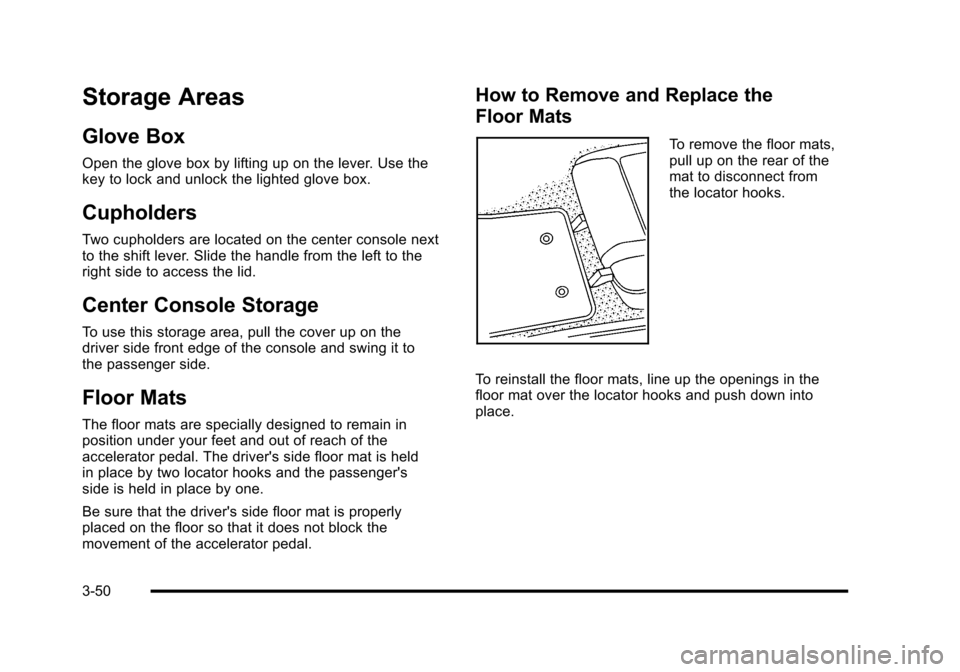
How to Remove and Replace the
Floor Mats
To remove the floor mats,
pull up on the rear of the
mat to disconnect from
the locator hooks.
To reinstall the floor mats, line up the openings in the
floor mat over the locator hooks and push down into
place.
3-50
Page 167 of 472
3. Use the wrench, located in the console, and turn the pressure release bolt counterclockwise
one revolution, to relieve pressure to the hydraulic
pump. This will allow you to manually raise the
convertible top.
4. Then follow the steps under raising the manual convertible top. See “Convertible Top (Manual)”
under Convertible Top (Manual)
on page 3‑59or
Convertible Top (Power) on page 3‑66
When power is restored to the vehicle, the hydraulic
bolt must be tightened, by turning it clockwise.
The power convertible top button can then be
used to lower or raise the convertible top. If the power convertible top is operated multiple times,
the engine should be running to prevent drain on the
vehicle's battery. Under certain conditions, the Driver
Information Center (DIC) may display a message
regarding the power top. See
DIC Warnings and
Messages
on page 4‑52for more information.
If the battery has been disconnected, the power
windows must be initialized for the power top to
operate. See Power Windows
on page 3‑17for
more information.
3-71
Page 188 of 472
To change the language and unit selections, see
“OPTION” underDIC Operation and Displayson
page 4‑47.
Clean the inside of the windshield as needed to remove
any dirt or film that reduces the sharpness or clarity of
the HUD image.
To clean the HUD, spray household glass cleaner on a
soft, clean cloth. Wipe the HUD lens gently, then dry it.
Do not spray cleaner directly on the lens because the
cleaner could leak into the unit.
If the ignition is on and the HUD image cannot be seen,
check to see if:
.Something is covering the HUD unit.
.The HUD dimmer control is adjusted properly.
.The HUD image is adjusted to the proper height.
.Ambient light is low, in the direction the vehicle is
facing.
.A fuse is blown. See Fuses and Circuit Breakerson page 6‑101.
Keep in mind that the windshield is part of the HUD
system. See Windshield Replacement on page 6‑59.
Accessory Power Outlet(s)
The accessory power outlet can be used to connect
electrical equipment, such as a cellular phone.
The accessory power outlet is located inside the center
console storage compartment, on the forward left side.
To use the outlet, remove the tethered cap. When not
using it, always cover the outlet with the protective cap.
Notice: Leaving electrical equipment plugged in for
an extended period of time while the vehicle is off
will drain the battery. Power is always supplied to
the outlets. Always unplug electrical equipment
when not in use and do not plug in equipment that
exceeds the maximum 20 ampere rating.
Certain electrical accessories may not be compatible
with the accessory power outlet and could result in
blown vehicle or adapter fuses. If you experience
a problem, see your dealer/retailer for additional
information on accessory power outlets.
4-20