Page 272 of 524
Playing a USB Flash Memory Device (Models with navigation system)
Features
269
SKIP BAR
AUX BUTTON
INTERFACE DIAL CENTER DISPLAY
CANCEL BUTTON AUDIO CONTROL DISPLAY
(SOUND) BUTTON
SCAN/A.SEL (SCAN/
AUTO SELECT) BAR
AUDIO BUTTON MAP BUTTON CATEGORY BAR USB INDICATOR VOL/
(VOLUME/POWER) KNOB
2010 TSX
Page 277 of 524
Push up the selector on the interface
dial to switch the display to the
folder list, then turn the knob on the
interf ace dial to select a f older.Press ENTER to change the display
to the file list, then turn the knob on
the interf ace dial to select a f ile.
Press ENTER to set your selection.
To go back to the normal playing
display, press the AUDIO button.
Pressing the CANCEL button goes
back to the previous screen and
pressing the MAP button cancels the
audio mode display.
You can also select a f older or f ile
fromthelistbyusingtheinterface
dial. Press the AUDIO button to
show the audio control display on the
navigation screen.
Playing a USB Flash Memory Device (Models with navigation system)
T o Select a File f rom Folder and File
Lists
274
2010 TSX
Page 278 of 524
�µ�µ
�µ
�µ
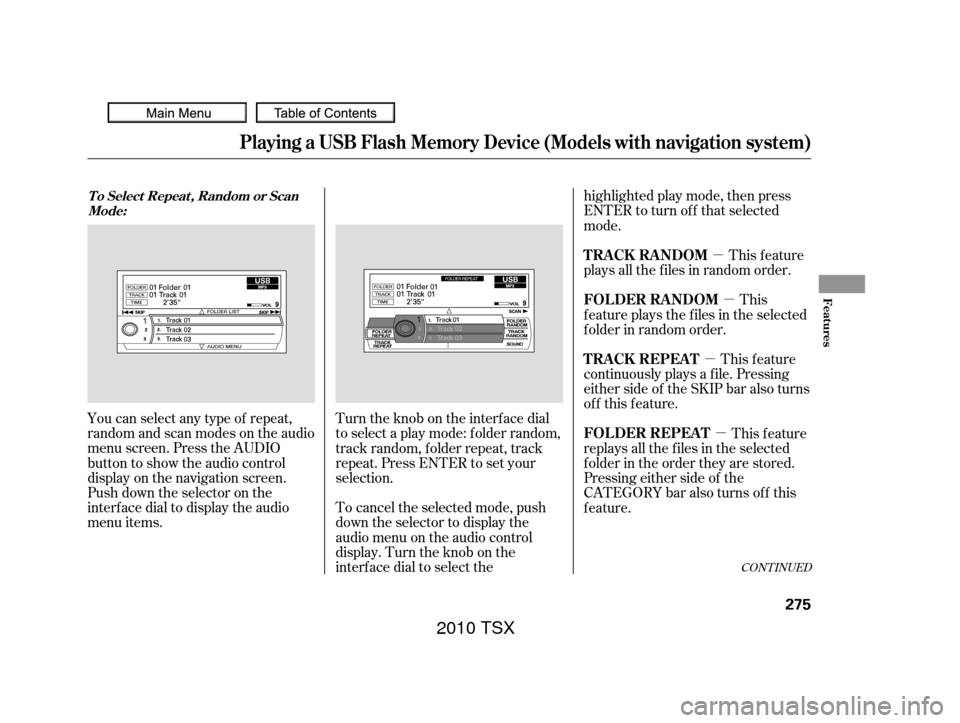
You can select any type of repeat,
random and scan modes on the audio
menu screen. Press the AUDIO
button to show the audio control
display on the navigation screen.
Push down the selector on the
interf ace dial to display the audio
menu items. Turntheknobontheinterfacedial
to select a play mode: f older random,
track random, folder repeat, track
repeat. Press ENTER to set your
selection.
To cancel the selected mode, push
down the selector to display the
audio menu on the audio control
display. Turn the knob on the
interf ace dial to select thehighlighted play mode, then press
ENTER to turn of f that selected
mode.
This feature
continuously plays a f ile. Pressing
either side of the SKIP bar also turns
of f this f eature. This feature
plays all the f iles in random order.
This
f eature plays the f iles in the selected
f older in random order.
This feature
replays all the f iles in the selected
f older in the order they are stored.
Pressing either side of the
CATEGORY bar also turns of f this
feature.
CONT INUED
Playing a USB Flash Memory Device (Models with navigation system)
T o Select Repeat , Random or Scan
Mode:
T RA CK REPEA T TRACK RANDOM
FOLDER RANDOM
FOLDER REPEAT
Features
275
2010 TSX
Page 286 of 524
Turn the knob to select a sound
mode, then press ENTER to set your
selection. Turn the knob to your
liking (see page f or more sound
setting inf ormation).
If you receive a call when the
Audio is playing, press the
HFLTalkbuttononthesteering
wheel. The screen and the center
displayswitchtotheHFLmode(see
page ).
Af ter ending the call, press the HFL
Backbuttontogobacktothe
Audio mode.
If you receive a call while the system
is in the pause mode, the mode will
be canceled and
Audio
will continue to play. Select any other audio mode by
pressing a button; FM, AM,
or DISC (if a disc is loaded),
on the audio control panel or press
the mode button on the steering
wheel repeatedly to select another
audio mode. If iPod or USB f lash
memory device is connected to the
USB adapter cable or audio unit is
connected to AUX jack, pressing the
AUX button also changes a mode.
Switching to another mode pauses
the music playing f rom your phone.
233
304
Bluetooth Bluetooth Bluetooth As required by the FCC:
This device complies with Part 15 of theFCC rules. Operation is subject to thef ollowing two conditions: (1) This devicemay not cause harmf ul interf erence, and(2) this device must accept anyinterf erence received, includinginterf erence that may cause undesiredoperation.
Changes or modif ications not expresslyapproved by the party responsible f orcompliance could void the user’sauthority to operate the equipment.
This device complies with IndustryCanada Standard RSS-210.Operation is subject to the f ollowing twoconditions: (1) this device may not causeinterf erence, and (2) this device mustaccept any interf erence that may causeundesired operation of the device.
BluetoothAudio System (Models with navigation system)
T o switch to HFL mode T o t urn of f t he Bluet oot h
Audio
mode
Features
283
2010 TSX
Page 287 of 524

The radio can receive the complete
AM and FM bands.
Those bands cover these f requen-
cies:
AM band: 530 to 1,710 kHz
FM band: 87.7 to 107.9 MHzHow well the radio receives stations
is dependent on many f actors, such
as the distance from the station’s
transmitter, nearby large objects,
and atmospheric conditions.
Driving very near the transmitter of
a station that is broadcasting on a
f requency close to the f requency of
the station you are listening to can
also af f ect your radio’s reception.
You may temporarily hear both
stations,orhearonlythestationyou
are close to.
A radio station’s signal gets weaker
as you get f arther away f rom its
transmitter. If you are listening to an
AM station, you will notice the sound
volume becoming weaker, and the
stationdriftinginandout.If youare
listening to an FM station, you will
see the stereo indicator f lickering of f
and on as the signal weakens.
Eventually, the stereo indicator will
go of f and the sound will f ade
completely as you get out of range of
the station’s signal.
Radio stations on the AM band are
assigned f requencies at least 10 kHz
apart (530, 540, 550). Stations on the
FM band are assigned f requencies at
least 0.2 MHz apart (87.9, 88.1, 88.3).
Stations must use these exact
f requencies. It is f airly common f or
stations to round-of f the f requency in
their advertising, so your radio could
display a f requency of 100.9 even
though the announcer may identif y
the station as ‘‘FM101.’’ FM/A M Radio Frequencies FM/A M Radio Reception
FM/A M Radio Reception
284
2010 TSX
Page 288 of 524
Radio signals, especially on the FM
band, are def lected by large objects
such as buildings and hills. Your
radio then receives both the direct
signal f rom the station’s transmitter,
and the def lected signal. This causes
the sound to distort or flutter. This is
a main cause of poor radio reception
in city driving.Radio reception can be af f ected by
atmospheric conditions such as
thunderstorms, high humidity, and
even sunspots. You may be able to
receive a distant radio station one
day and not receive it the next day
because of a change in conditions.
Electrical interf erence f rom passing
vehicles and stationary sources can
cause temporary reception problems.
As required by the FCC:
Changes or modif ications not expresslyapproved by the party responsible f orcompliance could void the user’sauthority to operate the equipment.
FM/A M Radio Reception
Features
285
2010 TSX
Page 292 of 524
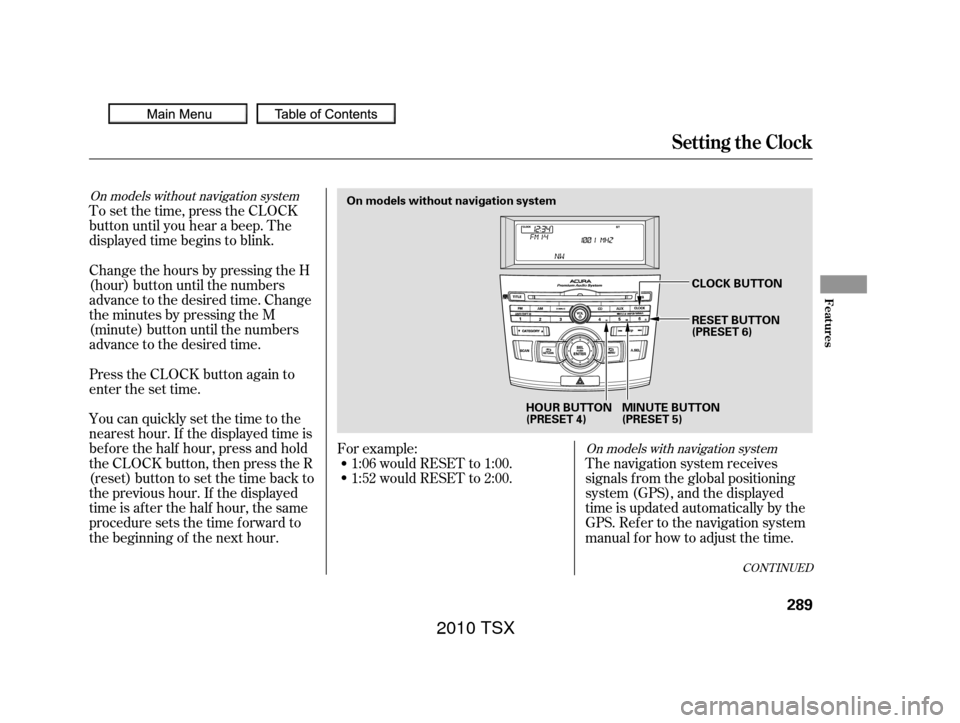
To set the time, press the CLOCK
button until you hear a beep. The
displayed time begins to blink.
Change the hours by pressing the H
(hour) button until the numbers
advance to the desired time. Change
the minutes by pressing the M
(minute) button until the numbers
advance to the desired time.
Press the CLOCK button again to
enter the set time.
You can quickly set the time to the
nearest hour. If the displayed time is
bef ore the half hour, press and hold
the CLOCK button, then press the R
(reset) button to set the time back to
the previous hour. If the displayed
time is af ter the half hour, the same
procedure sets the time f orward to
the beginning of the next hour.The navigation system receives
signals f rom the global positioning
system (GPS), and the displayed
time is updated automatically by the
GPS. Ref er to the navigation system
manual f or how to adjust the time.
1:06 would RESET to 1:00.
1:52 would RESET to 2:00.
For example:
On models with navigation system
On models without navigation system
CONT INUED
Setting the Clock
Features
289
On models without navigation system
HOUR BUTTON
(PRESET 4)MINUTE BUTTON
(PRESET 5)CLOCK BUTTON
RESET BUTTON
(PRESET 6)
2010 TSX
Page 294 of 524
While setting the clock, pressing
the RETURN button will go back
to the previous display.
Pressing the MENU button again
will cancel this setting mode.
Turn the selector knob to change
the setting between 12H and 24H.
Press the selector knob (ENTER)
to enter your selection. The
display will return to the clock
adjusting display. Press the selector knob (ENTER)
to enter your selection. The
display will return to the clock
adjusting display. Turn the selector knob to count
the numbers up or down. To set the time, turn the selector
knob and select the hours or the
minutes, then press the knob to
enter your selection. The display
changes to the setting display.
5.
6.
7.
8.
9.
CONT INUED
Setting the Clock
Features
291
MINUTE SETTING
2010 TSX


