Page 307 of 524
�µ�µ
Bluetooth
www.acura.ca,
www.acura.com/
handsf reelinkHandsFreeLink(HFL)
allows you to place and receive
phone calls using voice commands,
without handling your cell phone.
To use HFL, you need a Bluetooth-
compatible cell phone. For a list of
compatible phones, pairing
procedures, and special f eature
capabilities:
In Canada, visit or call
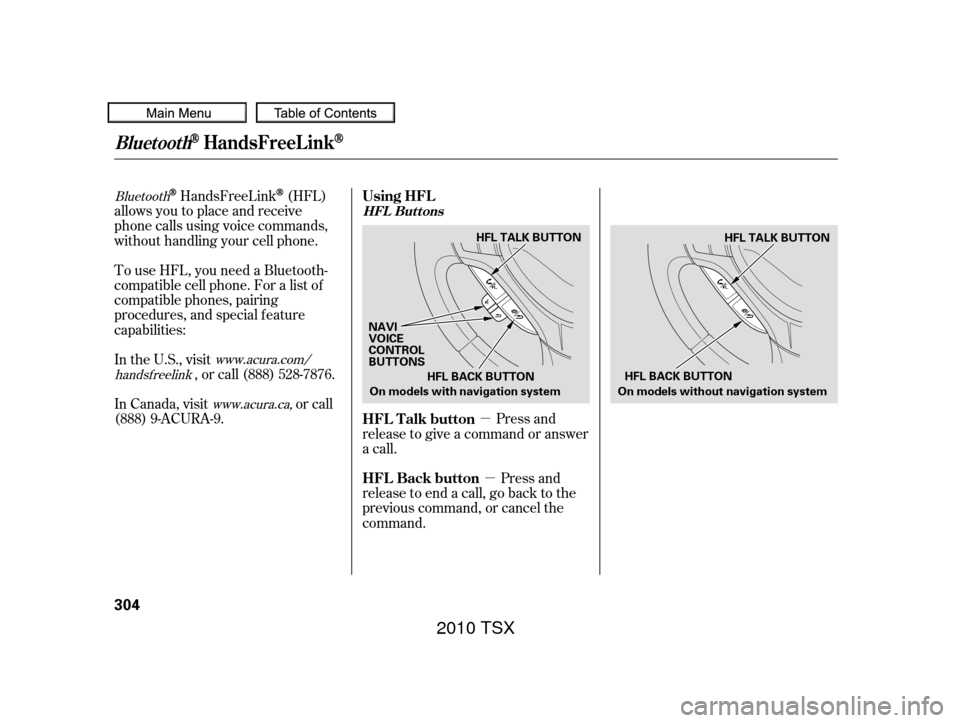
(888) 9-ACURA-9. Press and
release to give a command or answer
a call.
Press and
release to end a call, go back to the
previous command, or cancel the
command.
In the U.S., visit
, or call (888) 528-7876. Using HFL
HFL Talk button
HFL Back button
HFL Buttons
BluetoothHandsFreeL ink
304
HFL BACK BUTTON
On models with navigation system
NAVI
VOICE
CONTROL
BUTTONS HFL TALK BUTTON
HFL TALK BUTTON
On models without navigation system HFL BACK BUTTON
2010 TSX
Page 330 of 524
As required by the FCC:This device complies with Part 15 of theFCC rules. Operation is subject to thef ollowing two conditions: (1) This devicemay not cause harmf ul interf erence, and(2) this device must accept anyinterf erence received, includinginterf erence that may cause undesiredoperation.
Changes or modif ications not expresslyapproved by the party responsible f orcompliance could void the user’sauthority to operate the equipment.
This device complies with IndustryCanada Standard RSS-210.Operation is subject to the f ollowing twoconditions: (1) this device may not causeinterf erence, and (2) this device mustaccept any interf erence that may causeundesired operation of the device.
Bluetooth
Bluetooth
U.S. models only
Thename and logos are
registered trademarks owned by
Bluetooth SIG, Inc. and any use of
such marks by Honda Motor Co.,
Ltd. is under license. Other
trademarks and trade names are
those of their respective owners. An incoming call on HFL will
interrupt
Audio when it is
playing. Audio will resume when the
call is ended.
In addition, you cannot use HFL
while using AcuraLink.
Bluet oot hWireless T echnology HFL L imitations
BluetoothHandsFreeL ink
Features
327
2010 TSX
Page 331 of 524
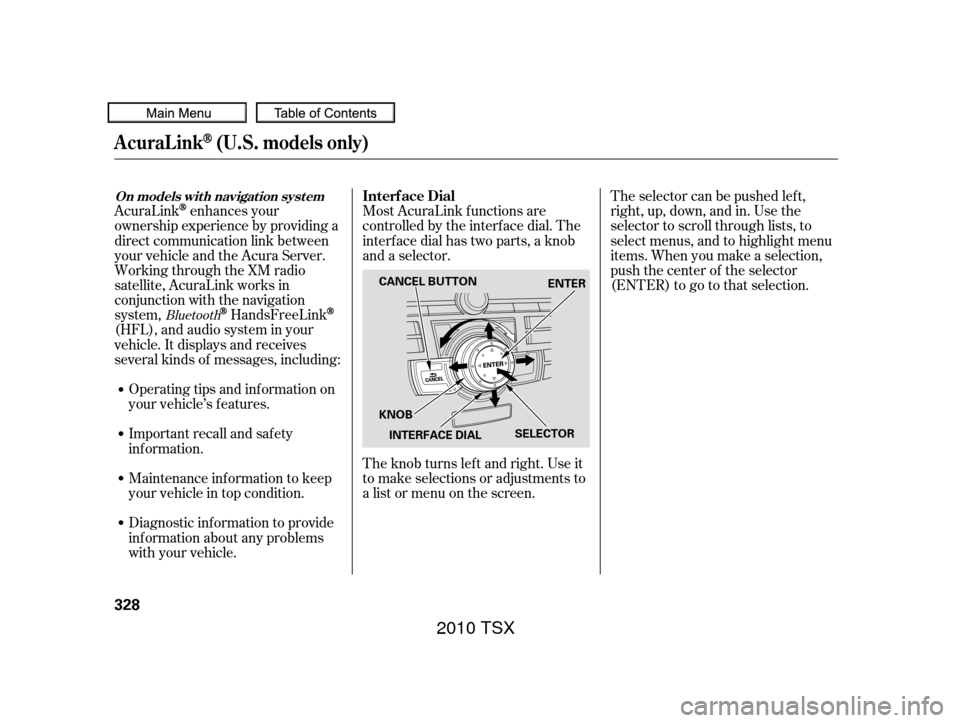
Most AcuraLink f unctions are
controlled by the interf ace dial. The
interface dial has two parts, a knob
and a selector.
The knob turns lef t and right. Use it
to make selections or adjustments to
a list or menu on the screen.The selector can be pushed lef t,
right, up, down, and in. Use the
selector to scroll through lists, to
select menus, and to highlight menu
items. When you make a selection,
push the center of the selector
(ENTER)togotothatselection.
AcuraLinkenhances your
ownership experience by providing a
direct communication link between
your vehicle and the Acura Server.
Working through the XM radio
satellite, AcuraLink works in
conjunction with the navigation
system,
HandsFreeLink
(HFL),andaudiosysteminyour
vehicle. It displays and receives
several kinds of messages, including:
Operating tips and inf ormation on
your vehicle’s f eatures.
Important recall and safety
inf ormation.
Maintenance inf ormation to keep
your vehicle in top condition.
Diagnostic inf ormation to provide
inf ormation about any problems
with your vehicle.
Bluetooth
Interf ace Dial
AcuraLink(U.S. models only)
On models wit h navigat ion syst em
328
SELECTOR
KNOB ENTER
CANCEL BUTTON
INTERFACE DIAL
2010 TSX
Page 334 of 524
�µ
�µ
�µ �µ
�µ
�µ
Select this option to delete
the current message.
Select this option to hear a
voice read the entire message. This
gives you more inf ormation than the
screen can display at one time. When
you select the Voice option, it
changes to a Stop Reading option.
Select the option again to stop the
voice.
Select this option to call a
phone number embedded in the
message. When you select , the
HandsFreeLink(HFL)
dials the number f or you. Select this
option to get more inf ormation about
the current diagnostic message. To
use this option, your cellphone must
be paired with the HFL. In addition,
the paired phone must have a
compatible data service and be set
up with the AcuraLink system to
make a data connection. Access the
handsf reelink.com website to f ind
out which data services are currently
compatible with AcuraLink.
To set your AcuraLink pref erences
(thetypesof messagesyouwantto
receive, if any), visit the My Acura
website at , and
choose what you would like to
receive. If you do not have internet
access, call Acura Client Services at
(800) 382-2238; they can set your
message pref erences f or you.
To make a call, your
compatible phone must be paired to
the vehicle’s HandsFreeLink system,
powered on, and located within the
vehicle(seepage ). Select this
option to f ind the nearest Acura
dealer using the navigation system.
Select this
option to call the Acura dealer you
purchased your vehicle f rom.
AcuraLink also directs you to this
dealer so you can schedule a
maintenance appointment or receive
inf ormation about a message. If your
assigned servicing dealer changes,
AcuraLink will reset to call that
dealer.
311
Bluetooth www.owners.acura.com
Bluetooth
Delete
Voice
Call
Call Diagnostic Inf o
Message Pref erences
Find Nearest Dealer
Call Your Dealer
AcuraLink(U.S. models only)
Features
331
2010 TSX
Page 336 of 524
There are six message categories in
AcuraLink: Quick Tips, Feature
Guide, Maintenance Minder,
Recalls/Campaigns, Diagnostic Inf o,
and Scheduled Dealer Appointment.
The system can store up to 255
messages.
Message categories can be added,
revised, or deleted through
broadcast messages f rom Acura.These messages, based on updated
vehicle inf ormation and comments
f rom other TSX owners, supplement
your Owner’s Manual. They provide
you with relevant inf ormation f or a
safe and enjoyable ownership
experience. For additional
inf ormation, call Acura Client
Services directly through HFL.During the f irst 90 days of
ownership, a number of messages
appears each day. These messages
help you to use and understand the
f eatures of your vehicle. Feature Guide
Quick T ips
Message Categories
AcuraLink(U.S. models only)
Features
333
2010 TSX
Page 337 of 524
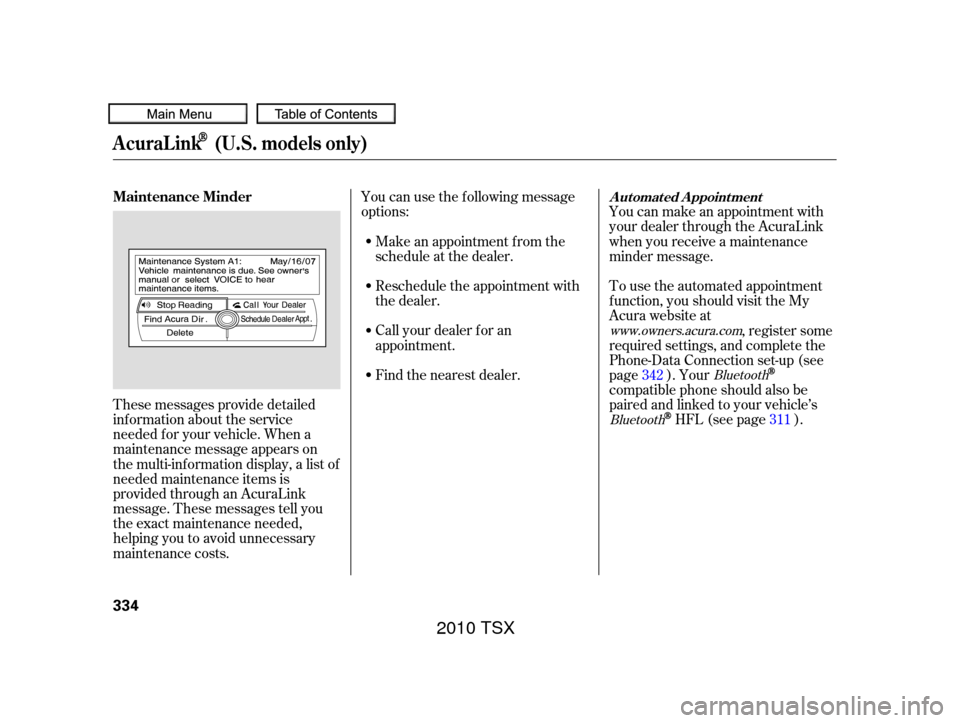
These messages provide detailed
inf ormation about the service
needed f or your vehicle. When a
maintenance message appears on
the multi-information display, a list of
needed maintenance items is
provided through an AcuraLink
message. These messages tell you
the exact maintenance needed,
helping you to avoid unnecessary
maintenance costs.You can use the f ollowing message
options:
Make an appointment f rom the
schedule at the dealer.
Reschedule the appointment with
the dealer.
Call your dealer f or an
appointment.
Find the nearest dealer. You can make an appointment with
your dealer through the AcuraLink
when you receive a maintenance
minder message.
To use the automated appointment
f unction, you should visit the My
Acura website at
, register some
required settings, and complete the
Phone-Data Connection set-up (see
page ). Your
compatible phone should also be
paired and linked to your vehicle’s
HFL (see page ).
342
311
www.owners.acura.com
Bluetooth
Bluetooth
Maintenance MinderA ut omat ed A ppoint ment
AcuraLink(U.S. models only)
334
2010 TSX
Page 338 of 524
The system will automatically
connect to the Acura server, then
show you an appropriate
appointment date and time on the
navigation screen. If you accept this
appointment, select ‘‘Conf irm
Appointment,’’ then press ENTER.
Select the received message, then
press ENTER. You will see the
message as shown. To make an
appointment, select ‘‘Schedule
Dealer Appt.’’ then press ENTER.
When you see the maintenance
minder message on the multi-
inf ormation display, you will also
receive a message in the navigation
screen. To open the message, press
ENTER. Select ‘‘New Messages,’’
then press ENTER. You will see the
list of all messages. The most recent
message is listed at the top.
CONT INUED
AcuraLink(U.S. models only)
Features
335
2010 TSX
Page 339 of 524
The conf irmation message will be
displayed on the screen. Make sure
to conf irm the appointment date,
time and dealer. If it is OK, press
ENTER.
If you want to change or reschedule
the appointment date, select ‘‘Cancel,’’
then press ENTER.You will see the screen to reschedule
as shown. To make an appointment,
select ‘‘Reschedule Appointment,’’
then press ENTER.
The system will automatically
connect to the Acura server, then
show you a new appointment date
and time on the navigation screen. If
you accept this appointment, select
‘‘Conf irm Appointment,’’ then press
ENTER.
PresstheINFObuttontogotothe
inf ormation screen. Select
‘‘Messages,’’ then select ‘‘Scheduled
Dealer Appointment’’ f rom the
message category list. Then press
ENTER.
T o reschedule t he appoint ment :
Scheduled Dealer A ppointment
AcuraLink(U.S. models only)
336
2010 TSX