Page 242 of 524

�µ
�Ý�Û�µ
�µ
Youcanstoreupto12
preset channels using the six preset
buttons. Each button stores one
channel f rom the XM1 band and one
channel f rom the XM2 band.
To store a channel: Press the button or scroll
up by pushing the interf ace
selector up. Either XM1 or XM2
will be shown on the display.
Press
either side of the bar to select
another category. You can also
change a category by pushing the
interf ace selector lef t or right.
The scan f unction gives
you a sampling of all channels while
in the channel mode. In the category
mode, only the channels within that
category are scanned. To activate
SCAN,presstheSCANsideof the
SCAN/A.SEL bar. To scan with the
interf ace dial, scroll down, and push
interface selector to the right. You
will see SCAN on the screen and
center display.
The system plays each channel in
numerical order f or a f ew seconds,
then selects the next channel. When
you hear a channel you want to
continue listening to, push the
interf ace selector to the right again
or press the SCAN side of the bar to
cancel. Use the tune, skip (seek), or scan
function to tune to a desired
channel.
Repeat steps 2 and 3 to store the
f irst six channels. Pick the preset button you want
f or that channel. Press and hold
the preset button until you hear a
beep. You can also pick the
number with the interf ace dial.
Select your desired number and
press and hold ENTER on the
interf ace selector. In category mode, only channels
within that category can be
selected. In channel mode, all
channels can be selected.
1. 2.
3.
4.
CONT INUED
Preset
CATEGORY ( or )
SCAN
Playing the XMRadio (Models with navigation system)
Features
239
XM BAND
2010 TSX
Page 244 of 524

CONT INUED
The XM satellites are in orbit over
the equator; therefore, objects south
of the vehicle may cause satellite
reception interruptions. To help
compensate f or this, ground-based
repeaters are placed in major
metropolitan areas.
Satellite signals are more likely to be
blocked by tall buildings and
mountains the f arther north you
travel from the equator.
Depending on where you drive, you
may experience reception problems.
Interf erence can be caused by any of
these conditions:Driving on the north side of an
east/west mountain road.
Driving on the north side of a
large commercial truck on an
east/west road.
Driving in tunnels. Driving on a road beside a vertical
wall, steep clif f , or hill to the south
of you.
Driving on the lower level of a
multi-tiered road.
Driving on a single lane road
alongside dense trees taller than
50 ft. (15 m) to the south of you.
There may be other geographic
situations that could affect XM Radio
reception.
As required by the FCC:
Changes or modif ications not expresslyapproved by the party responsible f orcompliance could void the user’sauthority to operate the equipment.
Playing the XMRadio (Models with navigation system)
Features
241
SATELLITE
GROUND REPEATER
Signal may be blocked by
mountains or large
obstacles to the south.
Signal weaker in
these areas.
2010 TSX
Page 252 of 524

You can select any type of repeat and
random modes by using the
interf ace dial.
Push the AUDIO button to display
the audio inf ormation on the screen,
then scroll down by pushing down
the selector to select the audio menu.
If you don’t, the system advances to
the next track, plays about 10
seconds of it, and continues through
the rest of the tracks the same way. To exit the track list display, press
the AUDIO button, or push the
interf ace selector to the lef t, or press
the cancel button.
When you press the SCAN side of
the SCAN/A. SEL bar or scroll down
and push the interf ace selector to
the left, the next track of the current
track plays f or about 10 seconds.
You will see SCAN next to TRACK
on the screen and center display. To
listen to the rest of the track, press
andholdtheSCANsideof thebar
until you hear a beep or push the
interface selector to the left again
within 10 seconds. When you press the SCAN side of
the SCAN/A. SEL bar repeatedly
until you see SCAN in the center
display and the disc number begins
to blink, or push the interf ace
selector to the right, the first track of
the current disc plays f or about 10
seconds. You will see SCAN next to
DISC on the screen. The disc
number is blinking and SCAN is also
shown in the center display. To listen
to the rest of the disc, press and hold
the SCAN side of the bar until you
hear a beep, or push the interf ace
selector to the right again within 10
seconds.
If you don’t, the system advances to
the next disc, plays about 10 seconds
of its f irst track, and continues
through the rest of the discs the
same way. When the system reaches
the last disc, DISC SCAN is canceled,
and that disc continues to play.
CONT INUED
Playing Discs (Models with navigation system)
T o Select Repeat or Random
Mode:
Disc Scan
Track Scan
Features
249
Push down the selector.
2010 TSX
Page 253 of 524
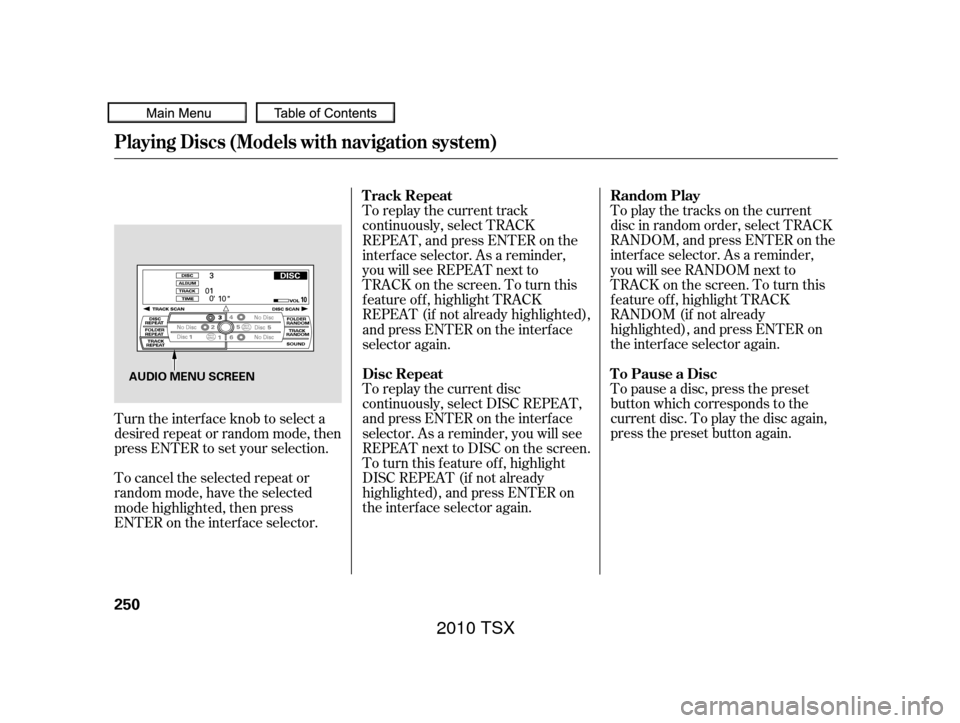
To pause a disc, press the preset
button which corresponds to the
current disc. To play the disc again,
press the preset button again. To play the tracks on the current
disc in random order, select TRACK
RANDOM, and press ENTER on the
interf ace selector. As a reminder,
you will see RANDOM next to
TRACKonthescreen.Toturnthis
f eature of f , highlight TRACK
RANDOM (if not already
highlighted), and press ENTER on
the interf ace selector again.
To replay the current track
continuously, select TRACK
REPEAT, and press ENTER on the
interf ace selector. As a reminder,
you will see REPEAT next to
TRACKonthescreen.Toturnthis
feature off, highlight TRACK
REPEAT (if not already highlighted),
andpressENTERontheinterface
selector again.
To replay the current disc
continuously, select DISC REPEAT,
andpressENTERontheinterface
selector. As a reminder, you will see
REPEAT next to DISC on the screen.
To turn this feature off, highlight
DISC REPEAT (if not already
highlighted), and press ENTER on
the interf ace selector again.
Turn the interface knob to select a
desired repeat or random mode, then
press ENTER to set your selection.
To cancel the selected repeat or
random mode, have the selected
mode highlighted, then press
ENTER on the interf ace selector.
Playing Discs (Models with navigation system)
To Pause a Disc Random Play
T rack Repeat
Disc Repeat
250
AUDIO MENU SCREEN
2010 TSX
Page 256 of 524
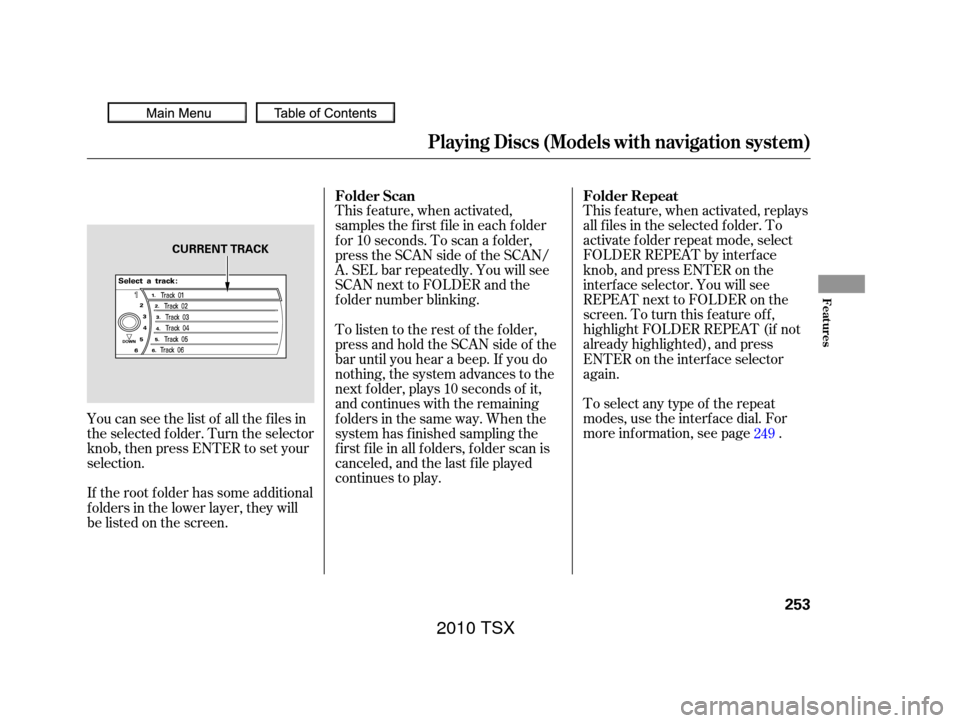
This f eature, when activated, replays
all f iles in the selected f older. To
activate f older repeat mode, select
FOLDER REPEAT by interface
knob, and press ENTER on the
interf ace selector. You will see
REPEAT next to FOLDER on the
screen. To turn this f eature of f ,
highlight FOLDER REPEAT (if not
already highlighted), and press
ENTER on the interf ace selector
again.
Toselectanytypeof therepeat
modes,usetheinterfacedial.For
more information, see page .
This feature, when activated,
samples the f irst f ile in each f older
f or 10 seconds. To scan a f older,
press the SCAN side of the SCAN/
A. SEL bar repeatedly. You will see
SCAN next to FOLDER and the
f older number blinking.
To listen to the rest of the folder,
press and hold the SCAN side of the
bar until you hear a beep. If you do
nothing, the system advances to the
next f older, plays 10 seconds of it,
and continues with the remaining
f olders in the same way. When the
system has f inished sampling the
f irst f ile in all f olders, f older scan is
canceled, and the last f ile played
continues to play.
If the root f older has some additional
f olders in the lower layer, they will
belistedonthescreen. You can see the list of all the f iles in
the selected f older. Turn the selector
knob, then press ENTER to set your
selection. 249
Folder Repeat
Folder Scan
Playing Discs (Models with navigation system)
Features
253
CURRENT TRACK
2010 TSX
Page 257 of 524
To remove the disc that is currently
playing, press the eject button. You
will see ‘‘EJECT’’ in the center
display. When you remove the disc
from the slot, the system
automatically enters the previous
modeAM,FM1,FM2,orXMRadio.
The system also begins the load
sequence so you can load another
disc. If you do not load another disc,
the load sequence is canceled, and
the system continues playing in the
previous mode.
This f eature, when activated, plays
all f iles in the current f older in
random order. To activate f older
random play, select FOLDER
RANDOM by interf ace knob, and
press ENTER on the interf ace
selector. You will see RANDOM
next to FOLDER on the screen. To
turn this feature off, highlight
FOLDER RANDOM (if not already
highlighted), and press ENTER on
the interf ace selector again.
Toselectanytypeof therandom
modes, use the interf ace dial. For
more inf ormation, see page . If you do not remove the disc f rom
the slot, the system will reload the
disc af ter 10 seconds. To begin
playing the disc, press the DISC
button.
To remove a dif f erent disc f rom the
changer,firstselectitbypressing
the corresponding number on the
preset button or turning theinterf ace knob, and pressing ENTER
on the interf ace selector. When that
disc begins playing, press the eject
button.
When you press the eject button
while listening to the radio, or with
the audio system turned of f , the disc
that was last selected is ejected.
Af ter that disc is ejected, pressing
the eject button again will eject the
next disc in numerical order. By
doing this six times, you can remove
all the discs f rom the changer.
You can also eject discs when the
ignition switch is of f :
To eject one disc, press and release
the eject button.
To eject all discs, press and hold the
eject button until the f irst disc begins
to eject.
249
Playing Discs (Models with navigation system)
Removing Discs f rom the
Changer
Folder Random
254
2010 TSX
Page 262 of 524
Playing an iPod(Models with navigation system)
Features
259
INTERFACE DIAL
AUDIO BUTTON MAP BUTTON
CANCEL BUTTON USB ICON
CENTER DISPLAY
AUX BUTTON
SKIP BAR iPod ICON
2010 TSX
Page 267 of 524
If you select ‘‘ALL’’ on either the
artists or albums list, all available
f iles on the selected list are played.
PresstheAUDIObuttontogoback
to the normal audio playing display.
Pressing the CANCEL button goes
back to the previous screen, and
pressing the MAP button cancels the
audio control display on the screen.You can select any type of repeat and
random mode on the audio menu.
Press the AUDIO button to display
the audio control screen, then push
down the selector to display the
audio menu. Turn the knob on the
interf ace dial to select an audio
mode: repeat, album random, and
track random. Press ENTER to set
your selection.To cancel the selected mode, press
ENTER again while the highlighted
mode is selected on the audio control
display.
Playing an iPod(Models with navigation system)
T o Select Repeat or Random Mode:
264
Push down the selector.
2010 TSX

