Page 160 of 520

160 2-3. Operating the lights and wipers
■Daytime running light system (if equipped)
To make your vehicle more visible to other drivers, the headlights turn on
automatically (at a reduced intensity) whenever the engine is started and the
parking brake is released. Daytime running lights are not designed for use at
night.
■ Headlight control sensor
■ Automatic light off system
●When the headlights come on: The headlights and tail lights turn off 30
seconds after all doors are closed with the engine switch turned to the
ACC or LOCK position. (The lights turn off immediately if the LOCK but-
ton on the wireless remote control is pressed twice after all doors are
locked.)
● When only the tail lights come on: The tail lights turn off automatically
with the engine switch turned to the ACC or LOCK position and the
driver’s door is opened.
If the driver’s door is kept open, the lights automatically turn off after 30 min-
utes.
To turn the lights on again, turn the engine switch to the ON position, or turn
the headlight switch off once and then back to the or position.
■ Customization that can be co nfigured at Toyota dealer
Settings (e.g. light sensor sensitivity) can be changed.
(Customizable features P. 495)
The sensor may not function properly if
an object is placed on the sensor, or any-
thing that blocks the sensor is affixed to
the windshield.
Doing so interferes with the sensor
detecting the level of ambient light and
may cause the automatic headlight sys-
tem to malfunction.
Page 164 of 520
164 2-3. Operating the lights and wipers
■The windshield wiper and washer can be operated when
The engine switch must be in the ON position.
■ If no windshield washer fluid sprays
Check that the washer nozzles are not blocked and if there is washer fluid in
the windshield washer fluid reservoir.
NOTICE
■When the windshield is dry
Do not use the wipers, as they may damage the windshield.
■ When there is no washer fluid spray from the nozzle
Damage to the washer fluid pump may be caused if the lever is pulled
toward you and held continually.
■ When a nozzle becomes block
Do not try to clear it with a pin or other object. The nozzle will be damaged.
Washer/wiper dual opera-
tion
Wipers will automatically oper-
ate a couple of times after the
washer squirts.
Page 177 of 520
177
2-4. Using other driving systems
2
When driving
Four-wheel drive system (4WD models)
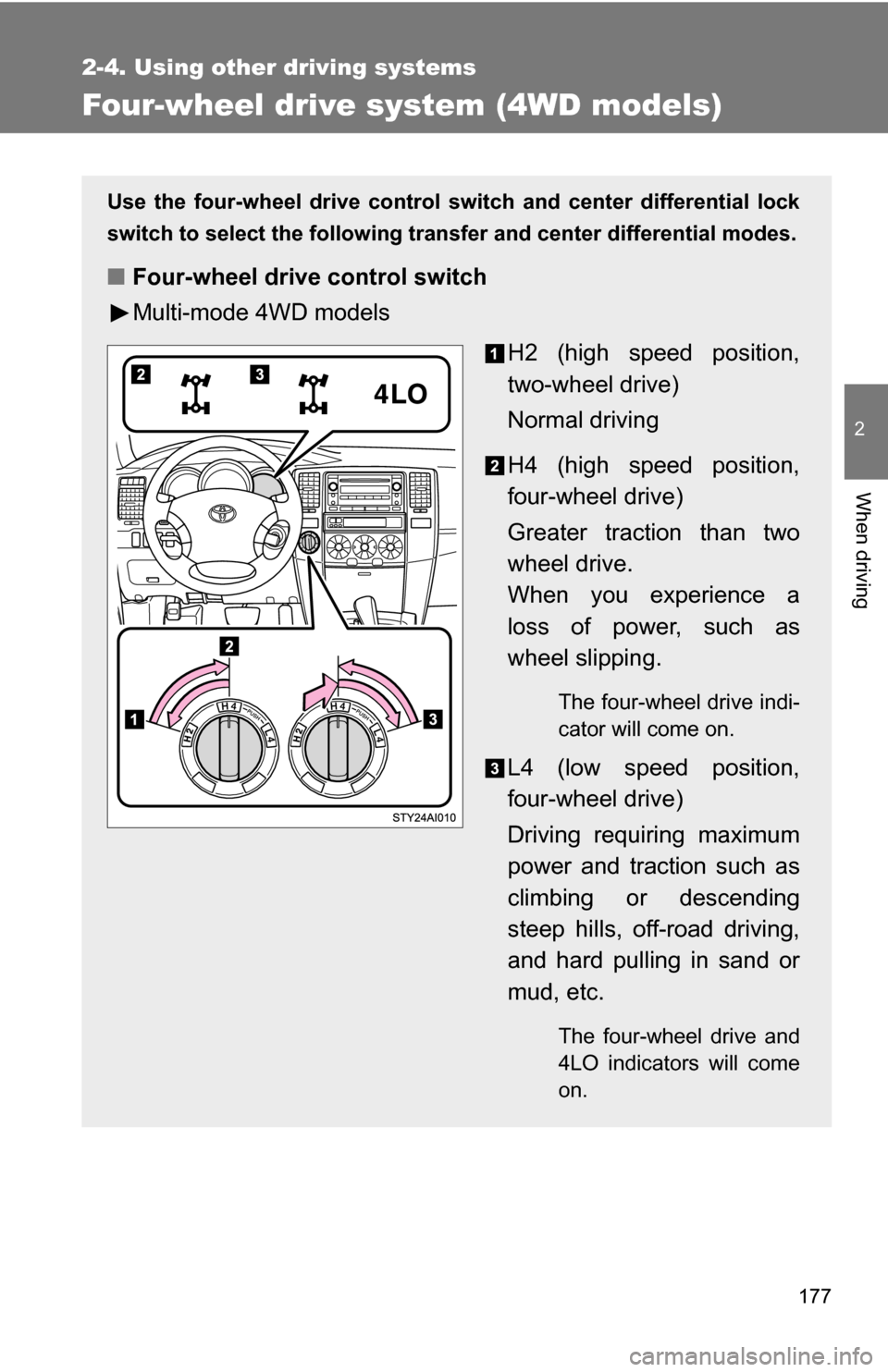
Use the four-wheel drive control switch and center differential lock
switch to select the following transfer and center differential modes.
■ Four-wheel drive control switch
Multi-mode 4WD models
H2 (high speed position,
two-wheel drive)
Normal driving
H4 (high speed position,
four-wheel drive)
Greater traction than two
wheel drive.
When you experience a
loss of power, such as
wheel slipping.
The four-wheel drive indi-
cator will come on.
L4 (low speed position,
four-wheel drive)
Driving requiring maximum
power and traction such as
climbing or descending
steep hills, off-road driving,
and hard pulling in sand or
mud, etc.
The four-wheel drive and
4LO indicators will come
on.
Page 179 of 520
179
2-4. Using other
driving systems
2
When driving
Shifting between H4 and L4
■ Shifting from H4 to L4
Stop the vehicle completely.
Shift the shift lever to N.
Push and turn the four-wheel drive control switch fully clock-
wise.
Maintain this condition until the 4LO indicator turns on.
■Shifting from L4 to H4
Stop the vehicle completely.
Shift the shift lever to N.
Turn the four-wheel drive control switch counterclockwise.
Maintain this condition until the 4LO indicator turns off.
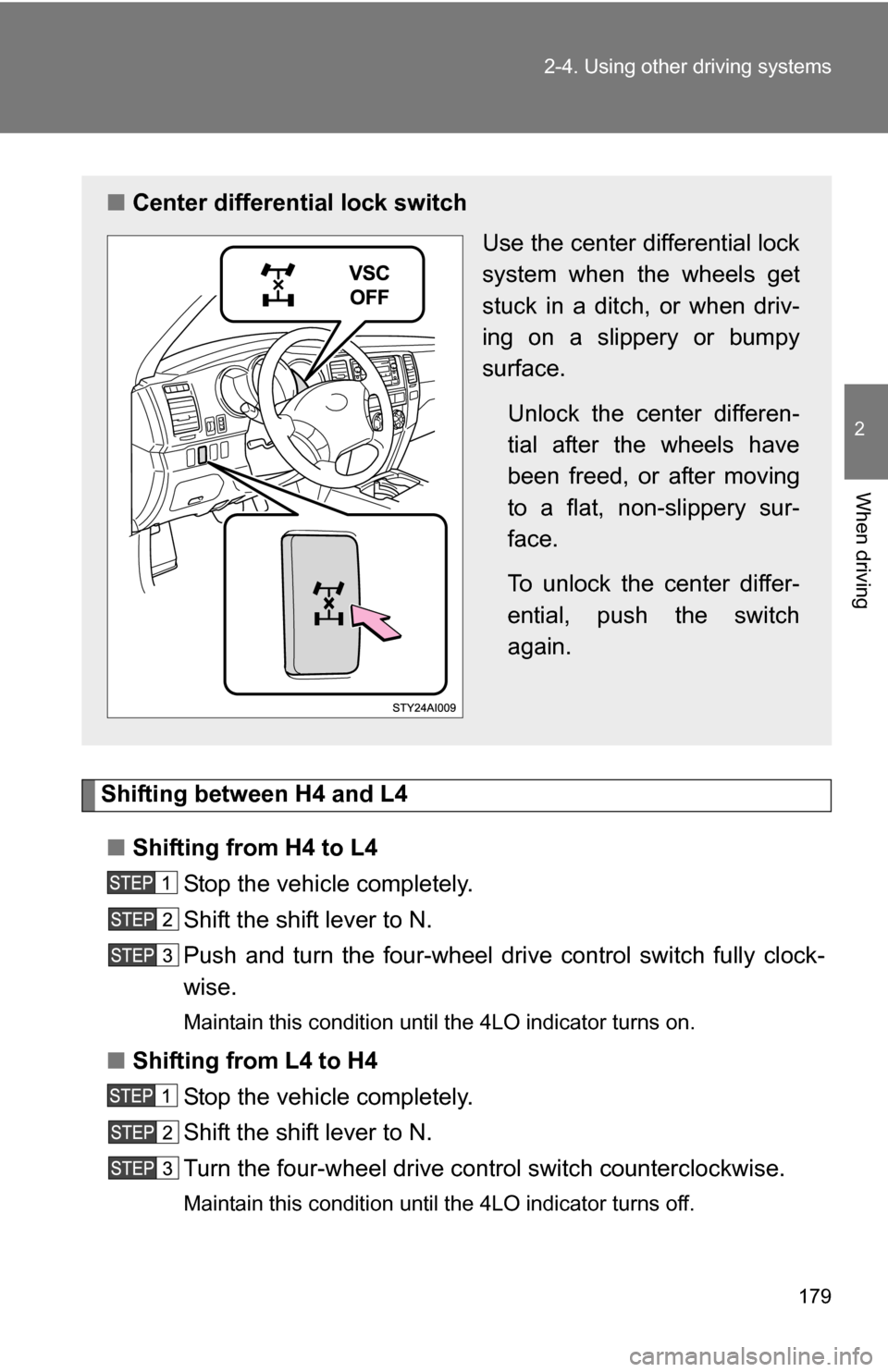
■Center differential lock switch
Use the center differential lock
system when the wheels get
stuck in a ditch, or when driv-
ing on a slippery or bumpy
surface.
Unlock the center differen-
tial after the wheels have
been freed, or after moving
to a flat, non-slippery sur-
face.
To unlock the center differ-
ential, push the switch
again.
Page 180 of 520
180 2-4. Using other driving systems
■Shifting between H2 and H4
●Shifting from H2 to H4
Reduce the vehicle speed to less than 62 mph (100 km/h) and turn the
four-wheel drive control switch fully clockwise.
● Shifting from H4 to H2
Turn the four-wheel drive control switch fully counterclockwise.
This can be done at any speed.
■ If the four-wheel drive indicat or or the 4LO indicator blinks
● Shifting from H2 to H4
• If the four-wheel drive indicator continues to blink, drive straight ahead
while accelerating or decelerating.
• If the four-wheel drive indicator continues to blink and the buzzer sounds, stop the vehicle or reduce the vehicle speed to less than 62
mph (100 km/h). Operate the switch again.
● Shifting from H4 to H2
• If the four-wheel drive indicator continues to blink, drive straight ahead
while accelerating or decelerating, or drive forward or backward in a
short distance.
● Shifting to H4 or L4
If the 4LO indicator continues to blink when you operate the four-wheel
drive control switch to the H4 or L4 position, drive forward or backward in a
short distance, then stop the vehicle completely, shift the shift lever
securely into N and operate the switch again.
If the indicators continue to blink even if doing so, contact your Toyota dealer
as soon as possible. There may be a trouble in the four-wheel drive system.
■ Four-wheel drive usage freque ncy (Multi-mode 4WD models)
You should drive in four-wheel drive for at least 10 miles (16 km) each
month.
This will assure that the front drive components are lubricated.
Page 181 of 520
181
2-4. Using other
driving systems
2
When driving
■Limited slip center differential
If one wheel begins to spin, the limited slip center differential (transfer) is
designed to aid traction by automatically transmitting driving force to the
wheels on the other drive axle. It transmits driving force to the front wheels if
a rear wheel spins, and to the rear wheels if a front wheel spins.
■ The center differential lock switch can be operated when
The four-wheel drive control switch is in the H4 or L4 position.
■ Center differential lock system
●When the center differential is locked, the VSC system is automatically
turned off and the center differential lock and VSC OFF indicators come
on.
● When the four-wheel drive control switch is turned to the H2 position, the
center differential is automatically unlocked.
● If the operation is not completed, the center differential lock indicator
blinks. If the indicator does not go off when unlocking the center differen-
tial, drive straight ahead while accelerating or decelerating, or drive \
in
reverse.
NOTICE
■When shifting the four-w heel drive control switch
Never operate the four-wheel drive control switch if the wheels are slipping.
Stop the slipping or spinning before shifting.
■ To prevent damage to the center differential
●For normal driving on dry and hard surface roads, unlock the center differ-
ential.
● Unlock the center differential after the wheels are out of the ditch or off the
loose or bumpy surface.
● Do not push the center differential lock switch when the vehicle is corner-
ing or when its wheels are spinning freely off the ground.
Page 182 of 520
182
2-4. Using other driving systems
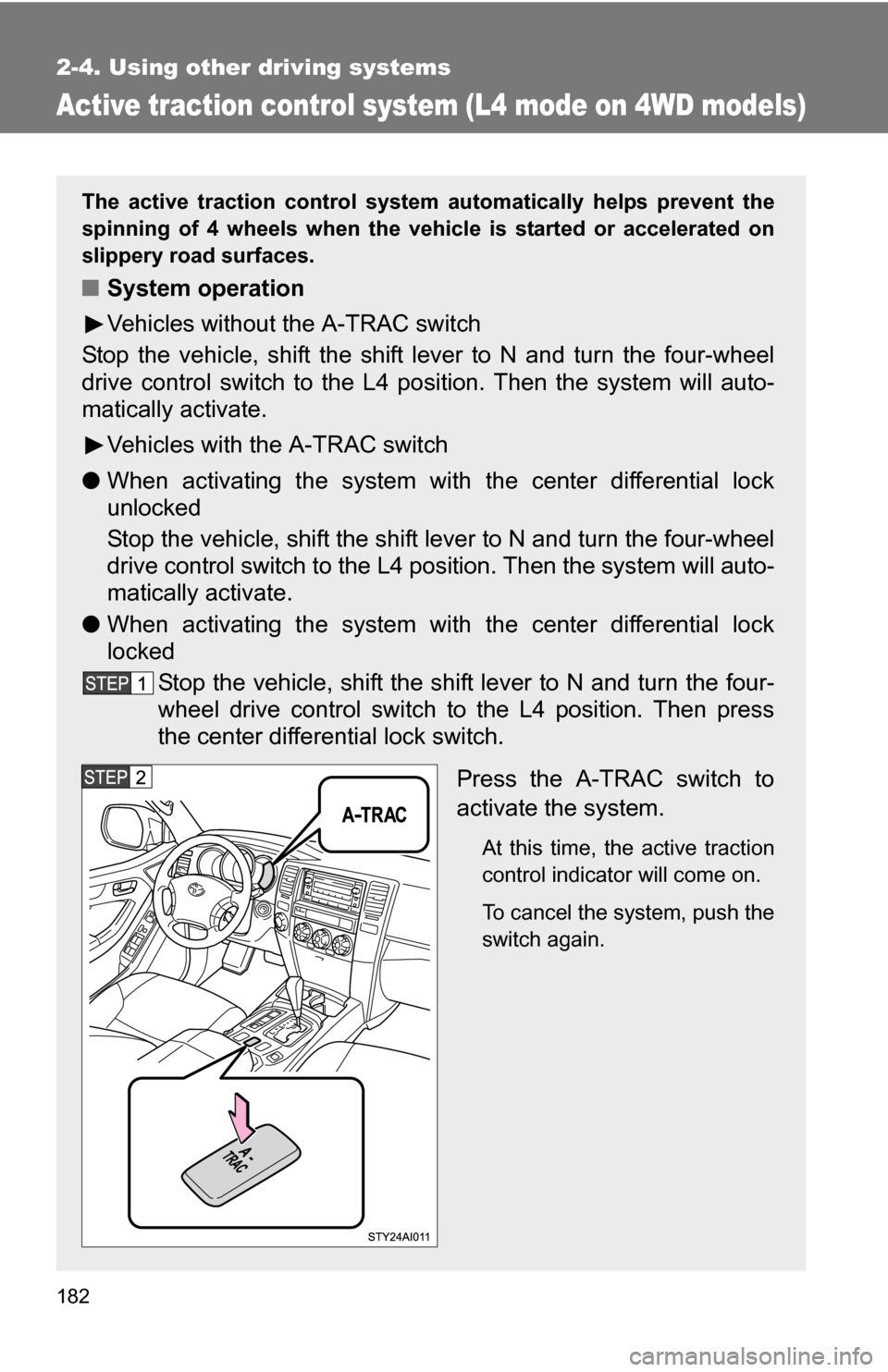
Active traction control system (L4 mode on 4WD models)
The active traction control system automatically helps prevent the
spinning of 4 wheels when the vehicle is started or accelerated on
slippery road surfaces.
■ System operation
Vehicles without the A-TRAC switch
Stop the vehicle, shift the shift lever to N and turn the four-wheel
drive control switch to the L4 po sition. Then the system will auto-
matically activate.
Vehicles with the A-TRAC switch
● When activating the system with the center differential lock
unlocked
Stop the vehicle, shift the shift lever to N and turn the four-wheel
drive control switch to the L4 position. Then the system will auto-
matically activate.
● When activating the system with the center differential lock
locked
Stop the vehicle, shift the shift lever to N and turn the four-
wheel drive control switch to the L4 position. Then press
the center differential lock switch.
Press the A-TRAC switch to
activate the system.
At this time, the active traction
control indicator will come on.
To cancel the system, push the
switch again.
Page 183 of 520

183
2-4. Using other
driving systems
2
When driving
When the active traction control system is operating
If all wheels spin, the slip indica-
tor flashes to indicate that the
active traction control system
have been engaged.
■When the rear differential is locked (vehicles with the rear differential
lock system)
The active traction control system is activated only when the vehicle speed
is less than 4 mph (6 km/h).
■ Sounds and vibrations caused by the active traction control system
●A sound may be heard from the engine compartment when the engine is
started or just after the vehicle begins to move. This sound does not indi-
cate that a malfunction has occurred in the system.
● Vibrations may be felt through the vehicle body and steering. It may
occur when the system is operating.
■ If the brake system overheats
The system will cease operation and a buzzer will sound to alert the driver.
Stop the vehicle in a safe place. (Ther e is no problem with continuing normal
driving.)
CAUTION
■ The active traction control system m ay not operate effectively when
Directional control and power may not be achievable while driving on slip-
pery road surfaces, even if the active traction control system is operating.
Do not drive the vehicle in conditions where stability and power may be lost.