2009 SUBARU TRIBECA battery
[x] Cancel search: batteryPage 953 of 2453

TPM(diag)-3
General Description
TIRE PRESSURE MONITORING SYSTEM (DIAGNOSTICS)
2. General Description
A: CAUTION
1. SRS AIRBAG SYSTEM
Airbag system wiring harness is routed near the
TPM control module.
CAUTION:
•Wiring harnesses of all airbag system are yel-
low. Do not use the electrical test equipment on
these circuits.
•Be careful not to damage the airbag system
wiring harness when servicing the tire pressure
monitoring control module.
2. TIRE PRESSURE MONITORING CON-
TROL MODULE
•If the alteration of tire rotation, the installation po-
sition or the replacement of transmitter is per-
formed, ID registration for the transmitter is
required.
Monitor.>
•When adjusting tire pressure indoors in winter,
there is a big temperature difference between the
indoor facilities and outside. Once the car is outside
where the temperature is lower, the air pressure in
the tires will drop, causing the tire pressure warning
light to come on, even if the pressure in the tires
was adjusted to standard values indoors. To avoid
this, it is necessary to adjust the tire pressure to the
high side in consideration of the difference in tem-
perature between inside and outside.
B: INSPECTION
Before performing diagnosis, check the following
item which might affect the quality of the tire pres-
sure monitoring system.
1. TIRE
•Inspect that the tire pressure is within the speci-
fication while the tire is cool. (Refer to Tire Caution
Label.)
•Check the tires for damage or the insertion of for-
eign matters.
2. BATTERY
Check that amount of battery fluid, gravity and volt-
age are within the specifications.
Standard voltage: 12 V or more
Specific gravity: 1.260 or more
Te m p e r a -
ture
°C (°F)
Indoor
tempera-
ture
15.5 (60)
Ambient
tempera-
ture
–1 (30) –12 (10) –23 (–10)
Reference
for adjusting
tire pres-
sure
kPa (psi)
Fr o n t 25 0 ( 36 ) 26 5 ( 3 8 ) 2 8 0 ( 4 0)
Rear 240 (35) 255 (37) 270 (39)
Page 956 of 2453

TPM(diag)-6
Control Module I/O Signal
TIRE PRESSURE MONITORING SYSTEM (DIAGNOSTICS)
4. Control Module I/O Signal
A: ELECTRICAL SPECIFICATION
Te r m i n a l
No.Measured value Measuring condition Remarks
1Select monitor communication Serial communication —
2Tire pressure warning light output When malfunction occurs, or tire pres-
sure decreases
System failure: blinks
Tire pressure decreases: turns on
4Speed sensor signal While driving (Pulse signal) Change according to vehicle
speed
5Ignition power supply IG switch ON (Battery voltage) —
6Battery power supply Battery voltage Always
8Body integrated unit (Hazard output
signal).—When hazard turns on.
9GND 0 V (Always) Always
Page 957 of 2453

TPM(diag)-7
Control Module I/O Signal
TIRE PRESSURE MONITORING SYSTEM (DIAGNOSTICS)
B: WIRING DIAGRAM
(1) Battery power supply (4) Antenna (8) Vehicle speed signal
(2) Ignition power supply (5) Ground (9) Subaru Select Monitor
(3) Tire pressure monitoring control
module
(6) Transmitter (10) Body integrated unit
(7) Combination meter
TPM00005
(6)
(6)
(6)
(6)
(1)
(2)
(7)
(9)
(5)
(8)
(10)
(3)
6
5
4
8
2
1
9
(4)
123456
789101112
Page 959 of 2453
![SUBARU TRIBECA 2009 1.G Service Workshop Manual TPM(diag)-9
Subaru Select Monitor
TIRE PRESSURE MONITORING SYSTEM (DIAGNOSTICS)
2. DATA DISPLAY
1) On the «Main Menu» display screen, select the {Each System Check} and press the [YES] key.
2) On th](/manual-img/17/7322/w960_7322-958.png "SUBARU TRIBECA 2009 1.G Service Workshop Manual TPM(diag)-9
Subaru Select Monitor
TIRE PRESSURE MONITORING SYSTEM (DIAGNOSTICS)
2. DATA DISPLAY
1) On the «Main Menu» display screen, select the {Each System Check} and press the [YES] key.
2) On th")
TPM(diag)-9
Subaru Select Monitor
TIRE PRESSURE MONITORING SYSTEM (DIAGNOSTICS)
2. DATA DISPLAY
1) On the «Main Menu» display screen, select the {Each System Check} and press the [YES] key.
2) On the «System Selection Menu» display screen, select the {Tire Pressure Monitor} and press the [YES]
key.
3) Press the [YES] key after the {Tire Pressure Monitor} is displayed.
4) On the «Tire pressure monitor diagnosis» display screen, select the {Data Display}, and then press the
[YES] key, then necessary data will be displayed.
•A list of the support data is shown in the following table.
3. CLEAR MEMORY
1) On the «Main Menu», select the {2. Each Sys-
tem Check} and press the [YES] key.
2) On the «System Selection Menu» display
screen, select the {Tire Pressure Monitor} and
press the [YES] key.
3) Press the [YES] key after the {Tire Pressure
Monitor} is displayed.
4) On the «Tire Pressure Monitor Diagnosis» dis-
play screen, select the {Memory Clear} and press
the [YES] key.
5) When «Done» and «Turn ignition switch OFF»
are shown on the display screen, turn the Subaru
Select Monitor and ignition switch to OFF.
NOTE:
For details concerning operation procedure, refer
to the “SUBARU SELECT MONITOR OPERATION
MANUAL”.
4. REGISTER TRANSMITTER ID
Perform the procedures below to register the trans-
mitter.
•Transmitter replaced.
•Switched the position of the transmitter (rotated
tires)
•Replaced the tire pressure monitoring control
module.
NOTE:
•If registration of the transmitter ID is not possible
after 2 attempts, replace the tire pressure monitor-
ing control module.
REMOVAL, Tire Pressure Monitoring System.>
•If the ignition switch and Subaru Select Monitor
power are turned OFF while registering the trans-
mitter, or if registration is not possible for more than
5 minutes, the registration mode is cancelled.
•When rotating tires, there is no affect on the per-
formance or functions of the tire pressure monitor-
ing control module even if the transmitter (ID) is not
registered, however, the tire position displayed on
the Subaru Select Monitor will be incorrect.
1) Adjust all tire pressures to the specifications.
NOTE:
Refer to the tire caution label on the driver's side
door for the correct tire pressure.
Display Contents to be monitored Unit of measure
FR FN Code
LEARN, LOW BAT, OFF, WAKE, RE ME, NOR-
MAL
LEARN: Transmitted transmitter ID using the transmit-
ter registration tool
LOW BAT: Transmitter battery voltage running low
OFF: Transmitter function stops (no data transmission)
RE ME: Tire air changes ±8.4 kPa
WA K E : S t a r t ed tr an sm it t i ng da t a f r o m a s t op p ed st a te
NORMAL: Conditions other than above
FL FN Code
RR FN Code
RL FN Code
FR tire pressureVa l u e c o nve r t e d t o t i r e p r e s s u r e f r o m d a t a d e l i v -
ered from transmitter is displayed.
(It may be different from values measured by the
direct contact meter.)
kPa, psig, mmHg, inHg
FL tire pressurekPa, psig, mmHg, inHg
RR tire pressurekPa, psig, mmHg, inHg
RL tire pressurekPa, psig, mmHg, inHg
Ve h i c l e S p e e dVe h i c l e s p e e d s i g n a l w h i c h i s i n p u t i n c o n t r o l
module.km/h, MPH
Pressure warning Threshold where tire pressure warning light lights kPa, psig, mmHg, inHg
Return pressureThreshold where tire pressure warning light goes
outkPa, psig, mmHg, inHg
Page 961 of 2453
TPM(diag)-11
Subaru Select Monitor
TIRE PRESSURE MONITORING SYSTEM (DIAGNOSTICS)
B: INSPECTION
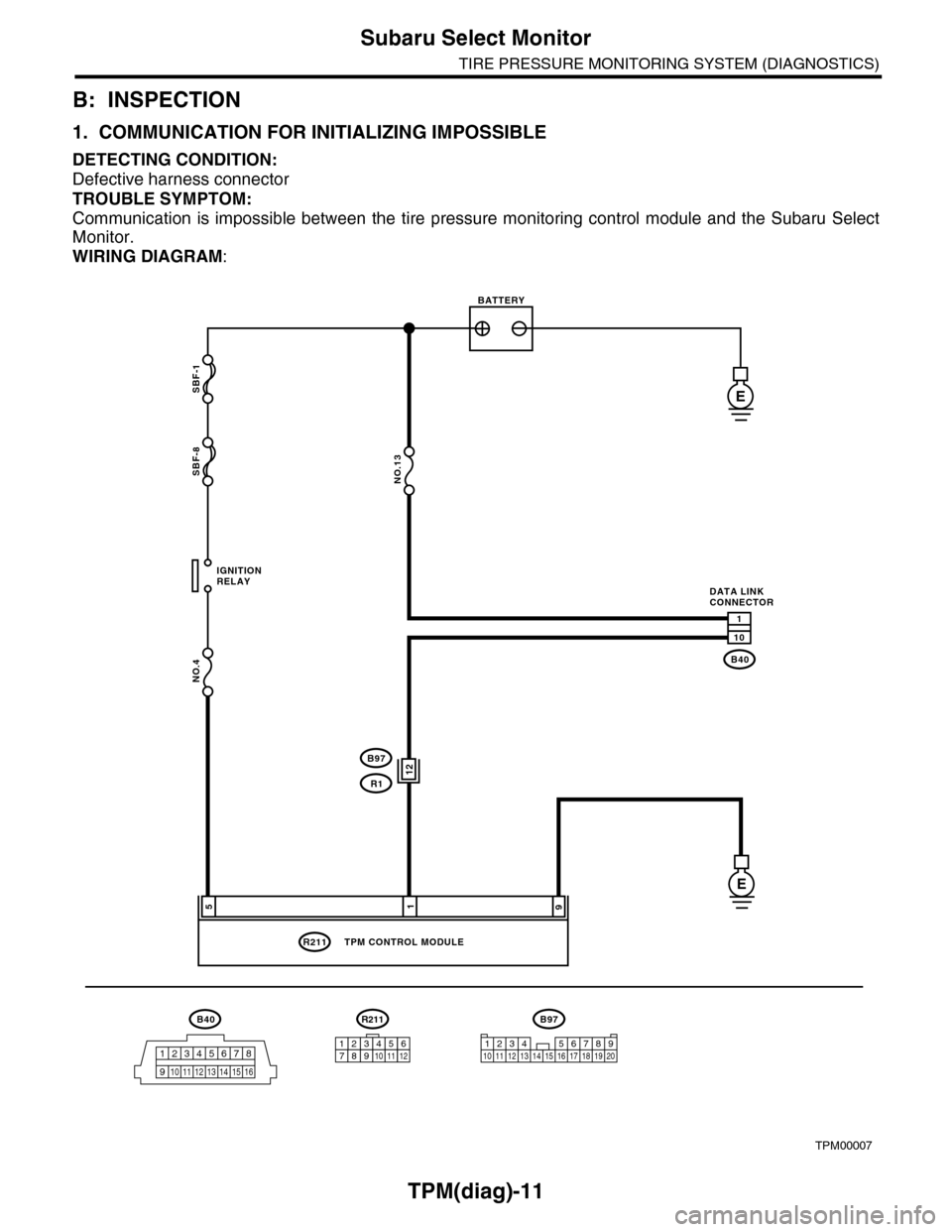
1. COMMUNICATION FOR INITIALIZING IMPOSSIBLE
DETECTING CONDITION:
Defective harness connector
TROUBLE SYMPTOM:
Communication is impossible between the tire pressure monitoring control module and the Subaru Select
Monitor.
WIRING DIAGRAM:
TPM00007
B40
12345678
910 11 12 13 14 15 16
SBF-1
SBF-8
NO.4
B40
R211
E
E
1
10
195
IGNITIONRELAY
BATTERY
DATA LINKCONNECTOR
NO.13
TPM CONTROL MODULE
R211
123456789101112
12B97
R1
B97
1234 567891011 1213 14 15 16 17 18 19 20
Page 962 of 2453
TPM(diag)-12
Subaru Select Monitor
TIRE PRESSURE MONITORING SYSTEM (DIAGNOSTICS)
Step Check Yes No
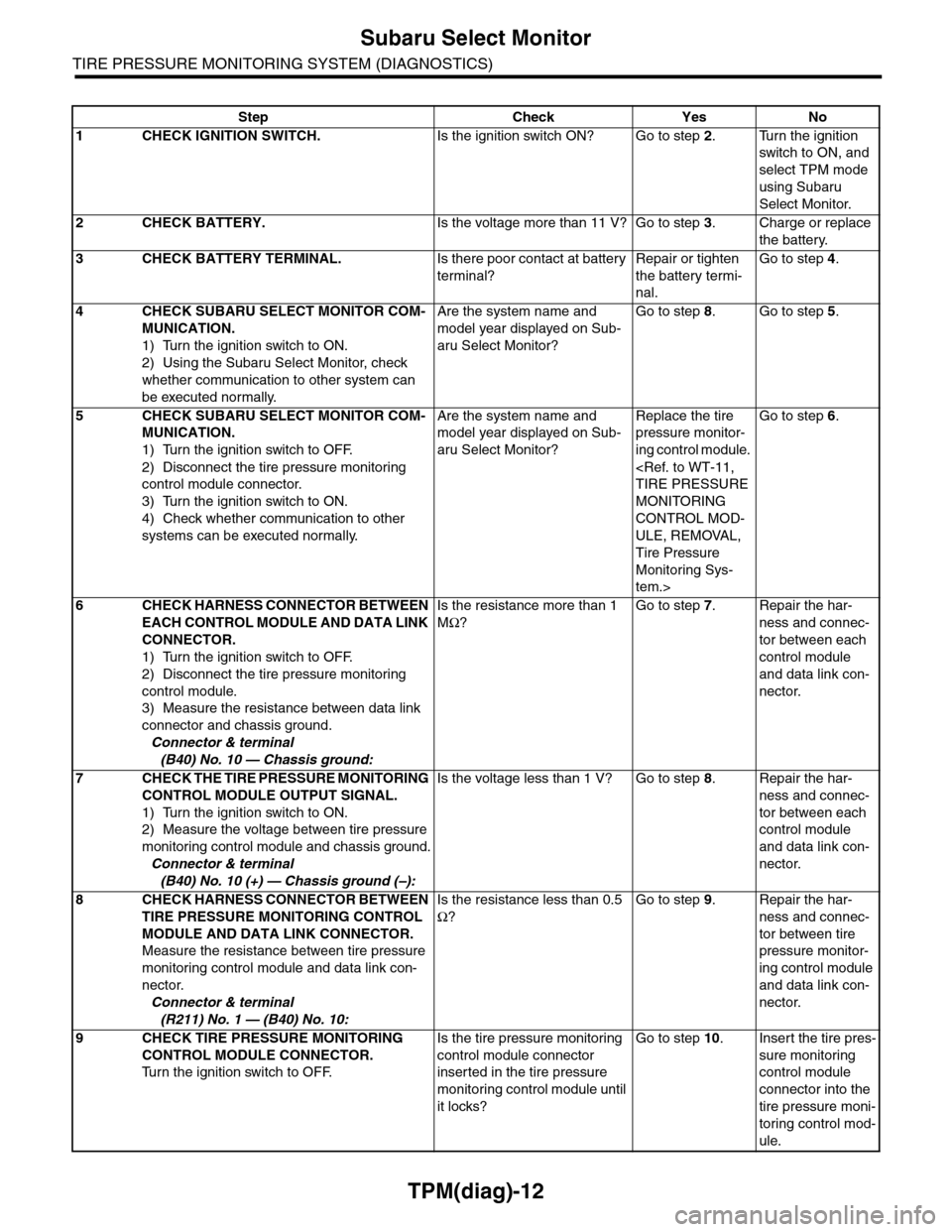
1CHECK IGNITION SWITCH.Is the ignition switch ON? Go to step 2.Turn the ignition
switch to ON, and
select TPM mode
using Subaru
Select Monitor.
2CHECK BATTERY.Is the voltage more than 11 V? Go to step 3.Charge or replace
the battery.
3CHECK BATTERY TERMINAL.Is there poor contact at battery
terminal?
Repair or tighten
the battery termi-
nal.
Go to step 4.
4CHECK SUBARU SELECT MONITOR COM-
MUNICATION.
1) Turn the ignition switch to ON.
2) Using the Subaru Select Monitor, check
whether communication to other system can
be executed normally.
Are the system name and
model year displayed on Sub-
aru Select Monitor?
Go to step 8.Go to step 5.
5CHECK SUBARU SELECT MONITOR COM-
MUNICATION.
1) Turn the ignition switch to OFF.
2) Disconnect the tire pressure monitoring
control module connector.
3) Turn the ignition switch to ON.
4) Check whether communication to other
systems can be executed normally.
Are the system name and
model year displayed on Sub-
aru Select Monitor?
Replace the tire
pressure monitor-
ing control module.
MONITORING
CONTROL MOD-
ULE, REMOVAL,
Tire Pressure
Monitoring Sys-
tem.>
Go to step 6.
6CHECK HARNESS CONNECTOR BETWEEN
EACH CONTROL MODULE AND DATA LINK
CONNECTOR.
1) Turn the ignition switch to OFF.
2) Disconnect the tire pressure monitoring
control module.
3) Measure the resistance between data link
connector and chassis ground.
Connector & terminal
(B40) No. 10 — Chassis ground:
Is the resistance more than 1
MΩ?
Go to step 7.Repair the har-
ness and connec-
tor between each
control module
and data link con-
nector.
7CHECK THE TIRE PRESSURE MONITORING
CONTROL MODULE OUTPUT SIGNAL.
1) Turn the ignition switch to ON.
2) Measure the voltage between tire pressure
monitoring control module and chassis ground.
Connector & terminal
(B40) No. 10 (+) — Chassis ground (–):
Is the voltage less than 1 V? Go to step 8.Repair the har-
ness and connec-
tor between each
control module
and data link con-
nector.
8CHECK HARNESS CONNECTOR BETWEEN
TIRE PRESSURE MONITORING CONTROL
MODULE AND DATA LINK CONNECTOR.
Measure the resistance between tire pressure
monitoring control module and data link con-
nector.
Connector & terminal
(R211) No. 1 — (B40) No. 10:
Is the resistance less than 0.5
Ω?
Go to step 9.Repair the har-
ness and connec-
tor between tire
pressure monitor-
ing control module
and data link con-
nector.
9CHECK TIRE PRESSURE MONITORING
CONTROL MODULE CONNECTOR.
Tu r n t h e i g n i t i o n s w i t c h t o O F F.
Is the tire pressure monitoring
control module connector
inserted in the tire pressure
monitoring control module until
it locks?
Go to step 10.Insert the tire pres-
sure monitoring
control module
connector into the
tire pressure moni-
toring control mod-
ule.
Page 963 of 2453

TPM(diag)-13
Subaru Select Monitor
TIRE PRESSURE MONITORING SYSTEM (DIAGNOSTICS)
10 CHECK POWER SUPPLY CIRCUIT.
1) Turn the ignition switch to ON. (Engine
OFF)
2) Measure the ignition power voltage
between tire pressure monitoring control mod-
ule connector and chassis ground.
Connector & terminal
(R211) No. 5 (+) — Chassis ground (–):
Is the voltage 10 — 15 V? Go to step 11.Repair open circuit
of the harness
between the tire
pressure monitor-
ing control module
and battery.
11 CHECK HARNESS CONNECTOR BETWEEN
TIRE PRESSURE MONITORING CONTROL
MODULE AND CHASSIS GROUND.
1) Turn the ignition switch to OFF.
2) Disconnect the connector from the tire
pressure monitoring control module.
3) Measure the resistance of harness
between tire pressure monitoring control mod-
ule and chassis ground.
Connector & terminal
(R211) No. 9 — Chassis ground:
Is the resistance less than 0.5
Ω?
Go to step 12.Repair open circuit
of the harness of
the tire pressure
monitoring control
module.
12 CHECK POOR CONTACT OF CONNECTOR.Is there poor contact in tire
pressure monitoring control
module power supply, ground
circuit and data link connector?
Repair the con-
nector.
Replace the tire
pressure monitor-
ing control module.
MONITORING
CONTROL MOD-
ULE, REMOVAL,
Tire Pressure
Monitoring Sys-
tem.>
Step Check Yes No
Page 977 of 2453

TPM(diag)-27
List of Diagnostic Trouble Code (DTC)
TIRE PRESSURE MONITORING SYSTEM (DIAGNOSTICS)
51 FL transmitter battery low voltage Transmitter battery voltage is low.
Procedure with Diagnostic Trouble Code
(DTC).>
52 FR transmit battery low voltage. Transmitter battery voltage is low.
Procedure with Diagnostic Trouble Code
(DTC).>
53 RR transmit battery low voltage. Transmitter battery voltage is low.
Procedure with Diagnostic Trouble Code
(DTC).>
54 RL transmit battery low voltage. Transmitter battery voltage is low.
Procedure with Diagnostic Trouble Code
(DTC).>
61 Vehicle speed is abnormal.
Ve h i c l e s p e e d s i g n a l i s n o t i n p u t
to the control module with the
vehicle speed more than 25 km/h.
with Diagnostic Trouble Code (DTC).>
DTC Item Contents of diagnosis Remarks