Page 289 of 2453
EI-47
Floor Mat
EXTERIOR/INTERIOR TRIM
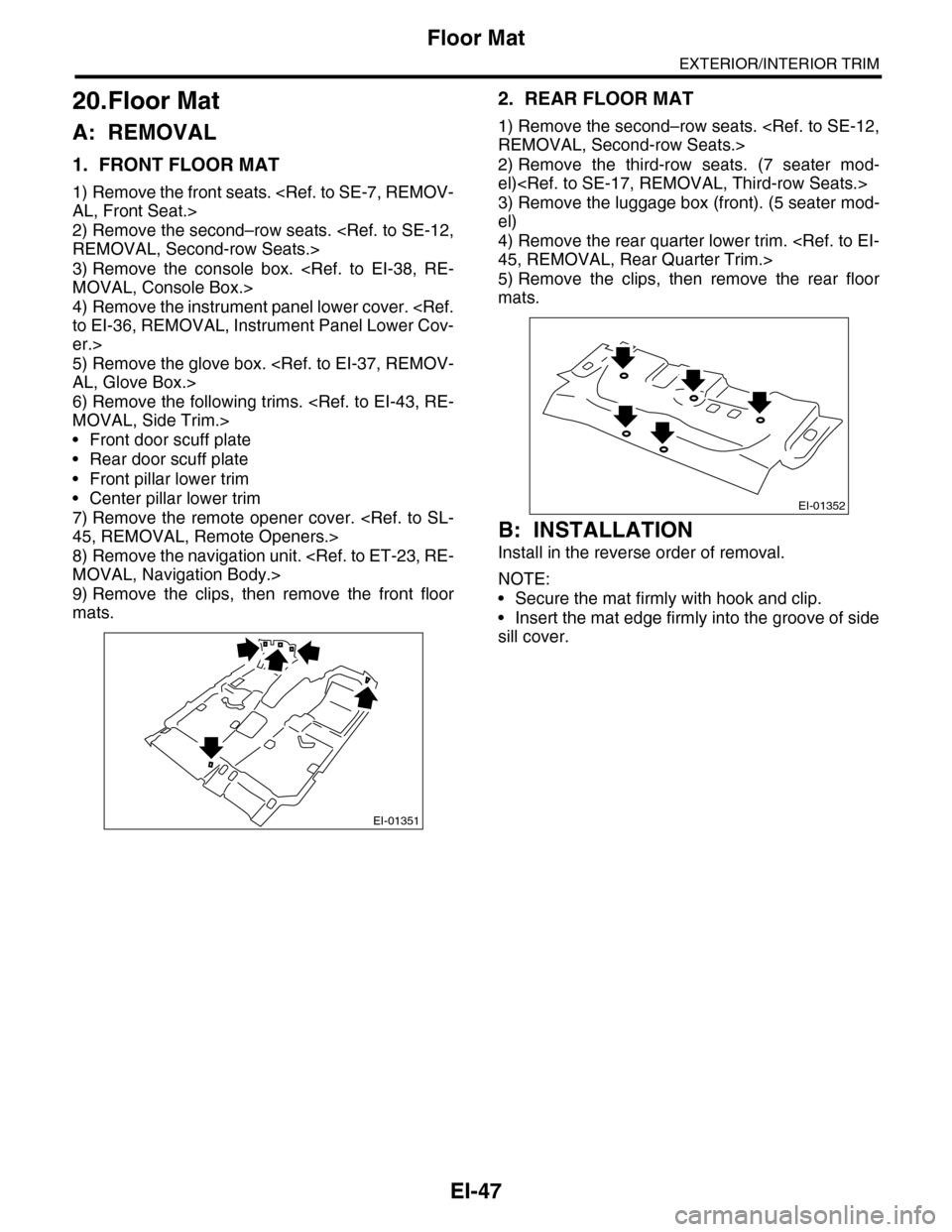
20.Floor Mat
A: REMOVAL
1. FRONT FLOOR MAT
1) Remove the front seats.
AL, Front Seat.>
2) Remove the second–row seats.
REMOVAL, Second-row Seats.>
3) Remove the console box.
MOVAL, Console Box.>
4) Remove the instrument panel lower cover.
to EI-36, REMOVAL, Instrument Panel Lower Cov-
er.>
5) Remove the glove box.
AL, Glove Box.>
6) Remove the following trims.
MOVAL, Side Trim.>
•Front door scuff plate
•Rear door scuff plate
•Front pillar lower trim
•Center pillar lower trim
7) Remove the remote opener cover.
45, REMOVAL, Remote Openers.>
8) Remove the navigation unit.
MOVAL, Navigation Body.>
9) Remove the clips, then remove the front floor
mats.
2. REAR FLOOR MAT
1) Remove the second–row seats.
REMOVAL, Second-row Seats.>
2) Remove the third-row seats. (7 seater mod-
el)
3) Remove the luggage box (front). (5 seater mod-
el)
4) Remove the rear quarter lower trim.
45, REMOVAL, Rear Quarter Trim.>
5) Remove the clips, then remove the rear floor
mats.
B: INSTALLATION
Install in the reverse order of removal.
NOTE:
•Secure the mat firmly with hook and clip.
•Insert the mat edge firmly into the groove of side
sill cover.
EI-01351
EI-01352
Page 352 of 2453
AC-26
Blower Motor Unit Assembly
HVAC SYSTEM (HEATER, VENTILATOR AND A/C)
7. Blower Motor Unit Assembly
A: REMOVAL
1) Disconnect the ground cable from battery.
2) Remove the glove box.
AL, Glove Box.>
3) Disconnect the connectors of the A/C control
module, intake door actuator, blower motor, power
transistor and blower resistor.
4) Lift the floor mat.
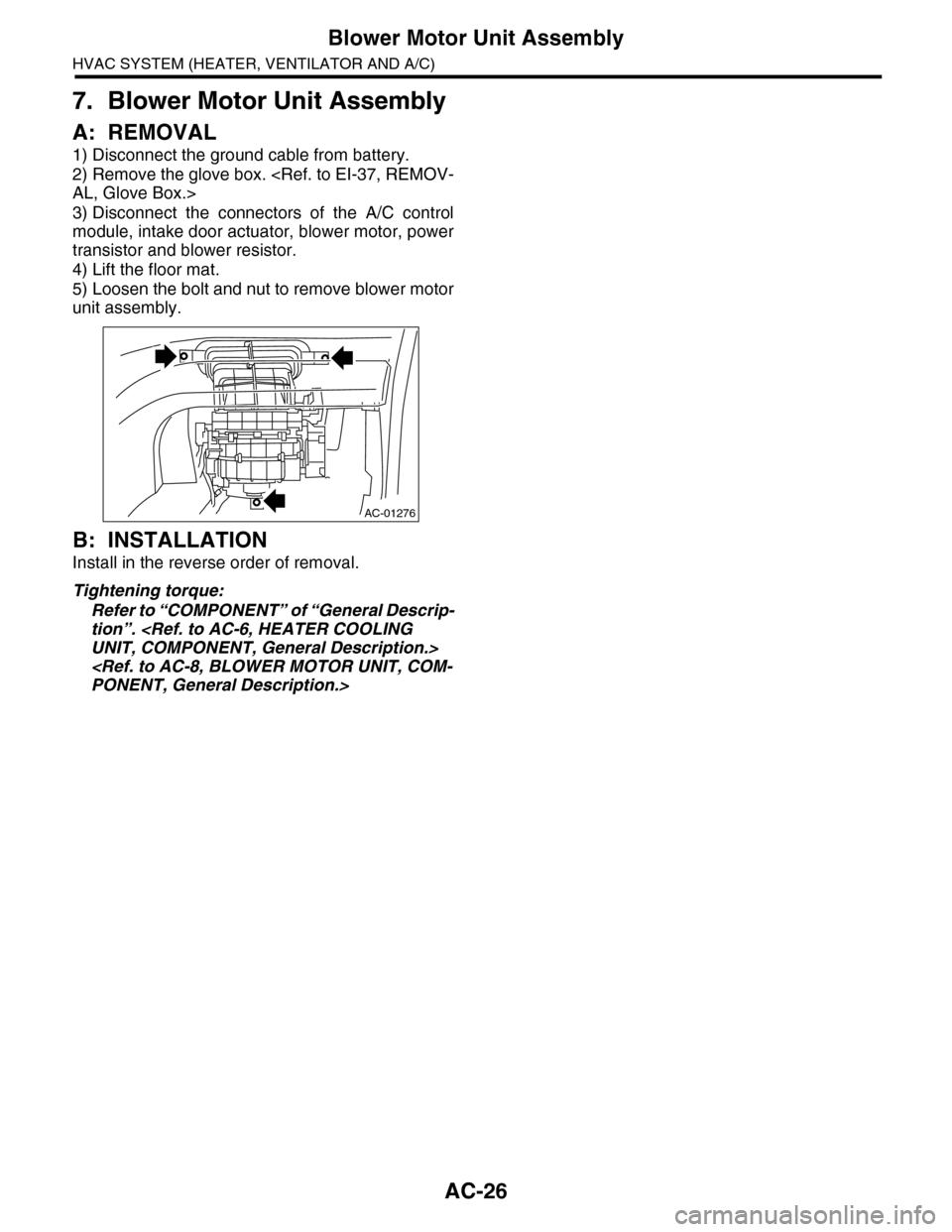
5) Loosen the bolt and nut to remove blower motor
unit assembly.
B: INSTALLATION
Install in the reverse order of removal.
Tightening torque:
Refer to “COMPONENT” of “General Descrip-
tion”.
UNIT, COMPONENT, General Description.>
PONENT, General Description.>
AC-01276
Page 353 of 2453
AC-27
Blower Motor
HVAC SYSTEM (HEATER, VENTILATOR AND A/C)
8. Blower Motor
A: REMOVAL
1) Disconnect the ground cable from battery.
2) Remove the glove box lower cover.
37, REMOVAL, Glove Box.>
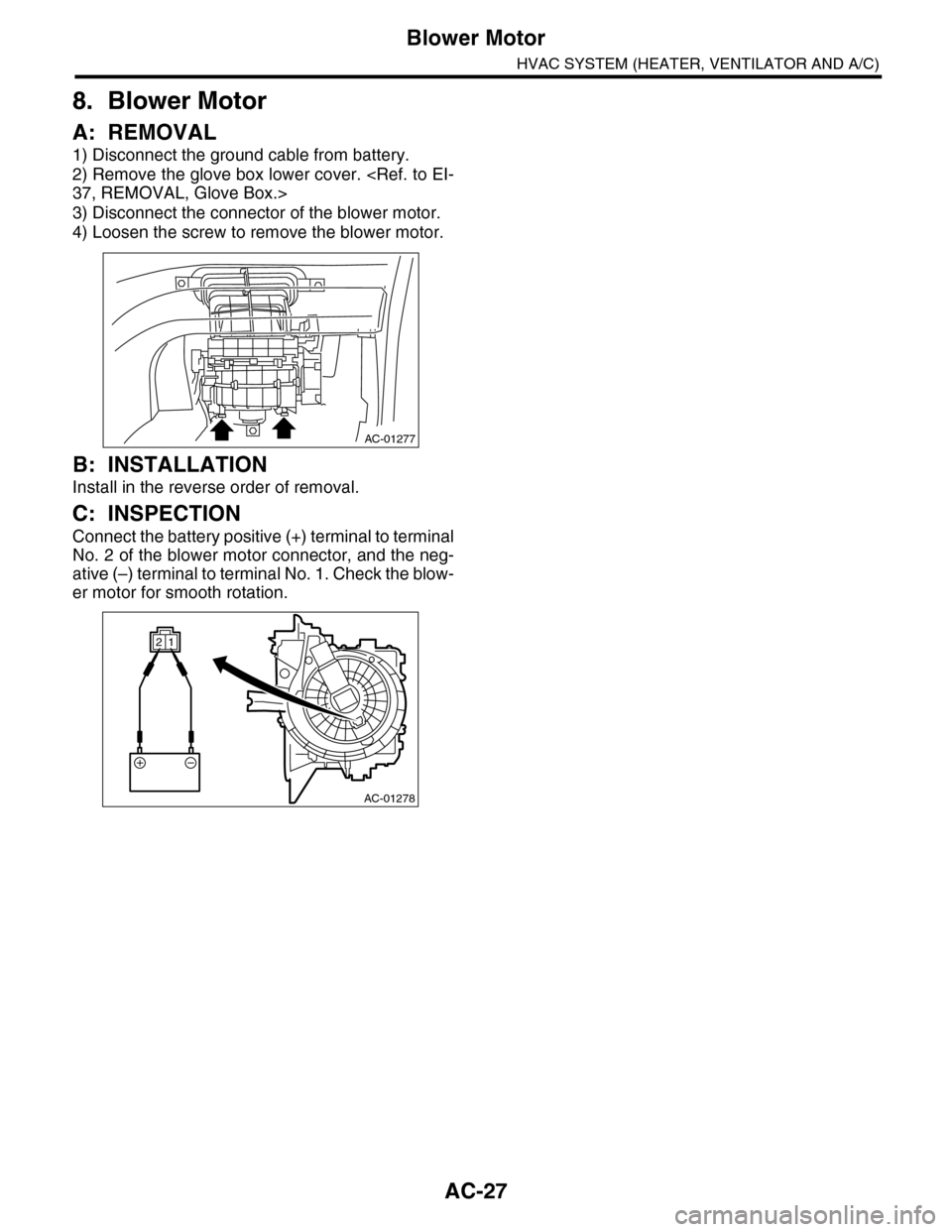
3) Disconnect the connector of the blower motor.
4) Loosen the screw to remove the blower motor.
B: INSTALLATION
Install in the reverse order of removal.
C: INSPECTION
Connect the battery positive (+) terminal to terminal
No. 2 of the blower motor connector, and the neg-
ative (–) terminal to terminal No. 1. Check the blow-
er motor for smooth rotation.
AC-01277
AC-01278
12
Page 354 of 2453
AC-28
Power Transistor (Auto A/C Model)
HVAC SYSTEM (HEATER, VENTILATOR AND A/C)
9. Power Transistor (Auto A/C
Model)
A: REMOVAL
1) Remove the glove box lower cover on passen-
ger side.
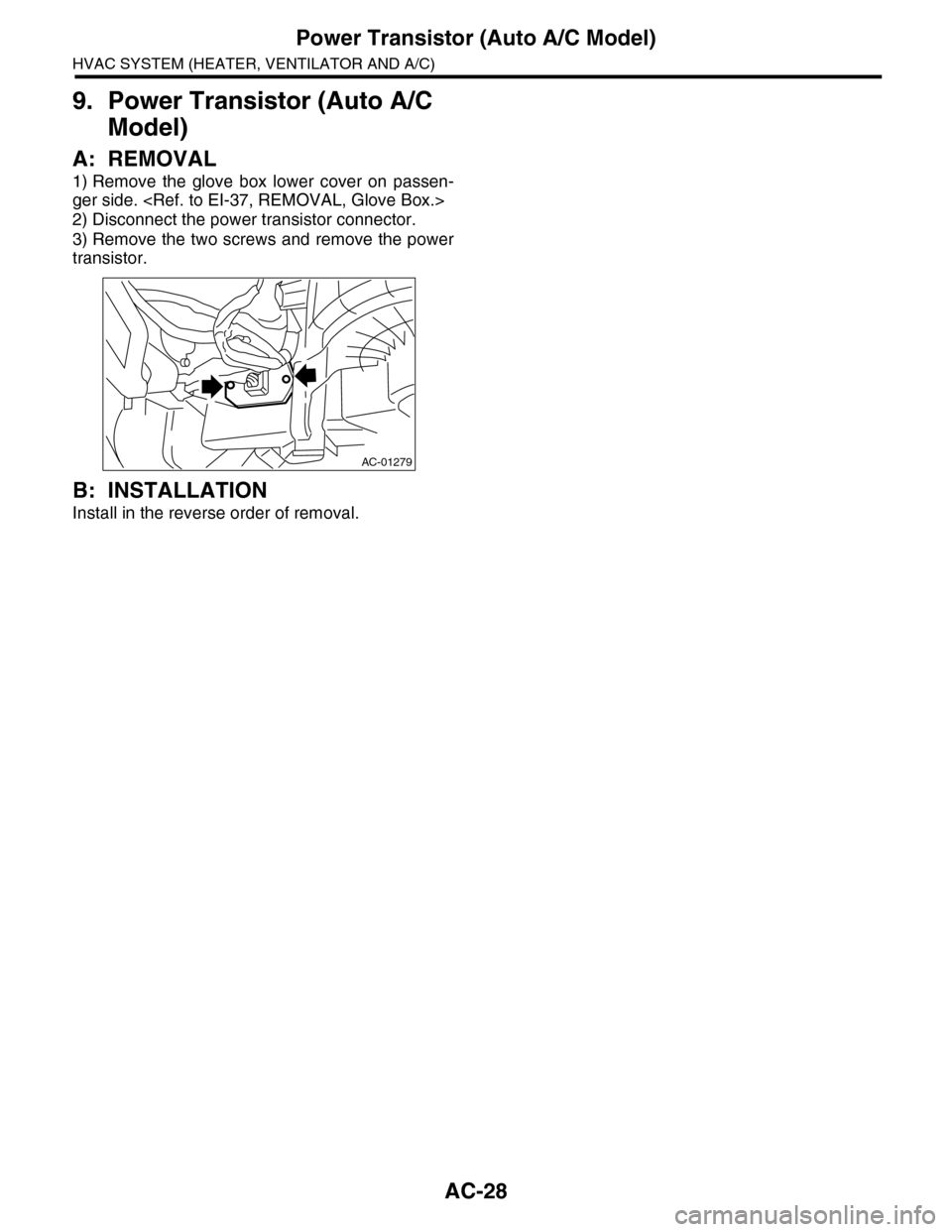
2) Disconnect the power transistor connector.
3) Remove the two screws and remove the power
transistor.
B: INSTALLATION
Install in the reverse order of removal.
AC-01279
Page 358 of 2453
AC-32
Control Unit (Auto A/C Model)
HVAC SYSTEM (HEATER, VENTILATOR AND A/C)
13.Control Unit (Auto A/C Model)
A: REMOVAL
1) Disconnect the ground cable from battery.
2) Remove the glove box.
AL, Glove Box.>
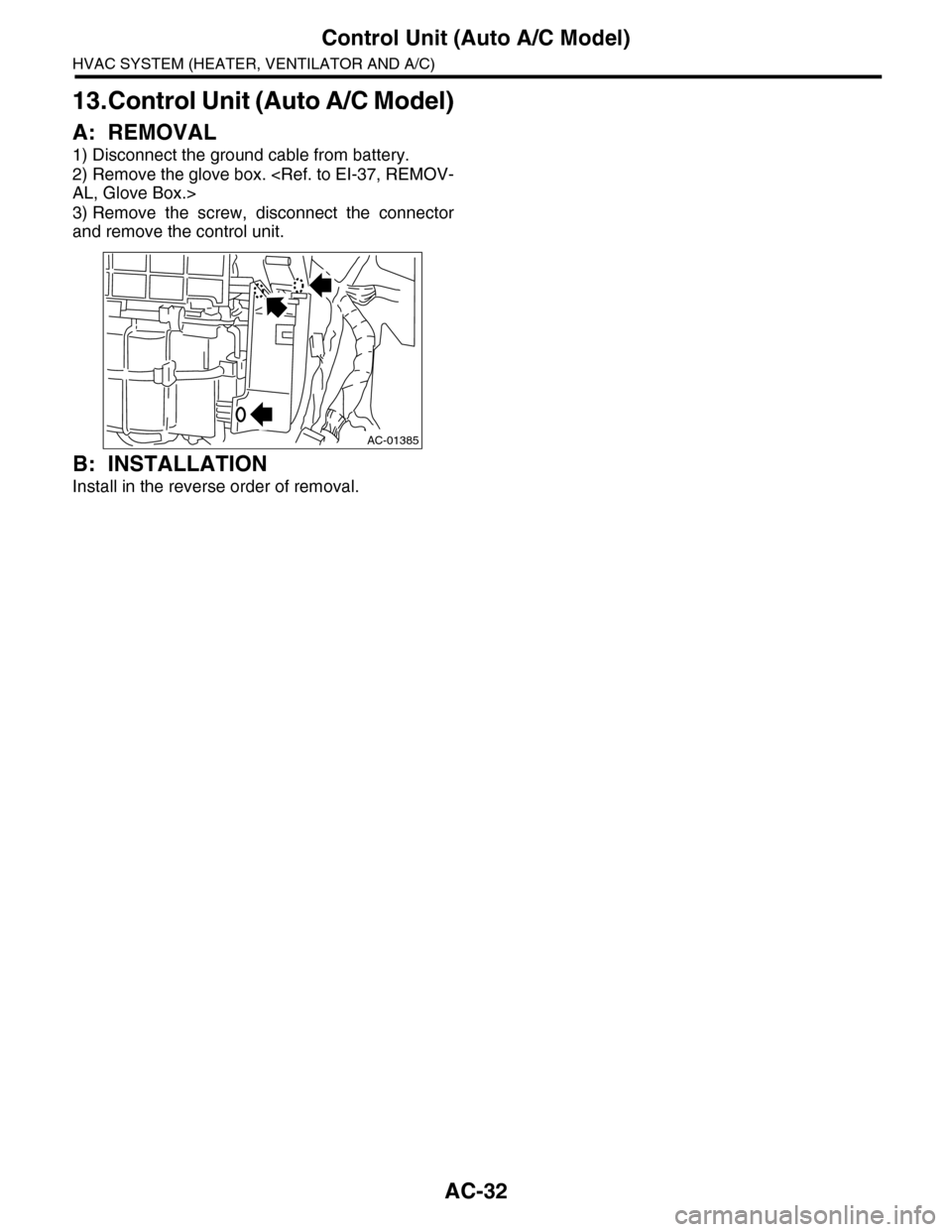
3) Remove the screw, disconnect the connector
and remove the control unit.
B: INSTALLATION
Install in the reverse order of removal.
AC-01385
Page 375 of 2453
AC-49
A/C Filter
HVAC SYSTEM (HEATER, VENTILATOR AND A/C)
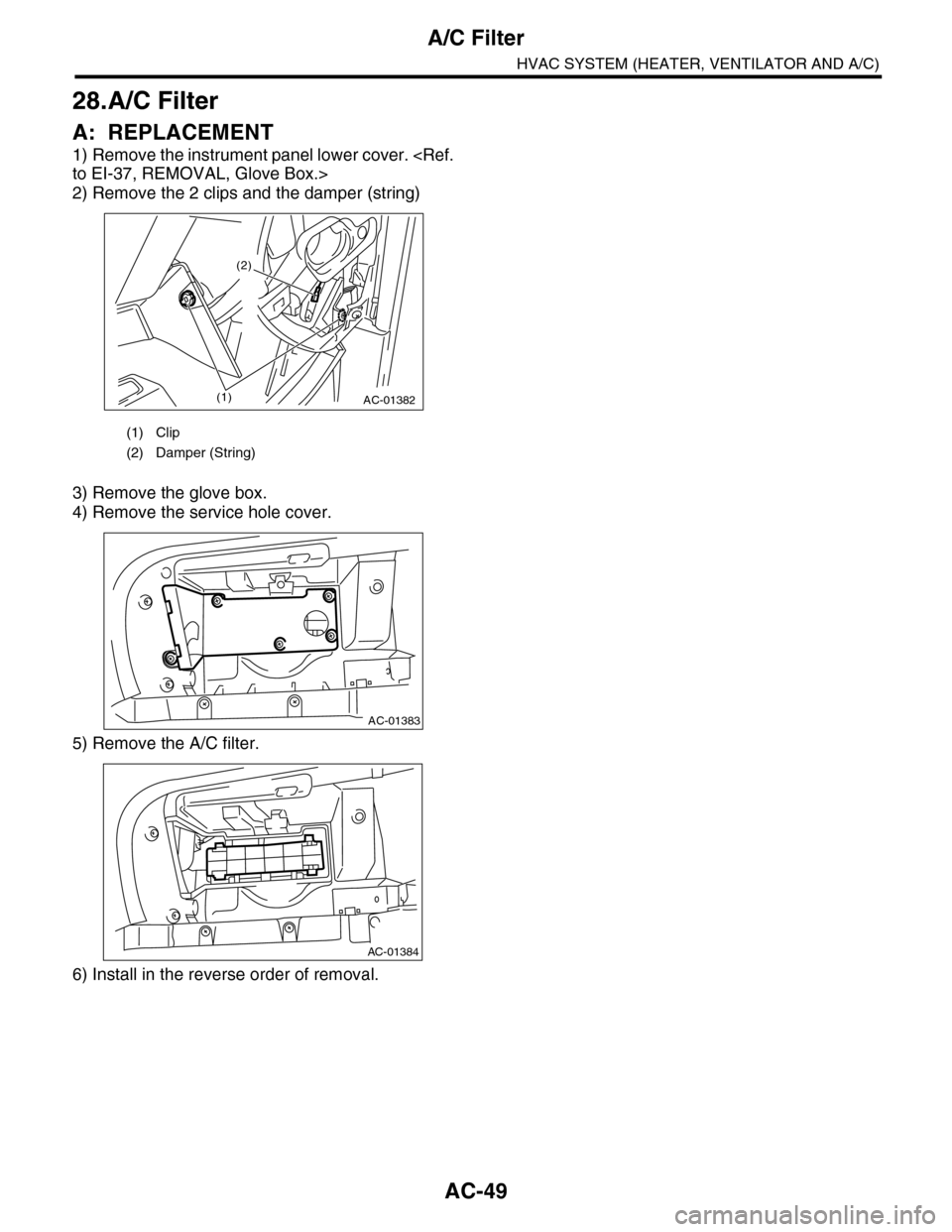
28.A/C Filter
A: REPLACEMENT
1) Remove the instrument panel lower cover.
to EI-37, REMOVAL, Glove Box.>
2) Remove the 2 clips and the damper (string)
3) Remove the glove box.
4) Remove the service hole cover.
5) Remove the A/C filter.
6) Install in the reverse order of removal.
(1) Clip
(2) Damper (String)
AC-01382(1)
(2)
AC-01383
AC-01384
Page 413 of 2453

AC(diag)-36
Diagnostic Procedure for Sensors
HVAC SYSTEM (AUTO A/C) (DIAGNOSTICS)
Step Check Yes No
1CHECK EVAPORATOR SENSOR
1) Turn the ignition switch to OFF.
2) Remove the glove box.
3) Disconnect the connector from evaporator
sensor.
4) Measure the resistance between connector
terminals of evaporator sensor.
Te r m i n a l s
No. 1 — No. 2:
Is the resistance approximately
1.9 kΩ at 20°C (68°F)?
Go to step 2.Replace the evap-
orator sensor.
REMOVAL, Evap-
orator.>
2CHECK INPUT SIGNAL FOR EVAPORATOR
SENSOR.
1) Turn the ignition switch to ON.
2) Measure the voltage between connector
(B88) terminal and chassis ground.
Connector & terminal
(B88) No. 1 (+) — No. 2 (–):
Is the voltage approx. 5 V? Go to step 6.Go to step 3.
3CHECK AUTO A/C CONTROL MODULE
OUTPUT SIGNAL.
1) Turn the ignition switch to OFF.
2) Remove the auto A/C control module.
3) Turn the ignition switch to ON.
4) Measure the voltage between connector
terminals of auto A/C control module.
Connector & terminal
(B282) No. 13 (+) — No. 15 (–):
Is the voltage approx. 5 V? Go to step 4.Go to step 6.
4CHECK HARNESS CONNECTOR BETWEEN
AUTO A/C CONTROL MODULE AND EVAP-
ORATOR SENSOR.
1) Turn the ignition switch to OFF.
2) Disconnect the connector from auto A/C
control module.
3) Measure the resistance of harness
between auto A/C control module and evapo-
rator sensor.
Connector & terminal
(B88) No. 2 — (B282) No. 15:
Is the resistance less than 1
Ω?
Go to step 5.Repair the open
circuit of harness
between auto A/C
control module
and evaporator
sensor.
5CHECK HARNESS CONNECTOR BETWEEN
AUTO A/C CONTROL MODULE AND EVAP-
ORATOR SENSOR.
Measure the resistance of harness between
auto A/C control module and evaporator sen-
sor.
Connector & terminal
(B88) No. 1 — (B282) No. 13:
Is the resistance less than 1
Ω?
Go to step 6.Repair the open
circuit of harness
between auto A/C
control module
and evaporator
sensor.
6CHECK POOR CONTACT.
Check poor contact of auto A/C control module
connector.
Is there poor contact in con-
nector?
Repair the con-
nector.
Replace the auto
A/C control mod-
ule.
32, REMOVAL,
Control Unit (Auto
A/C Model).>
Page 535 of 2453

LI-2
General Description
LIGHTING SYSTEM
1. General Description
A: SPECIFICATION
B: CAUTION
•Before removing or installing parts, always disconnect the battery ground cable from battery. When replac-
ing the audio, control module and other parts provided with memory functions, record the memory contents
before disconnecting the battery ground cable. Otherwise, the memory is cleared.
•Reassemble the parts in the reverse order of disassembly procedure unless otherwise indicated.
•Adjust parts to the given specifications.
•Connect the connectors securely during reassembly.
•After reassembly, make sure functional parts operate smoothly.
WARNING:
•The air bag system wiring harness is routed near electrical parts and switches. Airbag system
wiring harnesses and connectors are yellow. Do not use electrical test equipment on these cir-
cuits.
•Be careful not to damage the air bag system wiring harness when servicing electrical parts and
switches.
C: PREPARATION TOOL
1. GENERAL TOOL
HeadlightHalogen type low beam 12 V — 55 W
Halogen type high beam 12 V — 65 W
Fr o nt t ur n si gn a l, p ar k in g 1 2 V — 27 / 8 W
Fr o nt si d e m ar ke r li gh t12 V — 5 W
Fr o nt fog li g ht12 V — 55 W
Side turn signal light 12 V — 2.7 W (LED)
Rear combination lightStop/Tail light/Rear side marker light 12 V — 21/5 W
Tu r n s i g n a l l i g h t 1 2 V — 2 1 W
Rear finisher light12 V — 3.8 W
Back-up light12 V — 16 W
License plate light12 V — 5 W
High-mounted stop light 12 V — 1.3 W (LED)
Room light12 V — 8 W
Spot map light12 V — 8 W
Luggage room light12 V — 13 W
Rear gate light12 V — 5 W
Glove box light12 V — 1.4 W
Door step light12 V — 3.5 W
TOOL NAME REMARKS
Circuit tester Used for measuring resistance and voltage.