2009 SKODA YETI light
[x] Cancel search: lightPage 44 of 271

Unlocking and locking
43
Using the system
Safety
Driving Tips
General Maintenance
Breakdown assistance
Technical Data
Button for the central locking systemIf the vehicle was not locked from outside,
you can also unlock and lock it with the
rocker switch on the centre consol
e without the ignition switched on.
Locking all doors and the boot lid– Press button
⇒page 43, fig. 34
. The symbol
in the button comes on.
Unlocking all doors and the boot lid– Press button
⇒page 43, fig. 34
. The symbol
goes out in the button.
The following applies if
you have locked your vehicle using the button :
•
It is not possible to open the doors or the boot lid from the outside (safety feature,
e.g. when stopping at traffic lights etc.).•
You can unlock the doors individually from the inside and open them by pulling the
door opening lever.•
As long as one door is opened
7), the doors cannot be locked in order to avoid inad-
vertently locking the key in the vehicle.•
In the event of an accident in which the airbags are deployed, the locked doors are
automatically unlocked from the inside in orde
r to enable rescuers to gain access to
the vehicle. By pressing and holding the button or ,
you can conveniently close or open the
windows
⇒page 49.
WARNING
The central locking system al
so operates if the ignition is switched off. All the
doors and the boot lid are locked. Children should never be left unattended in the vehicle since it is difficult to prov
ide assistance from the outside when the
doors are locked. Locked doors make it difficult for rescuers to get into the vehicle in an emergency - hazard!
Note
The door opening lever and the buttons for
the central locking system do not operate
if the safe securing system is activated.Emergency locking of the doorsAll the other doors without locking cylinder
have an emergency locking which is only
visible once the door is opened. The emergenc
y locking must be used in particular if
the vehicle battery fails.Locking– Remove the panel
⇒fig. 35
.
– Insert the key into the slot and turn it
into the horizontal position in the direc-
tion of the arrow (mirror-inverted on the right doors).
– Re-insert the panel.
7)Is not valid for the boot lid.
Fig. 34 Centre console: Buttons for central locking
A1A2
A1
A1
A2
Fig. 35 Rear door: Emergency locking of the door
AA
AB
sgg.6.book Page 43 Thursday, September 24, 2009 2:32 PM
Page 45 of 271

Unlocking and locking
44After closing the door, you can no
longer open it from outsid
e. If the child safety lock
is not switched on, it is possible to open
the door from the inside by pulling once on
the door handle. If the child safety lock is activated (only on the rear doors), first of all it is necessary to pull once on the inner door
handle and then open the door from the
outside.Boot lidOpen the boot lid by pressing the hand grip above the licence plate after unlocking the vehicle using the key or the radio remote control.Opening the boot lid–Press on the handle
⇒fig. 36
and at the same time raise the boot lid.
Closing the boot lid– Pull the boot lid down and cl
ose it with a slight swing
⇒
.
A handle which makes the closing easier is located on the inner paneling of the boot lid.
WARNING
•
Ensure that the lock is properly enga
ged after closing the boot lid. Other-
wise, the boot lid might open
suddenly when driving even
if the boot lid lock is
closed - risk of accident!
•
Never drive with the boot lid fully open
ed or slightly ajar otherwise exhaust
gases may get into the interior of the vehicle - risk of poisoning!•
Do not press on the rear window when closing the boot lid, it could crack -
risk of injury!
Note
•
After closing the boot lid, it is automatically locked within 2 seconds and the
anti-theft alarm system* is activated.
This applies only if
the vehicle was locked
before closing the boot lid.•
The function of the hand grip above the li
cence plate is deactivated when starting
off or as of a speed of more than 5 km/hour
for vehicles with central locking. The func-
tion of the hand grip is activated again
when the vehicle has stopped and a door is
opened.Emergency unlocking of the boot lidIf there is a fault in the central locking, you can open the boot lid as follows: – Fold one of the outer rear seats forwards. – Move the operating lever with the aid of a
narrow object, e.g. a screwdriver, up to
the stop in the direction of arrow and then unlock the boot lid in the direction of arrow .
– Open the boot lid/luggage compartment door from outside.
Fig. 36 Handle of boot lid
WARNING (continued)
Fig. 37 Emergency unlocking of the boot lid
A1
A2
sgg.6.book Page 44 Thursday, September 24, 2009 2:32 PM
Page 46 of 271
Unlocking and locking
45
Using the system
Safety
Driving Tips
General Maintenance
Breakdown assistance
Technical Data
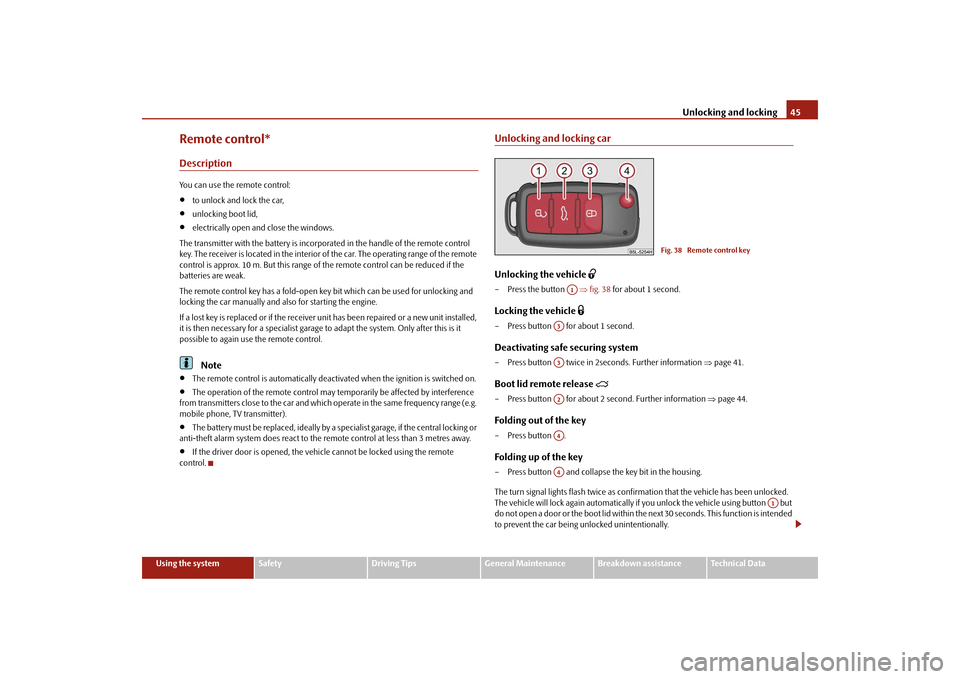
Remote control*DescriptionYou can use the remote control:•
to unlock and lock the car,
•
unlocking boot lid,
•
electrically open and close the windows.
The transmitter with the battery is incorporated in the handle of the remote control key. The receiver is located in the interior of the car. The operating range of the remote control is approx. 10 m. But this range of
the remote control can be reduced if the
batteries are weak. The remote control key has a fold-open key
bit which can be used
for unlocking and
locking the car manually and also for starting the engine. If a lost key is replaced or if the receiver unit has been repaired or a new unit installed, it is then necessary for a specialist garage to adapt the system. Only after this is it possible to again use the remote control.
Note
•
The remote control is automatically deactivated when the ignition is switched on.
•
The operation of the remote control may temporarily be affected by interference
from transmitters close to th
e car and which operate in the same frequency range (e.g.
mobile phone, TV transmitter).•
The battery must be replaced, ideally by a specialist garage, if the central locking or
anti-theft alarm system does react to the remote control at less than 3 metres away.•
If the driver door is opened, the vehi
cle cannot be locked using the remote
control.
Unlocking and locking carUnlocking the vehicle
– Press the button
⇒fig. 38
for about 1 second.
Locking the vehicle
– Press button for about 1 second.Deactivating safe securing system– Press button twice in 2seconds. Further information
⇒page 41.
Boot lid remote release
– Press button for about 2 second. Further information
⇒page 44.
Folding out of the key– Press button .Folding up of the key– Press button and collapse the key bit in the housing. The turn signal lights flash twice as confir
mation that the vehicl
e has been unlocked.
The vehicle will lock again automatically if
you unlock the vehicle using button but
do not open a door or the boot lid within th
e next 30 seconds. This
function is intended
to prevent the car being unlocked unintentionally.
Fig. 38 Remote control key
A1
A3A3A2A4A4
A1
sgg.6.book Page 45 Thursday, September 24, 2009 2:32 PM
Page 47 of 271

Unlocking and locking
46In addition, when the car is unlocked, the electrically adjustable seats and exterior mirrors* move into the position assigned to this key. The stored setting of driver seat and exterior mirrors is retrieved. Display of the locking The turn signal lights flash once to confir
m that the vehicle has been correctly locked.
If the vehicle is locked by pr
essing the button and some doors or the boot lid are
not closed, the turn signal lights flash only after closing.
WARNING
If the vehicle is locked from the outside and the safe securing system is acti-vated, there must not be any person in the vehicle as it is then not possible to open either a door or a window from the inside. The locked doors make it more difficult for rescuers to get into th
e vehicle in an emergency - hazard!
Note
•
Operate the radio remote control only when
the doors and boot lid are closed and
you have visual contact with the vehicle.•
Once in the car, you must
not press the lock button
of the radio remote control
before inserting the key into the ignition lock in order to avoid the car being inadvert- ently locked and the alarm system* being switched on. Should this happen, press the unlock button
of the radio remote control.
Synchonisation of the remote controlIf the vehicle cannot be unlocked by actuatin
g the remote control system then it is
possible that the code in the key and the co
ntrol unit in the vehicle are no longer
synchronised. This can occur when the buttons on the radio-operated key are actuated a number of times outside of the operative
range of the equipment or the battery on
the remote control was replaced. This means it is necessary to
synchronise the code as follows:
•
Press any button on the remote control.
•
pressing of the button means that the d
oor will unlock with the key within 1
minute.
Anti-theft alarm system*DescriptionThe anti-theft alarm system increases the level of protection against people seeking to break into the vehicle. The system triggers audible and visual warning signals if an attempt is made to break into the vehicle. How is the alarm
system activated?
The anti-theft alarm system is activated au
tomatically when the vehicle is locked with
the key on the closed driver's door or by us
ing the radio remote control. It is activated
30 seconds after locking the door. How is the alarm system deactivated? The anti-theft alarm system is deactivated if
the vehicle is unlocked by only using the
radio remote control. The vehicle is automati
cally locked again if the vehicle is not
opened within 30 seconds after reactivating the anti-theft alarm system. Once you unlock the vehicle by inserting the ke
y into the driver door you then have to
insert the key into the ignition lock and sw
itch the ignition on within 15 seconds after
opening the door in order to deactivate the anti-theft alarm system. The
alarm will be
triggered
if you do
not switch on
the ignition within 15 seconds.
When is the alarm triggered? The following security areas of
the locked vehicle are monitored:
•
Bonnet,
•
Boot lid,
•
Doors,
•
Ignition lock,
•
Angle of the vehicle*
⇒page 47,
•
Vehicle interior*
⇒page 47,
•
A drop in voltage of the on-board power supply.
An alarm is immediately triggered if either of the two battery terminals is disconnected while the anti-theft alarm system is activated.
A3
sgg.6.book Page 46 Thursday, September 24, 2009 2:32 PM
Page 48 of 271

Unlocking and locking
47
Using the system
Safety
Driving Tips
General Maintenance
Breakdown assistance
Technical Data
How is the alarm switched off? You switch the alarm off if you unlock the vehi
cle with the radio remote control or if you
switch the ignition on.
Note
•
The working life of the alarm siren is 6 years. More detailed information is available
by a specialist garage.•
Before leaving the car, check that all the doors, windows and the electric
sliding/tilting roof* are properly closed in order to ensure that the anti-theft alarm system is fully operational.•
Coding of the radio remote control and th
e receiver unit precludes the use of the
radio remote control from other vehicles.Interior monitor* and Towing protection monitoring*Switch off the interior monitor and towing protection monitoring– Switch off the ignition. – Open the driver door.– Press the button
at the centre column on the driver side
⇒fig. 39
, the symbol
which lights up in the button changes from red to orange.
– Lock the vehicle within 30 seconds. The interior monitor and the towing protec
tion monitoring are switched on again
automatically the next time the car is locked.
Note
•
You can switch the interior monitor and th
e towing protection monitoring off if
there is a possibility that movements from (e.g. children or animals) inside the vehicle interior or if the vehicle must be transpor
ted (e.g. by train or ship) or towed, might
trigger the alarm.•
The opened storage compartment for spectacles reduces the effectiveness of the
interior monitor. In order to ensure the func
tion of the interior
monitor to be fully
operational, always close the storage comp
artment for spectacles before locking the
vehicle.Power windows*Buttons on the driver's doorThe power windows operate only when ignition is switched on.Opening a window – A window is opened by pressing lightly on the respective button in the door. The
process stops when one releases the button.
– Additionally you can open the window auto
matically (fully open
ed) by pressing the
button up to the stop. Renewed pressing of
the button causes the window to stop
immediately.
Fig. 39 Button for interior monitor and towing protection monitoring
Fig. 40 Buttons on the driver's door
sgg.6.book Page 47 Thursday, September 24, 2009 2:32 PM
Page 49 of 271

Unlocking and locking
48 Closing a window– A window is closed through pulling lightly on the respective button in the door. The
closing process stops when
one releases the button.
– Additionally you can close the window auto
matically (fully clos
ed) by pulling the
button up to the stop. Renewed pulling of the button causes the window to stop immediately.
The buttons for the individual windows are located in the armrest of the driver's door ⇒ page 47, fig. 40
, front passenger door and in the rear doors*
⇒page 48.
Buttons for the power windows in the armrest for the driver Button for the power window in the driver's door Button for the power window in the front passenger's door Button for the power window in the rear door on the right* Button for the power window in the rear door on the left* Safety pushbutton* Safety pushbutton* You can deactivate the buttons for power wind
ows at rear doors by pressing the safety
pushbutton
⇒page 47, fig. 40
. The buttons for power windows at rear doors are
activated again by pressing
the safety pushbutton again.
If the buttons for the rear doors are deactivated, the indicator light
in the safety
switch lights up.
WARNING
•
If you lock the vehicle from the outside, do not leave any person in the
vehicle since it is no longer possible to
open the windows from the inside in an
emergency.•
The system is fitted with a force limiter
⇒page 49. If there is an obstacle, the
closing process is stopped and the window
goes down by several centimeters.
You should then take particular care when closing the windows! You may otherwise suffer severe injuries as a re
sult of getting an arm, for example,
jammed in the window!
•
It is recommended to deactivate the el
ectrically operated
power windows in
the rear doors (safety pushbutton)
⇒page 47, fig. 40
when children are
being transported on the rear seats.
Note
•
After switching the ignition off, it is still
possible to open or close the windows for a
further 10 minutes. The automatic closing and opening functions will not operate during this time. The power windows are sw
itched off completely once you open the
driver or front passenger door.•
When driving always use the existing he
ating, air conditioning and ventilation
system for ventilating the interior of the vehicle. If the windows are opened, dust as well as other dirt can get into the vehicle an
d in addition the wind noise is more at
certain speeds.Button in front passenger door and in rear doorsA button for the relevant window is provided in these doors.Opening a window– Lightly press the appropriate button
down
and hold it until the window has moved
into the desired position.
AAABACADAS
AS
AS
AS
WARNING (continued)
AS
Fig. 41 Position of button in front passenger door
sgg.6.book Page 48 Thursday, September 24, 2009 2:32 PM
Page 50 of 271

Unlocking and locking
49
Using the system
Safety
Driving Tips
General Maintenance
Breakdown assistance
Technical Data
– Additionally you can open the window automatically (fully opened) by pressing the
button
down
up to the stop. Renewed pressing
of the button causes the window
to stop immediately.
Closing a window– Lightly press the appropriate button
up and hold it until the window has moved
into the desired position.
– Additionally you can close the window auto
matically (fully clos
ed) by pressing the
button
up up to the stop. Renewe
d pressing of the button causes the window to
stop immediately.
WARNING
The system is fitted with a force limiter
⇒page 49. If there is an obstacle, the
closing process is stopped and the window
goes down by several centimeters.
You should then take particular care when closing the windows! You may otherwise suffer severe injuries as a re
sult of getting an arm, for example,
jammed in the window!
Note
•
After switching the ignition off, it is still possible to open or close the windows for a
further 10 minutes. The automatic closin
g and opening functions will not operate
during this time. The power windows are sw
itched off completely once you open the
driver or front passenger door.Force limiter of the power windowsThe electrically operated power windows are fitted with a force limiter. It reduces the risk of bruises or injuries when closing the windows. If there is an obstacle, the closing process is stopped and the window goes down by several centimeters. If the obstacle prevents the window from being closed during the next 10 seconds, the closing process is interrupted once agai
n and the window goes down by several
centimeters.
You must try to close the window once ag
ain within 10 seconds after the window has
gone down twice, even if the obstacle wa
s not yet removed, the closing process is
stopped. During this time it
is not possible to automa
tically close the window. The
force limiter is still switched on. The force limiter is only switched off, if you attempt to close the window within the next 10 seconds -
the window closes now with full strength!
If you wait longer than 10 seconds, th
e force limiter is switched on again.
WARNING
You should take particular care when closing the windows! You may otherwise suffer severe injuries as a result of get
ting an arm, for example, jammed in the
window!Window convenience operationYou can open and close the electrically powered windows as follows when unlocking and locking the vehicle (only close the sliding/tilting roof).Opening a window– Hold the key in the locking cylinder of the
driver's door in the
unlock position or
press the unlock button of the radio re
mote control until all the windows are
opened.
Closing a window– Hold the key in the locking cylinder of the driver's door in the lock position or press
the lock button of the radio remote co
ntrol until all the windows are closed.
You can interrupt the opening or closing
operation of the windows immediately by
releasing the key or the lock button.
WARNING
The system is fitted with a force limiter
⇒page 49. If there is an obstacle, the
closing process is stopped and the window goes down by several centimeters. You should then take particular care when closing the windows! You may
sgg.6.book Page 49 Thursday, September 24, 2009 2:32 PM
Page 54 of 271

Lights and Visibility
53
Using the system
Safety
Driving Tips
General Maintenance
Breakdown assistance
Technical Data
Lights and VisibilityLightsSwitching lights on and off
Switching on side lights– Turn the light switch into position
.
Switching on the low beam and main beam– Turn the light switch into position
.
– Press the main beam lever forward in order to switch on the main beam
⇒ page 59, fig. 50
.
Switching off lights (except daylight driving lights)– Turn the light switch into position°0. Low beam comes on only if the ignition is
switched on. After switching off the ignition,
the low beam is switched off automatically and only the side lights come on. For vehi- cles which are equipped with the function Coming/Leaving-Home*
⇒page 55, the
side lights also go out. On models fitted with
right-hand steering
the position of certain switches differs
from that shown in
⇒fig. 44
. The symbols which mark the switch positions are iden-
tical, however.
WARNING
Never drive with side lights on - risk of accident! The side lights are not bright enough to light up the road sufficiently in front of you or to be seen by other oncoming traffic. In this case, always switch on the low beam when it is dark or if visibility is poor.
Note
•
An audible warning will sound if you wi
thdraw the ignition key and open the
driver's door when the vehicle lights are still on.•
The acoustic warning signal is switched off over the door contact when the driver's
door is closed (ignition off). The vehicle
can be parked with
the side lights on.
•
If the car is parked for a lengthy period,
we recommend switching off all lights, or
leaving only the parking lights switched on.•
The switching on of the described lights
should only be undertaken in accordance
with the legal requirements.•
If a fault occurs in the light switch
, the low beam comes on automatically.
•
In the event of cool or humid weather cond
itions, the headlights can be misted up
from inside.
− The temperature difference between interior and external area of the headlight lenses is decisive. − When the driving lights are switched on,
the light outlet surfaces are free from
mist after a short period. The headlight lens
es can possibly mist up at the border
areas. − It also concerns reverse light and turn signal lights. − This mist has no influence on th
e life of the lighting system.
Daylight driving lightsIn some countries, the na
tional legal provisions require that the vehicles are equipped
with the function daylight driving lights.
Fig. 44 Dash panel: Light switch
sgg.6.book Page 53 Thursday, September 24, 2009 2:32 PM