Page 80 of 234
Instruments, controls80
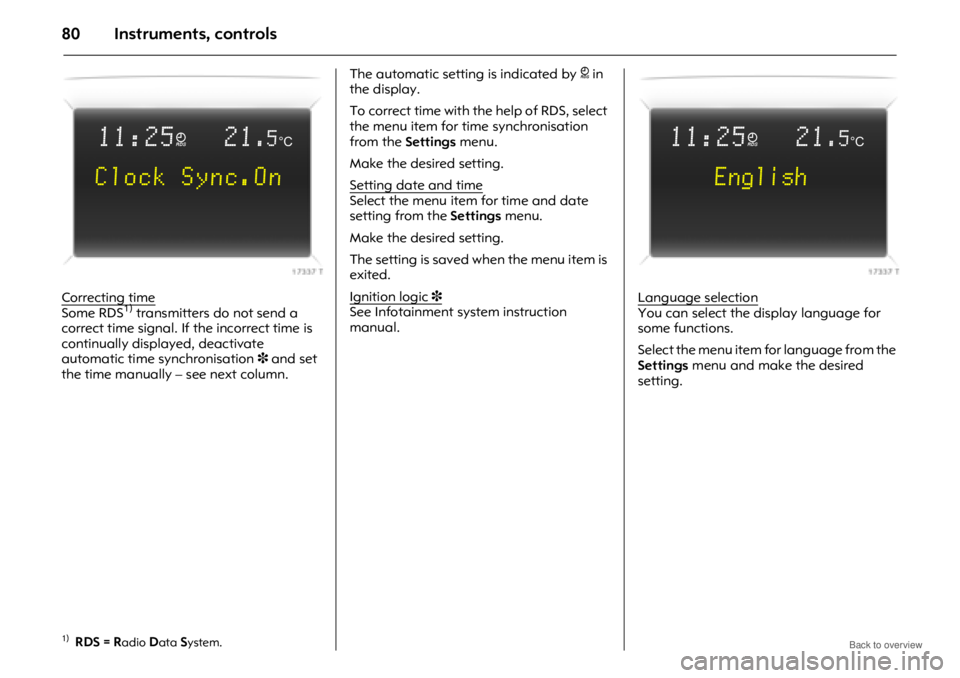
Correcting timeSome RDS1) transmitters do not send a
correct time signal. If the incorrect time is
continually displayed, deactivate
automatic time synchronisation 3 and set
the time manually – see next column. The automatic setting is indicated by
} in
the display.
To correct time with the help of RDS, select
the menu item for time synchronisation
from the Settings menu.
Make the desired setting.
Setting date and time
Select the menu item for time and date
setting from the Settings menu.
Make the desired setting.
The setting is saved when the menu item is
exited.
Ignition logic
3See Infotainment system instruction
manual. Language selectionYou can select the display language for
some functions.
Select the menu item for language from the
Settings
menu and make the desired
setting.
1)RDS = Radio Data System.
11:25}21.5°C
Clock Sync.On
11:25}21.5°C
English
Page 84 of 234

Instruments, controls84
To select using the arrow buttons:
Select menu items via menus and with
the buttons on the Infotainment system.
If check control3 issues a warning
message, the display is blocked from other
functions. Acknowledge the message by
pressing the right or left arrow button. If
there are several warning messages,
acknowledge them one at a time. To select using the multifunction knob:
To exit a menu, turn the multifunction knob
left or right to
Return or Main and select.
If check control 3 issues a warning
message, the display is blocked from other
functions. Acknowledge the message by
pressing the multifunction knob.
If there are several warning messages,
acknowledge them one at a time. To select using the le
ft adjuster wheel on
the steering wheel:
If check control 3 issues a warning
message, the display is blocked from other
functions. Acknowledge the message by
pressing the left adjuster wheel. If there are
several warning messages, acknowledge
them one at a time.
Turn Mark menu items or
commands, select functions.
Press Select marked item, confirm
command.Turn up Previous menu item.
Turn down Next menu item.
Press Select marked item,
confirm command.
Page 85 of 234

Instruments, controls85
For each functional area there is a main
page (Main), which is selected at the
top edge of the display:
zAudio
z Navigation 3
z Telephone 3
z Trip computer 3
For audio, navigation 3 and telephone 3
functions – see Infotainment system
instruction manual. Graphical information display
3 or
colour information display 3,
system settings
The settings are accessed via the Settings
menu.
Press the Main button 3 (not found on all
Infotainment systems) on the Infotainment
system (call up main display).
Press the Settings button on the
Infotainment system. On Infotainment
System CD 30, make sure no menu has
been selected.
The Settings menu is displayed. Setting date and timeSelect menu item
Time, Date from the
Settings menu.
The menu for Time, Date is displayed.
Select the menu items required:
make the desired setting.
FM [TP] CDin
�90.6 MHz
19,5° 19:36
7
77 7Settings 19,5° 19:36
Time, Date 19:36
Language
Units 10 . 07 . 2004
Contrast
Day / Night
6
66 6 Ign. logic
7
77 7 Time, Date 19,5° 19:36
Time 19:36
Date 10 . 07 . 2004
6
66 6 Synchron. clock automatical.
Page 86 of 234

Instruments, controls86
Correcting time 3With the navigation system, date and time
are set automatically upon receipt of a
GPS
1) satellite signal. If the displayed time
does not match local time, it can be
corrected manually or automatically by
receiving an RDS
2) time signal 3.
Some RDS transmitters do not send correct
time signals. If the incorrect time is
displayed often, deactivate automatic
time synchronisation 3 and set the time
manually.
To correct time with the help of RDS, select
menu item Synchron. clock automatical.
from the Time, Date menu.
The box in front of Synchron. clock
automatical. will be ticked:
see Fig. 17340 T. Language selection
You can select the display language for
some functions.
Select menu item
Language from the
Settings menu.
The available langua ges are displayed. Select the desired language.
Selections are indicated by a
6 in front of
the menu item.
In systems with voice output 3, when the
language setting of the display is changed,
the system will ask whether the
announcement language should also be
changed – see Infotainment system
instruction manual.
1)GPS = Global Positioning System,
satellite system for w orld-wide positioning.
2)RDS = Radio Data System.
7
77 7Settings 19,5° 19:36
Time, Date
Language Deutsch
Units English
Contrast Español
Day / Night ...
6
66 6 Ign. logic
7
77 713 Languages 19,5° 19:36
XDeutsch
English
Español
Nederlands
Français
Italiano
Page 105 of 234

Climate control105
Heated rear window,
heated exterior mirrors 3
Operational only in ignition switch
positions ACC or ON.
Control indicator in button.
Turn off as soon as vision is clear.
Rear window and exterior mirror heating is
switched off automatically after approx.
15 minutes.
To avoid discharging the battery, do not
operate when you are just starting the
vehicle, or if there is a build up of snow or
ice. Operate only with the engine running.
Do not use sharp instruments or abrasive
cleaners on rear window or exterior mirrors,
and avoid scratching or damaging their
heating elements.
Heated front seats 3
Operational only in ignition switch
positions ACC or ON.
Press switch ß on respective side one or
more times to set the desired heat output.
Control indicator in switch indicates which
of the three heating levels is active.
To switch heating off, set heat output to
the lowest level and press the switch again.
The control indicato r will extinguish.
Prolonged use could cause damage to
delicate and thin clothing and burn seat
occupants.
Avoid subjecting seats to heavy impacts,
as this may cause damage to the heating
element.
If temperature continues to rise, turn seat
heating off and consult a workshop.
Glove compartment cooling 3
Cooled air is fed into the glove
compartment through an air opening,
when the air conditioning is turned on.
Rotate adjustment wheel anti-clockwise to
allow the air conditioning to keep the
contents of the glove compartment cool.
Rotate adjustment wheel clockwise to close
air opening when glove compartment
cooling is not required.
General notes and notes on air intake,
pollen filter and maintenance
see page 114.
Press button
Ü=On
Press button Ü again = Off
Page 115 of 234

Driving and operation115
Driving and operationAutomatic transmission 3
The automatic transmission permits
manual gearshifting (manual mode) or
automatic gearshifting ( automatic mode)
with fully automatic clutch control.
The engine can only be started when the
selector lever is in position P or N. When
starting in P, turn key in ignition switch to
ACC or ON, depress foot brake and press
selector lever button before selecting a
gear.
Do not accelerate whilst gearshifting. If a
gear has been selected and the foot brake
is released without accelerating, the
vehicle will "creep".
Never operate the brake pedal and
accelerator simultaneously. Selecting
D puts the transmission in
automatic mode.
If the selector lever is moved to the left from
position D, manual mode is activated.
Forward gear changes only can then be
made manually by tipping the selector
lever towards + or -.
Automatic transmission
3................. 115
All Wheel Drive.................................... 121
Driving hints ........................................ 127
Save fuel, protect the environment ... 129
Fuels, refuelling ................................... 131
Catalytic converter, exhaust emissions........................................... 133
Drive control systems ......................... 136
Brake system ....................................... 145
Anti-lock Brake System (ABS) u....... 148
Wheels, tyres ....................................... 149
Roof racks 3........................................ 153
Flex-Fix system 3................................ 154
Towing equipment 3 .......................... 164
Towing ................................................. 1679 Warning
Disregard of these instructions may
cause damage to the vehicle and lead to
injuries or endanger life.
Page 116 of 234

Driving and operation116
Transmission display
Display of mode or current gear.Selector lever settings,
P, R, N and D (automatic mode)Selector lever can only be moved out of
P
or N with the ignition switched on and the
foot brake depressed (selector lever lock).
To engage P or R, press selector lever
button.
Never shift to P or R while the vehicle is
moving.
The engine can only be started when the
selector lever is in position P or N. Depress
foot brake or apply hand brake before
starting.
Do not accelerate during the selection
procedure.
P Park position.
R Reverse gear.
N Neutral.
D Automatic mode.
1 to 5 Selected gear in manual
mode.
P
Park position. Front wheels locked.
Only engage when the vehicle is
stationary and the hand brake is
applied. "P" appears on the
transmission display.
R Reverse gear. Only engage when the
vehicle is stationary. "R" appears on
the transmission display.
N Neutral or idle. "N" appears on the
transmission display.
D Drive position for normal driving in 1st
gear to 5th gear. "D" appears on the
transmission display.
Page 119 of 234

Driving and operation119
Parking
Before leaving the vehicle:
zDepress and hold foot brake,
z Apply hand brake,
z Move selector lever to position P,
z Turn key to LOCK position,
z Remove ignition key,
z Engage steering column lock,
z Lock the vehicle.
When the ignition is switched off, the
automatic transmission no longer responds
to movements of the selector lever. Rocking the vehicle
If it becomes necessary to rock the vehicle
to free it from water, ice, sand, mud, snow
or a dip, observe the following:
Check there are no objects or people in the
vicinity before attempting to rock the
vehicle.
Turn the steering wheel fully from left to
right to clear the area around the front
tyres.
Move the selector lever between
R and a
forward gear in a repeat pattern while
applying light pressure to the accelerator
pedal when the vehicle is in gear.
Do not spin the wheels or race the engine
and avoid sudden acceleration.
This applies only in the exceptional
circumstances mentioned above.
If the vehicle cannot be released after
rocking the vehicle several times, your
vehicle may need to be towed.
Towing - see page 174. Manoeuvring the vehicle
To manoeuvre the vehicle back and forth
during attempts to park or in garage
entrances, the creeping movement can be
utilized by releasing the foot brake.
Never actuate the accelerator and brake
pedals simultaneously.