2009 MERCEDES-BENZ E-CLASS COUPE tow
[x] Cancel search: towPage 103 of 313
Hill start assist
Hill start assist help
syou when pulling away
forwards or in reverse on an uphill gradient.
It hold sthe vehicl efor as hort time after you
have removed yourf oot from the brake pedal.
This gives you time to move yourf oot from
the brake peda ltothe accelerator peda land
depress it before the vehicl ebegins to roll. G
Risk of accident
Never leave the vehicl ewhen it is held by hill
start assist. After approximately one second,
hil lstart assist wil lnolonger brake yourv ehi-
cle and it coul droll away.
X Take yourf oot off the brake pedal.
i Once you have taken yourf oot off the
brake pedal, the vehicl eisheld for around
one second.
X Pulla way.
Hill start assist willn ot function if:
R you are pulling away on aleve lroad or a
downhill gradient.
R on vehicles with automatic transmission*,
the transmission is in position N.
R the vehicl eissecure dwith the parking
brake.
R ESP ®
is malfunctioning. Parking
G
Risk of accident
Only remove the key from the ignitio nlock
when the vehicl eisstationary, as you cannot
steer the vehicl ewhen the key is removed.
Never leave children unsupervised in the vehi-
cle. They coul drelease the parking brake. This
coul dleadtoas erious or fatal accident. G
Risk of fire
Make sure that the exhaust system does not
under any circumstances come into contact
with easily ignitable material such as dry grass or petrol
.Otherwise, the flammable material
may ignite and set the vehicl eonfire.
To ensure that the vehicl eissecure dagainst
rolling away unintentionally:
R the parking brake must be applied
R on vehicles with manua ltransmission,
engag efirst gearorr everse gear
R on vehicles with automatic transmission*,
the transmission must be in position Pand
the key must be removed from the ignition
lock
R on steep uphill or downhill gradients, turn
the front wheels toward sthe kerb
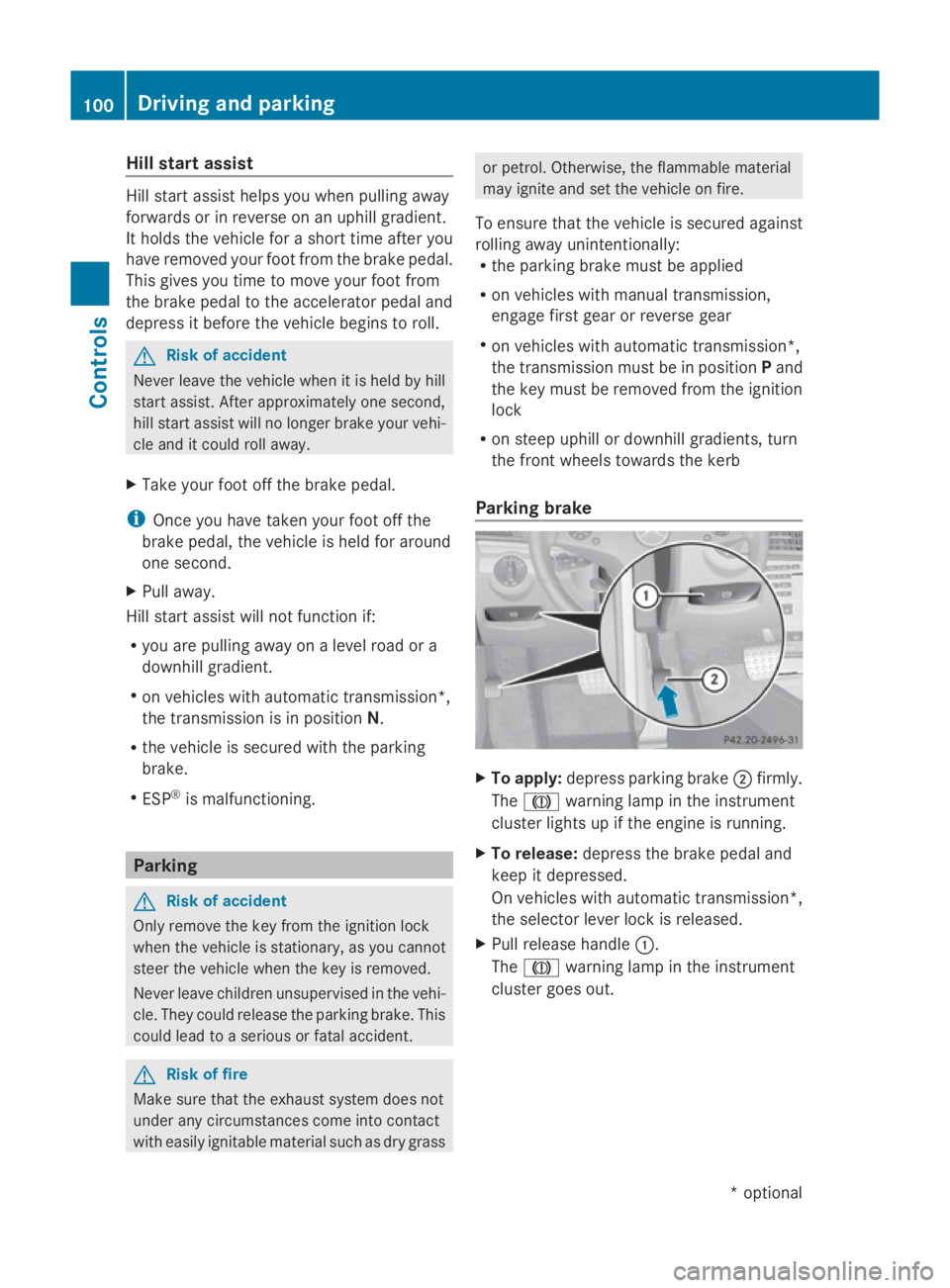
Parking brake X
To apply: depress parking brake 0047firmly.
The 004D warning lampint he instrument
cluster lights up if the engine is running.
X To release: depress the brake peda land
keep it depressed.
On vehicles with automatic transmission*,
the selector leve rlock is released.
X Pullr elease handle 0046.
The 004D warning lampint he instrument
cluster goes out. 100
Driving and parkingControls
*o
ptional
207_AKB; 2; 3, en-GB
mkalafa,
Version: 2.11.8.1 2009-07-23T10:23:49+02:00-Seite 100
Page 106 of 313
0044
Neutral
Releasing the brakes will allo
wyou
to mov ethe vehicl efreely, e.g .to
push it or tow it.
Do not shift the transmission into
position Nwhil edriving. Other-
wise ,the automatic transmission
could be damaged.
If ESP ®
is deactivated or faulty:
onl yshift the transmission to Nif
the vehicl eisindangerofs kidding,
e.g .oni cy roads. 003A
Drive
Th
ea utomatic transmission
change sgeara utomatically. All
forward gear sareavailable. Touchshift in vehicle
swithas elector
lever When the selector lever is in position
D,you
can influence the gearshifts made by the
automatic transmission by:
R changing gear yourself using the selector
lever or the steering whee lgears hift pad-
dles*
R restricting/derestricting the shift range
X To shift up/down: brieflypusht he selec-
tor lever to the right towards D+or to the
left towards D–.
Th ea utomatic transmission shifts to the
next gear up/down depending on the gear
currentl yselect ed.Thisa lsor estricts/
derestricts the shift range.
i To prevent the engine fro moverrevving,
the automatic transmission does not shift
down if yo upusht he selector lever towards
D– whil edrivin gatt oo high aspeed.
X To derestrict the shift range: press and
hol dthe selector lever towards D+until D is shown once mor
einthe multifunction
display.
Th ea utomatic transmission shifts fro mthe
current shift range directl ytoD.
X To select the mos teffec tive shift
range: press and hol dthe selector lever to
the left towards D–.
Th ea utomatic transmission shifts to a
range which allows idea lacceleratio nand
deceleration. To do this, the automatic
transmission shifts down one or more
gears.
Shift ranges When the automatic transmission is in posi-
tion
D,itisp ossibl etor estric torderestrict
the shift range.
X Briefl ypusht he selector lever to the left/
right towards D+/D–.
Th es hift range selected is shown in the
multifunctio ndisplay .The automatic trans-
mission shifts onl yasfaras the selected
gear.
i If the maximum engine spee dfor the shift
range is reache dand yo ucontinue to accel-
erate, the automatic transmission shifts up
in order to prevent the engine fro mover-
revving, eve nifthe shift range is restricted. Driving situations
0040
Th
eb raking effect of the engine can
be used in thi sposit ion 0038
To us
ethe braking effect of the
engine on downhil lgradients and
for driving:
R on steep mountai nroads
R in mountainou sterrain
R in arduou sconditions 0037
To us
ethe braking effect of the
engine on extremel ysteep downhill
gradients and long downhill
stretches Transmission
103Controls
*optional
207_AKB; 2; 3, en-GB
mkalafa
,V ersion: 2.11.8.1
2009-07-23T10:23:49+02:00
-Seite 103 Z
Page 108 of 313
Kickdown
Use kickdown for maximum acceleration.
X Depress th eaccelerato rpedal beyon dthe
pressur epoint.
The transmission shifts to alower gear
depending on th eengines peed.
X Eas eoff th eaccelerato rpedal once the
desired spee disreached.
The automatic transmission shifts bac kup.
Traile rtowing
X When driving up gradients ,kee ptot hemid-
dle of th eengines pee drange.
X Shift down to shif trange 3or
2 (Y page 103) depending on th einclin eof
th eu phill or downhill gradient, eve nif
cruise control is activated. Steering wheel gearshift paddles*
and manua ldrive program* G
Ris
kofa ccident
Do no tchang ed own for additional engine
braking on aslippery road surface .This could
caus ethe driv ewheels to lose their gri pand
th ev ehicl ecould skid.
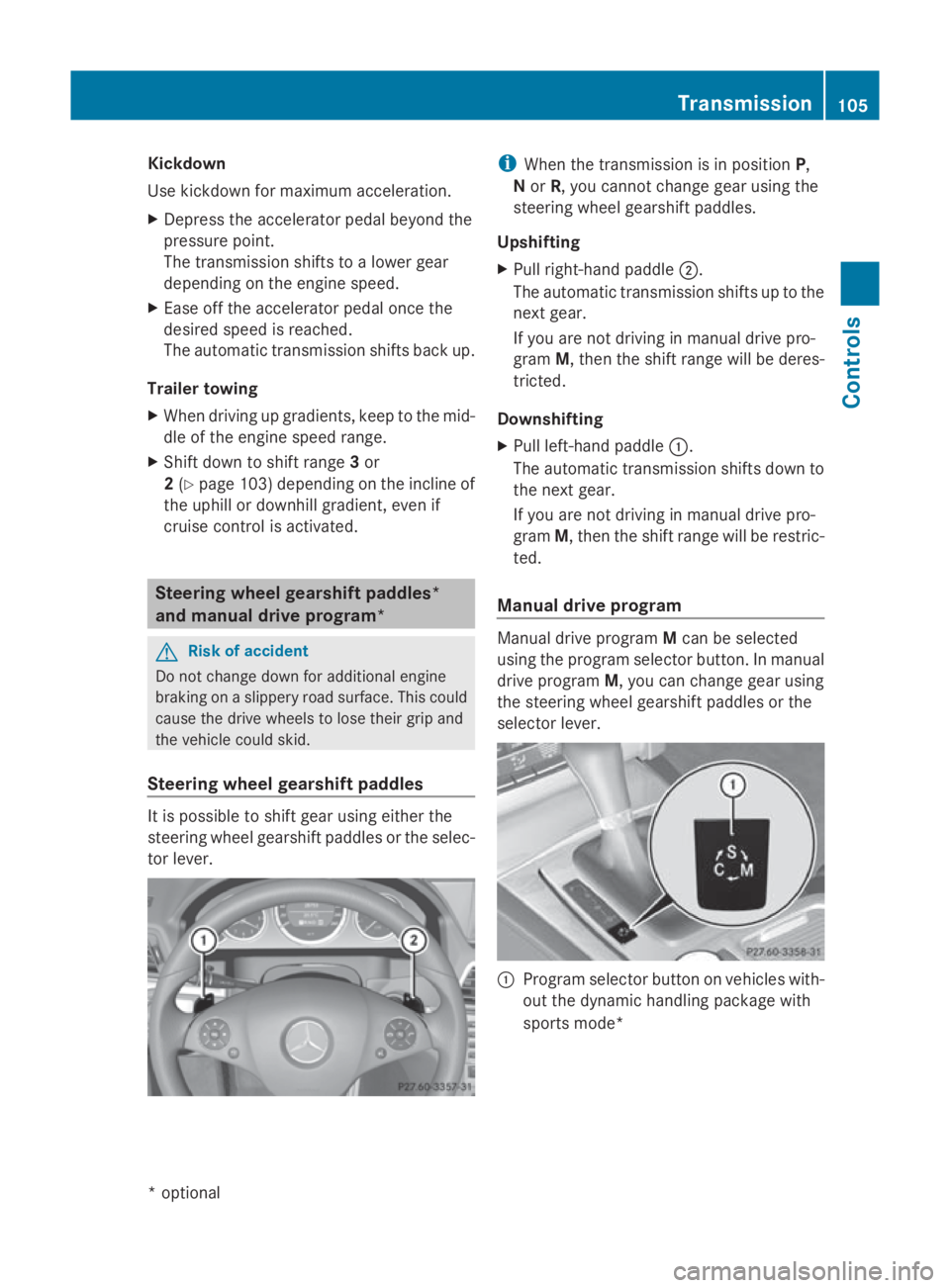
Steering wheel gearshift paddles It is possible to shif
tgear usin geither the
steering wheel gearshif tpaddle sortheselec-
to rlever. i
When th etransmission is in position P,
N or R,y ou canno tchang eg ear usin gthe
steering wheel gearshif tpaddles.
Upshifting
X Pull right-hand paddle 0047.
The automatic transmission shifts up to the
next gear.
If you are no tdriving in manual driv epro-
gram M,thent he shif trange will be deres-
tricted.
Downshifting
X Pull left-hand paddle 0046.
The automatic transmission shifts down to
th en extg ear.
If you are no tdriving in manual driv epro-
gram M,thent he shif trange will be restric-
ted.
Manua ldrive program Manual driv
eprogram Mcan be selected
usin gthe program selector button. In manual
driv eprogram M,you can chang egear using
th es teering wheel gearshif tpaddle sorthe
selector lever. 0046
Program selector butto nonvehicles with-
out th edynamic handlin gpackage with
sports mode* Transmission
105Controls
*optio nal
207_AKB; 2; 3, en-GB
mkalafa
,V ersion: 2.11.8.1
2009-07-23T10:23:49+02:00
-Seite 105 Z
Page 109 of 313
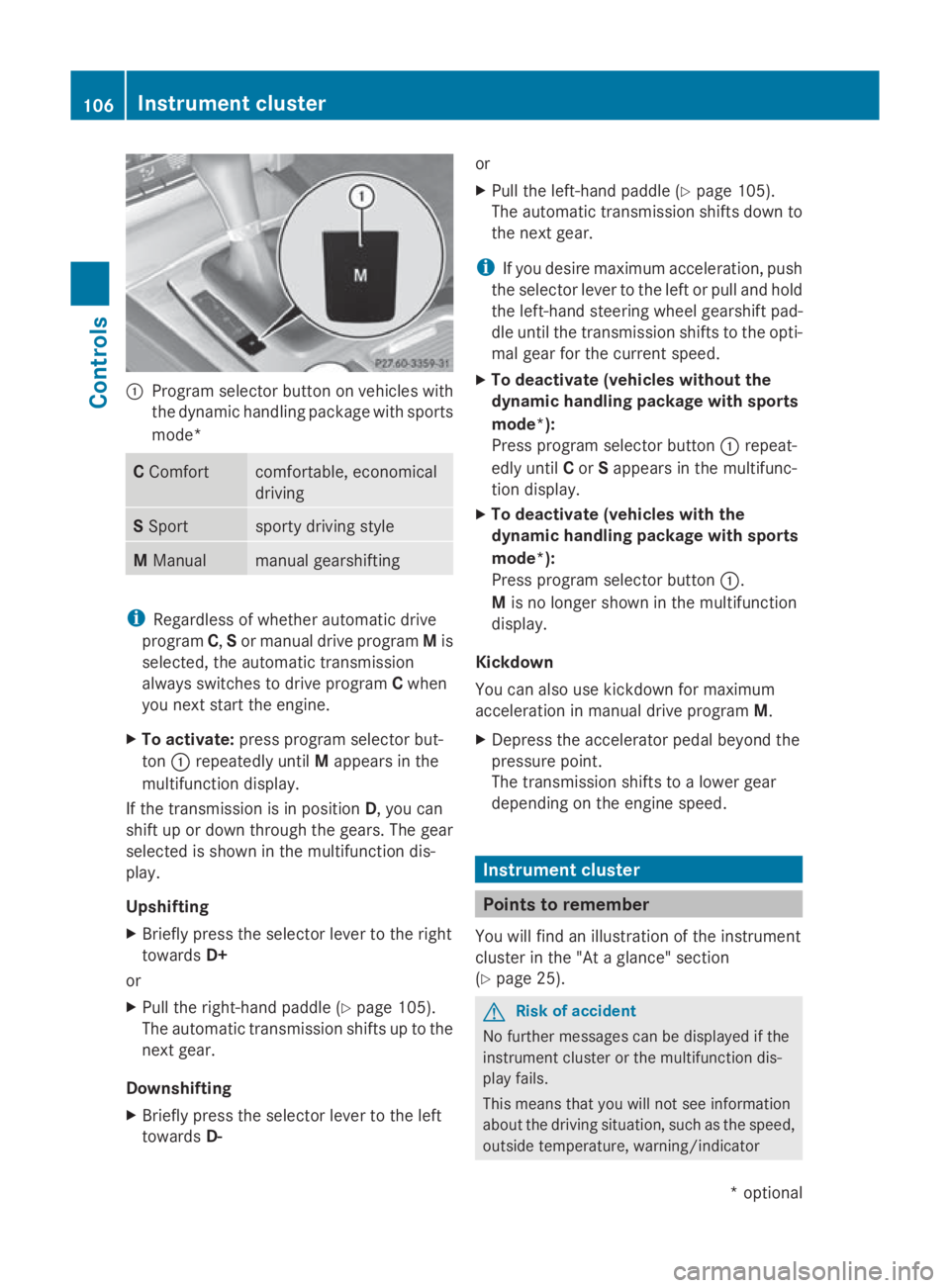
0046
Program selector button on vehicles with
the dynamic handling package with sports
mode* C
Comfort comfortable, economical
driving
S
Sport sporty driving style
M
Manual manual gearshifting
i
Regardless of whether automatic drive
program C,Sor manual drive program Mis
selected, the automatic transmission
alway sswitches to drive program Cwhen
you next start the engine.
X To activate: press program selector but-
ton 0046repeatedly until Mappears in the
multifunction display.
If the transmission is in position D,you can
shift up or down through the gears. The gear
selected is shown in the multifunction dis-
play.
Upshifting
X Briefly press the selector lever to the right
towards D+
or
X Pull the right-hand paddle ( Ypage 105).
The automatic transmission shifts up to the
next gear.
Downshifting
X Briefly press the selector lever to the left
towards D- or
X
Pull the left-hand paddle ( Ypage 105).
The automatic transmission shifts down to
the next gear.
i If you desire maximum acceleration ,push
the selector lever to the left or pull and hold
the left-hand steerin gwheel gearshift pad-
dle until the transmission shifts to the opti-
mal gear for the curren tspeed.
X To deactivate (vehicles without the
dynamic handling package with sports
mode*):
Press program selector button 0046repeat-
edly until Cor Sappears in the multifunc-
tion display.
X To deactivate (vehicles with the
dynamic handling package with sports
mode*):
Press program selector button 0046.
M is no longer shown in the multifunction
display.
Kickdown
You can also use kickdown for maximum
acceleration in manual drive program M.
X Depress the accelerator pedal beyond the
pressure point.
The transmission shifts to alower gear
depending on the engine speed. Instrument cluster
Points to remember
You will find an illustration of the instrument
cluster in the "At aglance" section
(Y page 25). G
Risk of accident
No further messages can be displayed if the
instrument cluster or the multifunction dis-
play fails.
This means that you will not see information
about the driving situation, such as the speed,
outside temperature, warning/indicator 106
Instrument clusterControls
*o
ptional
207_AKB; 2; 3, en-GB
mkalafa,
Version: 2.11.8.1 2009-07-23T10:23:49+02:00-Seite 106
Page 126 of 313

to avoi
dexceeding the se tspeed. On long and
steep downhil lgradients ,especially if the
vehicl eisladen or towing atrailer, yo umust
shift to alower gear in good tim eorselect
shift range 1,2or 3on vehicles with auto-
matic transmission* .Bydoing so ,you will
make us eofthe braking effect of the engine,
which relieves the load on the brake system
and prevents the brakes fro moverheating
and wearing too quickly. G
Ris
kofa ccident
Do not change down for additional engine
braking on aslipper yroads urface. This could
cause the drive wheels to lose their gri pand
the vehicl ecould skid.
Use cruis econtrol onl yifroada nd traffi ccon-
ditions make it appropriate to maintain a
stead yspeed foraprolonge dperiod. Youc an
store any roa dspeed above 30 km/h. G
Ris
kofa ccident
Cruise control cannot take account of road
and traffi cconditions.
Alway spayattentio ntotrafficconditions
eve nw henc ruis econtrol is activated.
Cruise control is onl yanaiddesigne dtoassist
driving. Yo uareresponsibl efor the vehicle's
spee dand for braking in good time. G
Ris
kofa ccident
Do not us ecruis econtrol:
R in roa dand traffi cconditions which do not
allo wyouto maintain aconstant spee d(e.g.
heav ytraffi corw inding roads). Yo ucould
otherwis ecause an accident.
R on slippery roads .Braking or accelerating
could cause the drive wheels to lose trac-
tio na nd the vehicl ecould the nskid.
R when there is poor visibility, e.g .due to fog,
heav yrainors now
Cruis econtro llever Yo
uc an operate cruis econtrol and variable
Speedtroni cwitht he cruis econtrol lever. Th
eL IM indicator lamp on the cruis econtrol
lever indicates which syste myouhave selec-
ted:
R LIM indicator lamp off:
Cruise control is selected.
R LIM indicator lamp lit:
Variable Speedtroni ciss elect ed. 0046
To store the current spee dorahigher
speed
0047 LIM indicator lamp
008A To store the current spee dortocallup
the last stored speed
0088 To store the current spee doralower
speed
0086 To switch between cruis econtrol and var-
iabl eSpeedtronic
0087 To deactivate cruis econtrol
When cruis econtrol is activated ,the stored
spee disd isplayed in the multi-functio ndis-
play for five seconds. In the multi-function
display, the segments between the stored
spee dand the maximum spee dlight up.
Selecting cruis econtrol X
Check whether LIM indicator lamp 0047is off.
If it is off ,cruis econtrol is already selected.
If it is not, press the cruis econtrol lever in
the directio nofarrow 0086.
LIM indicator lamp 0047in the cruis econtrol
lever goes off .Cruise control is selected. Driving systems
123Controls
*optio nal
207_AKB; 2; 3, en-GB
mkalafa
,V ersion: 2.11.8.1
2009-07-23T10:23:49+02:00
-Seite 123 Z
Page 127 of 313
Storing and maintaining the current
speed
You can store the current speed if you are
driving faster than 30 km/ha nd ESP®
is acti-
vated (Y page 54).
X Accelerate the vehicl etothe desired
speed.
X Briefl ypress the cruis econtro llev er
up 0046 or down 0088to the pressure point.
X Remov eyourfoo tfrom the accelerator
pedal.
Cruise contro lisactivated .The vehicle
automaticall ymaintains the stored speed.
i Cruise contro lmaybe unabl etomaintain
the stored speed on uphill gradients. The
stored speed is resumed when the gradient
evens out. Cruise contro lmaintains the
stored speed on downhil lgradients by
automaticall yapplyin gthe brakes.
Vehicles with manua ltransmission:
R always drive at adequate, bu tnot exces-
sive, engine speeds.
R change gear in goo dtime.
R if possible, do not change down several
gear satat ime.
Storin gthe curren tspeed or callin gup
the las tstored speed G
Ris
kofa ccident
Onl yselect astored speed if yo uknow what
tha tspeed is and whethe ritissuitabl efor the
current situation. Otherwise, sudden acceler-
ation or braking could endanger yo uorothers.
X Briefl ypullt he cruis econtro llev er towards
you 008A.
X Remov eyourfoo tfrom the accelerator
pedal.
The first time cruis econtro lisactivated ,it
stores the current speed or regulate sthe
speed of the vehicl etothe previously
stored speed. Settin
gaspeed X
Press the cruis econtro llev er to the pres-
sure point, up 0046for ahighe rs peed or
down 0088for alower speed.
X Kee pthe cruis econtro llev er presse duntil
the desired speed is reached.
X Releas ethe cruis econtro llev er.
The new speed is stored.
i Cruise contro lisnot deactivated if you
depress the accelerator pedal. For exam-
ple, if yo uaccelerate briefl ytoovertake,
cruis econtro ladjusts the vehicle's speed
to the last speed stored after yo uhavef in-
ished overtaking.
Making fin eadjustments in 1km/h
increments X
Briefl ypress the cruis econtro llev er to the
pressure point, up 0046for ahighe rspeed or
down 0088for alower speed.
The last speed stored is increased or
reduced.
Adjustment in 10 km/h increments X
Briefl ypress the cruis econtro llev er
beyond the pressure point, up 0046for a
highe rspeed or down 0088for alower speed.
The last speed stored is increased or
reduced.
Deactivatin gcruise control There ar
esevera lwaystod eactivate cruise
control:
X Briefl ypress the cruis econtro llev er for-
wards 0087.
or
X Brake.
or 124
Driving systemsControls
207_AKB; 2; 3, en-GB
mkalafa,
Version: 2.11.8.1 2009-07-23T10:23:49+02:00-Seite 124
Page 128 of 313
X
Briefly press the cruise control lever in the
direction of arrow 0086.
Variabl eSpeedtroni cisselected .LIM indi-
cator lamp 0047in the cruise control lever
lights up.
Cruise control is automaticall ydeactivated if:
R yo ud epress the parking brake.
R yo ud rive at less than 30 km/h
R ESP ®
intervenes or yo udeactivate ESP ®
R yo uc hange into neutral in avehicle with
manual transmission while driving or if the
clutch is depressed for longer than 6sec-
onds
R on vehicle swithm anual transmission, you
shift to ahigher gea rand as aresult the
engine speed is too low
R yo um ove the selector lever to Non vehi-
cle sw itha utomatic transmission* while
driving
If cruise control is deactivated, yo uwillh ear
aw arning tone. You see the Cruise con‐
trol off messageinthe multi-function dis-
play for approximately five seconds.
i The last speed store disclearedwheny ou
switch off the engine. DISTRONI
CPLUS*
i Distronic Plu sisnot available in al lcoun-
tries.
Distronic Plu sregulates the speed and auto-
matically maintains the distance to the vehi-
cle in front. It brakes automaticall yinorder
to avoid exceeding the set speed. On long and
stee pdownhil lgradients, especially if the
vehicle is laden or towing atrailer, yo umust
select shift range 1,2or 3in goo dtime .By
doing so, yo uwillm ake us eofthe braking
effect of the engine, which relieves the load
on the brake system and prevents the brakes
from overheating and wearing too quickly. G
Risk of accident
Do not change dow nfor additiona lengine
braking on aslippery roa dsurface .Thisc ould
cause the drive wheel stoloset hei rgripa nd
the vehicle could skid. G
Risk of accident
DISTRONIC PLUS is only an ai ddesigne dto
assist driving .The driver is fully responsible
for the vehicle's distance from othe rvehicles,
the vehicle's speed and for braking in good
time.
DISTRONIC PLUS doe snot react to:
R pedestrians
R stationar yobstacles on the road, e.g. stop-
ped or parked vehicles
R oncoming and crossing traffic
DISTRONIC PLUS may not detect narro wvehi-
cle sdriving in front, e.g. motorcycles, or vehi-
cle sd riving on adifferent line. Therefore,
always pa yattention to traffi cconditions even
whe nDISTRONIC PLUS is activated. Other-
wise, yo umay fai ltorecognise dangers in
time ,cause an accident and injure yourself
and others.
If as lower-moving vehicle is detected in front,
Distronic Plu scauses your vehicle to brake
and maintai napreset distance to the vehicle
in front. G
Risk of accident
DISTRONIC PLUS cannot take account of road
and traffi cconditions .IfDISTRONIC doe snot
recognise or no longer recognise sthe vehicle
in front, do not activate DISTRONIC or, if it is
already active, deactivate it. Thi sisespecially
the case:
R before corners
R in filter lanes Drivin
gsystems
125Controls
*optional
207_AKB; 2; 3, en-GB
mkalafa
,V ersion: 2.11.8.1
2009-07-23T10:23:49+02:00
-Seite 125 Z
Page 130 of 313
Selecting Distronic Plus
X
Check whether LIM indicator lamp 008Ais off.
If it is off, Distronic Plus is already selected.
If it is not, press the cruise control lever in
the direction of arrow 0087.
LIM indicator lamp 008Ain the cruise control
lever goes off. Distronic Plus is selected.
Switching on Distronic, storing the cur-
rent speed and maintaining it G
Risk of accident
The vehicle can be braked when DISTRONIC
PLUS is activated. For this reason, deactivate
DISTRONIC PLUS if the vehicle is to be set in
motion by other means (e.g. in acar wash or
by towing).
You can activate Distronic Plus in the follow-
ing circumstances:
R after the engine has been running for about
two minutes
R if the parking brake is not applied
R if ESP ®
is activated
R if the automatic transmission* is in position
D
R if the bonnet is closed
R if the driver's door is closed and you switch
from Pto Dor your seat belt is fastened.
R if the front-passenger door is closed
Activating while driving
When driving at speeds below 30 km/h, you
can only activate Distronic Plus if the vehicle
in front has been detected and is shown in the
multi-function display.Ift he vehicle in front is
not shown in the multi-function display and is
no longer being detected, because it has
changed lanes, for example, Distronic Plus is
deactivated and atone sounds. X
Briefly pull the cruise control lever towards
you 0088or press it up 0046or down 0086to the
pressure point.
Distronic Plus is selected.
X Keep the cruise control lever pressed
up 0046 or down 0086until the desired speed
is set.
X Remove your foot from the accelerator
pedal.
Your vehicle adapts its speed to that of the
vehicle in front,b ut only up to the stored
speed.
i If you do not fully release the accelerator
pedal, the DISTRONIC PLUS suspended
message appears in the multi-function dis-
play.T he set distance to aslower-moving
vehicle in front will then not be maintained.
You will be driving at the speed you deter-
mine by the position of the accelerator
pedal.
Activating when driving towards asta-
tionary vehicle
If the vehicle in front of you is stationary, you
can only activate Distronic Plus once your
vehicle is stationary as well.
X Briefly pull the cruise control lever towards
you 0088.
Distronic Plus is selected.
i Distronic Plus can only be activated at
under 30 km/hi favehicle in front has been
detected. Therefore, the Distronic Plu sdis-
tance displayint he instrument cluster
should be activated.
X Keep the cruis econtrol leve rpressed
up 0046 or down 0086until the desired speed
is set.
i You can use the cruis econtrol leve rtoset
the stored spee dand the thumbwheel on
the cruis econtrol leve rtoset the specified
minimu mdistance (Y page129). Driving systems
127Controls
*optional
207_AKB; 2; 3, en-GB
mkalafa,
Version: 2.11.8.1 2009-07-23T10:23:49+02:00-Seite 127 Z