2009 JAGUAR XF mode
[x] Cancel search: modePage 170 of 391
Driving dynamics
170
DYNAMIC MODE
(V8 petrol and diesel vehicles only)
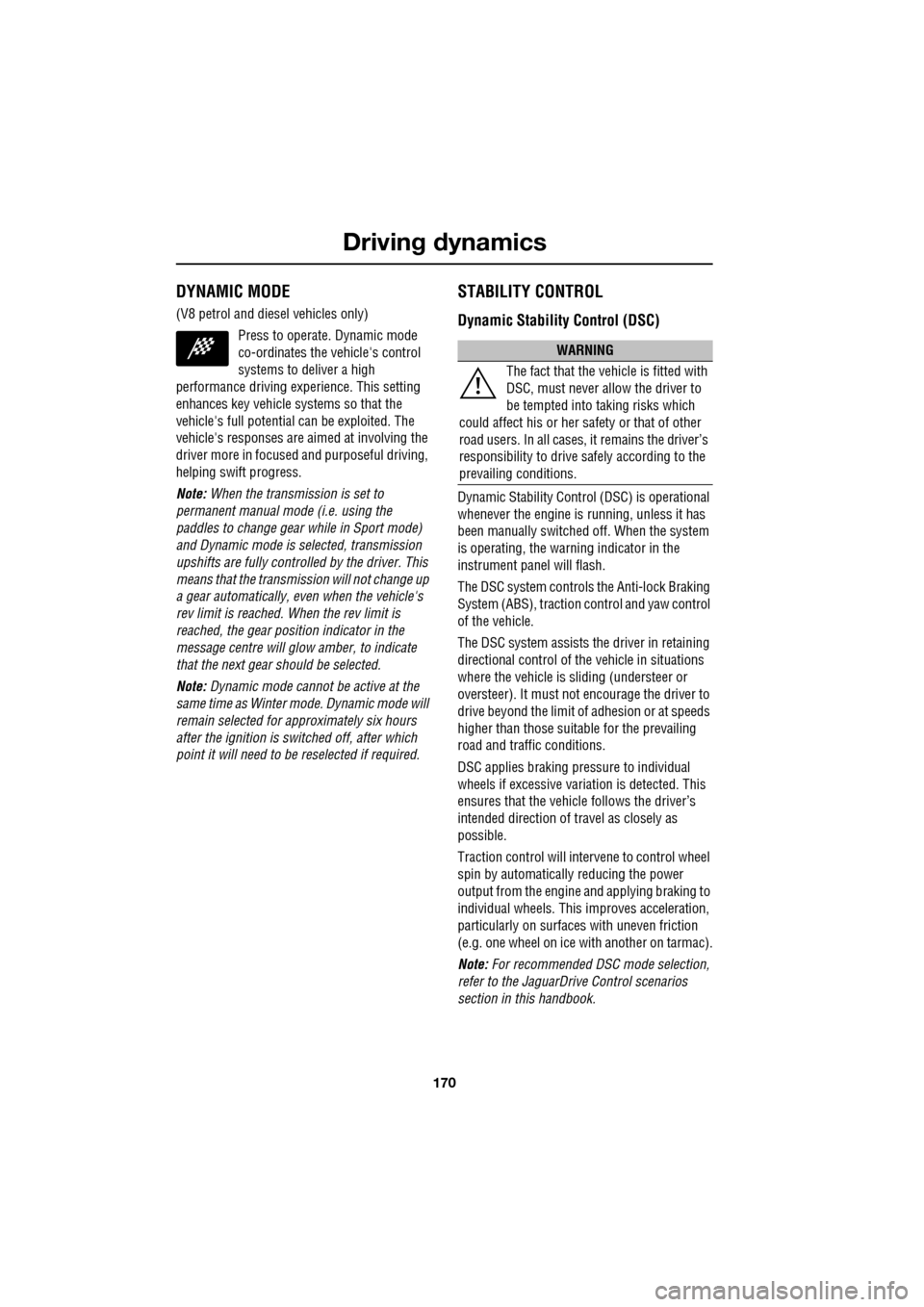
Press to operate. Dynamic mode
co-ordinates the vehicle's control
systems to deliver a high
performance driving experience. This setting
enhances key vehicle systems so that the
vehicle's full potential can be exploited. The
vehicle's responses are aimed at involving the
driver more in focused and purposeful driving,
helping swift progress.
Note: When the transmission is set to
permanent manual mode (i.e. using the
paddles to change gear while in Sport mode)
and Dynamic mode is selected, transmission
upshifts are fully controlled by the driver. This
means that the transmissi on will not change up
a gear automatically, even when the vehicle's
rev limit is reached. When the rev limit is
reached, the gear position indicator in the
message centre will glow amber, to indicate
that the next gear should be selected.
Note: Dynamic mode cannot be active at the
same time as Winter m ode. Dynamic mode will
remain selected for approximately six hours
after the ignition is swit ched off, after which
point it will need to be reselected if required.
STABILITY CONTROL
Dynamic Stability Control (DSC)
Dynamic Stability Contro l (DSC) is operational
whenever the engine is running, unless it has
been manually switched off. When the system
is operating, the warn ing indicator in the
instrument panel will flash.
The DSC system controls the Anti-lock Braking
System (ABS), traction control and yaw control
of the vehicle.
The DSC system assists the driver in retaining
directional control of th e vehicle in situations
where the vehicle is sliding (understeer or
oversteer). It must not encourage the driver to
drive beyond the limit of adhesion or at speeds
higher than those suitable for the prevailing
road and traffic conditions.
DSC applies braking pres sure to individual
wheels if excessive variation is detected. This
ensures that the vehicle follows the driver’s
intended direction of travel as closely as
possible.
Traction control will intervene to control wheel
spin by automatically reducing the power
output from the engine and applying braking to
individual wheels. This improves acceleration,
particularly on surfaces with uneven friction
(e.g. one wheel on ice with another on tarmac).
Note: For recommended DSC mode selection,
refer to the JaguarDri ve Control scenarios
section in this handbook.
WARNING
The fact that the vehicle is fitted with
DSC, must never allow the driver to
be tempted into taking risks which
could affect his or her sa fety or that of other
road users. In all cases, it remains the driver’s
responsibility to drive sa fely according to the
prevailing conditions.
Page 171 of 391
171
Driving dynamics
TracDSC
TracDSC is an alternative setting of DSC with
reduced system interventions. With TracDSC
engaged, traction may be somewhat increased,
although stability may be reduced compared to
normal DSC. TracDSC is intended for use only
on dry tarmac, by suitably experienced drivers
and should not be select ed for other surfaces
or by drivers with insufficient skill and training
to operate the vehicle safely with the TracDSC
function engaged.
The less restrictive TracDSC setting may be
preferred, for example, by expert drivers
engaged in high performance driving on dry
Tarmac surfaces such as tracks and circuits.
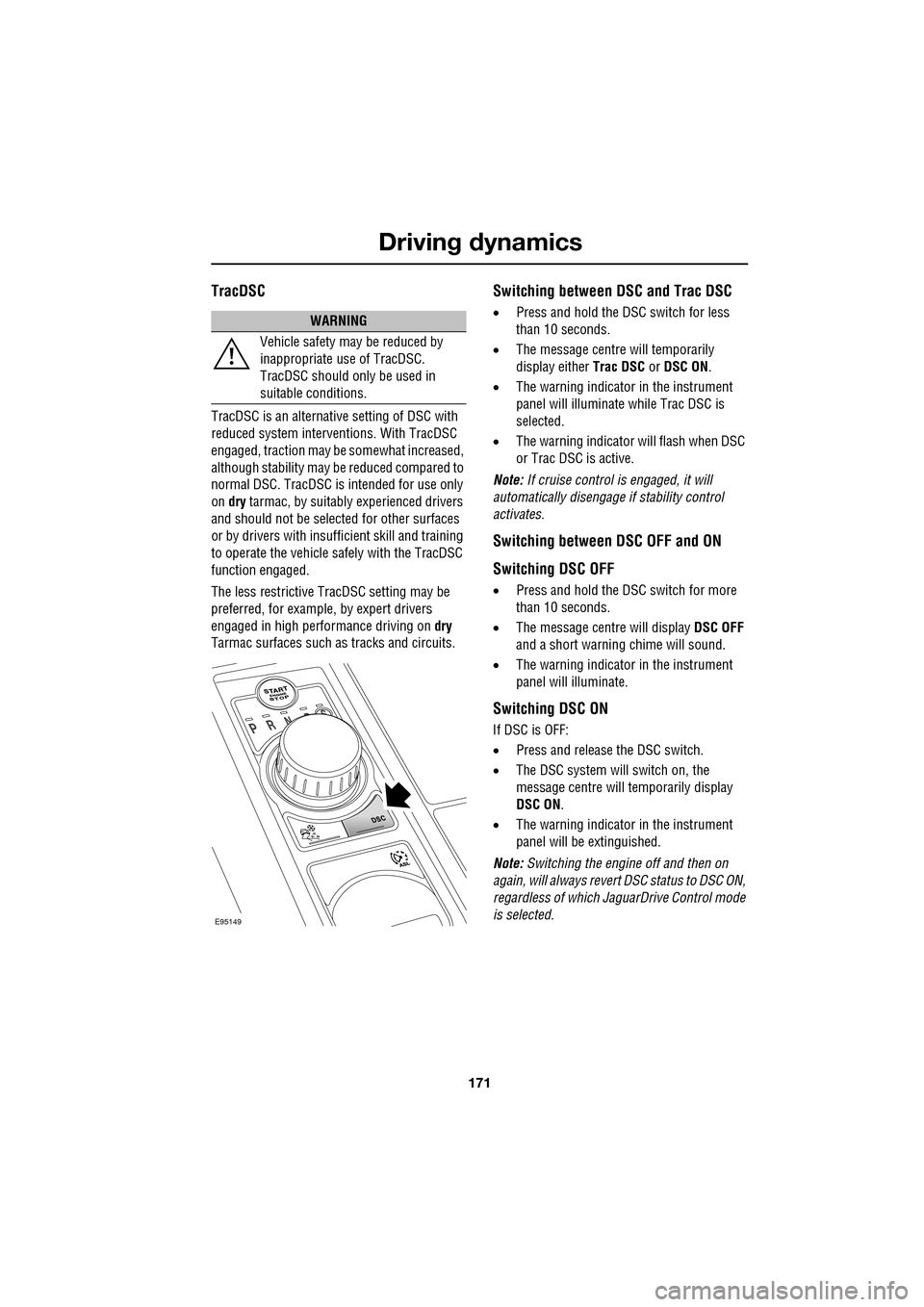
Switching between DSC and Trac DSC
• Press and hold the DSC switch for less
than 10 seconds.
• The message centre will temporarily
display either Trac DSC or DSC ON.
• The warning indicator in the instrument
panel will illuminate while Trac DSC is
selected.
• The warning indicator will flash when DSC
or Trac DSC is active.
Note: If cruise control is engaged, it will
automatically disengage if stability control
activates.
Switching between DSC OFF and ON
Switching DSC OFF
• Press and hold the DSC switch for more
than 10 seconds.
• The message centre will display DSC OFF
and a short warning chime will sound.
• The warning indicator in the instrument
panel will illuminate.
Switching DSC ON
If DSC is OFF:
• Press and release the DSC switch.
• The DSC system will switch on, the
message centre will temporarily display
DSC ON .
• The warning indicator in the instrument
panel will be extinguished.
Note: Switching the engine off and then on
again, will always revert DSC status to DSC ON,
regardless of which Ja guarDrive Control mode
is selected.
WARNING
Vehicle safety may be reduced by
inappropriate use of TracDSC.
TracDSC should only be used in
suitable conditions.
E95149
Page 172 of 391
Driving dynamics
172
Note: In rare circumstances, when TracDSC is
selected or DSC is o ff, high acceleration on
rough roads may cause DSC to switch back on.
This prevents high loads on the vehicle
driveline. DSC will su bsequently remain on,
unless TracDSC is selected or DSC is switched
off manually.
Stability control indicator
If there is a fault, the warning
indicator will ill uminate in the
instrument panel and the message
centre will display DSC NOT AVAILABLE with
an amber backlight.
It is safe to drive the vehicle, but the DSC
system will not activa te under wheel spin or
slide conditions. You should seek qualified
assistance as soon as possible.
Adaptive dynamics
(Supercharged vehicles only)
Jaguar Adaptive dy namics continuously
monitors the road a nd driver inputs and
optimises the vehicle suspension settings for
ride comfort and control.
The adaptive dynamics system is linked to
Dynamic mode, modifying the suspension
settings for a more sporting character.
If the message centre displays the message
ADAPTIVE DYNAMICS FAULT , a fault has been
detected in the adaptive dynamics system.
Seek qualified assistan ce as soon as possible.
Active Differential Control (E-diff)
(Supercharged vehicles only)
The E-diff improves trac tion when one driven
wheel has more grip than the other. This
improves progress out of corners and on
patchy or uneven surfaces. The E-diff can also
increase stability in oversteer situations,
depending on road c onditions and driver
inputs. Settings for the E-diff are made automatically,
without the need for driver selection.
If there is a fault with the E-diff system, the
message centre will display
EDIFF SYSTEM
FAULT . If DSC is off, then TracDSC will be
selected automatically. The driver can still
switch between DSC mode s, as normal and the
vehicle is safe to dr ive, but seek qualified
assistance as soon as possible.
Note: If the E-diff is active continuously for an
extended period (e.g. on a patchy surface with
DSC off) then the E-diff may be temporarily
deactivated to prevent ov erheating. If DSC is
off, then TracDSC will be selected
automatically. The mess age centre will display
EDIFF NOT AVAILABLE . The driver can still
switch between DSC modes as normal and the
E-diff will become availa ble again automatically
when it has cool ed sufficiently.
Page 173 of 391
173
Driving dynamics
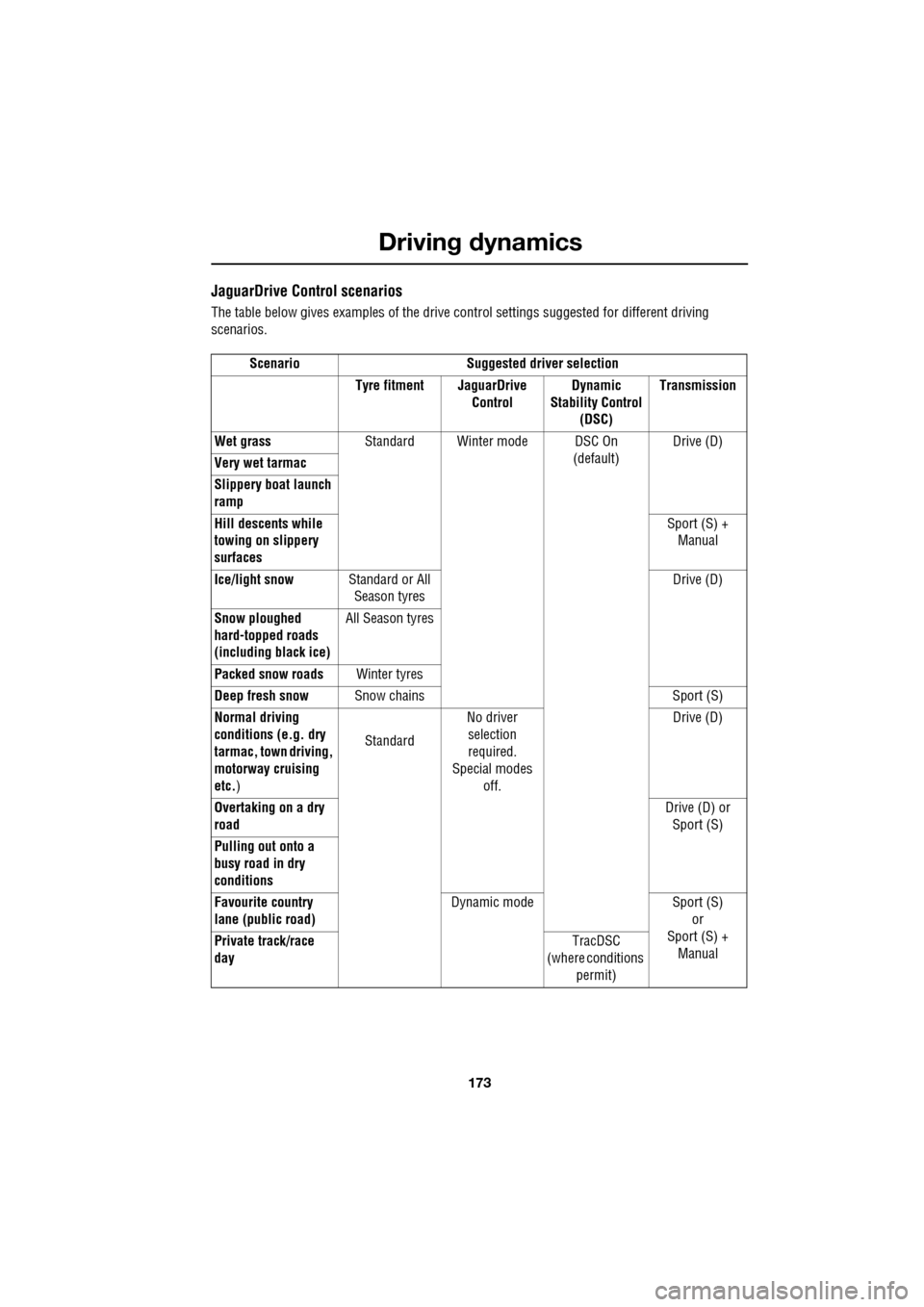
JaguarDrive Control scenarios
The table below gives examples of the drive control settings suggested for different driving
scenarios.
Scenario Suggested driver selection Tyre fitment JaguarDrive ControlDynamic
Stability Control (DSC) Transmission
Wet grass Standard Winter mode DSC On
(default)Drive (D)
Very wet tarmac
Slippery boat launch
ramp
Hill descents while
towing on slippery
surfaces Sport (S) +
Manual
Ice/light snow Standard or All
Season tyres Drive (D)
Snow ploughed
hard-topped roads
(including black ice) All Season tyres
Packed snow roads Winter tyres
Deep fresh snow Snow chains Sport (S)
Normal driving
conditions (e.g. dry
tarmac, town driving,
motorway cruising
etc. ) Standard
No driver
selection
required.
Special modes off. Drive (D)
Overtaking on a dry
road Drive (D) or
Sport (S)
Pulling out onto a
busy road in dry
conditions
Favourite country
lane (public road) Dynamic mode Sport (S)
or
Sport (S) + Manual
Private track/race
day TracDSC
(where conditions
permit)
Page 177 of 391

177
Fuel and refuelling
Sulphur content
In some countries diesel may contain higher
levers of Sulphur, wh ich could cause damage
to the vehicle, if in doubt contact a local
Dealer/Authorised Repairer for advice.
RUNNING OUT OF FUEL
Note: If the vehicle does run out of fuel, a
minimum of 4 litres (0.9 gallons) will be
required to restart the engine. The vehicle will
need to be driven 1.6-5 km (1-3 miles) in order
to reset the engine management and
monitoring systems.
Note: If the vehicle does run out of fuel,
seeking qualified assistance is advisable.
Diesel engines
Vehicles with diesel e ngines are equipped with
a system to prevent the fuel tank from
emptying completely. When the fuel reaches a
minimum level, the system will activate a
reduced power mode (i.e . the engine will not
run properly). This will be followed by the
engine stopping in a pproximately 1.6 km
(1 mile). This feature prevents the fuel system from
running dry, which could cause damage to the
vehicle. If the gauge indicates low fuel or the
warning indicator illumi
nates, the fuel tank
should be refuelled as soon as possible at the
next filling stat ion, with at least 4 litres (0.9
gallons) of fuel.
If the system protection function has activated,
the vehicle must firstly be refuelled, then
restarted using the following procedure:
1. With the brake pedal pressed, press and
hold the engine START/STOP button and
crank the engine for five seconds.
2. Release the START/STOP button.
3. With the brake pedal pressed, press and
release the START/STOP button to crank
the engine. The engine should start within
approximately five seconds.
Note: If the engine does not start, pause for ten
seconds with the ignition in convenience
mode, before re peating the procedure from the
beginning.
FUEL CUT-OFF
The fuel system cut-off forms part of the
Supplementary Restraint System (SRS) fitted
to your vehicle. Following an impact, and
depending on the severity , the fuel pump may
be switched off.
CAUTION
Your vehicle is fitted with a Diesel
Particulate Filter (DPF), the maximum
Sulphur content must not exceed 0.005%.
Using an incorrect fuel will cause serious
damage to the DPF. See DIESEL
PARTICULATE FILTER (DPF) (page 135).
CAUTION
Avoid running out of fuel. Doing so can
cause damage to th e vehicle's engine,
fuel and emission control systems.
CAUTION
Do not crank the engine for longer than
30 seconds, or damage to the fuel pump
may occur.
Page 188 of 391

Vehicle care
188
Do not use household soaps or detergents. The
use of Jaguar Vehicle Shampoo is
recommended.
Note: The vehicle's brightwork should be
cleaned using a sponge and generous
quantities of cold or lukewarm water only.
Rinse thoroughly and dry with a chamois
leather or synthetic substitute.
Using an automatic wash
Note: Regular use of automatic car washes
tends to dull the lustre of the paintwork.
1. Drive up to the entry of the car wash and
onto the conveyor.
2. Select N (Neutral) using the JaguarDrive
selector.
3. Press and release the engine START/STOP
button to stop the engine. The JaguarDrive
selector should remain raised and the
selector and message centre should
indicate that N is selected. 4.
The vehicle should rema in in this condition
while it is conveyed through the car wash.
5. At the end of the wash cycle, when directed
to start the engine by the car wash
instructions, press the brake pedal and
press and release the engine START/STOP
button to start the engine.
6. Select D (Drive) using the JaguarDrive
selector and drive away.
Do not start the engine or change the
JaguarDrive selector position during the car
wash.
After leaving the car wash, switch on the
windscreen wiper immediately to remove water
and prevent a build up of wax.
Underbonnet cleaning
CAUTIONS
Commercially operated automatic car
washes, jet washes and power-operated
mops, are not recommen ded. The detergents
used can contain certain chemicals which
may, over time, be detrimental to some
exterior parts of the vehicle. Prolonged usage
of automatic car wash es and power-operated
mops will also cause fine scratches in the paint
surface.
Ensure that Auto wipe is not selected
when entering a car wash, or damage to
the wiper blades and arms can occur if they
operate during the wash cycle.
Ensure that when using an automatic
drive through car wash, N (Neutral) is
selected and that the ignition is left in
convenience mode for the duration of the
wash.
CAUTIONS
Do not use a high pr essure washer or
steam cleaner in the engine
compartment. Damage to components could
occur.
Ensure that the brake fluid reservoir is
kept dry at all times. Only use a clean,
dry cloth to clean the brake fluid cap and
reservoir.
Page 197 of 391

197
Maintenance
Engine oil dipsticks (Red/yellow) - V6
Petrol only
Power steering fluid reservoir cap
(Black)
Coolant reservoir cap (Black)ENGINE OIL CHECK - V6 Petrol
engines
The oil consumption of an engine is influenced
by many factors. Unde r high loads an engine
will consume more oil than usual. Diesel
engines consume slightly more oil than petrol
engines.
Above normal oil consumption should be
expected when the engine is new.
Check the oil level weekly , when the engine is
cold and with the vehicle resting on level
ground.
E95160
E95161
E96102
CAUTIONS
If the message ENGINE OIL PRESSURE
LOW is displayed, st op the engine as
soon as it is safe to do so and seek qualified
assistance. Do not start the engine until the
cause has been identified and rectified.
Your vehicle’s warranty may be
invalidated if damage is caused by the
use of improper engine oil. Low quality or
obsolete oils do not pr ovide the protection
required by modern, high performance
engines. Failure to use an oil that meets the
required specification could cause excessive
engine wear, a build up of sludge and deposits
and increased pollution. It could also lead to
engine failure.
Do not use oil additi ves of any type as
engine damage coul d occur. Use only
specified lubricants.
Page 199 of 391

199
Maintenance
ENGINE OIL CHECK - V8 Petrol
engines
Engine oil consumption
A certain amount of oil consumption is normal.
The rate of consumpt ion will depend on the
following:
• The quality and viscosity of the oil.
• Climatic conditions.
• The speed at which th e engine is being
operated.
• Road conditions.
Drivers should expe ct above normal
consumption when th e engine is new.
Checking the oil level
For an accurate oil level reading to be taken, the
following conditions must be met:
•The vehicle needs to be parked on level
ground. •
The oil level should be checked when the
oil is hot. It is therefore recommended that
a reading is taken after a journey.
• The vehicle needs to stand for
approximately 10 minutes after the engine
is switched off, to allow the oil to drain
back into the sump.
Note: The system will not gi ve a reading until
the oil level has stabilised.
Once the above conditions are met, check the
oil level as follows:
1. Switch on the ignition - do not start the
engine.
2. Set the transmission to Park ( P).
3. Press the TRIP butt on on the end of the
left-hand column stalk repeatedly, until the
oil can icon is displa yed at the bottom of
the message centre.
4. The oil level and topping- up advice will be
shown in the message centre. Top-up as
instructed.
CAUTIONS
It is recommended that the oil level is
checked weekly. If any significant or
sudden drop in oil level is noted you should
seek qualified assistance immediately.
Your vehicle’s warranty may be
invalidated if damage is caused by the
use of improper engine oil. Low quality or
obsolete oils do not provide the protection
required by modern, high performance
engines. Failure to use an oil that meets the
required specification could cause excessive
engine wear, a build up of sludge and deposits
and increased pollution. It could also lead to
engine failure.
Do not use oil additi ves of any type as
engine damage could occur. Use only
specified lubricants.