2009 JAGUAR XF mode
[x] Cancel search: modePage 201 of 391

201
Maintenance
1.Unscrew the oil filler cap (arrowed).
2. Add the appropriate quantity of oil (as
indicated by the message centre oil level
display). Wait 5 minutes to let the oil level
stabilise and re-check the level.
Clean up any oil spilled during topping up.
3. Once the correct level is achieved, refit the
filler cap and hand tighten securely.
Note: The approximate quantity of oil required
to raise the level from the minimum level of
safe operation to the ma ximum, is 1.5 litres
(2.6 pints).
ENGINE OIL CHECK - V6 Diesel
engines
Engine oil consumption
A certain amount of oil consumption is normal.
The rate of consumption will depend on the
following:
• The quality and visc osity of the oil.
• Climatic conditions.
• The speed at which the engine is being
operated.
• Road conditions.
Drivers should expe ct above normal
consumption when the engine is new.
JAG1383
CAUTIONS
If the warning ENGINE OIL CRITICALLY
LOW is displayed in the message centre,
stop the engine as soon as it is safe to do so
and seek qualified assistance. Do not start the
engine until the cause ha s been identified and
rectified.
Your vehicle’s warranty may be
invalidated if damage is caused by the
use of improper engine oil. Low quality or
obsolete oils do not pr ovide the protection
required by modern, high performance
engines. Failure to use an oil that meets the
required specification could cause excessive
engine wear, a build up of sludge and deposits
and increased pollution. It could also lead to
engine failure.
Do not use oil additives of any type as
engine damage could occur. Use only
specified lubricants.
Page 203 of 391

203
Maintenance
Topping up the oil
1.With the ignition on, but the engine not
running, unscrew the oil filler cap
(arrowed).
2. Add the appropriate quantity of oil (as
indicated by the message centre oil level
display). Wait 5 minutes to let the oil level
stabilise and re-check the level.
Clean up any oil spilled during topping up.
3. Once the correct level is achieved, refit the
filler cap and hand tighten securely until
one click is heard.
Note: The approximate quantity of oil required
to raise the level from the minimum level of
safe operation to the ma ximum, is 1.5 litres
(2.6 pints). Note:
The ignition must be left on during the
top-up, so that the el ectronic dipstick can
register and display the new oil level. This
enables an accurate level re-check.
ENGINE OIL SPECIFICATION
It is essential to use the correct specification of
engine oil, and to ensure it is suitable for the
climatic conditions in whic h the vehicle is to be
operated.
Jaguar recommends:
CAUTIONS
Your vehicle warranty may be
invalidated if damage is caused by using
oil that does not meet the required
specification.
Failure to use an oil that meets the
required specification, could cause
excessive engine wear, a build-up of sludge
and deposits and increase pollution. It could
also lead to engine failure.
Overfilling with oil could result in severe
engine damage.
JAG1383
Model Specification
V6 Petrol
engines 5W-30 engine oil, meeting
Jaguar specification WSS
M2C913-B is preferred.
Where this is not
possible, oil
meeting ACEA A1/B1 or ACEA
A3/B3 specification may be
used.
V8 Petrol
engines 5W-20 engine oil, meeting
Jaguar specification WSS
M2C925-A only.
Diesel engines 5W-30 e ngine oil, meeting
Jaguar specification WSS
M2C934-B only.
Japan V6
Petrol engines 5W-30 engine oil, meeting
specification ILSAC GF-4
with API SM is preferred.
Where this is not
possible, oil
meeting ILSAC GF-3 API SL
specification may be used.
Japan V8
Petrol engines 5W-20 engine oil, meeting
Jaguar specification WSS
M2C925-A only.
Page 223 of 391

223
Wheels and tyres
USING WINTER TYRES
Winter tyres are more suitable during extremes
of low temperatures, snow and ice and will
considerably improve the vehicle’s handling
during these conditions.
Do not exceed 240 km/h (150 mph) when
using Jaguar approved winter tyres.
Winter tyres must be fitted to all four wheels.
Approved winter tyre sizes
Front :
• Dunlop Wintersport M3 - 235/55R17 99H,
245/45R18 96V, 245/45R18 100V,
245/40R19 98V.
• W240 Pirelli Sotto Zero - 245/45R18 100V,
245/40R19 98V, 255/35R20 97V
Rear:
• Dunlop Wintersport M3 - 235/55R17 99H,
245/45R18 96V, 245/45R18 100V,
245/40R19 98V.
• W240 Pirelli Sotto Zero - 245/45R18 100V,
245/40R19 98V, 285/30R20 99V
Winter tyre pressures
USING SNOW CHAINS
Snow chains, of the recommended type, can
only be fitted to rear wheels. They should not
be used on temporary use spare wheels.
You should contact your Dealer/Authorised
Repairer for details and availability of approved
snow chains.
The maximum speed when using snow chains
is 50 km/h (30 mph).
Remove the snow chains immediately the
roads are clear of snow.
Ensure the fitting instructions supplied with the
snow chains are kept in a safe place, for
example, with this literature pack.
Note: When using snow chains, select
JaguarDrive Control Winter mode with DSC
switched on.
CAUTION
Tyres with an all season icon or M+S
have a level of winter performance and
need not be replaced.
Up to 240 km/h (150 mph)
Front 2.0 bar (30 lbf/in², 207 kPa)
Rear 2.3 bar (33 lbf/in², 230 kPa)
CAUTION
It is essential that only snow chains of
the recommended type are fitted, other
snow chains may cause damage to the vehicle.
Page 269 of 391

269
Audio unit overview
AUDIO UNIT OVERVIEW
The Jaguar infotainment system contains
AM/FM radio, compact disc player and portable
audio interface. Digital (DAB) radio, six-disc CD
player and TV are optional.
Audio controls
The audio unit is c ontrolled by the
touch-screen ( 1) and console buttons ( 2–8).
1. Touch-screen: See TOUCH-SCREEN
(page 109).
2. LOAD : Press to load one or more CDs.
See LOADING COMPACT DISCS
(page 292).
3. Seek up: Short press to seek next station
frequency up or next CD track.
4. Settings button:
•Short press to display the audio Settings
menu.
• Long press (two seconds) to display the
Vol presets settings menu. 5.
Audio system on/off and volume control:
•Press to switch the system on/off.
• Rotate to increase or decrease volume
level. Any volume adjustment made in
any mode will be memorised for that
mode.
6. SOURCE : Press repeatedly to scroll
through all audio sources: FM1, FM2, AM,
DAB1, DAB2, DAB3, CD , Portable audio
and TV.
7. Seek down: Short press to seek next
station frequency down or previous CD
track.
8. Eject: Press to eject CD. See EJECTING
COMPACT DISCS (page 294).
9. CD load and eject slot.
WARNING
Sustained exposure to high sound
levels can damage your hearing.
Audio/TV
DAB radio
CDAM/FM
12 : 26 pm
BBC R2 BBC R3
BBC R4 BBC LDN BBC W&M Mercia Galaxy 106 2Radio 1
Settings
Autostore
TP TA PTY AF REG 3CHFM2 89 0 BBC R2
Portable audio TV
E93935
1
9
8
7
6
5
2
3
4
Page 270 of 391

Audio unit overview
270
Steering wheel controls
1.Rotate up or down to increase or decrease
volume.
2. Rotate up or down and release repeatedly
to scroll through preset radio stations or
CD tracks. Rotate up and hold for two
seconds to select next strong radio station
or next loaded CD (if a six-disc system is
fitted).
3. SOURCE : Press repeatedly to scroll
through all audio sources.
4. Press to mute audio unit. This button is
also used to dial, answer or end calls in
phone mode and to st art a Voice session.
Sound system overview
There are three versions of the sound system:
• The standard Jaguar sound system
comprises a 140W sy stem with AM/FM
radio featuring EON, RDS, PTY, TA and
in-dash CD player with automatic volume
control, MP3 compatibility (six-disc
system only) and 8 speakers
• The Jaguar 320W Premium Sound System
system also includes a remote amplifier,
upgraded speakers plus an additional
subwoofer mounted in the rear of the
vehicle.
• The Bowers & Wilkins 440W Surround
Sound System has been developed in
conjunction with Bowe rs & Wilkins™ and
incorporates upgraded kevlar speakers,
additional mid range sp eakers mounted in
the front doors, an additional centre
speaker mounted in the fascia and
additional surround sound speakers to
support Dolby Prologic II Surround
Sound™.CAUTIONS
Care must be taken to avoid spilling or
splashing drinks onto the audio unit
controls, speakers or touch-screen. In the
event of such an occurrence, contact your
Dealer/Authorised Repairer.
The audio unit may be damaged if
unsuitable items, such as coins or credit
cards, are inserted into the CD load slot.
E94043
12
43
Page 271 of 391

271
Audio unit operation
ON/OFF CONTROL
The audio system can be used with the vehicle
ignition on or off, but will switch off
automatically when the ignition is switched off.
To operate the audio system when the ignition
has been switched off, press the On/off volume
control.
The audio system can be switched on in one of
two ways:
With the vehicle ignition on or off, press the
on/off control on the console, or;
With the vehicle ignition on and the
touch-screen active, select Audio/TV from the
Home menu. The touch-screen displays the current audio
settings. The informati
on displayed will depend
on the mode selected , e.g. AM/FM radio.
VOLUME CONTROL
The volume of the audio output can be adjusted
in one of two ways:
Rotate the audio on/off and volume control on
the audio console, or;
Rotate the volume control on the steering
wheel.
E94044
Home
Audio/TV
Climate
Phone
Navigation
VehicleExternal
ft Right
20 17CC
15C
.5 .5AUDIO OFF
Valet12 : 26 pmE94045
WARNING
Sustained exposure to high sound
levels can damage your hearing.
Home
Audio/TV
Climate
Phone
Navigation
VehicleExternal
Left Right
20 17CC
15C
.5 .5
DAB radio DAB1
BBC 5Live Xtra
BBC National DAB
TA FM DAB i Subch. PL II
Valet12 : 26 pmE94046
E94085
E94086
Page 273 of 391
273
Audio unit operation
Standard and Premium sound systems
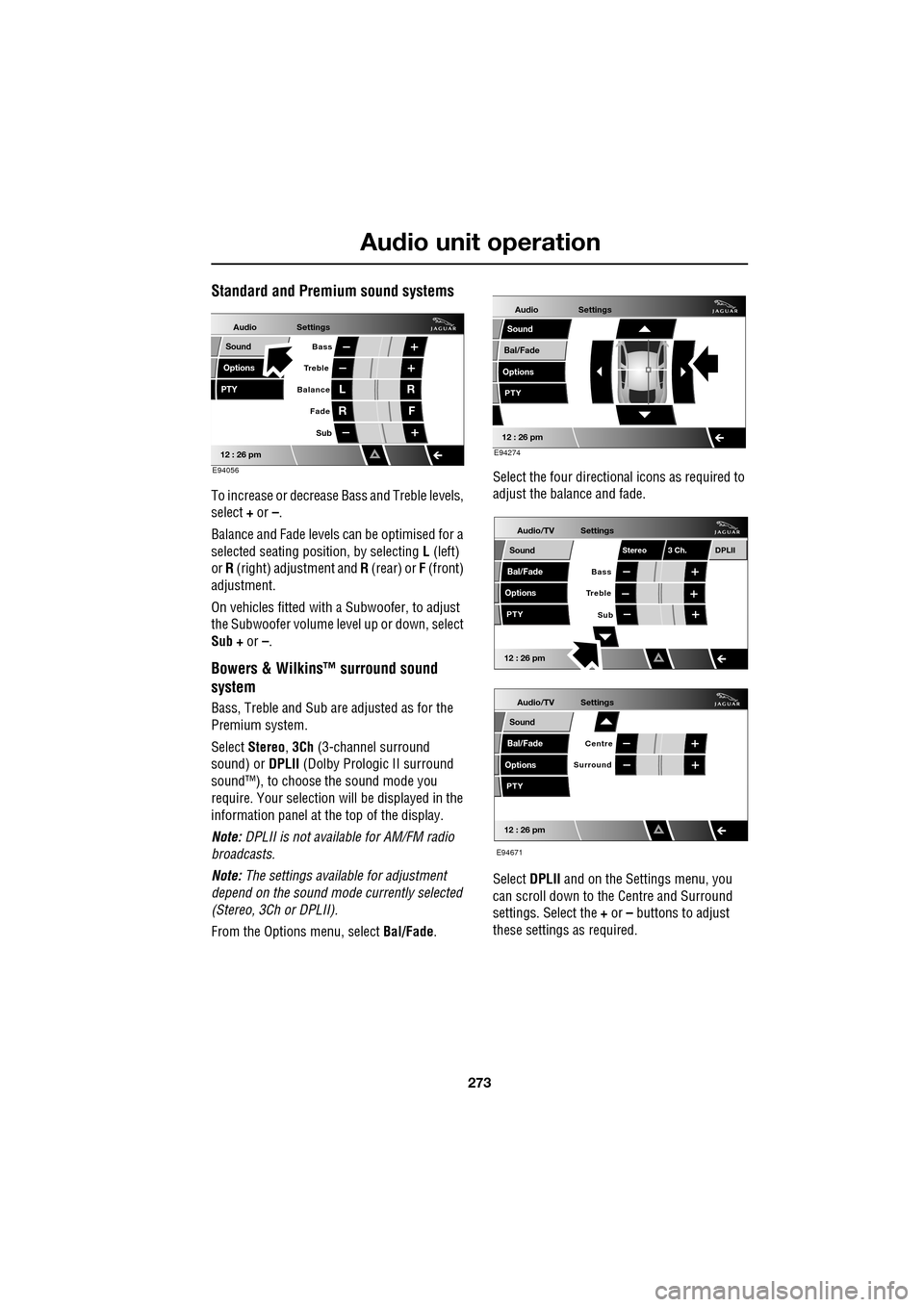
To increase or decrease Bass and Treble levels,
select + or –.
Balance and Fade levels can be optimised for a
selected seating posit ion, by selecting L (left)
or R (right) adjustment and R (rear) or F (front)
adjustment.
On vehicles fitted with a Subwoofer, to adjust
the Subwoofer volume le vel up or down, select
Sub + or –.
Bowers & Wilkins™ surround sound
system
Bass, Treble and Sub are adjusted as for the
Premium system.
Select Stereo , 3Ch (3-channel surround
sound) or DPLII (Dolby Prologic II surround
sound™), to choose the sound mode you
require. Your selection will be displayed in the
information panel at the top of the display.
Note: DPLII is not availa ble for AM/FM radio
broadcasts.
Note: The settings available for adjustment
depend on the sound mode currently selected
(Stereo, 3Ch or DPLII).
From the Options menu, select Bal/Fade. Select the four directio
nal icons as required to
adjust the balance and fade.
Select DPLII and on the Settings menu, you
can scroll down to the Centre and Surround
settings. Select the + or – buttons to adjust
these settings as required.
Audio
Options
PTY
Sound
12 : 26 pm
Settings
Treble Bass
Balance
FadeL
R R
F
E94056
Sub
Audio
Bal/Fade
Options
Sound
12 : 26 pm
Settings
PTY
E94274
Audio/TV
Bal/Fade
Options
Sound
12 : 26 pm
Settings
Treble
Sub
PTY
Bass
Stereo 3 Ch.DPLII
Audio/TV
Bal/Fade
Options
Sound
12 : 26 pm
Settings
Surround
PTY
Centre
E94671
Page 275 of 391
275
Audio unit operation
STATION PRESET BUTTONS
Tuning stations
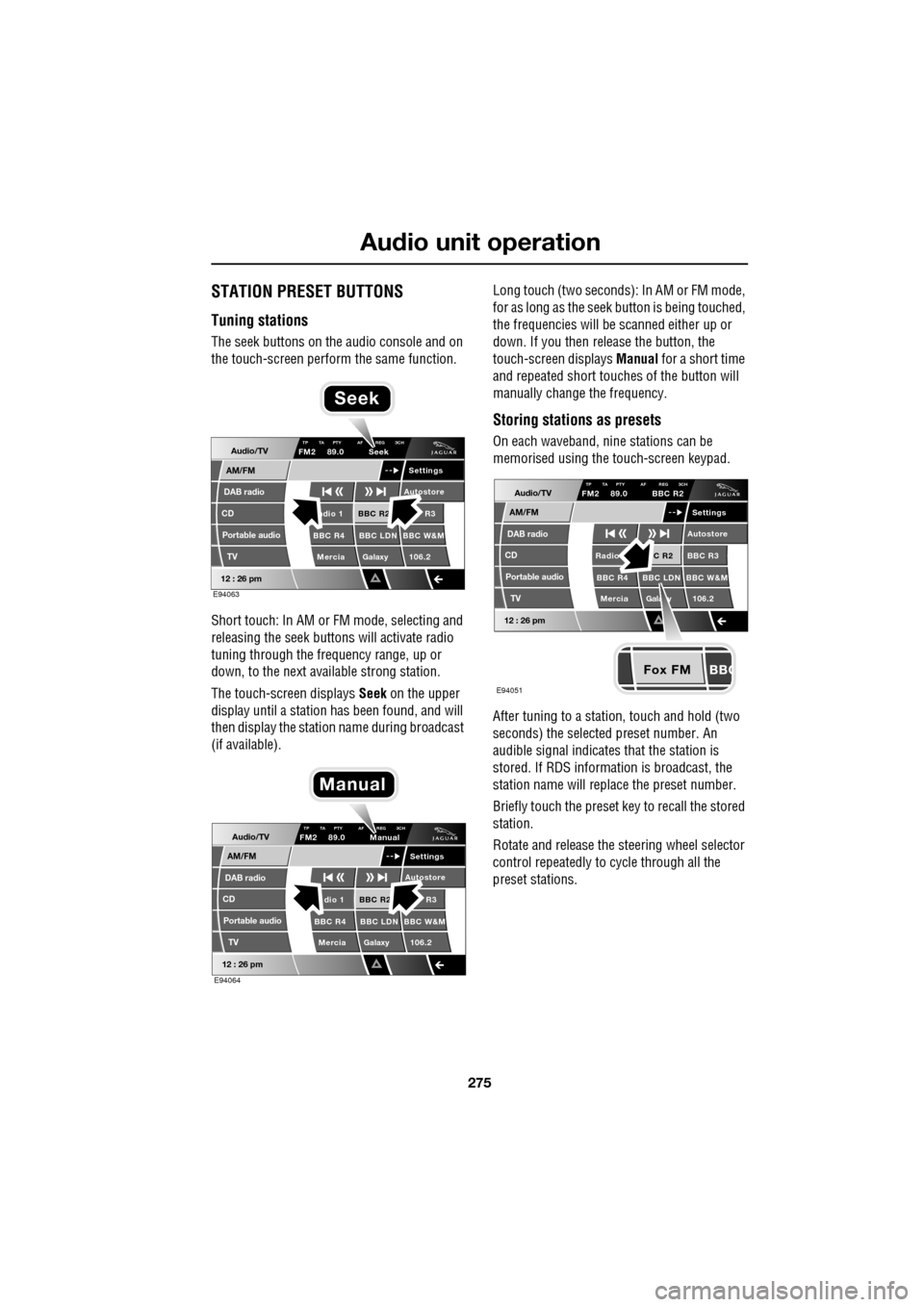
The seek buttons on the audio console and on
the touch-screen perform the same function.
Short touch: In AM or FM mode, selecting and
releasing the seek buttons will activate radio
tuning through the frequency range, up or
down, to the next available strong station.
The touch-screen displays Seek on the upper
display until a station has been found, and will
then display the station name during broadcast
(if available). Long touch (two seconds): In AM or FM mode,
for as long as the seek
button is being touched,
the frequencies will be scanned either up or
down. If you then release the button, the
touch-screen displays Manual for a short time
and repeated short touc hes of the button will
manually change the frequency.
Storing stations as presets
On each waveband, ni ne stations can be
memorised using the touch-screen keypad.
After tuning to a stati on, touch and hold (two
seconds) the selected preset number. An
audible signal indicates that the station is
stored. If RDS informat ion is broadcast, the
station name will replace the preset number.
Briefly touch the preset key to recall the stored
station.
Rotate and release the steering wheel selector
control repeatedly to cycle through all the
preset stations.Audio/TV
DAB radio
CD
AM/FM
12 : 26 pm
BBC R2 R3
BBC R4 BBC LDN BBC W&M Mercia Galaxy 106.2adio 1
Settings
Autostore
TP TA PTY AF REG 3CHFM2 89.0 Seek
Portable audio TV
E94063
Seek
Audio/TV
DAB radio
CD
AM/FM
12 : 26 pm
BBC R2 R3
BBC R4 BBC LDN BBC W&M Mercia Galaxy 106.2dio 1
Settings
Autostore
TP TA PTY AF REG 3CHFM2 89.0 Manual
Portable audio TV
E94064
Manual
Fox FM
Audio/TV
DAB radio
CD
AM/FM
12 : 26 pm
C R2 BBC R3
BBC R4 BBC LDN BBC W&M
Mercia Gala y 106.2Radio
Settings
Autostore
TP TA PTY AF REG 3CHFM2 89.0 BBC R2
Portable audio TV
E94051