2009 CADILLAC XLR lights
[x] Cancel search: lightsPage 189 of 462

SERVICE ABS (Antilock Brake System)
If this message displays when you are driving, stop
as soon as possible and turn the ignition off. Then start
the engine again to reset the system. If the message
stays on, or comes back on again while you are driving,
the vehicle is in need of service. See your dealer/retailer.
If the SERVICE ABS message is being displayed, the
Traction Control System (TCS) and StabiliTrak
®System
will also be disabled. The Driver Information Center
will scroll three messages: SERVICE ABS, SERVICE
TRACTION SYS, and SERVICE STABILITRAK, and the
antilock brake system and traction control warning
lights on the instrument panel cluster will be illuminated.
SeeAntilock Brake System (ABS) Warning Light on
page 3-48andStabiliTrak
®/Traction Control System
(TCS) Warning Light on page 3-48. The driver can
acknowledge these messages by pressing the RESET
button three times. When the service message is
displayed, the computer controlled systems will not
assist the driver and you should have the system
repaired by your dealer/retailer as soon as possible.
Adjust your driving accordingly.
SERVICE AFS (Adaptive Forward
Lighting System) LAMPS
This message displays when the Adaptive Forward
Lighting System (AFS) is disabled and needs service.
See your dealer/retailer. SeeAdaptive Forward Lighting
System on page 3-28for more information.
SERVICE ELECT (Electrical) SYSTEM
This message displays if an electrical problem has
occurred within the Powertrain Control Module (PCM).
Have the vehicle serviced by your dealer/retailer.
SERVICE FUEL SYSTEM
This message displays when the Powertrain Control
Module (PCM) has detected a problem within the fuel
system. Have the vehicle serviced by your dealer/retailer.
This message will also be displayed when the cluster is
not getting fuel information from the PCM.
SERVICE RADAR CRUISE
If the vehicle has this feature, this message displays
when the Adaptive Cruise Control (ACC) system
is disabled and needs service. See your dealer/retailer.
3-67
Page 195 of 462

Auto Exit Recall
This feature allows the steering column and driver seat
to automatically move to the current driver’s exit
position when one of the following occurs:
The vehicle is turned off or in RAP or accessory
mode and the driver’s door is opened.
The vehicle is turned off or in RAP and the unlock
button on the keyless access transmitter is
pressed.
The DIC will display AUTO EXIT RECALL OFF or
AUTO EXIT RECALL ON. Press the OPTIONS button
to change the setting.
Approach Lights
This feature activates the parking lamps, front fog lamps
and back-up lamps during low light periods when the
unlock button on the keyless access transmitter is
pressed, both doors are closed and the vehicle is off or
in RAP. The lamps remain on for 20 seconds or until
a door is opened, the lock button on the keyless access
transmitter is pressed or the vehicle is no longer off
or in RAP.
The DIC will display APPROACH LIGHTS OFF or
APPROACH LIGHTS ON. Press the OPTIONS button
to change the setting.
Exit Lights
This feature activates the parking lamps and front fog
lamps for 15, 30 or 90 seconds. This will occur when the
vehicle is off or in RAP and the headlamps are on
due to the automatic headlamp system. The parking
lamps and front fog lamps will remain on until the driver
selected time period expires, the exterior lamp control
is activated or the vehicle is no longer off or in RAP.
The DIC will display EXIT LIGHTS OFF, EXIT
LIGHTS - 15 SEC, EXIT LIGHTS - 30 SEC, or EXIT
LIGHTS - 90 SEC. Press the OPTIONS button to
change the setting.
Flash at Unlock
This feature activates the front and rear turn signals for
two short ashes when the unlock or trunk button on
the keyless access transmitter is pressed. This will only
occur when the vehicle is off.
The DIC will display NO FLASH AT UNLOCK or
FLASH AT UNLOCK. Press the OPTIONS button to
change the setting.
3-73
Page 226 of 462

Select the space symbol to enter a space between
characters or the words of a name.
V:Select the backspace symbol if an incorrect
character has been selected.
To make the name selections easier, the system only
allows a selection of a character which can follow
the last one entered. For example, if Z is entered,
T could not be entered after it. The system highlights
the available characters and darken the unavailable
characters.
If unsuccessful when entering a name, it may need to
be entered differently. It is also possible that the
map DVD database may not contain that information or
the correct search area has not been selected. See
Database Coverage Explanations on page 4-52for more
information.
Touch Sensitive Buttons
Touch-sensitive buttons are located on the screen.
After successfully selecting a screen button, a beep is
heard. These buttons highlight when a feature is
available and are dim when not unavailable. There are
some toggle screen buttons that are light blue when
active and dark blue when inactive.
Setup Menu
MENU:Press this key, located to the right of the
navigation screen, to access the SETUP MENU.
Map appearance, navigation settings, and voice
guidance volume can be adjusted in the SETUP MENU.
4-12
Page 241 of 462
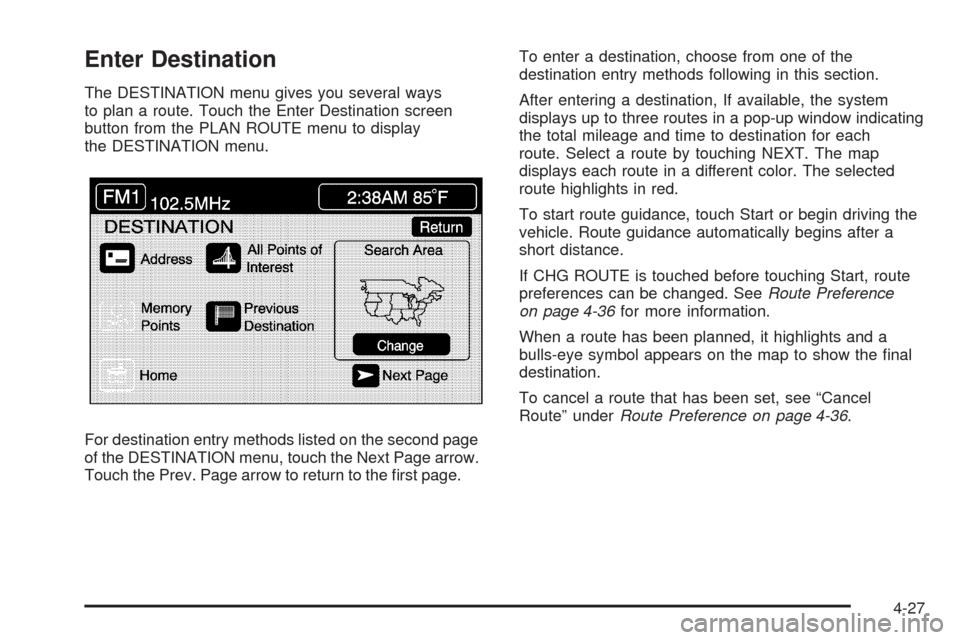
Enter Destination
The DESTINATION menu gives you several ways
to plan a route. Touch the Enter Destination screen
button from the PLAN ROUTE menu to display
the DESTINATION menu.
For destination entry methods listed on the second page
of the DESTINATION menu, touch the Next Page arrow.
Touch the Prev. Page arrow to return to the rst page.To enter a destination, choose from one of the
destination entry methods following in this section.
After entering a destination, If available, the system
displays up to three routes in a pop-up window indicating
the total mileage and time to destination for each
route. Select a route by touching NEXT. The map
displays each route in a different color. The selected
route highlights in red.
To start route guidance, touch Start or begin driving the
vehicle. Route guidance automatically begins after a
short distance.
If CHG ROUTE is touched before touching Start, route
preferences can be changed. SeeRoute Preference
on page 4-36for more information.
When a route has been planned, it highlights and a
bulls-eye symbol appears on the map to show the nal
destination.
To cancel a route that has been set, see “Cancel
Route” underRoute Preference on page 4-36.
4-27
Page 261 of 462

Turn List:This option allows viewing of a step-by-step
listing of upcoming street names, the distance that you
will travel on the road, and turns needed to make during
the planned route.
After touching Turn List, the system may take some time
to create the list. The length of time varies depending
on the length of the route and the planning methods
selected.The turn list reads from bottom to top. The bottom street
name is the street you are currently on. The system
automatically updates this screen as each turn is made.
Touch the scroll up and down arrows, providing scroll is
available. Touching the down arrow gives the current
location. Touching the up arrow gives upcoming streets.
At times, there may not be names available for entrance
or exit ramps.
To avoid a turn, touch AVOID next to the turn to be
avoided. Use REDUCE or ENLARGE to edit the avoided
point. Touch Reroute or press the MAP key to calculate
the new route.
Touch Return to view the current position and to turn
the turn list screen off.
Touch REROUTE or press the MAP key to calculate a
new route.
Auto Reroute
When the destination is set and you travel off of the
planned route, the system automatically begins to
reroute. The new route highlights on the screen.
4-47
Page 405 of 462

Fuses Usage
CLSTR/HUDInstrument Panel Cluster, Heads-up
Display (HUD)
COLUMN LK
MDLNot Used
DECK LID
CLOSE/PRK/
BRK BTrunk Close Button, Parking Brake
Solenoid B
DR LOCKS Door Locks
ECM Engine Control Module
EMPTY Not Used
EMPTY Not Used
EMPTY Not Used
EMPTY Not Used
EMPTY Not Used
FOLDING
TOP/TRUNK
LATCHRetractable Hardtop, Trunk Latch
FUSE PULLER Fuse Puller
GMLAN
DEVICESGMLAN Devices
HTD STR WHL Heated Steering Wheel
HTD/SEAT LH Driver Side Heated Seat
HTD/SEAT RH Passenger Side Heated Seat
HVAC/PWR
SNDClimate Control System, Power
SounderFuses Usage
IGN SW/INTR
SNSRIgnition Switch, Intrusion Sensor
INTERIOR
LIGHTSInterior Lights
ISRVM/HVACInside Rearview Mirror, Climate
Control System, Column Lock,
Power Sounder
ONSTAR OnStar
®
PRK/BRK
SOL AParking Brake Solenoid A
PWR FLDG
MIR-EXT/RETPower Folding Mirror
PWR LUMBAR
LH/RHPower Lumbar
RADIO/S-BAND/
VICSRadio, S-Band, CD Changer
REAR
FOG/ALDLRear Fog Lamps, Diagnostic Link
Connector
REVERSE
LAMPReverse Lamp
REVERSE
LAMPSReverse Lamps
RPA/H/C
SEAT/WPR
RELAYSRear Park Aid, Heated/Cooled
Seats, Windshield Wiper Relays
RUN/ACSRY
PWRRun, Accessory Power
6-85
Page 406 of 462

Fuses Usage
RUN/CRANK Starter/Crank
SDM/PSIR SW Airbags
SPARE FUSE
HOLDERSpare Fuse
SPARE FUSE
HOLDERSpare Fuse
SPARE FUSE
HOLDERSpare Fuse
SPARE FUSE
HOLDERSpare Fuse
STOP LAMP Stoplamp
STR WHL
DIMMINGSteering Wheel Control Button
Lights
TILT/TELE
SW/MEM SEAT
MOD/TOP SWPower Tilt Wheel, Telescopic
Steering Column, Memory Seat,
Driver Seat Switch, Retractable
Hardtop Switch
TUTD
SW/STRG
COL SWTap-Up/Tap-Down Switch
WPR DWELL Rainsense™Relays Usage
PRK/BRK
HOLDPark Brake Hold
PRK/BRK
RELEASEPark Brake Release
F/MIR
RETRACTNot Used
FOG RR Not Used
F/MIR EXTEND Not Used
FUEL DR Fuel Door
Circuit
BreakersUsage
PWR SEAT Power Seats
DR CNTRLS Door Controls
6-86
Page 455 of 462

Instrument Panel
Brightness..................................................3-30
Cluster.......................................................3-42
Overview..................................................... 3-4
J
Jump Starting.................................................6-36
K
Keyless Access System.............................2-4, 4-48
Keyless Access System, Operation...................... 2-5
Keys............................................................... 2-3
L
Labeling, Tire Sidewall.....................................6-48
Lamp
Malfunction Indicator....................................3-50
Lamps
Courtesy....................................................3-30
Exterior Lighting Battery Saver......................3-30
Reading.....................................................3-30
Twilight Sentinel
®........................................3-29Lap-Shoulder Belt...........................................1-20
LATCH System for Child Restraints...................1-33
Lifting the Vehicle, Tires...................................6-68
Light
Airbag Readiness........................................3-44
Antilock Brake System (ABS) Warning............3-48
Brake System Warning.................................3-47
Charging System.........................................3-46
Fog Lamp ..................................................3-55
Highbeam On.............................................3-55
Lights On Reminder.....................................3-55
Passenger Airbag Status Indicator..................3-45
Safety Belt Reminders..................................3-44
Security.....................................................3-55
StabiliTrak
®/Traction Control System (TCS)
Warning Light..........................................3-48
Tire Pressure..............................................3-50
Lighting
Entry/Exit...................................................3-30
Lights
Exterior Lamps............................................3-26
Flash-to-Pass............................................... 3-8
High/Low Beam Changer................................ 3-8
On Reminder..............................................3-27
Limited-Slip Rear Axle.....................................5-10
Loading Your Vehicle.......................................5-21
Lockout Protection..........................................2-13
7