Page 272 of 512
272
PRIUS_U_(L/O_0802)
3-4.Using the hands-free system
Hands-free system (for cellular phone)
The hands-free system is a function that allows you to use your
mobile phone without touching it.
This system supports Bluetooth
® mobile phones. Bluetooth® is a
wireless data system that allows th e mobile phone to wirelessly con-
nect to the hands-free syst em and make/receive calls.
Telephone switch
Sending/Receiving/“Tele-
phone” screen display
(when stopped)
End call
Microphone The person you are speaking
to can be heard from the
driver’s side speaker.
To use the hands-free system yo u must register your Bluetooth
®
phone in the system. (P. 277)
12
ITY34P001
ITY34P002
Page 273 of 512
273
3-4. Using the hands-free system
3
Interior features
PRIUS_U_(L/O_0802)
Status display
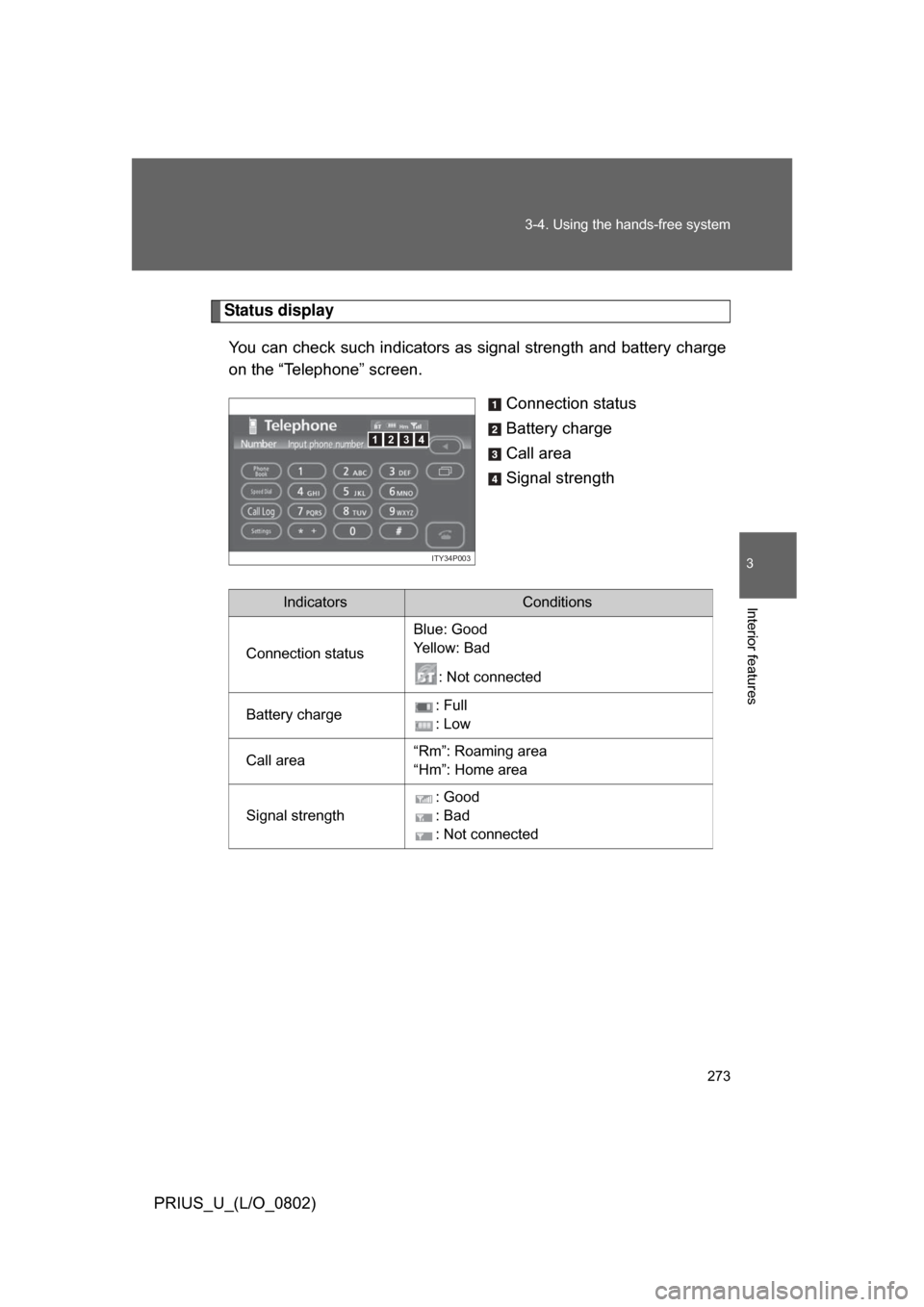
You can check such indicators as signal strength and battery charge
on the “Telephone” screen.
Connection status
Battery charge
Call area
Signal strength
4123
ITY34P003
IndicatorsConditions
Connection status Blue: Good
Ye l l o w : B a d
: Not connected
Battery charge : Full
: Low
Call area “Rm”: Roaming area
“Hm”: Home area
Signal strength : Good
: Bad
: Not connected
Page 277 of 512
277
3-4. Using the hands-free system
3
Interior features
PRIUS_U_(L/O_0802)
Using the Bluetooth® phone
Registering a Bluetooth® phone
You can register up to 6 phones in the system. Press .
Touch on the “Information” screen.
Touch on the “Telephone” screen.
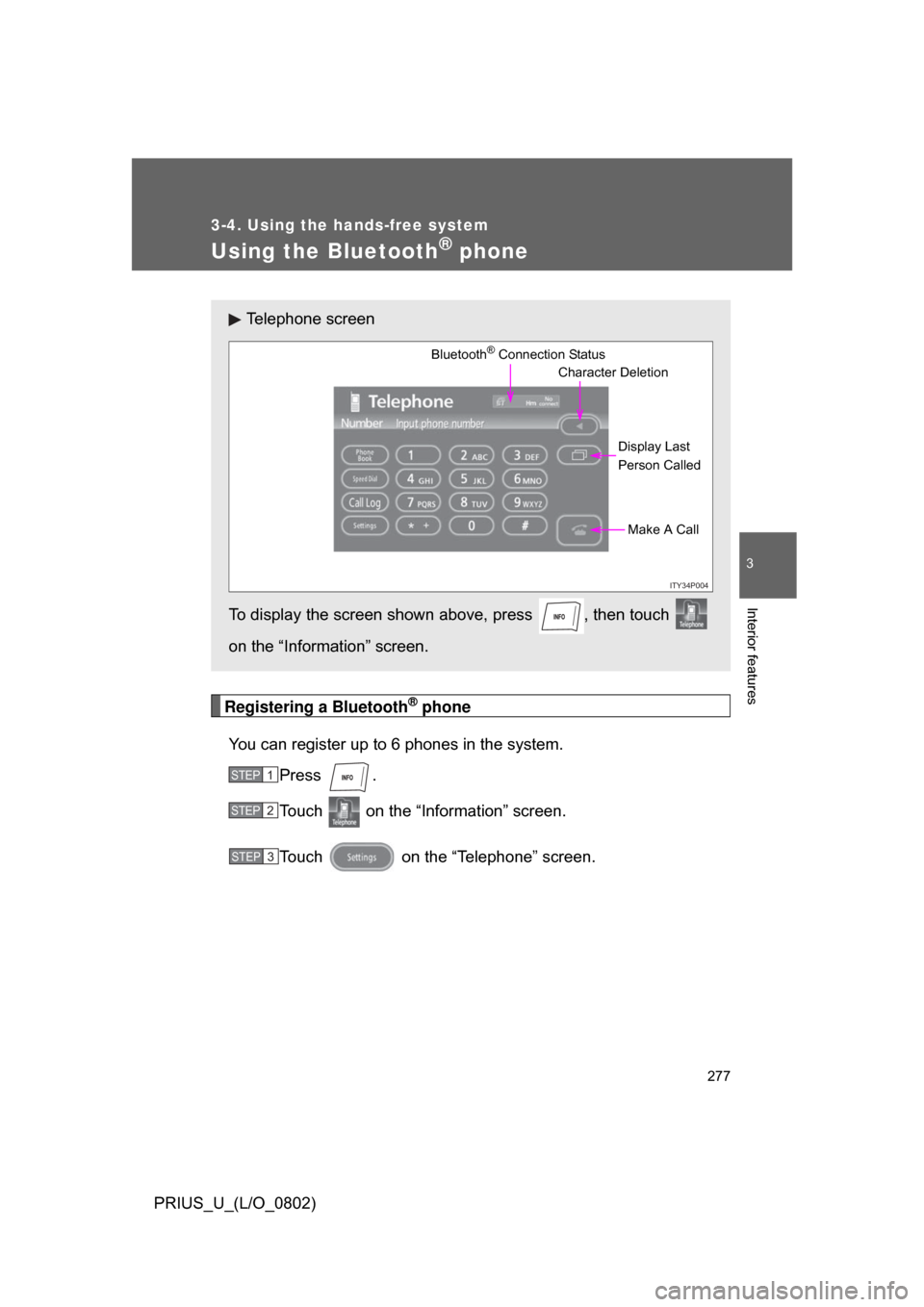
Telephone screen
To display the screen shown above, press , then touch
on the “Information” screen.
ITY34P004
Bluetooth® Connection Status Display Last
Person CalledMake A Call
Character Deletion
STEP1
STEP2
STEP3
Page 278 of 512
278 3-4. Using the hands-free system
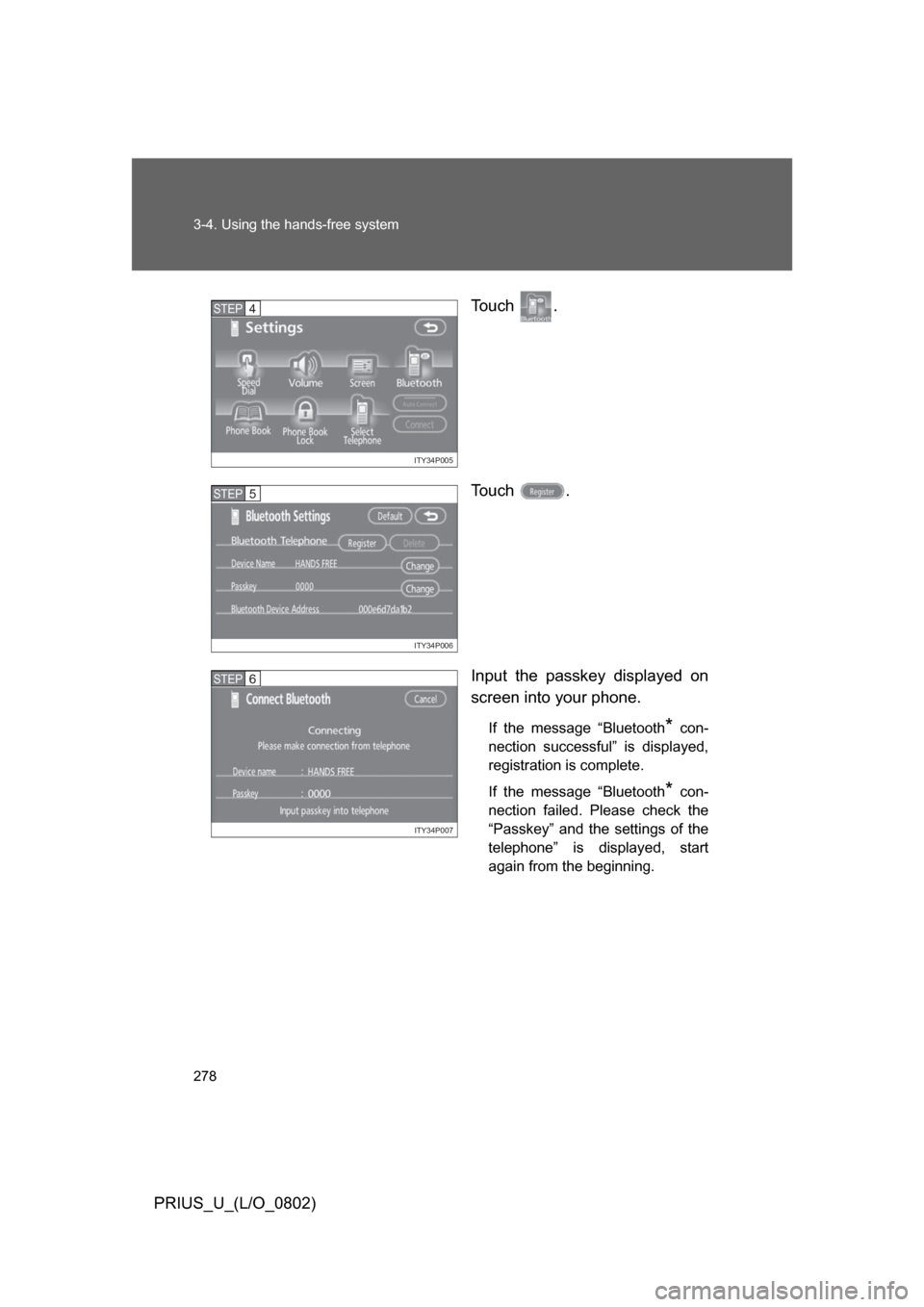
PRIUS_U_(L/O_0802)To u c h .
To u c h .
Input the passkey displayed on
screen into your phone.
If the message “Bluetooth* con-
nection successful” is displayed,
registration is complete.
If the message “Bluetooth
* con-
nection failed. Please check the
“Passkey” and the settings of the
telephone” is displayed, start
again from the beginning.
ITY34P005
STEP4
ITY34P006
STEP5
ITY34P007
STEP6
Page 279 of 512
279
3-4. Using the hands-free system
3
Interior features
PRIUS_U_(L/O_0802)
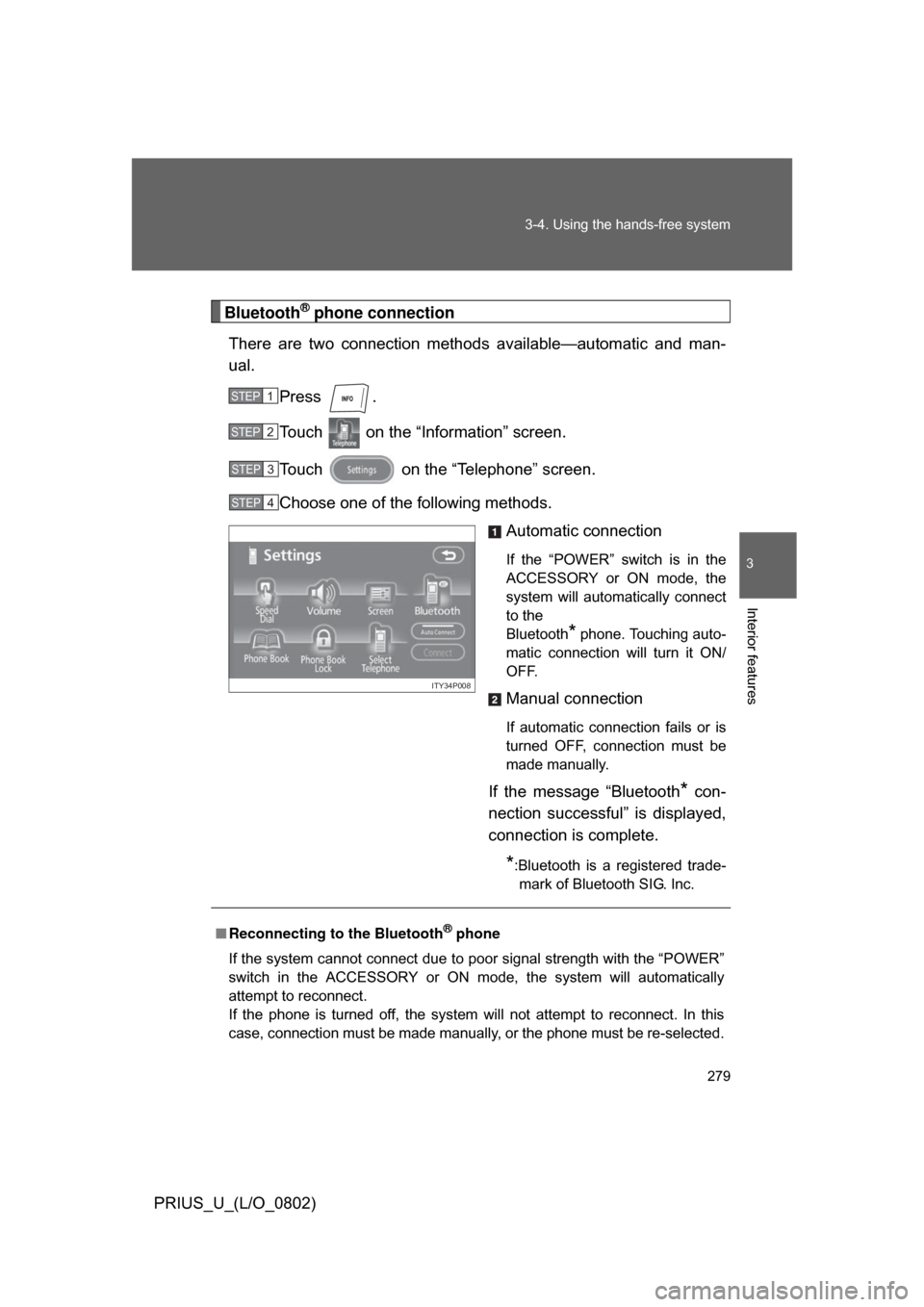
Bluetooth® phone connection
There are two connection method s available—automatic and man-
ual.
Press .
Touch on the “Information” screen.
Touch on the “Telephone” screen.
Choose one of the following methods. Automatic connection
If the “POWER” switch is in the
ACCESSORY or ON mode, the
system will automatically connect
to the
Bluetooth
* phone. Touching auto-
matic connection will turn it ON/
OFF.
Manual connection
If automatic connection fails or is
turned OFF, connection must be
made manually.
If the message “Bluetooth* con-
nection successful” is displayed,
connection is complete.
*:Bluetooth is a registered trade- mark of Bluetooth SIG. Inc.
STEP1
STEP2
STEP3
STEP4
ITY34P008
■ Reconnecting to the Bluetooth® phone
If the system cannot connect due to poor signal strength with the “POWER”
switch in the ACCESSORY or ON mode, the system will automatically
attempt to reconnect.
If the phone is turned off, the system will not attempt to reconnect. In this
case, connection must be made manually, or the phone must be re-selected.
Page 280 of 512
280 3-4. Using the hands-free system
PRIUS_U_(L/O_0802)
Making a callOnce the Bluetooth
® phone is registered, you can make a call using
the following procedure.
■ Dialing
Press .
Touch on the “Inf ormation” screen.
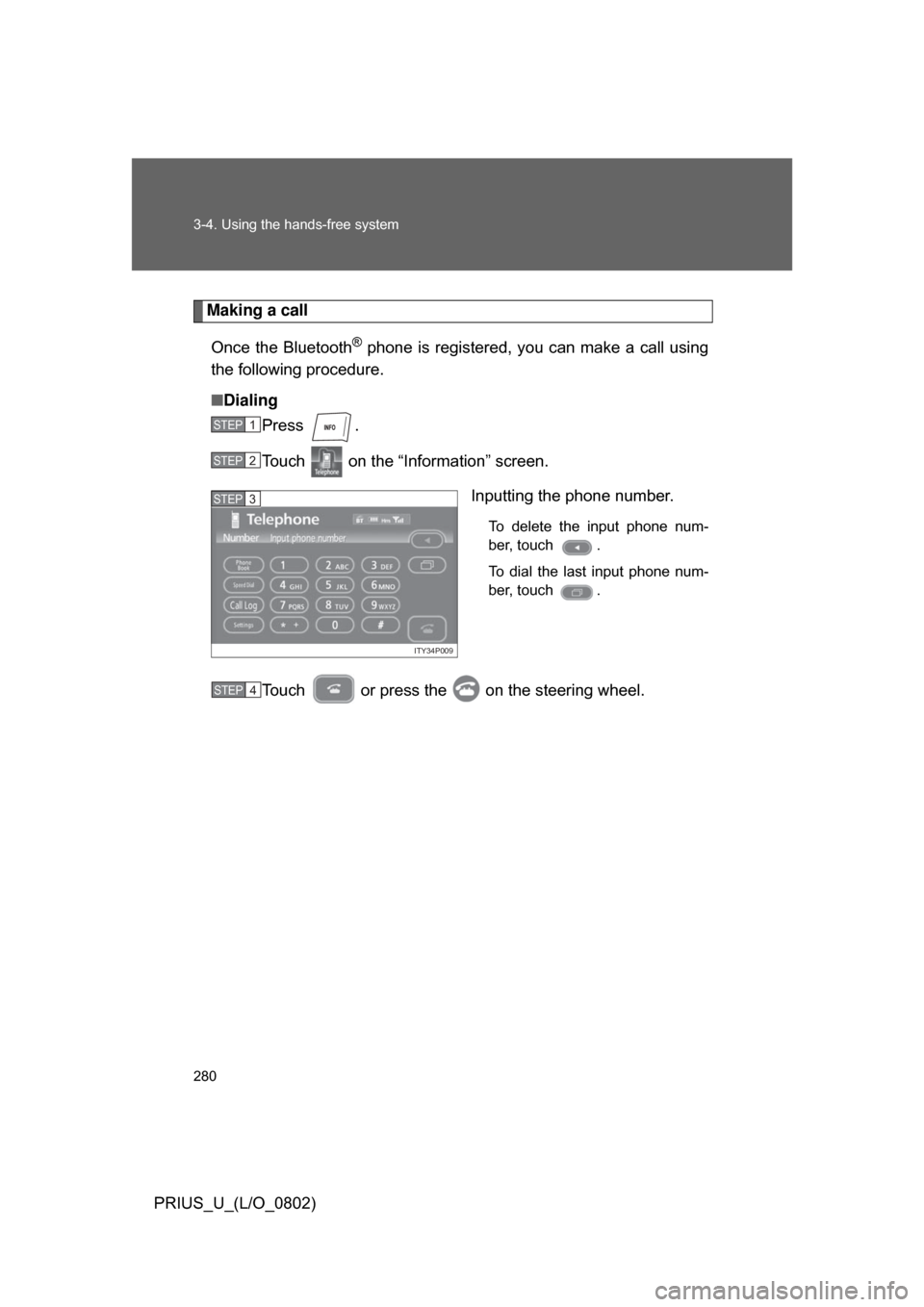
Inputting the phone number.
To delete the input phone num-
ber, touch .
To dial the last input phone num-
ber, touch .
Touch or press the on the steering wheel.
STEP1
STEP2
ITY34P009
STEP3
STEP4
Page 281 of 512
281
3-4. Using the hands-free system
3
Interior features
PRIUS_U_(L/O_0802)
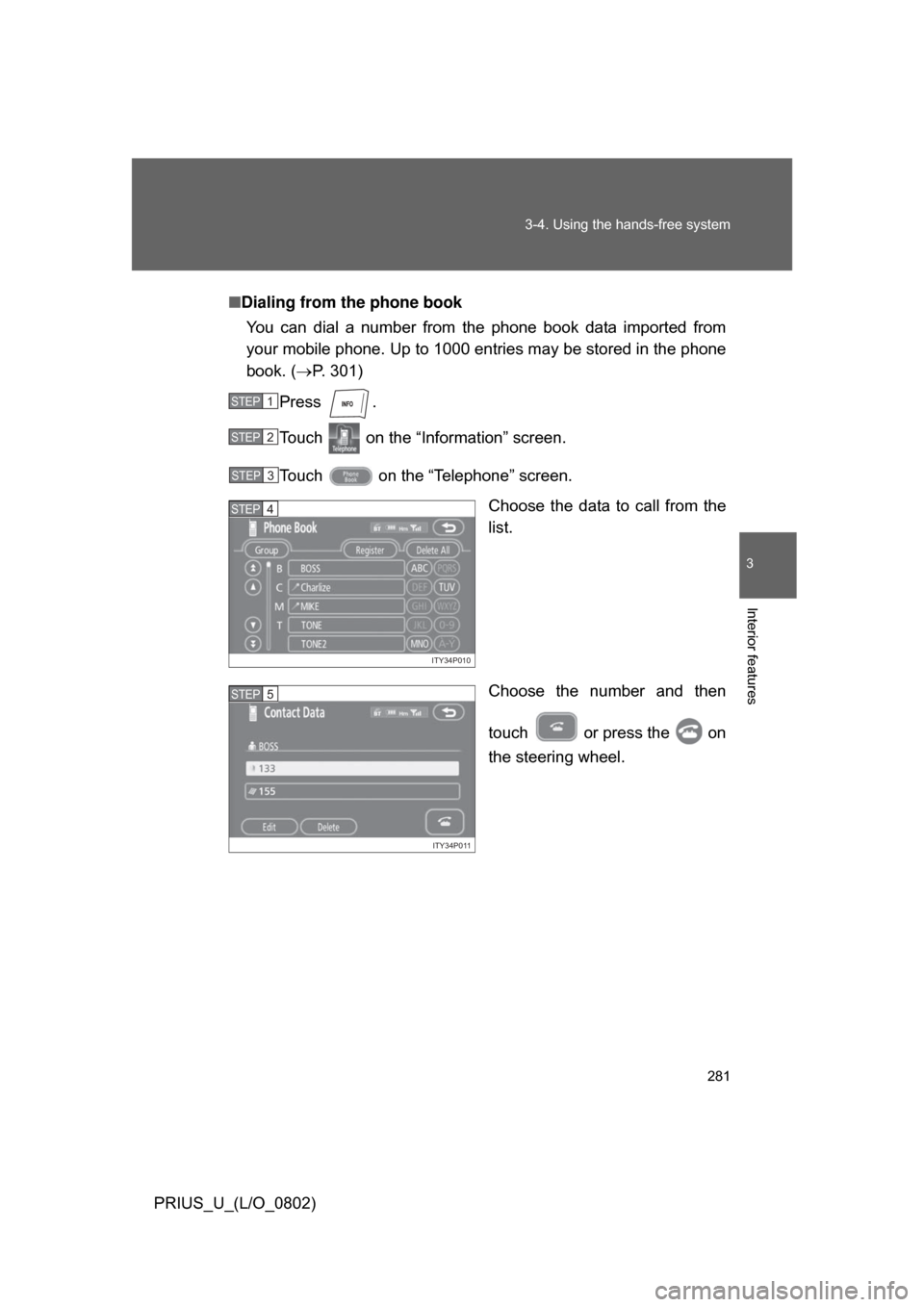
■
Dialing from the phone book
You can dial a number from the phone book data imported from
your mobile phone. Up to 1000 entries may be stored in the phone
book. ( P. 301)
Press .
Touch on the “Information” screen.
Touch on the “Telephone” screen. Choose the data to call from the
list.
Choose the number and then
touch or press the on
the steering wheel.
STEP1
STEP2
STEP3
ITY34P010
STEP4
ITY34P011
STEP5
Page 282 of 512
282 3-4. Using the hands-free system
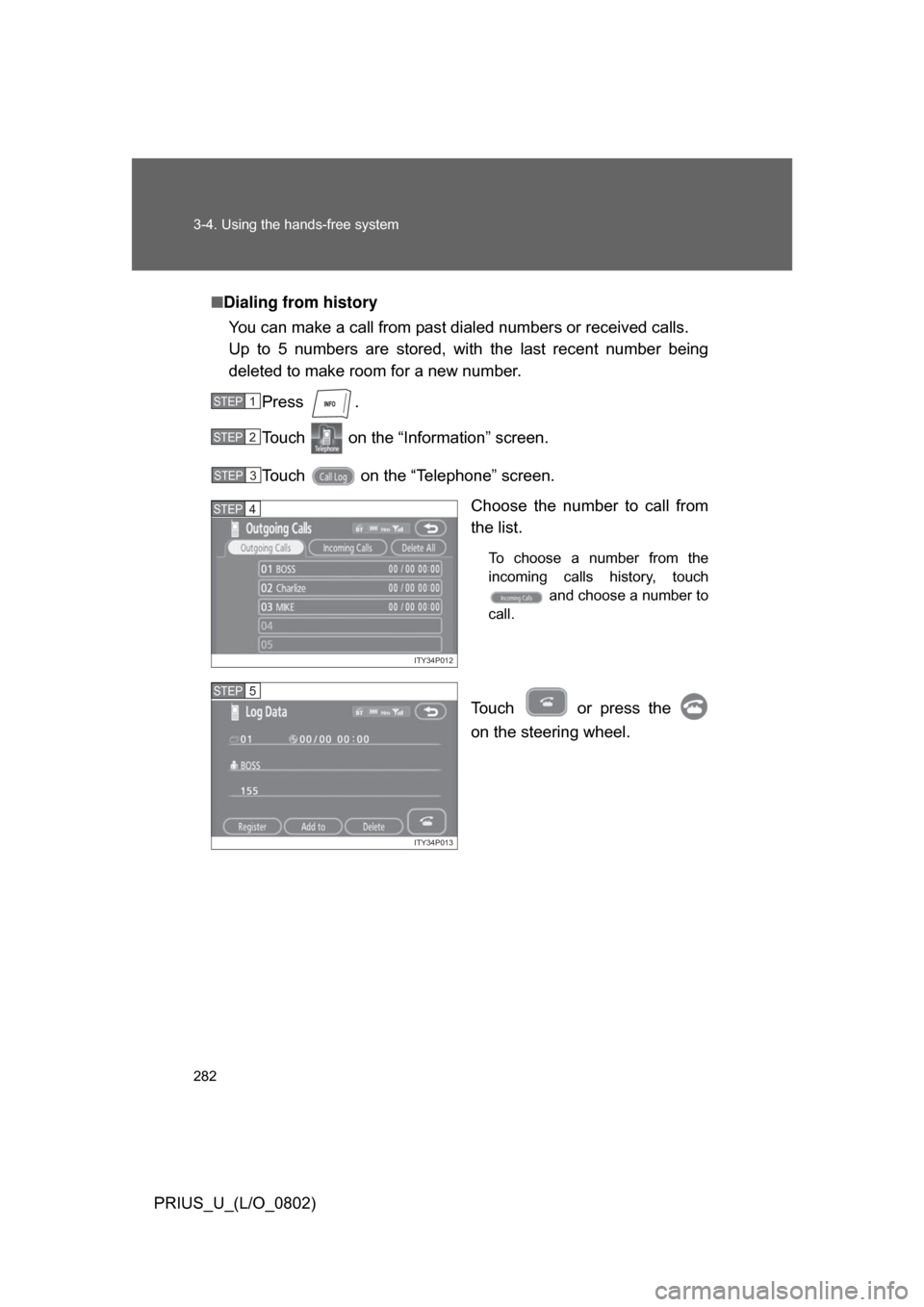
PRIUS_U_(L/O_0802)■
Dialing from history
You can make a call from past dialed numbers or received calls.
Up to 5 numbers are stored, with the last recent number being
deleted to make room for a new number.
Press .
Touch on the “Inf ormation” screen.
Touch on the “Telephone” screen. Choose the number to call from
the list.
To choose a number from the
incoming calls history, touch and choose a number to
call.
Touch or press the
on the steering wheel.
STEP1
STEP2
STEP3
ITY34P012
STEP4
ITY34P013
STEP5