2008 NISSAN TEANA check engine
[x] Cancel search: check enginePage 1141 of 5121
CO-18
< ON-VEHICLE REPAIR >
WATER PUMP
WATER PUMP
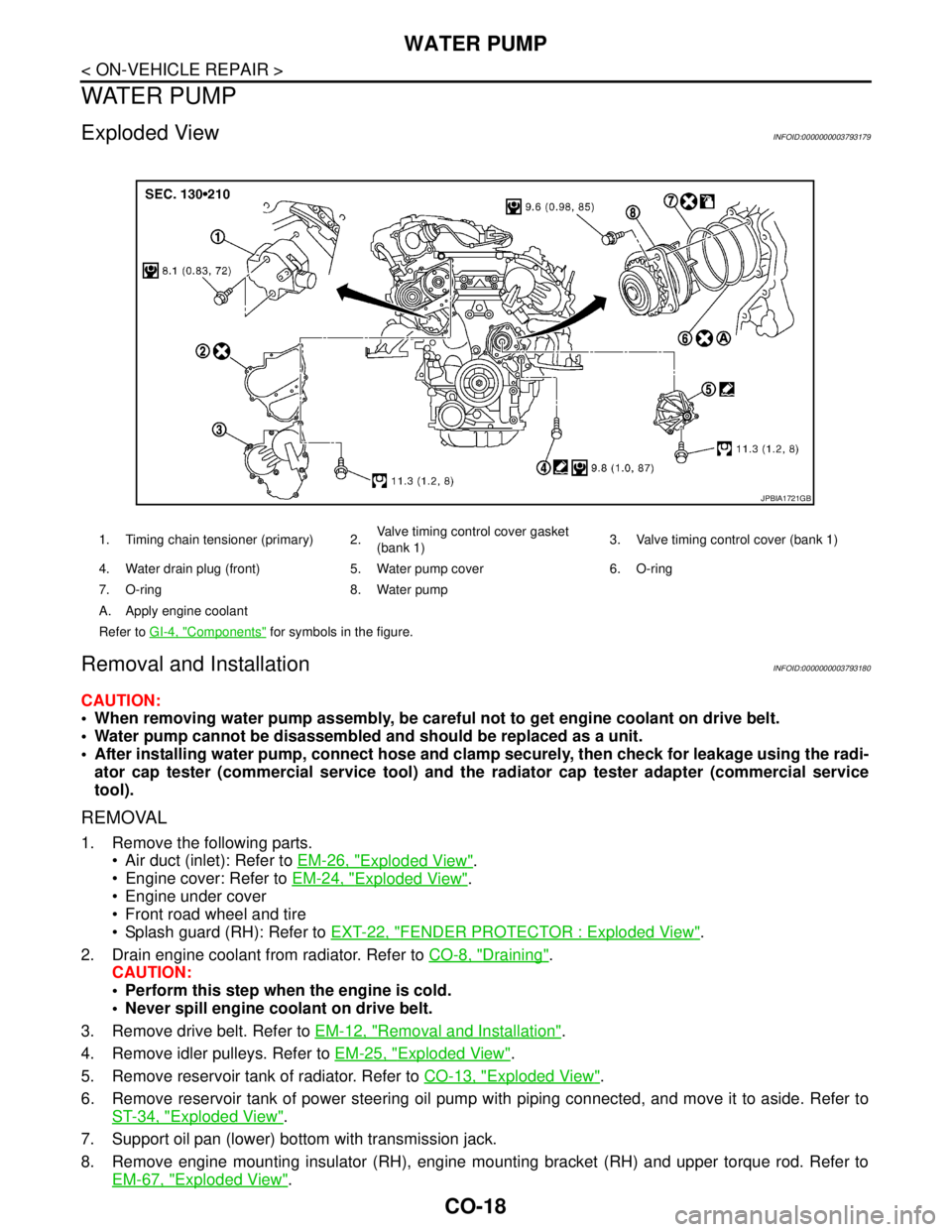
Exploded ViewINFOID:0000000003793179
Removal and InstallationINFOID:0000000003793180
CAUTION:
When removing water pump assembly, be careful not to get engine coolant on drive belt.
Water pump cannot be disassembled and should be replaced as a unit.
After installing water pump, connect hose and clamp securely, then check for leakage using the radi-
ator cap tester (commercial service tool) and the radiator cap tester adapter (commercial service
tool).
REMOVAL
1. Remove the following parts.
Air duct (inlet): Refer to EM-26, "
Exploded View".
Engine cover: Refer to EM-24, "
Exploded View".
Engine under cover
Front road wheel and tire
Splash guard (RH): Refer to EXT-22, "
FENDER PROTECTOR : Exploded View".
2. Drain engine coolant from radiator. Refer to CO-8, "
Draining".
CAUTION:
Perform this step when the engine is cold.
Never spill engine coolant on drive belt.
3. Remove drive belt. Refer to EM-12, "
Removal and Installation".
4. Remove idler pulleys. Refer to EM-25, "
Exploded View".
5. Remove reservoir tank of radiator. Refer to CO-13, "
Exploded View".
6. Remove reservoir tank of power steering oil pump with piping connected, and move it to aside. Refer to
ST-34, "
Exploded View".
7. Support oil pan (lower) bottom with transmission jack.
8. Remove engine mounting insulator (RH), engine mounting bracket (RH) and upper torque rod. Refer to
EM-67, "
Exploded View".
1. Timing chain tensioner (primary) 2.Valve timing control cover gasket
(bank 1)3. Valve timing control cover (bank 1)
4. Water drain plug (front) 5. Water pump cover 6. O-ring
7. O-ring 8. Water pump
A. Apply engine coolant
Refer to GI-4, "
Components" for symbols in the figure.
JPBIA1721GB
Page 1143 of 5121
![NISSAN TEANA 2008 Service Manual CO-20
< ON-VEHICLE REPAIR >
WATER PUMP
b. Screw M8 bolts [pitch: 1.25 mm (0.0492 in) length: approxi-
mately 50 mm (1.97 in)] into water pumps upper and lower
mounting bolt holes until they reach timi](/manual-img/5/57391/w960_57391-1142.png "NISSAN TEANA 2008 Service Manual CO-20
< ON-VEHICLE REPAIR >
WATER PUMP
b. Screw M8 bolts [pitch: 1.25 mm (0.0492 in) length: approxi-
mately 50 mm (1.97 in)] into water pumps upper and lower
mounting bolt holes until they reach timi")
CO-20
< ON-VEHICLE REPAIR >
WATER PUMP
b. Screw M8 bolts [pitch: 1.25 mm (0.0492 in) length: approxi-
mately 50 mm (1.97 in)] into water pumps upper and lower
mounting bolt holes until they reach timing chain case. Then,
alternately tighten each bolt for a half turn, and pull out water
pump.
CAUTION:
Pull straight out while preventing vane from contacting
socket in installation area.
Remove water pump without causing sprocket to contact
timing chain.
c. Remove M8 bolts and O-rings from water pump.
CAUTION:
Never disassemble water pump.
INSTALLATION
1. Install new O-rings to water pump.
Apply engine oil and engine coolant to O-rings as shown in the
figure.
Locate O-ring with white paint mark to engine front side.
2. Install water pump.
CAUTION:
Never allow cylinder block to nip O-rings when installing
water pump.
Check that timing chain and water pump sprocket are
engaged.
Insert water pump by tightening mounting bolts alternately and
evenly.
3. Install timing chain tensioner (primary) as follows:
a. Turn crankshaft pulley clockwise so that timing chain on the tim-
ing chain tensioner (primary) side is loose.
JLC357B
PBIC1397E
SLC031B
PBIC4820E
Page 1144 of 5121
WATER PUMP
CO-21
< ON-VEHICLE REPAIR >
C
D
E
F
G
H
I
J
K
L
MA
CO
N
P O
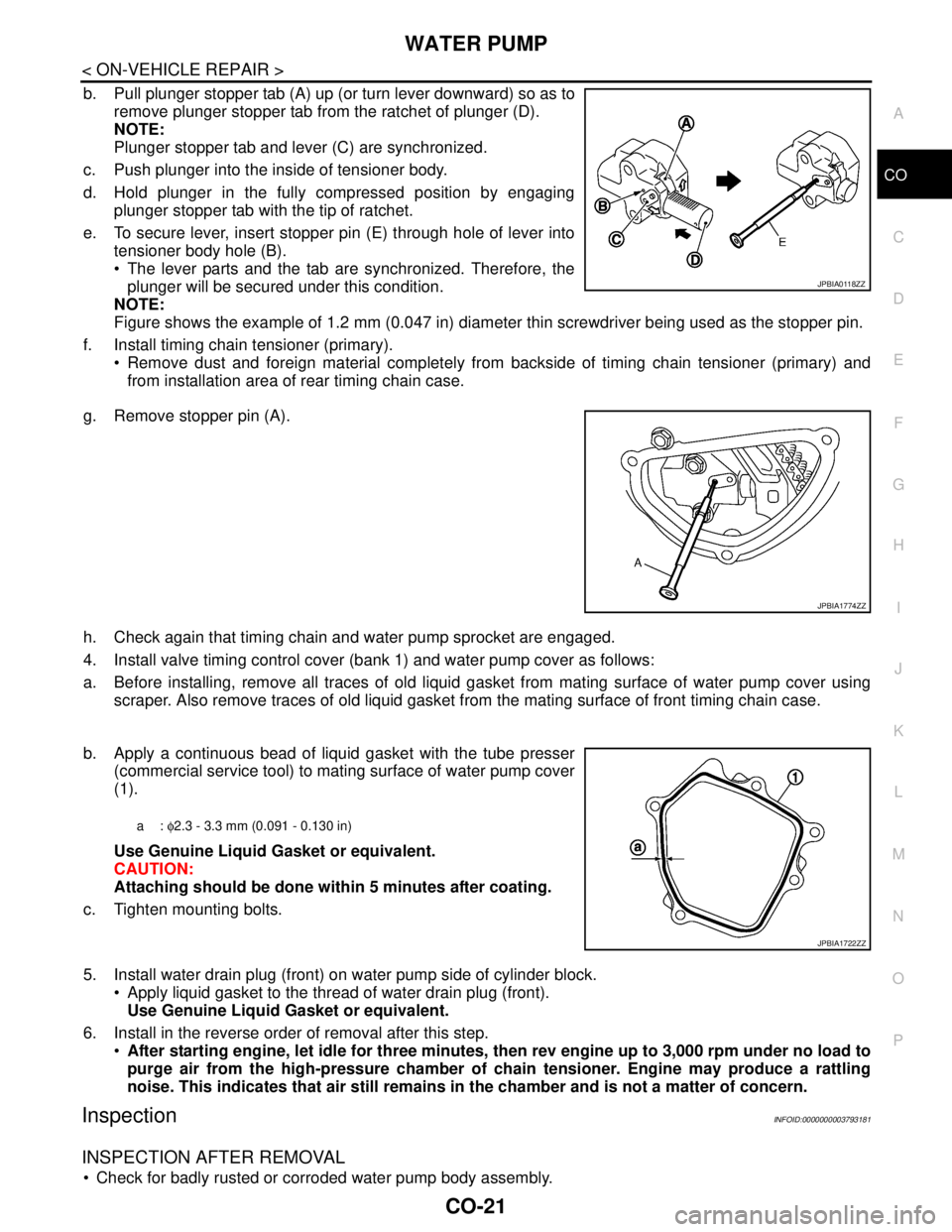
b. Pull plunger stopper tab (A) up (or turn lever downward) so as to
remove plunger stopper tab from the ratchet of plunger (D).
NOTE:
Plunger stopper tab and lever (C) are synchronized.
c. Push plunger into the inside of tensioner body.
d. Hold plunger in the fully compressed position by engaging
plunger stopper tab with the tip of ratchet.
e. To secure lever, insert stopper pin (E) through hole of lever into
tensioner body hole (B).
The lever parts and the tab are synchronized. Therefore, the
plunger will be secured under this condition.
NOTE:
Figure shows the example of 1.2 mm (0.047 in) diameter thin screwdriver being used as the stopper pin.
f. Install timing chain tensioner (primary).
Remove dust and foreign material completely from backside of timing chain tensioner (primary) and
from installation area of rear timing chain case.
g. Remove stopper pin (A).
h. Check again that timing chain and water pump sprocket are engaged.
4. Install valve timing control cover (bank 1) and water pump cover as follows:
a. Before installing, remove all traces of old liquid gasket from mating surface of water pump cover using
scraper. Also remove traces of old liquid gasket from the mating surface of front timing chain case.
b. Apply a continuous bead of liquid gasket with the tube presser
(commercial service tool) to mating surface of water pump cover
(1).
Use Genuine Liquid Gasket or equivalent.
CAUTION:
Attaching should be done within 5 minutes after coating.
c. Tighten mounting bolts.
5. Install water drain plug (front) on water pump side of cylinder block.
Apply liquid gasket to the thread of water drain plug (front).
Use Genuine Liquid Gasket or equivalent.
6. Install in the reverse order of removal after this step.
After starting engine, let idle for three minutes, then rev engine up to 3,000 rpm under no load to
purge air from the high-pressure chamber of chain tensioner. Engine may produce a rattling
noise. This indicates that air still remains in the chamber and is not a matter of concern.
InspectionINFOID:0000000003793181
INSPECTION AFTER REMOVAL
Check for badly rusted or corroded water pump body assembly.
JPBIA0118ZZ
JPBIA1774ZZ
a: φ2.3 - 3.3 mm (0.091 - 0.130 in)
JPBIA1722ZZ
Page 1145 of 5121
CO-22
< ON-VEHICLE REPAIR >
WATER PUMP
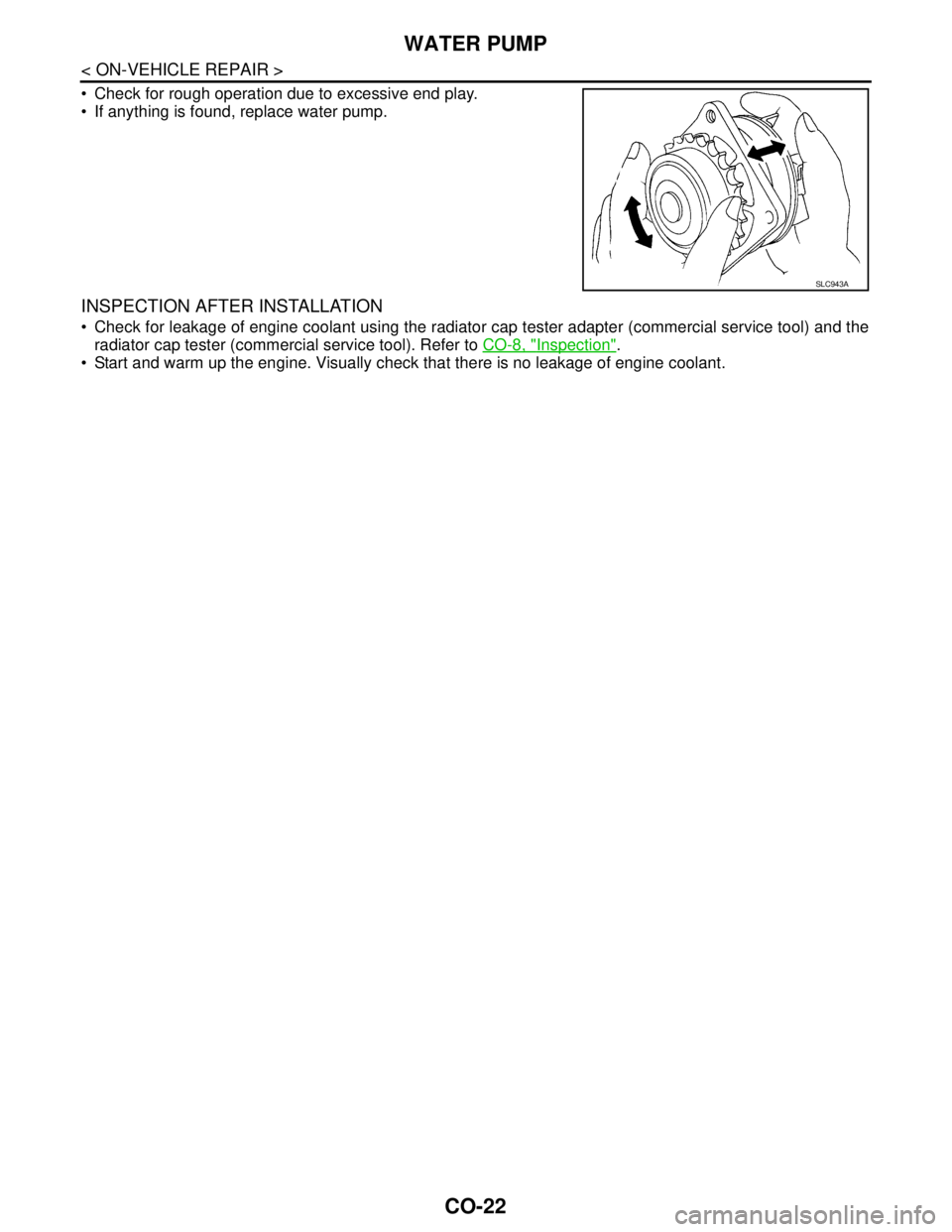
Check for rough operation due to excessive end play.
If anything is found, replace water pump.
INSPECTION AFTER INSTALLATION
Check for leakage of engine coolant using the radiator cap tester adapter (commercial service tool) and the
radiator cap tester (commercial service tool). Refer to CO-8, "
Inspection".
Start and warm up the engine. Visually check that there is no leakage of engine coolant.
SLC943A
Page 1147 of 5121
CO-24
< ON-VEHICLE REPAIR >
WATER INLET AND THERMOSTAT ASSEMBLY
Inspection
INFOID:0000000003793184
INSPECTION AFTER REMOVAL
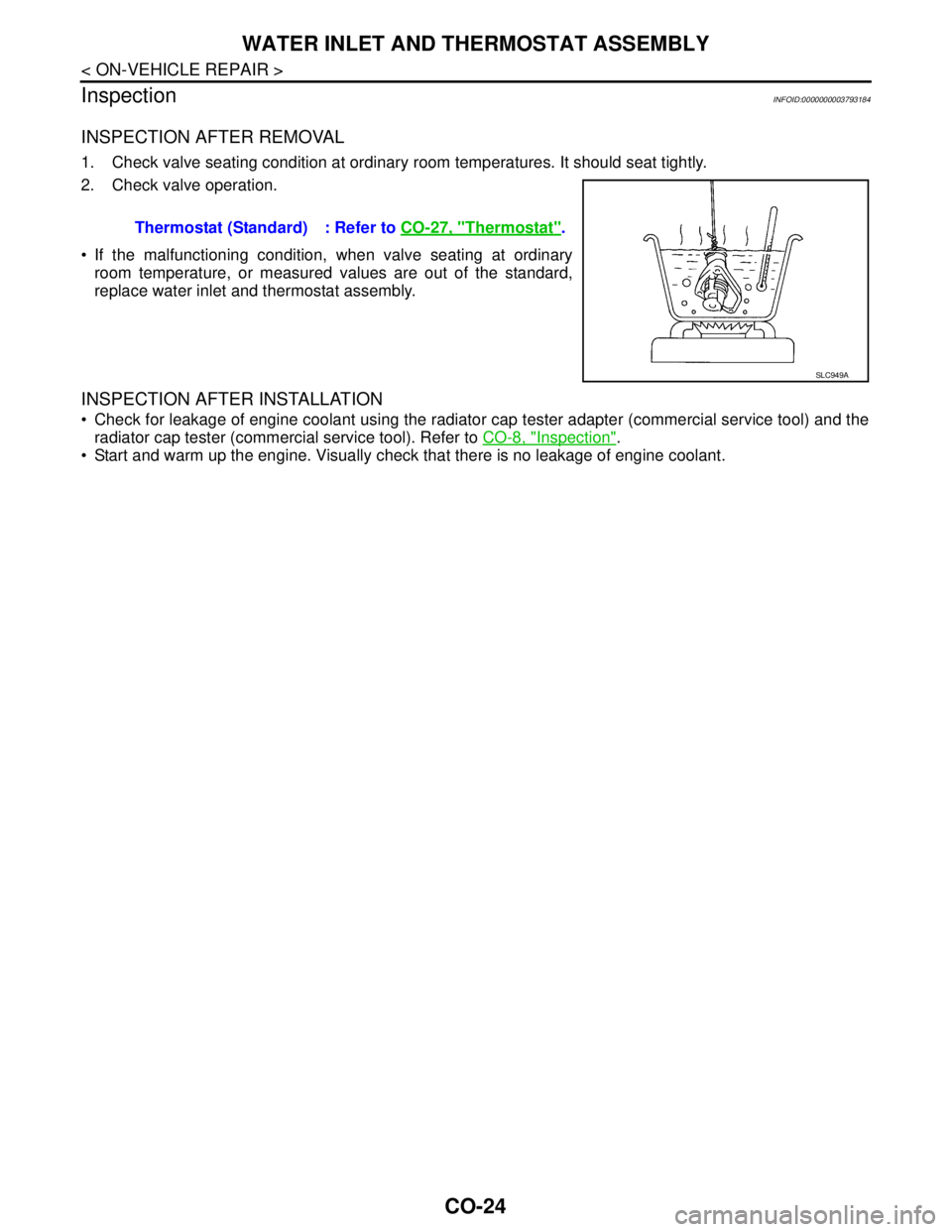
1. Check valve seating condition at ordinary room temperatures. It should seat tightly.
2. Check valve operation.
If the malfunctioning condition, when valve seating at ordinary
room temperature, or measured values are out of the standard,
replace water inlet and thermostat assembly.
INSPECTION AFTER INSTALLATION
Check for leakage of engine coolant using the radiator cap tester adapter (commercial service tool) and the
radiator cap tester (commercial service tool). Refer to CO-8, "
Inspection".
Start and warm up the engine. Visually check that there is no leakage of engine coolant. Thermostat (Standard) : Refer to CO-27, "
Thermostat".
SLC949A
Page 1149 of 5121
CO-26
< ON-VEHICLE REPAIR >
WATER OUTLET AND WATER PIPING
5. Remove CVT fluid charging pipe and CVT fluid level gauge. Refer to TM-332, "Exploded View" (VQ25DE)
or TM-168, "
Exploded View" (VQ35DE).
6. Move CVT control cable aside. Refer to TM-319, "
Exploded View" (VQ25DE) or TM-157, "Exploded View"
(VQ35DE).
7. Remove vacuum pipe (front) mounting bolt from water outlet. Refer to EM-67, "
Exploded View".
8. Remove radiator hose (upper) from water outlet.
9. Remove water hoses and heater hoses.
10. Disconnect harness connectors, and move harness to aside.
11. Remove engine coolant temperature sensor as necessary.
CAUTION:
Be careful not to damage engine coolant temperature sensor.
12. Remove water outlet, heater pipe, water bypass pipe and water connector.
INSTALLATION
Note the following, and install in the reverse order of removal.
Securely insert each hose, and install clamp at a position where it does not interfere with the pipe bulge.
When inserting water bypass pipe and heater pipe into water connector, apply neutral detergent to O-ring.
InspectionINFOID:0000000003793187
INSPECTION AFTER INSTALLATION
Check for leakage of engine coolant using the radiator cap tester adapter (commercial service tool) and the
radiator cap tester (commercial service tool). Refer to CO-8, "
Inspection".
Start and warm up the engine. Visually check that there is no leakage of engine coolant.
Page 1260 of 5121
![NISSAN TEANA 2008 Service Manual DLK-44
< FUNCTION DIAGNOSIS >[WITH INTELLIGENT KEY SYSTEM]
DIAGNOSIS SYSTEM (BCM)
SELF-DIAG RESULT
Refer to DLK-153, "DTCIndex".
DATA MONITOR
Monitor item Description
REMO CONT ID CONFIR It can be che](/manual-img/5/57391/w960_57391-1259.png "NISSAN TEANA 2008 Service Manual DLK-44
< FUNCTION DIAGNOSIS >[WITH INTELLIGENT KEY SYSTEM]
DIAGNOSIS SYSTEM (BCM)
SELF-DIAG RESULT
Refer to DLK-153, \"DTCIndex\".
DATA MONITOR
Monitor item Description
REMO CONT ID CONFIR It can be che")
DLK-44
< FUNCTION DIAGNOSIS >[WITH INTELLIGENT KEY SYSTEM]
DIAGNOSIS SYSTEM (BCM)
SELF-DIAG RESULT
Refer to DLK-153, "DTCIndex".
DATA MONITOR
Monitor item Description
REMO CONT ID CONFIR It can be checked whether Intelligent Key ID code is registered or not in this mode.
AUTO LOCK SETAuto door lock time can be changed in this mode.
MODE 1: 1 minute
MODE 2: 5 minutes
MODE 3: 30 seconds
MODE 4: 2 minutes
LOCK/UNLOCK BY I-KEYDoor lock/unlock function by door request switch (driver side and passenger side) mode can be
changed to operate (WITH) or not operate (WITHOUT) in this mode.
ENGINE START BY I-KEYEngine start function mode can be changed to operate (WITH) or not operate (WITHOUT) in this
mode.
TRUNK/GLASS HATCH OPENBuzzer reminder function mode by trunk lid opener request switch can be changed to operate
(WITH) or not operate (WITHOUT) in this mode.
PANIC ALARM SETNOTE:
This item is displayed, but cannot be used.
PW DOWN SETNOTE:
This item is displayed, but cannot be used.
TRUNK OPEN DELAYTrunk button pressing on Intelligent Key button can be selected as per the following in this mode.
MODE 1: Press and hold
MODE 2: Press twice
MODE 3: Press and hold, or press twice
LO-BATT OF KEY FOB WARNIntelligent Key low battery warning mode can be changed to operate (WITH) or not operate (WITH-
OUT) in this mode.
ANTI KEY LOCK IN FUNCTIKey reminder function mode can be changed to operate (WITH) or not operate (WITHOUT) in this
mode.
HAZARD ANSWER BACKHazard reminder function mode can be selected from the following in this mode.
LOCK ONLY: Door lock operation only
UNLOCK ONLY: Door unlock operation only
LOCK/UNLOCK: Lock/unlock operation
OFF: Non-operational
ANS BACK I-KEY LOCKBuzzer reminder function (lock operation) mode by door request switch (driver side and passenger
side) can be selected from the following is this mode.
Horn chirp: Sound horn
Buzzer: Sound Intelligent Key warning buzzer
OFF: Non-operational
ANS BACK I-KEY UNLOCKBuzzer reminder function (unlock operation) mode by door request switch can be changed to op-
erate (ON) or not operate (OFF) in this mode.
SHORT CRANKING OUTPUTStarter motor can operate during the times below.
70 msec
100 msec
200 msec
INSIDE ANT DIAGNOSIS This function allows inside key antenna self-diagnosis.
HORN WITH KEYLESS LOCKHorn reminder function mode by Intelligent Key button can be changed to operate (ON) or not op-
erate (OFF) in this mode.
Monitor Item Condition
REQ SW -DR Indicates [ON/OFF] condition of door request switch (driver side).
REQ SW -AS Indicates [ON/OFF] condition of door request switch (passenger side).
REQ SW -BD/TR Indicates [ON/OFF] condition of trunk lid opener request switch.
PUSH SW Indicates [ON/OFF] condition of push-button ignition switch.
IGN RLY2 -F/B Indicates [ON/OFF] condition of ignition relay 2.
Page 1262 of 5121
![NISSAN TEANA 2008 Service Manual DLK-46
< FUNCTION DIAGNOSIS >[WITH INTELLIGENT KEY SYSTEM]
DIAGNOSIS SYSTEM (BCM)
TRUNK
TRUNK : CONSULT-III Function (BCM - TRUNK)INFOID:0000000003794767
BCM CONSULT-III FUNCTION
CONSULT-III performs](/manual-img/5/57391/w960_57391-1261.png "NISSAN TEANA 2008 Service Manual DLK-46
< FUNCTION DIAGNOSIS >[WITH INTELLIGENT KEY SYSTEM]
DIAGNOSIS SYSTEM (BCM)
TRUNK
TRUNK : CONSULT-III Function (BCM - TRUNK)INFOID:0000000003794767
BCM CONSULT-III FUNCTION
CONSULT-III performs")
DLK-46
< FUNCTION DIAGNOSIS >[WITH INTELLIGENT KEY SYSTEM]
DIAGNOSIS SYSTEM (BCM)
TRUNK
TRUNK : CONSULT-III Function (BCM - TRUNK)INFOID:0000000003794767
BCM CONSULT-III FUNCTION
CONSULT-III performs the following functions via CAN communication with BCM.
Te s t i t e m D e s c r i p t i o n
BATTERY SAVERThis test is able to check interior room lamp operation.
The interior room lamp will be activated when “ON” on CONSULT-III screen is touched.
PW REMOTO DOWN SETNOTE:
This item is displayed, but cannot be used.
OUTSIDE BUZZERThis test is able to check Intelligent Key warning buzzer operation.
The Intelligent Key warning buzzer will be activated when “ON” on CONSULT-III screen is touched.
INSIDE BUZZERThis test is able to check warning chime in combination meter operation.
Take away warning chime sounds when “TAKE OUT” on CONSULT-III screen is touched.
Key warning chime sounds when “KEY” on CONSULT-III screen is touched.
P position warning chime sounds when “KNOB” on CONSULT-III screen is touched.
INDICATORThis test is able to check warning lamp operation.
“KEY” Warning lamp illuminates when “RED ON” on CONSULT-III screen is touched.
“KEY” Warning lamp blinks when “RED IND” on CONSULT-III screen is touched.
INT LAMPThis test is able to check interior room lamp operation.
The interior room lamp will be activated when “ON” on CONSULT-III screen is touched.
LCDThis test is able to check meter display information
Engine start information displays when “BP N” on CONSULT-III screen is touched.
Engine start information displays when “BP I” on CONSULT-III screen is touched.
Key ID warning displays when “ID NG” on CONSULT-III screen is touched.
Steering lock information displays when “ROTAT” on CONSULT-III screen is touched.
P position warning displays when “SFT P” on CONSULT-III screen is touched.
Intelligent Key insert information displays when “INSRT” on CONSULT-III screen is touched.
Intelligent Key low battery warning displays when “BATT” on CONSULT-III screen is touched.
Take away warning displays when “OUTKEY” on CONSULT-III screen is touched.
OFF position warning displays when “LK WN” on CONSULT-III screen is touched.
TRUNK/GLASS HATCHThis test is able to check trunk lid opener actuator open operation.
This actuator opens when “OPEN” on CONSULT-III screen is touched.
FLASHERThis test is able to check security hazard lamp operation.
The hazard lamps will be activated when “RH” or “LH”on CONSULT-III screen is touched.
HORNThis test is able to check horn operation.
The horn will be activated when “ON” on CONSULT-III screen is touched.
P RANGEThis test is able to check control device power supply
Control device power is supplied when “ON” on CONSULT-III screen is touched.
ENGINE SW ILLUMIThis test is able to check push-ignition switch illumination operation.
Push-ignition switch illumination illuminates when “ON” on CONSULT-III screen is touched.
LOCK INDICATORThis test is able to check LOCK indicator in push-ignition switch operation.
LOCK indicator in push-ignition switch illuminates when “ON” on CONSULT-III screen is touched.
ACC INDICATORThis test is able to check ACC indicator in push-ignition switch operation.
ACC indicator in push-ignition switch illuminates when “ON” on CONSULT-III screen is touched.
IGNITION ON INDThis test is able to check ON indicator in push-ignition switch operation.
ON indicator in push-ignition switch illuminates when “ON” on CONSULT-III screen is touched.
KEY SLOT ILLUMIThis test is able to check key slot illumination operation.
Key slot illumination illuminates when “ON” on CONSULT-III screen is touched.
TRUNK/BACK DOORThis test is able to check trunk lid opener actuator open operation.
This actuator opens when “OPEN” on CONSULT-III screen is touched.