Page 2792 of 5121
![NISSAN TEANA 2008 Service Manual HAC-164
< COMPONENT DIAGNOSIS >[WITH 7 INCH DISPLAY]
U1000 CAN COMM CIRCUIT
COMPONENT DIAGNOSIS
U1000 CAN COMM CIRCUIT
DescriptionINFOID:0000000003884734
CAN (Controller Area Network) is a serial comm](/manual-img/5/57391/w960_57391-2791.png "NISSAN TEANA 2008 Service Manual HAC-164
< COMPONENT DIAGNOSIS >[WITH 7 INCH DISPLAY]
U1000 CAN COMM CIRCUIT
COMPONENT DIAGNOSIS
U1000 CAN COMM CIRCUIT
DescriptionINFOID:0000000003884734
CAN (Controller Area Network) is a serial comm")
HAC-164
< COMPONENT DIAGNOSIS >[WITH 7 INCH DISPLAY]
U1000 CAN COMM CIRCUIT
COMPONENT DIAGNOSIS
U1000 CAN COMM CIRCUIT
DescriptionINFOID:0000000003884734
CAN (Controller Area Network) is a serial communication line for real time application. It is an on-vehicle mul-
tiplex communication line with high data communication speed and excellent error detection ability. Many elec-
tronic control units are equipped onto a vehicle, and each control unit shares information and links with other
control units during operation (not independent). In CAN communication, control units are connected with two
communication lines (CAN-H line, CAN-L line) allowing a high rate of information transmission with less wiring.
Each control unit transmits/receives data but selectively reads required data only.
CAN Communication Signal Chart. Refer to LAN-13, "
How to Use CAN Communication Signal Chart".
DTC LogicINFOID:0000000003884735
DTC DETECTION LOGIC
Diagnosis ProcedureINFOID:0000000003884736
1.CHECK WITH SELF-DIAGNOSIS FUNCTION OF CONSULT-III
1. Turn ignition switch ON and wait for 2 or more seconds.
2. Using CONSULT-III, perform “SELF-DIAGNOSIS RESULTS” of HVAC.
Is
“CAN COMM CIRCUIT” displayed?
YES >> Perform trouble diagnosis for the CAN communication system. Refer to LAN-14, "Trouble Diagno-
sis Flow Chart".
NO >> Perform the intermittent malfunction diagnosis. Refer to GI-35, "
Intermittent Incident".
DTCItems
(CONSULT-III screen terms)Diagnostic item is detected when... Possible cause
U1000 CAN COMM CIRCUITWhen A/C auto amp. is not transmitting
or receiving CAN communication signal
for 2 or more seconds.CAN communication system
Page 2887 of 5121
INL-8
< FUNCTION DIAGNOSIS >
INTERIOR ROOM LAMP CONTROL SYSTEM
Component Description
INFOID:0000000003774542
Part Description
BCM Activates the interior room lamp timer depending on the vehicle condition to turn the
interior room lamp ON/OFF.
Turns the step lamp ON/OFF according to any door switch status.
Remote keyless entry receiver Receives the lock/unlock signal from keyfob.
Transmits the lock/unlock signal to BCM.
Request switch
Door lock/unlock switchInputs the lock/unlock signal to BCM.
Door switch
Trunk room lamp switchInputs the switch signal to BCM.
Page 2889 of 5121
INL-10
< FUNCTION DIAGNOSIS >
INTERIOR ROOM LAMP BATTERY SAVER SYSTEM
Component Parts Location
INFOID:0000000003774545
Component DescriptionINFOID:0000000003774546
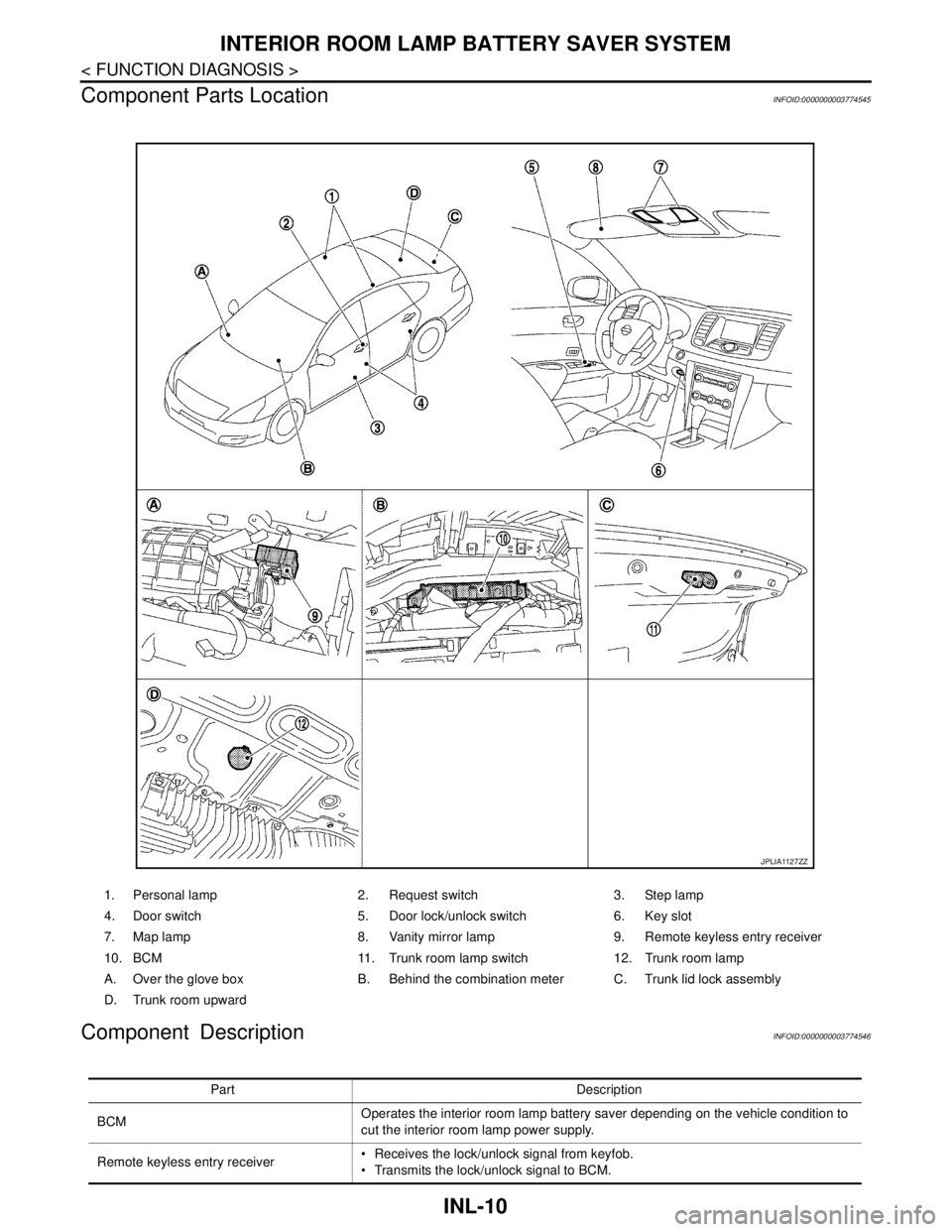
1. Personal lamp 2. Request switch 3. Step lamp
4. Door switch 5. Door lock/unlock switch 6. Key slot
7. Map lamp 8. Vanity mirror lamp 9. Remote keyless entry receiver
10. BCM 11. Trunk room lamp switch 12. Trunk room lamp
A. Over the glove box B. Behind the combination meter C. Trunk lid lock assembly
D. Trunk room upward
JPLIA1127ZZ
Part Description
BCMOperates the interior room lamp battery saver depending on the vehicle condition to
cut the interior room lamp power supply.
Remote keyless entry receiver Receives the lock/unlock signal from keyfob.
Transmits the lock/unlock signal to BCM.
Page 2891 of 5121
INL-12
< FUNCTION DIAGNOSIS >
ILLUMINATION CONTROL SYSTEM
ILLUMINATION CONTROL SYSTEM
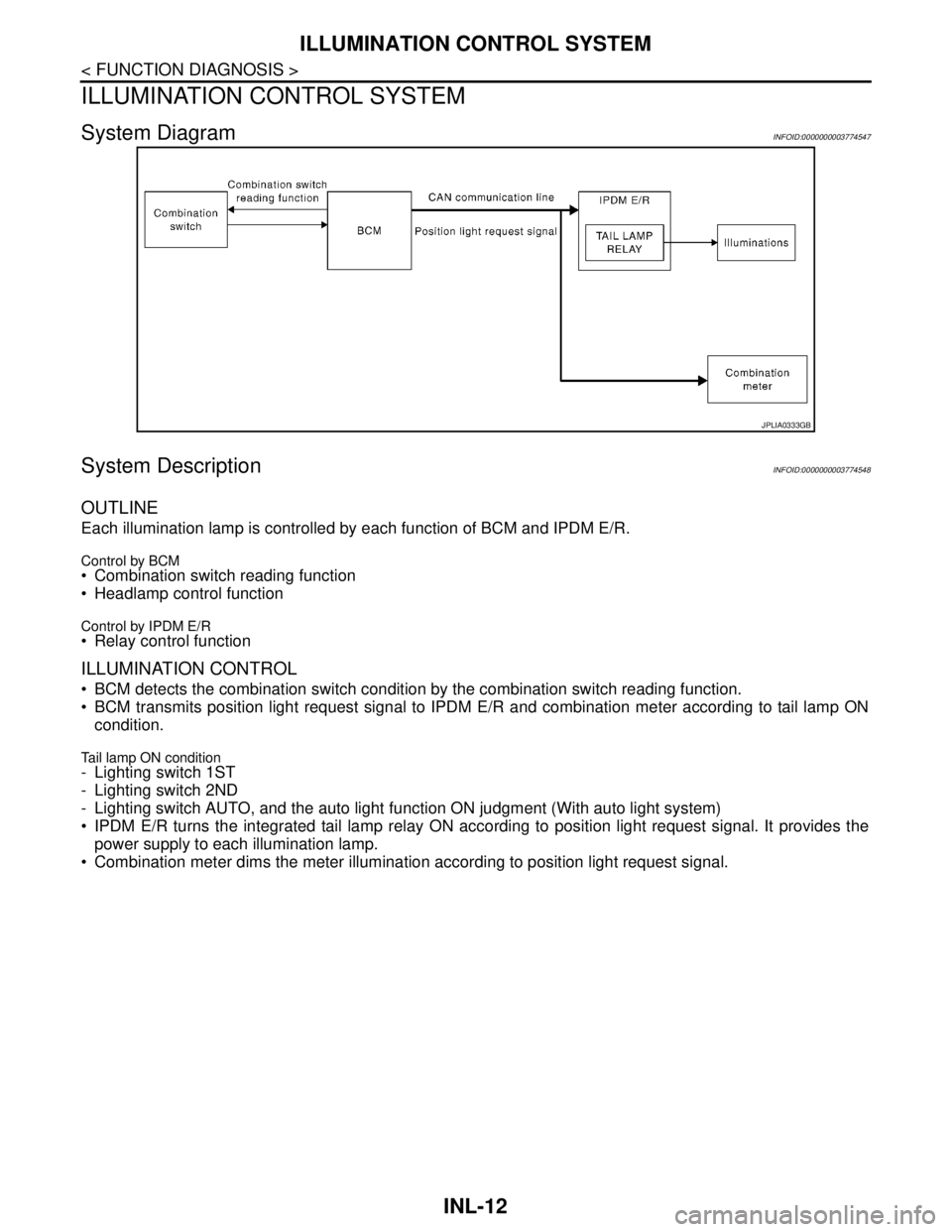
System DiagramINFOID:0000000003774547
System DescriptionINFOID:0000000003774548
OUTLINE
Each illumination lamp is controlled by each function of BCM and IPDM E/R.
Control by BCM Combination switch reading function
Headlamp control function
Control by IPDM E/R Relay control function
ILLUMINATION CONTROL
BCM detects the combination switch condition by the combination switch reading function.
BCM transmits position light request signal to IPDM E/R and combination meter according to tail lamp ON
condition.
Tail lamp ON condition- Lighting switch 1ST
- Lighting switch 2ND
- Lighting switch AUTO, and the auto light function ON judgment (With auto light system)
IPDM E/R turns the integrated tail lamp relay ON according to position light request signal. It provides the
power supply to each illumination lamp.
Combination meter dims the meter illumination according to position light request signal.
JPLIA0333GB
Page 2892 of 5121
ILLUMINATION CONTROL SYSTEM
INL-13
< FUNCTION DIAGNOSIS >
C
D
E
F
G
H
I
J
K
MA
B
INL
N
O
P
Component Parts LocationINFOID:0000000003774549
Component DescriptionINFOID:0000000003774550
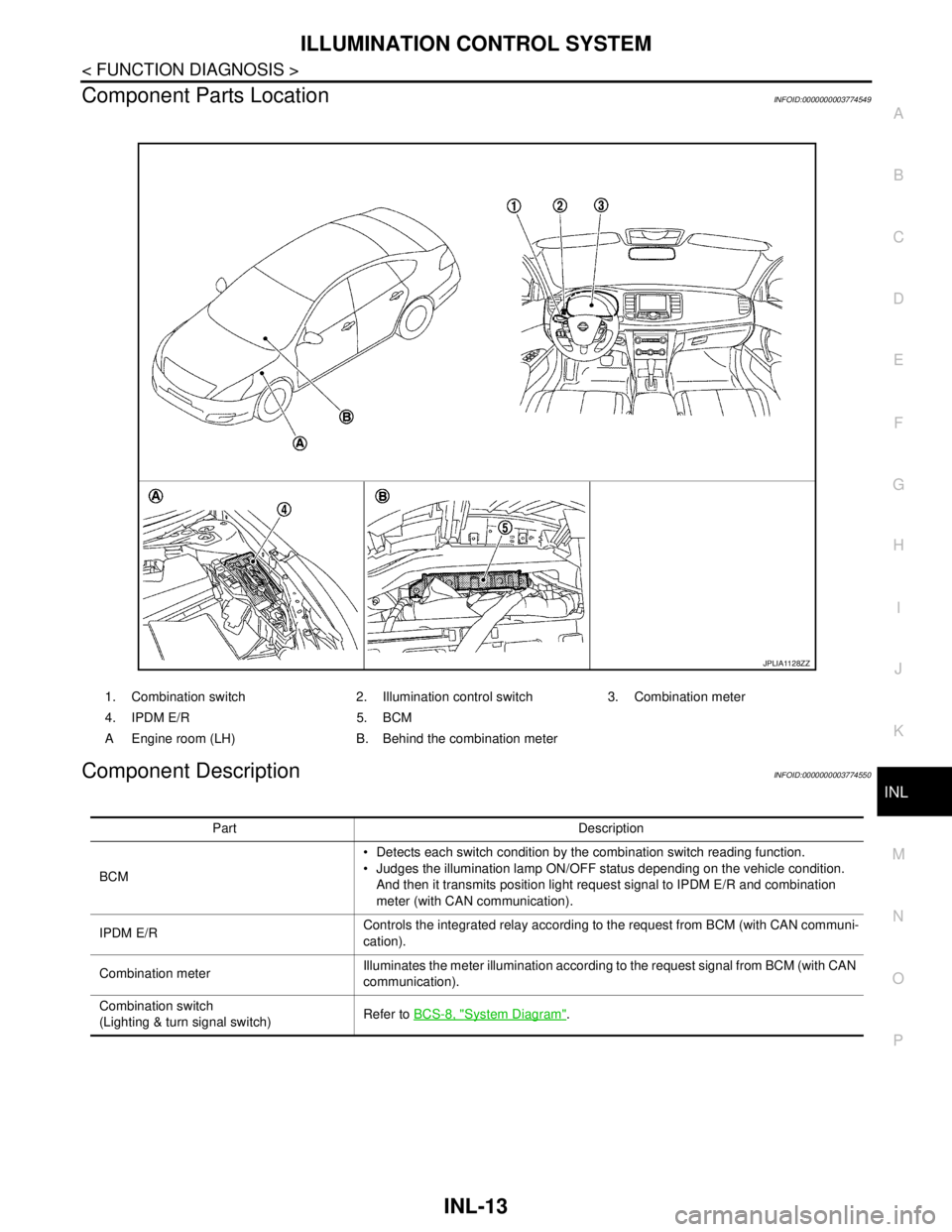
1. Combination switch 2. Illumination control switch 3. Combination meter
4. IPDM E/R 5. BCM
A Engine room (LH) B. Behind the combination meter
JPLIA1128ZZ
Part Description
BCM Detects each switch condition by the combination switch reading function.
Judges the illumination lamp ON/OFF status depending on the vehicle condition.
And then it transmits position light request signal to IPDM E/R and combination
meter (with CAN communication).
IPDM E/RControls the integrated relay according to the request from BCM (with CAN communi-
cation).
Combination meterIlluminates the meter illumination according to the request signal from BCM (with CAN
communication).
Combination switch
(Lighting & turn signal switch)Refer to BCS-8, "
System Diagram".
Page 2963 of 5121

INL-84
< ECU DIAGNOSIS >
BCM (BODY CONTROL MODULE)
HIGH FLASHER OPERATION
BCM detects the turn signal lamp circuit status by the current value.
BCM increases the turn signal lamp blinking speed if the bulb or harness open is detected with the turn signal
lamp operating.
NOTE:
The blinking speed is normal while activating the hazard warning lamp.
DTC Inspection Priority ChartINFOID:0000000003959705
If some DTCs are displayed at the same time, perform inspections one by one based on the following priority
chart.
B2608: STARTER RELAY Inhibit engine cranking500 ms after the following signal communication status becomes
consistent
Starter motor relay control signal
Starter relay status signal (CAN)
B2609: S/L STATUS Inhibit engine cranking
Inhibit steering lockWhen the following steering lock conditions agree
BCM steering lock control status
Steering lock condition No. 1 signal status
Steering lock condition No. 2 signal status
B260A: IGNITION RELAY Inhibit engine cranking500 ms after the following conditions are fulfilled
IGN relay (IPDM E/R) control signal: OFF (Battery voltage)
Ignition ON signal (CAN to IPDM E/R): OFF (Request signal)
Ignition ON signal (CAN from IPDM E/R): OFF (Condition signal)
B260F: ENG STATE SIG LOSTMaintains the power supply
position attained at the time
of DTC detectionWhen any of the following conditions is fulfilled
Power position changes to ACC
Receives engine status signal (CAN)
B2612: S/L STATUS Inhibit engine cranking
Inhibit steering lockWhen any of the following conditions is fulfilled
Steering lock unit status signal (CAN) is received normally
The BCM steering lock control status matches the steering lock
status recognized by the steering lock unit status signal (CAN
from IPDM E/R)
B2617: STARTER RELAY CIRC Inhibit engine cranking1 second after the starter motor relay control inside BCM becomes
normal
B2618: BCM Inhibit engine cranking1 second after the ignition relay (IPDM E/R) control inside BCM be-
comes normal
B2619: BCM Inhibit engine cranking1 second after the steering lock unit power supply output control in-
side BCM becomes normal
B261E: VEHICLE TYPE Inhibit engine cranking BCM initialization
B26E1: ENG STATE NO RES Inhibit engine crankingWhen any of the following conditions is fulfilled
Power position changes to ACC
Receives engine status signal (CAN)
B26E9: S/L STATUS Inhibit engine cranking
Inhibit steering lockWhen BCM transmits the LOCK request signal to steering lock unit,
and receives LOCK response signal from steering lock unit, the fol-
lowing conditions is fulfilled
Steering condition No. 1 signal: LOCK (0 V)
Steering condition No. 2 signal: LOCK (Battery voltage) Display contents of CONSULT Fail-safe Cancellation
Priority DTC
1 B2562: LOW VOLTAGE
2 U1000: CAN COMM CIRCUIT
U1010: CONTROL UNIT (CAN)
3 B2190: NATS ANTENNA AMP
B2191: DIFFERENCE OF KEY
B2192: ID DISCORD BCM-ECM
B2193: CHAIN OF BCM-ECM
Page 3001 of 5121

INT-24
< SYMPTOM DIAGNOSIS >
SQUEAK AND RATTLE TROUBLE DIAGNOSES
SEATS
When isolating seat noise it is important to note the position the seat is in and the load placed on the seat
when the noise occurs. These conditions should be duplicated when verifying and isolating the cause of the
noise.
Cause of seat noise include:
1. Headrest rods and holder
2. A squeak between the seat pad cushion and frame
3. Rear seatback lock and bracket
These noises can be isolated by moving or pressing on the suspected components while duplicating the con-
ditions under which the noise occurs. Most of these incidents can be repaired by repositioning the component
or applying urethane tape to the contact area.
UNDERHOOD
Some interior noise may be caused by components under the hood or on the engine wall. The noise is then
transmitted into the passenger compartment.
Causes of transmitted underhood noise include:
1. Any component mounted to the engine wall
2. Components that pass through the engine wall
3. Engine wall mounts and connectors
4. Loose radiator mounting pins
5. Hood bumpers out of adjustment
6. Hood striker out of adjustment
These noises can be difficult to isolate since they cannot be reached from the interior of the vehicle. The best
method is to secure, move or insulate one component at a time and test drive the vehicle. Also, engine RPM
or load can be changed to isolate the noise. Repairs can usually be made by moving, adjusting, securing, or
insulating the component causing the noise.
Page 3025 of 5121
INT-48
< ON-VEHICLE REPAIR >
FLOOR TRIM
6. Remove instrument lower cover, instrument driver panel, instrument assist lower panel and instrument
side panel (LH/RH). Refer to IP-12, "
Removal and Installation".
7. Remove G-sensor. Refer to VTL-82, "
WITH INTELLIGENT AIR CONDITIONER SYSTEM : Removal and
Installation".
8. Remove diagnosis sensor unit. Refer to SR-22, "
Removal and Installation".
9. Remove dash side finisher (LH/RH), front kicking plate inner (LH/RH), center pillar lower garnish (LH/RH)
and body side welt (LH/RH). Refer to INT-39, "
Removal and Installation".
10. Remove side brake wire. Refer to BR-17, "
Removal and Installation".
11. Remove automatic transmission drive. Refer to FAX-16, "
Exploded View".
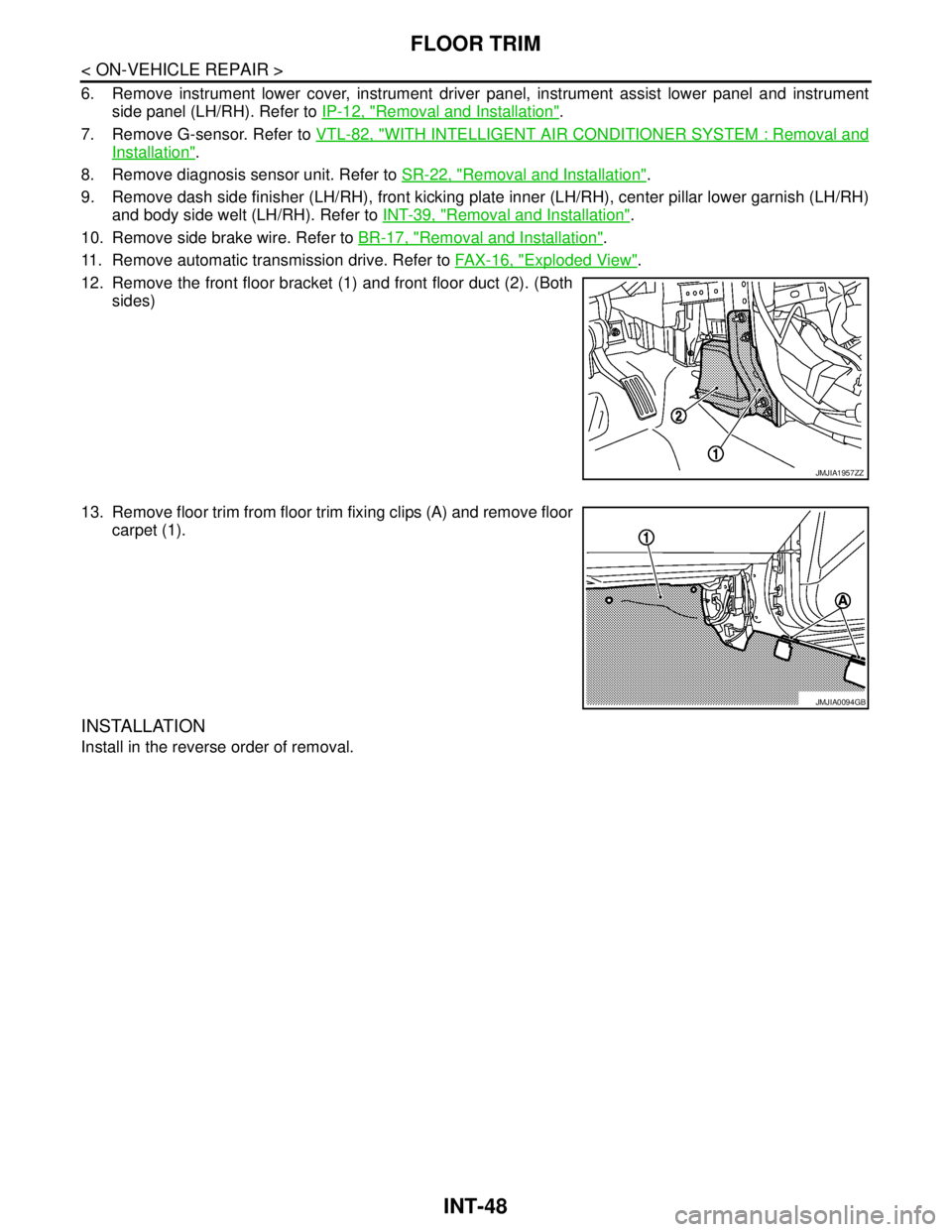
12. Remove the front floor bracket (1) and front floor duct (2). (Both
sides)
13. Remove floor trim from floor trim fixing clips (A) and remove floor
carpet (1).
INSTALLATION
Install in the reverse order of removal.
JMJIA1957ZZ
JMJIA0094GB