2008 NISSAN TEANA torque
[x] Cancel search: torquePage 1092 of 5121
![NISSAN TEANA 2008 Service Manual WHEEL SENSOR
BRC-151
< ON-VEHICLE REPAIR >[VDC/TCS/ABS]
C
D
E
G
H
I
J
K
L
MA
B
BRC
N
O
P
ON-VEHICLE REPAIR
WHEEL SENSOR
FRONT WHEEL SENSOR
FRONT WHEEL SENSOR : Exploded ViewINFOID:0000000003767300
NOT](/manual-img/5/57391/w960_57391-1091.png "NISSAN TEANA 2008 Service Manual WHEEL SENSOR
BRC-151
< ON-VEHICLE REPAIR >[VDC/TCS/ABS]
C
D
E
G
H
I
J
K
L
MA
B
BRC
N
O
P
ON-VEHICLE REPAIR
WHEEL SENSOR
FRONT WHEEL SENSOR
FRONT WHEEL SENSOR : Exploded ViewINFOID:0000000003767300
NOT")
WHEEL SENSOR
BRC-151
< ON-VEHICLE REPAIR >[VDC/TCS/ABS]
C
D
E
G
H
I
J
K
L
MA
B
BRC
N
O
P
ON-VEHICLE REPAIR
WHEEL SENSOR
FRONT WHEEL SENSOR
FRONT WHEEL SENSOR : Exploded ViewINFOID:0000000003767300
NOTE:
The above figure shows left side. Right side is the mirror image.
FRONT WHEEL SENSOR : Removal and InstallationINFOID:0000000003767301
REMOVAL
Be careful with the following when removing sensor.
CAUTION:
Do not twist sensor harness as much as possible, when removing it. Pull sensors out without pulling
sensor harness.
Be careful to avoid damaging sensor edges or rotor teeth. Remove wheel sensor first before remov-
ing front or rear wheel hub. This is to avoid damage to sensor wiring and loss of sensor function.
INSTALLATION
Be careful with the following when installing wheel sensor. Tighten installation bolts to the specified torques.
Refer to BRC-151, "
FRONT WHEEL SENSOR : Exploded View".
CAUTION:
When installing, make sure there is no foreign material such as iron chips on and in the mounting
hole of the wheel sensor. Make sure no foreign material has been caught in the sensor rotor. Remove
any foreign material and clean the mount.
1. Front LH wheel sensor 2. Front LH wheel sensor connector
: Vehicle front
Refer to GI section GI-4, "
Components" for symbol marks in the figure.
JSFIA0221GB
Page 1093 of 5121
![NISSAN TEANA 2008 Service Manual BRC-152
< ON-VEHICLE REPAIR >[VDC/TCS/ABS]
WHEEL SENSOR
Completely push in rubber grommets of strut bracket and body bracket until they lock when install-
ing wheel sensor so that the wheel sensor h](/manual-img/5/57391/w960_57391-1092.png "NISSAN TEANA 2008 Service Manual BRC-152
< ON-VEHICLE REPAIR >[VDC/TCS/ABS]
WHEEL SENSOR
Completely push in rubber grommets of strut bracket and body bracket until they lock when install-
ing wheel sensor so that the wheel sensor h")
BRC-152
< ON-VEHICLE REPAIR >[VDC/TCS/ABS]
WHEEL SENSOR
Completely push in rubber grommets of strut bracket and body bracket until they lock when install-
ing wheel sensor so that the wheel sensor harness will not be twisted. Install grommet groove onto
bracket with orange line on the harness facing bracket opening (mounting hole). There should be no
twists in the harness when installed.
REAR WHEEL SENSOR
REAR WHEEL SENSOR : Exploded ViewINFOID:0000000003767302
NOTE:
The above figure shows left side. Right side is the mirror image.
REAR WHEEL SENSOR : Removal and InstallationINFOID:0000000003767303
REMOVAL
Be careful with the following when removing sensor.
CAUTION:
Do not twist sensor harness as much as possible, when removing it. Pull sensors out without pulling
sensor harness.
Be careful to avoid damaging sensor edges or rotor teeth. Remove wheel sensor first before remov-
ing front or rear wheel hub. This is to avoid damage to sensor wiring and loss of sensor function.
INSTALLATION
Be careful with the following when installing wheel sensor. Tighten installation bolts to the specified torques.
Refer to BRC-152, "
REAR WHEEL SENSOR : Exploded View".
CAUTION:
When installing, make sure there is no foreign material such as iron chips on and in the mounting hole
of the wheel sensor. Make sure no foreign material has been caught in the sensor rotor. Remove any
foreign material and clean the mount.
1. Rear LH wheel sensor connector 2. Rear LH wheel sensor
: Vehicle front
Refer to GI section GI-4, "
Components" for symbol marks in the figure.
JSFIA0222GB
Page 1095 of 5121
![NISSAN TEANA 2008 Service Manual BRC-154
< ON-VEHICLE REPAIR >[VDC/TCS/ABS]
ABS ACTUATOR AND ELECTRIC UNIT (CONTROL UNIT)
ABS ACTUATOR AND ELECTRIC UNIT (CONTROL UNIT)
Exploded ViewINFOID:0000000003767308
Removal and InstallationINFO](/manual-img/5/57391/w960_57391-1094.png "NISSAN TEANA 2008 Service Manual BRC-154
< ON-VEHICLE REPAIR >[VDC/TCS/ABS]
ABS ACTUATOR AND ELECTRIC UNIT (CONTROL UNIT)
ABS ACTUATOR AND ELECTRIC UNIT (CONTROL UNIT)
Exploded ViewINFOID:0000000003767308
Removal and InstallationINFO")
BRC-154
< ON-VEHICLE REPAIR >[VDC/TCS/ABS]
ABS ACTUATOR AND ELECTRIC UNIT (CONTROL UNIT)
ABS ACTUATOR AND ELECTRIC UNIT (CONTROL UNIT)
Exploded ViewINFOID:0000000003767308
Removal and InstallationINFOID:0000000003767299
REMOVAL
CAUTION:
Before servicing, disconnect the battery cable from negative terminal.
To remove brake tube, use a flare nut wrench to prevent flare nuts and brake tube from being dam-
aged. To install, use flare nut crowfoot and torque wrench.
Do not apply excessive impact to ABS actuator and electric unit (control unit), such as dropping it.
Do not remove and install actuator by holding harness.
After work is completed, bleed air from brake tube. Refer to BR-10, "
Bleeding Brake System".
1. Remove cowl top cover. Refer to EXT-20, "
Exploded View".
2. Disconnect ABS actuator and electric unit (control unit) connector.
3. Loosen brake tube flare nuts, then remove brake tubes from ABS actuator and electric unit (control unit).
4. Remove ABS actuator and electric unit (control unit) bracket mounting nuts.
5. Remove ABS actuator and electric unit (control unit) from vehicle.
INSTALLATION
Note the following, and install in the reverse order of removal.
CAUTION:
Before servicing, disconnect the battery cable from negative terminal.
1. ABS actuator and electric unit (control
unit)2. Bushing 3. Bracket
A. From master cylinder secondary side B. From master cylinder primary side C. To front LH brake caliper
D. To rear RH brake caliper E. To rear LH brake caliper F. To front RH brake caliper
: Vehicle front
Refer to GI section GI-4, "
Components" for symbol marks in the figure.
JSFIA0223GB
Page 1096 of 5121
![NISSAN TEANA 2008 Service Manual ABS ACTUATOR AND ELECTRIC UNIT (CONTROL UNIT)
BRC-155
< ON-VEHICLE REPAIR >[VDC/TCS/ABS]
C
D
E
G
H
I
J
K
L
MA
B
BRC
N
O
P
To remove brake tube, use a flare nut wrench to prevent flare nuts and brake](/manual-img/5/57391/w960_57391-1095.png "NISSAN TEANA 2008 Service Manual ABS ACTUATOR AND ELECTRIC UNIT (CONTROL UNIT)
BRC-155
< ON-VEHICLE REPAIR >[VDC/TCS/ABS]
C
D
E
G
H
I
J
K
L
MA
B
BRC
N
O
P
To remove brake tube, use a flare nut wrench to prevent flare nuts and brake")
ABS ACTUATOR AND ELECTRIC UNIT (CONTROL UNIT)
BRC-155
< ON-VEHICLE REPAIR >[VDC/TCS/ABS]
C
D
E
G
H
I
J
K
L
MA
B
BRC
N
O
P
To remove brake tube, use a flare nut wrench to prevent flare nuts and brake tube from being dam-
aged. To install, use flare nut crowfoot and torque wrench.
Do not apply excessive impact to ABS actuator and electric unit (control unit), such as dropping it.
Do not remove and install actuator by holding harness.
After work is completed, bleed air from brake tube. Refer to BR-10, "
Bleeding Brake System".
After installing harness connector in the ABS actuator and electric unit (control unit), make sure
connector is securely locked.
When replacing ABS actuator and electric unit (control unit), make sure to adjust neutral position of
steering angle sensor. Refer to BRC-66, "
ADJUSTMENT OF STEERING ANGLE SENSOR NEUTRAL
POSITION : Description".
Install ABS actuator and electric unit (control unit) as per the follow-
ing steps.
1. Temporarily tighten mounting bolt (1) because the bracket (2) is
temporarily being hold.
2. Tighten mounting bolt (3) while holding the bracket.
3. Tighten mounting bolts to the specified torque in the order of (4),
(1).
JSFIA0271ZZ
Page 1098 of 5121
![NISSAN TEANA 2008 Service Manual STEERING ANGLE SENSOR
BRC-157
< ON-VEHICLE REPAIR >[VDC/TCS/ABS]
C
D
E
G
H
I
J
K
L
MA
B
BRC
N
O
P
STEERING ANGLE SENSOR
Exploded ViewINFOID:0000000003767354
Removal and InstallationINFOID:000000000376](/manual-img/5/57391/w960_57391-1097.png "NISSAN TEANA 2008 Service Manual STEERING ANGLE SENSOR
BRC-157
< ON-VEHICLE REPAIR >[VDC/TCS/ABS]
C
D
E
G
H
I
J
K
L
MA
B
BRC
N
O
P
STEERING ANGLE SENSOR
Exploded ViewINFOID:0000000003767354
Removal and InstallationINFOID:000000000376")
STEERING ANGLE SENSOR
BRC-157
< ON-VEHICLE REPAIR >[VDC/TCS/ABS]
C
D
E
G
H
I
J
K
L
MA
B
BRC
N
O
P
STEERING ANGLE SENSOR
Exploded ViewINFOID:0000000003767354
Removal and InstallationINFOID:0000000003767355
REMOVAL
1. Remove spiral cable assembly. Refer to SR-9, "Exploded View".
2. Remove steering angle sensor from spiral cable assembly.
INSTALLATION
Note the following, and install in the reverse order of removal.
CAUTION:
Never reuse steering angle sensor.
When installing steering angle sensor, tighten it to the specified torque with an electric screwdriver.
Be sure to tighten it completely with no floating and tilting.
After work, make sure to adjust neutral position of steering angle sensor. Refer to BRC-66,
"ADJUSTMENT OF STEERING ANGLE SENSOR NEUTRAL POSITION : Description".
1. Steering angle sensor
: Vehicle front
Refer to GI section GI-4, "
Components" for symbol marks in the figure.
JSFIA0237GB
Page 1132 of 5121
ENGINE COOLANT
CO-9
< ON-VEHICLE MAINTENANCE >
C
D
E
F
G
H
I
J
K
L
MA
CO
N
P O
4. Check drained engine coolant for contaminants such as rust, corrosion or discoloration.
If contaminated, flush the engine cooling system. Refer to CO-10, "
Flushing".
RefillingINFOID:0000000003793168
1. Install reservoir tank if removed, and radiator drain plug.
CAUTION:
Be sure to clean drain plug and install with new O-ring.
If water drain plugs on cylinder block are removed, close and tighten them. Refer to EM-110, "
Dis-
assembly and Assembly".
2. Check that each hose clamp has been firmly tightened.
3. Remove air duct assembly and air cleaner cases (upper and lower) assembly. Refer to EM-26, "
Exploded
View".
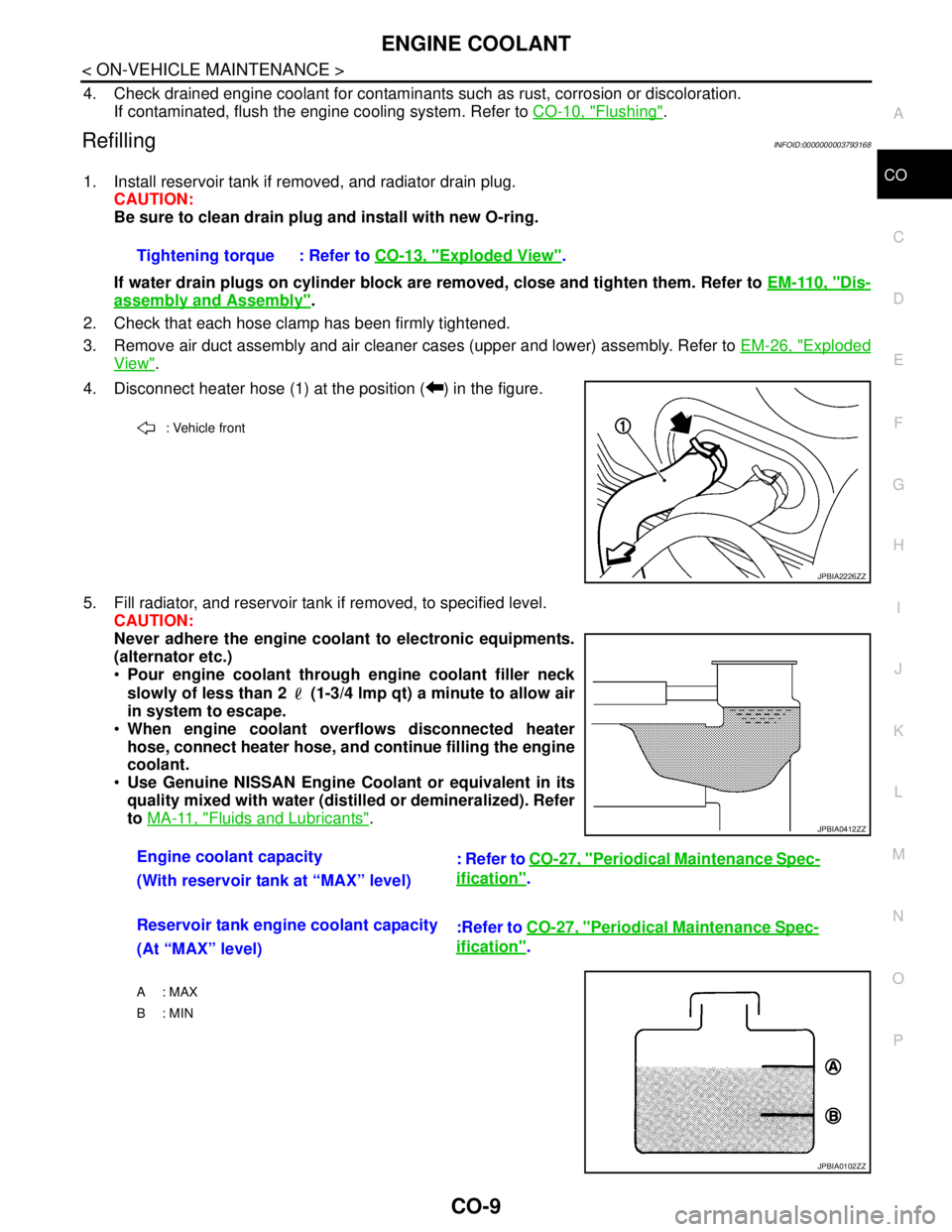
4. Disconnect heater hose (1) at the position ( ) in the figure.
5. Fill radiator, and reservoir tank if removed, to specified level.
CAUTION:
Never adhere the engine coolant to electronic equipments.
(alternator etc.)
Pour engine coolant through engine coolant filler neck
slowly of less than 2 (1-3/4 lmp qt) a minute to allow air
in system to escape.
When engine coolant overflows disconnected heater
hose, connect heater hose, and continue filling the engine
coolant.
Use Genuine NISSAN Engine Coolant or equivalent in its
quality mixed with water (distilled or demineralized). Refer
to MA-11, "
Fluids and Lubricants". Tightening torque : Refer to CO-13, "
Exploded View".
: Vehicle front
JPBIA2226ZZ
Engine coolant capacity
: Refer to CO-27, "Periodical Maintenance Spec-
ification".
(With reservoir tank at “MAX” level)
Reservoir tank engine coolant capacity
:Refer to CO-27, "
Periodical Maintenance Spec-
ification".
(At “MAX” level)
A : MAX
B: MIN
JPBIA0412ZZ
JPBIA0102ZZ
Page 1133 of 5121
CO-10
< ON-VEHICLE MAINTENANCE >
ENGINE COOLANT
6. Install air duct assembly and air cleaner cases (upper and lower) assembly. Refer to EM-26, "Exploded
View".
7. Install radiator cap.
8. Warm up engine until opening thermostat. Standard for warming-up time is approximately 10 minutes at
3,000 rpm.
Check thermostat opening condition by touching radiator hose (lower) to see a flow of warm water.
CAUTION:
Watch water temperature gauge so as not to overheat engine.
9. Stop the engine and cool down to less than approximately 50°C (122°F).
Cool down using fan to reduce the time.
If necessary, refill radiator up to filler neck with engine coolant.
CAUTION:
Never adhere the engine coolant to electronic equipments. (alternator etc.)
10. Refill reservoir tank to “MAX” level line with engine coolant.
11. Repeat steps 7 through 10 two or more times with radiator cap installed until engine coolant level no
longer drops.
12. Check cooling system for leakage with engine running.
13. Warm up the engine, and check for sound of engine coolant flow while running engine from idle up to
3,000 rpm with heater temperature controller set at several position between “COOL” and “WARM”.
Sound may be noticeable at heater unit.
14. Repeat step 13 three times.
15. If sound is heard, bleed air from cooling system by repeating step 5, and steps from 7 to 14 until engine
coolant level no longer drops.
FlushingINFOID:0000000003793169
1. Install reservoir tank if removed, and radiator drain plug.
CAUTION:
Be sure to clean drain plug and install with new O-ring.
If water drain plugs on cylinder block are removed, close and tighten them. Refer to EM-110, "
Dis-
assembly and Assembly".
2. Remove air duct assembly and air cleaner cases (upper and lower) assembly. Refer to EM-26, "
Exploded
View".
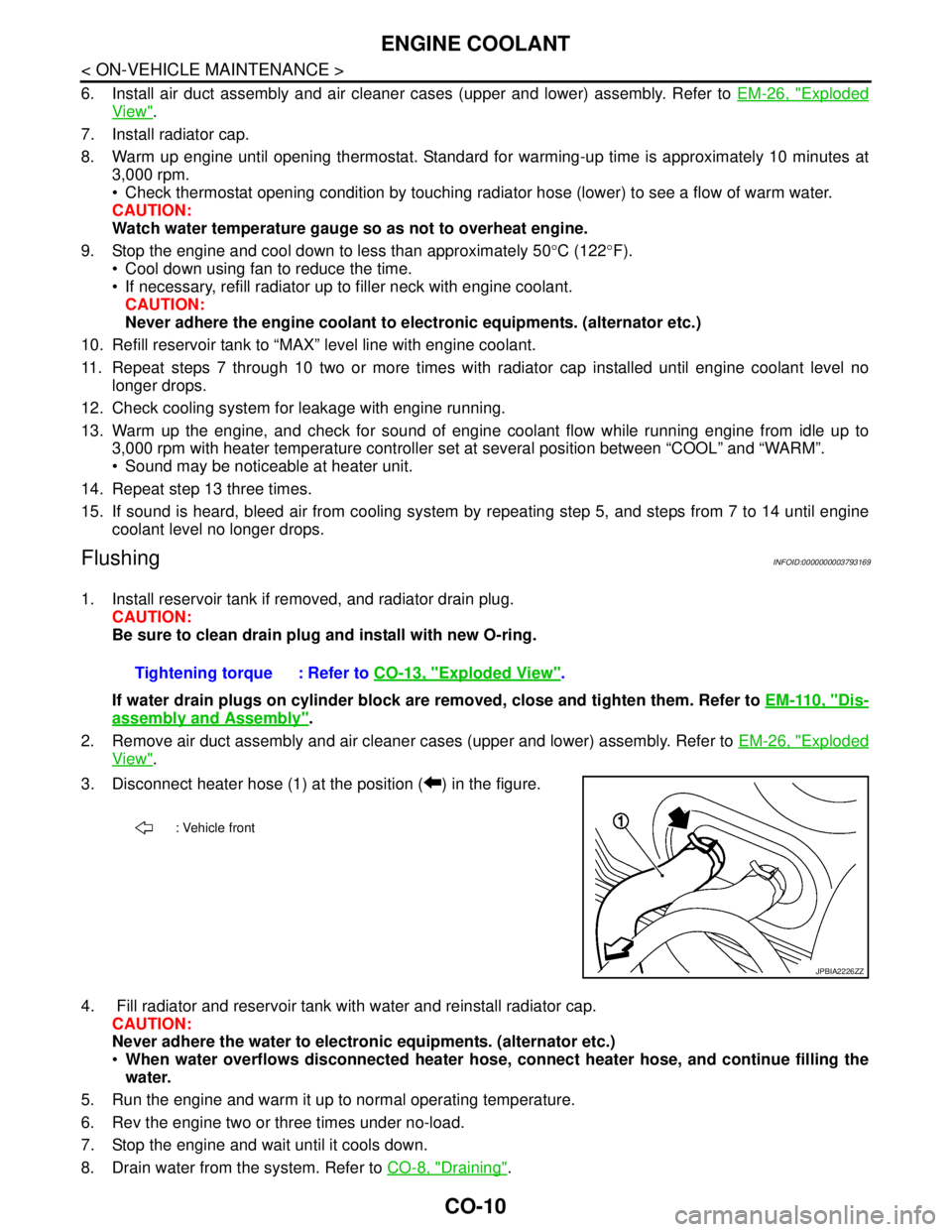
3. Disconnect heater hose (1) at the position ( ) in the figure.
4. Fill radiator and reservoir tank with water and reinstall radiator cap.
CAUTION:
Never adhere the water to electronic equipments. (alternator etc.)
When water overflows disconnected heater hose, connect heater hose, and continue filling the
water.
5. Run the engine and warm it up to normal operating temperature.
6. Rev the engine two or three times under no-load.
7. Stop the engine and wait until it cools down.
8. Drain water from the system. Refer to CO-8, "
Draining". Tightening torque : Refer to CO-13, "
Exploded View".
: Vehicle front
JPBIA2226ZZ
Page 1140 of 5121
COOLING FAN
CO-17
< ON-VEHICLE REPAIR >
C
D
E
F
G
H
I
J
K
L
MA
CO
N
P O
CAUTION:
Be careful not to damage or scratch on radiator core.
INSTALLATION
Note the following, and install in the reverse order of removal.
CAUTION:
Only use genuine parts for cooling fan mounting bolt and observe the specified torque (to prevent
radiator from being damaged).
NOTE:
Cooling fans are controlled by ECM. For details, refer to EC-60, "
System Diagram".
Disassembly and AssemblyINFOID:0000000003793177
DISASSEMBLY
1. Remove cooling fan mounting nuts, and then remove the cooling fans (RH and LH).
2. Remove fan motors (RH and LH).
ASSEMBLY
Note the following, and assemble in the reverse order of disassembly.
CAUTION:
RH and LH cooling fans are different. Be careful not to misassemble them.
Install each fan in the following position.
Secure the harness tightly to the fan shroud to prevent the fan rotation area from being loose.
Apply high thread locking sealant on for motor shaft.
InspectionINFOID:0000000003793178
INSPECTION AFTER DISASSEMBLY
Cooling Fan
Inspect cooling fan for crack or unusual bend.
If anything is found, replace cooling fan.Right side : 11 blades
Left side : 9 blades