2008 MERCEDES-BENZ GLK SUV ECU
[x] Cancel search: ECUPage 88 of 261
X
To release: depress the brake pedal and
keep it depressed.
X Pull release handle :.
The J warning lamp in the instrument
cluster goes out. Switching off the engine
G
Risk of accident
If the engine is not running, there is no power
assistance for the steering and brakes. Steer-
ing and braking will then require significantly
greater effort.
As a result, you might lose control of the vehi-
cle, cause an accident and injure yourself and
others.
Do not switch off the engine while driving.
X Move the selector lever to P.
X Turn the key to position 0(Y page 61) in
the ignition lock and remove it.
The immobiliser is activated.
i The key can only be removed when the
selector lever is in position P.Transmission
Notes on the transmission
G
Risk of accident
The movement of the pedals must not be
impaired in any way. Do not keep any objects
in the driver's footwell. Make sure that floor-
mats or carpets are correctly secured and
that there is sufficient clearance for the ped-
als.
Do not place several floormats on top of one
another. G
Risk of accident
Do not change down for additional engine
braking on a slippery road surface. This could
cause the drive wheels to lose their grip and the vehicle could skid. This could cause you
to lose control of your vehicle and cause an
accident.
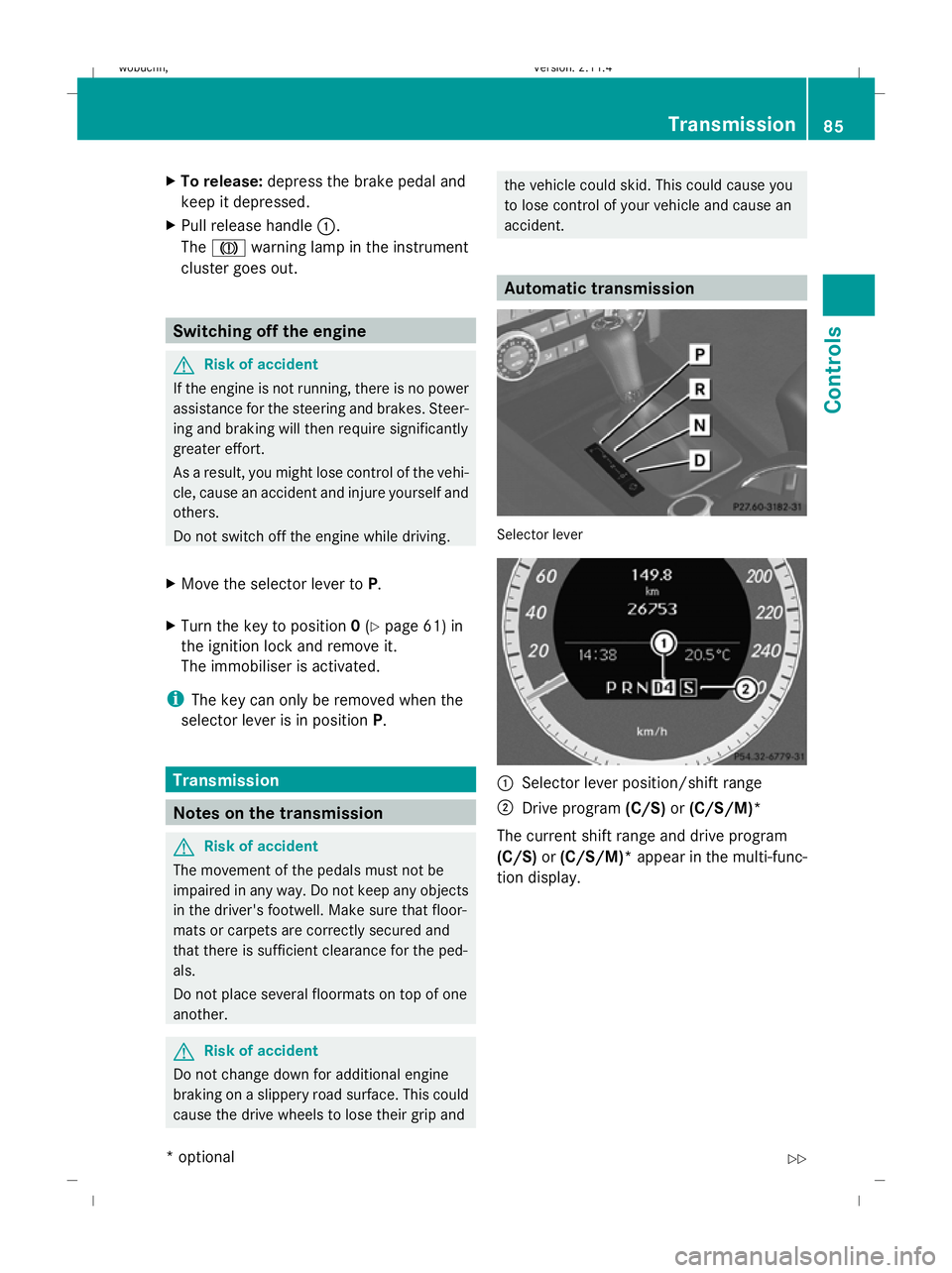
Automatic transmission
Selector lever
:
Selector lever position/shift range
; Drive program (C/S)or(C/S/M)*
The current shift range and drive program
(C/S) or(C/S/M)* appear in the multi-func-
tion display. Transmission
85Controls
* optional
X204_AKB; 1; 5, en-GB
wobuchh
,V ersion: 2.11.4
2008-10-15T13:20:56+02:00 - Seite 85 ZDateiname: 6515_0671_02_buchblock.pdf; preflight
Page 107 of 261
Vehicle
Set permanent SPEEDTRONIC with
Limit
speed (winter tyres): (Ypage 113).
Activating/deactivating automatic door
locking
If you select the Automatic Door Locks:
function, the vehicle is centrally locked above
a speed of around 15 km/h.
For more information on automatic door lock-
ing, see (Y page 59).
X Press the =or; button to select the
Settings menu.
X Press the :or9 button to select the
Vehicle submenu.
X Press the abutton to confirm.
X Press the :or9 button to select the
Automatic door locks: function.
You will see the selected setting: Onor
Off .
X Press the abutton to save the setting.
Convenience Activating/deactivating the easy-entry/
exit feature*
You can use the Easy-Entry/Exit: function
to activate or deactivate the easy-entry/exit
feature (Y page 67). G
Risk of injury
The steering wheel moves when the EASY-
ENTRY/EXIT feature is active. There is a risk
of occupants becoming trapped. Before acti-
vating the EASY-ENTRY/EXIT feature, make
sure that nobody can become trapped.
Do not leave children unsupervised in the
vehicle, even if they are secured in a child
restraint system. The children could open the
driver's door and thereby unintentionally acti-
vate the EASY-ENTRY/EXIT feature and
become trapped. X
Press the =or; button to select the
Settings menu.
X Press the :or9 button to select the
Convenience submenu.
X Press the abutton to confirm.
X Press the :or9 button to select the
Easy Entry/Exit: function.
You will see the selected setting: Onor
Off .
X Press the abutton to save the setting.
Switching the fold in mirrors when lock-
ing*function on/off
If you switch on the Fold mirrors in when
locking: function, the exterior mirrors fold
in when you lock the vehicle. When you
unlock the vehicle and then open the driver's
or front-passenger door, the exterior mirrors
fold out again.
If you have switched the function on and you
fold the exterior mirrors in using the button
on the door (Y page 68), they will not fold out
automatically. The exterior mirrors can then
only be folded out using the button on the
door.
X Press the =or; button to select the
Settings menu.
X Press the :or9 button to select the
Convenience submenu.
X Press the abutton to confirm.
X Press the :or9 button to select the
Fold in mirrors when locking: func-
tion.
You will see the selected setting: Onor
Off .
X Press the abutton to save the setting.
Restoring the factory settings For safety reasons, not all functions are reset:
the
Limit Speed (winter tyres): func-
tion in permanent Speedtronic can only be set
in the Vehicle submenu. The Daytime
driving lights: function in theLights104
On-board computer (12-button multi-function steering wheel*)Controls
* optional
X204_AKB; 1; 5, en-GB
wobuchh,
Version: 2.11.4 2008-10-15T13:20:56+02:00 - Seite 104Dateiname: 6515_0671_02_buchblock.pdf; preflight
Page 132 of 261
ing process is started in the corresponding
direction. You can stop automatic opera-
tion by pressing again.
Resetting the panorama sliding sunroof
and the roller sunblinds Reset the panorama sliding sunroof and the
roller sunblinds if the panorama sliding sun-
roof or the roller sunblinds do not open
smoothly.
X Turn the key to position 1or 2in the ignition
lock.
X Pull the switch to the point of resistance in
the direction of arrow ;until the roller
sunblinds are fully closed.
X Keep the switch pulled for an additional
second.
X Press the switch to the point of resistance
in the direction of arrow :and hold it until
the roller sunblinds are fully open.
X Press the switch to the point of resistance
in the direction of arrow :and hold it until
the panorama sliding sunroof has opened
about 10 cm.
X Pull the switch repeatedly to the point of
resistance in the direction of arrow ;until
the panorama sliding sunroof is fully
closed.
X Keep the switch pulled for an additional
second.
X Check whether the panorama sliding sun-
roof can be opened fully again
(Y page 127).
X If this is not the case, consult a qualified
specialist workshop. Loading and stowing
Loading guidelines
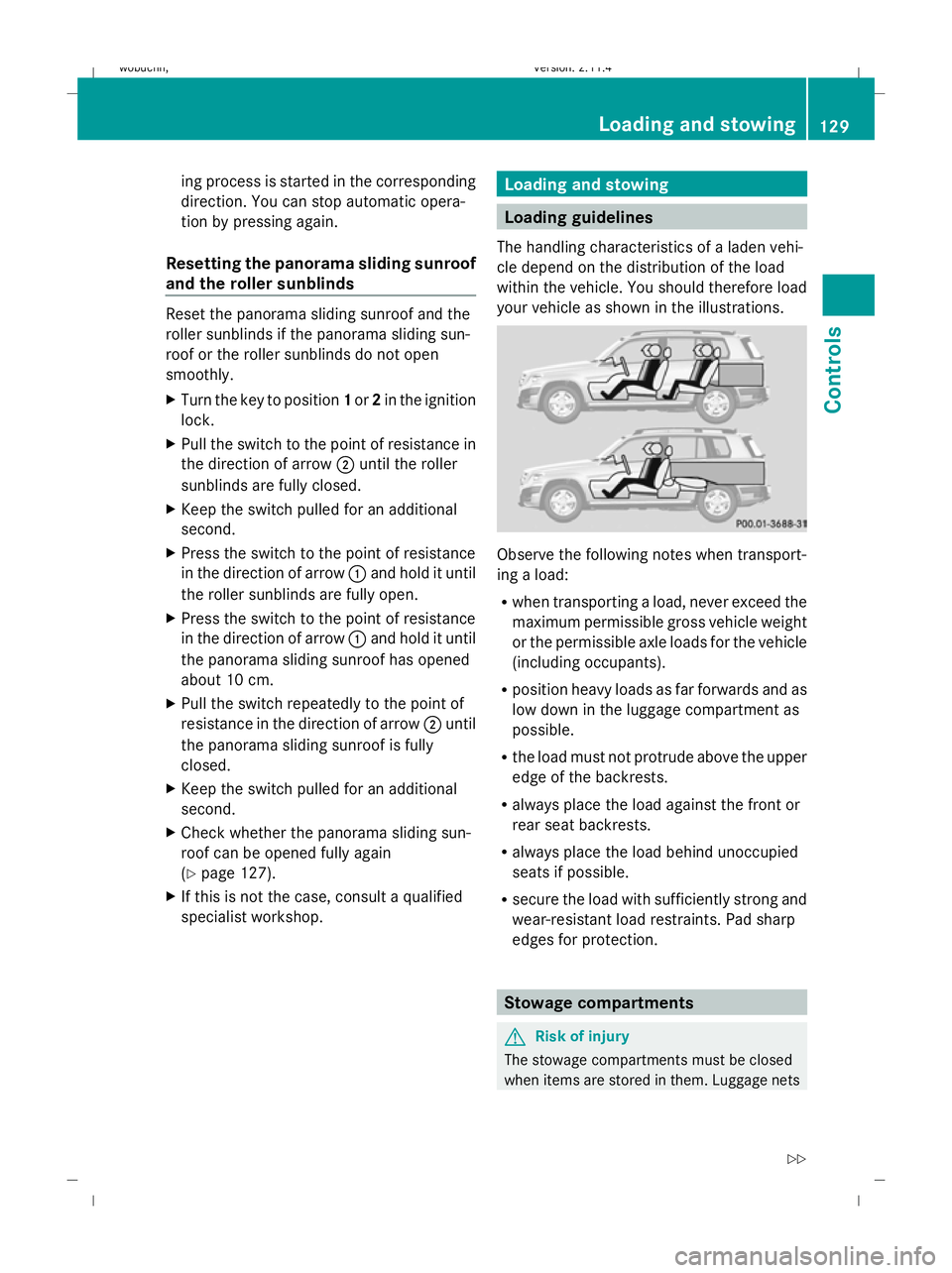
The handling characteristics of a laden vehi-
cle depend on the distribution of the load
within the vehicle. You should therefore load
your vehicle as shown in the illustrations. Observe the following notes when transport-
ing a load:
R
when transporting a load, never exceed the
maximum permissible gross vehicle weight
or the permissible axle loads for the vehicle
(including occupants).
R position heavy loads as far forwards and as
low down in the luggage compartment as
possible.
R the load must not protrude above the upper
edge of the backrests.
R always place the load against the front or
rear seat backrests.
R always place the load behind unoccupied
seats if possible.
R secure the load with sufficiently strong and
wear-resistant load restraints. Pad sharp
edges for protection. Stowage compartments
G
Risk of injury
The stowage compartments must be closed
when items are stored in them. Luggage nets Loading and stowing
129Controls
X204_AKB; 1; 5, en-GB
wobuchh, Version: 2.11.4 2008-10-15T13:20:56+02:00 - Seite 129 ZDateiname: 6515_0671_02_buchblock.pdf; preflight
Page 133 of 261
are not designed to secure heavy items of
luggage.
You or other vehicle occupants could be
injured by objects being thrown around if you:
R brake sharply
R change direction suddenly
R are involved in an accident
Sharp-edged and fragile objects must not be
placed in the luggage net.
Do not place hard objects in the map pockets.
Objects must not protrude from the map
pockets.
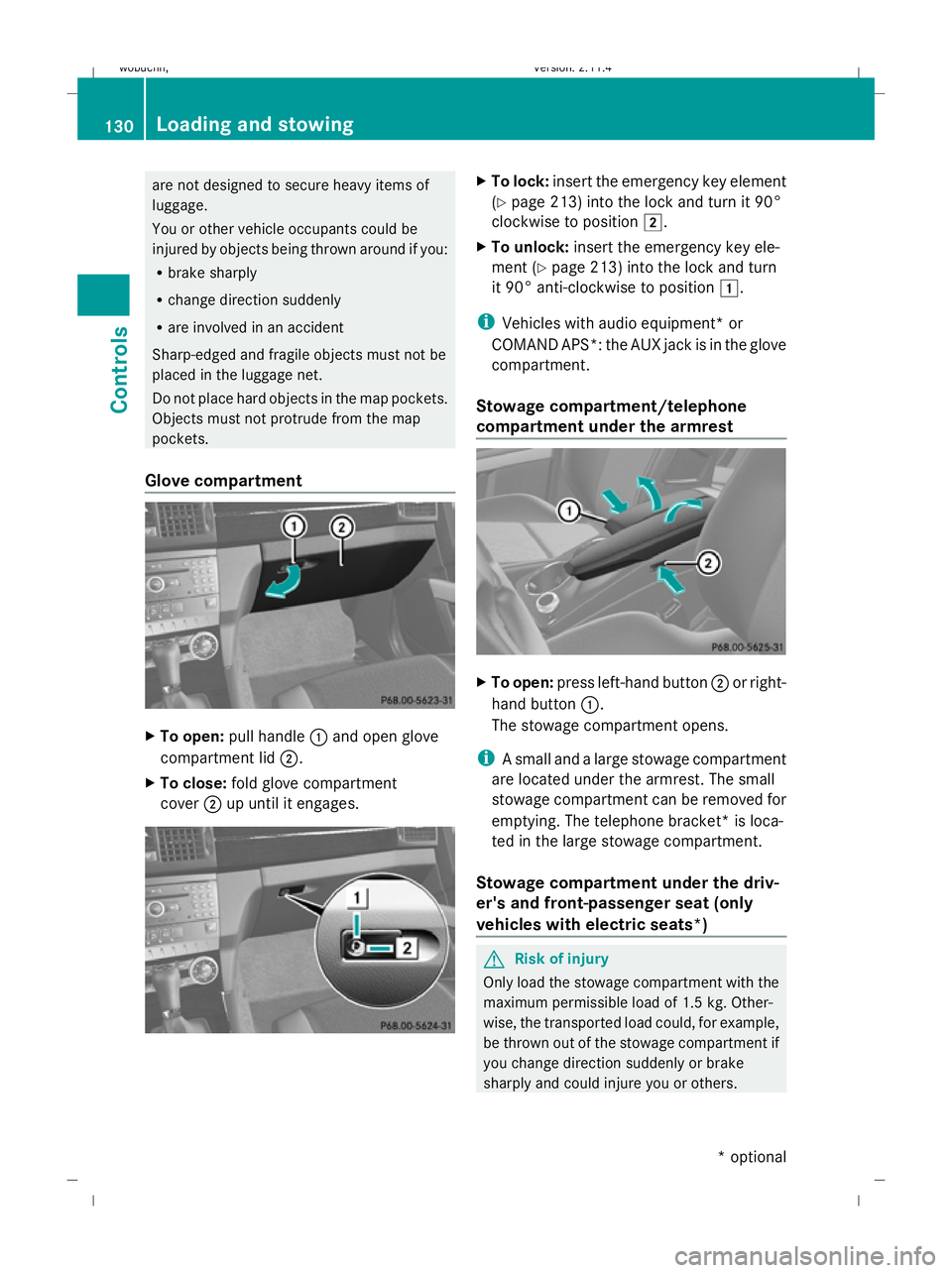
Glove compartment X
To open: pull handle :and open glove
compartment lid ;.
X To close: fold glove compartment
cover ;up until it engages. X
To lock: insert the emergency key element
(Y page 213) into the lock and turn it 90°
clockwise to position 2.
X To unlock: insert the emergency key ele-
ment (Y page 213) into the lock and turn
it 90° anti-clockwise to position 1.
i Vehicles with audio equipment *or
COMAND APS*: the AUX jack is in the glove
compartment.
Stowage compartment/telephone
compartment under the armrest X
To open: press left-hand button ;or right-
hand button :.
The stowage compartment opens.
i A small and a large stowage compartment
are located under the armrest. The small
stowage compartment can be removed for
emptying. The telephone bracket* is loca-
ted in the large stowage compartment.
Stowage compartment under the driv-
er's and front-passenger seat (only
vehicles with electric seats*) G
Risk of injury
Only load the stowage compartment with the
maximum permissible load of 1.5 kg. Other-
wise, the transported load could, for example,
be thrown out of the stowage compartment if
you change direction suddenly or brake
sharply and could injure you or others. 130 Loading and stowingControls
* optional
X204_AKB; 1; 5, en-GB
wobuchh,
Version: 2.11.4 2008-10-15T13:20:56+02:00 - Seite 130Dateiname: 6515_0671_02_buchblock.pdf; preflight
Page 134 of 261
X
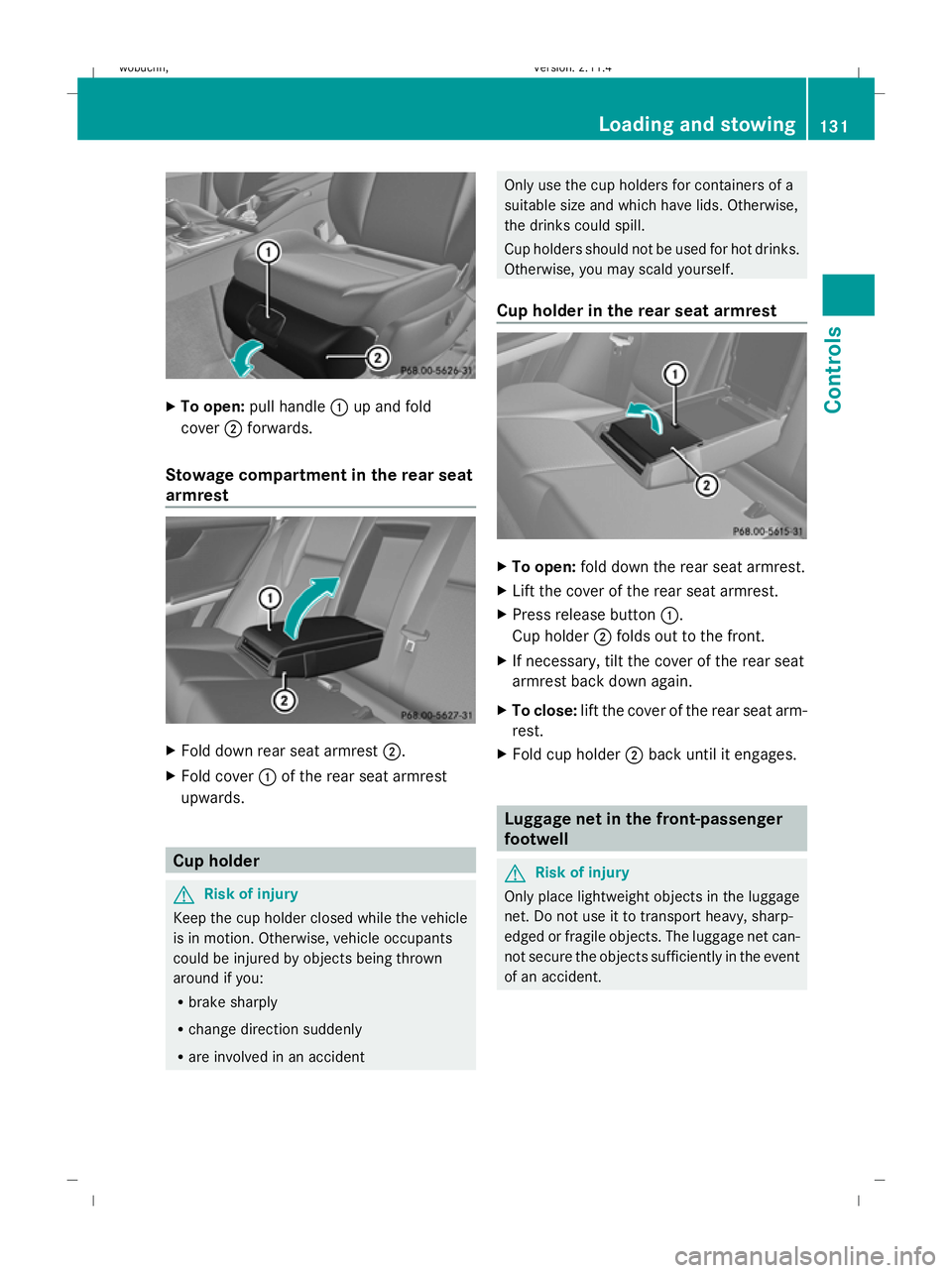
To open: pull handle :up and fold
cover ;forwards.
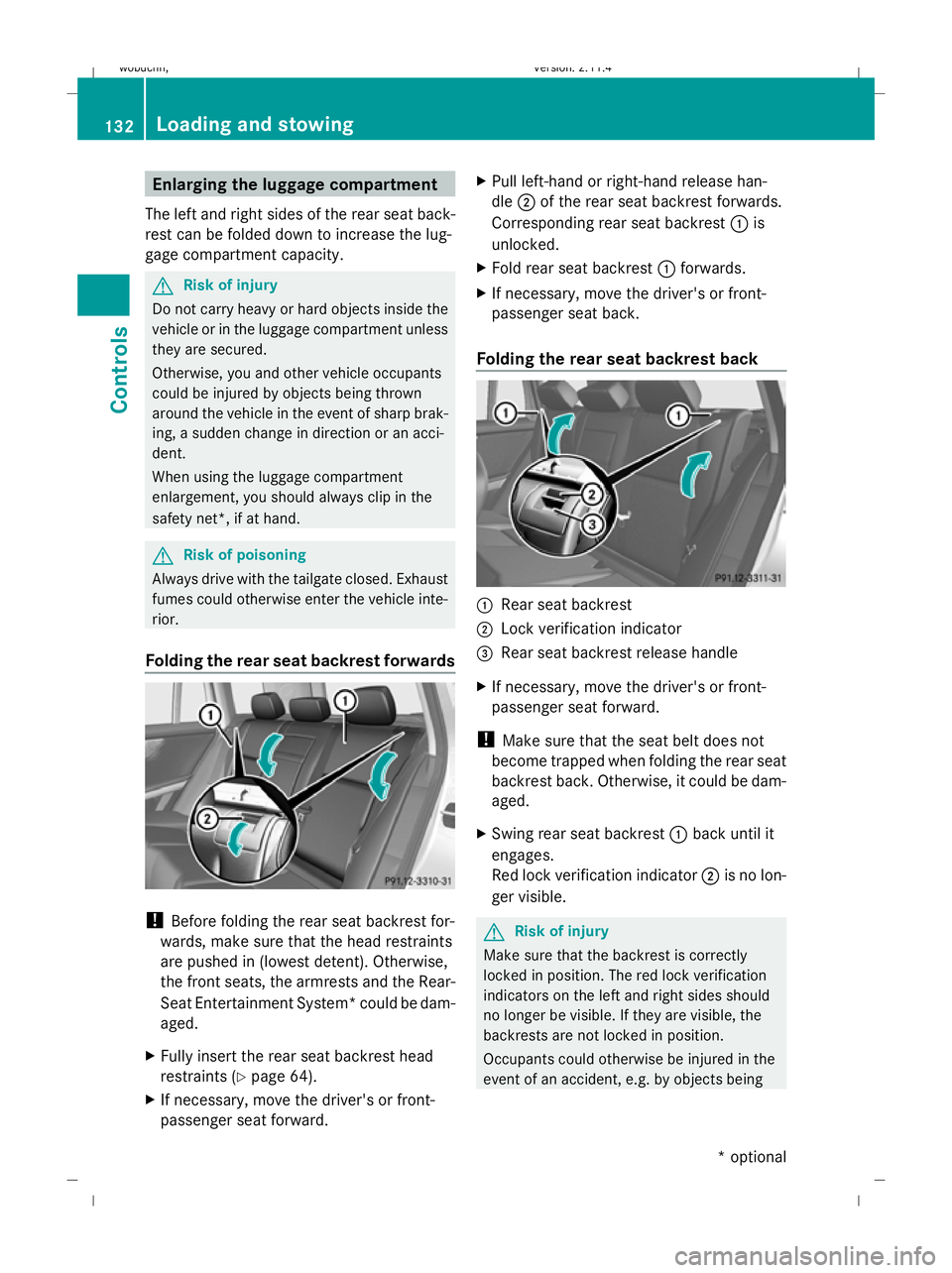
Stowage compartment in the rear seat
armrest X
Fold down rear seat armrest ;.
X Fold cover :of the rear seat armrest
upwards. Cup holder
G
Risk of injury
Keep the cup holder closed while the vehicle
is in motion. Otherwise, vehicle occupants
could be injured by objects being thrown
around if you:
R brake sharply
R change direction suddenly
R are involved in an accident Only use the cup holders for containers of a
suitable size and which have lids. Otherwise,
the drinks could spill.
Cup holders should not be used for hot drinks.
Otherwise, you may scald yourself.
Cup holder in the rear seat armrest X
To open: fold down the rear seat armrest.
X Lift the cover of the rear seat armrest.
X Press release button :.
Cup holder ;folds out to the front.
X If necessary, tilt the cover of the rear seat
armrest back down again.
X To close: lift the cover of the rear seat arm-
rest.
X Fold cup holder ;back until it engages. Luggage net in the front-passenger
footwell
G
Risk of injury
Only place lightweight objects in the luggage
net. Do not use it to transport heavy, sharp-
edged or fragile objects. The luggage net can-
not secure the objects sufficiently in the event
of an accident. Loading and stowing
131Controls
X204_AKB; 1; 5, en-GB
wobuchh,V ersion: 2.11.4
2008-10-15T13:20:56+02:00 - Seite 131 ZDateiname: 6515_0671_02_buchblock.pdf; preflight
Page 135 of 261
Enlarging the luggage compartment
The left and right sides of the rear seat back-
rest can be folded down to increase the lug-
gage compartment capacity. G
Risk of injury
Do not carry heavy or hard objects inside the
vehicle or in the luggage compartment unless
they are secured.
Otherwise, you and other vehicle occupants
could be injured by objects being thrown
around the vehicle in the event of sharp brak-
ing, a sudden change in direction or an acci-
dent.
When using the luggage compartment
enlargement, you should always clip in the
safety net*, if at hand. G
Risk of poisoning
Always drive with the tailgate closed. Exhaust
fumes could otherwise enter the vehicle inte-
rior.
Folding the rear seat backrest forwards !
Before folding the rear seat backrest for-
wards, make sure that the head restraints
are pushed in (lowest detent). Otherwise,
the front seats, the armrests and the Rear-
Seat Entertainment System* could be dam-
aged.
X Fully insert the rear seat backrest head
restraints (Y page 64).
X If necessary, move the driver's or front-
passenger seat forward. X
Pull left-hand or right-hand release han-
dle ;of the rear seat backrest forwards.
Corresponding rear seat backrest :is
unlocked.
X Fold rear seat backrest :forwards.
X If necessary, move the driver's or front-
passenger seat back.
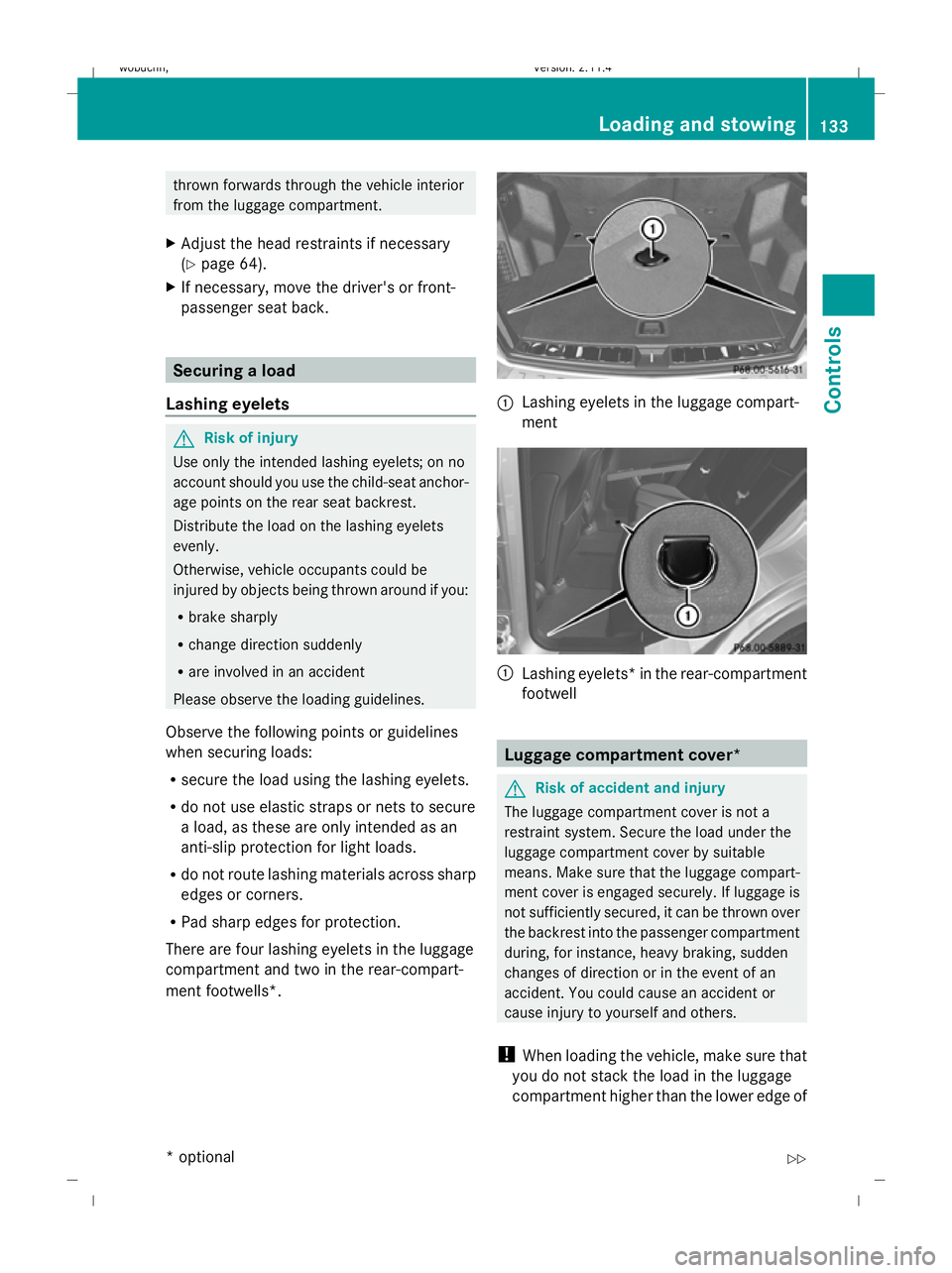
Folding the rear seat backrest back :
Rear seat backrest
; Lock verification indicator
= Rear seat backrest release handle
X If necessary, move the driver's or front-
passenger seat forward.
! Make sure that the seat belt does not
become trapped when folding the rear seat
backrest back. Otherwise, it could be dam-
aged.
X Swing rear seat backrest :back until it
engages.
Red lock verification indicator ;is no lon-
ger visible. G
Risk of injury
Make sure that the backrest is correctly
locked in position. The red lock verification
indicators on the left and right sides should
no longer be visible. If they are visible, the
backrests are not locked in position.
Occupants could otherwise be injured in the
event of an accident, e.g. by objects being 132 Loading and stowingControls
* optional
X204_AKB; 1; 5, en-GB
wobuchh,
Version: 2.11.4 2008-10-15T13:20:56+02:00 - Seite 132Dateiname: 6515_0671_02_buchblock.pdf; preflight
Page 136 of 261
thrown forwards through the vehicle interior
from the luggage compartment.
X Adjust the head restraints if necessary
(Y page 64).
X If necessary, move the driver's or front-
passenger seat back. Securing a load
Lashing eyelets G
Risk of injury
Use only the intended lashing eyelets; on no
account should you use the child-seat anchor-
age points on the rear seat backrest.
Distribute the load on the lashing eyelets
evenly.
Otherwise, vehicle occupants could be
injured by objects being thrown around if you:
R brake sharply
R change direction suddenly
R are involved in an accident
Please observe the loading guidelines.
Observe the following points or guidelines
when securing loads:
R secure the load using the lashing eyelets.
R do not use elastic straps or nets to secure
a load, as these are only intended as an
anti-slip protection for light loads.
R do not route lashing materials across sharp
edges or corners.
R Pad sharp edges for protection.
There are four lashing eyelets in the luggage
compartment and two in the rear-compart-
ment footwells*. :
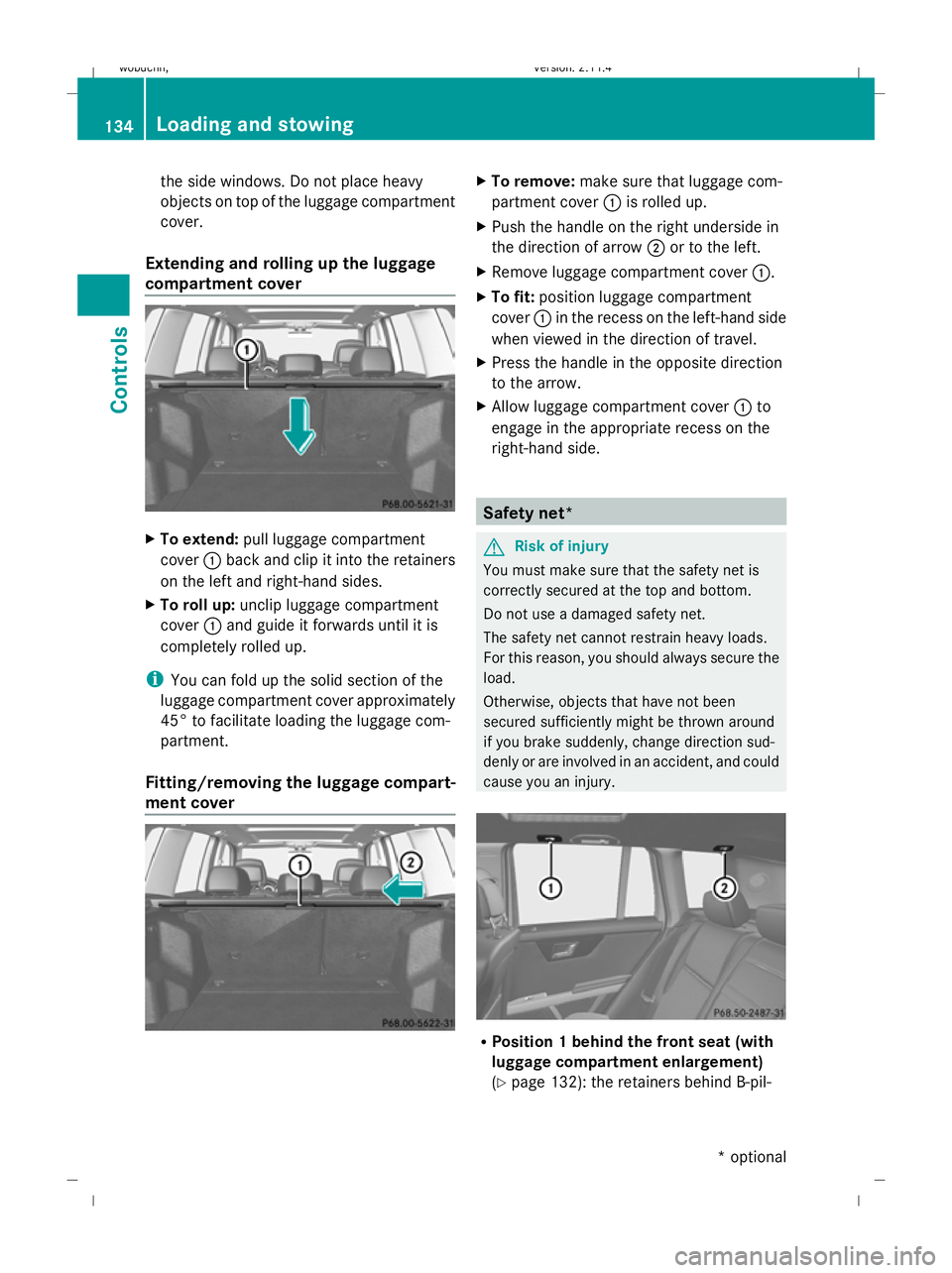
Lashing eyelets in the luggage compart-
ment :
Lashing eyelets *in the rear-compartment
footwell Luggage compartment cover*
G
Risk of accident and injury
The luggage compartment cover is not a
restraint system. Secure the load under the
luggage compartment cover by suitable
means. Make sure that the luggage compart-
ment cover is engaged securely. If luggage is
not sufficiently secured, it can be thrown over
the backrest into the passenger compartment
during, for instance, heavy braking, sudden
changes of direction or in the event of an
accident. You could cause an accident or
cause injury to yourself and others.
! When loading the vehicle, make sure that
you do not stack the load in the luggage
compartment higher than the lower edge of Loading and stowing
133Controls
* optional
X204_AKB; 1; 5, en-GB
wobuchh
,V ersion: 2.11.4
2008-10-15T13:20:56+02:00 - Seite 133 ZDateiname: 6515_0671_02_buchblock.pdf; preflight
Page 137 of 261
the side windows. Do not place heavy
objects on top of the luggage compartment
cover.
Extending and rolling up the luggage
compartment cover X
To extend: pull luggage compartment
cover :back and clip it into the retainers
on the left and right-hand sides.
X To roll up: unclip luggage compartment
cover :and guide it forwards until it is
completely rolled up.
i You can fold up the solid section of the
luggage compartment cover approximately
45° to facilitate loading the luggage com-
partment.
Fitting/removing the luggage compart-
ment cover X
To remove: make sure that luggage com-
partment cover :is rolled up.
X Push the handle on the right underside in
the direction of arrow ;or to the left.
X Remove luggage compartment cover :.
X To fit: position luggage compartment
cover :in the recess on the left-hand side
when viewed in the direction of travel.
X Press the handle in the opposite direction
to the arrow.
X Allow luggage compartment cover :to
engage in the appropriate recess on the
right-hand side. Safety net*
G
Risk of injury
You must make sure that the safety net is
correctly secured at the top and bottom.
Do not use a damaged safety net.
The safety net cannot restrain heavy loads.
For this reason, you should always secure the
load.
Otherwise, objects that have not been
secured sufficiently might be thrown around
if you brake suddenly, change direction sud-
denly or are involved in an accident, and could
cause you an injury. R
Position 1 behind the front seat (with
luggage compartment enlargement)
(Y page 132): the retainers behind B-pil- 134 Loading and sto
wingControls
* optional
X204_AKB; 1; 5, en-GB
wobuchh,
Version: 2.11.4 2008-10-15T13:20:56+02:00 - Seite 134Dateiname: 6515_0671_02_buchblock.pdf; preflight