2008 MERCEDES-BENZ CLS COUPE oil temperature
[x] Cancel search: oil temperaturePage 13 of 329
10 N
Navigation . . . . . . . . . . . . . . . . . . . . . 120
Navigation menu (on-board com-
puter) . . . . . . . . . . . . . . . . . . . . . . . 120
NECK-PRO head restraint . . . . . . . . . . 49
Resetting triggered NECK-PRO
head restraints . . . . . . . . . . . . . . . . 269 O
Oil topping up
. . . . . . . . . . . . . . . . . . . 195
On-board computer . . . . . . . . . . . . . . 111
AMG menu . . . . . . . . . . . . . . . . . . . 116
Audio menu . . . . . . . . . . . . . . . . . . 118
Convenience submenu . . . . . . . . . . 123
Display message . . . . . . . . . . . . . . 219
DVD menu . . . . . . . . . . . . . . . . . . . 120
Dynamic driving seat submenu . . . 129
Factory settings . . . . . . . . . . . . . . . 121
Heater submenu . . . . . . . . . . . . . . 123
Instrument cluster submenu . . . . . 122
Lighting submenu . . . . . . . . . . . . . 122
Message memory menu . . . . . . . . . 121
Navigation menu . . . . . . . . . . . . . . 120
Settings menu . . . . . . . . . . . . . . . . 121
Standard display menu . . . . . . . . . 115
Telephone menu . . . . . . . . . . . . . . 130
Time/Date submenu . . . . . . . . . . . 122
Trip computer menu . . . . . . . . . . . . 129 TV menu
. . . . . . . . . . . . . . . . . . . . . 119
Vehicle submenu . . . . . . . . . . . . . . 123
One-touch gearshifting . . . . . . . . . . . 105
Operating system see On-board computer
Outside temperature
Display (on-board computer) . 111, 116
Overhead control panel
Overview . . . . . . . . . . . . . . . . . . . . . 36
Own number sending (mobile
phone) . . . . . . . . . . . . . . . . . . . . . . . . . 184 P
Paint code number
. . . . . . . . . . . . . . 300
Parking . . . . . . . . . . . . . . . . . . . . . . . . 103
Parking aid . . . . . . . . . . . . . . . . . . . . . . 85 Parktronic . . . . . . . . . . . . . . . . . . . 148
Parking brake . . . . . . . . . . . . . . . . . . . 104
Display message . . . . . . . . . . . . . . 231
Parking lamps
Display message . . . . . . . . . . . . . . 236
Parking lock
Releasing manually (automatic
transmission) . . . . . . . . . . . . . . . . . 268
Parking position
Exterior mirror . . . . . . . . . . . . . . . . . 85
Parktronic . . . . . . . . . . . . . . . . . . . . . . 148
Activating/deactivating . . . . . . . . . 150
Malfunction . . . . . . . . . . . . . . . . . . 258 Range of the sensors
. . . . . . . . . . . 148
Warning display . . . . . . . . . . . . . . . 149
PASSENGER AIRBAG OFF warning
lamp . . . . . . . . . . . . . . . . . . . . . . . 51, 242
Performance . . . . . . . . . . . . . . . . . . . 303
Permanent Speedtronic . . . . . . . . . . 144
Petrol Minimum grade . . . . . . . . . . . . . . . 191
Plastic trim
Cleaning . . . . . . . . . . . . . . . . . . . . . 212
Power windows
see Side window
PRE-SAFE ®
system . . . . . . . . . . . . . . . . 48
PRE-SAFE ®
System
Display message . . . . . . . . . . . . . . 223
Preventive occupant safety system
see PRE-SAFE ®
Program selector button
Automatic transmission . . . . . . . . . 106
Pulling away . . . . . . . . . . . . . . . . . . . . 103 R
RACETIMER (on-board computer)
. . 117
Radio Changing a station (on-board
computer) . . . . . . . . . . . . . . . . . . . 119
see separate operating instructions
Rain closing feature (sliding/tilt-
ing sunroof) . . . . . . . . . . . . . . . . . . . . 171 Index
219_AKB; 2; 4, en-GB
mkalafa,
2007-11-13T09:28:36+01:00 - Seite 10
Page 16 of 329
13
Vehicle dimensions
. . . . . . . . . . . . 309
Vehicle weights . . . . . . . . . . . . . . . 310
Wheels . . . . . . . . . . . . . . . . . . . . . . 305
Telephone
see Mobile phone
Temperature
Engine oil (on-board computer) . . . 116
Outside temperature . . . . . . . . . . . 111
Thermatic
Malfunction indicator lamp . . . . . . 242
Thermotronic
Malfunction indicator lamp . . . . . . 242
Third brake lamp
Display message . . . . . . . . . . . . . . 234
Tightening torque . . . . . . . . . . . . . . . 286
Time Lap time (on-board computer) . . . . 117
Setting (on-board computer) . . . . . 124
Setting the time (on-board com-
puter) . . . . . . . . . . . . . . . . . . . . . . . 124
Timer (on-board computer) . . . . . . . 117
TIREFIT kit Storage location . . . . . . . . . . . . . . . 217
Using . . . . . . . . . . . . . . . . . . . . . . . 277
Total distance recorder
. . . . . . . . . . . . . . . . . . . . . . . . . . . . . 27, 29
Resetting the trip meter . . . . . . . . . 110
Tow-away protection . . . . . . . . . . . . . . 62
Towing . . . . . . . . . . . . . . . . . . . . . . . . 294 Towing eye
Fitting . . . . . . . . . . . . . . . . . . . . . . . 294
Removing . . . . . . . . . . . . . . . . . . . . 295
Transmission output (maximum)
Telephone/two-way radio . . . . . . . 299
Transport (vehicle) . . . . . . . . . . . . . . 295
Trip computer
Menu (on-board computer) . . . . . . 129
Trip meter . . . . . . . . . . . . . . . . . . . . . . 115
Resetting . . . . . . . . . . . . . . . . . . . . 110
Turn signal lamps
Display message . . . . . . . . . . 233, 234
TV
Operation (on-board computer) . . . 119
Two-way radio
Installation . . . . . . . . . . . . . . . . . . . 299
Tyre grip . . . . . . . . . . . . . . . . . . . . . . . 207
Tyre pressure . . . . . . . . . . . . . . . . . . 200
Calling up (on-board computer) . . 202
Display message . . . . . . . . . . 224, 237
Tyre pressure loss warning system 201
Tyre pressure monitor Warning lamp . . . . . . . . . . . . . . . . . 248
Tyre pressures
Table . . . . . . . . . . . . . . . . . . . . . . . 304
Tyres
Direction of rotation . . . . . . . . . . . . 199
General notes . . . . . . . . . . . . . . . . . 198
Technical data . . . . . . . . . . . . . . . . 305
Tyre tread . . . . . . . . . . . . . . . . . . . . . . 200 U
Unit for distance Setting (on-board computer)
. . . . . 123
Unladen weight . . . . . . . . . . . . . . . . . 310
Unlocking Emergency unlocking . . . . . . . . . . . 266
From the inside (central unlocking
button) . . . . . . . . . . . . . . . . . . . . . . . 70
Up (display message) . . . . . . . . . . . . 116 V
Variable Speedtronic . . . . . . . . . . . . .
142
Vehicle Emergency unlocking . . . . . . . 266, 267
Individual settings (on-board com-
puter) . . . . . . . . . . . . . . . . . . . . . . . 121
Leaving parked up . . . . . . . . . . . . . 265
Towing . . . . . . . . . . . . . . . . . . . . . . 294
Transporting . . . . . . . . . . . . . . . . . . 295
Vehicle battery . . . . . . . . . . . . . . . . . 288
Vehicle dimensions . . . . . . . . . . . . . . 309
Vehicle electronics . . . . . . . . . . . . . . 299
Vehicle identification plates . . . . . . 300
Vehicle level Display message . . . . . . . . . . . . . . 229
Setting (AIRMATIC DC) . . . . . . . . . 146
Vehicle tool kit . . . . . . . . . . . . . . . . . . 217
Vehicle weights . . . . . . . . . . . . . . . . . 310 Index
219_AKB; 2; 4, en-GB
mkalafa,
2007-11-13T09:28:36+01:00 - Seite 13
Page 119 of 329
On-board computer
116
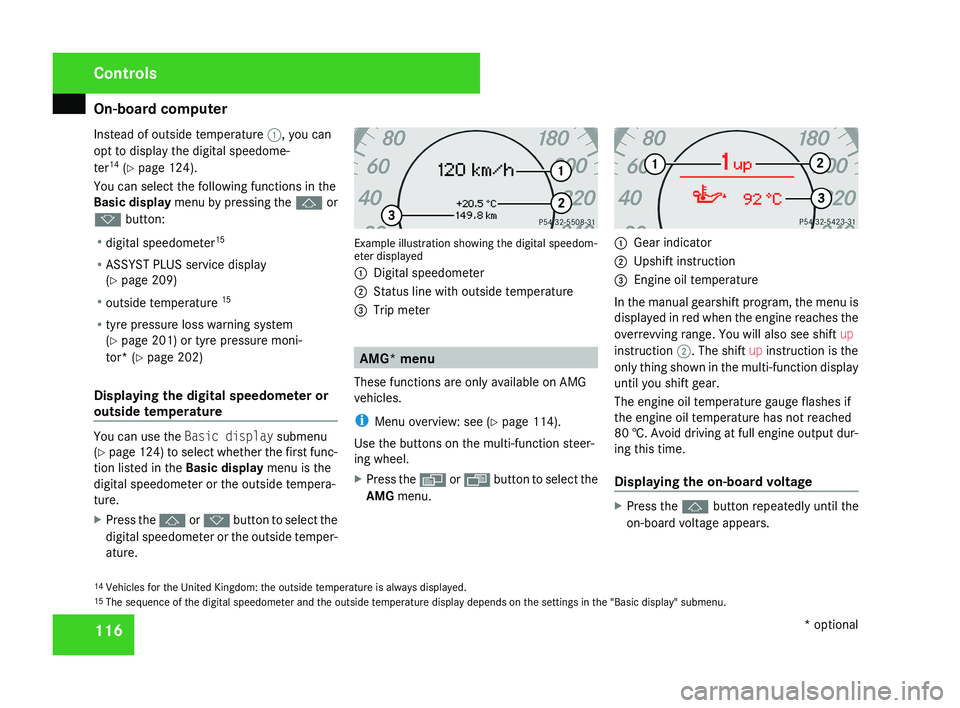
Instead of outside temperature
1, you can
opt to display the digital speedome-
ter 14
(Y page 124).
You can select the following functions in the
Basic display menu by pressing the j or
k button:
R digital speedometer 15
R ASSYST PLUS service display
(Y page 209)
R outside temperature 15
R tyre pressure loss warning system
(Y page 201) or tyre pressure moni-
tor* (Y page 202)
Displaying the digital speedometer or
outside temperature You can use the
Basic display submenu
(Y page 124) to select whether the first func-
tion listed in the Basic display menu is the
digital speedometer or the outside tempera-
ture.
X Press the j or k button to select the
digital speedometer or the outside temper-
ature. Example illustration showing the digital speedom-
eter displayed
1
Digital speedometer
2 Status line with outside temperature
3 Trip meter AMG* menu
These functions are only available on AMG
vehicles.
i Menu overview: see ( Y page 114).
Use the buttons on the multi-function steer-
ing wheel.
X Press the è or · button to select the
AMG menu. 1
Gear indicator
2 Upshift instruction
3 Engine oil temperature
In the manual gearshift program, the menu is
displayed in red when the engine reaches the
overrevving range. You will also see shift up
instruction 2. The shift up instruction is the
only thing shown in the multi-function display
until you shift gear.
The engine oil temperature gauge flashes if
the engine oil temperature has not reached
80 †. Avoid driving at full engine output dur-
ing this time.
Displaying the on-board voltage X
Press the j button repeatedly until the
on-board voltage appears.
14 Vehicles for the United Kingdom: the outside temperature is always displayed.
15 The sequence of the digital speedometer and the outside temperature display depends on the settings in the "Basic display" submenu. Controls
* optional
219_AKB; 2; 4, en-GB
mkalafa,
2007-11-13T09:28:36+01:00 - Seite 116
Page 196 of 329
Engine compartment
193
R
Vegetable oil
R Petrol
R Petroleum
R Kerosene
Do
not add such fuels to diesel fuel and do
not use any special additives (exception:
flow improvers – see "Low outside temper-
atures").
Damage caused by the use of unapproved
fuels or additives is not covered by the war-
ranty.
Low outside temperatures The flow properties of diesel may be insuffi-
cient at low ambient temperatures.
To prevent operating problems, diesel fuel
with improved cold flow qualities is available
during the winter months. Your vehicle must
be
refuelled with this winter diesel at temper-
atures of -5 °C or below.
You can use this winter diesel at tempera-
tures down to about -20 °C without problems.
If only summer diesel fuel or less cold-resist-
ant winter diesel fuel (e.g. in Mediterranean
regions) is available, you should add an
amount of flow improver to the fuel corre-
sponding to the outside temperature. Mix the additive with the diesel in good time,
before the flow properties of the diesel
become
insufficient. Otherwise, malfunctions
can only be rectified by heating the entire fuel
system, e.g. by parking the vehicle in a heated
garage. G
Risk of fire
Do not use petrol to refuel vehicles with a
diesel
engine. Never mix diesel with petrol.
This would damage the fuel system and
engine and could result in a vehicle fire.
Flow improver
The effectiveness of a flow improver is not
guaranteed with every fuel. Observe the infor-
mation provided by the manufacturer when
using a flow improver. Only use flow improv-
ers that have been tested and approved by
Mercedes-Benz. Information about flow
improvers that have been tested and
approved by Mercedes-Benz can be obtained
from any Mercedes-Benz Service Centre. Engine compartment
Bonnet
G
Risk of accident
Do not pull the release lever while the vehi-
cle is in motion. The bonnet could other-
wise open.
Opening G
Risk of injury
There is a risk of injury if the bonnet is open,
even if the engine is not running.
Some engine components can become
very hot.
To
avoid the risk of burns, only touch those
components described in the Owner’s Man-
ual and observe the relevant safety notes. G
Risk of injury
The radiator fan between the radiator and
the engine can start automatically, even if
the
key has been removed from the ignition
lock. For this reason you must not reach
into the turning area of the fan. You could
otherwise sustain an injury.
Vehicles with a petrol engine: Operation
219_AKB; 2; 4, en-GB
mkalafa,
2007-11-13T09:28:36+01:00 - Seite 193 Z
Page 198 of 329
Engine compartment
195Engine oil
Depending on how it is driven, the vehicle
consumes a maximum of 0.8 l oil per 1,000
km. The oil consumption may be higher than
this when the vehicle is new or if you fre-
quently drive at high engine speeds. You can
only estimate the oil consumption after you
have driven a considerable distance.
You will find further information about engine
oil in the "Technical data" section
(Y page 314).
Checking the engine oil level To do so:
R
the vehicle should be parked on level
ground
R the engine should be switched off for at
least five minutes if the engine was at nor-
mal operating temperature
R the engine should be switched off for at
least 30 minutes if the engine was not at
operating temperature (i.e. if you only star-
ted the engine briefly) Using the oil dipstick
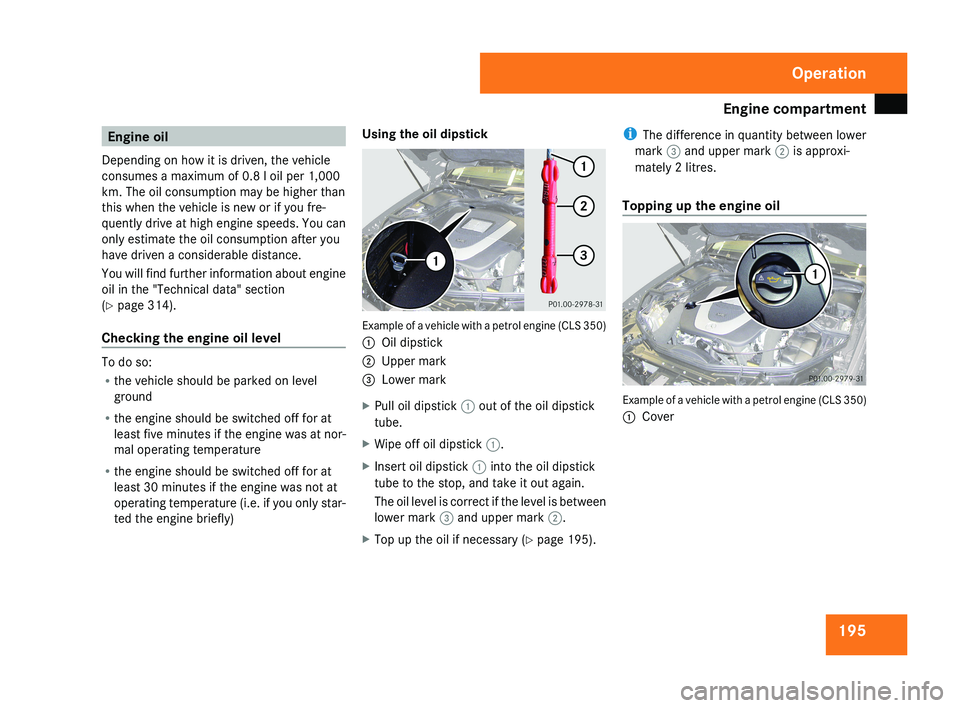
Example of a vehicle with a petrol engine (CLS 350)
1
Oil dipstick
2 Upper mark
3 Lower mark
X Pull oil dipstick 1 out of the oil dipstick
tube.
X Wipe off oil dipstick 1.
X Insert oil dipstick 1 into the oil dipstick
tube to the stop, and take it out again.
The oil level is correct if the level is between
lower mark 3 and upper mark 2.
X Top up the oil if necessary ( Y page 195).i
The difference in quantity between lower
mark 3 and upper mark 2 is approxi-
mately 2 litres.
Topping up the engine oil Example of a vehicle with a petrol engine (CLS 350)
1
Cover Operation
219_AKB; 2; 4, en-GB
mkalafa,
2007-11-13T09:28:36+01:00 - Seite 195
Page 199 of 329
Engine compartment
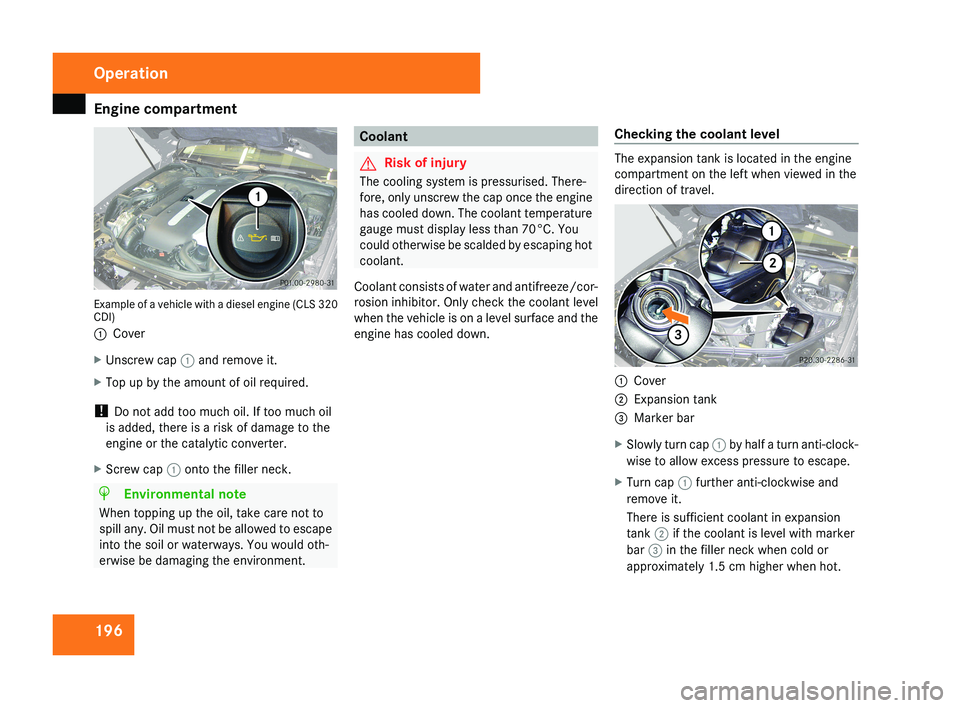
196Example of a vehicle with a diesel engine (CLS 320
CDI)
1
Cover
X Unscrew cap 1 and remove it.
X Top up by the amount of oil required.
! Do not add too much oil. If too much oil
is added, there is a risk of damage to the
engine or the catalytic converter.
X Screw cap 1 onto the filler neck.
H Environmental note
When topping up the oil, take care not to
spill any. Oil must not be allowed to escape
into the soil or waterways. You would oth-
erwise be damaging the environment.
Coolant
G Risk of injury
The cooling system is pressurised. There-
fore, only unscrew the cap once the engine
has cooled down. The coolant temperature
gauge must display less than 70°C. You
could otherwise be scalded by escaping hot
coolant.
Coolant consists of water and antifreeze/cor-
rosion inhibitor. Only check the coolant level
when the vehicle is on a level surface and the
engine has cooled down. Checking the coolant levelThe expansion tank is located in the engine
compartment on the left when viewed in the
direction of travel.
1
Cover
2 Expansion tank
3 Marker bar
X Slowly turn cap 1 by half a turn anti-clock-
wise to allow excess pressure to escape.
X Turn cap 1 further anti-clockwise and
remove it.
There is sufficient coolant in expansion
tank 2 if the coolant is level with marker
bar 3 in the filler neck when cold or
approximately 1.5 cm higher when hot.
Operation
219_AKB; 2; 4, en-GB
mkalafa,
2007-11-13T09:28:36+01:00 - Seite 196
Page 213 of 329
Care
210 Calling up the service due date
Use the buttons on the multi-function steer-
ing wheel.
X Switch on the ignition.
X Press è or ÿ to select the Basic
display menu (Y page 115).
X Press j or k to select the service
information.
The 9 service symbol and the service
due date are displayed.
X To select a different display, press j,
è or ÿ. Care
Notes on care
Regular and proper care maintains the value
of your vehicle.
i It
is advisable to use Mercedes-Benz care
products.
Scratches, corrosive deposits, areas affected
by corrosion and damage caused by inade-
quate care cannot always be completely
repaired. In such cases, visit a qualified spe-
cialist workshop immediately, e.g. a
Mercedes-Benz Service Centre.
Repair damage caused by loose chippings
and remove the following substances imme-
diately, whilst avoiding rubbing too hard:
R Soak insect remains with insect remover
and rinse off afterwards.
R Soak bird droppings with water and rinse
off afterwards.
R Remove tree resin, oils, fuels and grease by
rubbing gently with a cloth soaked in clean-
ing or lighter fluid.
R Use silicone remover to remove wax.
R Use tar remover to remove tar stains. H
Environmental note
Dispose of empty packaging, cleaning
cloths and polishing wads in an environ-
mentally responsible manner.
! Do not affix:
R stickers
R films
R magnetic plates or similar
to painted surfaces, otherwise you could
damage the paintwork. Vehicle care
!
Do not park the vehicle for a long period
of time directly after cleaning, especially if
the wheels have just been cleaned with a
wheel cleaner. Wheel cleaners could cause
rapid corrosion of the brake discs and
brake pads/linings. After cleaning, park
the vehicle when it is at normal operating
temperature. Operation
219_AKB; 2; 4, en-GB
mkalafa,
2007-11-13T09:28:36+01:00 - Seite 210
Page 240 of 329

Display messages
237Display messages Possible cause/consequence Possible solution
N Check engine oil
level when next
refuelling The engine oil level has dropped to a crit-
ical level. X
Check the engine oil level (Y page 195) and top
up the engine oil if necessary.
X Have the engine checked for leaks if the engine
oil needs topping up more often than usual. ± Display malfunc-
tion Consult work-
shop One or more electronic systems are
unable to deliver information to the on-
board computer. The following systems
may have failed:
R
Coolant temperature gauge
R Rev counter
R Cruise control or Speedtronic display X
Visit a qualified specialist workshop. H Tyre pressure Cau-
tion Tyre defect One or more tyres are losing air rapidly.
The affected wheel is highlighted in the
tyre pressure display of the tyre pressure
monitor*. X
Stop the vehicle without making any sudden
steering
or braking manoeuvres. Pay attention
to the traffic conditions as you do so.
X Repair or change the tyre (Y page 276). Practical advice
* optional
219_AKB; 2; 4, en-GB
mkalafa,
2007-11-13T09:28:36+01:00 - Seite 237 Z