2008 MERCEDES-BENZ CLS COUPE trip computer
[x] Cancel search: trip computerPage 12 of 329

9
Lights
Constant headlamp mode . . . . . . . . 92
Cornering light function . . . . . . . . . . 95
Dipped-beam headlamps . . . . . . . . . 92
Front foglamps . . . . . . . . . . . . . . . . . 93
Hazard warning lamps . . . . . . . . . . . 94
Headlamp flasher . . . . . . . . . . . . . . . 94
Headlamp range . . . . . . . . . . . . . . . . 95
Light switch . . . . . . . . . . . . . . . . . . . 91
Main-beam headlamps . . . . . . . . . . . 94
Rear foglamp . . . . . . . . . . . . . . . . . . 93
Switching off (display message) . . . 235
Turn signals . . . . . . . . . . . . . . . . . . . 94
LIM indicator lamp . . . . . . . . . . . . . . 133
Load compartment load, maximum
. . . . . . . . . . . . . . . . . . . . . . . . . . . . . . . 310
Loading guidelines . . . . . . . . . . . . . . 176
Locking Automatic . . . . . . . . . . . . . . . . . . . . . 69
Emergency locking . . . . . . . . . . . . . 267
From the inside (central locking
button) . . . . . . . . . . . . . . . . . . . . . . . 70
Luggage net . . . . . . . . . . . . . . . . . . . . 176
Lumbar support . . . . . . . . . . . . . . . . . . 78
Luxury head restraint . . . . . . . . . . 76, 77 M
Main-beam headlamps Display message
. . . . . . . . . . . . . . 235
Main fuse box . . . . . . . . . . . . . . . . . . . 296
Maintenance Battery . . . . . . . . . . . . . . . . . . . . . . 288
Malfunction memory
see Message memory menu
Manual gearshift program . . . . . . . . 108
Massage function (PULSE) . . . . . . . . . 80
Maximum speed Technical data . . . . . . . . . . . . . . . . 303
Memory card
Operation (on-board computer) . . . 119
Memory function . . . . . . . . . . . . . . . . . 86
Menu
DISTRONIC . . . . . . . . . . . . . . . . . . . 139
Menu (on-board computer) . . . . . . . . 114
AMG . . . . . . . . . . . . . . . . . . . . . . . . 116
Audio . . . . . . . . . . . . . . . . . . . . . . . 118
DVD . . . . . . . . . . . . . . . . . . . . . . . . 120
Message memory . . . . . . . . . . . . . . 121
Navigation . . . . . . . . . . . . . . . . . . . 120
Resetting to factory settings . . . . . 121
Settings . . . . . . . . . . . . . . . . . . . . . 121
Standard display . . . . . . . . . . . . . . 115
Submenu overview . . . . . . . . . . . . . 122
Telephone . . . . . . . . . . . . . . . . . . . 130 Trip computer
. . . . . . . . . . . . . . . . 129
TV . . . . . . . . . . . . . . . . . . . . . . . . . . 119
Message
see Message memory menu
Minispare emergency spare wheel
Storage location . . . . . . . . . . . . . . . 218
Technical data . . . . . . . . . . . . . . . . 308
Mirror
Sun visor . . . . . . . . . . . . . . . . . . . . 180
Mobile phone . . . . . . . . . . . . . . . . . . . 183
Bracket . . . . . . . . . . . . . . . . . . . . . 183
Display message . . . . . . . . . . . . . . 240
Installation . . . . . . . . . . . . . . . . . . . 299
Own number sending . . . . . . . . . . . 184
Run-on time . . . . . . . . . . . . . . . . . . 184
Telephone menu (on-board com-
puter) . . . . . . . . . . . . . . . . . . . . . . . 130
Modifying the programming
Key . . . . . . . . . . . . . . . . . . . . . . . . . . 66
KEYLESS GO key . . . . . . . . . . . . . . . 68
MOExtended run-flat system* . 199, 287
MP3 Operation (on-board computer) . . . 119
Multi-contour seat . . . . . . . . . . . . . . . . 79
Multi-function display . . . . . . . . 110, 112
Multi-function steering wheel . . . . . 111
Overview . . . . . . . . . . . . . . . . . . . . . 30 Index
219_AKB; 2; 4, en-GB
mkalafa,
2007-11-13T09:28:36+01:00 - Seite 9
Page 13 of 329
10 N
Navigation . . . . . . . . . . . . . . . . . . . . . 120
Navigation menu (on-board com-
puter) . . . . . . . . . . . . . . . . . . . . . . . 120
NECK-PRO head restraint . . . . . . . . . . 49
Resetting triggered NECK-PRO
head restraints . . . . . . . . . . . . . . . . 269 O
Oil topping up
. . . . . . . . . . . . . . . . . . . 195
On-board computer . . . . . . . . . . . . . . 111
AMG menu . . . . . . . . . . . . . . . . . . . 116
Audio menu . . . . . . . . . . . . . . . . . . 118
Convenience submenu . . . . . . . . . . 123
Display message . . . . . . . . . . . . . . 219
DVD menu . . . . . . . . . . . . . . . . . . . 120
Dynamic driving seat submenu . . . 129
Factory settings . . . . . . . . . . . . . . . 121
Heater submenu . . . . . . . . . . . . . . 123
Instrument cluster submenu . . . . . 122
Lighting submenu . . . . . . . . . . . . . 122
Message memory menu . . . . . . . . . 121
Navigation menu . . . . . . . . . . . . . . 120
Settings menu . . . . . . . . . . . . . . . . 121
Standard display menu . . . . . . . . . 115
Telephone menu . . . . . . . . . . . . . . 130
Time/Date submenu . . . . . . . . . . . 122
Trip computer menu . . . . . . . . . . . . 129 TV menu
. . . . . . . . . . . . . . . . . . . . . 119
Vehicle submenu . . . . . . . . . . . . . . 123
One-touch gearshifting . . . . . . . . . . . 105
Operating system see On-board computer
Outside temperature
Display (on-board computer) . 111, 116
Overhead control panel
Overview . . . . . . . . . . . . . . . . . . . . . 36
Own number sending (mobile
phone) . . . . . . . . . . . . . . . . . . . . . . . . . 184 P
Paint code number
. . . . . . . . . . . . . . 300
Parking . . . . . . . . . . . . . . . . . . . . . . . . 103
Parking aid . . . . . . . . . . . . . . . . . . . . . . 85 Parktronic . . . . . . . . . . . . . . . . . . . 148
Parking brake . . . . . . . . . . . . . . . . . . . 104
Display message . . . . . . . . . . . . . . 231
Parking lamps
Display message . . . . . . . . . . . . . . 236
Parking lock
Releasing manually (automatic
transmission) . . . . . . . . . . . . . . . . . 268
Parking position
Exterior mirror . . . . . . . . . . . . . . . . . 85
Parktronic . . . . . . . . . . . . . . . . . . . . . . 148
Activating/deactivating . . . . . . . . . 150
Malfunction . . . . . . . . . . . . . . . . . . 258 Range of the sensors
. . . . . . . . . . . 148
Warning display . . . . . . . . . . . . . . . 149
PASSENGER AIRBAG OFF warning
lamp . . . . . . . . . . . . . . . . . . . . . . . 51, 242
Performance . . . . . . . . . . . . . . . . . . . 303
Permanent Speedtronic . . . . . . . . . . 144
Petrol Minimum grade . . . . . . . . . . . . . . . 191
Plastic trim
Cleaning . . . . . . . . . . . . . . . . . . . . . 212
Power windows
see Side window
PRE-SAFE ®
system . . . . . . . . . . . . . . . . 48
PRE-SAFE ®
System
Display message . . . . . . . . . . . . . . 223
Preventive occupant safety system
see PRE-SAFE ®
Program selector button
Automatic transmission . . . . . . . . . 106
Pulling away . . . . . . . . . . . . . . . . . . . . 103 R
RACETIMER (on-board computer)
. . 117
Radio Changing a station (on-board
computer) . . . . . . . . . . . . . . . . . . . 119
see separate operating instructions
Rain closing feature (sliding/tilt-
ing sunroof) . . . . . . . . . . . . . . . . . . . . 171 Index
219_AKB; 2; 4, en-GB
mkalafa,
2007-11-13T09:28:36+01:00 - Seite 10
Page 16 of 329
13
Vehicle dimensions
. . . . . . . . . . . . 309
Vehicle weights . . . . . . . . . . . . . . . 310
Wheels . . . . . . . . . . . . . . . . . . . . . . 305
Telephone
see Mobile phone
Temperature
Engine oil (on-board computer) . . . 116
Outside temperature . . . . . . . . . . . 111
Thermatic
Malfunction indicator lamp . . . . . . 242
Thermotronic
Malfunction indicator lamp . . . . . . 242
Third brake lamp
Display message . . . . . . . . . . . . . . 234
Tightening torque . . . . . . . . . . . . . . . 286
Time Lap time (on-board computer) . . . . 117
Setting (on-board computer) . . . . . 124
Setting the time (on-board com-
puter) . . . . . . . . . . . . . . . . . . . . . . . 124
Timer (on-board computer) . . . . . . . 117
TIREFIT kit Storage location . . . . . . . . . . . . . . . 217
Using . . . . . . . . . . . . . . . . . . . . . . . 277
Total distance recorder
. . . . . . . . . . . . . . . . . . . . . . . . . . . . . 27, 29
Resetting the trip meter . . . . . . . . . 110
Tow-away protection . . . . . . . . . . . . . . 62
Towing . . . . . . . . . . . . . . . . . . . . . . . . 294 Towing eye
Fitting . . . . . . . . . . . . . . . . . . . . . . . 294
Removing . . . . . . . . . . . . . . . . . . . . 295
Transmission output (maximum)
Telephone/two-way radio . . . . . . . 299
Transport (vehicle) . . . . . . . . . . . . . . 295
Trip computer
Menu (on-board computer) . . . . . . 129
Trip meter . . . . . . . . . . . . . . . . . . . . . . 115
Resetting . . . . . . . . . . . . . . . . . . . . 110
Turn signal lamps
Display message . . . . . . . . . . 233, 234
TV
Operation (on-board computer) . . . 119
Two-way radio
Installation . . . . . . . . . . . . . . . . . . . 299
Tyre grip . . . . . . . . . . . . . . . . . . . . . . . 207
Tyre pressure . . . . . . . . . . . . . . . . . . 200
Calling up (on-board computer) . . 202
Display message . . . . . . . . . . 224, 237
Tyre pressure loss warning system 201
Tyre pressure monitor Warning lamp . . . . . . . . . . . . . . . . . 248
Tyre pressures
Table . . . . . . . . . . . . . . . . . . . . . . . 304
Tyres
Direction of rotation . . . . . . . . . . . . 199
General notes . . . . . . . . . . . . . . . . . 198
Technical data . . . . . . . . . . . . . . . . 305
Tyre tread . . . . . . . . . . . . . . . . . . . . . . 200 U
Unit for distance Setting (on-board computer)
. . . . . 123
Unladen weight . . . . . . . . . . . . . . . . . 310
Unlocking Emergency unlocking . . . . . . . . . . . 266
From the inside (central unlocking
button) . . . . . . . . . . . . . . . . . . . . . . . 70
Up (display message) . . . . . . . . . . . . 116 V
Variable Speedtronic . . . . . . . . . . . . .
142
Vehicle Emergency unlocking . . . . . . . 266, 267
Individual settings (on-board com-
puter) . . . . . . . . . . . . . . . . . . . . . . . 121
Leaving parked up . . . . . . . . . . . . . 265
Towing . . . . . . . . . . . . . . . . . . . . . . 294
Transporting . . . . . . . . . . . . . . . . . . 295
Vehicle battery . . . . . . . . . . . . . . . . . 288
Vehicle dimensions . . . . . . . . . . . . . . 309
Vehicle electronics . . . . . . . . . . . . . . 299
Vehicle identification plates . . . . . . 300
Vehicle level Display message . . . . . . . . . . . . . . 229
Setting (AIRMATIC DC) . . . . . . . . . 146
Vehicle tool kit . . . . . . . . . . . . . . . . . . 217
Vehicle weights . . . . . . . . . . . . . . . . . 310 Index
219_AKB; 2; 4, en-GB
mkalafa,
2007-11-13T09:28:36+01:00 - Seite 13
Page 30 of 329
Instrument cluster
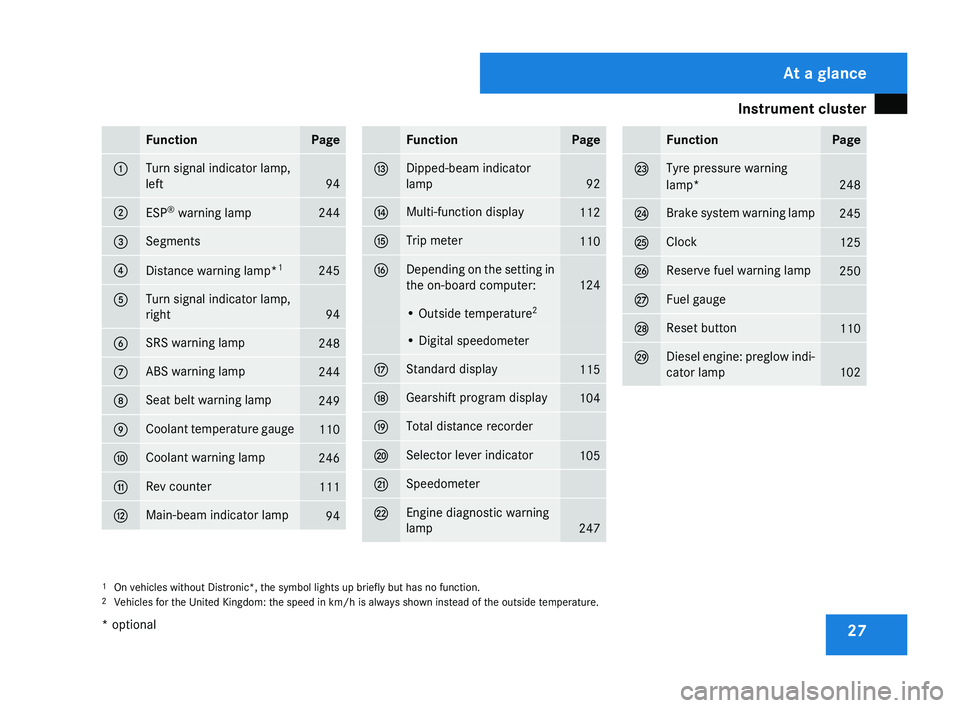
27Function Page
1 Turn signal indicator lamp,
left
94
2
ESP
®
warning lamp 244
3 Segments
4
Distance warning lamp*
1 245
5 Turn signal indicator lamp,
right
94
6 SRS warning lamp
248
7 ABS warning lamp
244
8 Seat belt warning lamp
249
9 Coolant temperature gauge
110
a Coolant warning lamp
246
b Rev counter
111
c Main-beam indicator lamp
94 Function Page
d Dipped-beam indicator
lamp
92
e Multi-function display
112
f Trip meter
110
g Depending on the setting in
the on-board computer:
124
• Outside temperature
2 • Digital speedometer
h Standard display
115
j Gearshift program display
104
k Total distance recorder
l Selector lever indicator
105
m Speedometer
n Engine diagnostic warning
lamp
247 Function Page
o Tyre pressure warning
lamp*
248
p Brake system warning lamp
245
q Clock
125
r Reserve fuel warning lamp
250
s Fuel gauge
t Reset button
110
u Diesel engine: preglow indi-
cator lamp
102
1
On vehicles without Distronic*, the symbol lights up briefly but has no function.
2 Vehicles for the United Kingdom: the speed in km/h
is always shown instead of the outside temperature. At a glance
* optional
219_AKB; 2; 4, en-GB
mkalafa,
2007-11-13T09:28:36+01:00 - Seite 27
Page 32 of 329
Instrument cluster
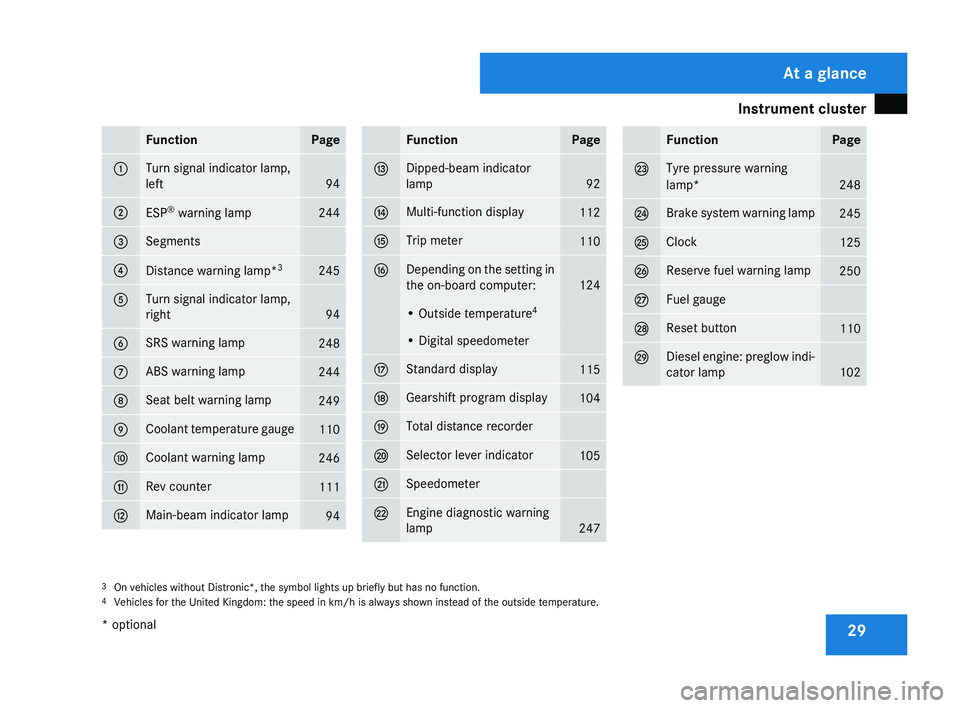
29Function Page
1 Turn signal indicator lamp,
left
94
2
ESP
®
warning lamp 244
3 Segments
4
Distance warning lamp*
3 245
5 Turn signal indicator lamp,
right
94
6 SRS warning lamp
248
7 ABS warning lamp
244
8 Seat belt warning lamp
249
9 Coolant temperature gauge
110
a Coolant warning lamp
246
b Rev counter
111
c Main-beam indicator lamp
94 Function Page
d Dipped-beam indicator
lamp
92
e Multi-function display
112
f Trip meter
110
g Depending on the setting in
the on-board computer:
124
• Outside temperature
4 • Digital speedometer
h Standard display
115
j Gearshift program display
104
k Total distance recorder
l Selector lever indicator
105
m Speedometer
n Engine diagnostic warning
lamp
247 Function Page
o Tyre pressure warning
lamp*
248
p Brake system warning lamp
245
q Clock
125
r Reserve fuel warning lamp
250
s Fuel gauge
t Reset button
110
u Diesel engine: preglow indi-
cator lamp
102
3
On vehicles without Distronic*, the symbol lights up briefly but has no function.
4 Vehicles for the United Kingdom: the speed in km/h
is always shown instead of the outside temperature. At a glance
* optional
219_AKB; 2; 4, en-GB
mkalafa,
2007-11-13T09:28:36+01:00 - Seite 29
Page 116 of 329
On-board computer
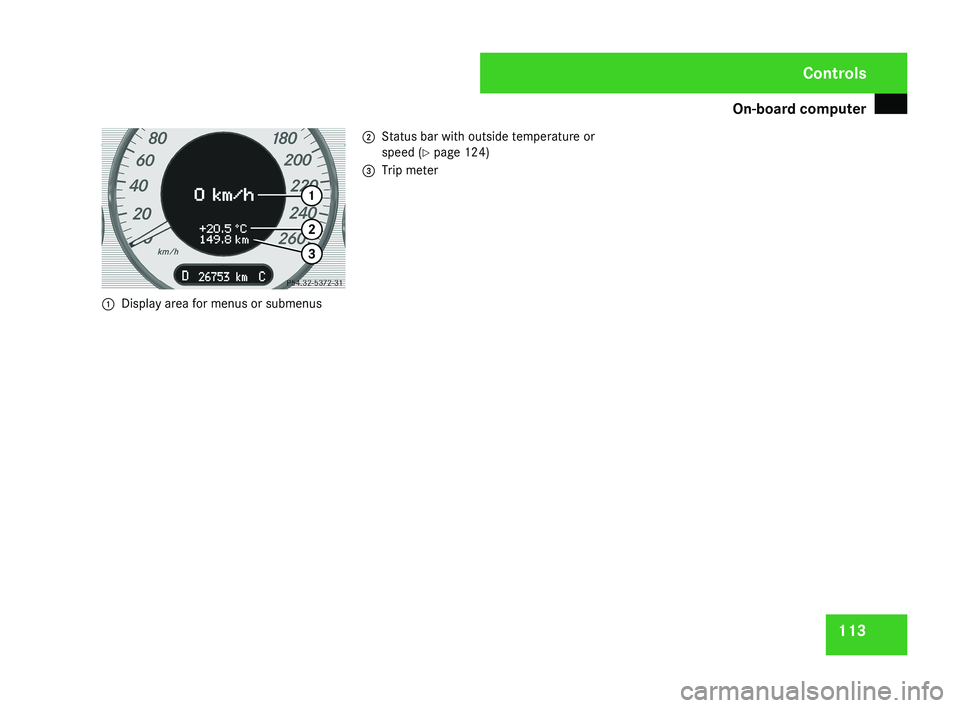
1131
Display area for menus or submenus 2
Status bar with outside temperature or
speed ( Y page 124)
3 Trip meter
Controls
219_AKB; 2; 4, en-GB
mkalafa,
2007-11-13T09:28:36+01:00 - Seite 113
Page 118 of 329
On-board computer
115Function
1 Basic display menu (Y page 115)
R
Digital speedometer 12
(Y page 116)
R Outside tempera-
ture 12
(Y page 116)
R ASSYST PLUS service display
(Y page 209)
R Tyre pressure loss warning system
(Y page 201) or tyre pressure mon-
itor* (Y page 202) 2
AMG* menu (Y page 116)
3
Audio/TV*/DVD*
(Y page 118)
menu
R Radio station ( Y page 119)
R Audio drive or media ( Y page 119)
R TV* (Y page 119)
R DVD video* (Y page 120) 4
Navigation* menu (Y page 120) Function
5
Distronic
* menu (distance display)
(Y page 135) 6
Message memory menu
13
(fault and
warning messages) ( Y page 121) 7 Settings menu (Y page 121)
R
Resetting to factory settings
(Y page 121)
R Selecting a submenu ( Y page 122) 8 Trip computer
menu
R Consumption statistics
(Y page 130)
R Range ( Y page 130) 9
Telephone*
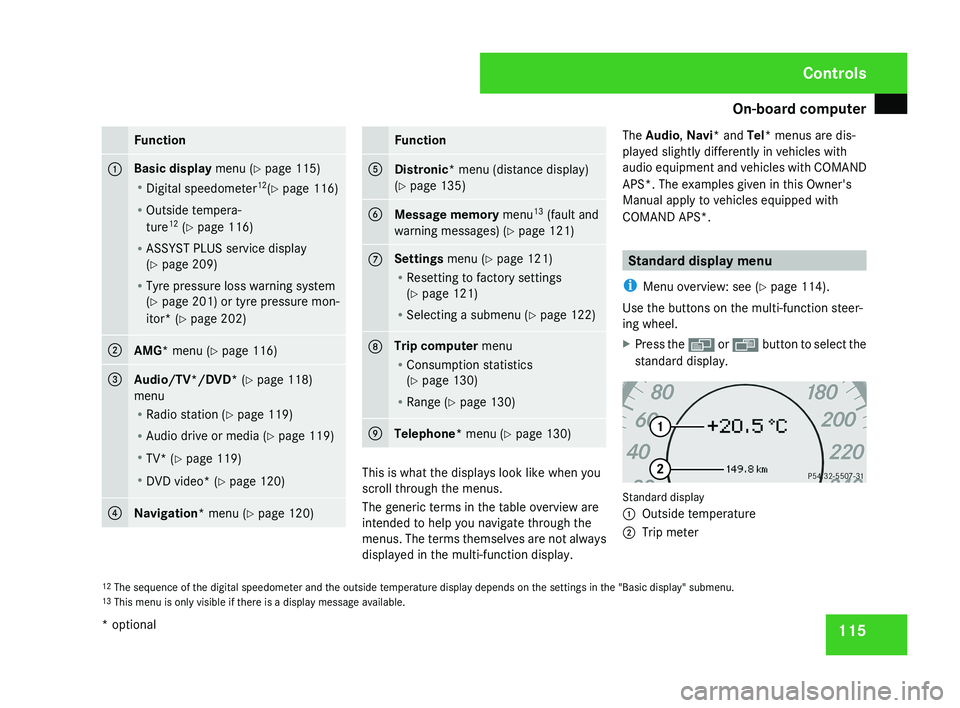
menu (Y page 130) This is what the displays look like when you
scroll through the menus.
The generic terms in the table overview are
intended to help you navigate through the
menus. The terms themselves are not always
displayed in the multi-function display.The Audio
, Navi* and Tel* menus are dis-
played slightly differently in vehicles with
audio equipment and vehicles with COMAND
APS*. The examples given in this Owner's
Manual apply to vehicles equipped with
COMAND APS*. Standard display menu
i Menu overview: see ( Y page 114).
Use the buttons on the multi-function steer-
ing wheel.
X Press the è or · button to select the
standard display. Standard display
1
Outside temperature
2 Trip meter
12 The sequence of the digital speedometer and the outside temperature display depends on the settings in the "Basic display" submenu.
13 This menu is only visible if there is a display message available. Controls
* optional
219_AKB; 2; 4, en-GB
mkalafa,
2007-11-13T09:28:36+01:00 - Seite 115
Page 119 of 329
On-board computer
116
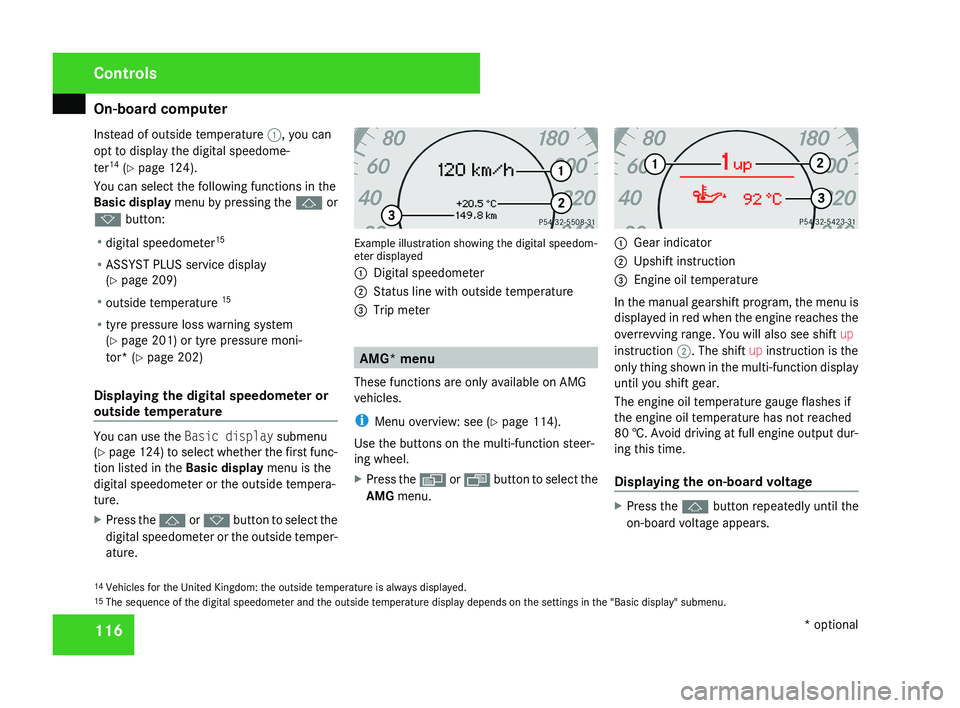
Instead of outside temperature
1, you can
opt to display the digital speedome-
ter 14
(Y page 124).
You can select the following functions in the
Basic display menu by pressing the j or
k button:
R digital speedometer 15
R ASSYST PLUS service display
(Y page 209)
R outside temperature 15
R tyre pressure loss warning system
(Y page 201) or tyre pressure moni-
tor* (Y page 202)
Displaying the digital speedometer or
outside temperature You can use the
Basic display submenu
(Y page 124) to select whether the first func-
tion listed in the Basic display menu is the
digital speedometer or the outside tempera-
ture.
X Press the j or k button to select the
digital speedometer or the outside temper-
ature. Example illustration showing the digital speedom-
eter displayed
1
Digital speedometer
2 Status line with outside temperature
3 Trip meter AMG* menu
These functions are only available on AMG
vehicles.
i Menu overview: see ( Y page 114).
Use the buttons on the multi-function steer-
ing wheel.
X Press the è or · button to select the
AMG menu. 1
Gear indicator
2 Upshift instruction
3 Engine oil temperature
In the manual gearshift program, the menu is
displayed in red when the engine reaches the
overrevving range. You will also see shift up
instruction 2. The shift up instruction is the
only thing shown in the multi-function display
until you shift gear.
The engine oil temperature gauge flashes if
the engine oil temperature has not reached
80 †. Avoid driving at full engine output dur-
ing this time.
Displaying the on-board voltage X
Press the j button repeatedly until the
on-board voltage appears.
14 Vehicles for the United Kingdom: the outside temperature is always displayed.
15 The sequence of the digital speedometer and the outside temperature display depends on the settings in the "Basic display" submenu. Controls
* optional
219_AKB; 2; 4, en-GB
mkalafa,
2007-11-13T09:28:36+01:00 - Seite 116