Page 66 of 225
65 Audio
CD audio/DVD audio and MP3
Many audio CDs contain CD text.
COMAND uses the information contained
in this text for displaying the name of the
artist, album and track.
If the audio CD does not contain any CD
text, COMAND can recognise unknown
audio tracks in CD audio mode with the aid
of the Gracenote Media Database. For this
to happen, the corresponding information
must be stored in the Gracenote Media
Database and the “Read CD Database”
function must be switched on.
If this is the case, COMAND provides the
corresponding data, such as name of art-
ist, album and track, in the corresponding
displays and lists.
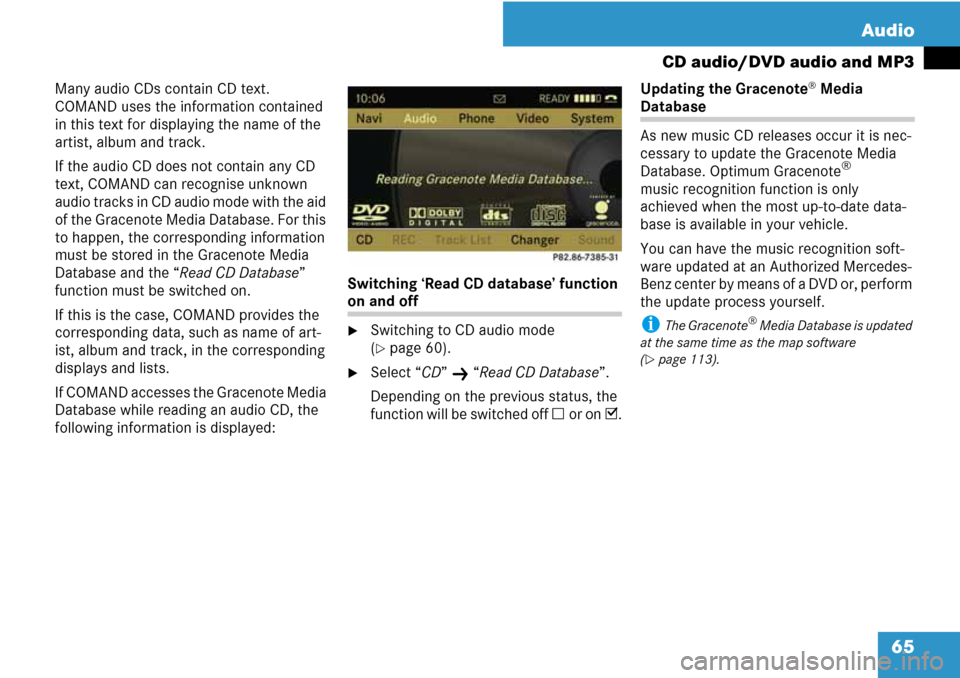
If COMAND accesses the Gracenote Media
Database while reading an audio CD, the
following information is displayed:Switching ‘Read CD database’ function
on and off
�Switching to CD audio mode
(
�page 60).
�Select “CD” K “Read CD Database”.
Depending on the previous status, the
function will be switched off C or on D.Updating the Gracenote
® Media
Database
As new music CD releases occur it is nec-
cessary to update the Gracenote Media
Database. Optimum Gracenote
®
music recognition function is only
achieved when the most up-to-date data-
base is available in your vehicle.
You can have the music recognition soft-
ware updated at an Authorized Mercedes-
Benz center by means of a DVD or, perform
the update process yourself.
i The Gracenote® Media Database is updated
at the same time as the map software
(
�page 113).
Page 67 of 225
66 Audio
CD audio/DVD audio and MP3
It is only possible to set the audio format in
DVD audio mode. The number of available
audio formats is dependent on the DVD.
The content of an audio DVD is called the
‘album’, which can be divided into a maxi-
mum of nine groups. A group may contain,
for example, music of different sound qual-
ities (stereo and multi-channel formats) or
bonus tracks. Each group can include up to
99 tracks. If a DVD audio only comprises
one audio format, the “Group” menu
item(s) cannot be selected.
�Switch to DVD audio mode
(
�page 60).
�Select “DVD-A” K “Group”.
The list of available audio formats ap-
pears. A dotRindicates the format
currently selected.
�To change setting: Rotate ymz or
slide qmr.
�Press n.
�To exit menu: Slide omp.The following options are available:
�“Normal Track Sequence”
You will hear the tracks in the normal
sequence (e. g. track 1, 2, 3 etc.).
�“Random Tracks”
You will hear the tracks in random or-
der (e. g. track 3, 8, 5 etc.).
�“Folder” (only in MP3 mode)
The tracks in the currently active folder
and any subfolders are heard in ran-
dom order.
�To select an option: Switch to CD au-
dio, DVD audio or MP3 mode
(
�page 60).
�Select “CD” or “DVD-A” or “MP3”.
The Options list appears. A dotRindi-
cates the activated option.
�Select an option.
The option is activated. A correspond-
ing display will appear in the display/
selection window for all options except
“Normal Track Sequence”.
i The option “Normal Track Sequence” is au-
tomatically activated if you change the medium
which is currently being played or if you select
another medium. An activated option remains
active after COMAND is switched on or off.
Setting audio formatPlayback options
Page 68 of 225
67 Audio
Music Register
You can record tracks from audio CDs and
store them as MP3 files in the Music Reg-
ister. The memory capacity is 4 GB.
! Keep your original music files in a safe
place. A fault with the COMAND may cause the
music files stored in the Music Register to be
lost. Mercedes-Benz USA, LLC is not liable for
any loss of data.
From another main function
�Select “Audio” K “Audio” K “Music
Register” in the display with Audio
menu (
�page 40).
i If “Music Register” was active last, you only
need to select “Audio”.
Within the audio function
�Select “Audio” K “Music Register”.
The Music Register is loaded. The Mu-
sic Register display appears.
No music files available:
A message will be displayed.
�First record music files to the Music
Register (
�page 68).
Music files available:
You will hear the first track of the first
folder found or playback will start from
the point listened to last.
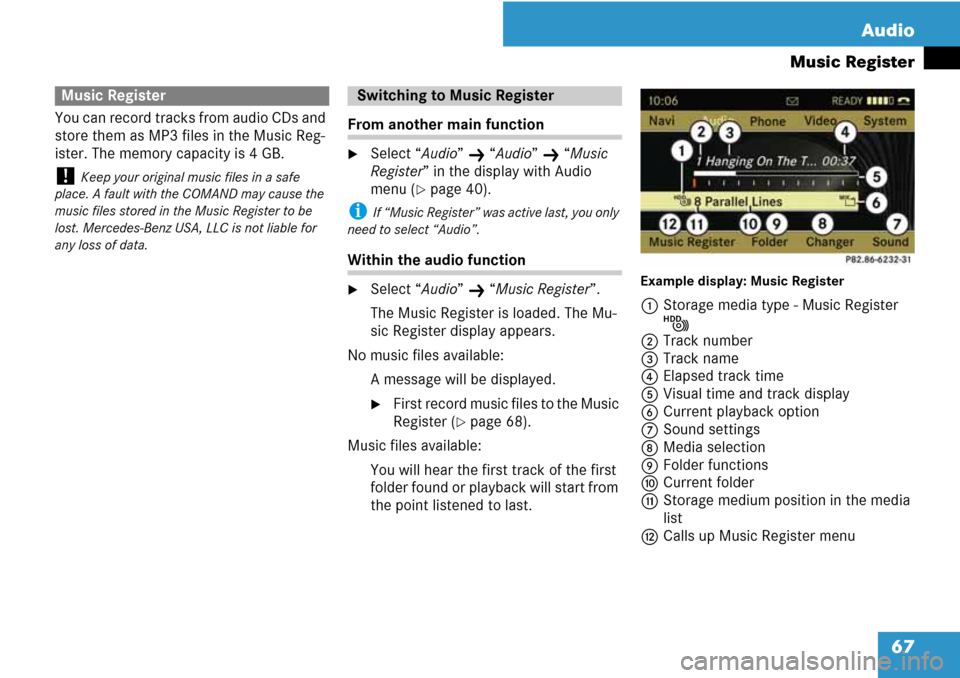
Example display: Music Register
1Storage media type - Music Register
N
2Track number
3Track name
4Elapsed track time
5Visual time and track display
6Current playback option
7Sound settings
8Media selection
9Folder functions
aCurrent folder
bStorage medium position in the media
list
cCalls up Music Register menu
Music RegisterSwitching to Music Register
Page 78 of 225
77 Video
DVD video
From the control unit
�Load DVD video (�page 55).
COMAND loads the inserted medium
and starts playing it.
or
�Press the function button y.
i Pressing the function button switches di-
rectly to the disc mode selected last (CD audio,
DVD audio, MP3 CD or DVD video). COMAND
then accesses all discs in the DVD changer.
�If necessary select “Changer” and in
the media list select (
�page 78) a DVD
video I.
From the COMAND controller
�Select “Video” in the main function
menu.
�To display: Slide qmr.
�To hide: Slide qmr.
or
�Wait apprx. eight seconds.
Control menu displayed
1Disc type
2Current track
3Current scene
4Elapsed track time
5Displays menu system
�To display: Press n.
�To hide: Slide qm and select “Full
Screen”.
Menu system displayed
1DVD-Video menu
2Pause function
3Stop function
4Media selection
5Sound settings
Switching to DVD videoDisplaying/hiding control menuDisplaying/hiding menu system
Page 79 of 225
78 Video
DVD video
�Slide and hold omp until the desired
point is reached.
or
�Press and hold G or H on the
control unit until the desired point is
reached.
The control menu will appear.
�In DVD video mode, if necessary dis-
play the menu system (
�page 77).
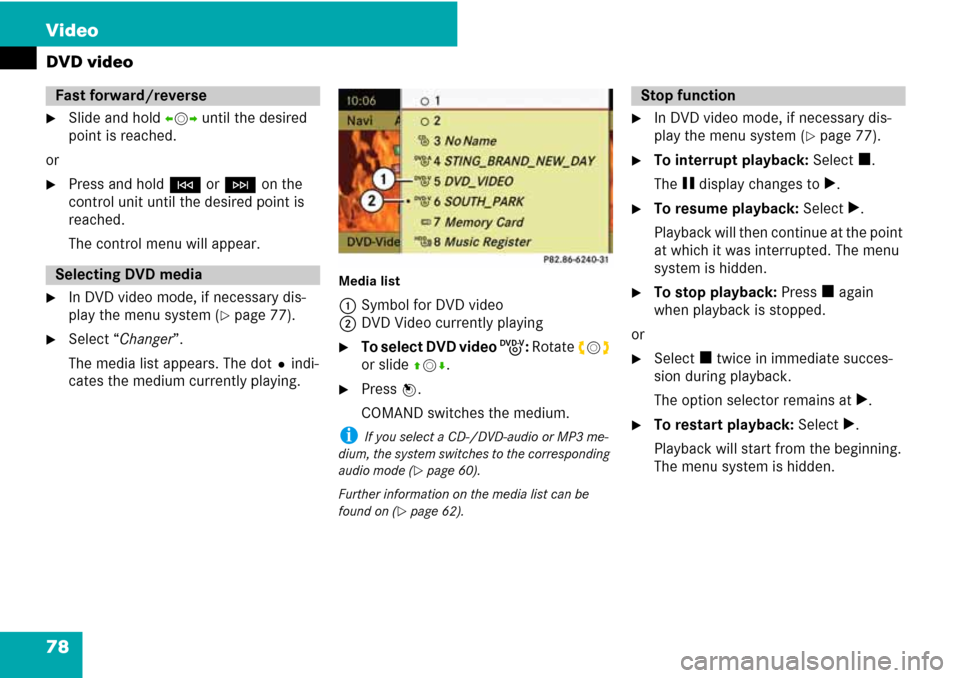
�Select “Changer”.
The media list appears. The dotRindi-
cates the medium currently playing.
Media list
1Symbol for DVD video
2DVD Video currently playing
�To select DVD video I: Rotate ymz
or slide qmr.
�Press n.
COMAND switches the medium.
i If you select a CD-/DVD-audio or MP3 me-
dium, the system switches to the corresponding
audio mode (
�page 60).
Further information on the media list can be
found on (
�page 62).
�In DVD video mode, if necessary dis-
play the menu system (
�page 77).
�To interrupt playback: Select h.
The g display changes to T.
�To resume playback: Select T.
Playback will then continue at the point
at which it was interrupted. The menu
system is hidden.
�To stop playback: Press h again
when playback is stopped.
or
�Select h twice in immediate succes-
sion during playback.
The option selector remains at T.
�To restart playback: Select T.
Playback will start from the beginning.
The menu system is hidden.
Fast forward/reverse
Selecting DVD media
Stop function
Page 199 of 225
198 Voice Control
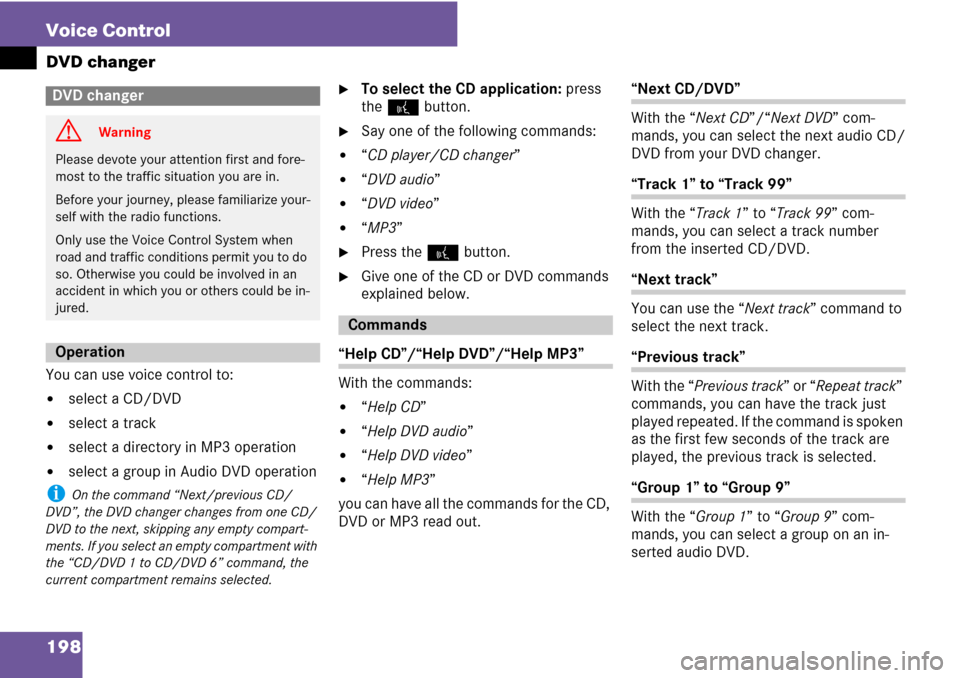
DVD changer
You can use voice control to:
�select a CD/DVD
�select a track
�select a directory in MP3 operation
�select a group in Audio DVD operation
i On the command “Next/previous CD/
DVD”, the DVD changer changes from one CD/
DVD to the next, skipping any empty compart-
ments. If you select an empty compartment with
the “CD/DVD 1 to CD/DVD 6” command, the
current compartment remains selected.
�To select the CD application: press
the ! button.
�Say one of the following commands:
�“CD player/CD changer”
�“DVD audio”
�“DVD video”
�“MP3”
�Press the ! button.
�Give one of the CD or DVD commands
explained below.
“Help CD”/“Help DVD”/“Help MP3”
With the commands:
�“Help CD”
�“Help DVD audio”
�“Help DVD video”
�“Help MP3”
you can have all the commands for the CD,
DVD or MP3 read out.
“Next CD/DVD”
With the “Next CD”/“Next DVD” com-
mands, you can select the next audio CD/
DVD from your DVD changer.
“Track 1” to “Track 99”
With the “Track 1” to “Track 99” com-
mands, you can select a track number
from the inserted CD/DVD.
“Next track”
You can use the “Next track” command to
select the next track.
“Previous track”
With the “Previous track” or “Repeat track”
commands, you can have the track just
played repeated. If the command is spoken
as the first few seconds of the track are
played, the previous track is selected.
“Group 1” to “Group 9”
With the “Group 1” to “Group 9” com-
mands, you can select a group on an in-
serted audio DVD.
DVD changer
G Warning
Please devote your attention first and fore-
most to the traffic situation you are in.
Before your journey, please familiarize your-
self with the radio functions.
Only use the Voice Control System when
road and traffic conditions permit you to do
so. Otherwise you could be involved in an
accident in which you or others could be in-
jured.
Operation
Commands
Page 200 of 225
199 Voice Control
External equipment (AUX)
“Next group”/“Previous group”
With the “Next group”/“Previous group”
commands, you can select the next or pre-
vious group on the inserted audio DVD.
“Next folder”/“Previous folder”
With the “Next folder”/“Previous folder”
commands, you can select a folder on the
inserted CD/DVD in MP3 mode.
“Memory card”
With the “Memory card” command, you
can switch to the PCMCIA card on the
COMAND system.
“DVD video”
With the “DVD video” command, you can
start a video DVD on the COMAND system.
“Hard disk”
With the “Hard disk” command, you can
change to the internal hard disk (Music
Register) of COMAND.You can use the “Audio Aux” command to
activate the aux input.
External equipment (AUX)
Audio aux
Page 201 of 225
200 Voice Control
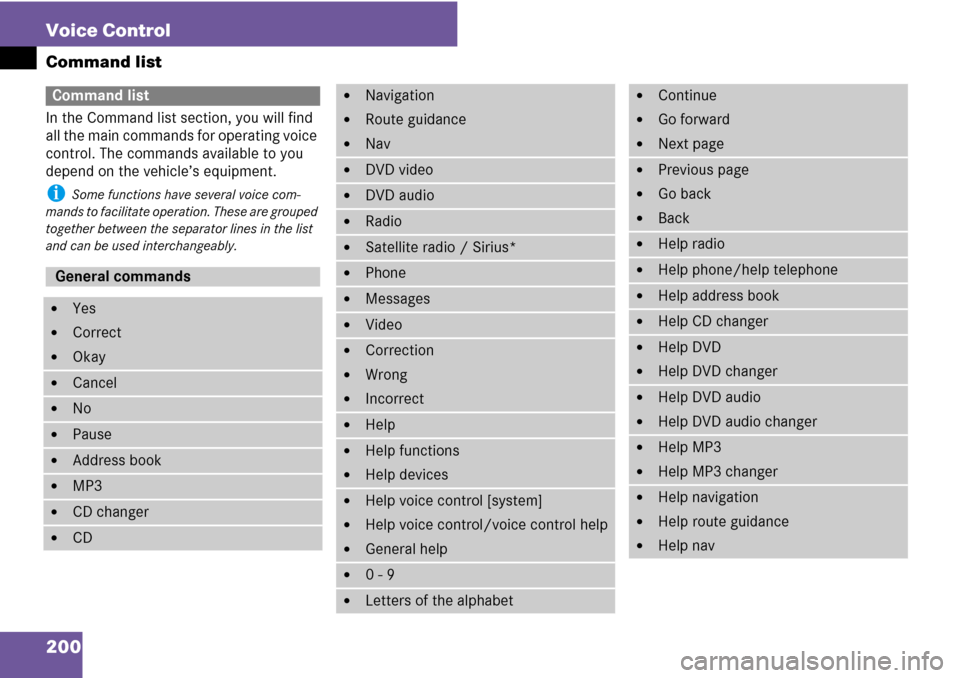
Command list
In the Command list section, you will find
all the main commands for operating voice
control. The commands available to you
depend on the vehicle’s equipment.
i Some functions have several voice com-
mands to facilitate operation. These are grouped
together between the separator lines in the list
and can be used interchangeably.
Command list
General commands
�Yes
�Correct
�Okay
�Cancel
�No
�Pause
�Address book
�MP3
�CD changer
�CD
�Navigation
�Route guidance
�Nav
�DVD video
�DVD audio
�Radio
�Satellite radio / Sirius*
�Phone
�Messages
�Video
�Correction
�Wrong
�Incorrect
�Help
�Help functions
�Help devices
�Help voice control [system]
�Help voice control/voice control help
�General help
�0 - 9
�Letters of the alphabet
�Continue
�Go forward
�Next page
�Previous page
�Go back
�Back
�Help radio
�Help phone/help telephone
�Help address book
�Help CD changer
�Help DVD
�Help DVD changer
�Help DVD audio
�Help DVD audio changer
�Help MP3
�Help MP3 changer
�Help navigation
�Help route guidance
�Help nav

