Page 58 of 225
57 Audio
CD audio/DVD audio and MP3
COMAND supports type I and II 16 bit full-
size PCMCIA memory cards.
i COMAND supports commercially available
PCMCIA cards or PCMCIA card adapters with
storage media that may not be designed for the
temperatures which occur in the vehicle. You
should therefore remove the PCMCIA card from
the vehicle when not in use since extreme tem-
peratures could damage these devices.
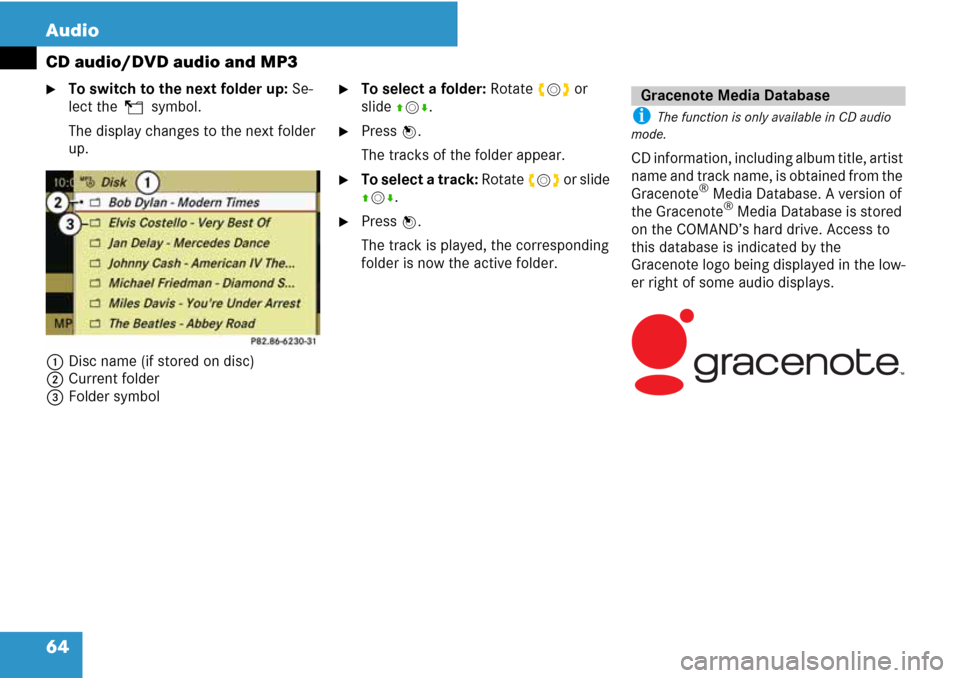
1Slot for PCMCIA memory card
�Push the PCMCIA memory card into
the slot 1.
The end with the contacts must be
pointing towards the slot.COMAND loads the memory card and
displays the message “Reading memo-
ry card”.
If no MP3 tracks can be found, a mes-
sage will be displayed.
Ejecting from the DVD changer
i If you eject a disc while another is being
played, the DVD changer interrupts playback.
Playback will continue once the disc has been
ejected completely.
Ejecting one disc
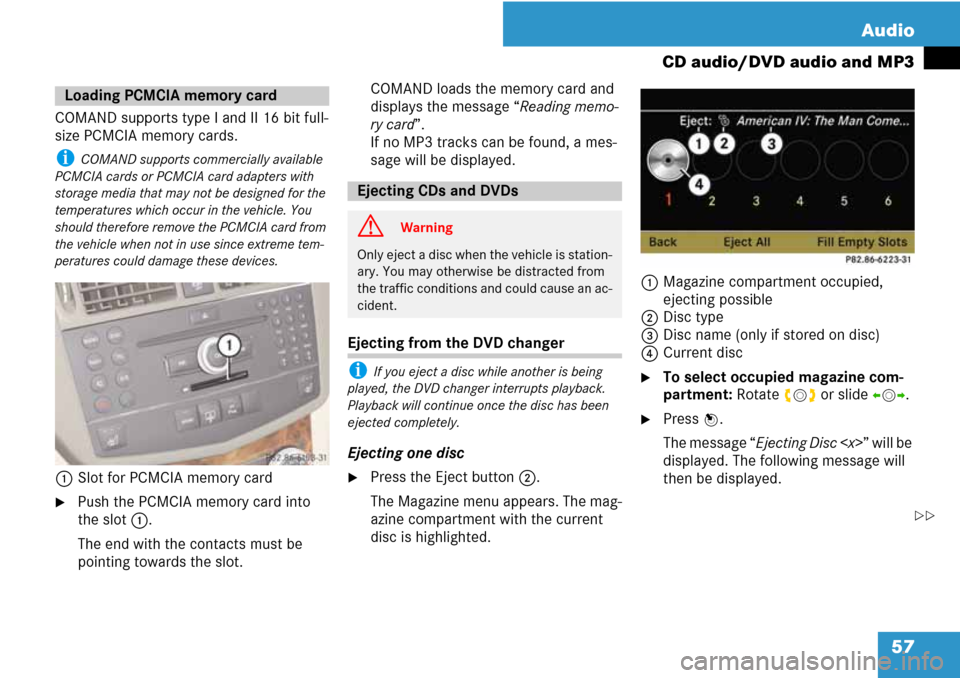
�Press the Eject button2.
The Magazine menu appears. The mag-
azine compartment with the current
disc is highlighted.1Magazine compartment occupied,
ejecting possible
2Disc type
3Disc name (only if stored on disc)
4Current disc
�To select occupied magazine com-
partment: Rotate ymz or slide omp.
�Press n.
The message “Ejecting Disc ” will be
displayed. The following message will
then be displayed.
Loading PCMCIA memory card
Ejecting CDs and DVDs
G Warning
Only eject a disc when the vehicle is station-
ary. You may otherwise be distracted from
the traffic conditions and could cause an ac-
cident.
��
Page 59 of 225
58 Audio
CD audio/DVD audio and MP3
�Remove the disc from the slot 1.
If you do not remove the disc from the
slot 1, the DVD changer will automat-
ically pull it back in after a short while
and begin playback.
Ejecting all discs
�Press the Eject button2.
The Magazine menu appears.
�Select “Eject All”.
The DVD changer ejects the first disc
found. The message “Ejecting Disc ”
is displayed.
�Remove the disc from the slot 1 when
you see the message prompting you to
do this.
The DVD changer switches to the next
occupied magazine compartment and
ejects the disc.
�Repeat the last step until the magazine
is empty.1Eject button
2Slot for PCMCIA memory card
�Press the Eject button 1 twice.
The PCMCIA memory card is ejected.
�Remove the PCMCIA memory card
from the slot 2.
Ejecting PCMCIA memory card
Page 60 of 225
59 Audio
CD audio/DVD audio and MP3
Submenu overview
CD or DVD-A
or MP3 g/h/T
(DVD audio mode only)
or
REC
(CD audio mode only)Track list
(CD and DVD audio
mode only)
or
Folder
(MP3 mode only)ChangerSound
Normal track sequenceg PauseDisplay track list
(CD audio and DVD au-
dio mode only)Media selection via me-
dia list (
�page 62)
Treble
Random Tracksh Stop
playbackFolder list
(MP3 mode only)Bass
Random Folder
(MP3 only)T Restart or resume
playbackBalance/Fader
Switch ‘Read CD data-
base’ function on/off
(CD mode only)REC
Switch on REC functionSurround sound
Page 61 of 225
60 Audio
CD audio/DVD audio and MP3
From the control unit
�Load CD/DVD (�page 54) or PCMCIA-
memory card (
�page 57).
COMAND loads the inserted medium
and begins playback.
or
�Press the y function button.
i Pressing the function button switches di-
rectly to the disc mode selected last (CD audio,
DVD audio, MP3-CD or DVD video). COMAND
then accesses all discs in the DVD changer, the
memory card or the Music Register.
�If necessary, select CD/DVD audio/
MP3 media (
�page 62).
or
�When playing a DVD video: Open the
media list as described under “Select-
ing DVD media” (
�page 78).
�Select an audio storage medium.
This switches to the required disc
mode.
From the COMAND controller
From another main function
�Select “Audio” K “Audio” K “Disc” or
“Memory Card” or “Music Register” in
the Audio menu (
�page 40).
i If the required mode was active last, you
only need to select “Audio”.
Within the audio function
�Select “Audio” K “Disc” or “Memory
Card” or “Music Register” in the Audio
menu.
i “Disc” accesses audio discs in the DVD
changer, “Memory Card” selects the PCMCIA
memory card, “Music Register” selects the Mu-
sic Register.
�If necessary, select CD/DVD audio/
MP3 media (
�page 62).
This switches to the required disc
mode.
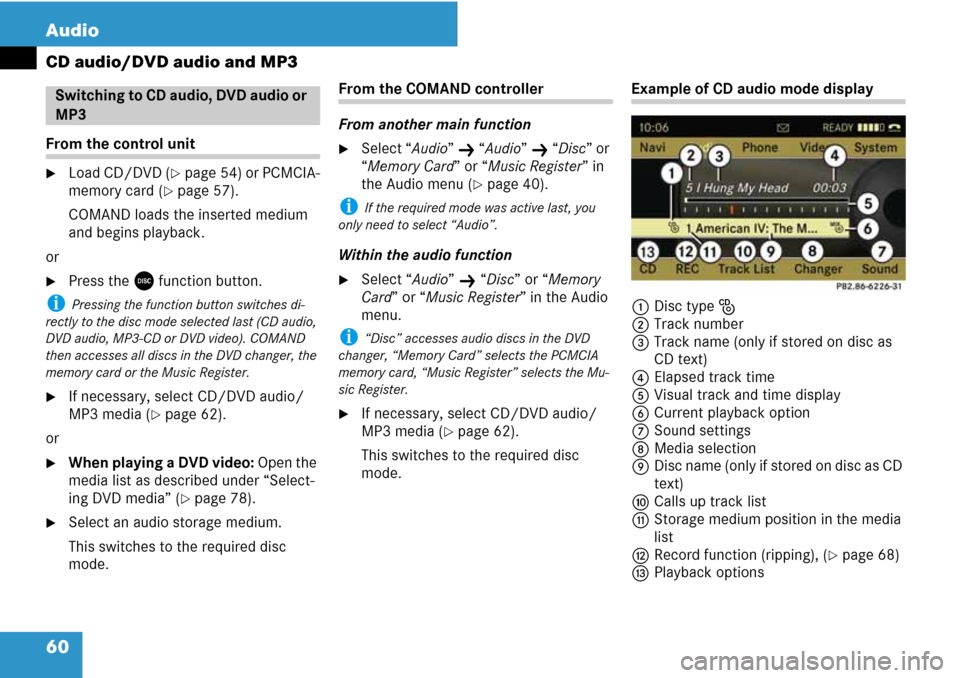
Example of CD audio mode display
1Disc type J
2Track number
3Track name (only if stored on disc as
CD text)
4Elapsed track time
5Visual track and time display
6Current playback option
7Sound settings
8Media selection
9Disc name (only if stored on disc as CD
text)
aCalls up track list
bStorage medium position in the media
list
cRecord function (ripping), (
�page 68)
dPlayback options
Switching to CD audio, DVD audio or
MP3
Page 62 of 225
61 Audio
CD audio/DVD audio and MP3
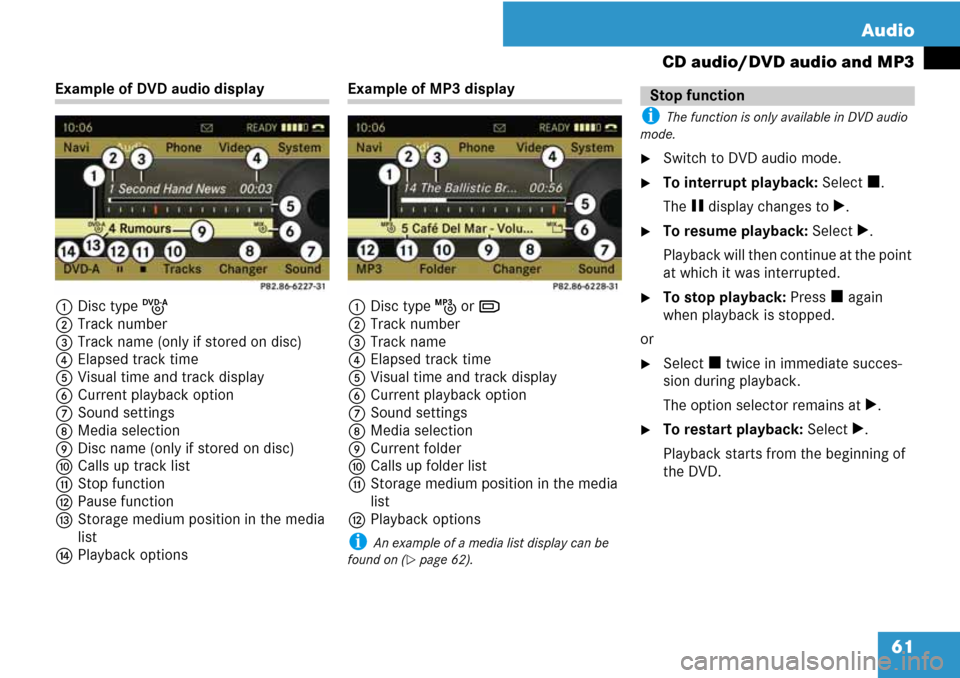
Example of DVD audio display
1Disc type K
2Track number
3Track name (only if stored on disc)
4Elapsed track time
5Visual time and track display
6Current playback option
7Sound settings
8Media selection
9Disc name (only if stored on disc)
aCalls up track list
bStop function
cPause function
dStorage medium position in the media
list
ePlayback optionsExample of MP3 display
1Disc type L or M
2Track number
3Track name
4Elapsed track time
5Visual time and track display
6Current playback option
7Sound settings
8Media selection
9Current folder
aCalls up folder list
bStorage medium position in the media
list
cPlayback options
i An example of a media list display can be
found on (
�page 62).
i The function is only available in DVD audio
mode.
�Switch to DVD audio mode.
�To interrupt playback: Select h.
The g display changes to T.
�To resume playback: Select T.
Playback will then continue at the point
at which it was interrupted.
�To stop playback: Press h again
when playback is stopped.
or
�Select h twice in immediate succes-
sion during playback.
The option selector remains at T.
�To restart playback: Select T.
Playback starts from the beginning of
the DVD.
Stop function
Page 63 of 225
62 Audio
CD audio/DVD audio and MP3
In CD audio, DVD audio and
MP3 mode
�To activate playback pause:
Briefly press I.
X appears at the top left of the status
bar.
�To resume playback: Briefly press I
again.
X disappears.
In DVD audio mode only
�To activate playback pause:
Switch to DVD audio mode.
�Select g.
The g display changes to T.
�To resume playback:
Switch to DVD audio mode.
�Select T.
The T display changes to g.
�In CD audio, DVD audio and MP3
mode: Select “Changer”.
or
�In CD audio and DVD audio mode
only: Press n if the display/selection
window is highlighted.
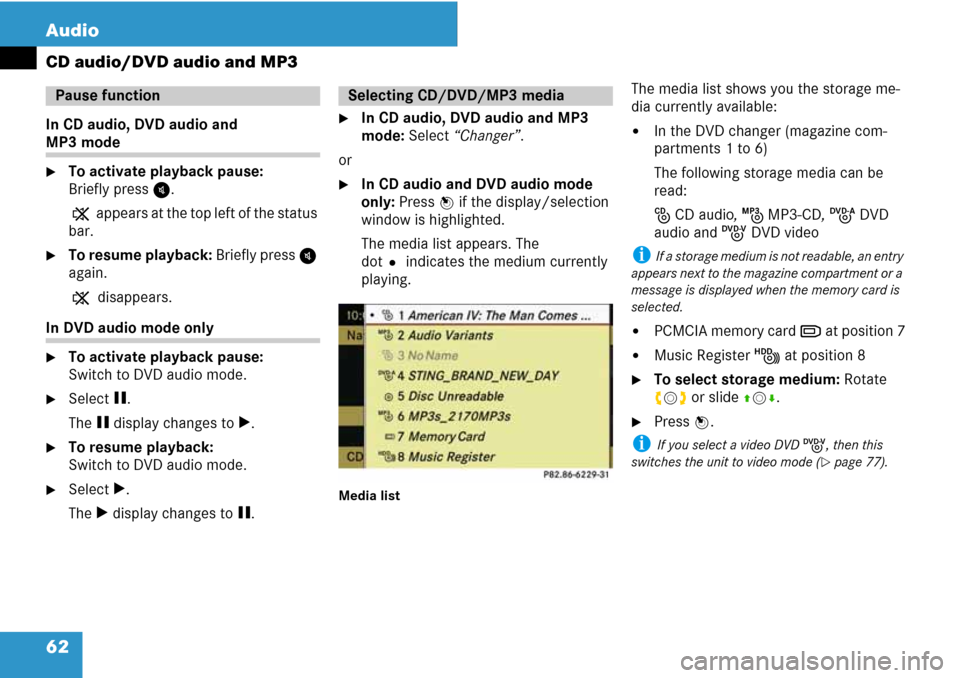
The media list appears. The
dotR indicates the medium currently
playing.
Media list
The media list shows you the storage me-
dia currently available:
�In the DVD changer (magazine com-
partments 1 to 6)
The following storage media can be
read:
J CD audio, L MP3-CD, K DVD
audio and I DVD video
i If a storage medium is not readable, an entry
appears next to the magazine compartment or a
message is displayed when the memory card is
selected.
�PCMCIA memory card M at position 7
�Music Register N at position 8
�To select storage medium: Rotate
ymz or slide qmr.
�Press n.
i If you select a video DVD I, then this
switches the unit to video mode (
�page 77).
Pause functionSelecting CD/DVD/MP3 media
Page 64 of 225
63 Audio
CD audio/DVD audio and MP3
i For many operating functions you can also
use the buttons on the multifunction steering
wheel, e.g. the (, &, $ or % but-
tons, for selecting a track or a menu or scrolling
through lists (
�page 23).
Selection via track skip
�To skip forwards or backwards to a
track: Rotate ymz.
or
�Press G or H.
i ‘Forward track skip’ skips to the next track.
‘Backward track skip’ skips to the beginning of
the current track, if the track has been playing
for more than 8 seconds. If the track has been
playing for less than 8 seconds, it will skip to the
beginning of the previous track.
If the playback option “Random Tracks” is
switched on, the track sequence is random.
Selecting via track list
�In CD audio/DVD audio mode: Select
“Track” or “Track List”.
or
�In MP3 mode: Press n if the display/
selection window is highlighted.The track list appears. The dotRindi-
cates the current track.
�To select a track: Rotate ymz or slide
qmr.
�Press n.
i In MP3 mode the list displays all tracks in al-
phabetical order.
�Display/selection window is high-
lighted: Slide and hold omp until the
desired point is reached.
or
�Press and hold G or H on the
control unit until the desired point is
reached.
i The function is only available in MP3 mode.
�Switch to MP3 mode (�page 60).
�Select “Folder”.
or
�Press n if the display/selection win-
dow is highlighted.
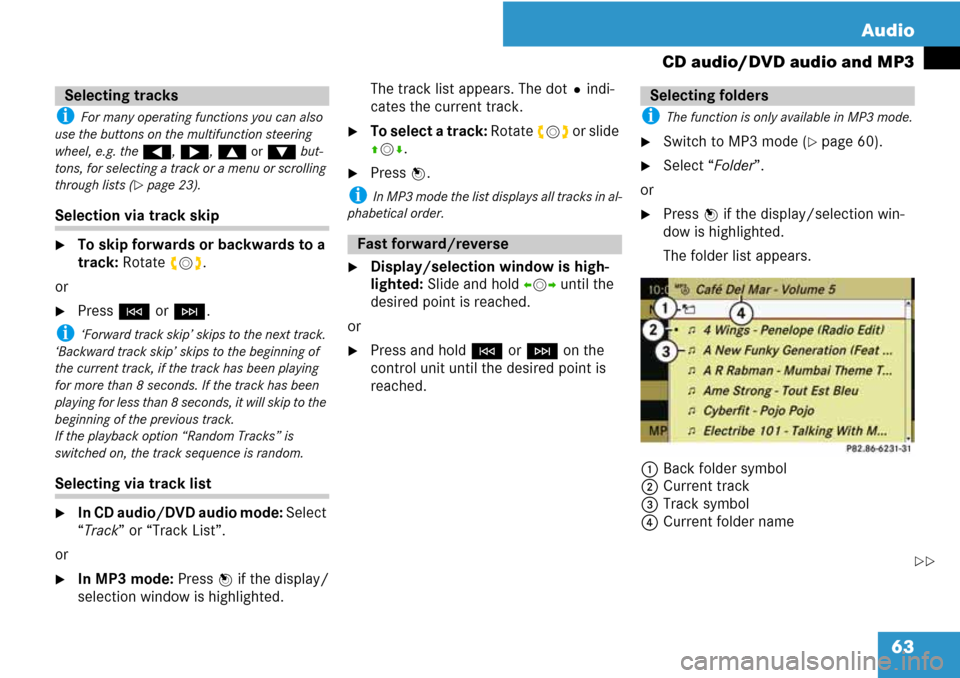
The folder list appears.
1Back folder symbol
2Current track
3Track symbol
4Current folder name
Selecting tracks
Fast forward/reverse
Selecting folders
��
Page 65 of 225
64 Audio
CD audio/DVD audio and MP3
�To switch to the next folder up: Se-
lect theQsymbol.
The display changes to the next folder
up.
1Disc name (if stored on disc)
2Current folder
3Folder symbol�To select a folder: Rotate ymz or
slide qmr.
�Press n.
The tracks of the folder appear.
�To select a track: Rotate ymz or slide
qmr.
�Press n.
The track is played, the corresponding
folder is now the active folder.
i The function is only available in CD audio
mode.
CD information, including album title, artist
name and track name, is obtained from the
Gracenote
® Media Database. A version of
the Gracenote® Media Database is stored
on the COMAND’s hard drive. Access to
this database is indicated by the
Gracenote logo being displayed in the low-
er right of some audio displays.
Gracenote Media Database