Page 229 of 312
AUDIO/VIDEO SYSTEM
228
D
Changing the audio format
DVD audio only —
Each time you touch “AUDIO”, another
audio format stored on the disc is se-
lected.
When you touch
, the previous
screen returns.
DChanging the angle
The angle can be selected for discs that
are multi− angle compatible when the
angle mark appears on the screen.
Each time you touch “Angle”, the angle
changes.
When you touch
, the previous
screen returns.
GX470_Navi_U (OM60D58U) 07/06/16
Page 230 of 312
AUDIO/VIDEO SYSTEM
229
D
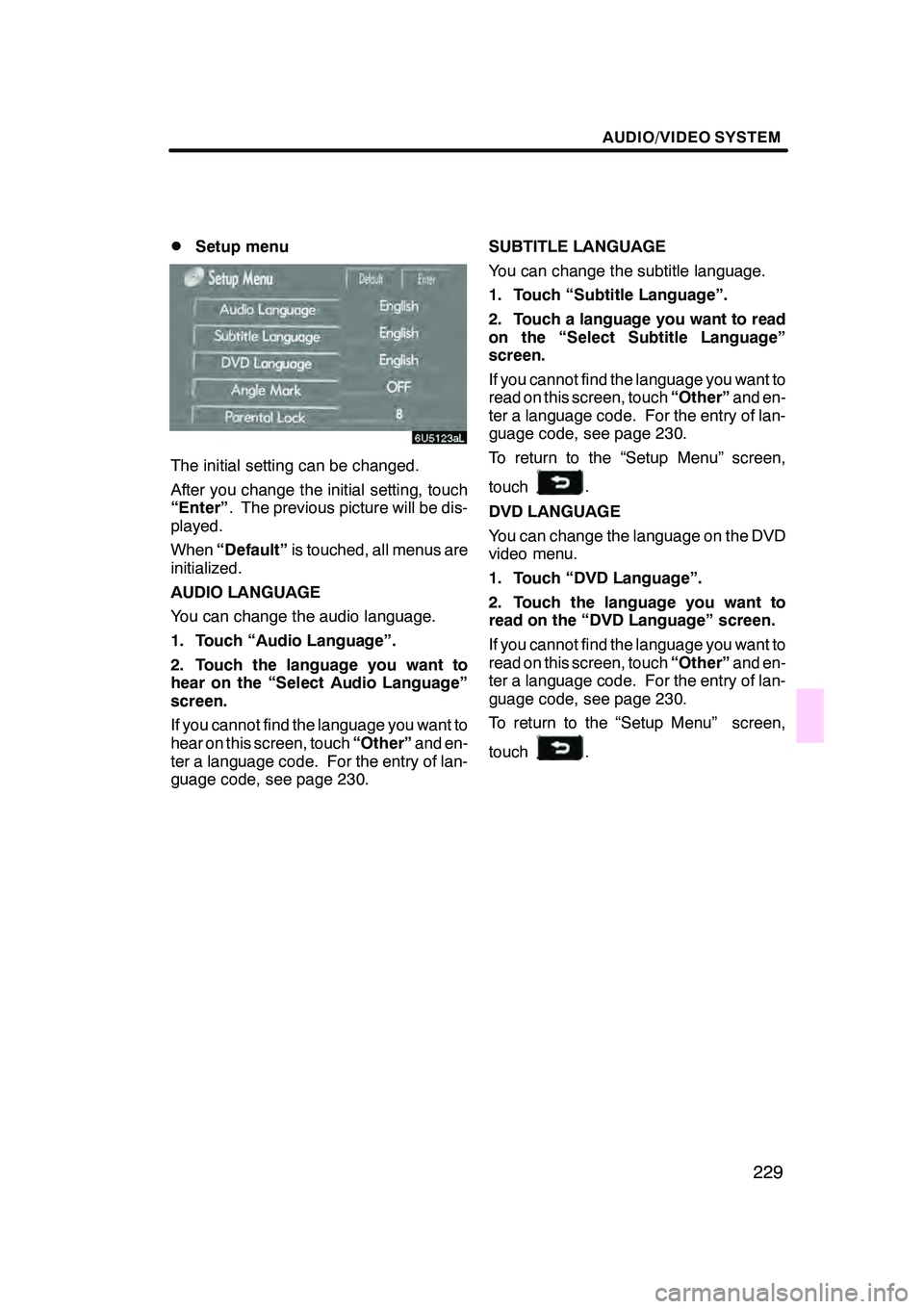
Setup menu
The initial setting can be changed.
After you change the initial setting, touch
“Enter”
. The previous picture will be dis-
played.
When “Default” is touched, all menus are
initialized.
AUDIO LANGUAGE
You can change the audio language.
1. Touch “Audio Language”.
2. Touch the language you want to
hear on the “Select Audio Language”
screen.
If you cannot find the language you want to
hear on this screen, touch “Other”and en-
ter a language code. For the entry of lan-
guage code, see page 230. SUBTITLE LANGUAGE
You can change the subtitle language.
1. Touch “Subtitle Language”.
2. Touch a language you want to read
on the “Select Subtitle Language”
screen.
If you cannot find the language you want to
read on this screen, touch
“Other”and en-
ter a language code. For the entry of lan-
guage code, see page 230.
To return to the “Setup Menu” screen,
touch
.
DVD LANGUAGE
You can change the language on the DVD
video menu.
1. Touch “DVD Language”.
2. Touch the language you want to
read on the “DVD Language” screen.
If you cannot find the language you want to
read on this screen, touch “Other”and en-
ter a language code. For the entry of lan-
guage code, see page 230.
To return to the “Setup Menu” screen,
touch
.
GX470_Navi_U (OM60D58U) 07/06/16
Page 231 of 312
AUDIO/VIDEO SYSTEM
230
ANGLE MARK
The multi−angle mark can be turned on or
off on the screen while the disc which is
multi− angle compatible is being played.
Each time you touch “Angle Mark”, the
angle mark on the screen turns on or off al-
ternately.
PARENTAL LOCK
The level of viewer restrictions can be
changed.
1. Touch “Parental Lock”.
2. Enter the 4− digit personal code on
the “Enter Personal Code” screen.
If you enter the wrong numbers, touch “A ”
to delete the numbers.
10 touches of “A ”will initialize the person-
al code.
3. Touch a parental level (1 — 8) on the
“Restriction Level”.
To return to the “Setup Menu” screen,
touch
.
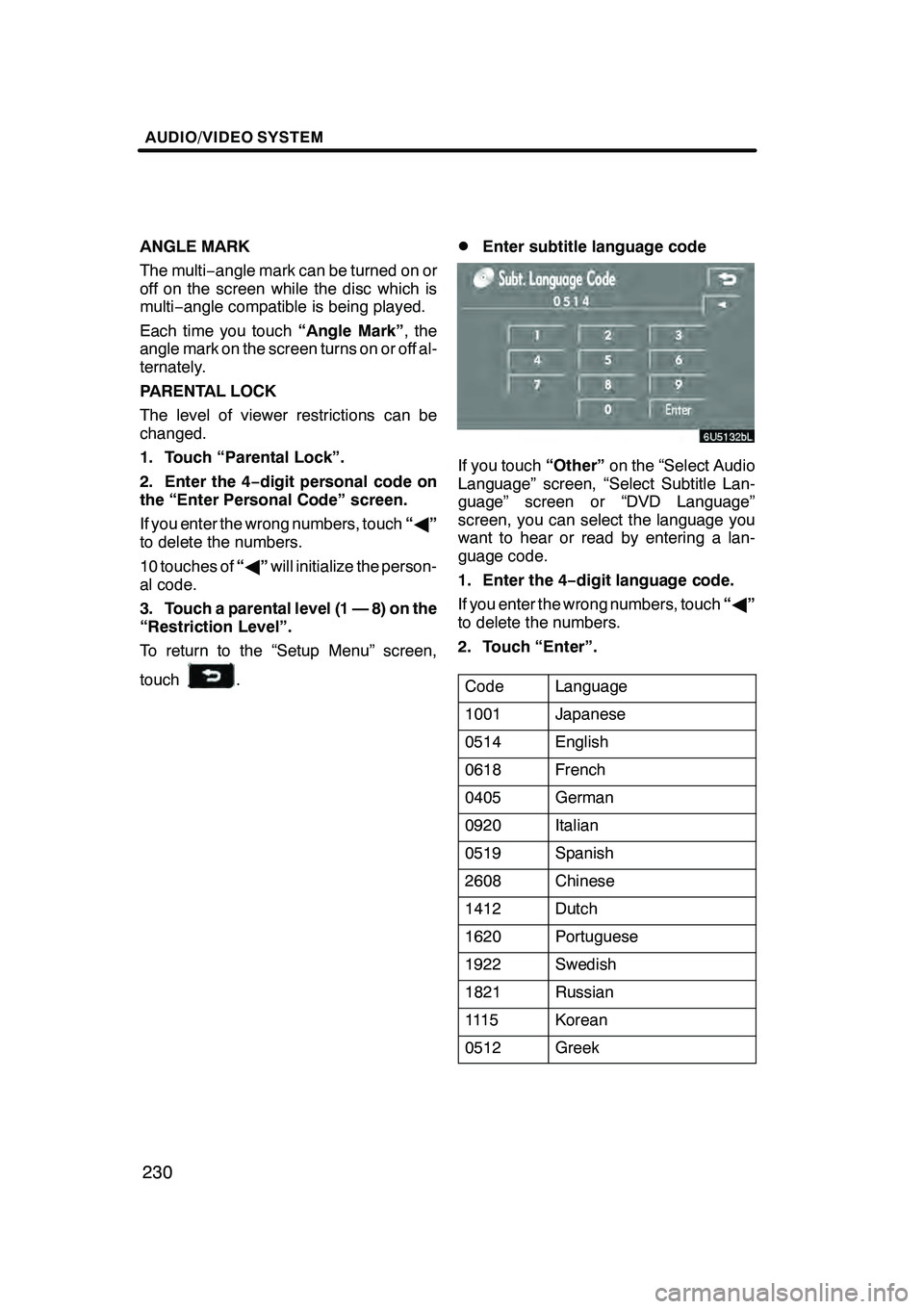
DEnter subtitle language code
If you touch “Other”on the “Select Audio
Language” screen, “Select Subtitle Lan-
guage” screen or “DVD Language”
screen, you can select the language you
want to hear or read by entering a lan-
guage code.
1. Enter the 4− digit language code.
If you enter the wrong numbers, touch “A ”
to delete the numbers.
2. Touch “Enter”.
Code
Language
1001Japanese
0514English
0618French
0405German
0920Italian
0519Spanish
2608Chinese
1412Dutch
1620Portuguese
1922Swedish
1821Russian
111 5Korean
0512Greek
GX470_Navi_U (OM60D58U) 07/06/16
Page 236 of 312
AUDIO/VIDEO SYSTEM
235
(h) If the changer malfunctions
If the changer or another unit equipped
with the changer malfunction, your audio/
video system will display following mes-
sages.
If “No Disc” appears on the display:It
indicates that there is no disc in the DVD
changer.
If “DISC ×Check” appears on the dis-
play: It indicates that the disc dirty, dam-
aged, or it was inserted upside down.
Clean the disc or insert it correctly. If a disc
which is not playable is inserted, “DISC ×
Check” will also appear on the screen. For
appropriate discs for this player, see “Au-
dio/video system operating hints” on page
262.
If “Region Code Error” appears on the
display: It indicates that the DVD region
code is not set properly.
If “DVD Error” appears on the display:
The following causes are possible.
DThere is a trouble inside the system.
Eject the disc.
DThe inside of the changer unit may be
too hot due to the very high ambient
temperature. Eject the disc and allow
the changer to cool down.
If “NO MUSIC FILE” appears on the dis-
play: It indicates that the disc has no play-
able data.
If the malfunction is not rectified: Take
your vehicle to your dealer.
If an MP3/WMA disc contains CD− DA
files, only CD −DA files are played. If an
MP3/WMA disc contains files other than
CD− DA, only MP3/WMA files are played. (i) DVD player and DVD video disc in-
formation
DDVD video discs
This DVD player conforms to NTSC color
TV formats.
Region codes: Some DVD video discs
have a region code indicating a country
where you can use the DVD video disc on
this DVD player. If the DVD video disc is
not labeled as “ALL” or “1”, you cannot use
it on this DVD player. If you attempt to play
an inappropriate DVD video disc on this
player, “Region Code Error” appears on
the screen. Even if the DVD video disc
does not have a region code, there is a
case that you cannot use it.
GX470_Navi_U (OM60D58U) 07/06/16
Page 237 of 312

AUDIO/VIDEO SYSTEM
236
Marks shown on DVD video discs:
Indicates NTSC
format of color TV.
Indicates the number
of audio tracks.
Indicates the number
of language subtitles.
Indicates the number
of angles.
Indicates the screen to
be selected.
Wide screen: 16:9
Standard: 4:3
Indicates a region code
by which this video disc
can be played.
ALL: in all countries
Number: region code
DDVD video disc glossary
DVD video discs: Digital versatile Disc
that holds video. DVD video discs have
adopted “MPEG2”, one of the world stan-
dards of digital compression technologies.
The picture data is compressed by 1/40 on
average and stored. Variable rate en-
coded technology in which the volume of
data assigned to the picture is changed de-
pending on the picture format has also
been adopted. Audio data is stored using
PCM and Dolby digital, which enables
higher quality of sound. Furthermore, mul-
ti− angle and multi −language features will
also help you enjoy the more advanced
technology of DVD video.
Viewer restrictions: This feature limits
what can be viewed in conformity with a
level of restrictions of the country. The lev-
el of restrictions varies depending on the
DVD video disc. Some DVD video discs
cannot be played at all, or violent scenes
are skipped or replaced with other scenes.
Level 1: DVD video discs for children can
be played.
Level 2 −7: DVD video discs for children
and G −rated movie can be played.
Level 8: All types of the DVD video discs
can be played.
Multi −angle feature: You can enjoy the
same scene at different angles.
Multi −language feature: You can select a
language of the subtitle and audio.
Region codes: The region codes are pro-
vided on DVD players and DVD discs. If
the DVD video disc does not have the
same region code as the DVD player, you
cannot play the disc on the DVD player.
For region codes, see page 236.
Audio: This DVD player can play liner
PCM, Dolby digital, DTS and MPEG audio
format DVD. Other decoded type cannot
be played.
Title and chapter: Video and audio pro-
grams stored in DVD video disc are divid-
ed in parts by title and chapter.
GX470_Navi_U (OM60D58U) 07/06/16
Page 238 of 312

AUDIO/VIDEO SYSTEM
237
Title:The largest unit of the video and au-
dio programs stored on DVD video discs.
Usually, one piece of movie, one album, or
one audio program is assigned as a title.
Chapter: The unit smaller than that of title.
A title comprises plural chapters.
Manufactured under license from
Dolby Laboratories. “Dolby”, “Pro Log-
ic”, and the double −D symbol are trade-
marks of Dolby Laboratories. Confi-
dential unpublished works.
E 1992 −1997 Dolby Laboratories. All
rights reserved.
This product incorporates copyright
protection technology that is protected
by method claims of certain U.S. pat-
ents and other intellectual property
rights owned by Macrovision Corpora-
tion and other rights owners. Use of
this copyright protection technology
must be authorized by Macrovision
Corporation, and is intended for home
and other limited viewing uses only un-
less otherwise authorized by Macrovi-
sion Corporation. Reverse engineering
or disassembly is prohibited.
“DTS” is a trademark of Digital Theater
Systems, Inc. The DVD player can play DVD video, au-
dio CD, video CD, CD text, dts
−CD or
MP3 disc only when a disc is loaded in
the DVD player. A WMA disc cannot be
played.
Refer to “Rear seat entertainment system”
for details.
For appropriate discs for this player, see
“Audio/video system operating hints” on
page 262.
(a) Inserting the disc
Insert the disc into the slot with the la-
bel side up.
An adapter must be used for 8 cm (3 in.)
discs which are loaded in the same man-
ner as for 12 cm (4.7 in.) discs.
GX470_Navi_U (OM60D58U) 07/06/16
—DVD player operation
Page 239 of 312
AUDIO/VIDEO SYSTEM
238
The indicator light turns on while the disc
is loaded.
If the label faces forward, the disc cannot
be played. In this case, “Disc Check” ap-
pears on the screen.
If a disc which is not playable is inserted,
“Disc Check” will also appear on the
screen. For appropriate discs for this play-
er, see “Audio/video system operating
hints” on page 262.
NOTICE
Never try to disassemble or oil any
part of the DVD player. Do not insert
anything other than a disc into the
slot.
(b) Ejecting a disc
Push thebutton.
GX470_Navi_U (OM60D58U) 07/06/16
Page 240 of 312
AUDIO/VIDEO SYSTEM
239
(c) Playing a disc
Push the “DISC·AUX” button if a disc is
already loaded in the player.
“DVD” appears on the screen. (If the CD
changer or DVD changer is turned on,
push the“DISC·AUX” button again to
switch to the DVD player.) (d) Operating an audio CD
DPlaying an audio CD
CD text only — The disc title and track title
will appear on the screen when pushing
the
“DISC·AUX” button.
Push the “AUDIO” button to display
this screen.
GX470_Navi_U (OM60D58U) 07/06/16


