Page 175 of 413
CONT INUED
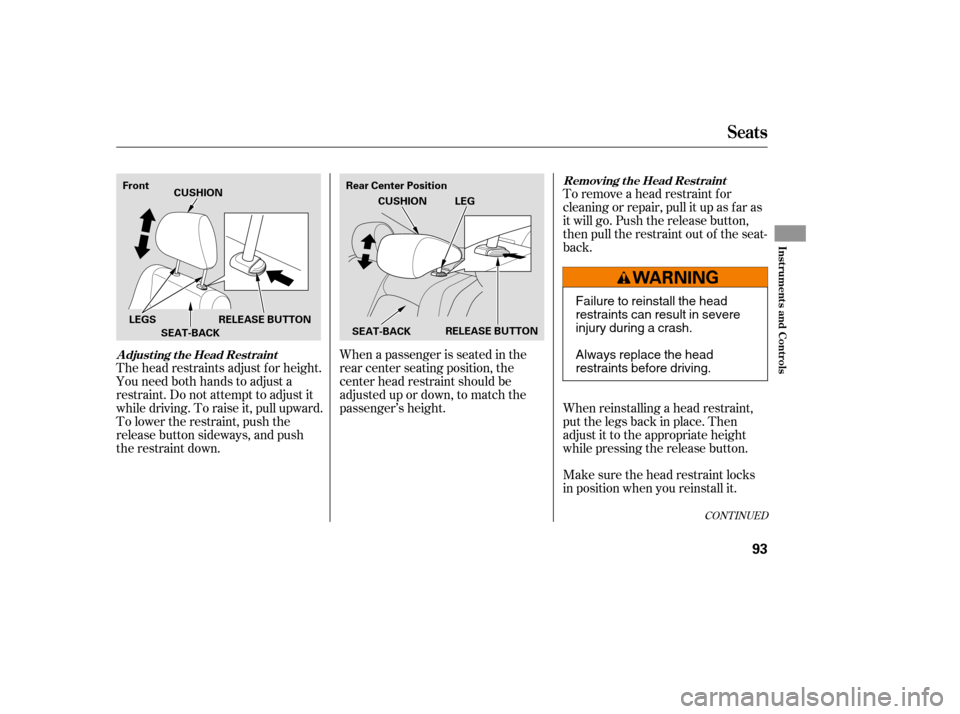
To remove a head restraint f or
cleaning or repair, pull it up as f ar as
it will go. Push the release button,
then pull the restraint out of the seat-
back.
When reinstalling a head restraint,
put the legs back in place. Then
adjust it to the appropriate height
while pressing the release button.
Make sure the head restraint locks
in position when you reinstall it.
When a passenger is seated in the
rear center seating position, the
center head restraint should be
adjusted up or down, to match the
passenger’s height.
The head restraints adjust f or height.
You need both hands to adjust a
restraint. Do not attempt to adjust it
while driving. To raise it, pull upward.
To lower the restraint, push the
release button sideways, and push
the restraint down.
Seats
Removing t he Head Rest raint
A djust ing t he Head Rest raint
Inst rument s and Cont rols
93
Rear Center Position
Front
RELEASE BUTTON
SEAT-BACK CUSHION
LEGS RELEASE BUTTON SEAT-BACKCUSHION
LEG
Failure to reinstall the head
restraints can result in severe
injury during a crash.
Always replace the head
restraints before driving.
�����—�����—�����y�������������
�y���
�(�#���������y���������y
Page 178 of 413
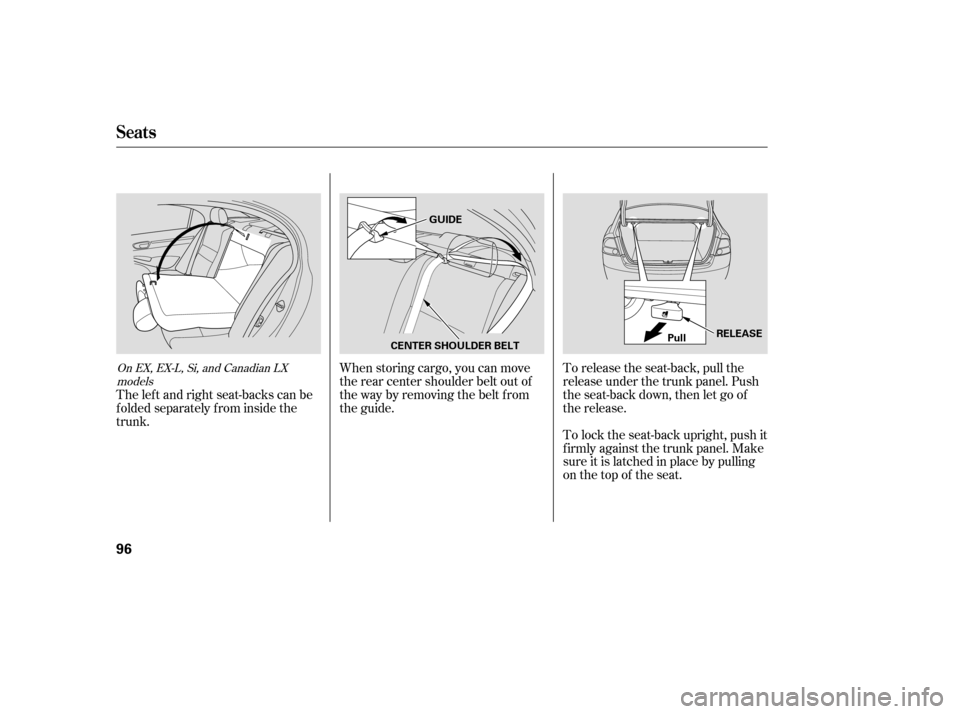
When storing cargo, you can move
therearcentershoulderbeltoutof
the way by removing the belt f rom
the guide.To lock the seat-back upright, push it
firmly against the trunk panel. Make
sure it is latched in place by pulling
on the top of the seat.
To release the seat-back, pull the
release under the trunk panel. Push
the seat-back down, then let go of
the release.
The lef t and right seat-backs can be
f olded separately f rom inside the
trunk.On EX, EX-L, Si, and Canadian LX
models
Seats
96
GUIDE
CENTER SHOULDER BELT Pull
RELEASE
�����—�����—�����y���������������y���
�(�#���������y���
���
�y
Page 188 of 413
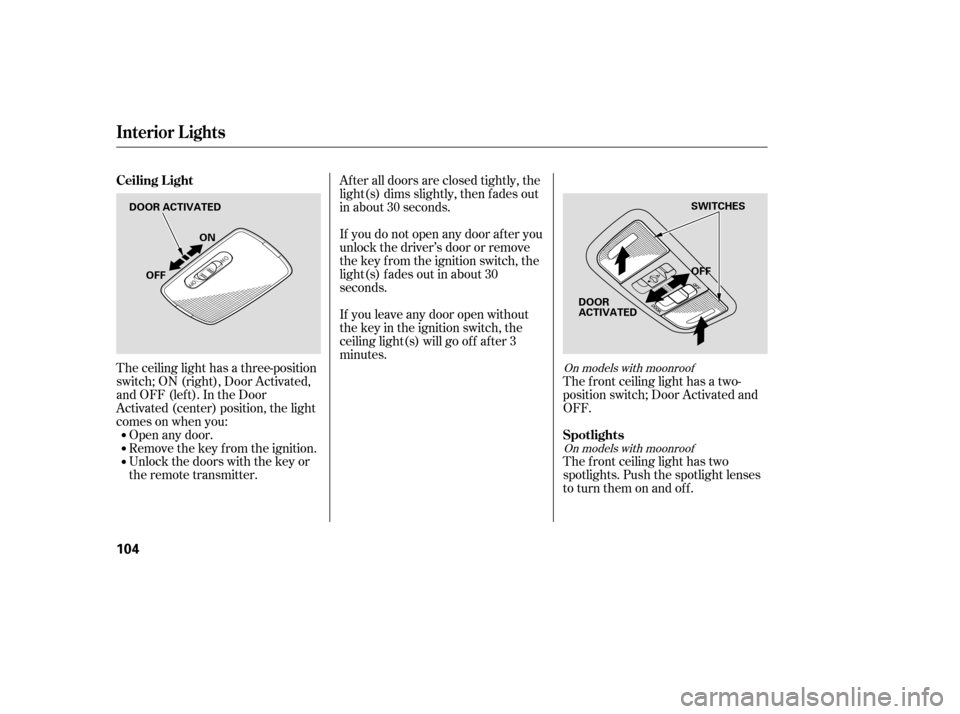
The ceiling light has a three-position
switch;ON(right),DoorActivated,
andOFF(left).IntheDoor
Activated (center) position, the light
comesonwhenyou:Open any door.
Remove the key from the ignition.
Unlock the doors with the key or
the remote transmitter. The f ront ceiling light has a two-
position switch; Door Activated and
OFF.
The f ront ceiling light has two
spotlights. Push the spotlight lenses
to turn them on and off.
After all doors are closed tightly, the
light(s) dims slightly, then f ades out
in about 30 seconds.
If you do not open any door af ter you
unlock the driver’s door or remove
the key from the ignition switch, the
light(s) f ades out in about 30
seconds.
If you leave any door open without
the key in the ignition switch, the
ceiling light(s) will go of f af ter 3
minutes.On models with moonroof
On models with moonroof
Ceiling L ight
Spotlights
Interior Lights
104
DOOR ACTIVATED OFF
OFF ON
SWITCHES
DOOR
ACTIVATED
�����—�����—�����y���������������y���
�(�#���������y���
�����y
Page 192 of 413
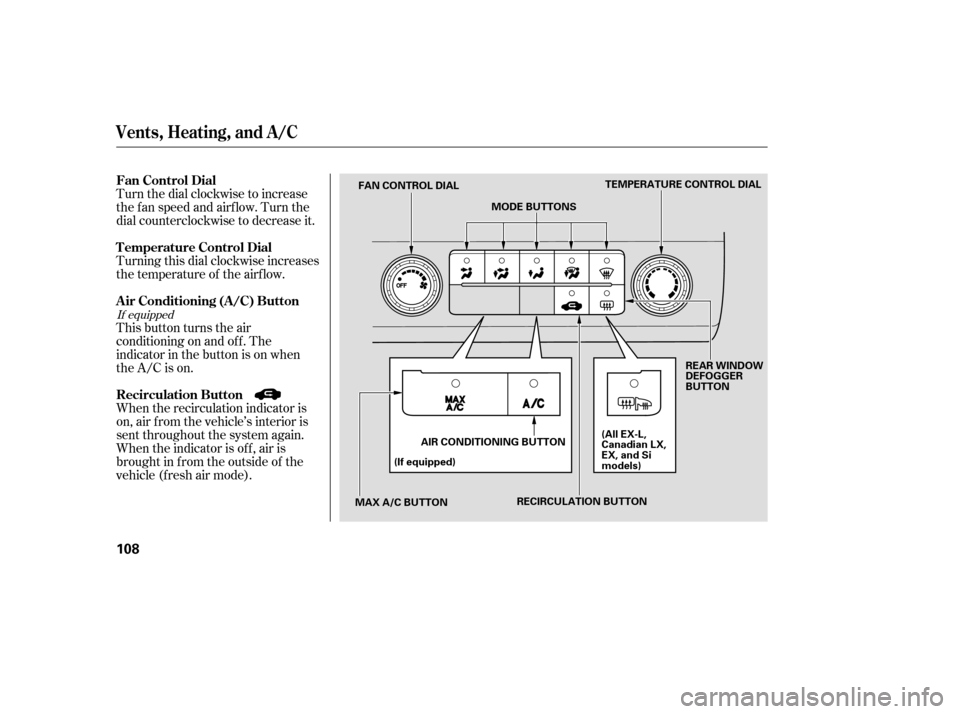
Turn the dial clockwise to increase
the fan speed and airflow. Turn the
dial counterclockwise to decrease it.
Turning this dial clockwise increases
the temperature of the airflow.
This button turns the air
conditioning on and of f . The
indicatorinthebuttonisonwhen
the A/C is on.
When the recirculation indicator is
on, air f rom the vehicle’s interior is
sent throughout the system again.
When the indicator is off, air is
brought in f rom the outside of the
vehicle (fresh air mode).
If equipped
Vents, Heating, and A/C
Air Conditioning (A/C) Button
Fan Control Dial
Recirculation Button
T emperature Control Dial
108
TEMPERATURE CONTROL DIAL
MODE BUTTONS
FAN CONTROL DIAL
MAX A/C BUTTON (If equipped)
AIR CONDITIONING BUTTON REAR WINDOW
DEFOGGER
BUTTON
(All EX-L,
Canadian LX,
EX, and Si
models)
RECIRCULATION BUTTON
�����—�����—�����y�����������
���y���
�(�#���������y���
�
���y
Page 207 of 413
�µ�µ
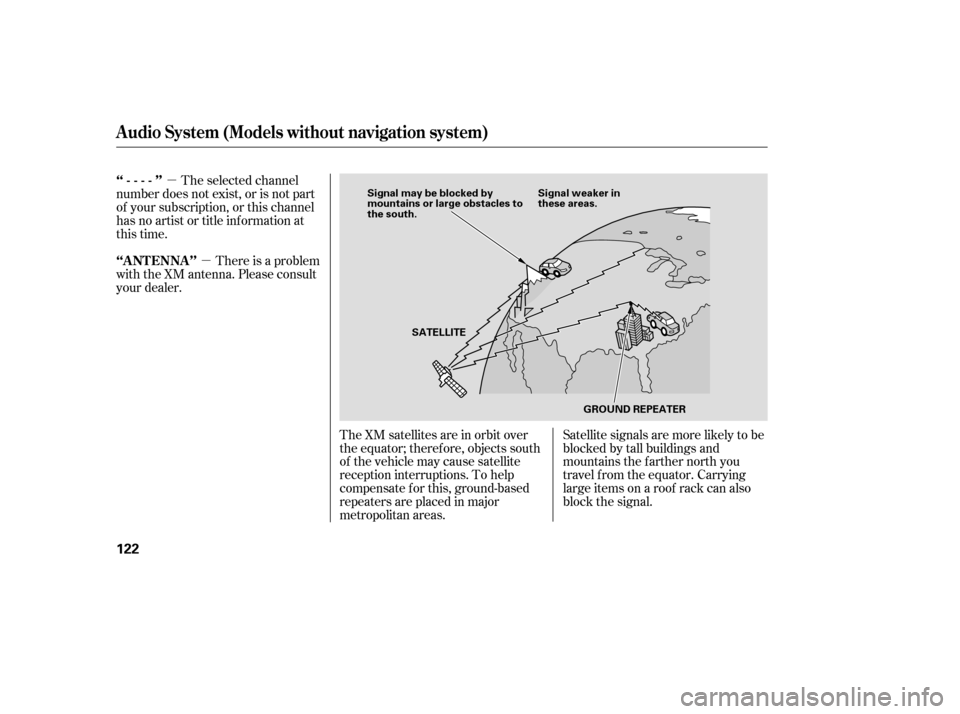
The XM satellites are in orbit over
the equator; therefore, objects south
of the vehicle may cause satellite
reception interruptions. To help
compensate f or this, ground-based
repeaters are placed in major
metropolitan areas. Satellite signals are more likely to be
blocked by tall buildings and
mountains the f arther north you
travel f rom the equator. Carrying
large items on a roof rack can also
block the signal.
The selected channel
number does not exist, or is not part
of your subscription, or this channel
has no artist or title inf ormation at
this time.
There is a problem
with the XM antenna. Please consult
your dealer.
‘‘----’’
‘‘A NT ENNA ’’
Audio System (Models without navigation system)
122
Signal may be blocked by
mountains or large obstacles to
the south.
Signal weaker in
these areas.
SATELLITE GROUND REPEATER
�����—�����—�����y�����������
���y���
�(�#���������y���
�����y
Page 225 of 413
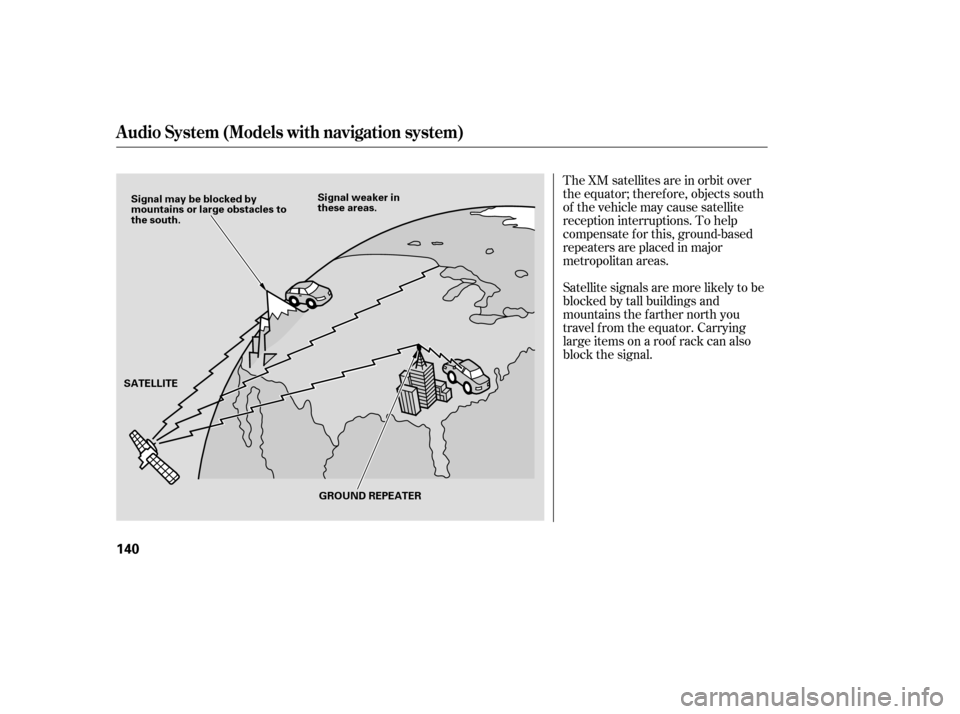
The XM satellites are in orbit over
the equator; therefore, objects south
of the vehicle may cause satellite
reception interruptions. To help
compensate f or this, ground-based
repeaters are placed in major
metropolitan areas.
Satellite signals are more likely to be
blocked by tall buildings and
mountains the f arther north you
travel f rom the equator. Carrying
large items on a roof rack can also
block the signal.
Audio System (Models with navigation system)
140
Signal may be blocked by
mountains or large obstacles to
the south.Signal weaker in
these areas.
SATELLITE GROUND REPEATER
�����—�����—�����y���
�����������y���
�(�#���������y���
�����y
Page 260 of 413
On models with navigation system
On models without navigation system
The navigation system receives
signals f rom the global positioning
system (GPS), and the displayed
time is updated automatically by the
GPS. Ref er to the navigation system
manual f or how to adjust the time.
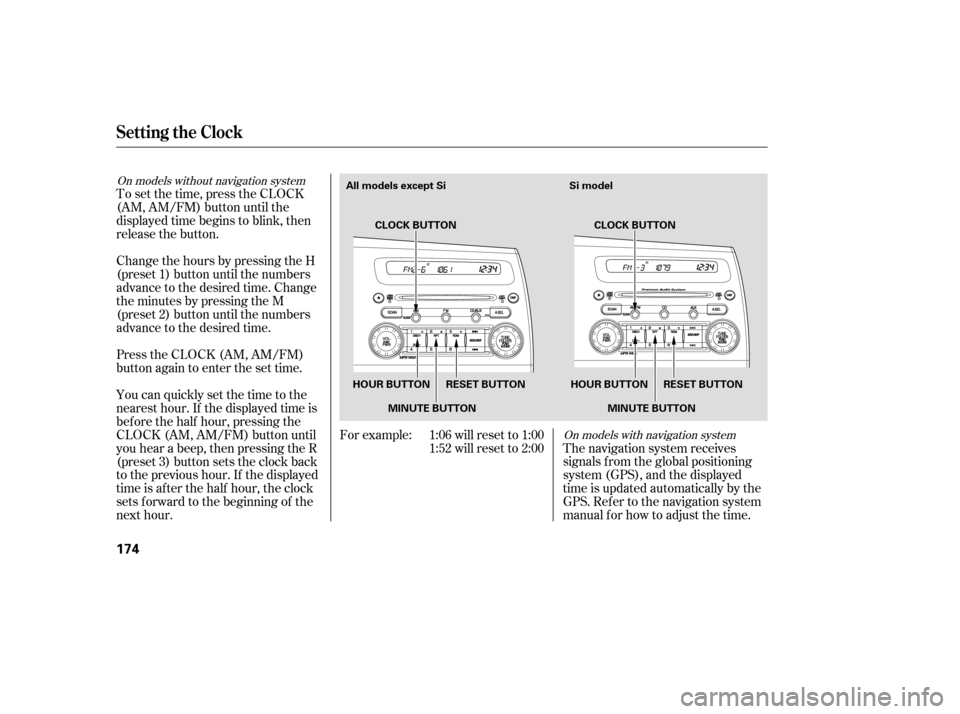
To set the time, press the CLOCK
(AM, AM/FM) button until the
displayed time begins to blink, then
release the button.
Change the hours by pressing the H
(preset 1) button until the numbers
advance to the desired time. Change
the minutes by pressing the M
(preset 2) button until the numbers
advance to the desired time.
Press the CLOCK (AM, AM/FM)
button again to enter the set time.
You can quickly set the time to the
nearest hour. If the displayed time is
bef ore the half hour, pressing the
CLOCK (AM, AM/FM) button until
you hear a beep, then pressing the R
(preset 3) button sets the clock back
to the previous hour. If the displayed
time is af ter the half hour, the clock
sets f orward to the beginning of the
next hour.
For example: 1:06 will reset to 1:00
1:52 will reset to 2:00
Setting the Clock
174
HOUR BUTTON RESET BUTTON
HOUR BUTTON RESET BUTTON
MINUTE BUTTON MINUTE BUTTON CLOCK BUTTON
CLOCK BUTTON Si model
All models except Si
�����—�����—�����y���
�����������y���
�(�#���������y���
�����y
Page 261 of 413
Once the security system is set,
opening any door, the trunk, or the
hood without using the key or the
remote transmitter will cause it to
alarm. It also alarms if the radio is
removed f rom the dashboard or the
wiring is cut.
The security system helps to protect
your vehicle and valuables f rom thef t.
The horn sounds and a combination
of headlights (low beam), parking
lights, side marker lights, and
taillights f lash if someone attempts
to break into your vehicle or remove
the radio. This alarm continues f or 2
minutes, then it stops. To reset an
alarming system bef ore the 2
minutes have elapsed, unlock the
driver’s door with the key or the
remote transmitter.
The security system automatically
sets 15 seconds after you lock the
doors, hood, and trunk. For the
system to activate, you must lock the
doors f rom the outside with the key,
driver’s lock tab, door lock master
switch, or remote transmitter. The
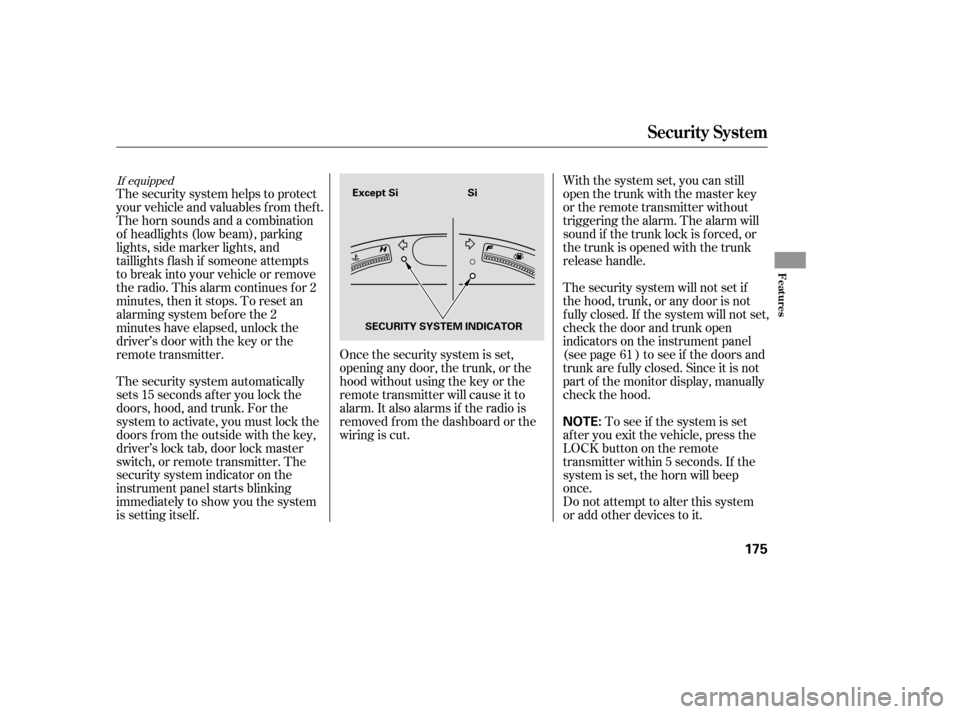
security system indicator on the
instrument panel starts blinking
immediately to show you the system
is setting itself . With the system set, you can still
open the trunk with the master key
or the remote transmitter without
triggering the alarm. The alarm will
sound if the trunk lock is f orced, or
the trunk is opened with the trunk
release handle.
The security system will not set if
the hood, trunk, or any door is not
f ully closed. If the system will not set,
check the door and trunk open
indicators on the instrument panel
(see page ) to see if the doors and
trunk are f ully closed. Since it is not
part of the monitor display, manually
check the hood.
Do not attempt to alter this system
or add other devices to it.
To see if the system is set
af ter you exit the vehicle, press the
LOCK button on the remote
transmitter within 5 seconds. If the
system is set, the horn will beep
once. 61
If equipped
Security System
Features
175
NOTE:
Except Si Si
SECURITY SYSTEM INDICATOR
�����—�����—�����y���
�����������y���
�(�#���������y���
�����y