Page 104 of 432
Compass Variance
Compass variance is the difference between earth’s
magnetic north and true geographic north. If not
adjusted to account for compass variance, the mirror’s
compass could give false readings. The mirror is
set in zone eight upon leaving the factory. It will be
necessary to adjust the compass to compensate
for compass variance if you live outside of zone eight.
Under certain circumstances, as during a long distance
cross-country trip, it will also be necessary to adjust
for compass variance.
To adjust for compass variance do the following:
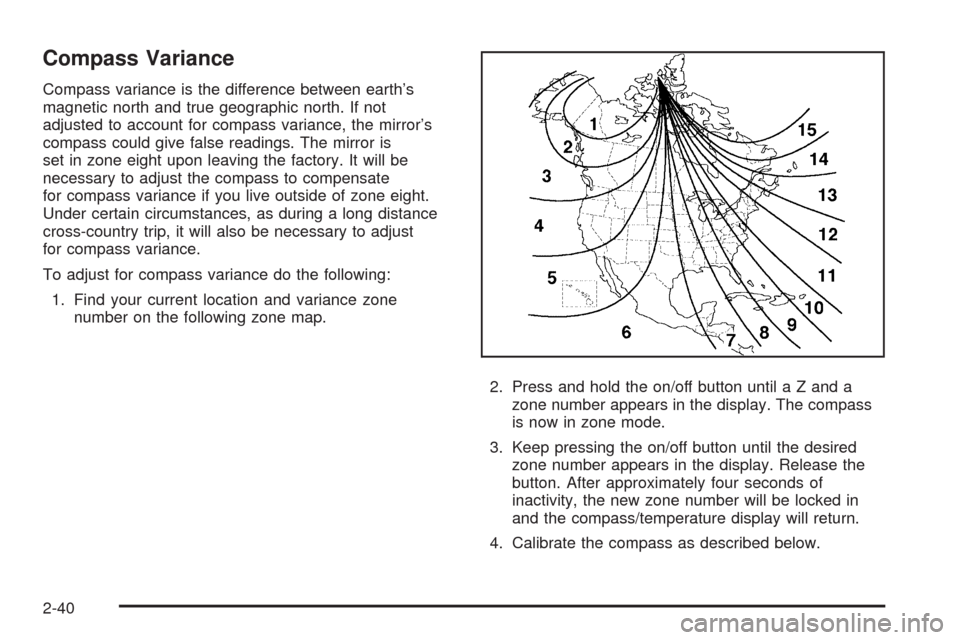
1. Find your current location and variance zone
number on the following zone map.
2. Press and hold the on/off button until a Z and a
zone number appears in the display. The compass
is now in zone mode.
3. Keep pressing the on/off button until the desired
zone number appears in the display. Release the
button. After approximately four seconds of
inactivity, the new zone number will be locked in
and the compass/temperature display will return.
4. Calibrate the compass as described below.
2-40
Page 111 of 432
Be sure to keep the original remote control transmitter for
use in other vehicles, as well as, for future programming.
Only the original remote control transmitter is needed for
Fixed Code programming. The programmed buttons
should be erased when the vehicle is sold or the lease
ends. See “Erasing Universal Home Remote Buttons”
later in this section.
Park the vehicle outside of the garage when
programming a garage door. Be sure that people and
objects are clear of the garage door or gate that is being
programmed.
Programming Universal Home
Remote — Rolling Code
For questions or help programming the Universal Home
Remote System, call 1-866-572-2728 or go to
www.learcar2u.com.
Most garage door openers sold after 1996 are Rolling
Code units.
Programming a garage door opener involves
time-sensitive actions, so read the entire procedure
before starting. Otherwise, the device will time out and
the procedure will have to be repeated.To program up to three devices:
1. Press START or put the vehicle in accessory mode.
SeeIgnition Positions on page 2-22for additional
information.
Programming can only occur when the vehicle is
running or in accessory mode.
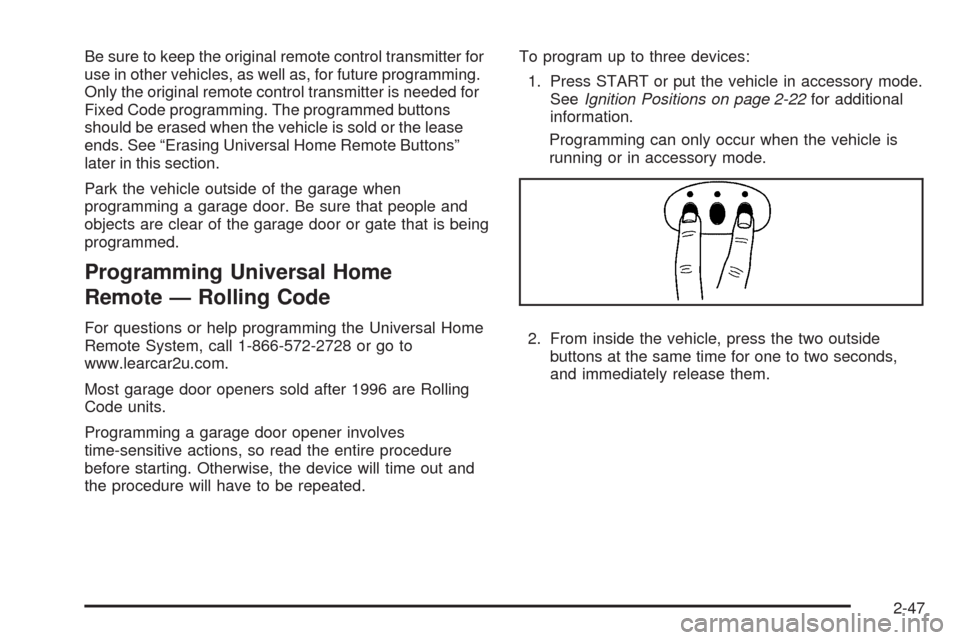
2. From inside the vehicle, press the two outside
buttons at the same time for one to two seconds,
and immediately release them.
2-47
Page 115 of 432
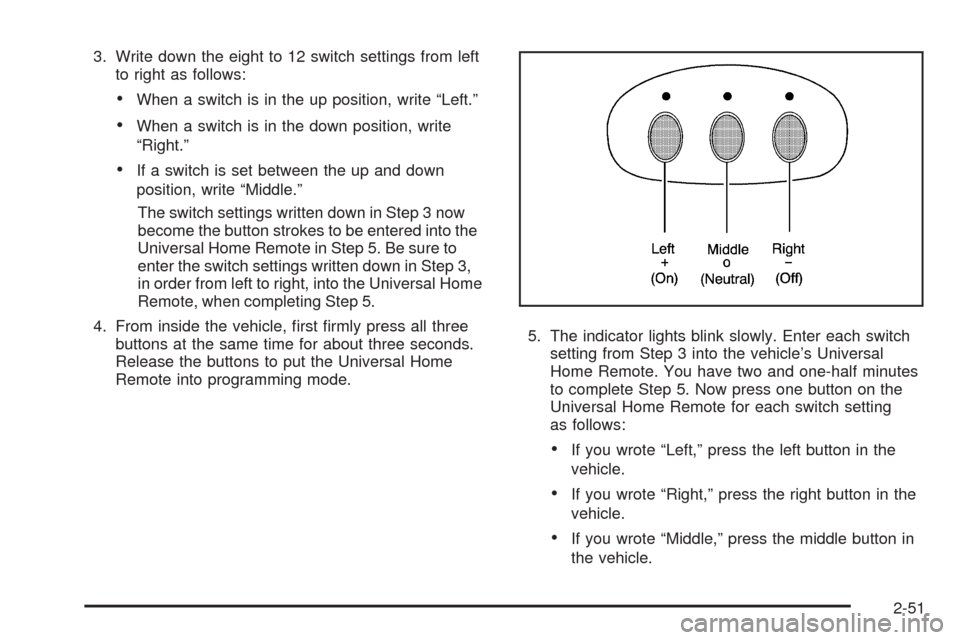
3. Write down the eight to 12 switch settings from left
to right as follows:
When a switch is in the up position, write “Left.”
When a switch is in the down position, write
“Right.”
If a switch is set between the up and down
position, write “Middle.”
The switch settings written down in Step 3 now
become the button strokes to be entered into the
Universal Home Remote in Step 5. Be sure to
enter the switch settings written down in Step 3,
in order from left to right, into the Universal Home
Remote, when completing Step 5.
4. From inside the vehicle, rst rmly press all three
buttons at the same time for about three seconds.
Release the buttons to put the Universal Home
Remote into programming mode.5. The indicator lights blink slowly. Enter each switch
setting from Step 3 into the vehicle’s Universal
Home Remote. You have two and one-half minutes
to complete Step 5. Now press one button on the
Universal Home Remote for each switch setting
as follows:
If you wrote “Left,” press the left button in the
vehicle.
If you wrote “Right,” press the right button in the
vehicle.
If you wrote “Middle,” press the middle button in
the vehicle.
2-51
Page 116 of 432
6. After entering all of the switch positions, again,
rmly press and release all three buttons at the
same time. The indicator lights turn on.
7. Press and hold the button that will be used to
control the garage door until the garage door
moves. The indicator light above the selected button
should slowly blink. This button may need to be
held for up to 55 seconds.
8. Immediately release the button when the garage
door moves. The indicator light blinks rapidly until
programming is complete.
9. Press and release the same button again.
The garage door should move, conrming
that programming is successful and complete.
To program another Fixed Code device such as an
additional garage door opener, a security device,
or home automation device, repeat Steps 1-9, choosing
a different button in Step 7 than what was used for
the garage door opener.Using Universal Home Remote
Press and hold the appropriate button for at least half of
a second. The indicator light comes on while the
signal is being transmitted.
Operation can occur:
If the vehicle is in accessory mode.
If the vehicle is in running.
If the vehicle is in Retained Accessory Mode (RAP).
SeeRetained Accessory Power (RAP) on page 2-23
for more information.
Up to an additional 10 minutes after RAP nishes.
Up to 10 minutes after any door is opened.
2-52
Page 162 of 432
Climate Controls
Dual Automatic Climate Control
System
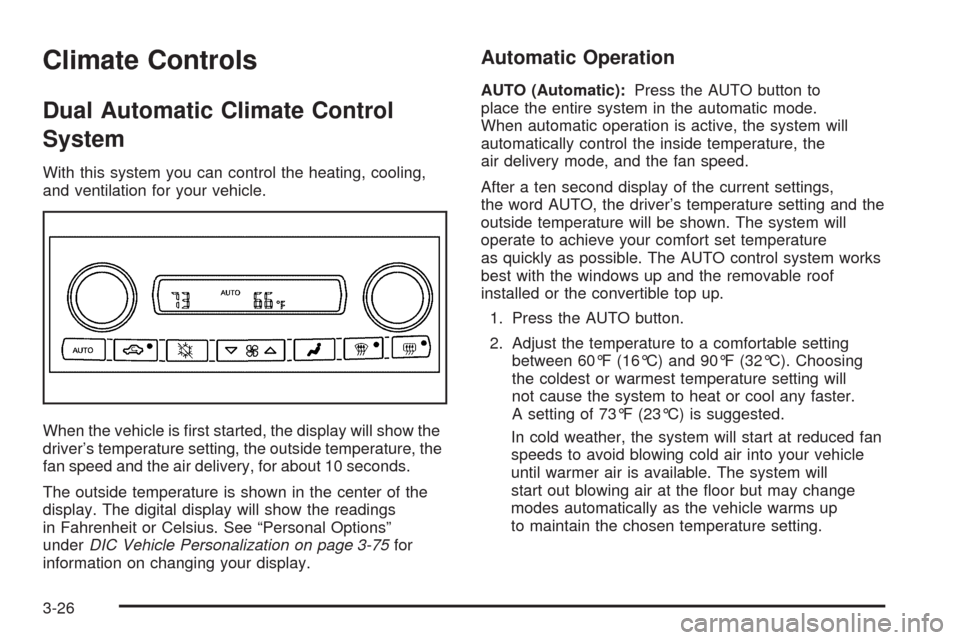
With this system you can control the heating, cooling,
and ventilation for your vehicle.
When the vehicle is rst started, the display will show the
driver’s temperature setting, the outside temperature, the
fan speed and the air delivery, for about 10 seconds.
The outside temperature is shown in the center of the
display. The digital display will show the readings
in Fahrenheit or Celsius. See “Personal Options”
underDIC Vehicle Personalization on page 3-75for
information on changing your display.
Automatic Operation
AUTO (Automatic):Press the AUTO button to
place the entire system in the automatic mode.
When automatic operation is active, the system will
automatically control the inside temperature, the
air delivery mode, and the fan speed.
After a ten second display of the current settings,
the word AUTO, the driver’s temperature setting and the
outside temperature will be shown. The system will
operate to achieve your comfort set temperature
as quickly as possible. The AUTO control system works
best with the windows up and the removable roof
installed or the convertible top up.
1. Press the AUTO button.
2. Adjust the temperature to a comfortable setting
between 60°F (16°C) and 90°F (32°C). Choosing
the coldest or warmest temperature setting will
not cause the system to heat or cool any faster.
A setting of 73°F (23°C) is suggested.
In cold weather, the system will start at reduced fan
speeds to avoid blowing cold air into your vehicle
until warmer air is available. The system will
start out blowing air at the oor but may change
modes automatically as the vehicle warms up
to maintain the chosen temperature setting.
3-26
Page 164 of 432
x9w(Fan):Press the button with the fan symbol
to manually increase or decrease the fan speed.
Keep pressing the up or down arrow on this switch until
the desired fan speed appears on the display.
Pressing the arrows will delete AUTO from the digital
display. The fan graphics with the fan speed bars will be
shown. To increase the fan speed so that more air
ows into the vehicle, press the up arrow on the
fan switch. To decrease the fan speed and airow,
press the down arrow. The AUTO button must be
pressed to return to the automatic fan control.
If the airow seems low when the fan speed is at the
highest setting, the passenger compartment air lter
may need to be replaced. For more information,
seePassenger Compartment Air Filter on page 3-32
andScheduled Maintenance on page 6-4.
?(Recirculation):Press this button to turn the
recirculation mode on or off. When the climate control
system is in recirculation mode an indicator light will
come on. This mode prevents outside air from entering
your vehicle. It can be used to prevent outside air and
odors from entering your vehicle and to help cool the air
inside your vehicle more quickly. Recirculation mode is
not available in defrost or defog mode.
^(Air Conditioning Off):Press this button to turn the
air conditioning compressor off. Press AUTO to return
to automatic operation. When in AUTO, the air
conditioning compressor will come on automatically,
as needed.
Air conditioning does not operate at temperatures below
about 35°F to 40°F (2°C to 4°C). In temperatures
above 40°F (4°C), the air conditioning cannot be turned
off in defrost and defog, as it helps to remove moisture
from the vehicle. It also helps to keep the windows clear.
You may notice a slight change in engine performance
when the air-conditioning compressor shuts off and
turns on again. This is normal. The system is designed
to make adjustments to help with fuel economy while
still maintaining the selected temperature.
On hot days, open the windows to let hot inside air
escape; then close them. This helps to reduce the time
it takes for your vehicle to cool down. It also helps
the system to operate more efficiently.
3-28
Page 165 of 432
For quick cool down on hot days press the AUTO button
and adjust the temperature to a cool, comfortable setting.
To achieve maximum cool down, do the following:
1. Select the vent mode.
2. Select recirculation mode.
3. Select the A/C on.
4. Select the coolest temperature.
5. Select the highest fan speed.
Using these settings together for long periods of time
may cause the air inside of your vehicle to become
too dry. To prevent this from happening, after the air
in your vehicle has cooled, turn the recirculation
mode off.
The air conditioning system removes moisture from the
air, so you may sometimes notice a small amount of
water dripping underneath your vehicle while idling
or after turning off the engine. This is normal.Sensors
The solar sensor on your vehicle monitors the solar
radiation and uses the information to maintain the
selected temperature when operating in AUTO mode by
initiating needed adjustments to the temperature, the
fan speed and the air delivery system. The system may
also supply cooler air to the side of the vehicle facing
the sun. The recirculation mode will also be activated,
as necessary. Do not cover the solar sensor located on
the top of the instrument panel near the windshield or
the system will not work properly.
There is also a sensor located behind the front bumper.
This sensor reads the outside air temperature and
helps to maintain the temperature inside the vehicle.
Any cover on the front of the vehicle could give a false
reading in the temperature.
If the outside temperature goes up, the displayed
temperature will not change until:
The vehicle’s speed is above 12 mph (19 km/h)
for ve minutes.
The vehicle’s speed is above 32 mph (52 km/h)
for two and a half minutes.
3-29
Page 171 of 432
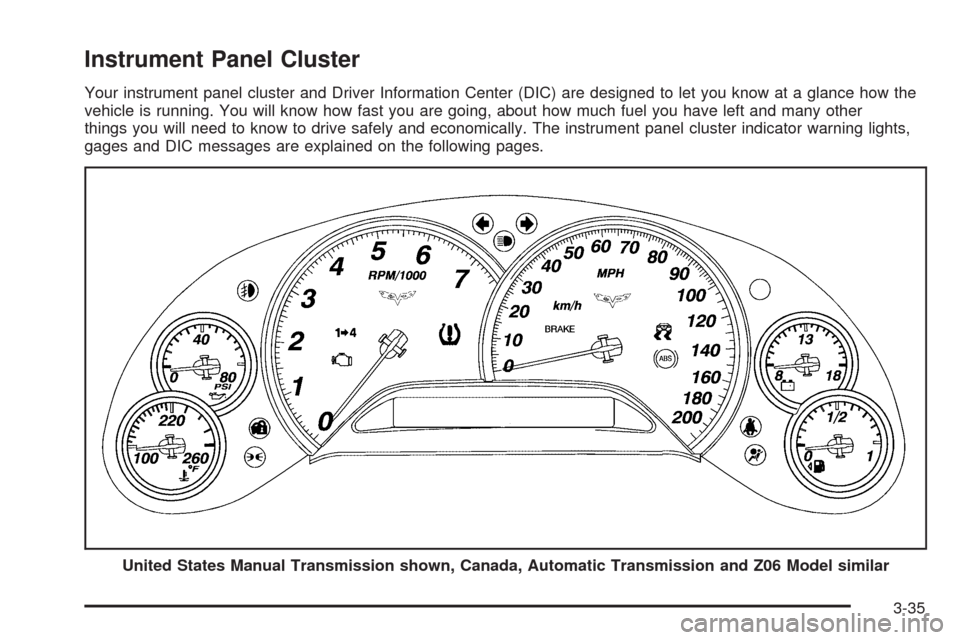
Instrument Panel Cluster
Your instrument panel cluster and Driver Information Center (DIC) are designed to let you know at a glance how the
vehicle is running. You will know how fast you are going, about how much fuel you have left and many other
things you will need to know to drive safely and economically. The instrument panel cluster indicator warning lights,
gages and DIC messages are explained on the following pages.
United States Manual Transmission shown, Canada, Automatic Transmission and Z06 Model similar
3-35