2008 CHEVROLET CORVETTE maintenance reset
[x] Cancel search: maintenance resetPage 192 of 432
Both of the trip odometers can be used simultaneously.
TRIP A could be used to track the distance to a
destination. TRIP B could be used to track maintenance
periods. The trip odometers can be reset by pressing
the RESET button on the DIC.
There is also a miles since last ignition feature that
displays the number of miles (kilometers) driven since
you last started the vehicle. Press and hold the
RESET button for three seconds, then release it.
The miles (kilometers) since the last ignition cycle will
be set into the trip odometer.
Elapsed Timer:Press the TRIP button until ELAPSED
TIMER is displayed, such as ELAPSED TIMER .00.
When the ignition is in on, the DIC can be used as a
stopwatch. The display can show hours, minutes and
seconds. The elapsed time indicator will record up to
23 hours, 59 minutes and 59 seconds, then it will reset to
zero and continue counting. The display appears as
ELAPSED TIMER .00 in the elapsed time function.
You can start or stop the elapsed time by pressing the
RESET button. To reset the elapsed time to zero,
press the RESET button for three seconds while the
timer is displayed.Pressing and holding the RESET button for at least
10 seconds will reset the timer display to the time since
last ignition cycle.
Average Speed:Press the TRIP button until the
average speed is displayed, such as:
AVERAGE SPEED 62 MPH or
AVERAGE SPEED 100 km/h
Press and hold the RESET button to reset to
0.0 mph (km/h).
Engine Oil Life:Press the TRIP button until the engine
oil life is displayed, such as OIL LIFE REMAINING 89%.
This is an estimate of the engine oil’s remaining
useful life. It will show 100% when the system is reset
after an oil change. It will alert you to change the oil
on a schedule consistent with your driving conditions.
When the remaining oil life is low, the system will
alert you with the message CHANGE ENGINE OIL.
3-56
Page 193 of 432
Remember, you must reset the engine oil life system
yourself after each oil change. It will not reset itself.
To reset the system, seeEngine Oil Life System
on page 5-23. Be careful not to reset the engine oil life
system accidentally at any time other than when the
oil has just been changed. It cannot be reset accurately
until the next oil change.
SeeScheduled Maintenance on page 6-4andEngine
Oil on page 5-17for more information.
OPTION Button
The OPTION button allows you to access the
PERSONAL OPTIONS menu and customize the
personalization settings on your vehicle. SeeDIC
Vehicle Personalization on page 3-75for more
information.
RESET Button
The RESET button, used along with other buttons, will
reset system functions and turn off or acknowledge
messages on the DIC.
DIC Warnings and Messages
Messages are displayed on the DIC to notify the driver
that the status of the vehicle has changed and that
some action may be needed by the driver to correct the
condition. Multiple messages may appear one after
another. You can scroll through the messages that
may have been sent at the same time. The DIC is
continuously updated with the vehicle performance
status.
Some messages may not require immediate action,
but you can press the RESET button to acknowledge
that you received the messages and to clear them from
the display.
Some messages cannot be cleared from the DIC
display because they are more urgent. These messages
require action before they can be cleared. You should
take any messages that appear on the display seriously
and remember that clearing the messages will only
make the messages disappear, not correct the problem.
The following are the possible messages that can be
displayed and some information about them.
3-57
Page 196 of 432
If the driver remains unbuckled when the ignition is on
and the vehicle is in motion, the reminder will be
repeated. If the driver’s safety belt is already buckled,
this message and chime will not come on.
This message is an additional reminder to the safety
belt reminder light in the instrument panel cluster.
SeeSafety Belt Reminders on page 3-36for more
information.
CHANGE ENGINE OIL
This message displays when the life of the engine oil
has expired. SeeScheduled Maintenance on page 6-4.
After an oil change, the engine oil life system must
be reset. See “Engine Oil Life” underDIC Operation
and Displays on page 3-52. Also, seeEngine Oil on
page 5-17andEngine Oil Life System on page 5-23for
more information.
CHECK BRAKE FLUID
This message displays, a chime sounds, and the brake
system warning light on the instrument panel cluster
turns on if the ignition is on to inform the driver that the
brake uid level is low. SeeBrake System Warning
Light on page 3-41. Have the brake system serviced by
your dealer/retailer as soon as possible. SeeBrakes
on page 5-42.
CHECK COOLANT LEVEL
This message displays when the engine coolant level
is low. Have the cooling system serviced by your
dealer/retailer as soon as possible. SeeEngine Coolant
on page 5-28.
CHECK GAS CAP
This message displays if the fuel cap has not been fully
tightened. Check the fuel cap to make sure that it is
on properly. Once tightened, it takes at least one
overnight park to reset or clear this message. If both the
CHECK GAS CAP message and the malfunction
indicator lamp in the instrument panel cluster are on,
you may need to see your dealer/retailer for service.
SeeMalfunction Indicator Lamp on page 3-45for more
information.
CHECK OIL LEVEL
On some vehicles, this message displays and two
chimes sound if the oil level in the vehicle is low.
Once the vehicle senses a change in the engine oil
level, the light remains off.
If this message appears after starting the engine,
the engine oil level may be too low. You may need to
add oil. SeeEngine Overheating on page 5-31.
3-60
Page 384 of 432
If you want to purchase service information, seeService
Publications Ordering Information on page 7-17.
Owner Checks and Services on page 6-8tells you what
should be checked, when to check it, and what you can
easily do to help keep your vehicle in good condition.
The proper replacement parts, uids, and lubricants to
use are listed inRecommended Fluids and Lubricants
on page 6-12andMaintenance Replacement Parts
on page 6-14. When your vehicle is serviced, make sure
these are used. All parts should be replaced and all
necessary repairs done before you or anyone else
drives the vehicle. We recommend the use of genuine
parts from your dealer/retailer.
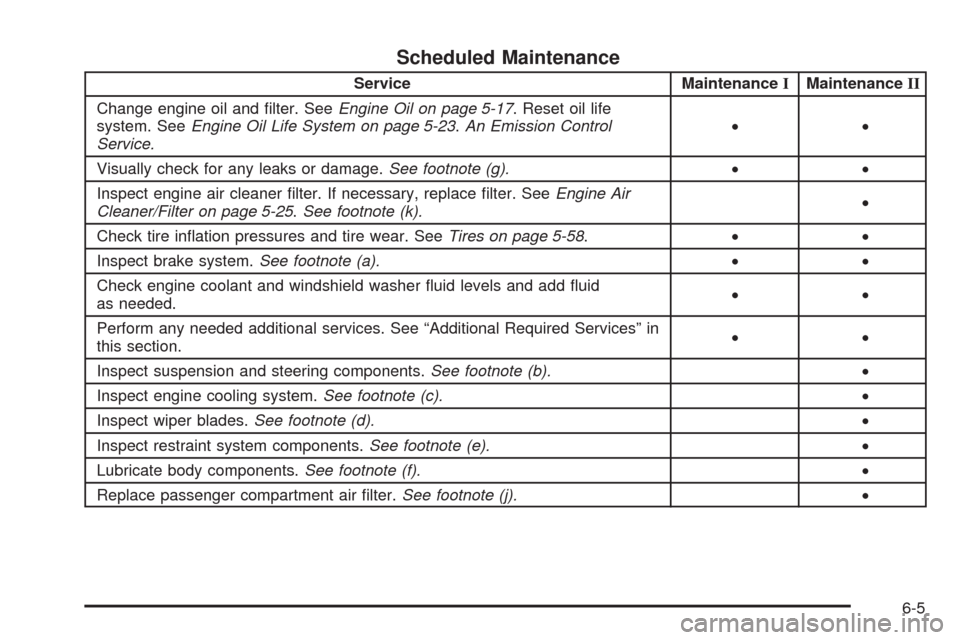
Scheduled Maintenance
When the CHANGE ENGINE OIL message comes on,
it means that service is required for your vehicle.
Have your vehicle serviced as soon as possible within
the next 600 miles (1 000 km). It is possible that, if
you are driving under the best conditions, the engine oil
life system may not indicate that vehicle service is
necessary for over a year. However, your engine oil
and lter must be changed at least once a year and at
this time the system must be reset. Your dealer/retailer
has trained service technicians who will perform this
work using genuine parts and reset the system.If the engine oil life system is ever reset accidentally,
you must service your vehicle within 3,000 miles
(5 000 km) since your last service. Remember to reset
the oil life system whenever the oil is changed. See
Engine Oil Life System on page 5-23for information on
the Engine Oil Life System and resetting the system.
When the CHANGE ENGINE OIL message appears,
certain services, checks, and inspections are required.
Required services are described in the following for
“MaintenanceI” and “MaintenanceII.” Generally,
it is recommended that your rst service be
MaintenanceI, your second service be MaintenanceII,
and that you alternate MaintenanceIand MaintenanceII
thereafter. However, in some cases, MaintenanceII
may be required more often.
MaintenanceI— Use MaintenanceIif the message
comes on within 10 months since the vehicle was
purchased or MaintenanceIIwas performed.
MaintenanceII— Use MaintenanceIIif the previous
service performed was MaintenanceI. Always use
MaintenanceIIwhenever the message comes on
10 months or more since the last service or if the
message has not come on at all for one year.
6-4
Page 385 of 432
Scheduled Maintenance
Service MaintenanceIMaintenanceII
Change engine oil and lter. SeeEngine Oil on page 5-17. Reset oil life
system. SeeEngine Oil Life System on page 5-23.An Emission Control
Service.••
Visually check for any leaks or damage.See footnote (g).••
Inspect engine air cleaner lter. If necessary, replace lter. SeeEngine Air
Cleaner/Filter on page 5-25.See footnote (k).•
Check tire ination pressures and tire wear. SeeTires on page 5-58.••
Inspect brake system.See footnote (a).••
Check engine coolant and windshield washer uid levels and add uid
as needed.••
Perform any needed additional services. See “Additional Required Services” in
this section.••
Inspect suspension and steering components.See footnote (b).•
Inspect engine cooling system.See footnote (c).•
Inspect wiper blades.See footnote (d).•
Inspect restraint system components.See footnote (e).•
Lubricate body components.See footnote (f).•
Replace passenger compartment air lter.See footnote (j).•
6-5