2007 NISSAN TIIDA Audio Visual
[x] Cancel search: Audio VisualPage 1 of 5883
MODEL C11 SERIES
2007 NISSAN EUROPE S.A.S.
All rights reserved. No part of this Electronic Service Manual may be reproduced or stored in a retrieval system, or transmitted in any form,
or by any means, electronic, mechanical, photocopying, recording or otherwise, without the prior written permission of Nissan Europe
S.A.S., Paris, France.
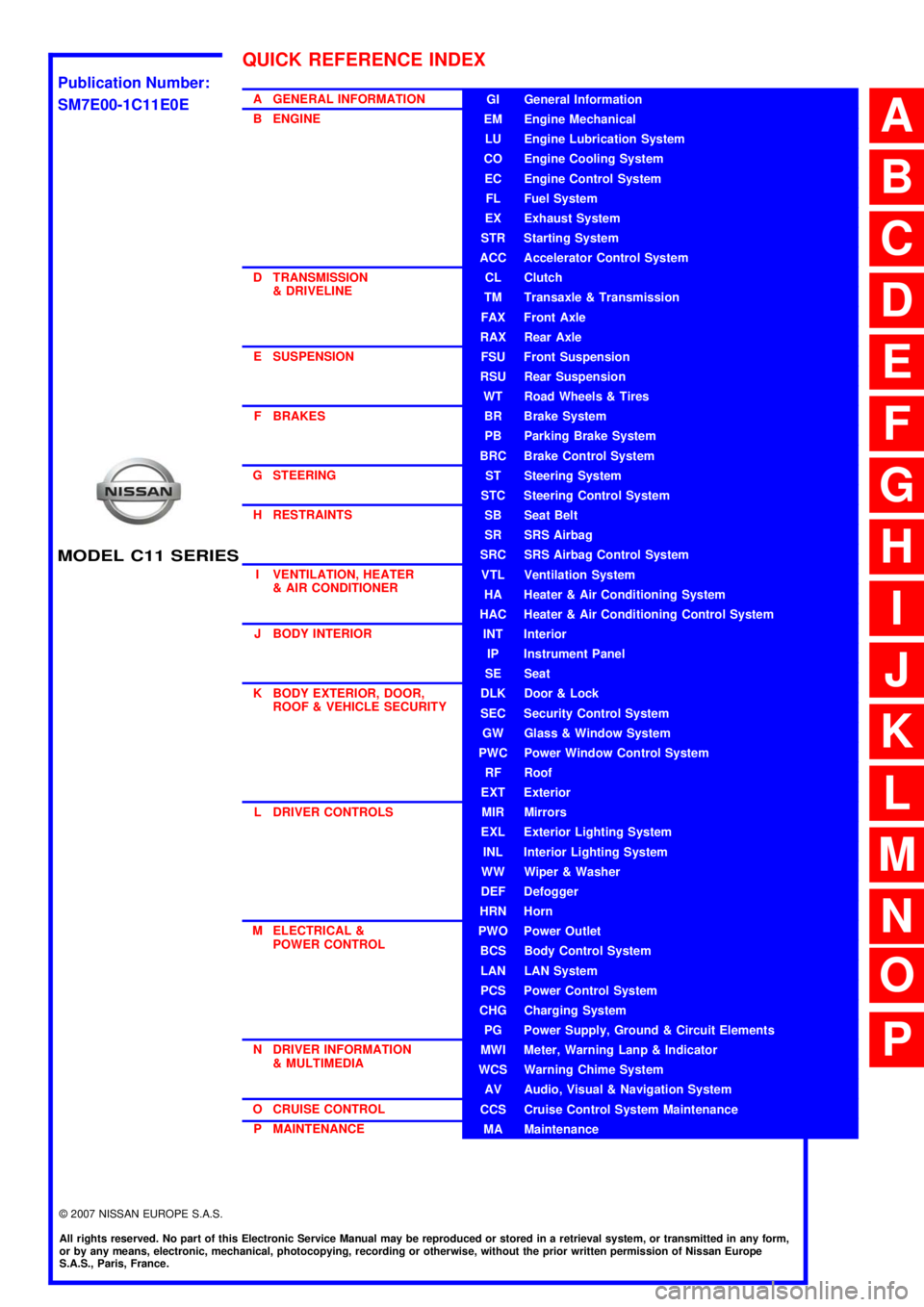
A GENERAL INFORMATION
B ENGINE
D TRANSMISSION& DRIVELINE
E SUSPENSION F BRAKES
G STEERING H RESTRAINTS
I VENTILATION, HEATER & AIR CONDITIONER
J BODY INTERIOR
K BODY EXTERIOR, DOOR, ROOF & VEHICLE SECURITY
L DRIVER CONTROLS
M ELECTRICAL & POWER CONTROL
N DRIVER INFORMATION & MULTIMEDIA
O CRUISE CONTROL P MAINTENANCEGI General Information
EM Engine Mechanical
LU Engine Lubrication System
CO Engine Cooling System
EC Engine Control System
FL Fuel System
EX Exhaust System
STR Starting System
ACC Accelerator Control System
CL Clutch
TM Transaxle & Transmission
FAX Front Axle
RAX Rear Axle
FSU Front Suspension
RSU Rear Suspension
WT Road Wheels & Tires
BR Brake System
PB Parking Brake System
BRC Brake Control System
ST Steering System
STC Steering Control System
SB Seat Belt
SR SRS Airbag
SRC SRS Airbag Control System
VTL Ventilation System
HA Heater & Air Conditioning System
HAC Heater & Air Conditioning Control System
INT Interior
IP Instrument Panel
SE Seat
DLK Door & Lock
SEC Security Control System
GW Glass & Window System
PWC Power Window Control System
RF Roof
EXT Exterior
MIR Mirrors
EXL Exterior Lighting System
INL Interior Lighting System
WW Wiper & Washer
DEF Defogger
HRN Horn
PWO Power Outlet
BCS Body Control System
LAN LAN System
PCS Power Control System
CHG Charging System
PG Power Supply, Ground & Circuit Elements
MWI Meter, Warning Lanp & Indicator
WCS Warning Chime System
AV Audio, Visual & Navigation System
CCS Cruise Control System Maintenance
MA Maintenance
QUICK REFERENCE INDEX
A
B
C
D
E
F
G
H
I
J
K
L
M
N
O
P
M
Publication Number:
SM7E00-1C11E0E
Page 6 of 5883

AV
AV-1
DRIVER INFORMATION & MULTIMEDIA
C
D
E
F
G
H
I
J
K
L
MB
SECTION AV
A
O
P
CONTENTS
AUDIO, VISUAL & NAVIGATION SYSTEM
AUDIO WITHOUT NAVIGATION
BASIC INSPECTION ....................................
5
DIAGNOSIS AND REPAIR WORKFLOW ..........5
Work Flow .................................................................5
FUNCTION DIAGNOSIS ...............................6
AUDIO SYSTEM ..................................................6
System Diagram ........................................................6
System Description ...................................................6
Component Parts Location ........................................8
Component Description .............................................8
COMPONENT DIAGNOSIS ..........................9
POWER SUPPLY AND GROUND CIRCUIT .......9
AV CONTROL UNIT ....................................................9
AV CONTROL UNIT : Diagnosis Procedure .............9
MICROPHONE ............................................................9
MICROPHONE : Diagnosis Procedure .....................9
STEERING SWITCH ..........................................11
Description ..............................................................11
Diagnosis Procedure ...............................................11
MICROPHONE SIGNAL CIRCUIT .....................13
Description ..............................................................13
Diagnosis Procedure ...............................................13
ECU DIAGNOSIS .........................................15
AV CONTROL UNIT ...........................................15
Reference Value .....................................................15
Wiring Diagram .......................................................17
SYMPTOM DIAGNOSIS ..............................19
MULTI AV SYSTEM SYMPTOMS ......................19
Symptom Table .......................................................19
NORMAL OPERATING CONDITION ...............20
Description ...............................................................20
PRECAUTION ..............................................21
PRECAUTIONS .................................................21
Precaution for Supplemental Restraint System
(SRS) "AIR BAG" and "SEAT BELT PRE-TEN-
SIONER" .................................................................
21
PREPARATION ...........................................22
PREPARATION .................................................22
Commercial Service Tool ........................................22
ON-VEHICLE REPAIR .................................23
AUDIO UNIT ......................................................23
Removal and Installation .........................................23
TWEETER .........................................................24
Removal and Installation .........................................24
FRONT DOOR SPEAKER ................................25
Removal and Installation .........................................25
REAR DOOR SPEAKER ..................................26
Removal and Installation .........................................26
STEERING SWITCH .........................................27
Removal and Installation .........................................27
AUDIO ANTENNA .............................................28
Location of Antenna .................................................28
Removal and Installation of Roof Antenna ..............28
AUDIO WITH NAVIGATION
BASIC INSPECTION ...................................
30
DIAGNOSIS AND REPAIR WORKFLOW ........30
Work Flow ................................................................30
FUNCTION DIAGNOSIS ..............................32
Page 83 of 5883
![NISSAN TIIDA 2007 Service Repair Manual AV-78
< COMPONENT DIAGNOSIS >[AUDIO WITH NAVIGATION]
U1244 GPS ANTENNA
U1244 GPS ANTENNA
DescriptionINFOID:0000000001728716
DTC LogicINFOID:0000000001728717
Diagnosis ProcedureINFOID:0000000001728718](/manual-img/5/57395/w960_57395-82.png "NISSAN TIIDA 2007 Service Repair Manual AV-78
< COMPONENT DIAGNOSIS >[AUDIO WITH NAVIGATION]
U1244 GPS ANTENNA
U1244 GPS ANTENNA
DescriptionINFOID:0000000001728716
DTC LogicINFOID:0000000001728717
Diagnosis ProcedureINFOID:0000000001728718")
AV-78
< COMPONENT DIAGNOSIS >[AUDIO WITH NAVIGATION]
U1244 GPS ANTENNA
U1244 GPS ANTENNA
DescriptionINFOID:0000000001728716
DTC LogicINFOID:0000000001728717
Diagnosis ProcedureINFOID:0000000001728718
1.CHECK GPS ANTENNA
Visually check GPS antenna and antenna feeder.
Is inspection result OK?
YES >> GO TO 2.
NO >> Repair malfunctioning parts.
2.CHECK NAVI CONTROL UNIT VOLTAGE
1. Disconnect GPS antenna connector.
2. Turn ignition switch ON.
3. Check voltage between NAVI control unit terminal 73 and ground.
Is inspection result OK?
YES >> INSPECTION END
NO >> Replace NAVI control unit.
Part name Description
GPS ANTENNA GPS signal is received and sent to NAVI control unit.
DTCDisplay contents of
CONSULT-IIIDTC Detection Condition Possible causes
U1244GPS ANTENNA CONN
[U1244]GPS antenna connection malfunction is detected. GPS antenna disconnection
73 - Ground : Approx. 5 V
Page 117 of 5883
![NISSAN TIIDA 2007 Service Repair Manual AV-112
< SYMPTOM DIAGNOSIS >[AUDIO WITH NAVIGATION]
NORMAL OPERATING CONDITION
MAP DVD-ROM
ROUTE CALCULATION AND VISUAL GUIDANCE
The GPS indicator on the screen
remains gray.GPS signals cannot be rec](/manual-img/5/57395/w960_57395-116.png "NISSAN TIIDA 2007 Service Repair Manual AV-112
< SYMPTOM DIAGNOSIS >[AUDIO WITH NAVIGATION]
NORMAL OPERATING CONDITION
MAP DVD-ROM
ROUTE CALCULATION AND VISUAL GUIDANCE
The GPS indicator on the screen
remains gray.GPS signals cannot be rec")
AV-112
< SYMPTOM DIAGNOSIS >[AUDIO WITH NAVIGATION]
NORMAL OPERATING CONDITION
MAP DVD-ROM
ROUTE CALCULATION AND VISUAL GUIDANCE
The GPS indicator on the screen
remains gray.GPS signals cannot be received depending on the
vehicle location, such as in a parking garage, on a
road that has numerous tall buildings, etc.Drive on an open, straight road for a while.
GPS signals cannot be received because objects are
placed on top of the display.Remove the objects from top of the dis-
play.
A sufficient amount of GPS satellites are not avail-
able.Wait for the satellites to move locations
available for navigation system.
The location of vehicle icon is mis-
aligned from the actual position.Speed calculations based on the speed sensor may
be incorrect when using tire chains or replacing the
tires.Drive the vehicle for a while (at approxi-
mately 30 km/h (19 MPH) for about 30
minutes) to automatically correct the vehi-
cle icon position.
Contact an NISSAN / INFINITI dealer if
this does not correct the vehicle icon posi-
tion.
The map data has mistake or is incomplete (the vehi-
cle icon position is always misaligned in the same ar-
ea).Updated road information will be included
in the next version of the map DVD-ROM. Symptoms Possible cause Possible solution
Symptom Possible cause Possible solution
The message “Error” appears. Map DVD-ROM is dirty or partially damaged.Check the DVD-ROM and wipe it clean
with a soft cloth.
Replace the DVD-ROM if there is any
damage.
Symptoms Possible cause Possible solution
In the auto reroute calculation, way-
points are not included.Waypoints already passed are not included in the
auto reroute calculation.In case of going to that waypoints again,
edit the route.
Route information is not displayed.Route calculation has not yet been performed.Set the destination and perform route calcu-
lation.
The vehicle is not driven on the suggested route. Drive on the suggested route.
Route guidance is set to off. Turn on route guidance.
Route information is not provided for narrow streets
(roads displayed in gray).This is not a malfunction.
The auto reroute calculation (or de-
tour calculation) suggests the same
route as the one previously sug-
gested. Route calculation took priority conditions into con-
sideration, but the same route was calculated. This is not a malfunction.
A waypoint cannot be added.Five waypoints are already set on the route, includ-
ing ones that already passed.A maximum of 5 waypoints can be set on
the route. In case of going to 6 or more way-
points, perform route calculations multiple
times as necessary.
The suggested route is not dis-
played.Roads near the destination cannot be calculated.Reset the destination to a main or ordinary
road, and recalculate the route.
The starting point and destination are too close. Set a more distant destination.
The starting point and destination are too far away.Divide the way by selecting one or two inter-
mediate destinations, and perform route
calculations multiple times.
There are time restricted roads (by day of week, by
time) near the current vehicle location or destina-
tion.Set Use Time Restricted Roads to off.
A part of the route is not displayed.The suggested route includes narrow streets (roads
displayed in gray).This is not a malfunction.